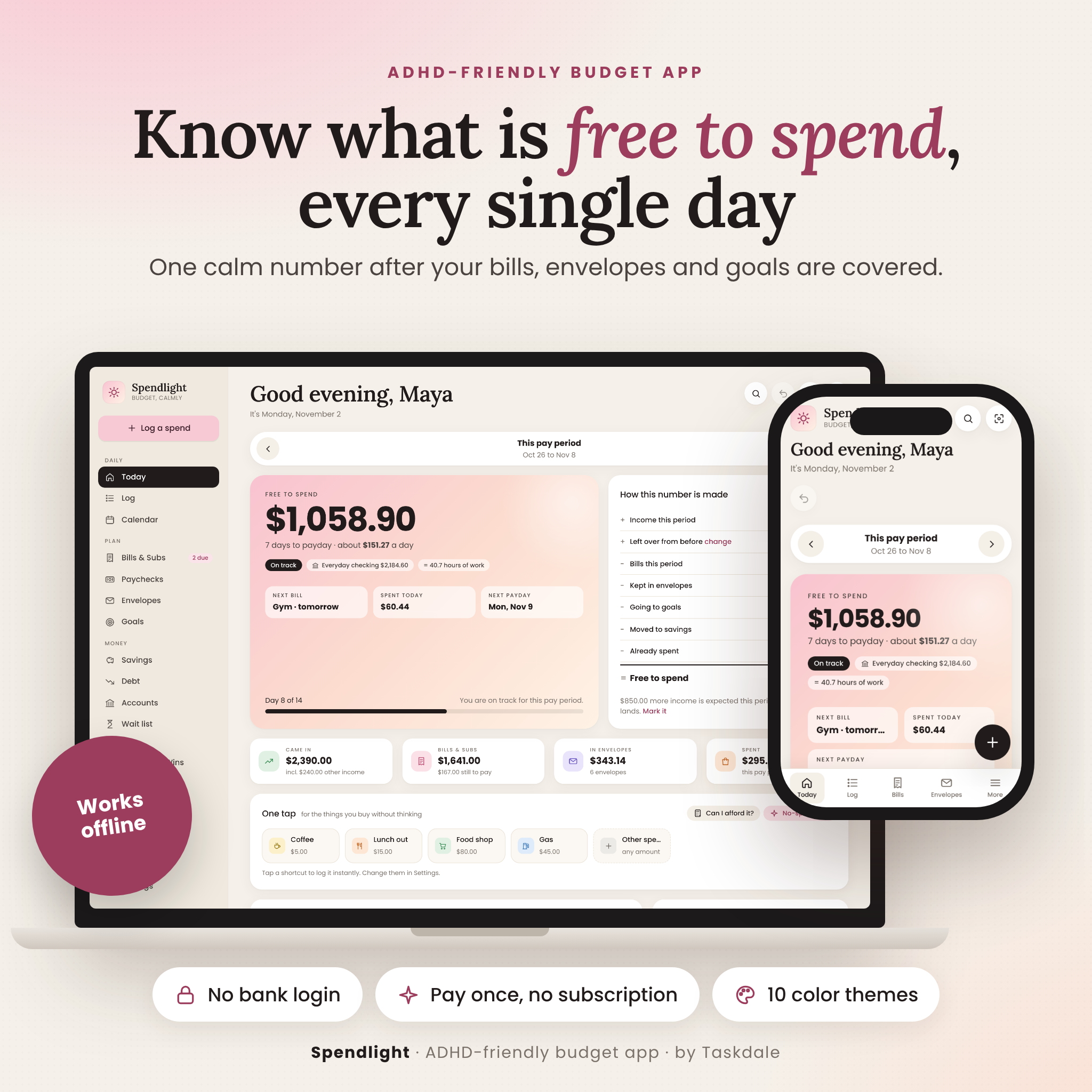


Spendlight is an ADHD budget planner app that answers one question every day: how much can I actually spend right now? It plans your money by payday, not by calendar month, takes out your bills, envelopes, goals and savings, and shows one calm number: Free to spend. No spreadsheets to wrestle with, no subscription and no bank login.
It is a single HTML file that opens in your web browser and works offline. Your numbers stay private on your own device.
Why this ADHD budget planner app is different
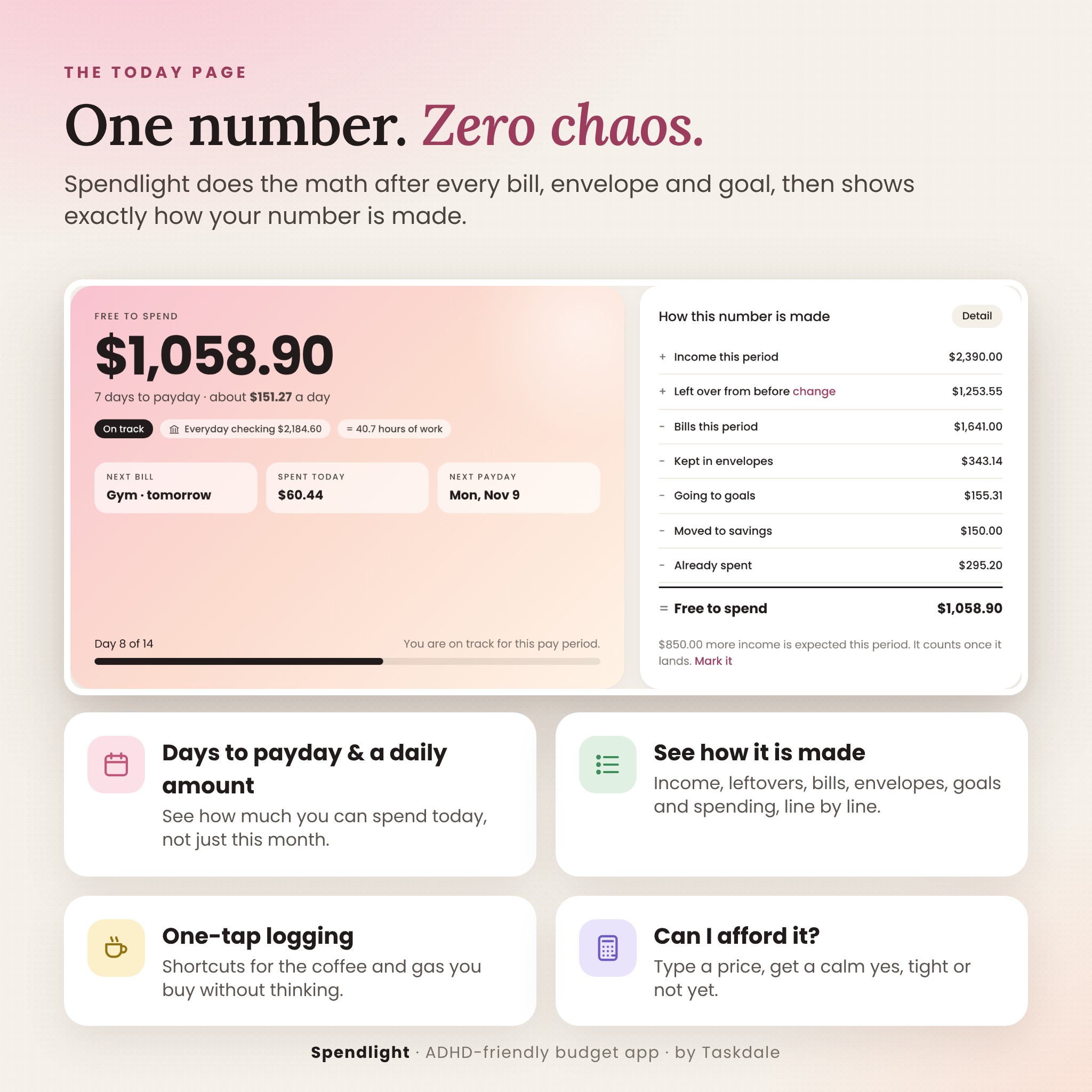
- One number, explained. Free to spend, the days to payday and an easy daily amount, with a clear “how this number is made” breakdown underneath.
- Logging in seconds. One-tap shortcuts for the things you buy without thinking. Spendlight learns your notes and fills in the category and envelope for you.
- Built for real-life brains. Gentle language, no shaming red alerts, streaks that count no-spend days, celebrations when you hit a goal, and a Focus mode that hides everything except your number.
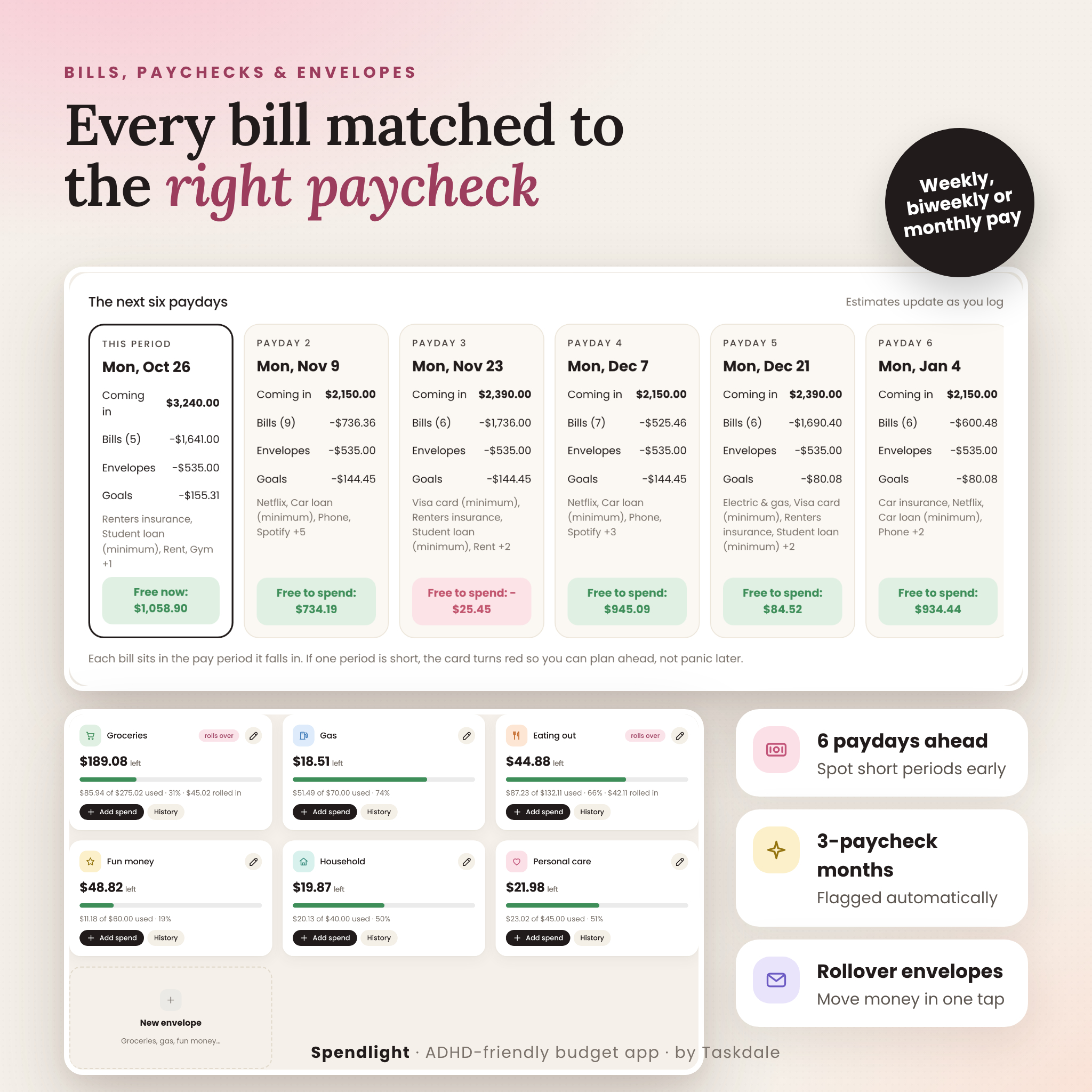
- Every bill in the right paycheck. Enter bills once. Spendlight lines them up with each payday, six paydays ahead, and flags 3-paycheck months.
- Private by design. No account, no cloud, no tracking. A one-tap backup file keeps your budget safe.
Features
Daily
- Today dashboard: Free to spend, status (On track, Slow down, Over plan), next bill, spending today, next payday, day-by-day spending chart, where your money went, how the paycheck splits up and whether the plan is holding.
- Can I afford it? Type a price and see your number after buying, the new daily amount and the cost in hours of work.
- Log: every spend grouped by day, with search, filters, edit, undo, refunds and extra income.
- Calendar: paydays highlighted, bills tagged paid or unpaid, daily spending bars, no-spend days and your five biggest spending days.
Plan
- Bills & subscriptions tracker: any repeat schedule, autopay, pause a subscription, monthly and yearly subscription costs.
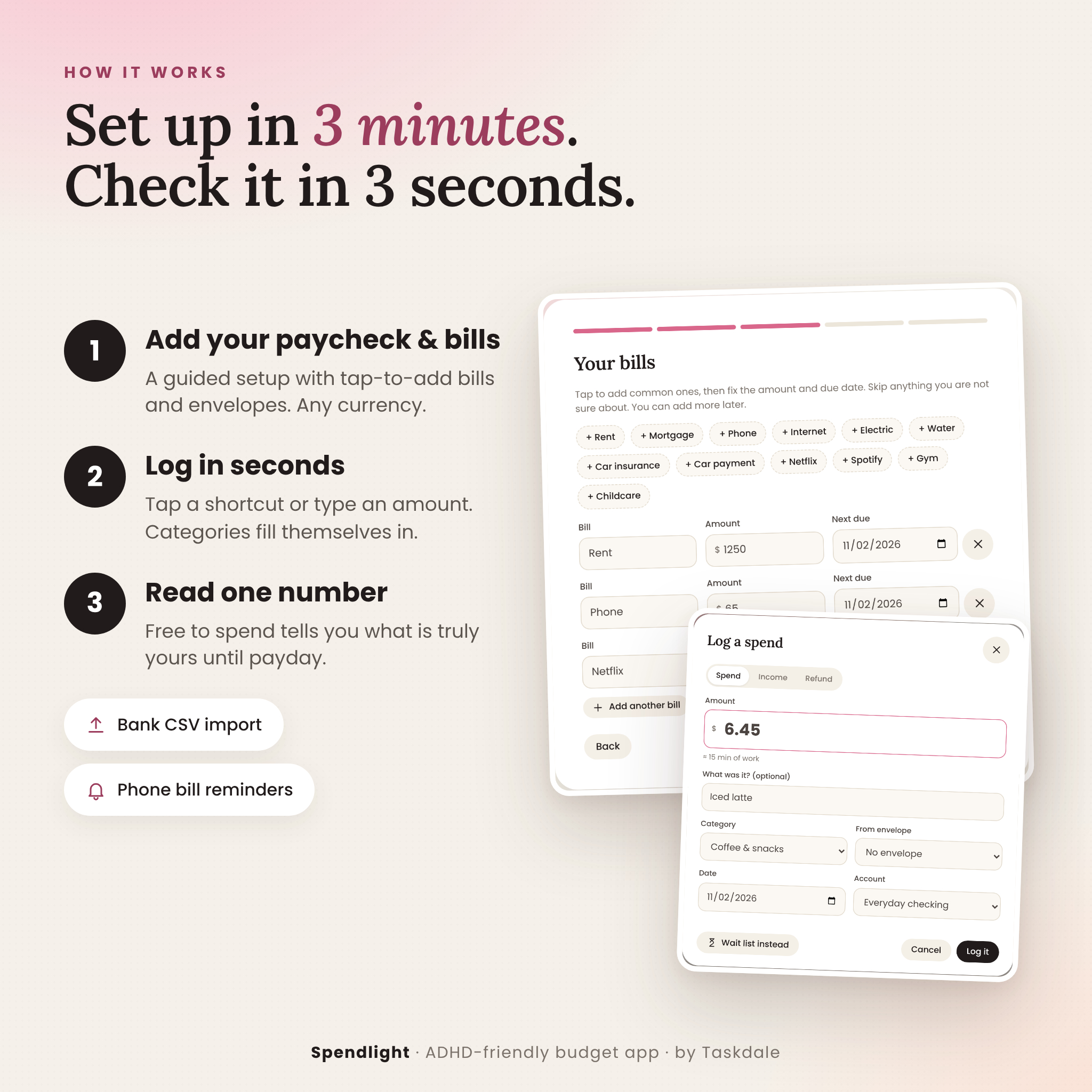
- Phone bill reminders: export bills and paydays to Apple, Google or Outlook calendar with a reminder the evening before.
- Paycheck planner: weekly, every two weeks, twice a month or monthly pay, weekend payday rules, change any single paycheck, and other income (side hustle or a partner’s pay) that counts only once it lands.
- Cash envelope budget: digital envelopes with rollover and “move money” between envelopes.
- Savings goals: suggested amount per payday, milestones and confetti when a goal is funded.
Money
- Savings tracker: savings pots, quick deposits, a 12-month chart, savings rate and your savings cushion in months.
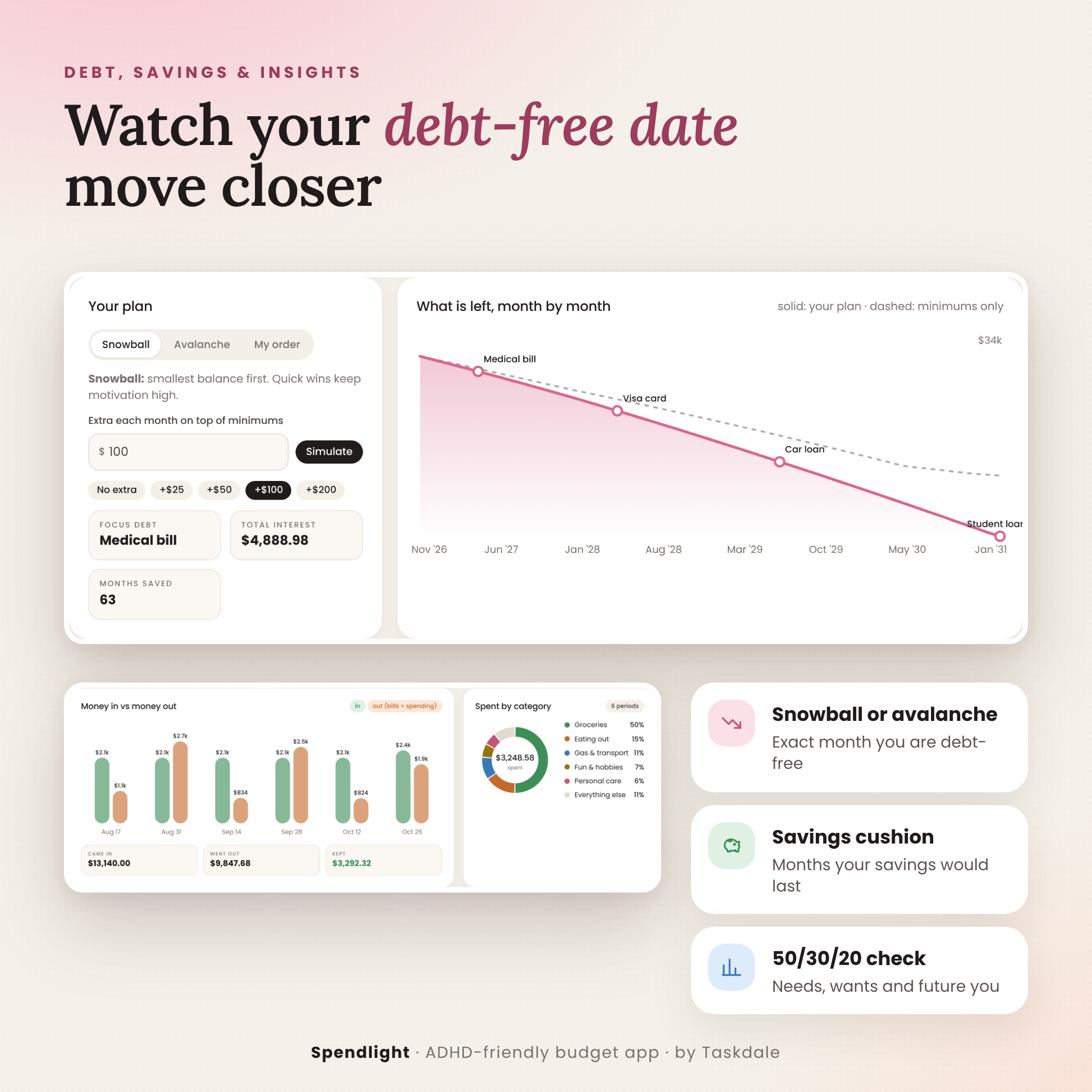
- Debt payoff planner: snowball, avalanche or your own order, an extra-payment simulator, exact debt-free month, total interest and interest saved, plus a month-by-month payoff chart.
- Accounts: checking, savings, cash and credit cards, money moves, card payments, “match bank” and net balance.
- 48-hour wait list: park impulse buys behind a timer and see how much you saved by letting go.
Habits and insights
- Routines & Wins: payday routine, weekly reset and month-end check-in that reset themselves, logging streaks and 12 unlockable wins.
- Insights: money in vs money out, spending by category, last seven days, your priciest weekday, a 50/30/20 needs-wants-future check and where you spend most often.
- Year in Review: what you kept, month-by-month spending with highest and lowest months, and a “do more of / do less of” reflection.
What is included
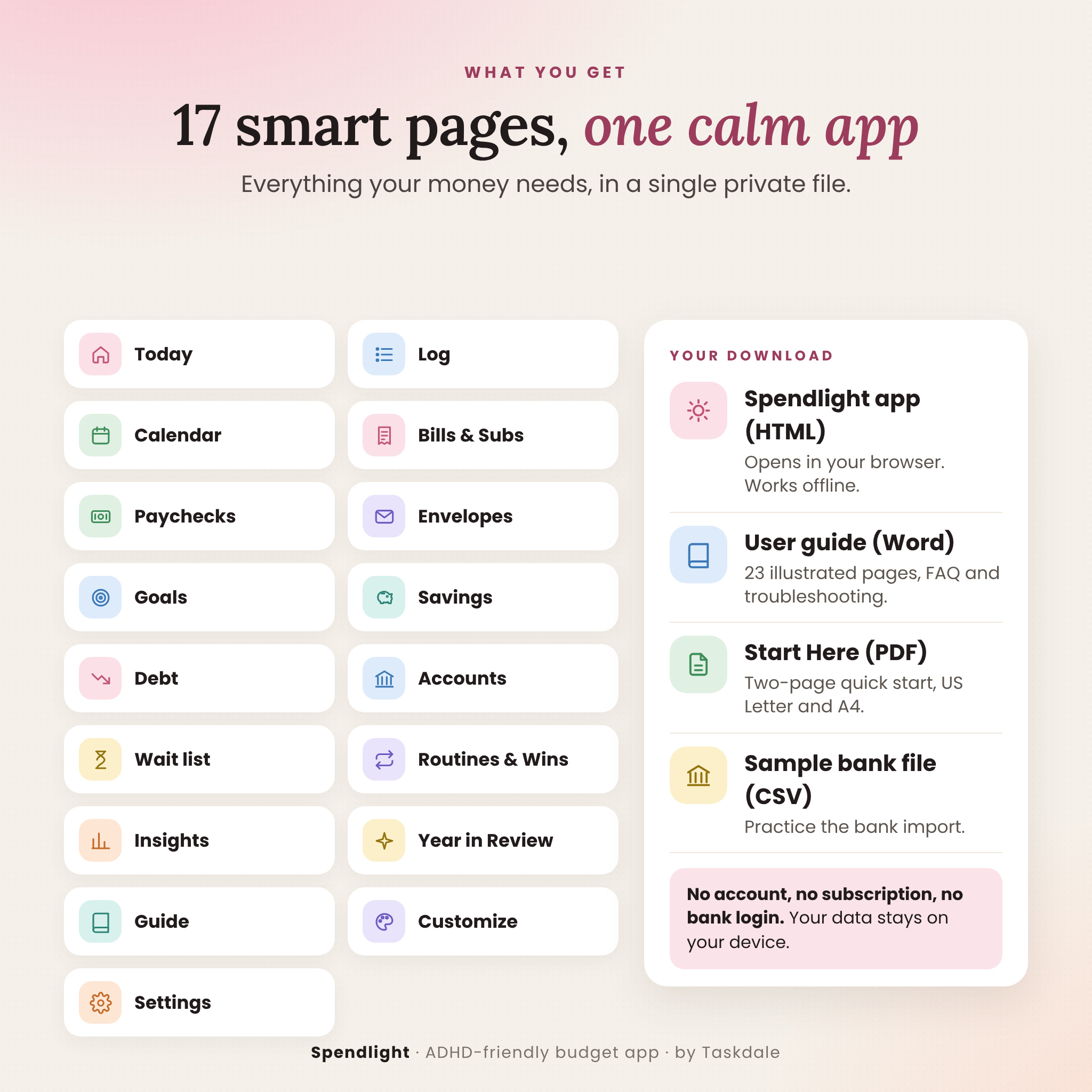
- Spendlight app (single HTML file)
- Spendlight User Guide (Word .docx, 23 illustrated pages)
- Spendlight Start Here quick guide (PDF, US Letter and A4)
- Sample bank file (CSV) to practice the bank import
- Everything in one ZIP, plus each file separately
How it works
- Open the file in your web browser and bookmark it.
- Follow the 3-minute setup: your name and currency, your paycheck, your bills and a few envelopes. Or explore with sample data first.
- Log as you go with a shortcut or the + button.
- Check one number each day: Free to spend.
File format and requirements
- Format: HTML web app (works offline), DOCX guide, PDF quick start, CSV sample
- Requires: a computer with a modern web browser. Tested in Google Chrome on desktop and on phone-sized screens.
- No internet connection, installation, account or subscription needed
- Mobile-friendly layout. Phones handle downloaded files differently, so a computer gives the smoothest experience. Each device keeps its own data; use Backup and Restore to move between devices.
Make it yours
Choose from 10 color themes (Blush, Honey, Sage, Apricot, Lavender, Sky, Mint, Cherry, Latte and Stone), light or dark mode, three fonts, larger text sizes and compact or roomy spacing. Simple mode hides the pages you do not need. Any currency: one setting controls the symbol, its position, decimals and number style everywhere in the app, with $ as the default. Rename categories, mark them as needs or wants and set up to 12 one-tap shortcuts.
Perfect for
- Living paycheck to paycheck and wanting to know what is safe to spend before payday
- Adults with ADHD who have given up on complicated spreadsheets or budget apps
- Biweekly earners who never know which paycheck pays rent
- Paying off credit cards and loans with the debt snowball or avalanche method
- Couples or side hustlers with more than one income
- Anyone who wants a private budget tracker with no bank sync
Digital download
This is an instant digital download. No physical item will be shipped. After purchase, download your files from your account or the download link in your order email.
FAQ
Is this a subscription?
No. Pay once and keep it.
Does it connect to my bank?
No. You type your numbers or import a CSV file from your bank. Nothing is uploaded anywhere.
Does it work offline?
Yes. Spendlight runs entirely in your browser with no internet connection needed.
Can I use it with my currency?
Yes. Pick from 37 currencies or type your own symbol. Every amount updates instantly.
Does it work if I am paid weekly or twice a month?
Yes. Weekly, every two weeks, twice a month on any two days, or monthly.
Will I lose my data?
Your budget is saved in your browser. Clearing browser data clears it, so use the one-tap Back up now button every week or two.
Can I use it on my phone?
The layout works on small screens, but phones open downloaded files differently, so a computer is recommended. Use Backup and Restore to move your budget between devices.
Is this financial advice?
No. Spendlight is a personal budgeting and organizing tool.
Licence: personal use for you and your household. Please do not resell, share or upload the files. © Taskdale.
Reviews
There are no reviews yet.