If you searched for a My Perfect CV free alternative, you probably want one simple thing: a good-looking CV you can edit whenever you like, without signing up for anything. That is a fair thing to want. Your CV is a document you will change dozens of times over the next few years.
This guide covers the honest free options first, because there are real ones. Then it looks at what online CV builders in general offer, what they ask in return, and when an editable template you pay for once and keep on your own computer is the better deal. You will finish with a clear plan for getting your CV out of a browser and into a file you control.
It suits anyone who has hit a paywall at the download step, anyone tired of logging in to fix a typo, and anyone who wants a CV they can open in Word or Google Docs years from now.
Quick picks: CV templates you buy once and keep
| Product | Best for | Price | Link |
|---|---|---|---|
| Crestwell ATS Resume Template Bundle | Online job portals and screening software | $6.38 | View |
| Marlowe Resume Template | Calm minimalist look with a writing playbook | $4.79 | View |
| Sloane Resume Template | Modern two-column layout with photo | $4.49 | View |
| Alder Resume Template with Photo | Full set plus a job tracker | $4.79 | View |
Why people look for an alternative to online CV builders
Online CV builders are popular for a good reason. You answer questions, pick a design and watch a CV appear. For someone who has never written one, that guidance can feel like a relief.
The friction tends to come later. Many builders, across the market, let you create a CV for nothing and then ask for payment or a trial when you want to download a clean PDF. Some trials roll into a recurring subscription if you forget to cancel. Others keep your CV on their site, so every small edit means logging back in. The exact terms change from service to service and over time, so always read the current pricing page before you enter card details.
None of that makes builders bad. It just means the true cost is not always clear at the start. Picture someone who spends 90 minutes building a CV on a Sunday night, clicks Download at 11pm, and only then sees the payment screen. That moment is why so many people search for another route.
Truly free ways to make a CV
You do not need to pay anyone to get a decent CV. Here are the routes that cost nothing.
Word and Google Docs built-in templates
Microsoft Word and Google Docs both include a handful of CV and resume templates. Open a new document, browse the template gallery, and pick one. They are plain but usable. In Google Docs the file lives in your own Drive, and you can download a PDF any time with File, Download.
LibreOffice or a blank document
A blank page with sensible headings is a perfectly good CV. Use one font, clear section titles (Profile, Experience, Education, Skills) and bold job titles. Plenty of strong candidates send exactly that.
Careers services and job centres
Universities, colleges and public job centres often offer free CV templates, workshops and one-to-one checks. If you studied somewhere, check whether alumni can still use the careers service. Many allow it for years after you leave.
Free templates from template sites
Lots of sites share free CV templates. Quality varies a great deal. Watch for files built from floating text boxes, which break the moment you add a line, and for fonts you have to hunt down and install. Our honest look at free vs paid resume templates goes through what you lose and gain with each.
These free options are good for a first CV, a quick update or a simple job where design does not matter much. Where they fall short is matching documents, solid layouts that do not break, and guidance on what to write.
What “templates you keep” means in practice
An editable template you keep is a file on your own computer or Drive. You download it once. After that there is no login, no trial and no download button that asks for anything. You can open it next week or in three years.
That ownership brings some practical wins:
- Edit anywhere. Word on a laptop, Google Docs on a phone, a library computer. The file goes where you go.
- Save as many versions as you like. One for retail jobs, one for admin roles, one for the job you really want.
- No surprise charges. You pay once at checkout, and that is the end of it.
- Full control of the layout. Change a colour, add a section, move education above experience. Nobody limits what you can change.
For screening software at large employers, a single-column file matters even more than looks. A bundle built for that job saves you guessing.
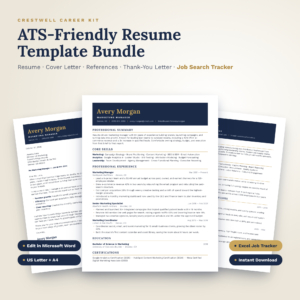
Crestwell ATS Resume Template Bundle
Price: $6.38 | Best for: online portals and big employers
Crestwell gives you five single-column resume layouts in Word, plus a matching cover letter, references page and interview thank-you letter, all in a navy-and-gold design. It also includes an Excel job search tracker with a dashboard and a 14-page Resume Writing Companion. Every placeholder is a writing prompt such as action verb plus what you did plus result, so start by typing over the prompts in your most recent role.
Online builder vs editable template: a side-by-side
Here is a general comparison. Individual services differ, so treat it as a guide to the questions to ask, not a verdict on any one company.
| Question | Typical online builder | Editable template you keep |
|---|---|---|
| Where does the CV live? | Usually on the builder’s site | On your computer or Drive |
| How do you pay? | Often a trial or subscription | One payment at checkout |
| Can you edit offline? | Usually not | Yes, in Word |
| Writing guidance | Often built in, with suggested phrases | Depends on the kit; some include guides |
| Matching cover letter | Often available | Included in most full kits |
| Use in five years | Depends on your account | Open the file and edit |
The builder wins on hand-holding. The template wins on ownership and long-term cost. If you are confident about what to write and just need the page to look right, ownership usually matters more.
How to move your CV out of a builder
If you already built a CV online, you do not have to start again. Here is a calm way to bring it home.
- Copy the text. If you can view your CV on screen, select all the text section by section and paste it into a plain document. Do this even if you cannot download a clean PDF.
- Save that text file. Call it “CV-text-backup”. It is your master copy now.
- Open your new template. Pick the version that fits your length, 1 or 2 pages for most people.
- Paste one section at a time. Use “paste as plain text” (Ctrl+Shift+V in most programs) so the old formatting does not come with it.
- Tidy and tighten. Builder phrases can sound generic. Swap one or two for real numbers from your own work.
- Export a PDF and check it on your phone.
Most people finish in under an hour. If you cancelled a trial along the way, note the cancellation date somewhere safe in case you need to show it later.
Choosing a template you will be happy to keep
A template you keep is one you will live with for years, so choose with a little care. Look for these signs:
- Built from tables or styles, not floating boxes. The page should grow when you add a line.
- An ATS version included. One column for online portals, a designed version for email.
- Both paper sizes. A4 for the UK, Europe, Africa and Australia; US Letter for North America.
- Matching letters. Cover letter, references and thank-you note with the same header.
- Some writing help. Prompts in the placeholder text or a short guide make a real difference.
If you want a quiet, classic design and a proper guide to the words, Marlowe is a strong pick.
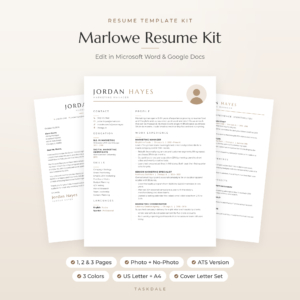
Marlowe Resume Template
Price: $4.79 | Best for: a calm classic look
Marlowe comes as 10 editable Word templates, each in Sand, Sage and Slate and in US Letter and A4, which makes 60 files. You get 1, 2 and 3 page resumes with and without a photo, an ATS resume, a cover letter, references page and thank-you letter. The bonus 10-page Resume Playbook covers profile writing, bullet examples, 120+ action verbs and interview prep, and there is a Job Search Tracker for Excel and Google Sheets. Read the playbook’s profile formula before you touch the template.
Replacing the hand-holding a builder gives you
The one thing a good builder does well is prompt you. It asks what you did, offers a few phrases and nudges you through each section. When you switch to a template, you need a simple way to replace that support, or the blank boxes can feel heavy.
Try this. Before you open the template, answer five questions in a notes app, one line each. What is the job you want next? What are the three things you do best at work? What is one result you are proud of from the last year, with a number if possible? Which software or tools do you use every day? What training have you finished in the last three years?
Those five answers become your profile, your top bullets and your skills list. A shop supervisor might write: “Store supervisor ready for an assistant manager role. Good at rotas, training new starters and calming busy Saturdays. Cut till errors by half in six months.” That is already better than most builder phrases, and it is true.
After that, look at the placeholder text in your template. Good kits use it as a prompt, telling you what belongs on each line. Type over it with your five answers and you have most of a CV in half an hour.
When a free option is all you need
Honesty matters here. If you are applying for a weekend café job, a summer role or an internal move where your manager already knows you, a clean free template in Google Docs is plenty. Spend your energy on the words and the cover email.
A paid kit earns its place when you are applying widely, when you need a matching cover letter and references page, when you want both an ATS version and a designed version, or when you simply do not want to wrestle with layout. If that is you, keep reading. If not, close this tab and go write. Our guide to making a resume in Google Docs walks you through the free route step by step.
A modern option with a photo
In many countries a CV photo is normal or expected, while in others it is best left off. If you need a photo version and a no-photo version in one kit, a two-column layout with a round photo frame is a tidy choice. Sloane is built from simple tables and Word styles, so sections grow as you type rather than spilling off the page.
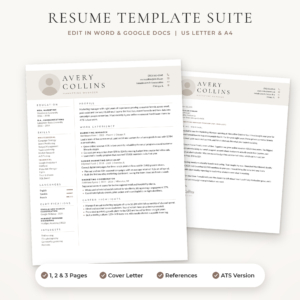
Sloane Resume Template
Price: $4.49 | Best for: modern two-column CVs
Sloane gives you a 1-page resume, a 2-page resume, a 3-page CV, an ATS-friendly resume, a cover letter and a references page, each in three colours and both US Letter and A4. The layout has a serif name, round photo frame and a slim left column for skills and education. A bonus Resume Writing Toolkit includes 96 action verbs and before-and-after bullet examples. Start with the 1-page file and see whether your experience fits before you move up a size.
Mistakes to avoid when switching
- Losing your text. Copy everything out of a builder before you cancel anything.
- Keeping generic phrases. “Results-driven professional” says nothing. Replace it with what you actually did.
- Forgetting to update the cover letter. If the CV changes design, match the letter too.
- Sending a Word file when a PDF would do. A PDF keeps your layout fixed on every screen.
- Skipping the ATS version. If you apply through company portals, upload the single-column file.
Frequently asked questions
Is there a completely free CV maker with no sign-up?
Yes. The templates inside Microsoft Word and Google Docs need no extra sign-up beyond the program itself, and you can download a PDF whenever you like.
Why do some CV sites charge to download?
Many online builders let you create a CV for nothing and charge for downloads, premium designs or ongoing access. Check each site’s current pricing before you start, so the download step holds no surprises.
Can I edit a Word CV template in Google Docs?
Yes. Upload the .docx file to Google Drive and open it with Google Docs. Templates that use common fonts and simple tables keep their look best.
Will an editable template pass applicant tracking systems?
A single-column template with standard headings and real text usually reads well. Use the ATS version of your kit for online portals and keep the designed version for email.
Do I own a CV template after I buy it?
You keep the files you download and can edit them for your own job search for as long as you like, with no account or subscription.
Your next step
If you have a CV sitting in a builder right now, copy its text into a plain document today, before anything else. Then pick a layout you will be glad to keep. For online applications and big employers, the Crestwell ATS Resume Template Bundle is a solid place to start.