A meal plan written by a stranger was built for a stranger’s week. It assumes they like salmon, have time to cook on Wednesday, own a slow cooker and have no one at the table who refuses anything green. That is why ready-made plans so often end up half followed and then abandoned.
A personalized meal plan template you fill in yourself flips that around. The template gives you the structure: days, meal slots, a grocery list, maybe a pantry check. You bring the content: your tastes, your schedule, your budget and the people you feed. This guide walks through how to do that properly, with a fill-in order that works, a worked example for a real household, the columns worth adding and three Taskdale templates in different formats.
Quick picks: fill-in meal plan templates
| Product | Best for | Price | Link |
|---|---|---|---|
| Pantry Bloom Meal Planner Spreadsheet | A blank spreadsheet plus a filled sample to copy from | $18.99 | View |
| Plate & Plan Weekly Meal Planner Printable | Typing into a fillable PDF or writing by hand | $1.69 | View |
| Thymewise Digital Meal Planner | Handwriting your plan on an iPad or tablet | $1.75 | View |
| Larkspoon Meal Planner Spreadsheet | A weekly spreadsheet that prices each dish | $12.99 | View |
What “personalized” should mean on a meal plan
Personal is not just your name at the top. A plan feels like yours when it reflects five things:
- Who eats. One person, a couple, a family of five with a toddler and a teenager.
- When you eat. Office hours, school runs, night shifts, gym at 6 am.
- What you like and avoid. Vegetarian two days a week, no pork, one child who will not eat sauce.
- What you can spend. A fixed weekly food amount.
- How much time you have. Twenty minutes on weeknights, an hour on Sunday.
A good template has room for all five. A bad one is a seven-by-three grid and nothing else. You can make the grid work, but you will be scribbling the other details in margins.
So before you fill anything in, jot those five answers on a scrap of paper. It takes three minutes. It is the most useful three minutes in the whole process.
The fill-in order that saves time
Most people start with Monday dinner and work across. That is the slowest way. Fill in a template in this order instead:
- Block out the fixed nights. Late meetings, sports practice, date night, dinner at a parent’s house. Write those in first.
- Add your easy nights. At least one leftover night and one very quick night.
- Fill the remaining dinners from a list of meals you already know your household eats.
- Copy breakfast and lunch across the week. Repeating them is fine.
- Add snacks if anyone in the house needs them planned.
- Write the grocery list straight from the filled plan.
- Check the pantry and cross off what you already have.
Done this way, a full week takes about 20 minutes. The hard decisions get made first, and the rest follows.
A worked example: a couple with shifts and a vegetarian partner
Let’s fill in a template for Sam and Priya. Sam works hospital shifts, three 12-hour days a week, this week Monday, Wednesday and Thursday. Priya works from home and is vegetarian. Sam eats everything. Their food budget is $110 a week.
Step 1: the fixed nights
Sam’s shift days need dinners that Priya can cook alone and Sam can reheat at 8:30 pm. Those three nights get one-pot meals that hold well.
Step 2: the easy nights
Friday is leftover night. Saturday is homemade pizza with half the toppings vegetarian.
Step 3: the rest
| Day | Dinner | Personal note |
|---|---|---|
| Monday | Chickpea and spinach curry with rice | Sam’s shift, reheats well |
| Tuesday | Tacos: black beans for Priya, ground beef for Sam | One base, two fillings |
| Wednesday | Lentil shepherd’s pie | Sam’s shift, made Tuesday night |
| Thursday | Shepherd’s pie leftovers with green beans | Sam’s shift, zero cooking |
| Friday | Clear the fridge: frittata or fried rice | Leftover night |
| Saturday | Homemade pizza, two halves | Easy night |
| Sunday | Halloumi and vegetable traybake, chicken thighs added on Sam’s side | Sunday cook-up |
Step 4: the list and the budget
With dinners set, the grocery list writes itself: chickpeas, lentils, black beans, a pound of ground beef, four chicken thighs, a block of halloumi, rice, tortillas, pizza dough, spinach, green beans, peppers, onions, potatoes and the usual eggs, milk and bread. Most of the protein is beans and lentils, which keeps the total comfortably under $110. The beef and chicken only appear on Sam’s side, so they buy small packs.
Look at how personal that is. No generic plan would know about Sam’s shift pattern or the split tacos. Yet the template did the hard work: a slot for every day, a column for notes, a grocery list underneath.
A spreadsheet template is handy for a household like this one, because you can save each recipe once and reuse it, and the grocery list adds up quantities from every dish for you.
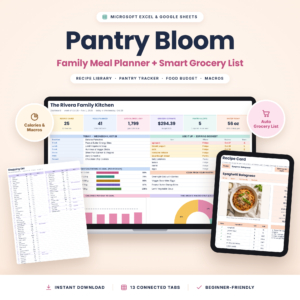
Pantry Bloom Meal Planner Spreadsheet
Price: $18.99 | Best for: first-timers who like seeing an example
Pantry Bloom comes as two Excel and Google Sheets files: a blank planner and a SAMPLE copy filled with a family week, 25 recipes, a pantry, budget and trackers. Across 13 connected tabs you save recipes once, pick meals from dropdowns, and get a grocery list scaled to your servings and checked against your pantry, with cost per serving and daily nutrition per person. An 18-page Word guide is included. Open the sample first, then make your own week in the blank file.
Columns and boxes worth adding to your template
Even a good template might be missing something your household needs. Here are additions that make a plan feel tailored:
- “Who cooks” box. Useful in shared houses and families with teenagers learning to cook.
- Prep-ahead note. “Soak beans Tuesday night” or “Defrost chicken Wednesday morning.”
- Diet tags. V for vegetarian, GF for gluten-free, a star for kid favorites.
- Time estimate. 15, 30 or 45 minutes, so the long recipes land on the free nights.
- Cost estimate. Even a rough $8 or $15 per dinner helps you stay under the weekly number.
- Rating after eating. One to five stars. Five-star meals go into your favorites list.
On a spreadsheet you can add a column in seconds. On paper, use the notes area or the margin. On a tablet, a sticker or a small handwritten tag does the job.
That last one, the rating, is the secret to getting faster. After a month, you will have a list of 15 or 20 meals that everyone likes. Planning becomes picking from your own greatest hits. Keeping those winners on recipe cards helps, and our recipe card template guide covers which size and layout to choose.
Printable or fillable PDF: writing by hand vs typing
Not everyone wants a spreadsheet. Plenty of people think better with a pen. Others like to type into a PDF and print a clean copy for the fridge. A fillable PDF does both: type on screen, or print it blank and write.
The benefit of paper is visibility. A plan on the fridge door gets read by everyone who opens it. Kids learn what is coming, partners know whose turn it is to cook, and nobody has to ask. The benefit of typing is neatness and the option to save a week and reprint it later.
A third route suits recipe collectors. If you already keep dozens of family recipes, a spreadsheet that stores each one with its ingredients lets the plan and the shopping list pull from that collection. Our guide to building a meal planner spreadsheet with recipes explains how that kind of recipe database works. For most people, though, the right choice is simply the format they will open again next Sunday.
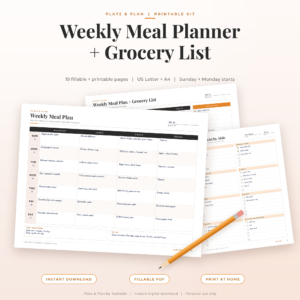
Plate & Plan Weekly Meal Planner Printable
Price: $1.69 | Best for: people who type or write by hand
Plate and Plan gives you 19 pages in four PDF files: US Letter and A4, each as a fillable and a print-only version, with Sunday and Monday start options. Pages include a weekly plan with breakfast, lunch, dinner and snacks, a weekly plan with a grocery list, a meal prep planner, a daily planner with optional calorie and macro boxes, a monthly calendar, a four-week dinner rotation, a family favorites page, pantry and freezer inventories and a spending tracker. Start with the weekly plan with grocery list page.
Personalizing for dietary needs and goals
A fill-in template shines when your needs do not match a standard plan. A few common situations:
Mixed diets at one table
Plan one base meal with two protein options, like the tacos above. Stir-fries, grain bowls, pasta and pizza all split easily.
Fitness or protein goals
Add a protein column and aim for a source at every meal. A spreadsheet that totals nutrition per person saves you doing the sums.
Allergies
Write the allergy at the top of every week, in a bright color, so nobody adds a recipe without thinking. Tag safe recipes in your favorites list.
Medical diets
If a doctor or dietitian has given you a specific eating plan, use the template to organize their guidance into days and a shopping list. The template should hold their advice, not replace it.
Filling in a template on a tablet
If you use GoodNotes or Notability for everything else, a meal planner on the same device is the one you will keep opening. Handwriting with a stylus feels like paper, but the pages link to each other, so you can jump from Monday’s dinner to the week’s grocery list with one tap and duplicate a page you liked.
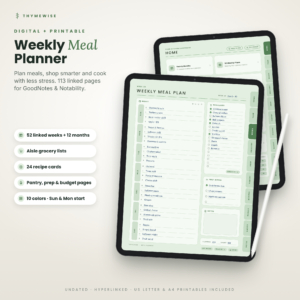
Thymewise Digital Meal Planner
Price: $1.75 | Best for: tablet users who like handwriting
Thymewise is an undated, hyperlinked 113-page planner for GoodNotes, Notability and other PDF note apps, with printable US Letter and A4 copies included. It holds 52 weekly meal plans with breakfast, lunch, dinner and snacks, 12 monthly calendars, aisle-sorted grocery lists, pantry and fridge inventories, a meal prep planner, 24 recipe cards and a grocery budget tracker. Begin by writing your household’s five answers (who, when, likes, budget, time) on the first notes page.
A weekly fill-in routine you can keep
A template only works if you open it every week. Tie it to something that already happens. Many people fill in their plan right after the weekly family calendar check on Sunday evening, or while the kettle boils on Saturday morning.
Here is a simple four-part rhythm:
- Copy. Duplicate last week’s page or tab. Most of it will stay.
- Clear the fixed nights. Look at the calendar and overwrite the busy nights with quick or leftover meals.
- Swap three meals. Pull in something from your favorites list, plus one new recipe if you feel like it.
- Rate last week. Give each dinner a quick star score so the list of winners keeps growing.
Ten to fifteen minutes, once a week. Over a couple of months, the template stops feeling like a form and starts feeling like your household’s own cookbook, with notes in your handwriting about who loved what and which nights were chaos. That small record is oddly satisfying to flip back through.
Mistakes when filling in your own meal plan
- Filling every slot with a new recipe. Two new meals a week, maximum. The rest should be known favorites.
- Ignoring the calendar. A 45-minute recipe on soccer night will not get cooked.
- Leaving the grocery list for later. Write it the same day, while the plan is fresh.
- Planning for the person you wish you were. If you never eat breakfast, do not plan smoothie bowls. Plan a banana.
- Starting over every week. Copy last week, change three things. A template is meant to be reused. If you are not sure which layout to reuse, our roundup of undated meal planner picks compares formats you can repeat all year.
Frequently asked questions
How do I make a meal plan template personal?
Start with five answers: who eats, when, what they like or avoid, the weekly budget and how much cooking time you have. Fill the fixed and busy nights first, then add favorite meals and a notes column for diet tags or who cooks.
Is a spreadsheet or printable template better?
A spreadsheet suits people who want the grocery list and costs added up automatically. A printable or fillable PDF suits people who like a plan on the fridge. Both work well when you reuse them every week.
Can I use one template for different diets in the same house?
Yes. Plan one base meal and note two protein options, or tag each meal with V, GF or similar. Tacos, bowls, stir-fries and pizzas split easily.
How long does it take to fill in a weekly meal plan?
About 20 to 30 minutes the first time, and around 15 once you have a list of rated favorites to pick from.
What should a meal plan template include?
Seven days with breakfast, lunch, dinner and snack slots, a notes area, a grocery list and ideally a pantry check. Budget and recipe pages are a bonus.
Your next step
Grab a scrap of paper and write your five answers: who eats, when, likes and dislikes, budget and cooking time. Then fill in next week’s fixed nights before anything else. If you would like a blank file with a finished example sitting beside it, open the Pantry Bloom Meal Planner Spreadsheet and start from the sample week.