Every family has that one recipe card. Soft at the corners, splashed with something brown, the handwriting fading where a thumb has held it a hundred times. Nobody would trade it for a phone screen.
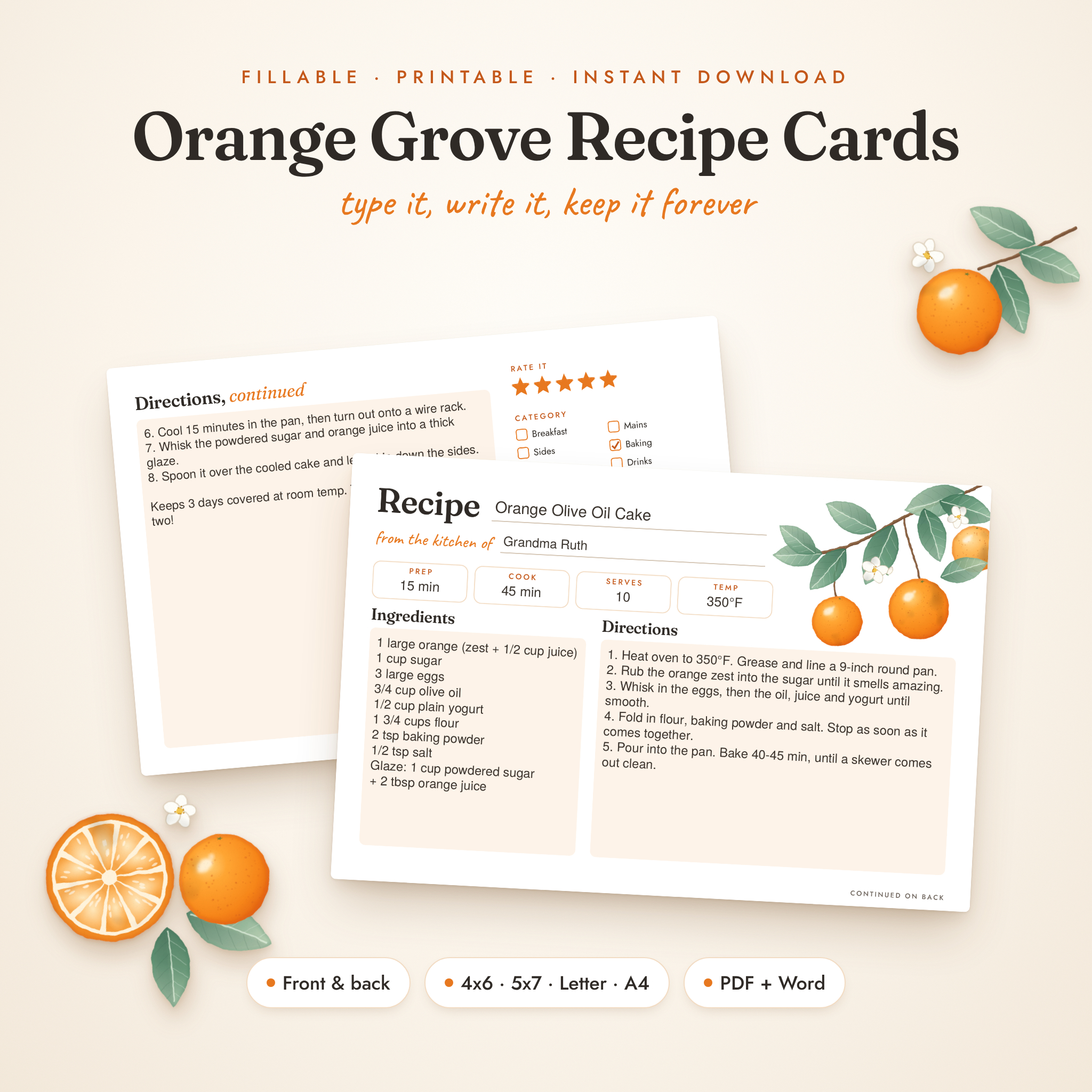
A good recipe card template lets you make more of those: cards that look like a set, fit in a box or binder, and are easy to read while your hands are covered in flour. This guide covers the size question (4×6 or 5×7?), what every card should include, and how to print and cut them at home so they look shop-bought. Along the way I’ll show how the Orange Grove Recipe Card Kit handles each step.
4×6 or 5×7: which recipe card size?
This is the first decision and it depends on where the cards will live.
| Size | Best for | Watch out for |
|---|---|---|
| 4×6 in | Standard recipe boxes, gifts, short recipes | Long recipes need the back |
| 5×7 in | Larger recipe boxes, fuller recipes, bigger handwriting | Won’t fit a 4×6 box |
| Full page (US Letter or A4) | Binders, long baking recipes, family cookbooks | Not for a box |
If you already own a recipe box, measure it before you print anything. Most are made for 4×6 cards. If you’re starting fresh and your recipes run long, 5×7 gives you about 45 percent more space on each side.
What every recipe card template should include
- Recipe name, big enough to read when the card is in a stack
- “From the kitchen of”, because in 20 years you’ll want to know whose recipe it was
- Prep time, cook time, servings and oven temperature at the top, so you can decide at a glance
- Ingredients and directions side by side, so you’re not flipping mid-stir
- A back side for longer directions and notes
- A notes box for swaps, tips and who loved it most
The back is the one most templates skip, and it’s the one you need most. Without it, you squeeze a 12-step recipe into tiny writing on a single face.
Type it or write it?
Both have a place. Typed cards are neat and easy to reprint. Handwritten cards feel personal and age beautifully. The problem with many templates is that they try to do both on one design, so typed text sits awkwardly over printed lines.
The Orange Grove kit solves this with two versions of every card. The fillable version has soft boxes made for typing in free Adobe Acrobat Reader, with no login and no internet needed after download. Long recipe names shrink to fit as you type. The lined version has proper ruled lines for pens. Pick per recipe: type the everyday ones, handwrite the special ones.
How to write a recipe so it’s easy to cook from
- List ingredients in the order you use them. Your eye follows the method down the card.
- Use short steps. One action per line: “Brown the mince, 5 minutes.”
- Use standard abbreviations. tsp, tbsp, g, ml, oz. Write “C” or “F” next to oven temperatures.
- Write your tweaks. “Add an extra clove of garlic.” “Our oven needs 10 minutes more.”
- Rate it. A star rating helps when you’re deciding between three chicken recipes.
On the Orange Grove cards, the back has a clickable 5-star rating and six category tick boxes (breakfast, mains, sides, baking, desserts, drinks), which helps when you sort cards into a box later.
Printing and cutting cards at home
A few habits make home-printed cards look professional:
- Print on cardstock. Something in the 65 to 110 lb (about 175 to 300 gsm) range feels sturdy and still feeds through most home printers. Check your printer’s limit first.
- Print at Actual Size. Never “fit to page”, or your 4×6 card becomes 3.8×5.7.
- Use crop marks. The kit’s print-at-home sheets put two 4×6 cards on one Letter or A4 page with crop marks, so you save card and cut straight lines.
- Print the back separately. Do a test sheet first to check which way your printer flips the page.
- Use a paper trimmer if you have one. Scissors work, but a trimmer gives cleaner edges.
One honest limit of home printing: most printers can’t print right to the edge, so a sliver of the corner artwork may get trimmed. Printing on larger paper and cutting on the crop marks avoids it.
What else is in the Orange Grove kit
The design has hand-painted style oranges, sage leaves and white blossoms in the corner, with clean type everywhere else. Beyond the cards, you get:
- Full recipe pages in US Letter and A4, with numbered direction lines 1 to 21 on the lined version
- A recipe binder cover with a fillable name and year
- A recipe index with 26 fillable rows
- 12 category divider cards (two with blank titles you can type)
- A kitchen conversion card for cups to millilitres, ounces to grams and oven temperatures
- A recipe request insert for bridal showers, family cookbooks and gifts
- Three editable Word templates (4×6 card, Letter page and A4 page) if you want to change fonts, colours or wording
- A 16-page user guide in DOCX and PDF
Who it suits, and who it doesn’t
It suits home cooks building a recipe box or binder, families saving recipes before they’re lost, and anyone hosting a bridal shower who wants guests to write their favourite recipe on a matching card.
It isn’t for you if you want a tablet-based recipe book with tabs and links, or if citrus artwork isn’t your style and you don’t fancy editing the Word templates. It’s also a print-it-yourself product, so you’ll need a printer and some card.
Recipe card template FAQ
What is the standard recipe card size?
4×6 inches is the most common size and fits most recipe boxes. 3×5 and 5×7 are also used, with 5×7 popular for longer recipes.
Can I edit a recipe card template in Word?
Some kits include Word versions. The Orange Grove kit has editable Word templates for the 4×6 card and the full Letter and A4 pages, with the fonts included.
What paper should I print recipe cards on?
Matte cardstock works best because it takes ink and pen well and stands up to kitchen use. Check what weight your printer can handle before buying a big pack.
How do I protect recipe cards in the kitchen?
Slide them into clear card sleeves or laminate the ones you use most. A sleeve also lets you prop the card against a jar while you cook.