A coloring page should be the least risky thing on your computer. Most of the time it is. But the search for “free coloring pages” leads plenty of people to sites with fake download buttons, surprise installers and pages nobody would want a six-year-old to see. A few simple checks keep you, your device and your kids out of trouble.
This guide is for parents, grandparents, teachers and adult colorists who download printable coloring page collections and want to choose safe ones. You will learn what a proper coloring file looks like, the warning signs of a risky site, how to check content before a child sees it, how to protect your privacy, and a short routine for every download.
Quick picks: coloring collections with clear, simple files
| Product | Best for | Price | Link |
|---|---|---|---|
| Marquee Me Personalized Name Pages | Kids’ names, parties, offline personalizing | $4.99 | View |
| Snug Hours Cozy Coloring Book | Adults, print or tablet | $5.99 | View |
| Orbit Pals Printable Coloring Book | Original space animals, ages 7 and up | $3.99 | View |
| Gearhead Zoo Printable Coloring Book | Robot animals for detail lovers | $3.99 | View |
What “safe” means for a coloring download
When people say they want a safe download, they usually mean one of four things. It helps to check all four, because a page can pass one test and fail another.
- File safety. The file is what it says it is: a PDF or image, with nothing hidden inside.
- Site safety. The website does not trick you into installing software, signing up for notifications or handing over card details.
- Content safety. Every page is suitable for the person coloring it. No surprises on page 17.
- License safety. You know what you are allowed to do with it: print at home, print for a class, give as a gift.
Picture a grandmother looking for dinosaur pages for a visiting grandson. She clicks the biggest “Download” button on a busy free site. Instead of a PDF, she gets a small program called “PDF Viewer Setup”. That is a file safety and a site safety problem at once, and it happens more often than it should. The rest of this guide is about avoiding moments like that.
File types a coloring collection should use
A real coloring collection comes in a small number of plain file types. If you know them, odd files stand out right away.
Normal, expected files
- PDF (.pdf): the standard for printable books. Opens in any PDF reader or web browser.
- PNG or JPG (.png, .jpg): single pages as pictures, handy for tablets and reprinting one page.
- ZIP (.zip): a folder squeezed into one file, holding PDFs or PNGs. You unzip it to see the contents.
- Word guide (.docx): some shops include a printing guide as a document.
Red-flag files for a coloring download
- .exe, .msi, .scr, .bat on Windows, or .dmg, .pkg on a Mac. These install or run programs. A coloring page never needs one.
- .apk on Android, unless you deliberately chose an app from an official store.
- Double extensions like “dino-pages.pdf.exe”. The real type is the last one. Turn on “show file extensions” in your computer’s settings so you can see it.
- “Download manager” or “converter” tools that a site insists you install first.
If a free page arrives as anything on the red list, delete it without opening it and empty your downloads folder. Then find a different source.
Warning signs of a risky coloring site
Many free coloring sites are honest and helpful. Some are not. These signs show up again and again on the risky ones:
- Several big “Download” buttons. When there are three, two are usually ads. The real link tends to sit right under the picture, smaller and plainer.
- A pop-up asking to “Allow notifications” to see the page. Click Block. Allowing it can fill your screen with spam alerts for weeks.
- A “free” download that asks for a card number. A free page should never need payment details.
- Huge bundles that sound too good. “50,000 coloring pages for free” often means scraped, blurry copies or a lure to something else.
- New tabs that open on their own or redirects to prize, quiz or “your device is infected” pages. Close the tab and leave.
- No contact page, no shop name, no terms. Real makers want you to know who they are.
The safest free sources are usually the boring ones: your library, museums, nature centers, teacher resource sites and coloring book shops sharing a sample. They have a name to protect.
Checking content before a child sees it
File safety is one thing. What is on the pages is another. A collection labeled “kids” can still include a page that is too scary for a sensitive four-year-old, or text that is not appropriate. It takes two minutes to check.
- Scroll every page first. Open the PDF and flick through the thumbnails before you print. You will spot a problem page in seconds.
- Read any words on the pages. Captions, jokes and signs in the background all count.
- Be wary of knock-off characters. Copies of famous characters on free sites are often redrawn badly, and some are altered in ways no parent would want. Original characters from a known shop avoid this.
- Match the detail to the age. Tiny shapes frustrate young kids, so “safe” also means “won’t end in tears”.
Original artwork with a clear description and a page list is the easiest kind to trust. You know what is inside before you buy, and you can check it against the file when it arrives.
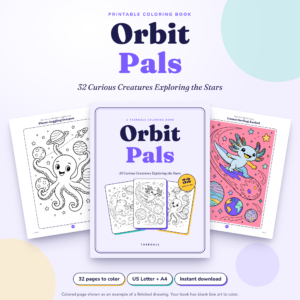
Orbit Pals Printable Coloring Book
Price: $3.99 | Best for: kids 7 and up, teens, adults
Orbit Pals has 32 original drawings of animals loose in space, such as a comet-surfing axolotl, a planet-juggling octopus and a starry space whale, each with a title and short caption. The download is plain and clear: a US Letter PDF, an A4 PDF, a ZIP of 32 single-page PNGs and a Word user guide. The license covers printing for yourself and your household. Flick through the thumbnails with your child and let them pick the first page.
Protecting your privacy and your kids’ names
Some coloring sites ask for an email address, an account or a child’s name before you can download. That is not always bad, but it is worth thinking about. Every sign-up is one more password to remember and one more company holding your details.
A few simple habits help:
- Use a separate email address for freebies and newsletters, so your main inbox stays clean.
- Never give a child’s full name, birthday or school to a free site.
- Check whether personalizing tools work on your own computer or upload your data. Offline tools keep names private.
- Keep a record of the accounts you do create. Our guide to a password organizer printable shows how to keep logins safe offline.
Personalized pages are a good example. Kids love seeing their own name on a coloring page, and parents rightly hesitate to type it into a website.
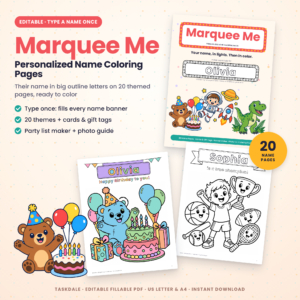
Marquee Me Personalized Name Pages
Price: $4.99 | Best for: party hosts and name practice
Marquee Me lets you type a child’s name once into a fillable PDF, and it appears in big hollow letters on 20 themed coloring pages. It also includes an offline Name Banner Maker, a single HTML file that runs in your browser without internet, so names are never uploaded. You get US Letter and A4 versions, eight greeting cards, eight gift tags and a photo-to-coloring-page guide. Open it in Adobe Acrobat Reader, Chrome or Edge and type the first name.
What a well-made coloring collection looks like
Good collections share a few traits. Use this as a quick checklist before you download anything, free or paid.
- A clear list of files, with file types and page counts stated on the listing.
- A page list or preview, so you know the content before it arrives.
- Both paper sizes (US Letter and A4) so nothing gets cropped or stretched.
- A plain license that says what you can print and for whom.
- A named shop with a contact address and order history.
- A way to re-download later, from your account or the confirmation email.
When all six are there, you can relax. When three or more are missing, keep looking.
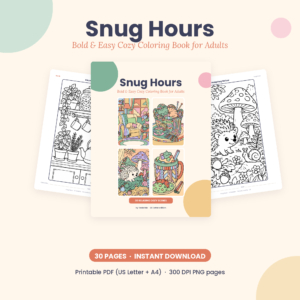
Snug Hours Cozy Coloring Book
Price: $5.99 | Best for: adults who print or color on tablets
Snug Hours lists exactly what you get: a US Letter PDF and an A4 PDF (42 pages each), 30 white-background PNG pages at 300 DPI, 30 transparent line-art PNGs for apps with layers, and a user guide. Inside are 30 cozy scenes with bold lines, a color test page, palette ideas and a license page. Start with the reading nook page, printed or on a tablet.
A safe routine for every download
Once you have chosen a collection, a short routine keeps things tidy and safe. It takes about two minutes the first time and becomes automatic after that.
- Check the file name and type in your downloads folder. PDF, PNG, JPG or ZIP. Nothing else.
- Let your security software scan it. Windows and Mac both have built-in protection. Right-click and scan if you want to be sure.
- Unzip into its own folder, named after the book, so pages do not get mixed up with other files.
- Open the PDF in a proper reader or your browser, and flick through every page.
- Save the order email or note where to re-download it, in case your computer changes.
- Back it up to a USB stick or cloud folder, so a favorite book is never lost.
Single-page image packs are handy here. If one page gets torn or scribbled over, you can reprint just that page without opening the whole book.
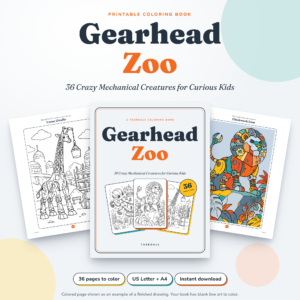
Gearhead Zoo Printable Coloring Book
Price: $3.99 | Best for: kids 7 and up who love detail
Gearhead Zoo has 36 original robot animals, like a clockwork lion, a toaster rhino and an airship whale, with plenty of bolts and gears for detail fans. The download includes US Letter and A4 PDFs (46 pages each), a ZIP of 36 single-page PNGs at 2000 x 3000 pixels, and a 9-page Word user guide. Unzip the PNGs into their own folder so reprinting a favorite takes seconds.
For more trustworthy printables for children, our post on printable coloring books for kids lists a few that pass every check here.
Downloading on phones and tablets
Many people now find and download coloring pages on a phone, then print later or color on a tablet. The same rules apply, with a few extra quirks.
- Watch for app-store redirects. If tapping “Download” opens an app store page, that is an ad for an app, not your coloring page. Go back.
- Find your files. On an iPhone or iPad, downloads land in the Files app under Downloads. On Android, look in the Files or My Files app. Knowing where they go stops you tapping random links trying to “find” them.
- Use the share menu to print. Open the PDF, tap Share, then Print. No extra printing app is needed for most home printers.
- For tablet coloring, use PNG pages. Import them into the coloring or drawing app you already trust, rather than downloading a new app from a pop-up.
Tablets shared with kids deserve one more step: turn on the parental controls that stop app installs without a password. Then a stray tap on an ad cannot add anything new.
Teaching older kids to download safely
By about age 9 or 10, many kids want to find their own coloring pages. That is a great chance to teach safe habits they will use for life. Sit with them for the first few searches and talk through what you see.
Three simple rules work well for this age. One: only click the download link that sits right under the picture. Two: if anything asks you to install, allow, sign up or pay, stop and fetch a grown-up. Three: if a page looks scary or weird, close it and tell someone, and you will never be in trouble for it. Write the rules on a sticky note and put it on the screen. A ten-year-old who spots a fake button and says “that’s an ad” feels genuinely proud, and they should.
Frequently asked questions
Are free coloring page downloads safe?
Many are, especially from libraries, museums and known shops. Stick to PDF, PNG, JPG or ZIP files and avoid sites that push installers or notification pop-ups.
What file type should a coloring page be?
PDF for printable books, PNG or JPG for single pages, and ZIP for a bundle. Never an .exe or other program file.
How do I know if a coloring site is legit?
Look for a shop name, contact details, clear terms and a single, plain download link. Many big flashing buttons and redirects are warning signs.
Is it safe to enter my child’s name on a coloring website?
It is better to avoid it. Choose personalized pages you fill in on your own computer, so the name never leaves your device.
What should I do if I downloaded a suspicious file?
Do not open it. Delete it, empty your trash or recycle bin, and run a scan with your security software.
Your next step
Open your downloads folder now and check what is in it. Delete anything with an unexpected file type, turn on “show file extensions”, and make one folder called “Coloring” for future downloads. If you want a personalized set that never uploads your child’s name, start with Marquee Me personalized name coloring pages.