Envelope budgeting is one of the oldest money methods around. You split your income into labeled pots, spend only what is in each pot, and stop when it is empty. Goodbudget brought that idea onto phones, and plenty of households use it happily. Others go looking for a Goodbudget alternative because they want to own their file, skip a subscription, budget offline or see the whole year in one place.
If that sounds like you, an envelope budget spreadsheet can do the same core job. This guide gives a fair comparison of app and spreadsheet, shows exactly how envelopes work in Excel, walks through a real paycheck fill for a couple, covers sinking funds and real cash, and points out who is better off keeping the app.
Quick picks: envelope budget spreadsheets on Taskdale
| Product | Best for | Price | Link |
|---|---|---|---|
| Lantern Budget System | Cash and digital envelopes with sinking funds | $12.99 | View |
| Seaglass Annual Budget Spreadsheet | Paycheck planning and a bill calendar | Original price was: $19.99.$9.99Current price is: $9.99. | View |
| Pocketbloom Annual Budget Spreadsheet | Rolling unspent money into next month | $24.99 | View |
| Ultimate Annual Budget Spreadsheet | Excel or Google Sheets with sinking funds | $6.00 | View |
Envelope budgeting in one minute
The original version used paper envelopes and cash. On payday you took out money, split it into envelopes marked Groceries, Fuel, Eating Out and so on, and paid for things from the right envelope. When the Eating Out envelope was empty, you ate at home until next payday. Simple, physical, and very hard to cheat.
Digital envelopes follow the same rules without the cash. Each category gets an amount when money comes in. Every purchase reduces one envelope. The balance tells you what is left. The power is in that balance. Instead of asking “how much is in my account?”, which mixes rent money with fun money, you ask “how much is left for groceries?” and get a straight answer.
If you want to try the cash version, our guide to cash stuffing for beginners covers the paper side in detail.
Why people look for a Goodbudget alternative
It is worth being fair here. Goodbudget is a well-known envelope app that lets households share a budget across phones, which is genuinely handy when two people shop. It offers a free version and a paid plan with more features. Check its own site for current limits and pricing, since those can change.
People still go looking for something different, usually for one of these reasons:
- No ongoing subscription. A spreadsheet is bought once and kept. Some people simply prefer that to a monthly or yearly fee for a budgeting tool.
- Owning the data. A file on your own computer needs no account or login, and nothing leaves your device unless you choose to share it.
- Working offline. No signal at the market? A spreadsheet opens anyway.
- Seeing the year. Apps are built for the phone screen and the current month. A spreadsheet can show twelve months side by side with charts.
- Customizing everything. Rename columns, add a tab for a wedding fund, build your own chart. A spreadsheet bends to fit.
- Mixing real cash with digital. Some people stuff real envelopes for groceries and fun money but pay bills by card. A spreadsheet can track both side by side.
App or spreadsheet: a fair comparison
| Question | Envelope app | Envelope spreadsheet |
|---|---|---|
| Quick entry at the till | Strong, made for phones | Possible on a phone, easier on a laptop |
| Sharing between partners | Built in with an account | Share the file through cloud storage or Google Sheets |
| Ongoing cost | Free tier or subscription | One-time purchase |
| Works offline | Depends on the app | Yes |
| Year view and charts | Usually limited | Strong |
| Customizing | Within the app’s options | Almost anything |
Neither wins on every line. The right choice depends on whether you value quick phone entry and sharing more than flexibility and a one-off cost.
How to run envelopes in a spreadsheet
Whether you build your own or use a template, the logic is the same five steps.
Step 1: List your envelopes
Start with 10 to 15. Groceries, Fuel, Household, Eating Out, Kids, Gifts, Personal Care, Fun Money, plus a few for bills. Each envelope is one row.
Step 2: Fill on payday
Each time money arrives, add a Fill entry to each envelope. The fills should add up to the paycheck, so every dollar has a home.
Step 3: Log spending against an envelope
Every purchase goes on a transaction log with a date, amount and envelope name. Use a dropdown so the names always match.
Step 4: Let the balance calculate
Balance equals everything filled minus everything spent. A SUMIFS formula on the fill column and another on the spending column, subtracted, gives each envelope’s live balance.
Step 5: Move money, never overspend silently
If Eating Out runs dry and you really want the dinner, move $30 from Fun Money with a Transfer entry. The envelope rule is not “never spend more”. It is “never spend more without deciding where it comes from”.
Most templates also let unspent money roll over, so $40 left in Groceries in March starts April with a head start. That small reward for being careful is surprisingly motivating.
A worked paycheck fill for a couple
Sam and Riley are paid biweekly. Together, each payday brings in $2,860. Rent and bigger bills come from the first paycheck of the month. Here is how the second paycheck in October was split into envelopes.
| Envelope | Fill |
|---|---|
| Groceries | $420 |
| Fuel | $140 |
| Utilities and phone | $310 |
| Car loan | $385 |
| Eating Out | $120 |
| Household and pets | $110 |
| Fun Money (Sam) | $75 |
| Fun Money (Riley) | $75 |
| Holiday Gifts sinking fund | $150 |
| Car Repairs sinking fund | $80 |
| Annual Bills sinking fund | $95 |
| Credit card payoff | $600 |
| Emergency fund | $300 |
| Total | $2,860 |
Two things made this work for them. Separate fun money envelopes ended the low-level arguments about who bought what. And the three sinking funds meant October’s surprise $260 brake job came out of Car Repairs, not the credit card they were trying to clear. Riley described it as the first time a car bill felt boring rather than scary.
Sinking funds: envelopes for the big stuff
Regular envelopes cover each pay period. Sinking fund envelopes fill slowly for costs that arrive once or twice a year: car insurance, holiday gifts, school uniforms, a vet check, a family trip.
Work out the target and the date, then divide. A $720 insurance renewal due in nine months needs $80 a month, or about $37 a paycheck if you are paid biweekly. A good spreadsheet does this division for you and flags when a fund falls behind.
Sinking funds are where a spreadsheet often shines over a phone screen. You can see every fund’s goal, progress and target date on one tab, and it is easy to add a new one in seconds when a wedding invitation lands on the mat.
Real cash and digital envelopes side by side
Plenty of envelope budgeters use cash for a few categories, often groceries and fun money, because handing over notes makes spending feel real. Bills stay digital. The trick is tracking both without logging anything twice.
A cash-friendly spreadsheet marks each envelope as cash or digital. When you withdraw cash for stuffing, it records the move. When you spend from a cash envelope, you log the purchase like any other. Some templates even tell you which notes to ask the bank for.
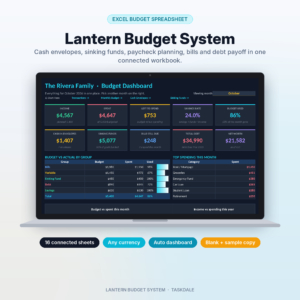
Lantern Budget System
Price: $12.99 | Best for: cash stuffers and digital envelope fans
A cash envelope budget spreadsheet for Excel with one transaction log feeding a dashboard of 10 live cards and four charts, envelope balances that turn amber when low, a sinking funds tracker for up to 15 funds with per-paycheck targets, a paycheck budget, a bill calendar and a debt snowball. Before a bank trip, it shows how many of each note to withdraw, envelope by envelope. Set each category to cash or digital first, then log your first payday fill.
Switching over from an app without losing a month
Moving systems mid-month invites chaos. A calmer way is to run both for one pay period, then switch.
- Export or screenshot your current envelope balances on the last day before payday.
- Recreate the same envelope names in your spreadsheet so the habit carries over.
- Enter each balance as an opening fill, dated the day you switch.
- Do the next payday fill in the spreadsheet only. Log everything there for two weeks.
- Compare on the next payday. If the balances match your bank, cancel or pause the app.
The whole move takes about an hour across two weeks. Nothing gets lost, and you can see for yourself whether the spreadsheet suits your routine before you commit.
Choosing an envelope-friendly spreadsheet
Not every budget spreadsheet thinks in envelopes. Look for three features: a fill or plan amount per category each period, a live balance per category, and a way to carry leftover money forward. Paycheck planning is a big bonus if you are paid weekly or biweekly.
If your budget revolves around paydays, a planner that shows what is due between this check and the next, and what is safe to spend per day, keeps envelopes honest between fills.
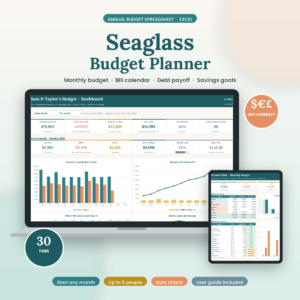
Seaglass Annual Budget Spreadsheet
Price: Original price was: $19.99.$9.99Current price is: $9.99. | Best for: paycheck-to-paycheck envelope budgeters
A 30-tab annual budget spreadsheet for Excel with 12 monthly budget tabs showing budget against actual, a dashboard, a bill calendar with paid and overdue status, a paycheck planner that shows what is safe to spend per day until the next payday, sinking funds and up to 15 savings goals. Couples and families can tag spending to up to six people. Setup takes about 15 minutes; enter your categories, paychecks and bills, then start logging.
If you like the envelope habit of rolling unspent money forward and want lots of categories, a planner built around that rule feels closest to an app.

Pocketbloom Annual Budget Spreadsheet
Price: $24.99 | Best for: households who roll leftovers forward
A 34-tab annual budget spreadsheet for Excel with up to 112 categories, recurring income and bills that fill all 12 months, a bill tracker and calendar, savings goals, a debt payoff plan comparing snowball and avalanche and a money health score. You can use 50/30/20 or a custom rule, set seasonal amounts and roll unspent money forward. Fill in Setup with your year, currency and people, then add your categories as envelopes.
Want to compare more options first? Our roundup of the best budget spreadsheet for Excel and Google Sheets ranks six picks.
Logging on the go without an app
The one thing an app does better is the two-second entry at the checkout. You can get close with a spreadsheet using a couple of habits.
- Use your phone’s spreadsheet app. Excel and Google Sheets both have free phone apps. Keep the transaction log as the first tab so it opens straight there.
- Batch it. Drop receipts in a pocket of your wallet or snap a photo, then log them all on Sunday evening. Ten minutes covers a week.
- Check balances before you shop. Glance at the Groceries envelope before you leave home. That one habit does most of the work an app would.
People who were tired of rebuilding the same file every month will also like our guide to keeping one monthly budget spreadsheet running all year.
Who should stick with an app
A spreadsheet is not for everyone. If you and your partner both shop daily and need to see the same envelope balances instantly on two phones, an app built for that is hard to beat. The same goes if you will never open a laptop, or if a spreadsheet makes you anxious no matter how friendly it looks. The method matters more than the tool. Pick whichever one you will actually use every week.
Frequently asked questions
Is there a Goodbudget alternative without a subscription?
Yes. An envelope budget spreadsheet in Excel or Google Sheets is a one-time purchase or a free build-your-own file, with no ongoing fee.
Can you do envelope budgeting in Excel?
Yes. List envelopes as categories, add a fill amount each payday, log spending against each one and let a formula show the balance left. Most envelope templates also roll unspent money forward.
Can I use real cash envelopes and a spreadsheet together?
Yes. Mark cash categories in the spreadsheet, record the money you withdraw for stuffing and log cash purchases like any other. Balances stay in sync with your paper envelopes.
How do couples share an envelope budget spreadsheet?
Store the file in shared cloud storage, or use Google Sheets so both partners can open it on their phones. Agree on one person or one weekly slot for logging to avoid clashing edits.
How many envelopes should I have?
Start with 10 to 15. Add sinking fund envelopes for yearly costs, and merge any envelope you never use.
Your next step
Write down your next paycheck amount and split it into envelopes on paper, like the table above, until every dollar has a home. If the split feels right, set it up in the Lantern Budget System on payday and log your first week.