The best budget spreadsheet isn’t the one with the most tabs. It’s the one you open again in week three, when the novelty has worn off and you’ve got 14 receipts in your bag. That comes down to two things: how little typing it asks of you, and whether it answers your actual question (usually “how much can I spend?”) without making you hunt.
I’ve gone through six Excel and Google Sheets budget templates on Taskdale. They overlap a lot. All of them track income, spending, bills, savings and debt. The differences are in how you put money in, how they handle pay schedules, and who they’re designed for.
What makes a budget spreadsheet good
Before the list, here’s what I looked for:
- One place to log spending. If you type the same purchase into two tabs, you’ll stop.
- Recurring bills entered once. Rent and subscriptions shouldn’t be re-typed every month.
- Locked formulas. One accidental keystroke shouldn’t break the year.
- Real Google Sheets support. Not just “opens”, but works.
1. Lilac Ledger: best for recurring bills and paychecks
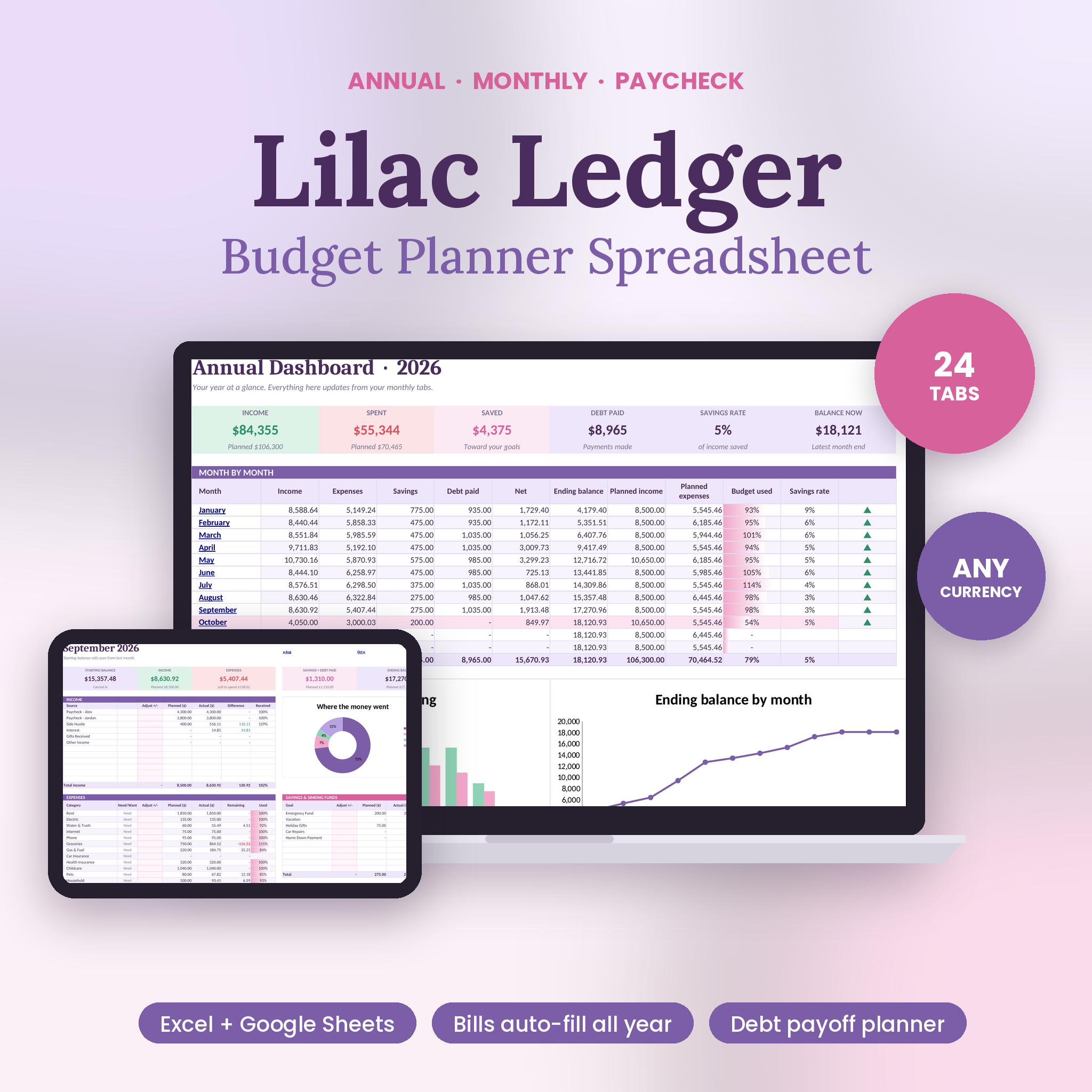
The Lilac Ledger Budget Planner solves the most boring part of budgeting. You list each paycheck, bill, subscription, savings transfer and loan payment once, with a frequency and a first due date, and it spreads them across all 12 months. A biweekly paycheck that lands three times in May? It catches it.
Its 24 tabs include a paycheck planner that shows what each check has to cover before the next payday, and a bill and payday calendar with a projected daily balance and a low-balance alert. There’s a debt planner for up to 10 debts (snowball, avalanche or custom), 10 savings goals, a net worth tracker, and a bills review list that adds up what you’d save by canceling flagged subscriptions.
Pick it if: you have lots of bills on different schedules, or more than one paycheck in the house.
2. Northstar: best for dark mode and phone checks
Northstar comes in a dark theme and a light theme, each with an example file holding nine months of sample data. All 12 months live in one workbook; pick a month from a dropdown and the dashboard follows. You can also set custom dates, which suits pay periods.
Two things stand out. A Phone View tab for small screens with a daily spending allowance, and a Start Here health check that flags duplicate names or missing categories. It works in Excel 2016 or newer and Google Sheets, not Apple Numbers.
Pick it if: you budget at night on a screen, or want to glance at your number on your phone.
3. Executive Budget Dashboard: best for lots of categories and sinking funds
The Executive Budget Dashboard Spreadsheet Suite runs on one rule: everything you spend goes on the Transactions sheet, and the other 14 sheets read from it. It handles 40 categories across 12 months, 12 savings goals and 14 sinking funds, plus net worth, a cash flow sheet and a Print Pack that fits the full picture on one page.
It opens in Excel 2016 or newer, Google Sheets, Apple Numbers and LibreOffice, which is the widest support on this list.
Pick it if: your spending is detailed and you save for many separate things.
4. Aurora Finance OS: best for “set it up once”
Aurora Finance OS puts all your income, bills, expenses, debts and goals on a single Setup tab. From there, 21 tabs fill in: 12 monthly budgets, an auto-populated bill calendar, a snowball or avalanche planner with payoff dates, savings progress bars, net worth and a cash-flow worksheet. Only the yellow cells are editable.
Pick it if: you want minimal ongoing fiddling and a Google Sheets plus Excel file.
5. Ultimate Annual Budget: best for themes and a quick start
The Ultimate Annual Budget Spreadsheet has 22 tabs: an annual dashboard, 12 monthly dashboards with expected vs actual, a 50/30/20 dashboard, net worth, debt payoff, sinking funds, an accounts dashboard and a smart calendar. You only fill the gold cells. It comes in three themes (Midnight, Rose, Sage) with sample data, and you get a Google Sheets access link as well as the Excel file.
Pick it if: you want to start in any month and like having a few looks to choose from.
6. Calm Cash: best for credit card users and goal setters
Calm Cash has a feature I haven’t seen elsewhere here: debit or credit mode. If you put groceries on a card and pay it off monthly, it counts the money properly without double counting the card payment. It also has an investments tab with a 1 to 30 year growth projector and a Goals tab covering five life areas.
You get four colorways plus an example planner with nine months of data and a 27-page guide.
Pick it if: you pay most things by card, or you want investments and life goals tracked next to the budget.
Which is the best budget spreadsheet for you?
- Many bills, different pay dates: Lilac Ledger
- Dark mode, phone glances: Northstar
- Detailed categories and many sinking funds: Executive Budget Dashboard
- One setup tab, then hands off: Aurora Finance OS
- Theme choice and a 50/30/20 dashboard: Ultimate Annual Budget
- Card spending and investments: Calm Cash
If you’re stuck between them, start with Lilac Ledger. Entering recurring items once and having them land on the right days saves the most time month after month, and its paycheck planner answers the question most people actually have.
Budget spreadsheet FAQ
Is a budget spreadsheet better than a budgeting app?
A spreadsheet is a one-time purchase, keeps your data in your own file and doesn’t need a bank login. Apps can import transactions automatically. If you’re happy typing in spending, a spreadsheet usually costs less over time.
Do these templates work in Google Sheets?
All six are listed as working in Google Sheets as well as Excel. Small visual extras like progress-bar shading can look different in Sheets, but the numbers work.
Can I start a budget spreadsheet mid-year?
Yes. Most of these let you start in any month, or simply leave earlier months empty.
Do they connect to my bank?
No. You enter amounts yourself, which keeps your data private and keeps you aware of where the money goes.