
Wedding Venue Comparison Spreadsheet: See What Each Venue Really Costs
The Aisleproof Wedding Quote Comparison Workbook is a wedding venue comparison spreadsheet for couples who are holding two or three venue quotes that are priced in completely different ways. One venue charges a high rental fee but includes tables, chairs and linens. Another has a low rental fee, a food and drink minimum and a 22% service charge. A third leaves tax off the quote entirely. Aisleproof prices all of them at the same guest count, line by line, and shows the real all-in total for each venue.
The result is one honest number per venue, a sentence that tells you which venue costs less and why, and a list of the questions you still need to ask before you sign.
Who It’s For
- Engaged couples comparing venues with different pricing structures (all-inclusive, rental-only, minimum spend, per-person packages)
- Couples who want to know how the cost changes if the guest list grows or shrinks
- Wedding planners and coordinators preparing a clear side-by-side for clients
What’s Included
- Wedding quote comparison workbook (.xlsx) with five tabs, ready to fill, no sample data to delete
- User guide (.docx) with screenshots, every option explained, troubleshooting and FAQ
The five tabs
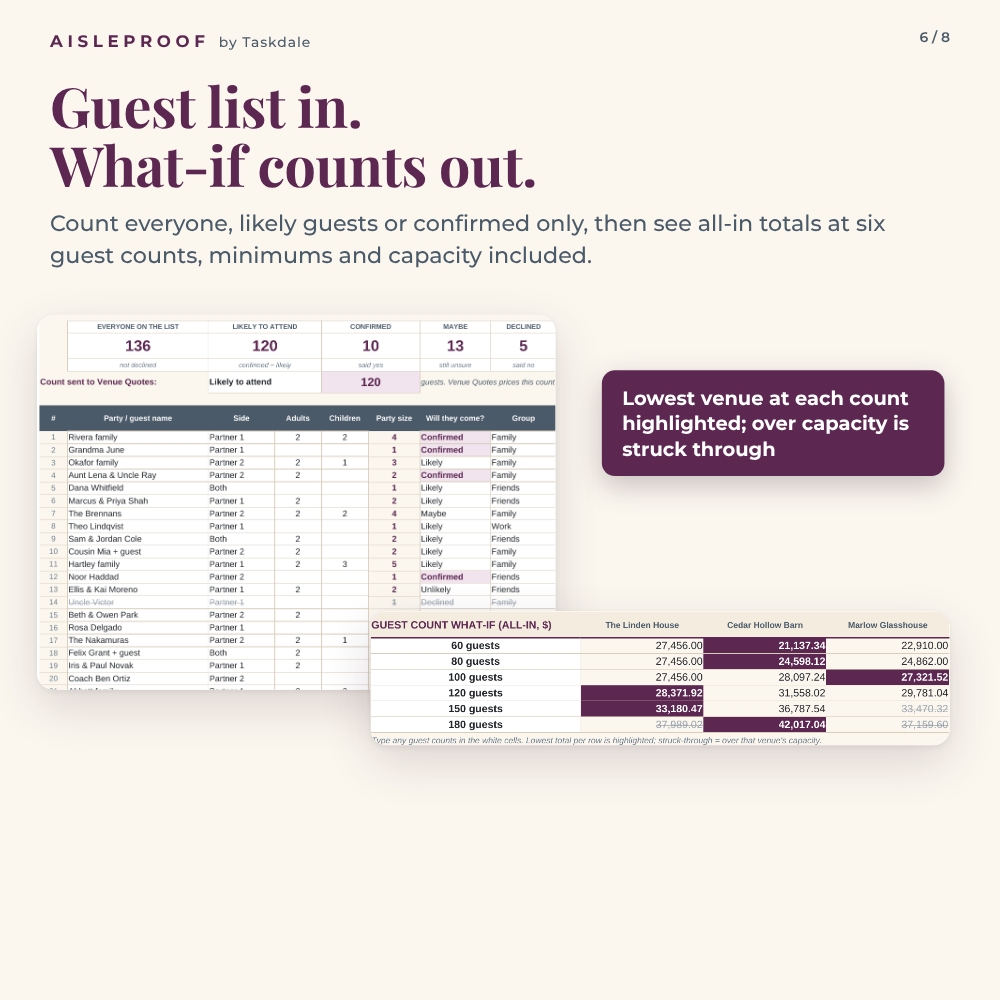
- Guest List: up to 300 invited parties with adults, children and how likely each party is to come. It gives you three planning counts (everyone on the list, likely to attend, confirmed) and sends your chosen count to Venue Quotes.
- Venue Quotes: three venues side by side with one editable guest count above them. Enter the venue details, every fee, the minimum spend, service charge, gratuity, admin fee, vendor-quoted tax and which rentals are included.
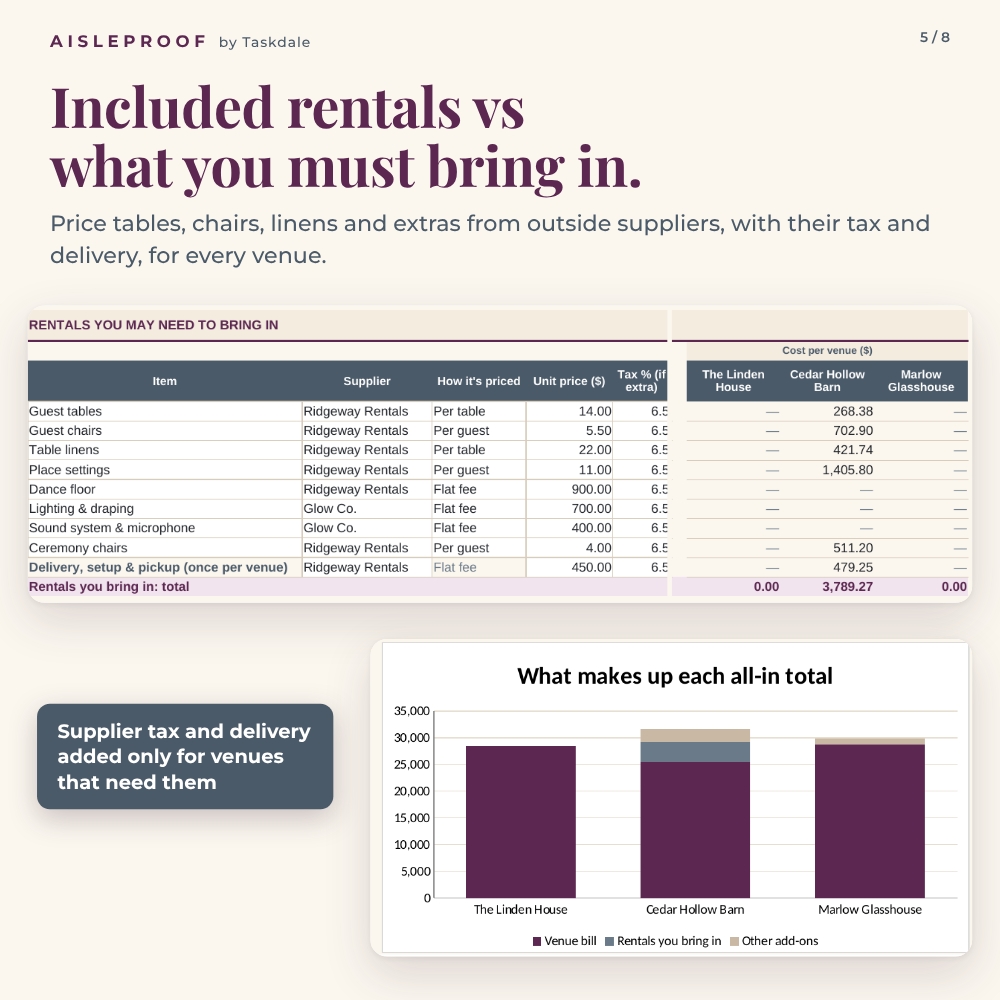
- Add-Ons: outside prices for rentals you would have to bring in (with supplier tax and one delivery fee) and venue-specific extras such as a guest shuttle, restroom trailer, generator or event insurance.
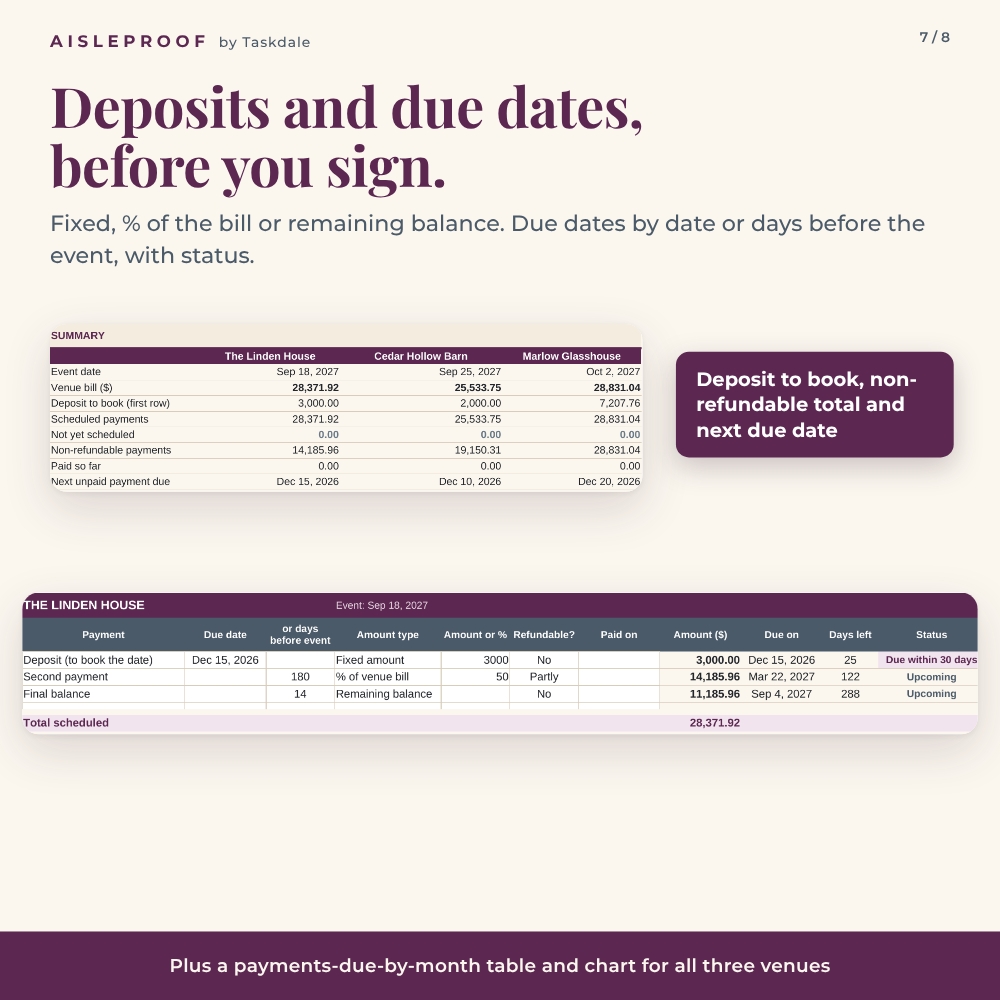
- Payment Dates: deposits and payment schedules for each venue, as fixed amounts, a percentage of the bill or the remaining balance, with due-date status and payments due by month.
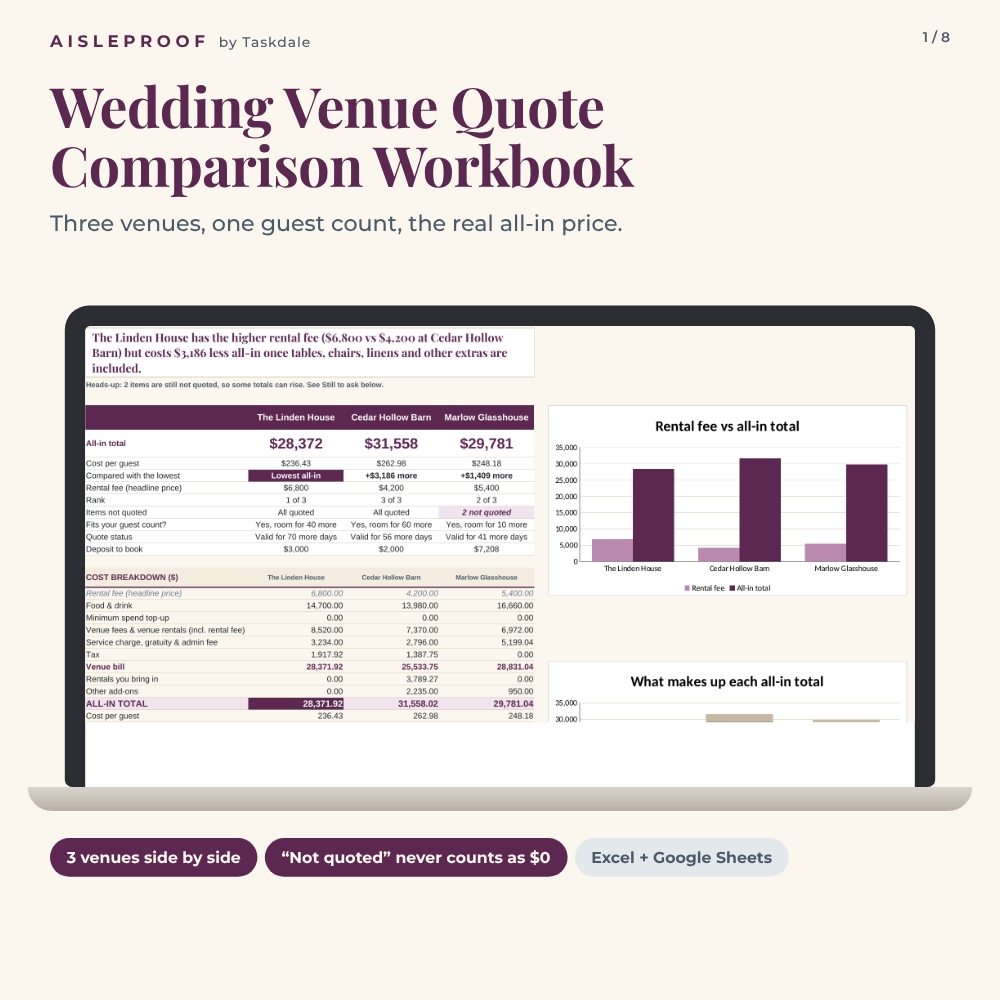
- Comparison: all-in totals, cost per guest, rank, charts, what each venue includes, a Still to ask list and a guest count what-if.
Features That Make Venue Quotes Comparable
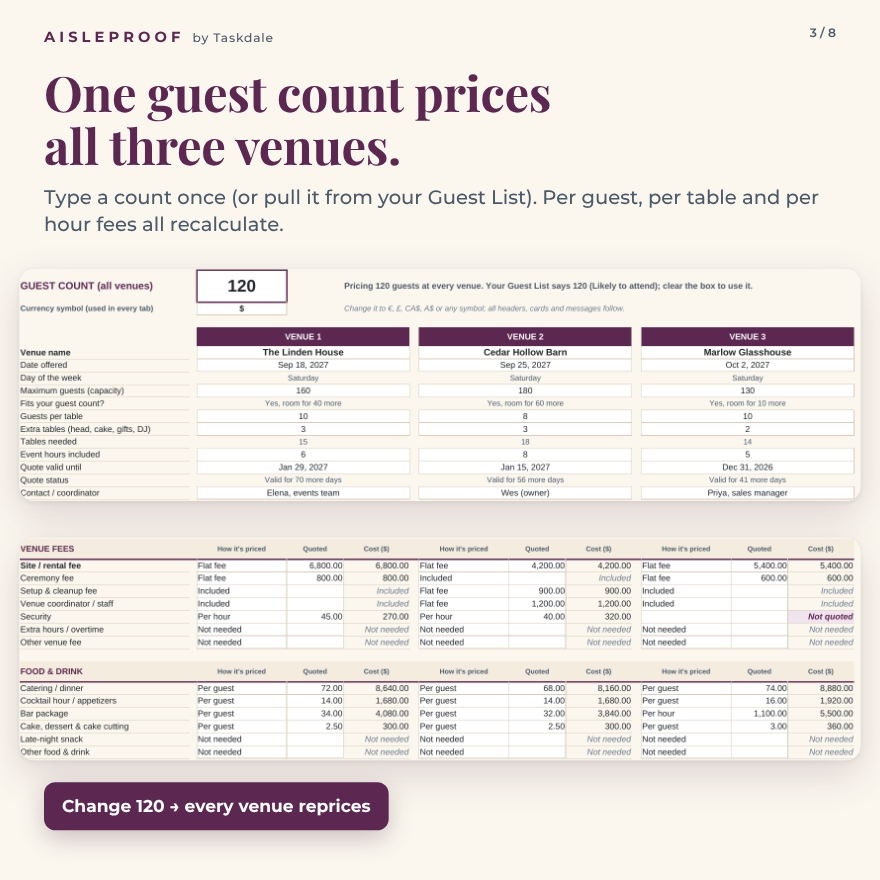
One guest count prices every venue
Type the guest count once, or let the Guest List supply it. Each fee can be priced as a flat fee, per guest, per table or per hour. Tables needed are worked out from each venue’s table size plus extra tables for the head table, cake and gifts, so per-table rentals and linens are priced correctly.
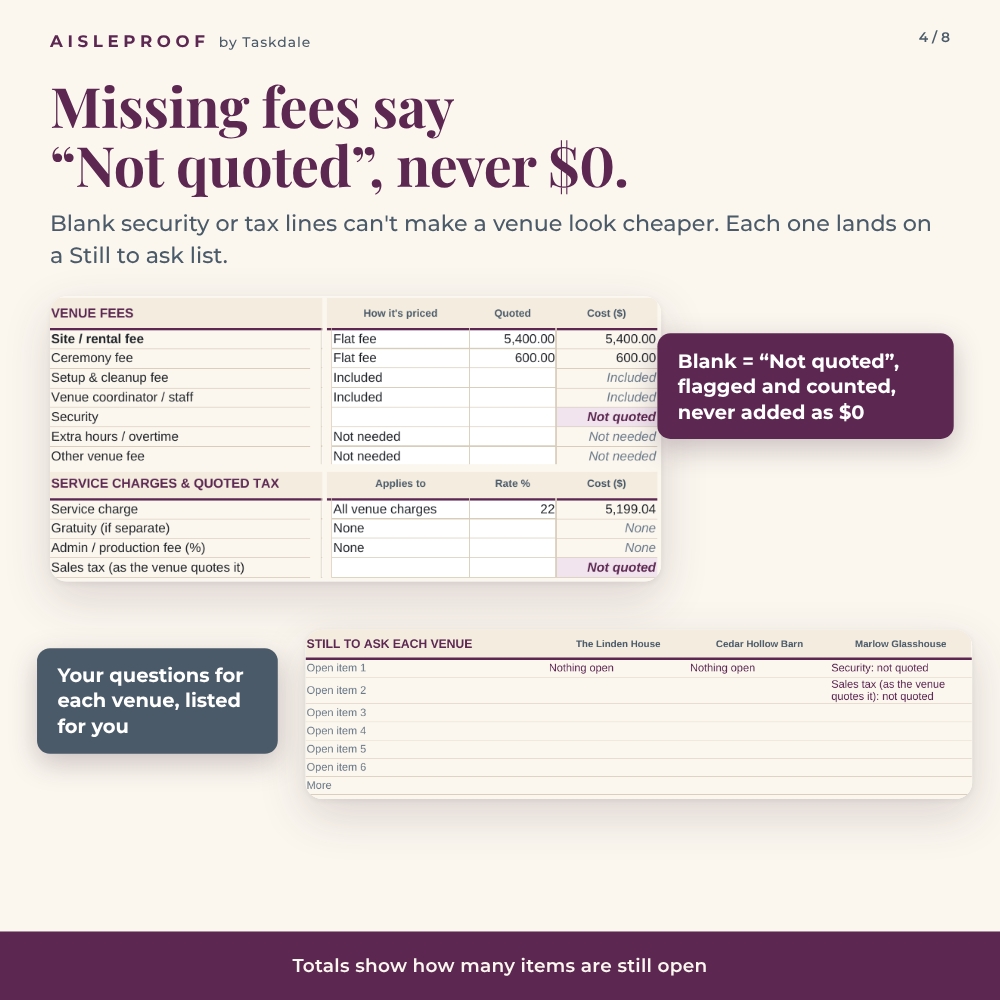
“Not quoted” is never counted as zero
A blank fee is not a free fee. Any line without a price shows “Not quoted” in plum, is counted under Items not quoted, and appears on the Comparison tab’s Still to ask list for that venue. Totals warn you when they are still incomplete.
Minimum spend, service charges and tax handled properly
Choose whether a minimum covers food and drink only or total spend, and the workbook adds any shortfall as a top-up. Service charge, gratuity and admin fees can apply to food and drink or to all venue charges. Tax can be charged on everything including service, everything except service, or food and drink only, exactly as the venue quotes it.
Included rentals vs. bring-in costs
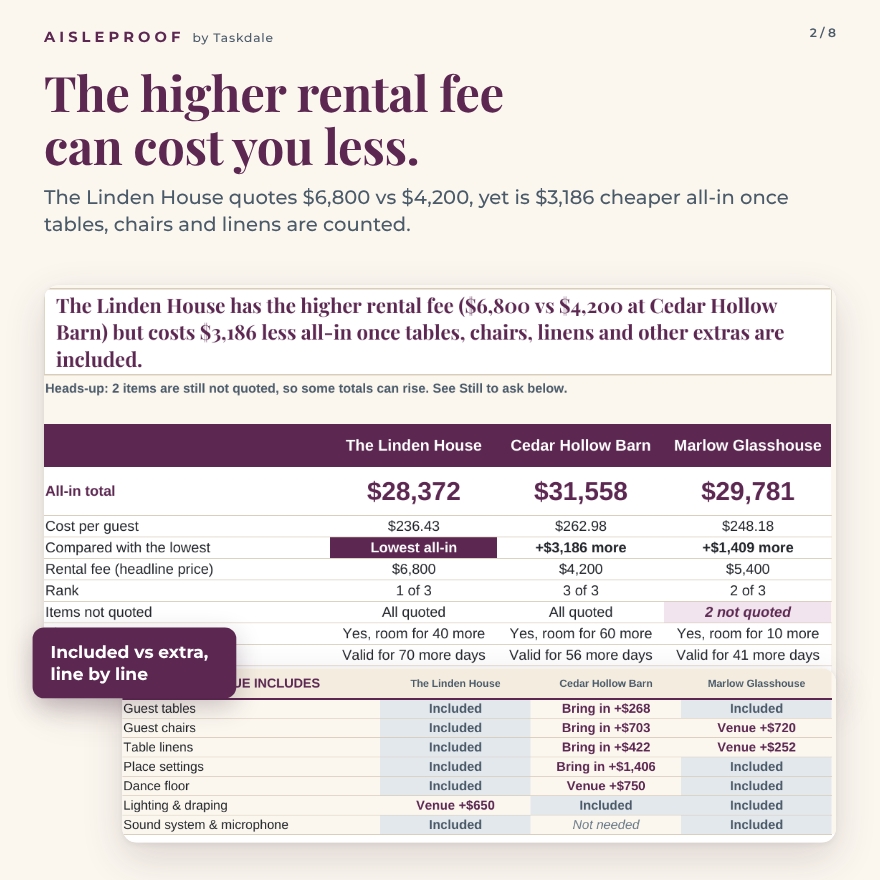
For tables, chairs, linens, place settings, dance floor, lighting, sound and ceremony chairs, mark each venue as Included, Venue rents it, Bring in or Not needed. Bring-in items are priced from the Add-Ons tab, so a venue with a lower rental fee but no furniture gets its true cost.
The decision that matters, in one sentence
The Comparison tab writes the conclusion for you, for example: “The Linden House has the higher rental fee ($6,800 vs $4,200 at Cedar Hollow Barn) but costs $3,186 less all-in once tables, chairs, linens and other extras are included.”
Guest count what-if
Type six guest counts and see every venue’s all-in total at each one. The lowest venue that fits is highlighted and counts above a venue’s capacity are struck through, which shows clearly where a minimum spend makes a smaller wedding cost the same as a bigger one.
Payment dates and deposits
Due dates can be calendar dates or a number of days before the event. The summary shows the deposit to book, what is scheduled and not yet scheduled, non-refundable payments, what you’ve paid and the next due date.
How It Works
- Add your guests (or simply type a guest count on Venue Quotes).
- Copy each venue’s quote into Venue Quotes exactly as written.
- Price outside rentals and extras on Add-Ons.
- Enter deposits and due dates on Payment Dates.
- Read the Comparison tab, ask each venue about its open items, and test other guest counts.
File Formats and Software
- One .xlsx workbook for Microsoft Excel 2016 or later, Microsoft 365 (Windows and Mac) and Google Sheets (upload and open with Google Sheets)
- Uses only standard functions that work the same in Excel and Google Sheets: no macros, no add-ins, no internet connection needed
- User guide in Word format (.docx)
Customization
Set your currency once ($, €, £, CA$ or any symbol) and every header and total follows. Rename fee lines and rental items, add notes, and change colors. Formula cells are locked without a password to protect the math while every input stays open.
Real Situations Where It Helps
- Choosing between an all-inclusive hotel ballroom and a rental-only barn
- Checking whether a venue’s minimum spend makes a small guest list expensive
- Spotting a missing tax line or service charge before you compare prices
- Planning cash for deposits and final payments across the engagement
Digital Download
This is an instant digital download. No physical item is shipped. Personal use only; you may not resell, share or redistribute the files.
FAQ
Does this wedding venue comparison spreadsheet work in Google Sheets?
Yes. Upload the .xlsx file to Google Drive and open it with Google Sheets. The formulas, dropdowns, colors and charts carry over.
How many venues can I compare?
Three side by side in each workbook. Save a copy of the file to compare more.
Does it calculate sales tax for my state?
No. You enter the tax rate the venue quotes, and choose what it applies to. It is a planning tool, not tax advice.
What happens if a venue didn’t quote a fee?
The line shows “Not quoted”, is kept out of the total, and is added to that venue’s Still to ask list. It is never treated as $0.
Can I change the currency?
Yes. Type any symbol in the currency cell on Venue Quotes and every tab updates.
Is a sample filled in?
The workbook arrives clean and ready to use. The user guide walks through a complete fictional three-venue example with screenshots.
Do I need Excel?
No. A free Google account and Google Sheets is enough.

Reviews
There are no reviews yet.