


Grocery Price Book Spreadsheet & Grocery Budget Tracker
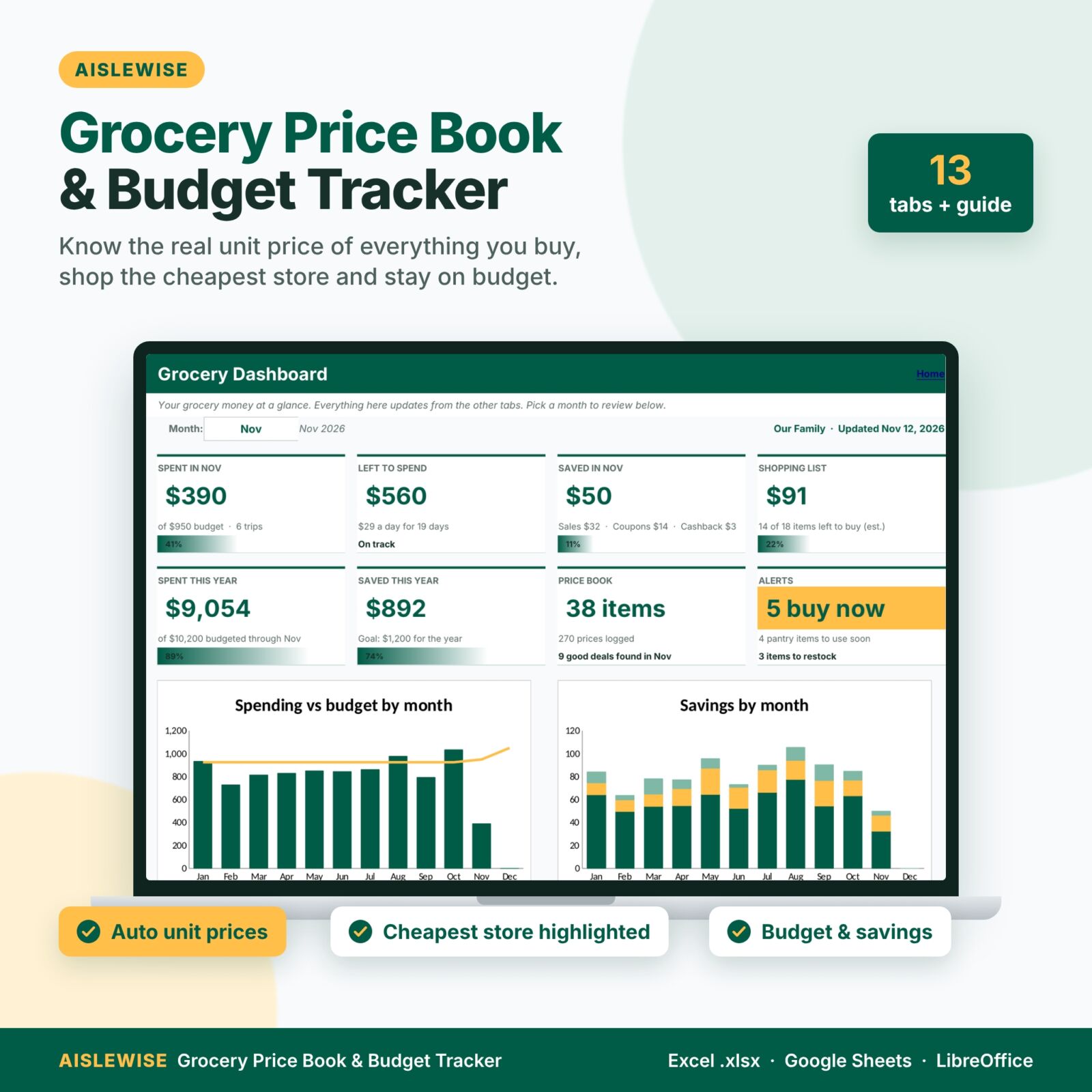
Grocery prices keep climbing, and weekly ads make it hard to tell a real deal from a red tag. Aislewise is a grocery price book spreadsheet and grocery budget tracker in one Excel-format workbook. You type the shelf price and the pack size from the label, in any unit, and it works out the unit price, converts between units, highlights the cheapest store and gives you a clear verdict: STOCK UP, GOOD DEAL, FAIR or PRICEY. Around the price book sit the tools that keep the whole grocery bill under control: a smart shopping list, a monthly budget with a receipt log, a pantry and freezer inventory, a stock-up list with target prices, a savings tracker and a dashboard with spend trends.
Who it’s for
- Families who want to cut the grocery bill without spending hours clipping coupons
- Shoppers who split trips between a supercenter, a discount grocer, a warehouse club, a local market or delivery
- Bulk buyers and stock-up shoppers who want to know the right price to buy extra
- Budgeters who want a dedicated grocery budget backed by real receipts
Main benefits
- Stop overpaying for “sales”. Every price is compared with your own targets and history.
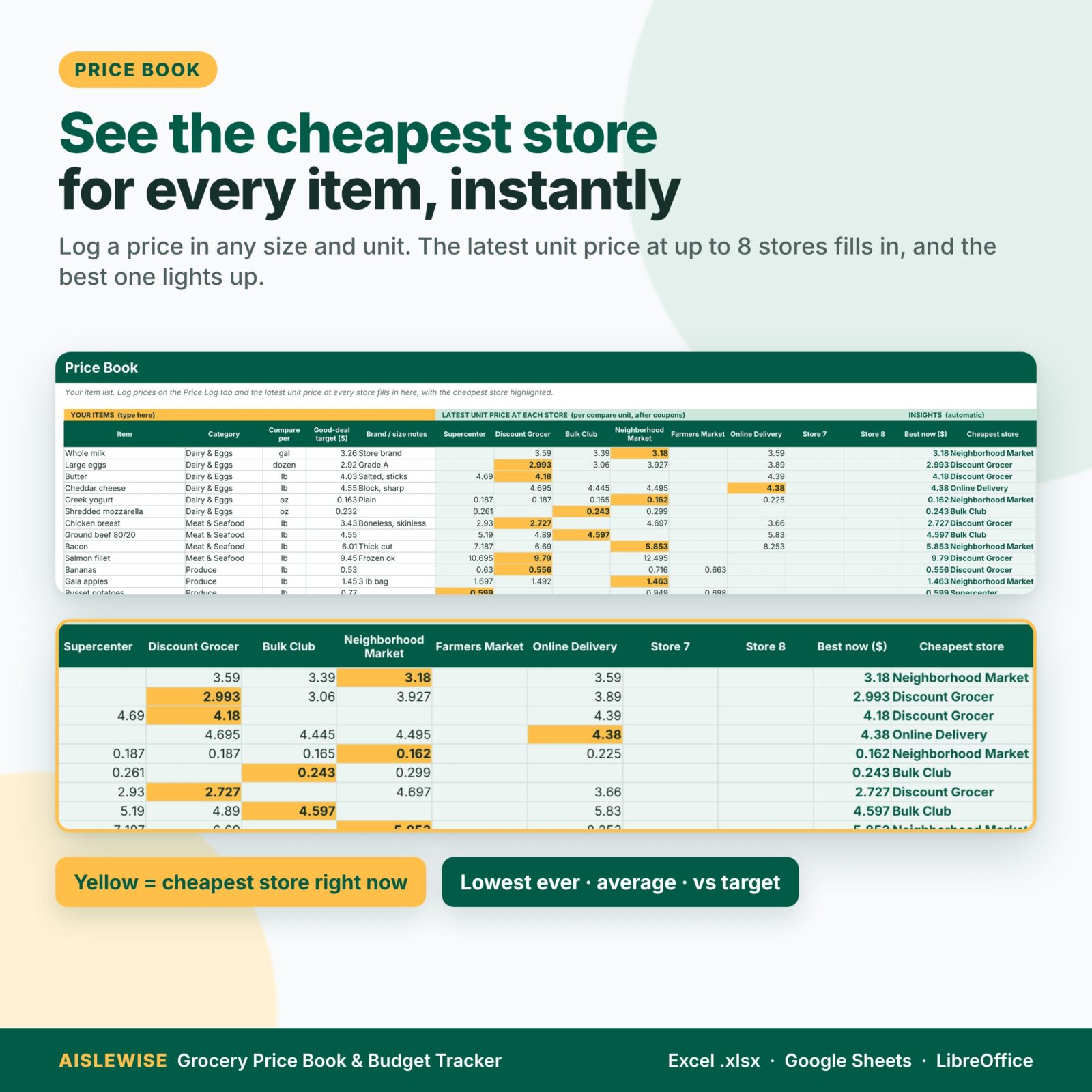
- Shop the cheapest store. The latest unit price at up to 8 stores, with the best one highlighted.
- Buy at the right time. Items flip to BUY NOW when any store hits your stock-up price.
- Stay on budget. Spent, remaining and a per-day allowance for the month, plus 12-month trends.
- Waste less food. Use-by countdown and restock flags for the pantry and freezer.
Features
Price Book with automatic unit prices
Track up to 300 items at up to 8 stores. Choose the unit you compare by (per lb, per oz, per fl oz, per roll, per load, per item) and every price converts to it automatically, including g, kg, gal, qt, pt, cup, L, ml and dozen. You also see the lowest price ever, your average price and how today’s best price compares with your good-deal target.
Price Log: “is this a good deal?”
Up to 1,500 price entries. Each row shows the net price after coupons, the unit price, your targets and an instant verdict. A duplicate-item check and unit-mismatch warning keep the data clean.
Deal Checker
An in-store calculator: pick an item, type the shelf price and pack size, and get the unit price and a big verdict without adding a row. A second tool compares up to four package sizes in any units and highlights the cheapest.
Smart Shopping List and printable Trip List
Up to 80 items. The list looks up each item’s cheapest store (or the store you choose), estimates the cost from your latest prices, tracks what’s in the cart and totals the estimate by store. The Trip List sorts everything by store and then by aisle, ready to print.
Monthly grocery budget and receipt log
Log up to 600 receipts with sale savings, coupons and cashback. The Budget tab shows budget vs spent for all 12 months, % used with progress bars, trips, average trip, weekly average and spending by type (groceries, household, baby, pet and more). Add a custom budget for holiday months.
Pantry & Freezer inventory
Up to 200 items with location, quantity, keep-at-least level, use-by countdown and status (Expired, Use soon, Restock, OK), plus the value of food on hand by location.
Stock-Up List with target prices
Set a buy-at price for up to 80 items. The list pulls the best current price and store, the lowest ever, what’s in your pantry and what you still need, then shows BUY NOW, Close or Wait with an estimated cost.
Savings tracker and dashboard
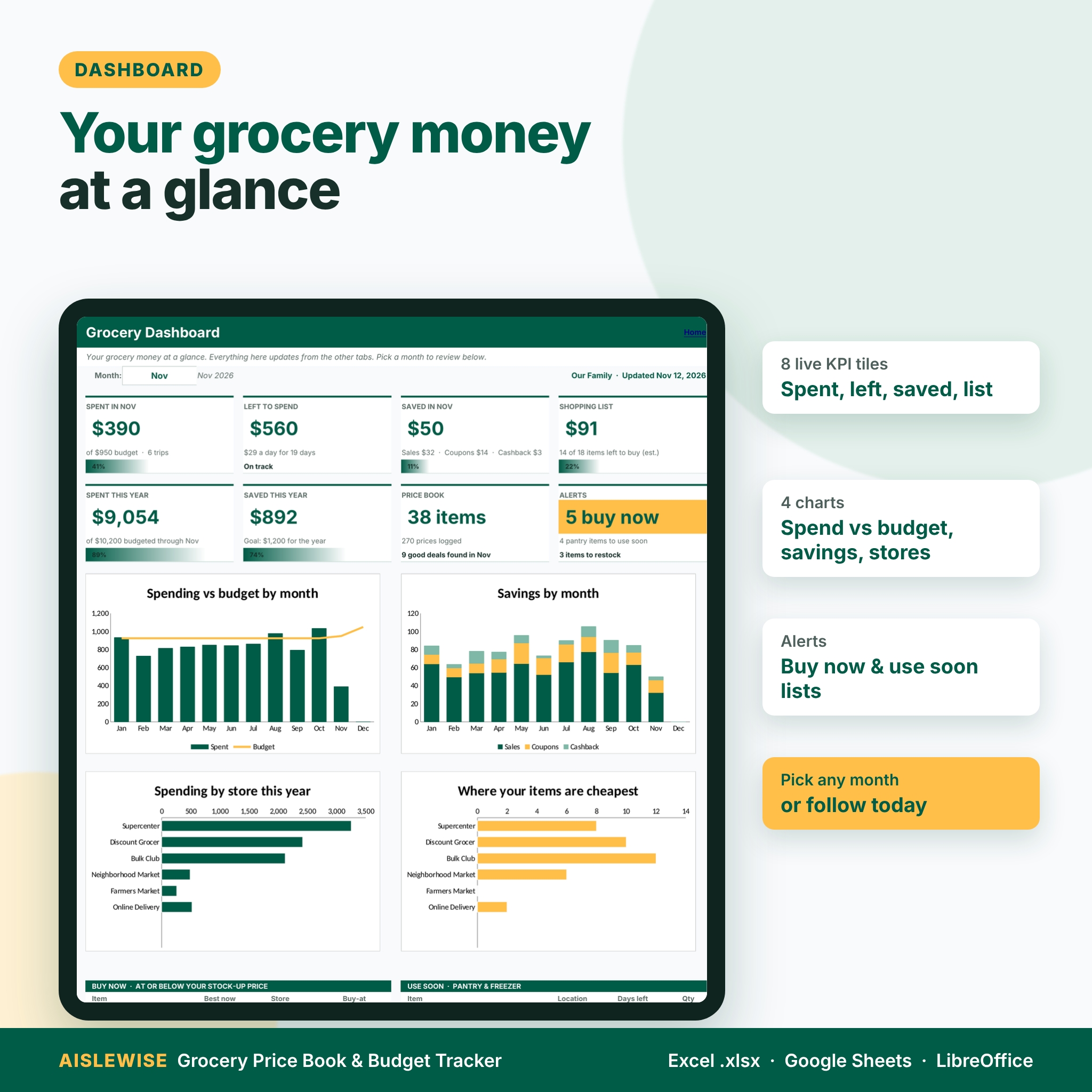
See savings by month and type, your savings rate, progress toward a yearly goal and a store scorecard. The dashboard pulls it all together with 8 KPI tiles, 4 charts (spending vs budget, savings by month, spending by store, where items are cheapest), a month selector and buy-now and use-soon lists.
What’s included
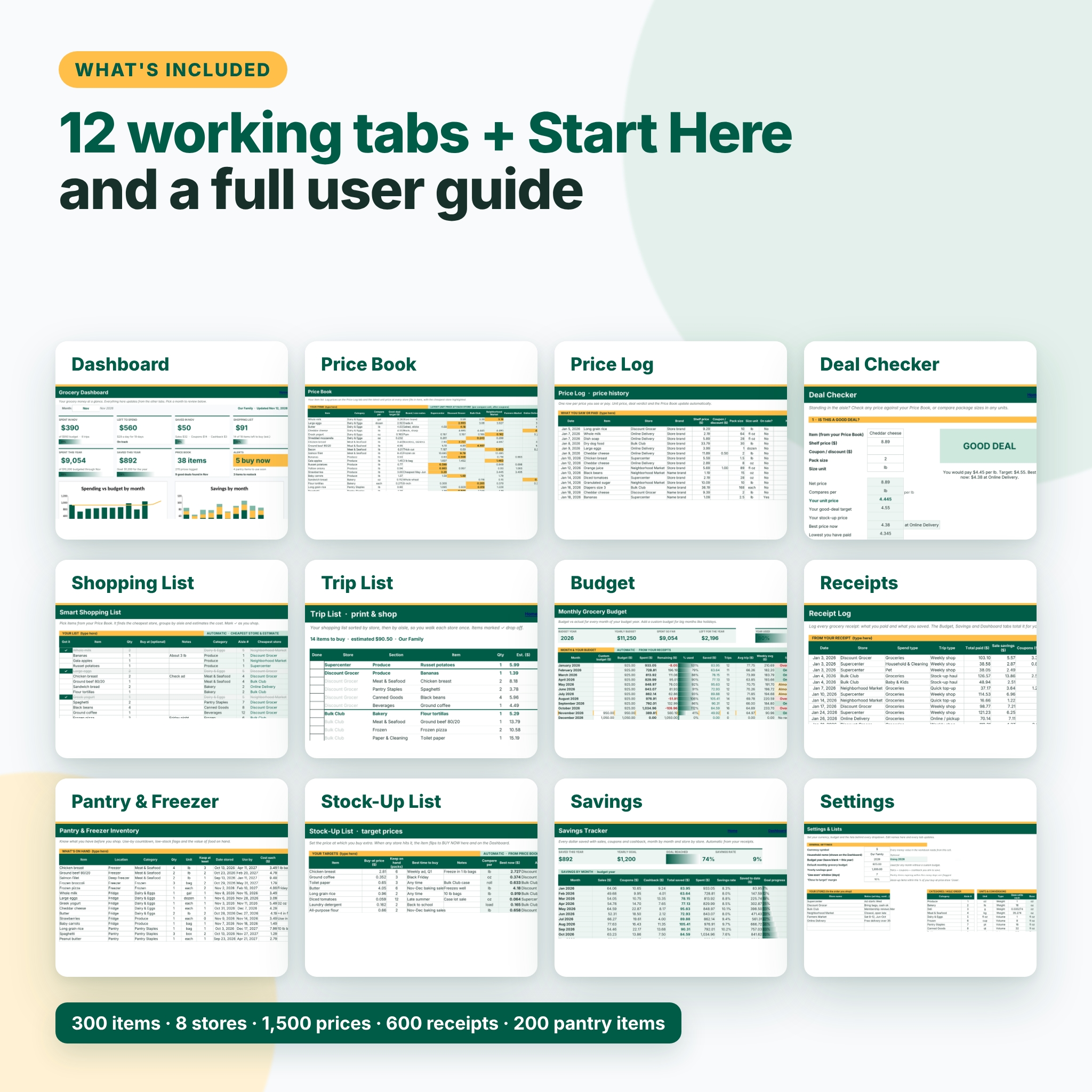
- Aislewise-Grocery-Price-Book-Budget-Tracker.xlsx: 13 tabs (Start Here, Dashboard, Price Book, Price Log, Deal Checker, Shopping List, Trip List, Budget, Receipts, Pantry & Freezer, Stock-Up List, Savings, Settings), clean and ready for your data
- Aislewise-User-Guide.docx: a step-by-step user guide with screenshots, tips, troubleshooting and FAQ
How it works
- Set up: choose your currency, type your stores in shopping order and set your monthly budget.
- Build your price book: list the items you buy most and the unit to compare by.
- Log prices and receipts: any pack size, any unit. Savings come straight from your receipts.
- Shop smart: use the shopping list, trip list and dashboard to buy at the right store and the right time.
File format and software requirements
Excel-format .xlsx for Microsoft Excel; tested in LibreOffice Calc; built with standard functions that also work when you open it in Google Sheets. A desktop or laptop is best for setup. No macros, no add-ins and no subscription.
Customization
One currency setting controls every money value (default $). Edit stores, categories and aisle order, units and conversions, spend types, trip types, storage locations and payment methods on the Settings tab and every dropdown updates. Formula cells are locked to keep them safe, and sheets are protected without a password, so you can unprotect them to change the layout. Font: Inter.
Digital download
This is an instant digital download. No physical item will be shipped. After purchase, download the files from your Taskdale account.
Use cases
- Finding out which of your three regular stores is really cheapest for your weekly basket
- Checking in the aisle whether a “family size” pack beats the regular one
- Planning a warehouse club stock-up only when prices hit your target
- Keeping the holiday grocery budget on track with a custom November and December budget
- Using up the freezer before buying more meat
FAQ
Does it work in Google Sheets?
Yes. Upload the .xlsx to Google Drive and open it with Google Sheets. It uses standard functions that also work there.
Does it include sample data?
The download is clean and ready for your own data. The listing images show it filled with example data.
Can I use my own currency?
Yes. Change one cell in Settings and every money value follows it.
Can I compare different package sizes and units?
Yes. Prices in lb, oz, g, kg, fl oz, gal, L, each, dozen, rolls, loads and more convert automatically. You can add your own units.
Is it a meal planner?
No. Aislewise focuses on prices and the grocery budget. It works well next to any meal planner.
How many stores can I compare?
Up to 8 at a time. Rename a store slot whenever you change where you shop.
Is there a free version?
Yes. The free Aislewise Grocery Price Book Lite covers the price book basics with 40 items and 4 stores.
License
Personal use only, for your own household. You may not resell, share, give away or redistribute the files, in whole or in part. © Taskdale.
Reviews
There are no reviews yet.