
A trucking invoice template that also tracks payments and factoring
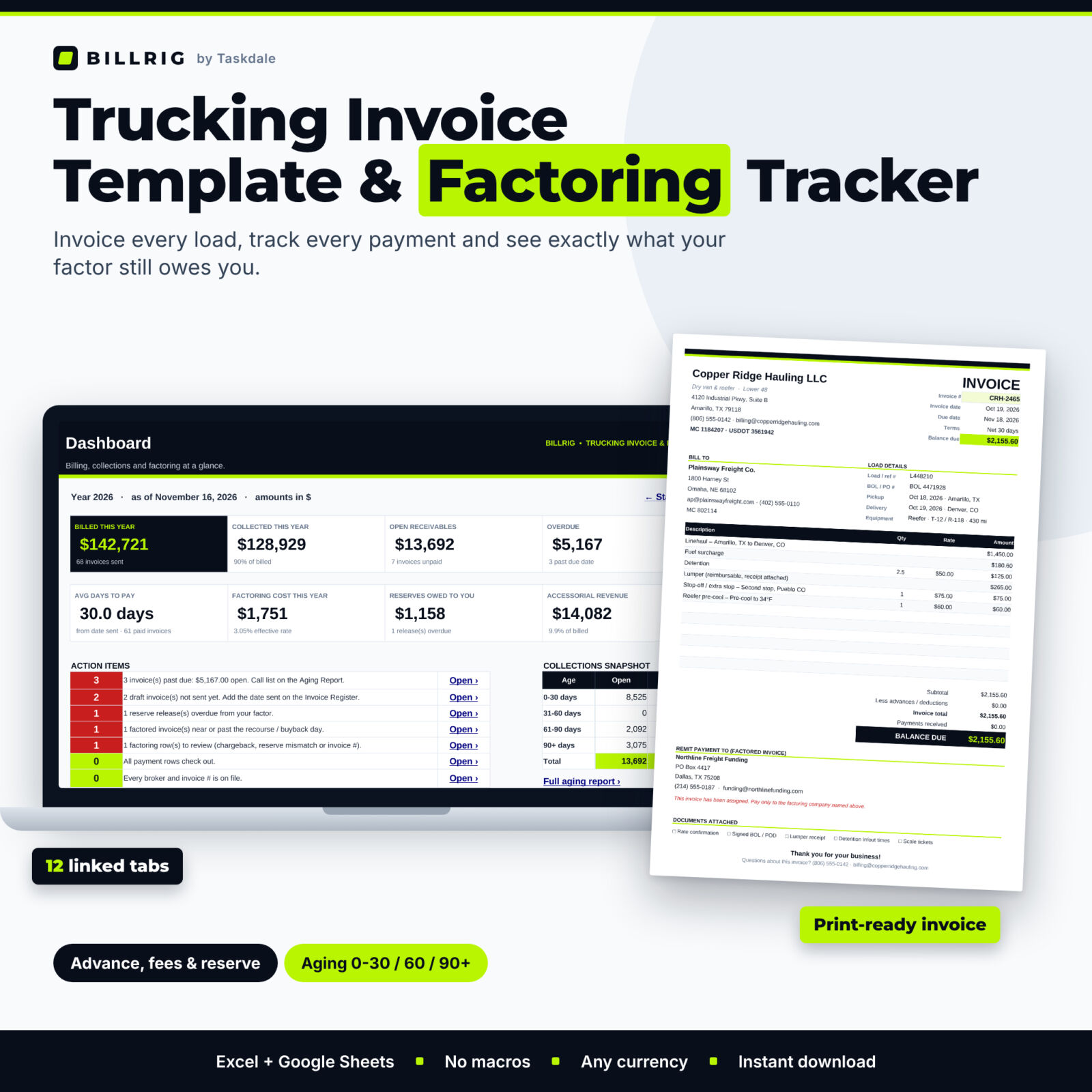
Billrig is a trucking invoice template and invoice factoring tracker in one spreadsheet. Log a load once and Billrig numbers the invoice, adds up the linehaul, fuel surcharge, detention, lumper and accessorial charges, prints a professional one-page invoice, and then tracks every payment, every factoring advance and every reserve release until the load is fully paid. It works in Microsoft Excel and Google Sheets, with no macros and no subscription.
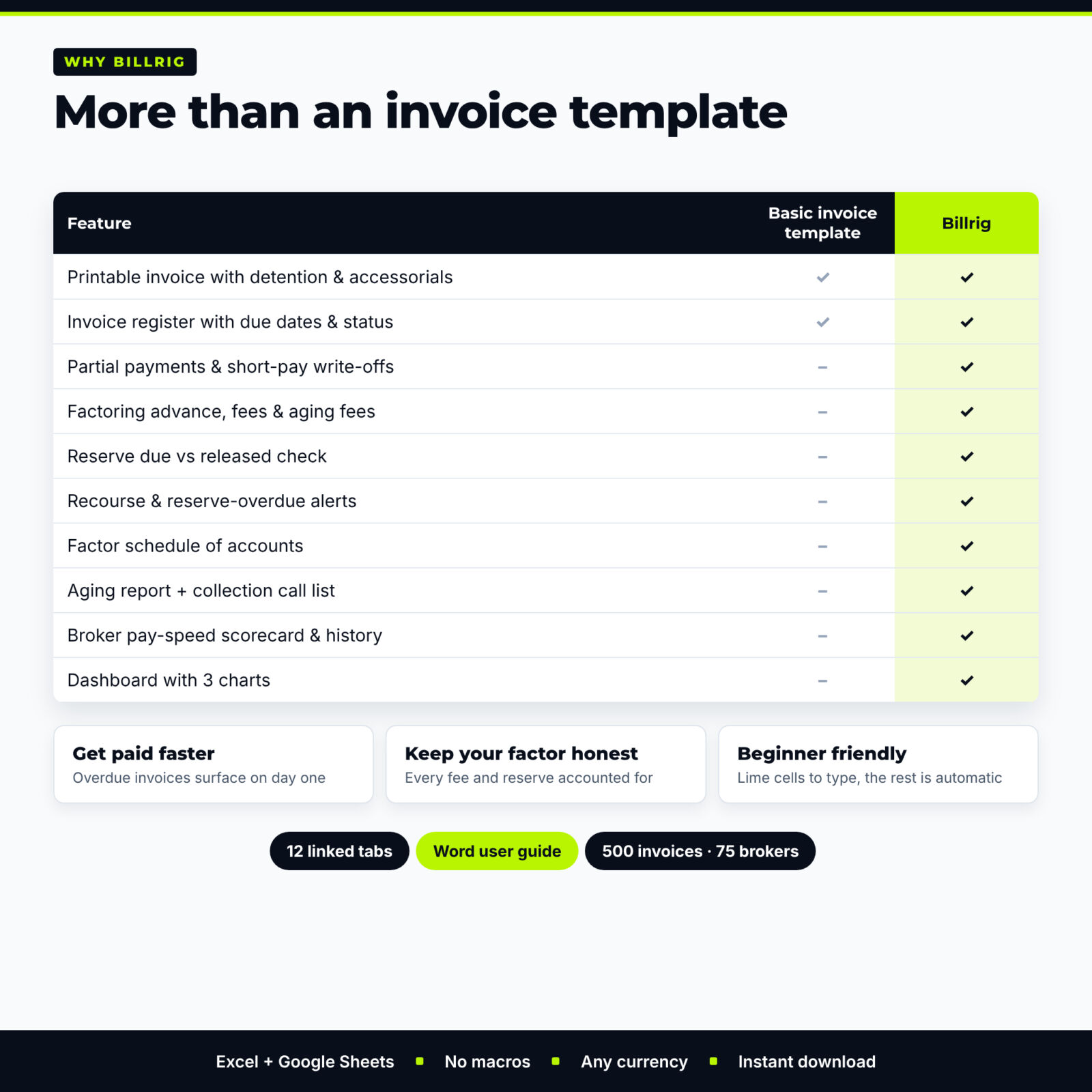
Most free trucking invoice templates stop at the invoice. The hard part of running a small carrier is what happens next: brokers who pay late, short pays, factoring fees that creep up, and reserves that never seem to come back. Billrig was built for that part of the job.
Who it is for
- Owner-operators and small fleets running under their own MC number
- Carriers who factor some or all of their loads, recourse or non-recourse
- Hotshot, box truck, dry van, reefer and flatbed operators who bill brokers or shippers directly
- Office managers and family members who handle billing and collections for a trucking business
Main benefits
- Get paid faster: every invoice gets a due date and status the moment you send it, and overdue loads show up on the dashboard and on a collection call list.
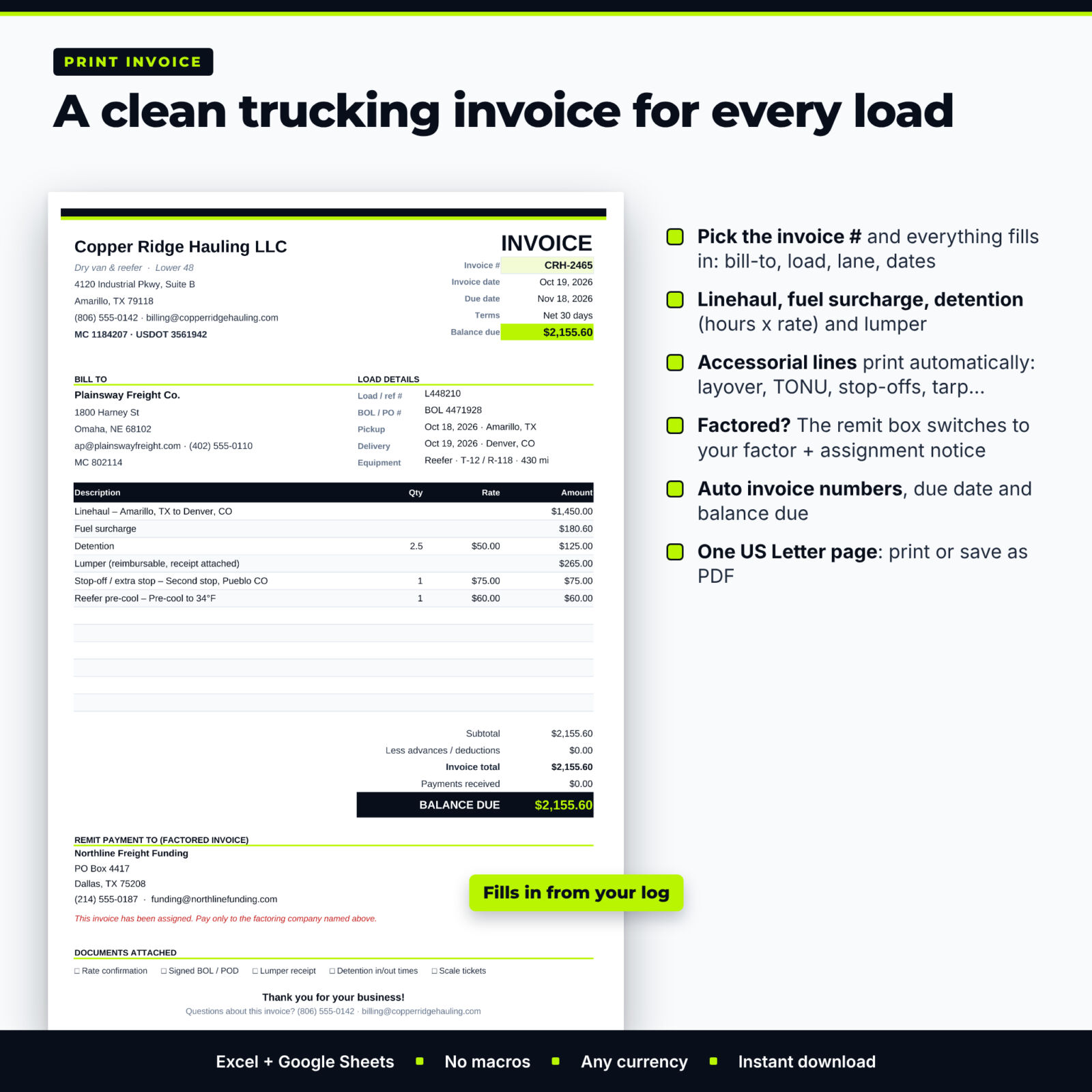
- Bill everything you earned: detention hours times your rate, lumper reimbursements and accessorials such as layover, TONU, stop-offs and tarp all print on the invoice.
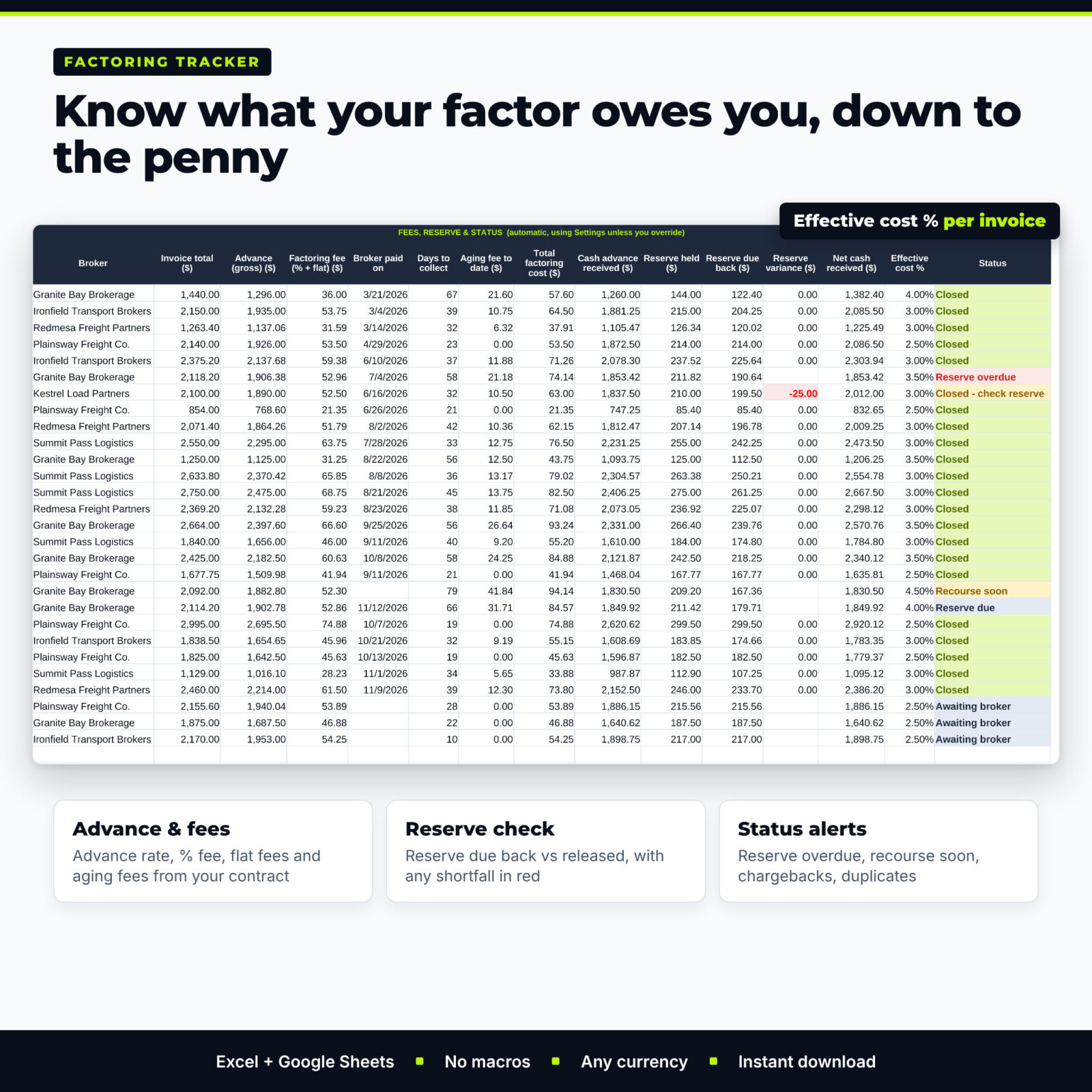
- Keep your factor honest: see the advance, the fee, aging fees, the reserve held and the reserve due back for every factored invoice, with a red flag when a release does not match.
- Know your brokers: average and slowest days to pay, on-time percentage and a pay rating for every broker you haul for.
Features
Load invoice generator
- Automatic invoice numbers with your own prefix and starting number
- Your company name, MC and USDOT numbers, address and payment instructions on every invoice
- Bill-to block, load and BOL / PO numbers, pickup and delivery dates, lane, equipment and miles
- Line items for linehaul, fuel surcharge, detention (hours x rate), lumper and up to 7 itemized accessorials, plus advances or deductions
- Factored invoices automatically show your factoring company’s remit-to address and your notice of assignment wording
- Prints on one US Letter page or saves as PDF
Invoice register and payments
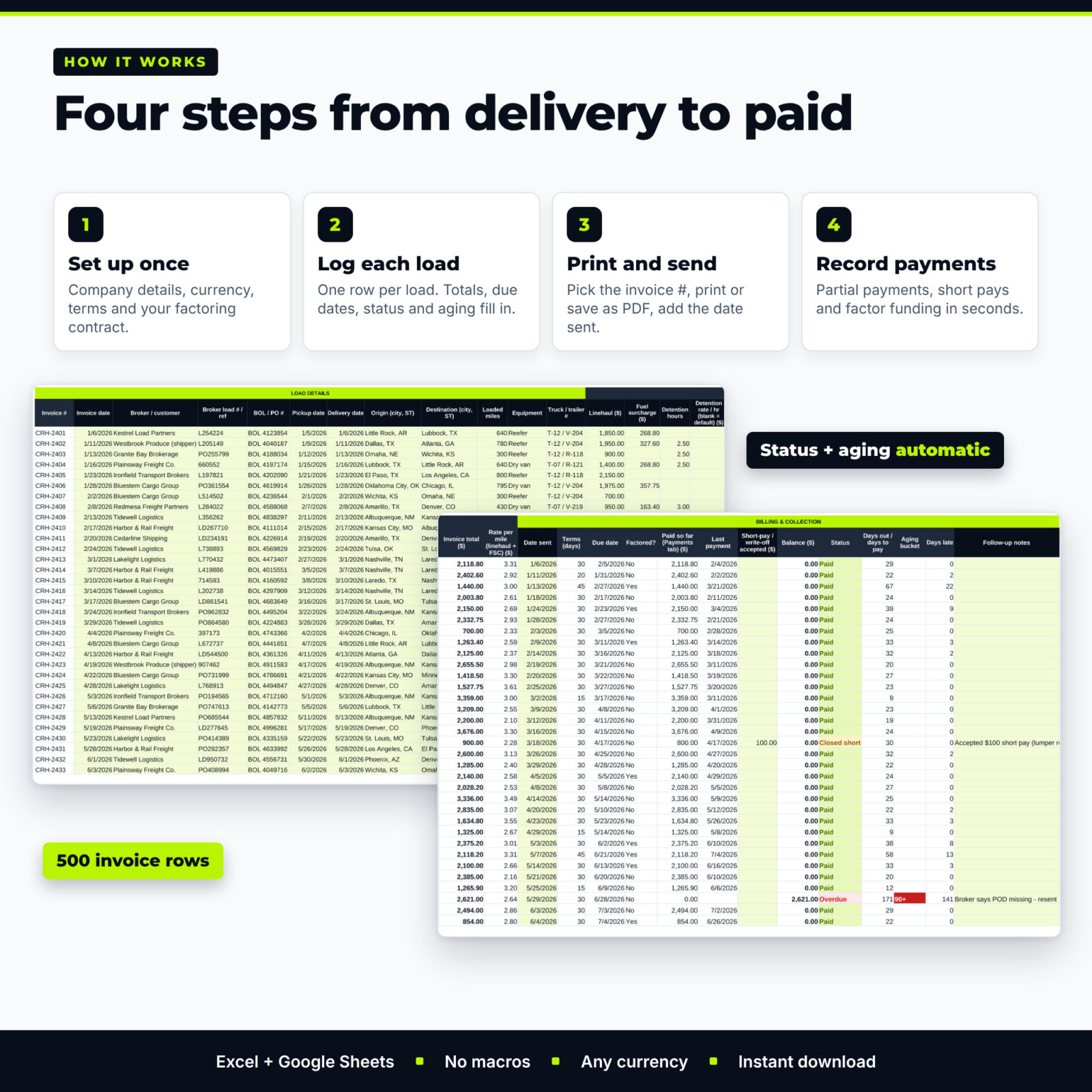
- 500 invoice rows with totals, rate per mile, terms, due date, balance, status, days out and aging bucket
- 600 payment rows with partial payments, short-pay write-offs and automatic checks for wrong invoice numbers or dates
- 600 accessorial charge lines with dropdown charge types you can edit
Factoring tracker
- Advance rate, factoring fee, per-invoice and transfer fees and aging fees taken from your own contract terms, with per-invoice overrides
- Fee taken from the advance or from the reserve, including 100% advance contracts
- Reserve held, reserve due back, reserve released, variance and effective cost % for every invoice
- Status flags: awaiting broker, recourse soon, past recourse day, reserve due, reserve overdue, charged back and more
- Printable factor schedule of accounts for each funding batch
Aging report, broker history and dashboard
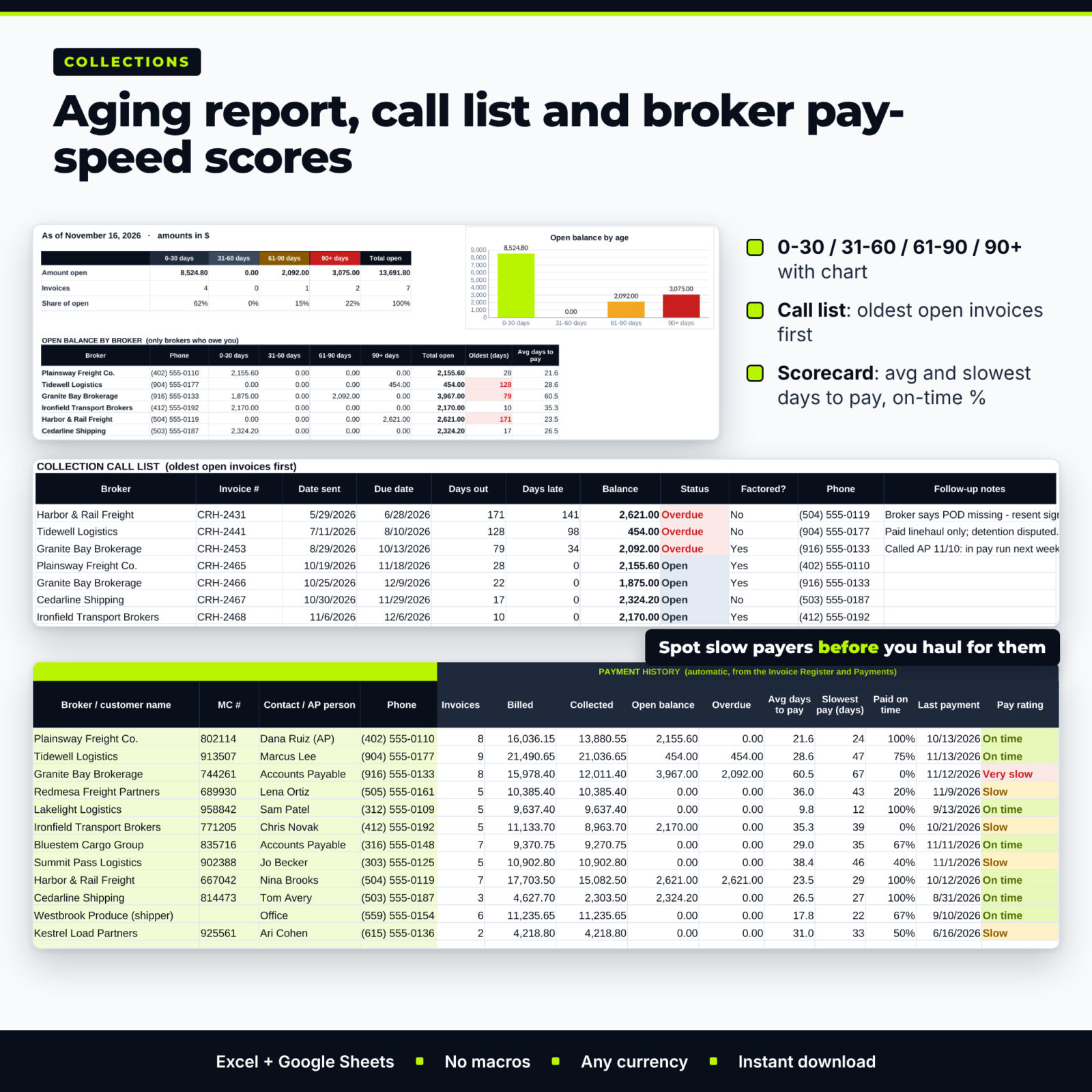
- 0-30, 31-60, 61-90 and 90+ day aging with a chart and open balance by broker
- Collection call list of the oldest open invoices with phone numbers and your follow-up notes
- Broker scorecard for up to 75 brokers and a broker payment history page with a days-to-pay chart
- Dashboard with 8 live tiles, action items, monthly summary, revenue mix and 3 charts
What is included
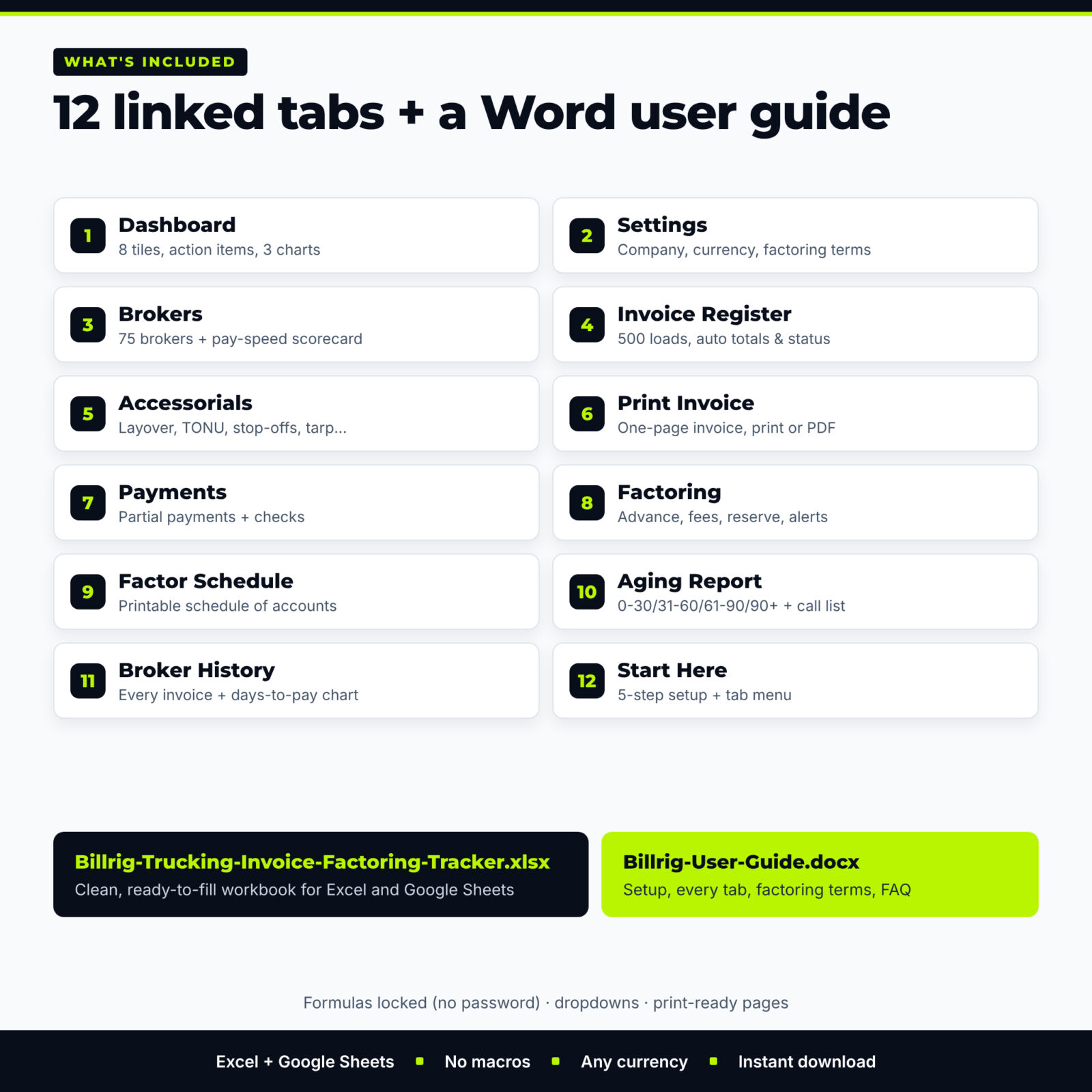
- Billrig-Trucking-Invoice-Factoring-Tracker.xlsx: the clean 12-tab workbook (Start Here, Dashboard, Settings, Brokers, Invoice Register, Accessorials, Print Invoice, Payments, Factoring, Factor Schedule, Aging Report, Broker History)
- Billrig-User-Guide.docx: a 13-page Word guide with setup steps, every tab explained, a worked factoring example, troubleshooting, FAQ and a glossary
How it works
- Type your company details, currency, invoice numbering and factoring contract terms on Settings.
- Add the brokers and shippers you haul for, with their payment terms.
- Log each load on the Invoice Register; add extra charges on Accessorials.
- Pick the invoice number on Print Invoice, print or save as PDF, and type the date sent.
- Record payments as they arrive and, if you factor, the funding date and reserve release.
File formats and software requirements
One .xlsx workbook that opens in Microsoft Excel 2016 or later, Microsoft 365, Excel for Mac and Excel for the web, and in Google Sheets (free with a Google account). No macros, add-ins or internet connection needed. The user guide is a Word .docx that also opens in Google Docs. Billrig is designed for a computer; a phone or tablet is fine for checking numbers.
Customization
Choose any currency symbol, invoice prefix and starting number, default payment terms and detention rate. Edit the dropdown lists of charge types, equipment and payment methods. Formula cells are locked without a password so nothing breaks by accident, and you can still change colors and fonts or add your logo to the invoice.
Digital download
This is a digital product: no physical item is shipped. Download the files right after purchase from your order confirmation or your account.
Use cases
- An owner-operator who delivers a reefer load with 2.5 hours of detention and a lumper receipt prints the invoice in the truck stop and sends it the same day.
- A small fleet compares its factoring statement with Billrig and spots a reserve released $25 short.
- A billing manager starts Monday with the call list and phones the three brokers past their due date.
- A carrier checks a broker’s pay history before accepting another load at a slow-paying rate.
FAQ
Do I have to use factoring?
No. If you do not factor, leave the Factoring tabs empty; invoicing, payments, aging and the dashboard work on their own.
Can I keep my current invoice numbers?
Yes. Set your prefix and the next number on Settings and Billrig continues from there.
Does it calculate detention?
Yes. Enter the billable hours; Billrig multiplies them by the rate on that load or your default rate.
Does it work in Google Sheets?
Yes. Upload the file to Google Drive and open it with Google Sheets. Formulas, dropdowns, colors and charts carry over.
How many loads does it hold?
500 invoices, 600 payment rows, 600 accessorial lines, 500 factored invoices and 75 brokers per workbook. Start a fresh copy each year.
Is this a free trucking invoice template?
A free lite version with 25 loads and a printable invoice is available on the Taskdale blog. This full version adds factoring, aging, payments, broker scorecards and the dashboard.
Is it tax or legal advice?
No. Billrig is a record-keeping tool. Enter the terms from your own factoring agreement and ask your accountant about taxes.
License: personal use only (or use within your own business for business templates). You may not resell, share, or redistribute the files. © 2026 Taskdale. All rights reserved.
Reviews
There are no reviews yet.