
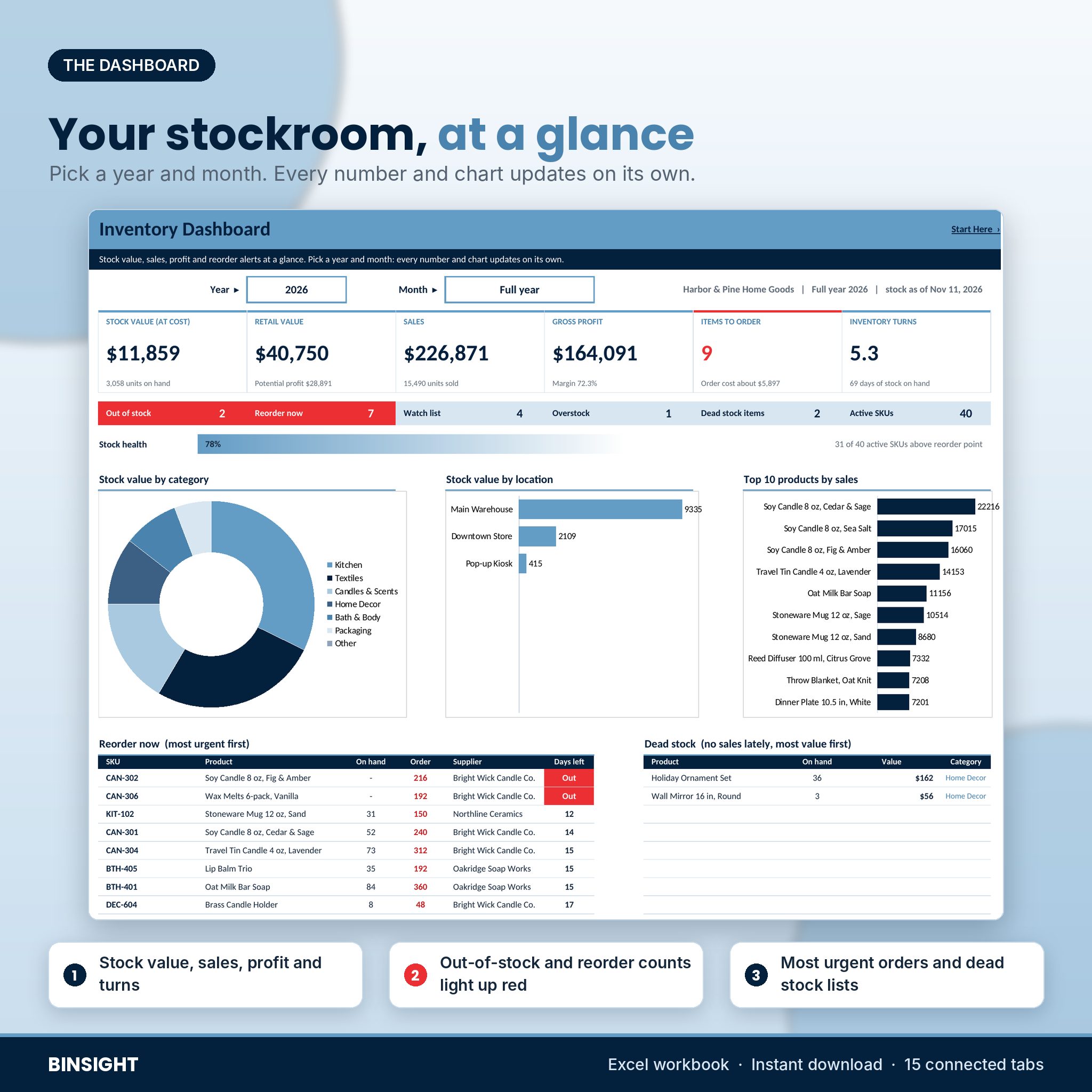


Binsight is an inventory management spreadsheet for Excel built for small retail, wholesale and warehouse businesses. You type each product once. Then you log what comes in and what goes out, and the workbook keeps stock on hand for every location, values it at average cost, flags what needs ordering and writes the purchase order. No subscription, no app to learn, no macros.
What this inventory spreadsheet does
Most stock lists tell you what you had last time you counted. Binsight tells you what you have now, where it is, how fast it sells and when you need to buy more. It was made for shop owners who keep running out of their best sellers while slow lines gather dust in the back room.
- Stock on hand by location. Up to 20 warehouses, stores, vans or shelves. Move stock between them with a transfer.
- Reorder alerts that think for you. Leave the reorder point blank and Binsight works one out from your last 90 days of sales, your lead time and a few days of safety stock. Or type your own.
- Suggested order quantities. Rounded up to the pack size, filled to your max stock level if you set one, and never below your usual order size.
- Order-by dates. The last day to order before you run out. Past dates turn red.
- One-page purchase orders. Pick a supplier and up to 12 items that need ordering fill the lines with suggested quantities. Change any quantity, add 4 extra lines, and the tax, shipping and total work themselves out.
Who it is for
Boutiques and gift shops, online sellers, makers who stock materials and packaging, small wholesalers and distributors, and any business with a few hundred SKUs and a growing headache. If you sell from a store and a website at the same time, the location tracking keeps both honest.
What is included
One Excel workbook with 15 connected tabs and a 26-page user guide (DOCX):
- Start Here: 5 setup steps, links to every tab and a color key.
- Dashboard: stock value at cost and retail, sales, gross profit, margin, inventory turns, days of stock, stock health and 5 charts. Pick any year and month.
- Products: SKU, category, supplier, unit, default location, cost, price, reorder point, reorder quantity, pack size, max stock, lead time and barcode, plus 13 automatic columns.
- Stock In: deliveries, opening balances and customer returns.
- Stock Out: sales, internal use, damage, samples and returns to suppliers, with revenue, cost of goods and profit.
- Adjust & Transfer: count corrections and moves between locations.
- Suppliers: contacts, payment terms, lead times, minimum orders and spend.
- Reorder: every item to order, most urgent first, filtered by supplier.
- Purchase Order: a printable one-page PO.
- Stock by Location: units and value per location, and everything held at the one you pick.
- Stock Take: a count sheet for a full stock take or a quick cycle count, with variance in units and money.
- Valuation: stock value by category, your 15 most valuable items and a dead stock list.
- ABC Analysis: every product ranked by 12-month usage value, with a Pareto chart.
- Item Card: one product on one page, with stock in every location and monthly movement.
- Settings: currency, reorder rules, PO details and every drop-down list.
How the inventory tracker works
- Set your currency, locations, categories and units on Settings.
- Add your suppliers and your products, one row each.
- Enter one opening balance per product for the stock you have today.
- From then on, log deliveries, sales, moves and counts as they happen. Everything else updates on its own.
Stock is valued at weighted average cost, so there are no FIFO layers to track. Profit on every sale uses the same average cost, which keeps your margins consistent from month to month.
Built to stay correct
Formula cells are locked (no password), input cells stay open, and every list is a drop-down. Each log has a Check column that flags unknown SKUs, missing dates, missing locations and stock that falls below zero. Rename a category or location and the rows that still use the old name turn red, so nothing breaks quietly.
File format and software
- One .xlsx workbook plus a .docx user guide.
- Built for Microsoft Excel 2010 or newer. Tested in LibreOffice Calc.
- Not designed for Google Sheets or Apple Numbers.
- Room for 1,000 products, 100 suppliers, 20 locations, 3,000 stock-in rows, 5,000 stock-out rows and 1,500 adjustments or transfers.
Make it yours
Pick from 22 currency symbols and every money cell follows. Rename categories, locations and units. Change colors and fonts without unprotecting anything. Need your own columns? Unprotect a tab (there is no password) and add them to the right.
Real ways people use it
- A candle shop with a store and a weekend market stall sees how many jars sit at each place and moves stock before Saturday.
- An online seller logs a week of orders in one go, then checks the Reorder tab every Monday and emails the POs.
- A small wholesaler runs a cycle count on one category a month and fixes variances in a few minutes.
- A gift shop finds $2,000 of dead stock on the Valuation tab and runs a bundle sale to clear it.
Digital download
This is a digital product. You get the files right after checkout. Nothing is shipped. The license covers one business: use and edit the files as much as you like, but do not resell, share or upload them.
FAQ
Does this inventory spreadsheet work in Google Sheets?
It is built for Microsoft Excel 2010 or newer and tested in LibreOffice Calc. It is not designed for Google Sheets.
Can it track stock in more than one warehouse or store?
Yes. Up to 20 locations, with transfers between them and a view of what each one holds.
How does it know when to reorder?
It averages your daily sales over the last 90 days (you can change this) and multiplies by lead time plus safety days. You can type your own reorder point instead.
Does it use FIFO or average cost?
Weighted average cost. It is simple and works for most small businesses. Ask your accountant which method you must report.
Can I print purchase orders and count sheets?
Yes. The purchase order prints on one page, and the stock take sheet is set up to print one page wide.
Can I use my own currency?
Yes. Pick your symbol once on Settings. Dollars are the default.
Are there macros?
No. There are no macros, add-ins or internet links. Your data stays in your file.

Reviews
There are no reviews yet.