


Painting Contractor App for Estimates, Crews and Jobs
Brushloft is a painting contractor app that books the way a painter thinks. Log the call, put the estimate walkthrough on the calendar, turn the quote into a multi-day job for your crew, take the deposit that holds the date, and print the invoice when the last coat dries. It is one offline file that opens in your browser. There is no account, no login and no monthly fee.
If you run a small residential painting company, you probably juggle a paper calendar, a text thread and a notes app. Brushloft puts all of it in one painting business app for your laptop and phone.
What This Painting Business App Does
- Captures every request. Calls, texts and web inquiries go into one inbox with a lead source, so you know what pays.
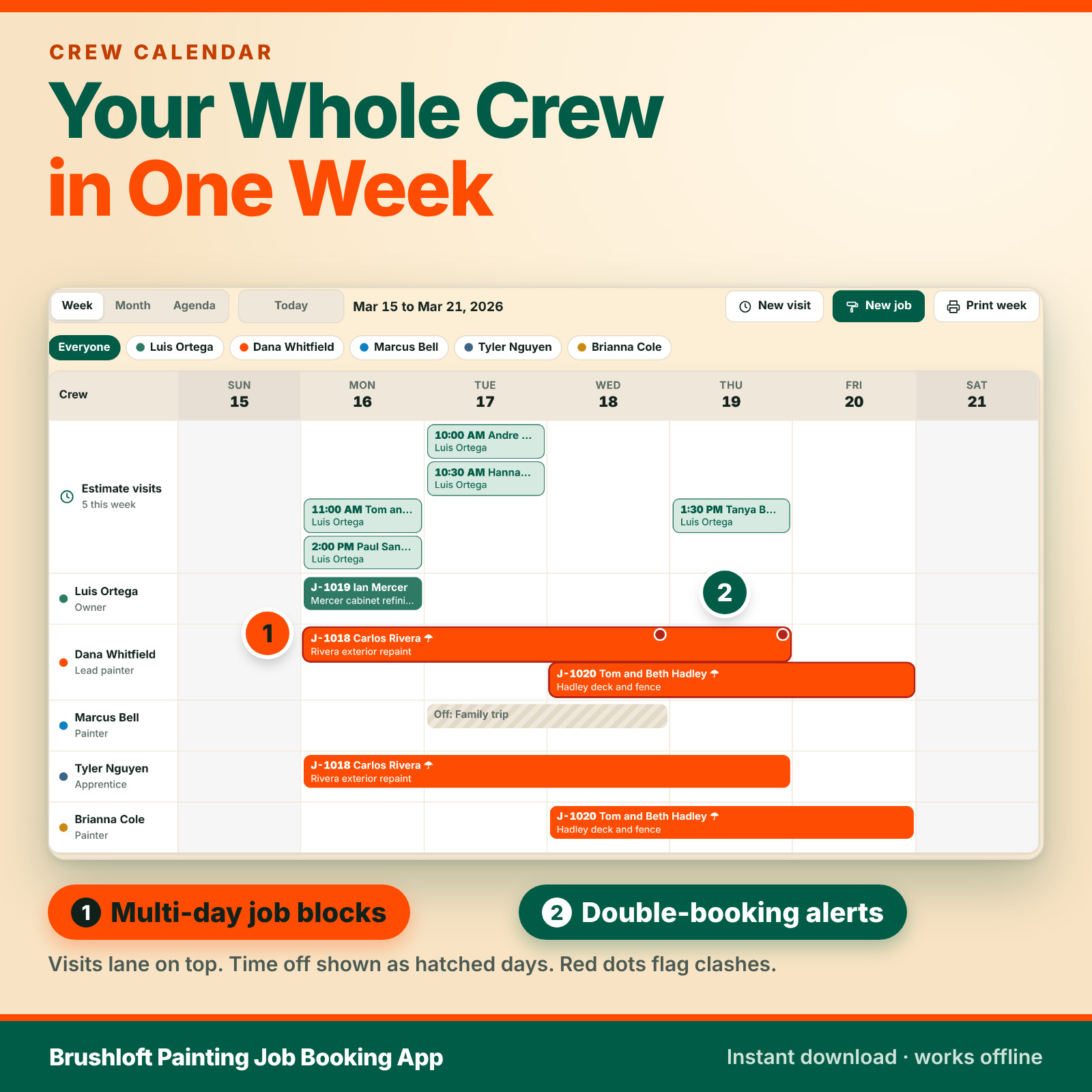
- Books estimate visits. Short walkthrough appointments sit on the calendar in their own lane, and the app warns you when the same person is double booked.
- Schedules multi-day jobs. As painting scheduling software, it turns a four-day interior repaint into one bar that skips your non-workdays and shows each painter on the job.
- Handles rain. One Rain delay button pushes the remaining days of an exterior job to the next workdays and re-checks the crew.
- Tracks money. Quote lines, a deposit to hold the start date, progress and final payments, refunds and the balance owed.
- Saves colors for touch-ups. Room, surface, brand, color name, code and sheen stay on file for the day a client calls two years later.
Who This Painter Booking App Is For
Brushloft fits owners of small painting companies with anywhere from one to about ten painters. A solo painter can use it as a booking app for one. A five-person crew can use it as painting crew schedule software with a lane for every person. It handles house painting business needs: interior and exterior repaints, cabinets, decks, fences, touch-ups and small commercial jobs.
Why Painters Choose This Painting Contractor App
- No double bookings. Dana on two jobs on Wednesday? A red dot and a plain-English warning show it before you promise a date.
- Deposits before dates. The dashboard lists every booked job that is still waiting on its deposit, with the amount due.
- Rain days in seconds. Pick the rained-out Tuesday and the app moves the job, the crew lane and the end date.
- Clear client instructions. The booking confirmation prints prep notes: move furniture, keep pets away, leave parking.
- You own it. It is painting contractor software with no subscription. Your data stays on your device.
Features
Dashboard
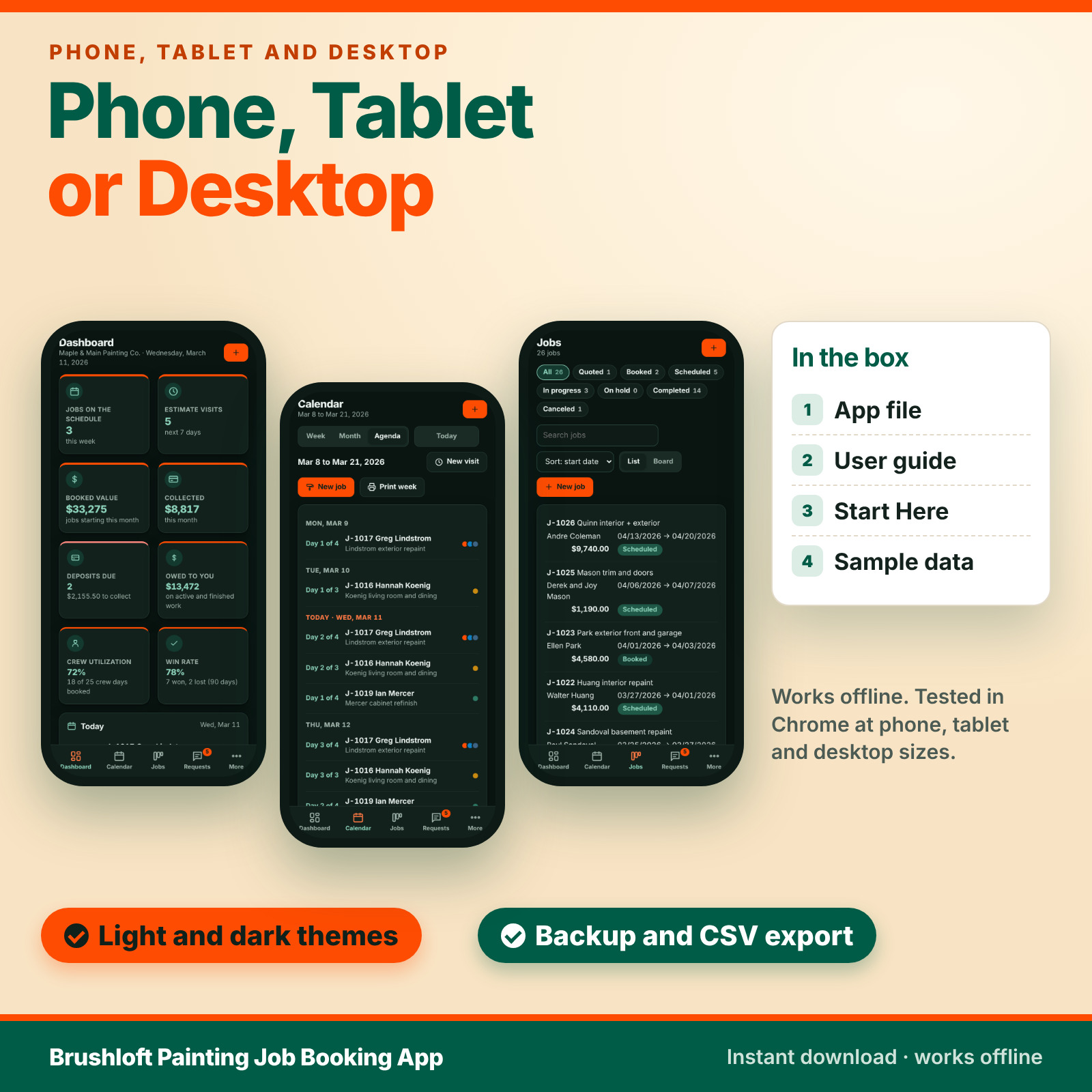
Eight tiles show jobs this week, upcoming visits, booked value, money collected, deposits due, money owed, crew utilization and win rate. Below them: today, the next seven days, four charts, a conflicts list and a rain watch for exterior jobs.
Requests and estimate visits
Each request has a status, a lead source and a preferred time. One click books the walkthrough or creates the job.
Crew calendar
Week, month and agenda views. Time off shows as hatched days. Crew utilization shows how full the week is, for example 10 of 14 crew days booked is 71 percent.
Jobs, quotes and payments
Simple price lines with a discount and tax rate, a deposit that calculates itself, and deposits, progress payments, finals and refunds. Balances and overdue invoices update as you record money.
Color schedules and checklists
A gallons helper turns 420 square feet at two coats into 2.64 gallons and says buy 3. Every job carries a crew checklist with a progress bar.
Six printable documents
Booking confirmation, quote, invoice, crew job sheet without prices, client color schedule and a weekly crew schedule for the shop wall. They print on US Letter or A4.
Reports, CSV and backups
Reports by month, job type, lead source and painter. Six CSV exports and a one-click backup you can restore on any device.
What Is Included
- Brushloft-Painting-Job-Booking-App.html, the app itself (empty, with a Load sample data option)
- User guide in DOCX, written for beginners, with screenshots of the real app
- Start Here sheet in PDF, US Letter and A4
- One ZIP with everything
How It Works
- Open the HTML file in your browser.
- Choose Explore with sample data, or Set up my business to enter your details and crew.
- Log a request, book the estimate visit, create the job and add the quote lines.
- Pick the start date, the number of days and the painters. Record the deposit.
- Mark days done, push rain days, record payments and print the invoice.
File Format and Software Requirements
Brushloft is one HTML file that works offline. We tested it in Google Chrome at desktop, tablet and phone sizes, so Chrome or Edge is best. On iPhone, the Files preview cannot run it; open it in a browser or an HTML viewer app. It is not an App Store app. The guide is a DOCX file.
Customize It
Pick your currency once in Settings and every amount, print and report follows it, including custom symbols. Rename job types, lead sources and paint brands and old records update to match. Edit the prep instructions, checklist and terms on your documents. Choose your workdays, date format and a light or dark theme.
Real Situations
- A solo painter books three walkthroughs and a four-day interior in one afternoon.
- A five-painter company splits two crews across spring exterior jobs and sees the clash early.
- A client calls two years later asking for the hallway color. You find the code in seconds.
Digital Download Information
This painting contractor app is an instant digital download. After checkout, download the files from your order page as often as you need, and export a backup every week.
Frequently Asked Questions
Does this painting job scheduling app work offline?
Yes. It makes no network requests, so it runs with no internet at all.
Is it an App Store app?
No. It is a file you open in your browser, on a computer or a phone.
Can I use it on my phone?
Yes. Phones get a bottom tab bar and full-screen forms, tested in Chrome at phone size. On iPhone, use a browser, not the Files preview.
Where is my data stored?
In your browser on your device. Nothing is uploaded. Export backups regularly, because clearing browser data deletes records.
Can I move it to a new computer?
Yes. Export a backup, copy the file across and use Import backup on the new device.
Can I change the currency?
Yes. Choose a symbol in Settings or type your own.
Is there a monthly fee?
No. You pay once and keep the file.
Can my crew share one calendar?
Each device keeps its own data, so there is no live sync. Send crew leads a backup to import, or print the weekly crew schedule and crew job sheets.
License
For use in one business on the devices of that business. You may not resell, share, upload or give away the file or any copy of it. Brushloft gives no tax or legal advice. Check tax rates and lead-safe rules for your area.


Reviews
There are no reviews yet.