



Nestmark is a couples budget planner web app that turns two incomes, shared bills and separate spending into one clear plan. It splits costs fairly, keeps a running settle-up balance, puts every payday and bill on a calendar and builds your reports for you – all in one private file that opens in your web browser. No spreadsheets, no formulas, no subscription.
A couples budget planner made for two people and one household
Nestmark is built around the questions couples and families actually ask: How much can we safely spend this month? Who paid for what? Who owes whom? Are we on track for our goals? You log a payment once and Nestmark does the rest – the split, the balance, the envelopes, the charts and the reports all update on their own.
Who it is for
- Married, engaged or newly moved-in couples who share some costs and keep some money separate
- Families running one household budget on two paychecks
- Partners with different incomes who want a fair split by paycheck instead of 50/50
Main features
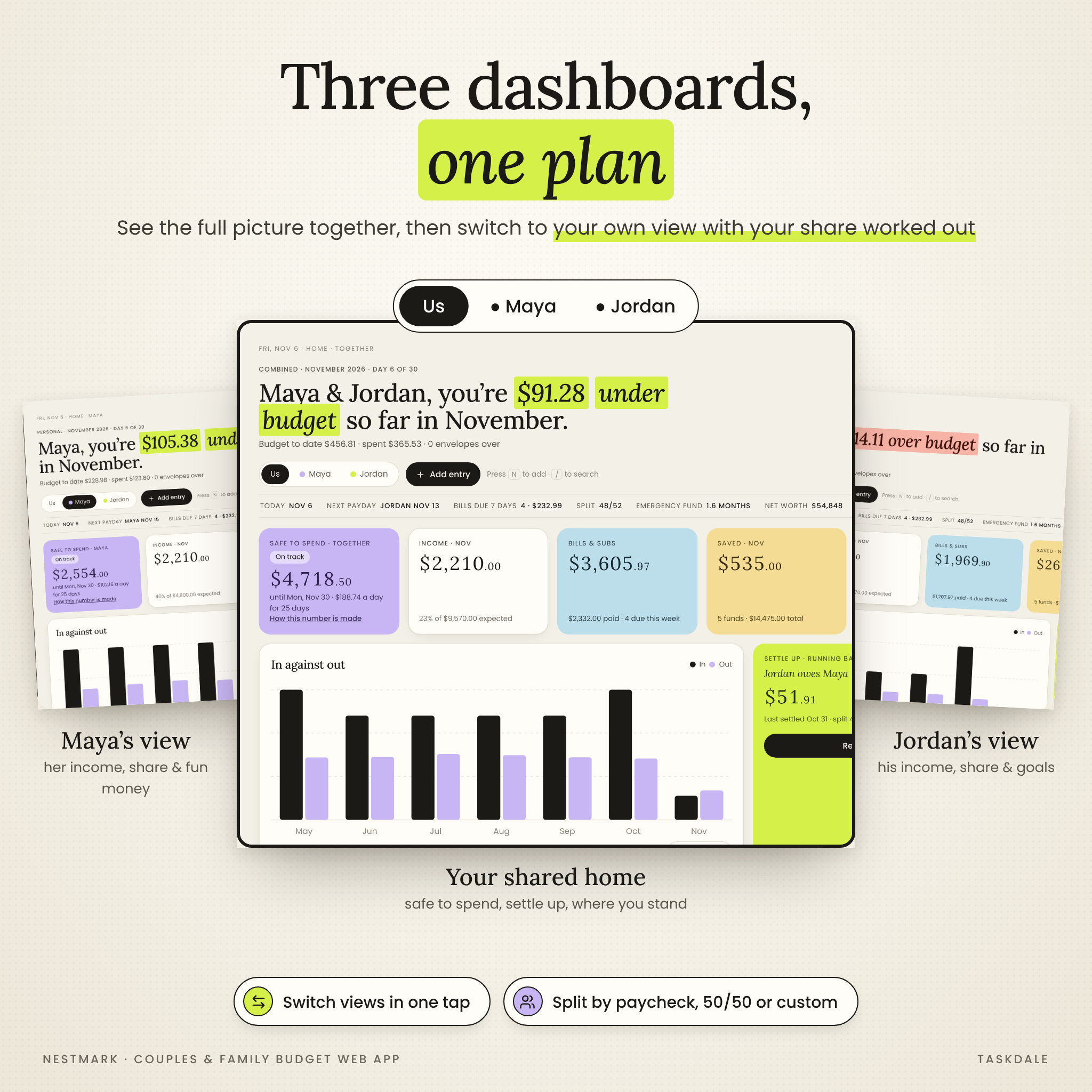
Three dashboards in one
Switch between a shared “Us” dashboard and a personal dashboard for each partner. Each shows Safe to spend (with a “how this number is made” breakdown), income, bills and subscriptions, savings, net worth, a running settle-up balance, 50/30/20 progress, upcoming bills and paydays, and friendly heads-up alerts.
Fair bill splitting and settle up
- Split shared costs by paycheck, 50/50 or a custom percentage – or override the split for a single entry
- Just choose who paid and whose expense it is; the live preview shows each share and who owes whom
- Settle up shows the running balance, what moved it, where each of you put money and your full settle-up history
- Recording a settle-up locks past entries so a settled balance can’t change by accident
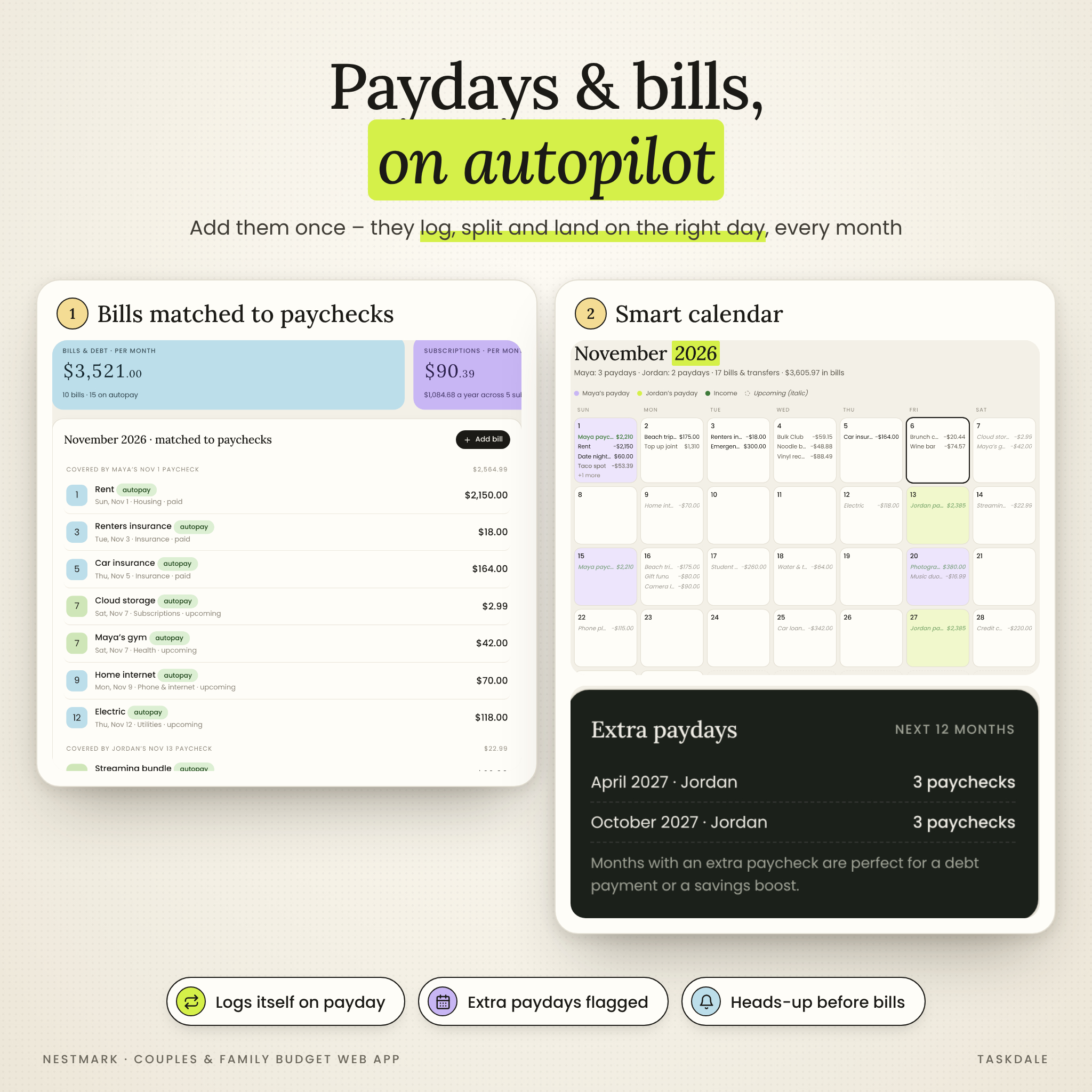
Paydays and bills on autopilot
- Add paychecks, bills, subscriptions, debt payments and savings transfers once – weekly, every 2 weeks, twice a month, monthly, quarterly or yearly
- Autopay items log themselves on the right day; manual bills get a one-tap “Paid” button and an overdue alert
- Bills are matched to the paycheck that covers them, and extra paydays are flagged 12 months ahead
- A smart calendar shows each partner’s paydays in their own color and upcoming items in italics
- Subscription audit: mark each subscription keep, review or cancel and see the yearly savings
Budget envelopes, savings goals and a wait list
- Monthly envelopes that reset on the 1st, with optional rollover and personal “fun money” for each partner
- Suggest envelopes automatically from your last three months of spending
- Savings and sinking funds with goal dates, the amount to save each month, your current pace and an on-track check
- A wait list for impulse buys with a countdown timer and a “saved by skipping” total
Debt payoff planner, accounts and net worth tracker
- Debt-free simulator with snowball, avalanche or your own order – drag the slider to see your new payoff date and interest saved
- Joint and personal account balances with one-step “match to bank” and a view of who topped up the joint account
- Net worth snapshots saved automatically every month, with an editable history
Reports that build themselves
Paycheck, Month (categories vs last month, budget vs actual and tips), Year (with a forecast for the rest of the year) and 50/30/20 reports – each for both of you or either partner, ready to print or save as PDF.
More helpful extras
- Money date page: a guided agenda filled with your real numbers plus 25 conversation starters and saved notes
- Weekly, monthly and yearly routines that reset by themselves
- Bank CSV import with auto-categories and duplicate detection
- Partner sync file to merge changes between two devices without duplicates
- One-tap backup and restore, CSV export, receipt photos, search, undo and a privacy blur for amounts
What is included
- Nestmark.html – the couples and family budget planner web app (16 pages)
- Nestmark User Guide – a 20-page illustrated DOCX guide with setup, every feature, troubleshooting and FAQ
- Start Here – a one-page PDF quick start
- Bank CSV example – a practice file for the import feature
How it works
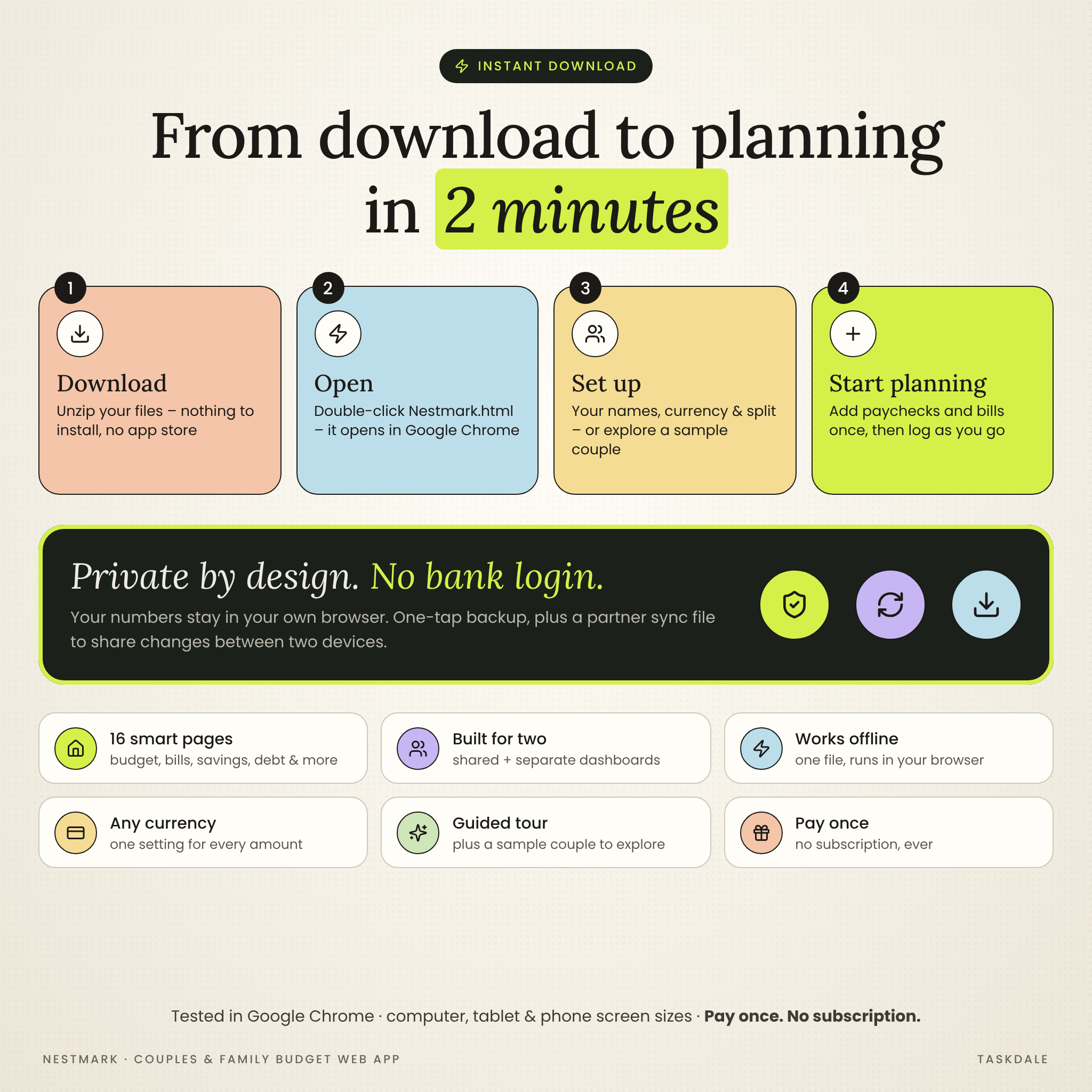
- Download and unzip your files.
- Double-click Nestmark.html – it opens in your web browser (Google Chrome on a computer recommended).
- Enter your names, currency and how you split costs – or explore the sample couple first.
- Add your paychecks and bills once, set a few envelopes and log as you go.
File format and requirements
- Format: a single HTML web app file, plus DOCX guide, PDF quick start and CSV example in one ZIP
- Works in your web browser – tested in Google Chrome at computer, tablet and phone screen sizes. A computer is recommended for everyday use
- No account, no app store, no internet needed after download, no subscription
- Private: your entries are stored in your own browser on your own device and never uploaded. It does not connect to your bank
- Sync between two devices is by sync file (not live cloud sync)
Customization
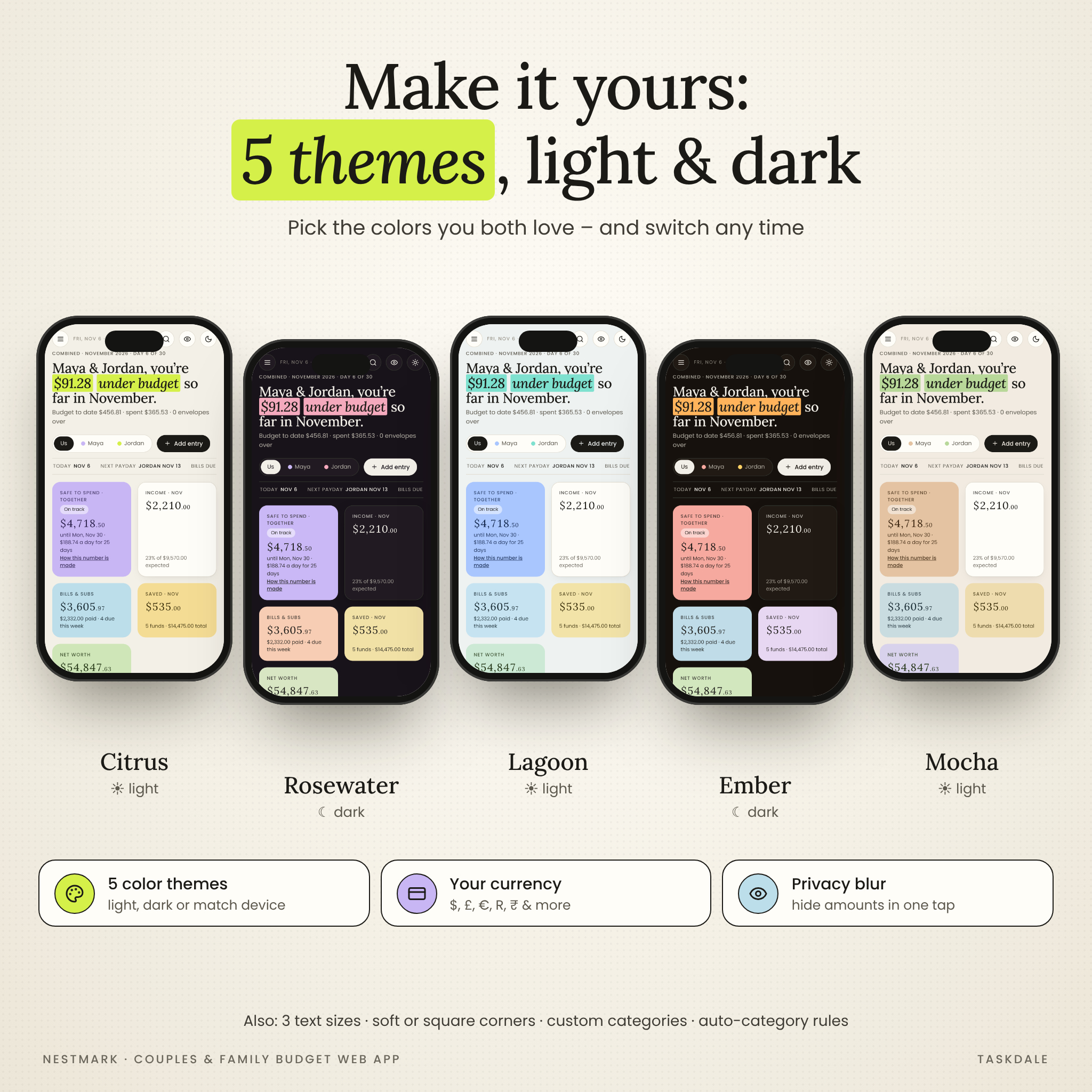
Choose from 5 color themes (Citrus, Rosewater, Lagoon, Ember and Mocha) in light or dark mode, 3 text sizes and soft or square corners. Set your own currency once and every amount follows – $ is the default, with £, €, R, ₹, ¥ and more, or type your own symbol. Rename partners, add and recolor categories, mark needs and wants, create auto-category rules and edit the routines.
Real-life ways couples use Nestmark
- Moving in together and working out a fair way to share rent, groceries and utilities
- Splitting costs by income when one partner earns more
- Paying off credit cards or a car loan faster with the debt snowball or avalanche
- Running a monthly money date with real numbers instead of guesswork
Digital download
This is an instant digital download. Nothing will be shipped. You will receive a ZIP file with the web app and guides as soon as your payment is confirmed.
FAQ
Is there a monthly fee?
No. You pay once and the planner is yours to use in your household.
Do we need Excel or Google Sheets?
No. Nestmark is a web app that opens in your browser – there are no formulas to fix.
Can we both use it?
Yes. Share one computer, or keep a copy each and swap a sync file – new and edited entries merge without duplicates.
Does it connect to our bank?
No, which keeps it private. You can log entries, let recurring payments log themselves, or import a CSV statement from your bank.
Can I use my own currency?
Yes. One currency setting changes every amount in the planner.
Does it work on a phone?
The layout adapts to phone screens and was tested at phone sizes in Chrome. Opening a downloaded HTML file depends on your phone’s browser and file app, so a computer is the best home for your planner.
License
For personal use in your own household only. Reselling, sharing or redistributing the files is not permitted. Nestmark is a budgeting tool and does not provide financial, tax or legal advice. © Taskdale.
Reviews
There are no reviews yet.