




A pool service route tracker built for pool techs, not accountants
The Clearstop pool service route tracker is a spreadsheet for solo pool techs and small pool service companies who want the useful parts of route software without the monthly bill. Add your pools once, and the workbook builds your weekly routes, prints the day’s stop list, logs every chemical reading, prices every gallon of chlorine you pour, tells you who to bill, and shows the profit of every client, route and service day.
It is one Excel workbook with 16 linked tabs. It also opens in Google Sheets, so you can use it on a laptop in the office or a phone on the route.
Who it is for
- Owner-operators running a weekly residential route
- Small pool companies with two to eight routes or techs
- New pool businesses moving off paper logs and texting threads
- Owners who suspect some pools lose money and want proof before raising rates
What the pool route spreadsheet does
Client and pool database
Up to 200 pools with address, gate code or access notes, gallons, surface, sanitizer, filter type, service day, route, stop number, billing type (monthly flat or per visit), rate and whether chemicals are included or billed extra. Blue columns calculate monthly value, visits this year, last visit, days since visit, balance due and chemical cost, and a Check column flags duplicates, missing routes, overdue invoices and missed visits.
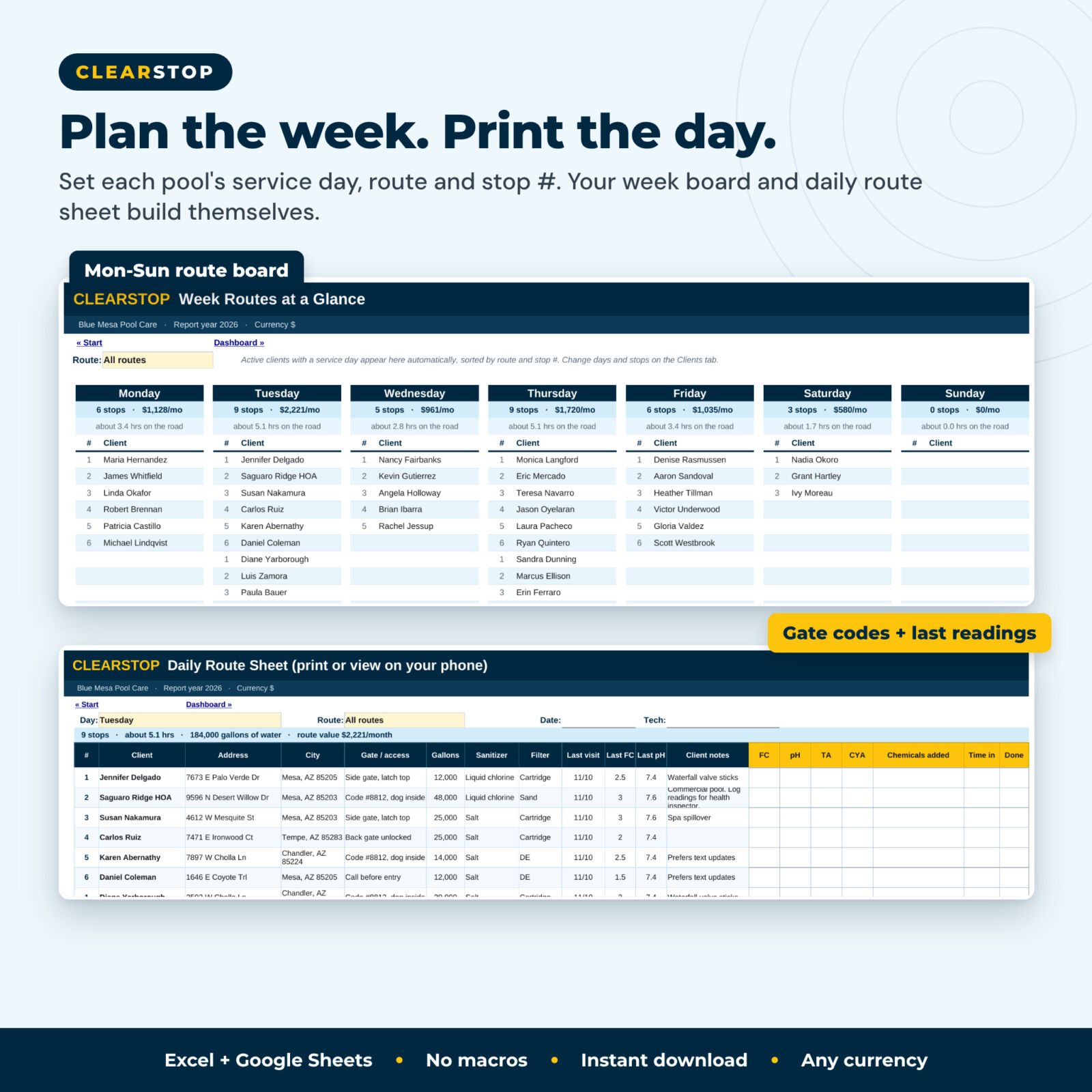
Week Routes and daily Route Sheet
A Monday-to-Sunday route board fills itself from the client list, sorted by route and stop. Each day shows stops, monthly value and estimated hours on the road. The printable Route Sheet lists up to 40 stops for any day and route with address, gate code, gallons, sanitizer, last visit, last FC and pH, client notes and write-in boxes for readings and chemicals.
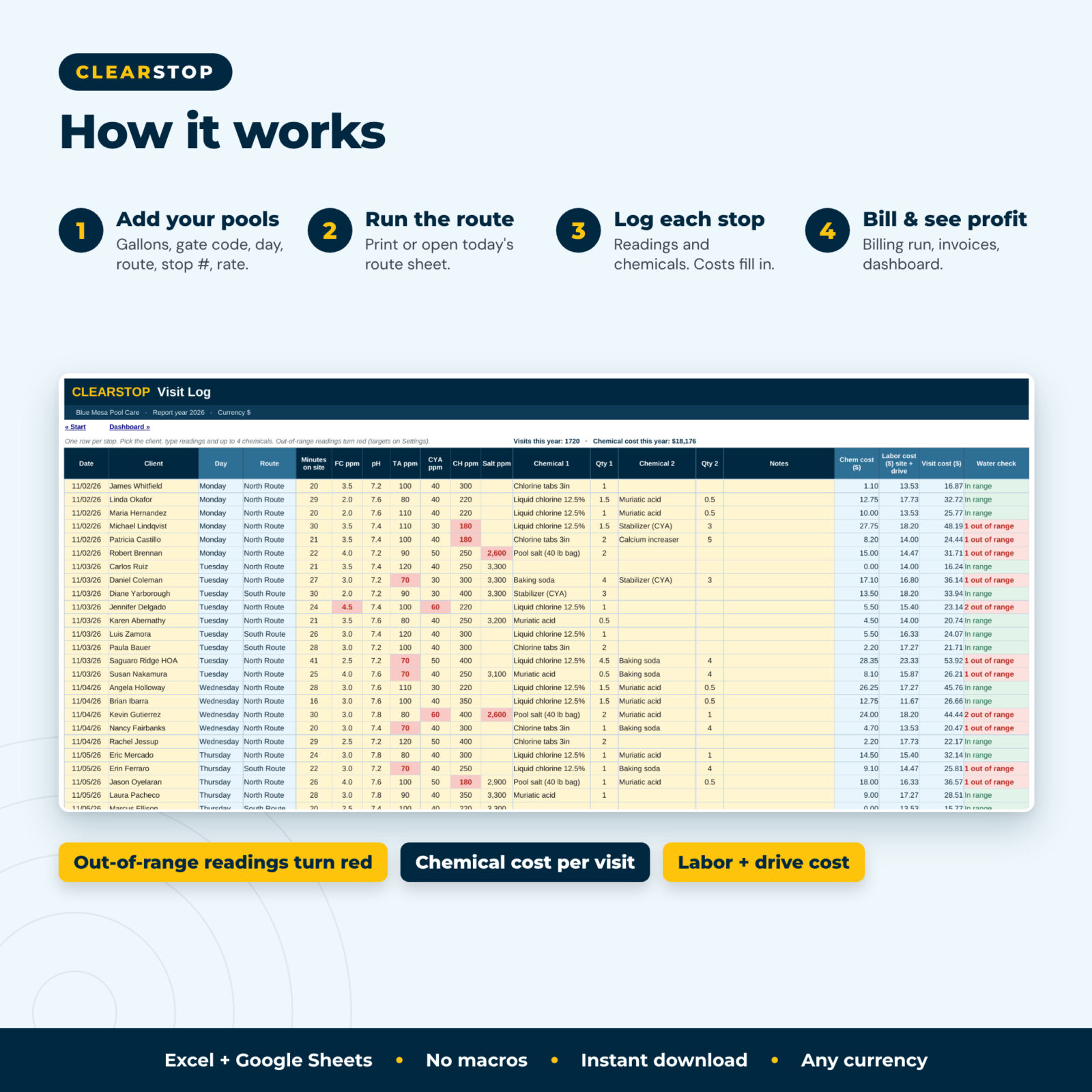
Visit log with water chemistry flags
3,000 rows for readings (FC, pH, TA, CYA, CH, salt), minutes on site, notes and up to four chemicals per stop. Readings outside your target ranges turn red. Each visit gets a chemical cost, a billable chemical amount, a labor cost (site plus drive time) and a drive cost.
Chemical cost, stock and reorder alerts
Keep a price list with your cost and bill-out price per unit. The pool chemical tracker adds purchases, subtracts what you use, shows stock on hand with reorder flags, and totals chemical spend per chemical, per pool and per month.
Billing run, invoices and a printable invoice
Pick a month and the Billing Run lists what every client owes: flat rate or visits times rate, plus billable chemicals and completed repairs, next to what you invoiced and collected. The 2,500-row invoice log tracks due dates, payments, balances and overdue status, and the printable invoice adds that month’s service visits for the client.
Repairs, upsells and equipment age
Track repair and upsell jobs from lead to completed with quote, parts, labor, job profit and win rate. The equipment tab lists pumps, filters, heaters, salt cells and cleaners with age, warranty status and Plan replacement or Past expected life flags, your ready-made upsell list.
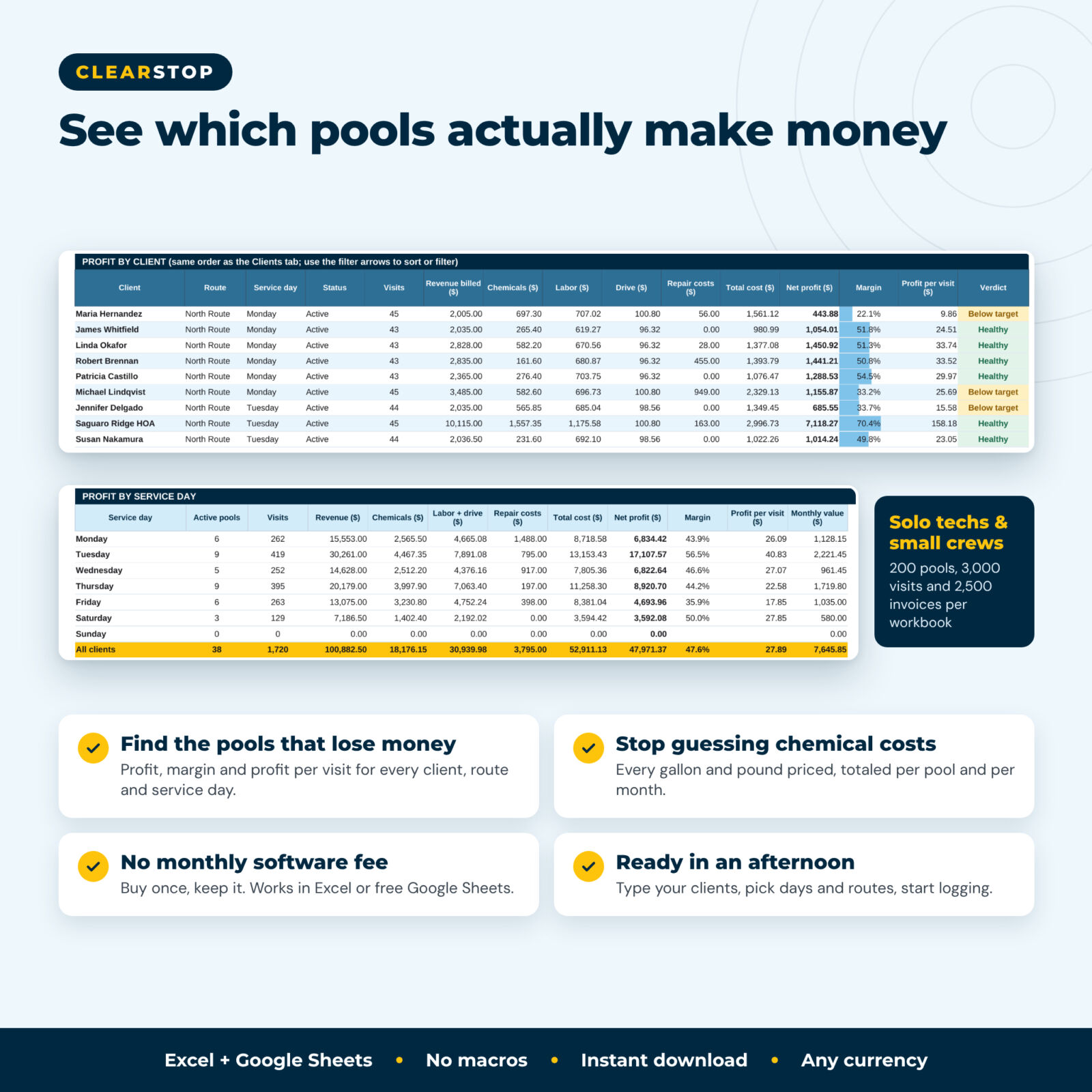
Profit per client, route and day, plus a dashboard
The Profit tab shows revenue, chemicals, labor, drive and repair costs, net profit, margin and profit per visit for every client, route and service day, for the full year or any month. The dashboard adds 12 KPI tiles, a to-do list of alerts, the least profitable clients and six charts.
Main benefits
- See which pools lose money and price new accounts with real numbers
- Stop guessing chemical costs and catch rising chlorine prices early
- Never forget to bill a client or chase an overdue invoice
- Show clients a tidy invoice with their service visits and readings
- Keep a water chemistry history for every pool
- No subscription: buy once and keep the file
What is included
- Clearstop Pool Service Route & Client Tracker (.xlsx), 16 tabs: Start, Dashboard, Settings, Clients, Week Routes, Route Sheet, Visit Log, Billing Run, Invoices, Invoice, Repairs, Equipment, Chemicals, Chem Purchases, Expenses, Profit
- Clearstop User Guide (.docx), 16 pages with screenshots, setup steps, troubleshooting and FAQ
How it works
- Enter your business details, currency, labor cost and drive cost on Settings, and your chemical prices on Chemicals.
- Add your pools with service day, route and stop number.
- Each morning, pick the day on the Route Sheet and print it or open it on your phone.
- Log each stop in the Visit Log. Costs and water checks calculate automatically.
- At month end, run the Billing Run, record invoices and payments, and check the Dashboard.
File format and software requirements
Microsoft Excel 2016 or newer (Windows or Mac), Excel on the web, or Google Sheets (free with a Google account). No macros or add-ins. Formulas are protected without a password; yellow cells are for typing. In Google Sheets a few Excel extras (data bars and tab links) do not carry over; all formulas, dropdowns and charts work.
Customization
Rename routes, service types, pool surfaces, sanitizers, payment methods, expense categories and equipment types. Set your own water chemistry target ranges, target profit margin, invoice terms and alert thresholds. One currency setting labels every money value, so it works in dollars, pounds, euros or any currency.
Digital download
This is a digital product. You get the files right after checkout. Nothing is shipped.
Use cases
- A solo tech with 45 weekly pools prints Tuesday’s route sheet, logs readings at lunch and bills on the 1st.
- A two-route company compares profit per route and moves a far-off pool to the closer route.
- An owner checks chemical cost per pool after a chlorine price jump and adjusts rates.
- A tech keeps HOA pool readings in one place for the board and the health inspector.
- A new business uses the repair and equipment tabs to plan pump and salt cell upgrades.
FAQ
Does this pool service spreadsheet work in Google Sheets?
Yes. Upload the .xlsx to Google Drive and open it with Google Sheets. Formulas, dropdowns, red flags and charts work.
How many pools and visits can it track?
200 clients, 3,000 visits, 2,500 invoices, 500 repair jobs and 600 equipment items per workbook. Most solo routes use one workbook per year.
Can I bill per visit instead of a monthly flat rate?
Yes. Choose the billing type per client. The Billing Run multiplies per-visit rates by the visits logged that month.
Does it calculate chemical doses?
No. It records readings and the chemicals you add, and calculates their cost. Follow product labels and your training for dosing.
Can I use it with more than one tech?
Yes. Set up one route per tech to compare results. For several people editing at once, use Google Sheets.
Is there a monthly fee?
No. You pay once and keep the files.
Can I change the currency?
Yes. Type any symbol on the Settings tab.
License: Personal use only (or use within your own business for business templates). You may not resell, share, or redistribute the files. © 2026 Taskdale. All rights reserved. Sample names and figures in the images are fictional.
Reviews
There are no reviews yet.