


An online coaching client tracker spreadsheet that keeps up with your clients
Coachloft is an online coaching client tracker spreadsheet for personal trainers and fitness coaches. It runs the business side of coaching in one workbook: clients, the plans they buy, sessions, weekly check-ins, measurements, leads, payments and expenses. You type what happened. The workbook does the counting.
Most trainer trackers are built around session packs only. Coachloft was built for how coaches work now: some clients pay monthly for online coaching, some buy a 12-week program, some buy 10 sessions at the studio, and a lot of them send a weekly check-in that you need to read and answer. All of that lives side by side here.
Who it is for
- Online fitness coaches who run weekly check-ins
- Hybrid personal trainers who mix studio sessions with online coaching
- In-person trainers who sell session packs and want progress reports
- Nutrition and habit coaches who track adherence
- New coaches who want a real system from day one, without a monthly software bill
What it does
A weekly check-in inbox
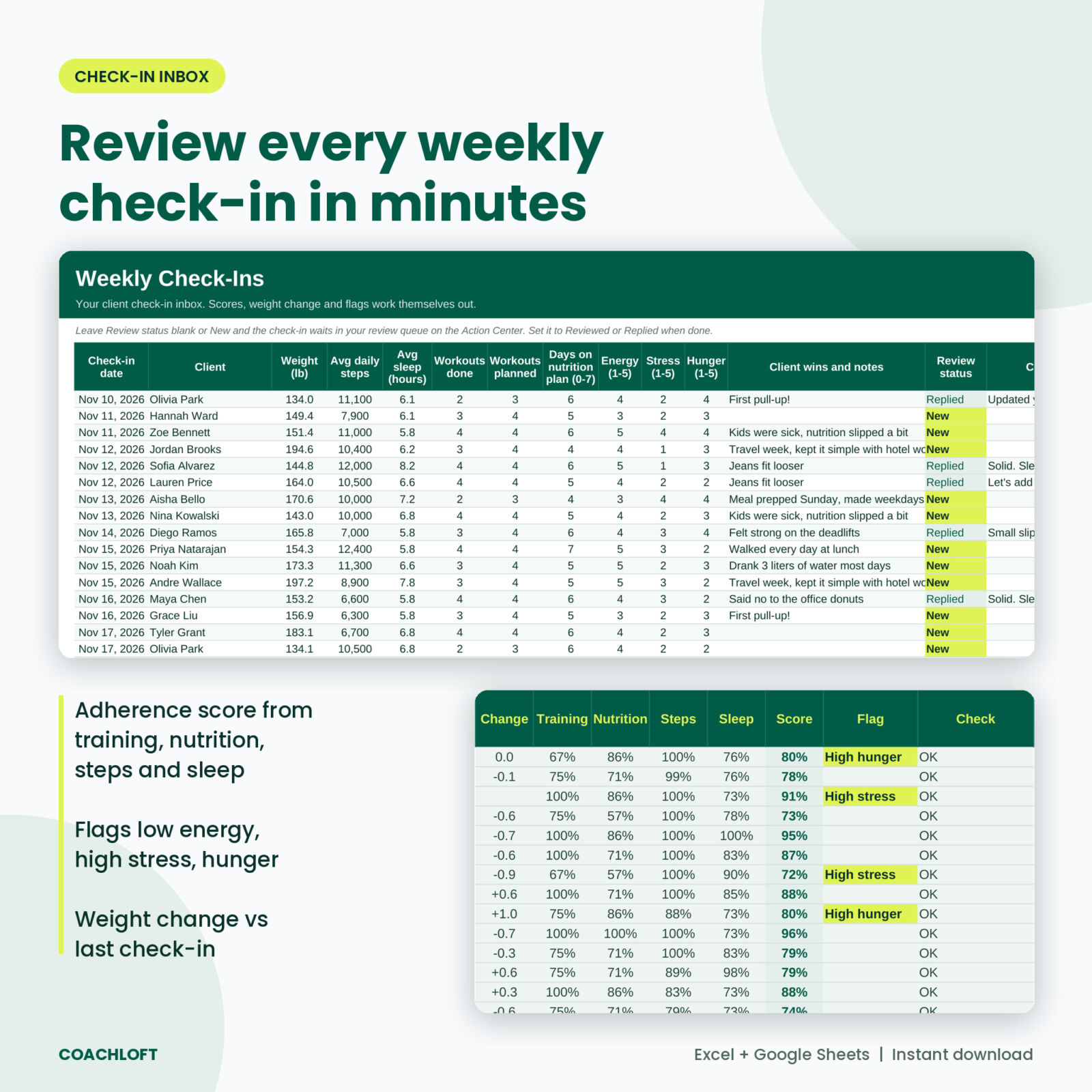
Log each check-in: weight, average steps, sleep, workouts done and planned, days on the nutrition plan, energy, stress and hunger. Coachloft scores adherence across training, nutrition, steps and sleep (you choose the weights), shows weight change since the last check-in and flags low adherence, low energy, high stress or high hunger. Every check-in you have not reviewed waits in a queue, oldest first. Mark it Replied and it leaves the list.
Action Center: who needs you today
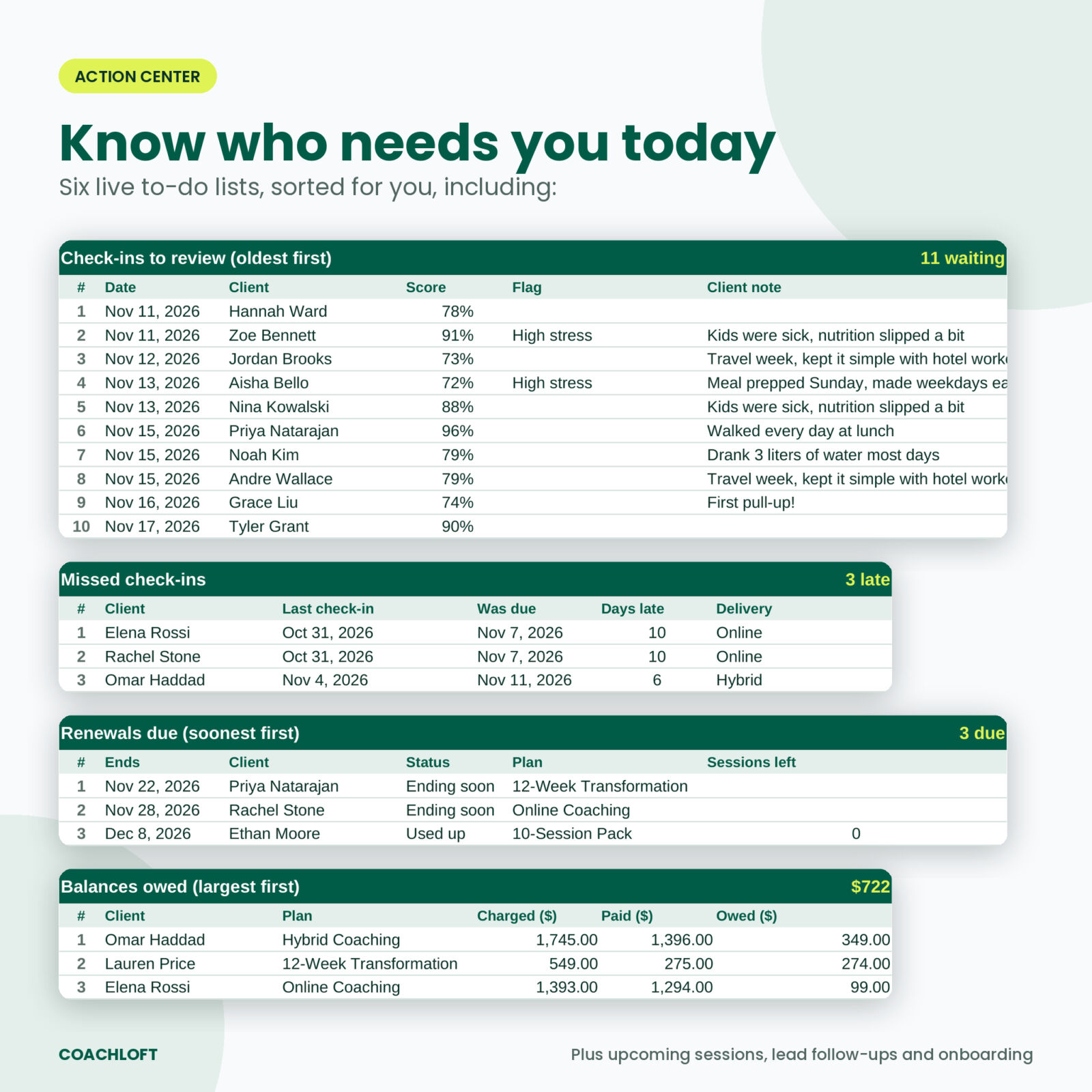
Seven short lists, sorted for you: check-ins to review, missed check-ins, renewals due, balances owed, upcoming sessions, lead follow-ups and onboarding to finish. Open it with your morning coffee and work down the page.
Memberships, programs and session packs
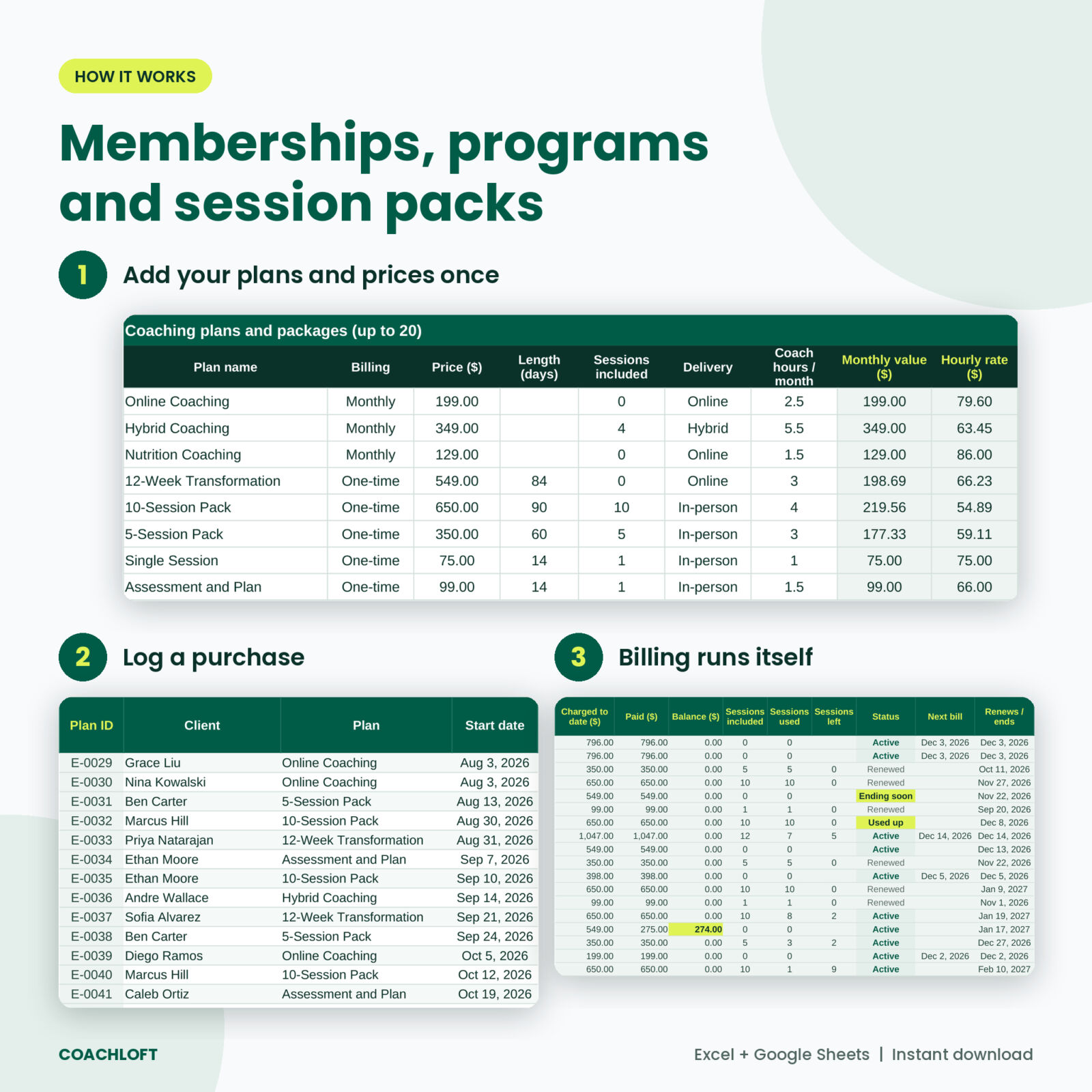
Set up to 20 plans on Settings. Monthly plans bill on the same day each month until you add a cancel date. One-time programs and packs end after their length. Coachloft counts bills to date, what was paid, the balance, sessions included, used and left, and shows each plan as Active, Ending soon, Used up, Renewed or Ended. Your no-show and late cancel policy decides whether a missed session uses a credit.
Client database with one clear alert
Each client row shows start and current weight, change, distance to goal, current plan, renewal date, sessions left, last and next check-in, days late, 28-day adherence, balance and total paid. A five-step onboarding checklist (intake, PAR-Q, agreement, start photos, app access) sits on the same row. One Alert column tells you the most urgent thing: Balance due, Check-in overdue, Renewal due, Low adherence or On track.
Client progress report
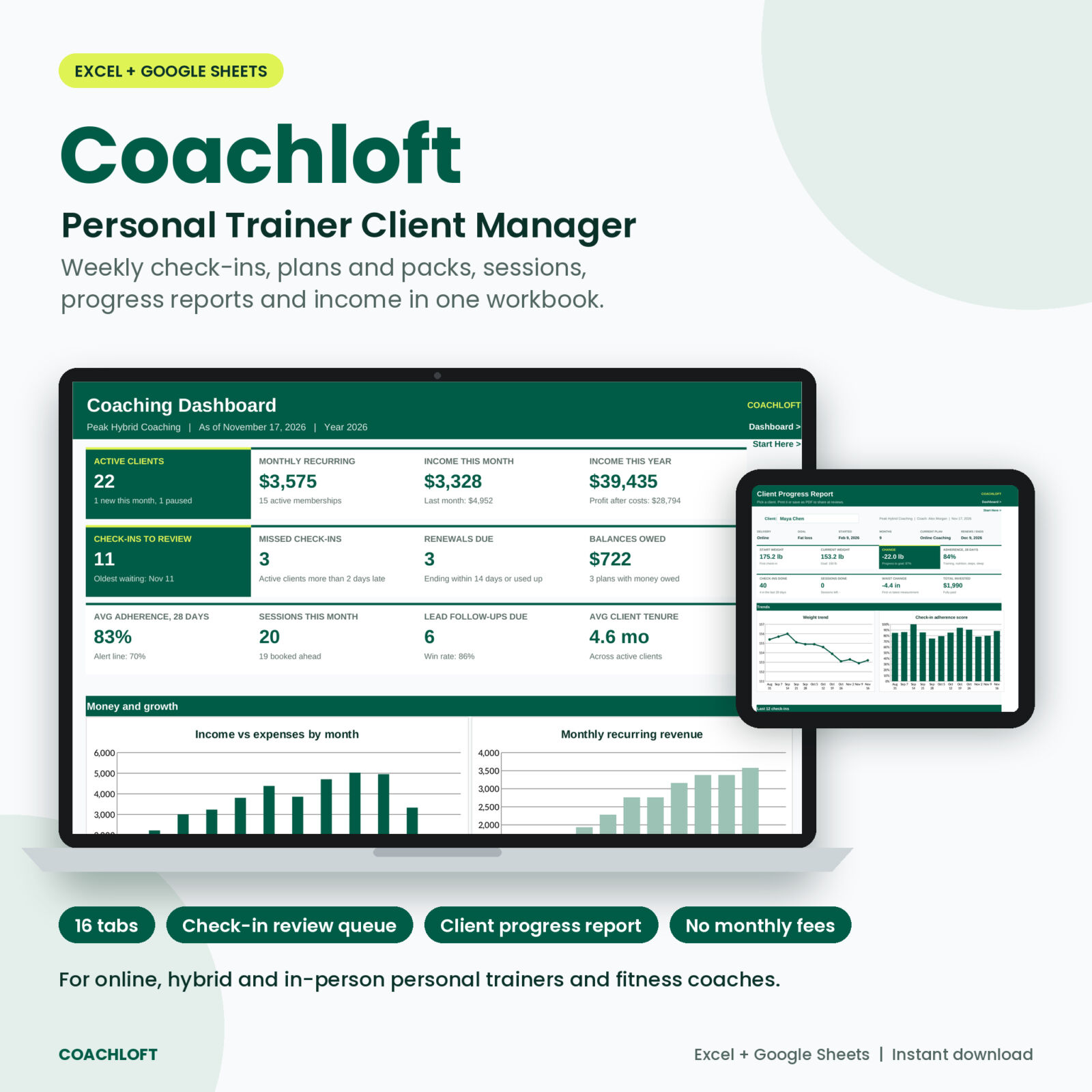
Pick a client and get a one-page report: plan details, eight tiles, a weight trend chart, an adherence chart, the last 12 check-ins, tape measurements first vs latest and your latest coach note. Print it or save it as a PDF for monthly reviews.
Dashboard and monthly report
The dashboard shows 12 live KPIs (active clients, monthly recurring revenue, income this month and year, check-ins waiting, renewals, money owed, average adherence and more) and 5 charts. The monthly report breaks down income, expenses, profit, tax set-aside, new and lost clients, active clients, recurring revenue, sessions, no-shows, check-ins, adherence and churn for every month, plus income by plan and lead sources by win rate.
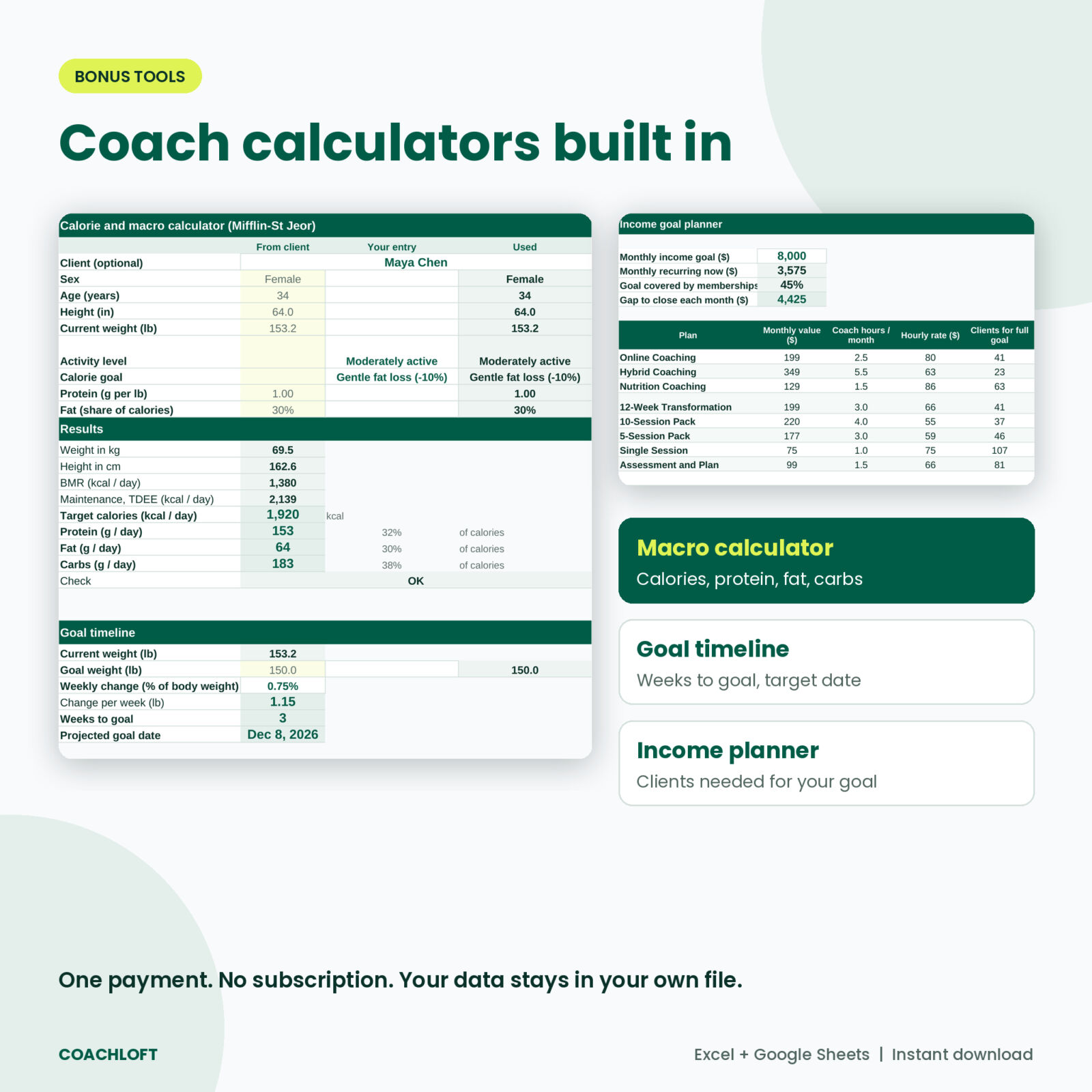
Coach calculators
- Calorie and macro calculator using the Mifflin-St Jeor equation, pulled from a client or typed in
- Goal timeline with weeks to goal and a projected date
- Income goal planner that shows how many clients of each plan you need, and the real hourly rate of every plan
What is included
- Coachloft workbook (.xlsx) with 16 tabs: Start Here, Dashboard, Action Center, Clients, Enrollments, Sessions, Check-Ins, Measurements, Client Report, Leads, Payments, Expenses, Monthly Report, Calculators, Settings and Lists
- Coachloft User Guide (.docx): setup, every tab explained, tips, troubleshooting and FAQ
How it works
- Settings: business name, currency, lb or kg, in or cm, check-in rhythm, policies, and your plans and prices.
- Clients: add each client once with goal and start date.
- Enrollments: log each plan a client buys.
- Check-Ins, Sessions, Payments: log as you go.
- Action Center and Dashboard: see who needs you and how the business is doing.
File format and software
- Microsoft Excel 2019, Excel 2021 or Microsoft 365 (Windows or Mac)
- Google Sheets: upload the .xlsx to Google Drive and open it with Google Sheets
- No macros, no add-ons, no subscription
- Room for 150 clients, 600 plans, 3,000 sessions, 3,000 check-ins, 1,500 measurements, 500 leads, 2,000 payments and 1,000 expenses
- Formula cells are locked without a password so they cannot be typed over by accident; input cells are white
Customization
Pick any currency symbol and every money label follows it. Switch between lb and kg, in and cm. Rename session types, goals, lead sources, payment methods and expense categories on the Lists tab. Change the adherence score weights, the alert line, the renewal warning window and the tax set-aside rate. If a renamed list item breaks a match, the row’s Check column tells you.
Real situations it handles
- A client finishes a 12-week program and moves to monthly online coaching: the program shows Renewed and the membership starts billing.
- A client pays half of a pack now and half next month: the balance stays on the Action Center until the second payment.
- Three check-ins come in on Sunday night: they wait in your review queue on Monday morning, oldest first.
- An online client goes quiet: after your grace period they appear under Missed check-ins.
- Review day: open the Client Report, pick the client, print the page.
Instant digital download
This is a digital product. You get the Excel workbook and the Word user guide right after purchase. Nothing is shipped.
FAQ
Does this personal trainer client tracker work in Google Sheets?
Yes. Upload the .xlsx to Google Drive and open it with Google Sheets. All formulas are ones Google Sheets supports.
Which Excel version do I need?
Excel 2019, 2021 or Microsoft 365. Excel 2016 and older lack two functions the workbook uses.
Can I use it if I only train clients in person?
Yes. Leave the check-in day blank for in-person clients and use sessions, packs, measurements and the progress report.
Can my clients fill in their own check-ins?
The workbook is for you, the coach. Most coaches collect check-ins by form or message and enter the numbers each week.
Is there a monthly fee?
No. You buy it once and the file is yours to use.
Can I change the currency and units?
Yes. One currency cell and two unit settings control the whole workbook.
Is my client data private?
Your data stays in your own file. Nothing is sent anywhere.
License: personal use for your own coaching business. Please do not resell, share or give away the file or guide.
Reviews
There are no reviews yet.