



HVAC Job Tracker Spreadsheet for Service Calls, Estimates, Invoices and Maintenance Agreements
Coilbook is an HVAC job tracker spreadsheet built for heating and cooling contractors who want the core of a field-service app without paying for one every month. Log a service call once and it flows through to the estimate, the invoice, the customer’s equipment history, your maintenance agreement reminders and a profitability dashboard. It works in Microsoft Excel and Google Sheets, with no macros and no add-ins.
Most job tracker templates are generic: a list of jobs and a total. Coilbook is made for HVAC work. It records every unit you service, knows which customers are on a maintenance plan, prices their repairs at member rates, tells you which spring and fall tune-ups are due, and flags old and R-22 systems as replacement leads.
Who it is for
- Owner-operators and small HVAC shops with roughly 1 to 12 technicians
- Residential and light-commercial heating and air conditioning contractors
- Mini-split and heat pump installers who sell maintenance plans
- Office managers who still run dispatch and billing from a spreadsheet
Main benefits
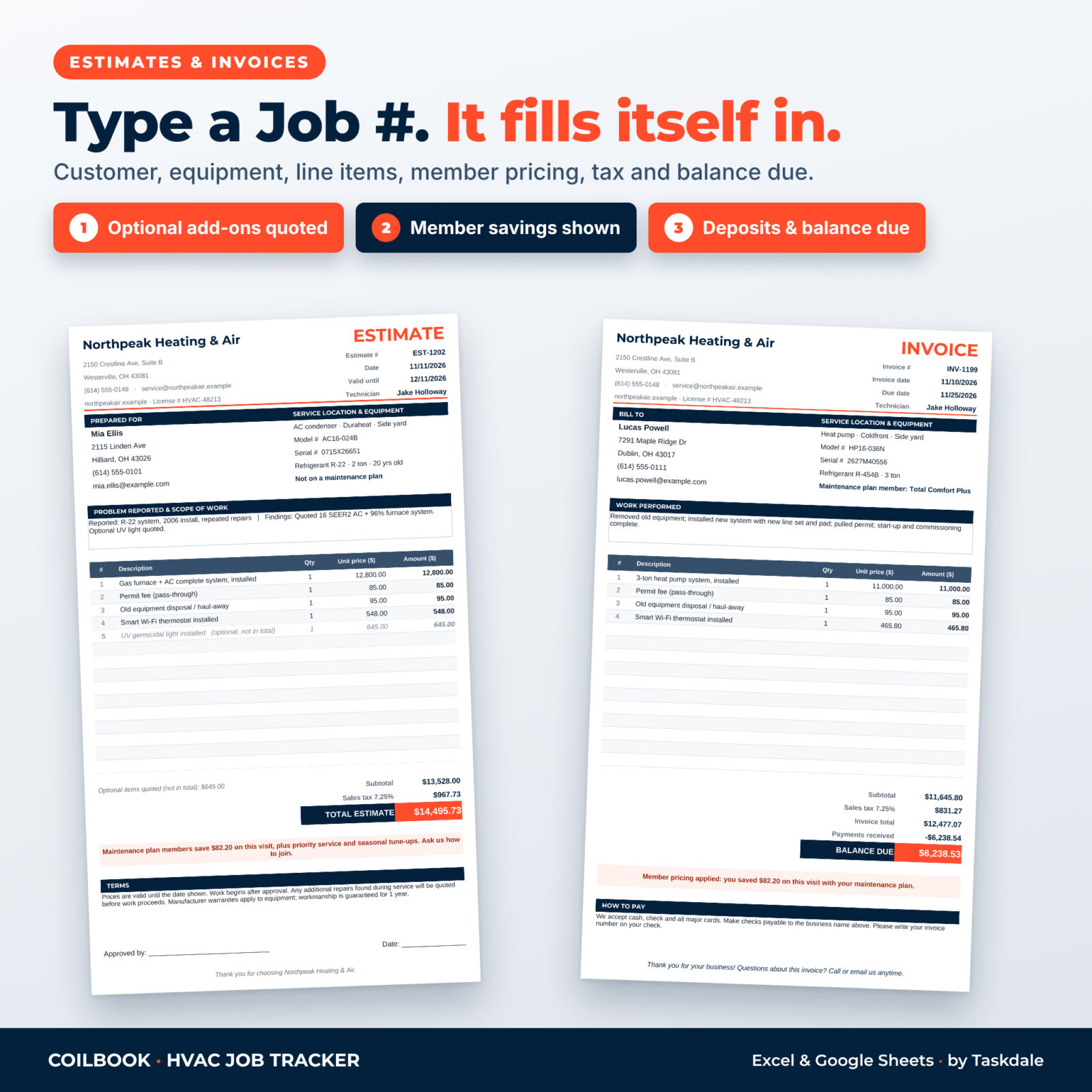
- Get paid faster: printable invoices fill in from a Job #, show deposits and the balance due, and an invoices-to-collect list shows who is overdue and by how many days.
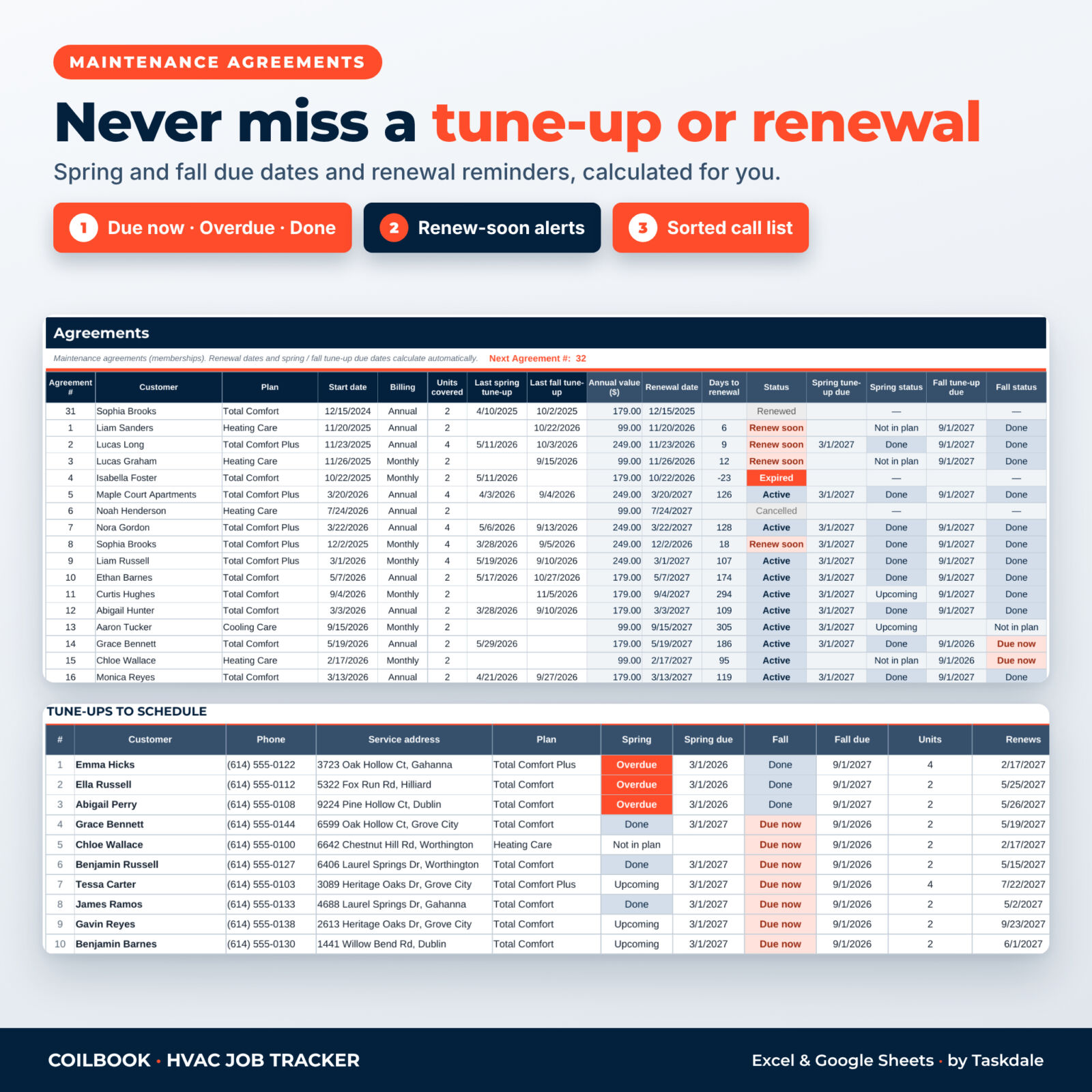
- Grow recurring revenue: track every maintenance agreement, see renewals coming up and never miss a seasonal tune-up.
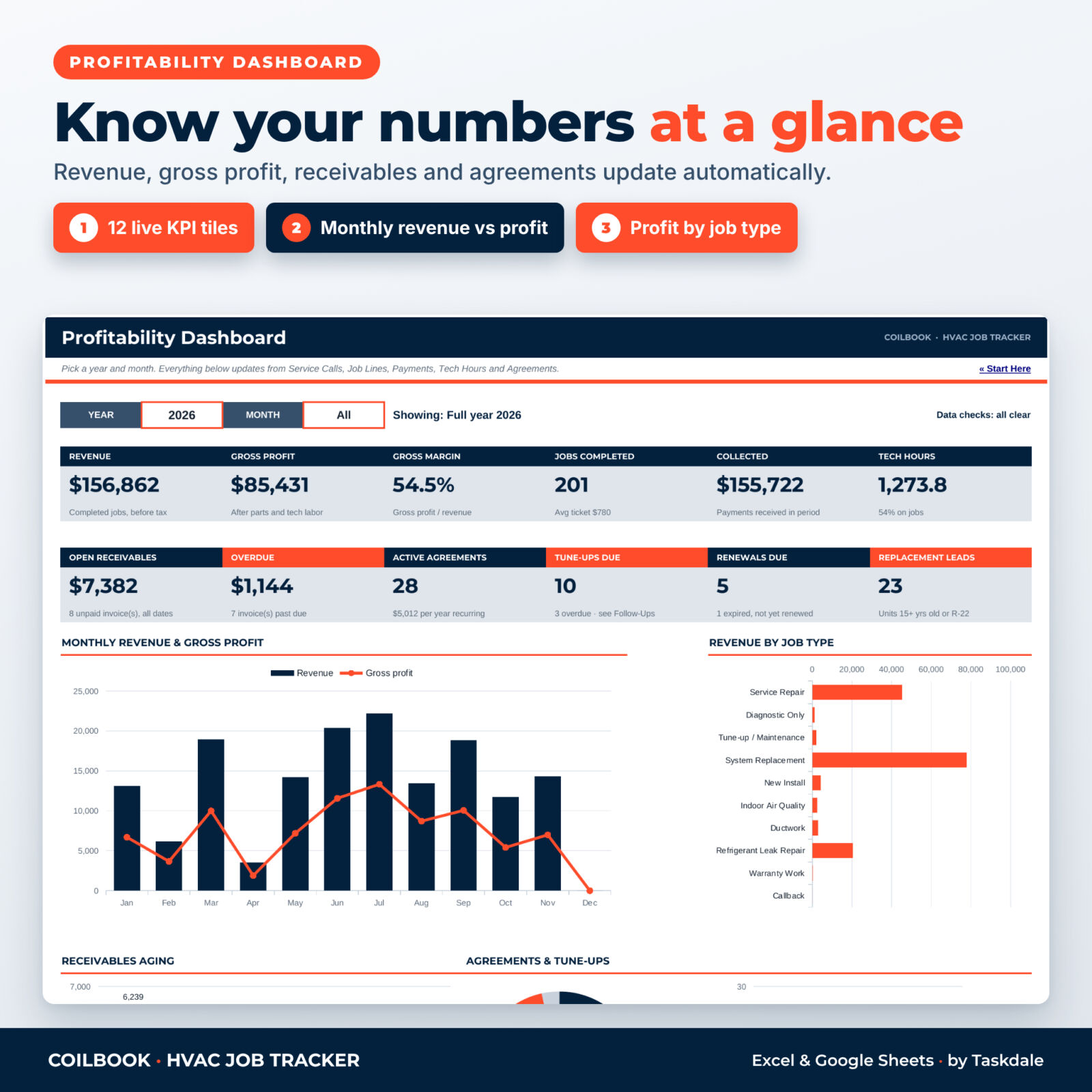
- Know your real profit: parts cost from your price book plus actual technician labor cost give gross profit and margin for every job, job type and technician.
- Sell more systems: replacement leads and a Good / Better / Best system quote with monthly payment estimates.
Features
Service calls, job lines and payments
- Service call log with job type, call reason, technician, status, problem reported, work performed and refrigerant added (lb)
- Line items by price book code with automatic member pricing, optional add-ons, custom items and sales tax on taxable items only
- Payments log for deposits and partial payments; payment status (Paid, Partial, Unpaid, Overdue) updates automatically
- Per-job parts cost, labor cost, gross profit and margin
Equipment records and customer history
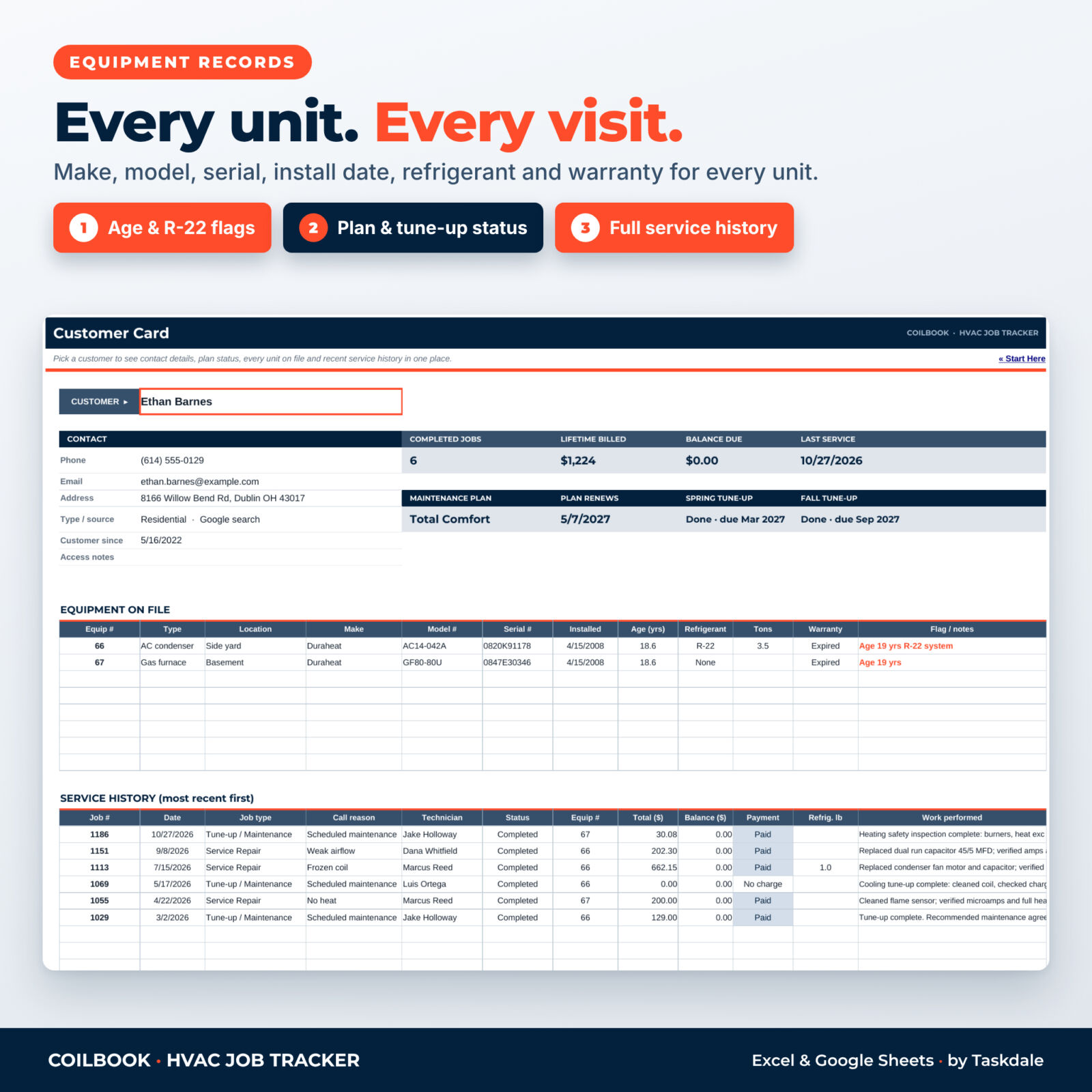
- Equipment tab for every unit: type, location, make, model, serial number, install date, refrigerant type, tonnage, SEER2 / AFUE, filter size and warranty end date
- Automatic age, warranty status, last service date and replacement flags (age you choose, plus R-22 systems)
- Customer Card: one page with contact details, plan status, every unit on file and recent service history
Flat-rate price book
- 53 starter HVAC items (diagnostics, tune-ups, capacitors, igniters, motors, refrigerant, IAQ, equipment installs) that you edit
- Suggested price from labor hours x your billable rate plus parts x your markup, or type your own flat price
- Member price, estimated job cost and margin for every item; low margins highlighted
Maintenance agreement tracker
- Plans with annual price and included spring and/or fall visits
- Renewal date, days to renewal and status: Active, Renew soon, Expired, Pending, Renewed, Cancelled
- Spring (cooling) and fall (heating) tune-up due dates and status based on season months you set
Dashboard and follow-ups
- 12 KPI tiles: revenue, gross profit, margin, jobs, average ticket, collected, tech hours, open receivables, overdue, active agreements, tune-ups due, renewals and replacement leads
- 5 charts plus month-by-month, job type, technician, lead source and refrigerant tables, filtered by year and month
- Follow-Ups tab: tune-ups to schedule, agreements to renew, invoices to collect and replacement leads, sorted by date
- 12 built-in data checks that catch typos, duplicates and missing information
What is included
- Coilbook HVAC Job Tracker (.xlsx): 17 connected tabs, blank and ready for your data
- Example workbook (.xlsx) filled with a fictional HVAC company so you can see every feature working
- Illustrated User Guide (Word .docx) covering setup, every tab, customization, troubleshooting and FAQ
How it works
- Enter your business details, currency, tax rate, payment terms, pricing rules and tune-up seasons on Settings.
- Add your technicians and plans on Lists, and set your hours and parts costs in the Price Book.
- Add customers and their equipment, then log each service call and its line items.
- Type the Job # on the Estimate or Invoice tab and print or save as PDF.
- Record payments and technician hours; the Dashboard and Follow-Ups update instantly.
File format and software requirements
One Excel workbook (.xlsx) that opens in Microsoft Excel 2016 or newer, Microsoft 365 (Windows, Mac and Excel for the web) and Google Sheets (free Google account; upload to Drive and open with Google Sheets). No macros, scripts or add-ins. Printable estimates, invoices, quotes and the Customer Card are set up for US Letter and print fine on A4. Apple Numbers is not supported.
Customization
Change the currency symbol once and every money label and printout follows. Edit dropdown lists for job types, call reasons, equipment types, refrigerants, payment methods, lead sources and plans. Your company name, address, license number, estimate terms and payment instructions print on every document. Formula cells are protected without a password, so beginners cannot break them by accident and advanced users can still change anything. Capacity: 1,500 service calls, 6,000 line items, 2,000 payments, 4,000 time entries, 600 customers, 1,000 units and 600 agreements.
Digital download
This is a digital product; nothing is shipped. After purchase you can download the workbook, the example workbook and the user guide right away. The example prices, hours and plan prices are placeholders to replace with your own.
Use cases
- A one-truck owner logs calls from a tablet in Google Sheets and emails PDF invoices the same day.
- A three-tech shop reviews the Follow-Ups tab every Monday to book tune-ups and chase overdue invoices.
- A contractor launching a maintenance club tracks members, renewals and the member discount on repairs.
- A service manager compares technician utilization and revenue per job hour before the busy season.
- An installer presents a Good / Better / Best replacement quote with monthly payment estimates at the kitchen table.
FAQ
Does this HVAC spreadsheet work in Google Sheets?
Yes. Upload the .xlsx to Google Drive and open it with Google Sheets. Formulas, dropdowns and charts carry over.
Is there a monthly fee?
No. It is a one-time purchase and your data stays in your own file.
Can I track maintenance agreements and tune-ups?
Yes. Each agreement gets a renewal date, status and spring and fall tune-up due dates, and the Follow-Ups tab lists who to call.
Does it make estimates and invoices?
Yes. Type a Job # and the printable estimate or invoice fills in with customer, equipment, line items, tax, payments and balance due.
Can I use my own prices and currency?
Yes. Edit the price book, billable rate, markup and member discount, and pick your currency symbol on Settings.
How many technicians can I track?
Up to 12 technicians, each with their own hourly cost for accurate job profit.
Is this accounting or tax software?
No. It organizes your jobs, sales and costs. Share the totals with your bookkeeper or accountant.
Personal use only (or use within your own business for business templates). You may not resell, share, or redistribute the files. © 2026 Taskdale.

Reviews
There are no reviews yet.