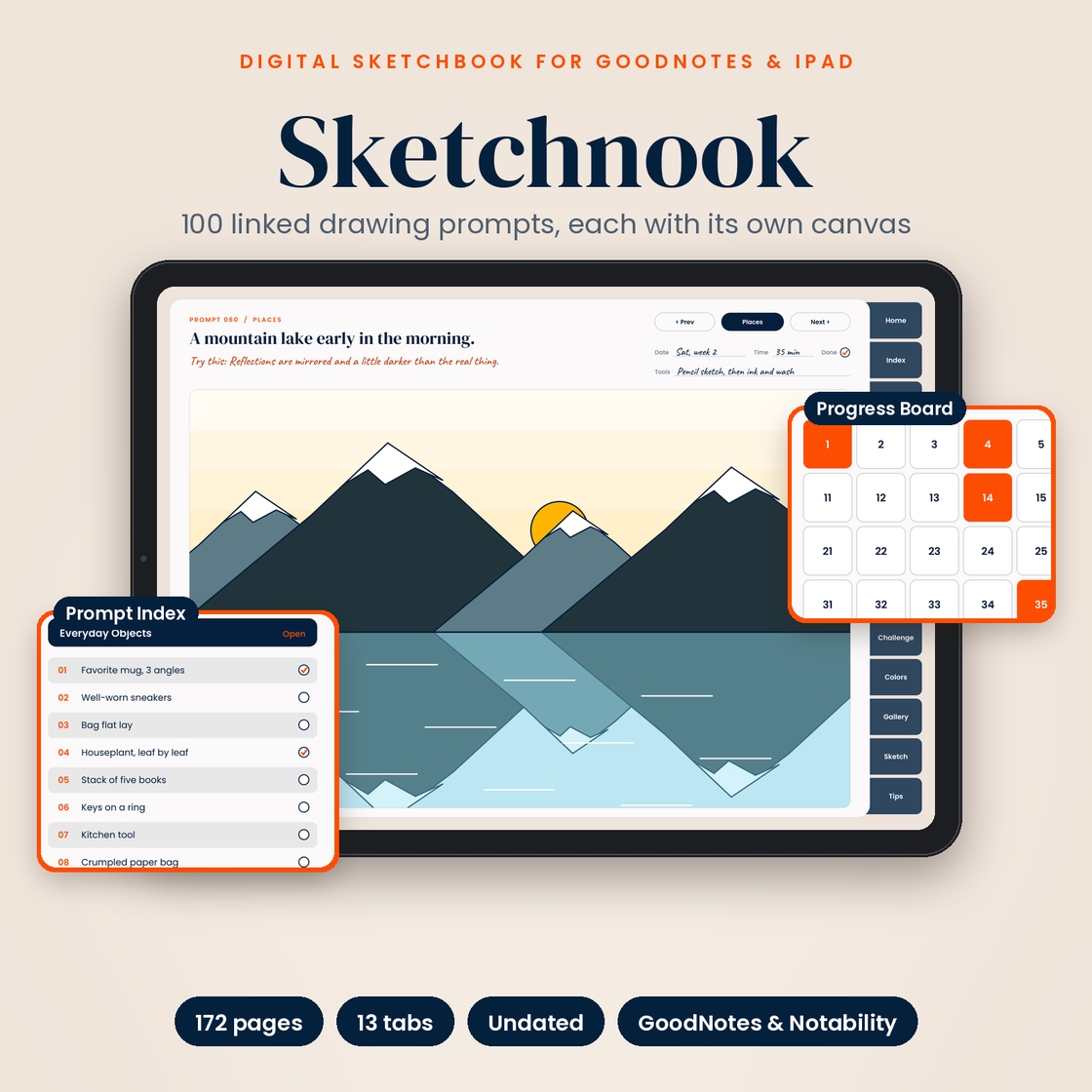


Sketchnook Digital Sketchbook with 100 Drawing Prompts
Sketchnook is a hyperlinked digital sketchbook for GoodNotes, Notability and other iPad and Android tablet apps. It gives you 100 original drawing prompts, and every prompt opens its own white canvas with one tap. No more scrolling through a long PDF to find an empty page, and no more staring at a blank screen wondering what to draw.
The file holds 172 undated landscape pages with 13 tabs down the right side of every page. Tap a tab to jump to a theme, the 30-day drawing challenge, the color pages, your progress gallery or a stack of blank, dot grid and light grid sketch paper.
Who this digital sketchbook is for
- Beginners who want simple daily drawing prompts, like a favorite mug or a sleeping cat, with a tip for each one.
- Returning artists rebuilding a sketching habit in 10 or 15 minutes a day.
- iPad and tablet sketchers who draw with an Apple Pencil or stylus in GoodNotes or Notability and want everything in one file.
- Teens, parents and teachers looking for drawing ideas with a visible way to track progress.
What makes Sketchnook different
Most prompt journals list ideas on one page and leave you to find somewhere to draw. Sketchnook links all 100 prompts to their own canvas pages, and each page has Prev and Next buttons, so you can work through prompt 1 to prompt 100 in order or jump around by theme.
Each prompt page also carries a short “Try this” tip. Prompt 13 asks for a bicycle parked against a wall, and the tip tells you to draw both wheels first and join them with two triangles. Small hints like that turn a vague idea into a drawing you can actually finish.
What is included
- Start Here page with six section cards, six theme buttons and quick links to each type of sketch paper
- How to Use page with six setup steps right inside the PDF
- Prompt Index: all 100 prompts on two pages with short titles and Done circles
- 6 theme pages: Everyday Objects, Animals, People, Places, Patterns and Imagination
- 100 prompt pages, each with the prompt, a drawing tip, date, time and tools fields, a Done circle and a large canvas
- 30-day drawing challenge: a linked 30-day grid plus a reflection page with a 30-dot streak and six questions
- 6 color pages: a 12-part color wheel with color harmonies and a value scale, 8 starter palettes with hex codes, 3 palette planner pages and a value and color study page
- 9 progress gallery pages: a 100-tile progress board, 4 gallery log pages for 100 entries, 2 Before and After pages and 2 Favorites Wall pages
- 41 sketch pages: 10 blank, 10 dot grid, 10 light grid, 4 thumbnail pages with 12 frames each, 3 study panel pages and 4 perspective guide pages (1-point and 2-point)
- Drawing Tips page with 12 practical tips, plus a license page
- DOCX user guide with setup steps for GoodNotes and Notability, troubleshooting and FAQs
The 100 drawing prompts
Six themes, 16 or 17 prompts each
Everyday Objects starts easy with things on your desk, like keys on a ring or a crumpled paper bag. Animals covers pets and wildlife, from a hedgehog rolled into a ball to a horse in profile. People builds figure skills with hands, quick gestures at a bus stop and a face lit from one side.
Places trains perspective with a quiet street, a library aisle and a train platform. Patterns gives you relaxing repeat designs such as wavy stripes, woven baskets and wood grain. Imagination mixes real things in playful ways: a teacup that is also a tiny house, a bookstore inside a giant shoe, or a garden robot with a watering can for a hand.
Color planning pages
The Color Basics page explains complementary, analogous, triadic, split complementary and warm and cool colors with small swatch examples. Eight starter palettes, such as Harbor Fog and Citrus Pop, list five hex codes each. Type a code like #0077B6 into your app’s custom color picker and your pen matches the palette exactly.
The palette planner pages give you 18 cards in total, each with five swatch circles to fill, a mood line, a prompt number and notes.
Track progress in your digital sketchbook
Shade a tile on the 100-tile Progress Board each time you finish a prompt. Every tile is also a link, so tile 42 opens prompt 42. Write your theme totals in the side panel, rate each piece out of five stars in the Gallery Log and heart your favorites. After a month, redraw an early prompt on the Before and After page. Seeing two versions of the same mug side by side is the fastest way to notice how much you have improved.
How the digital sketchbook works
- Download the PDF and import it into GoodNotes, Notability, Xodo or another PDF annotation app.
- Tap Start sketching on the cover, then pick a theme, a challenge day or a page type.
- Draw on the canvas with any pen or brush, tick Done and shade your tile.
- Need more paper? Duplicate any sketch page with your app’s page menu. Everything is undated, so skipped days waste nothing.
File format and requirements
- One hyperlinked PDF, 172 pages, about 1.3 MB, so it opens quickly
- Landscape page size of 1194 x 834 points, matching an 11-inch iPad and fitting most Android tablets
- Works in GoodNotes 5 and 6, Notability, Xodo and other apps that support PDF links
- Any stylus or a finger works; an Apple Pencil gives the most paper-like feel
- User guide in DOCX format, which opens in Word, Pages or Google Docs
Instant digital download
This is a digital product. Nothing ships to you. After checkout you can download the digital sketchbook PDF and the user guide right away, as many times as you need. It is licensed for personal use only, so please do not share or resell the file.
Real ways people use it
- A 10-minute sketch with morning coffee, working through the 30-day drawing challenge one day at a time
- Quick gesture practice on the train using the People prompts and the thumbnail pages
- A screen-friendly art activity for a teen who loves drawing on a tablet
FAQ
Does this digital sketchbook work with GoodNotes?
Yes. Import the PDF into GoodNotes 5 or 6 and every tab and link works. If a tap draws instead of jumping, switch to read-only mode or turn on stylus-only drawing.
Can I use it in Notability or on Android?
Yes. It works in Notability and in Android apps that support PDF links, such as Xodo.
Does it work in Procreate?
Procreate does not keep PDF links, so use a PDF note app like GoodNotes or Notability for the linked sketchbook.
Is it dated?
No. Every page is undated, so you can start any day of the year.
How many drawing prompts are included?
100 original prompts in six themes, each with its own page and a drawing tip.
Can I add more pages?
Yes. Duplicate any page in your app to get as many blank, dot grid or light grid pages as you like.

Reviews
There are no reviews yet.