

Fashion Designer Resume Template for Word: Monoprint
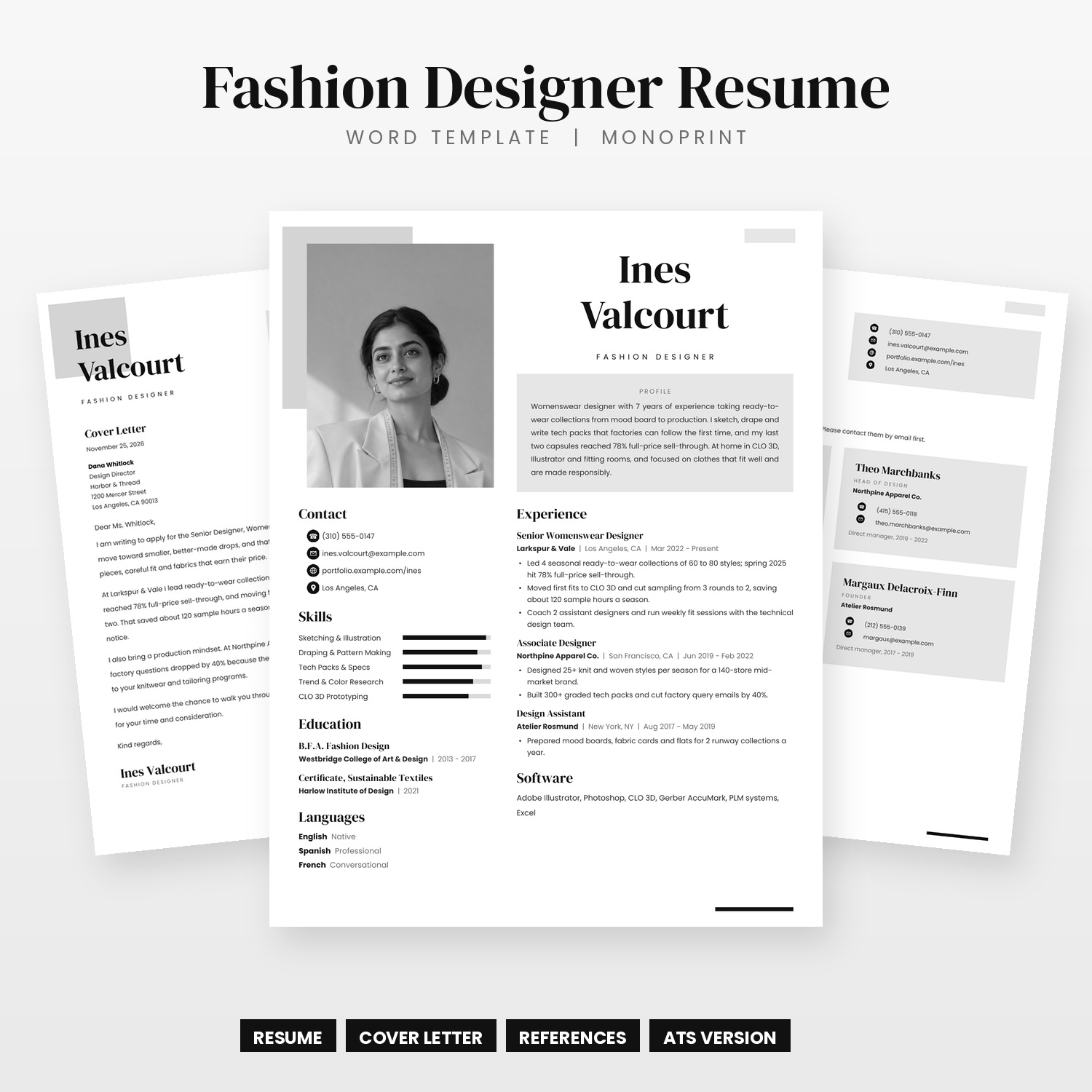
Monoprint is a fashion designer resume template for Word with the look of a magazine page: a tall grayscale photo, your name set in a large serif, a soft grey profile panel and slim black skill bars. It is made for designers who want their resume to look as considered as their collections, without spending a weekend fighting Word.
Every file is a normal .docx. Click on the sample text, type your own, and the layout holds. The kit includes a 1-page resume, a 2-page resume, a cover letter, a references page and an ATS-friendly resume, each in US Letter and A4. That is 10 Word files, plus a user guide with a fashion designer resume writing cheat sheet.
What you get in the kit
- 1-page resume with photo, profile panel, contact details, skill bars, education, languages, experience and software.
- 2-page resume that adds selected projects, awards, certifications, press and talks, core strengths and earlier experience.
- Cover letter with a matching letterhead and a sample letter written for a senior womenswear role.
- References page with four grey reference cards.
- ATS-friendly resume: one column, no photo and no tables, using the same fonts and wording.
- US Letter and A4 versions of every file.
- Fonts folder with Poppins and DM Serif Display (free SIL Open Font License).
- User guide (DOCX) with step-by-step editing help and a resume cheat sheet for fashion designers.
Why this fashion designer resume is easier to edit
Most Word resume templates break in the same places. Fonts go missing, text boxes drift, and the round or framed photo falls apart when you change it. Monoprint was built to avoid those problems.
- Embedded fonts. Poppins and DM Serif Display travel inside each file, so the design shows as intended on a computer that has never seen them. The font files are included as a backup.
- No floating text boxes. Columns and panels are table cells, so your words stay in the normal flow. Nothing overlaps when a bullet grows to two lines, and applicant tracking software can read the text.
- Photo that stays on style. Right-click, choose Change Picture, and your photo drops into the same frame and turns black and white. Want color? Picture Format, then Color, then No Recolor.
- Real Word styles. Your name, job title, section headings, job titles and bullets all use named styles, so you can change a font or color for the whole page from the Styles pane.
- Room to grow. The 1-page resume leaves space at the bottom. We tested it with three extra bullets and a two-line job title, and it still fits on one page.
- Recolorable design. Grey panels and skill bars are shaded table cells, and the grey blocks are Word shapes, so you can recolor them in a few clicks.
Sample content written for fashion designers
There is no lorem ipsum. The sample resume belongs to a fictional womenswear designer with seven years of experience, and the bullets show the kind of results design teams care about: collections of 60 to 80 styles, full-price sell-through, sample rounds cut from three to two, and 300 graded tech packs. Use the wording as a model and swap in your own numbers.
The guide adds a cheat sheet: a bullet formula (action, task, result with a number), 30 action verbs for designers, the keywords recruiters search for in fashion roles (tech packs, line planning, CLO 3D, fit sessions, fabric sourcing and more), and what to write in each section.
Who this resume template is for
- Fashion designers in womenswear, menswear, kidswear, knitwear, denim or activewear
- Design assistants and associate designers going for their next step
- Technical designers, textile designers and costume designers
- Recent fashion graduates who want a polished first resume and cover letter
- Senior designers and design directors who need two pages for projects and awards
How it works
- Download the zip file and the user guide right after checkout.
- Unzip the kit and open the US-Letter or A4 folder.
- Open the 1-page or 2-page resume in Microsoft Word and type over the sample text.
- Change the photo, adjust the skill bars and add or remove bullets.
- Edit the matching cover letter and references page, then save everything as PDF.
File formats and software
- Microsoft Word .docx files (Word 2013 or newer, Word for Mac, Microsoft 365)
- Opens in Google Docs and Apple Pages with minor layout differences; export your final PDF from Word if you can
- US Letter (8.5 x 11 in) and A4 (210 x 297 mm)
- Content sits at least 0.4 in from the page edge, so it prints cleanly at home
Customization
You can change every word, the photo, the colors and the fonts. Delete the photo for companies or countries that prefer resumes without one. Move sections between columns, add another job by copying an existing one, or switch to the ATS version for online portals. The guide walks you through each step with the exact menu names.
Real situations where this kit helps
- Applying for an associate designer role through an online job portal: send the ATS version there, then bring the designed resume to the interview.
- Emailing a creative director directly: attach the 1-page PDF and the matching cover letter.
- Moving from assistant to senior designer: use the 2-page resume to show capsules, fit library work and awards.
- Applying abroad: switch to the A4 files and keep the same look.
Digital download
This is a digital product. Nothing is shipped. You get instant access to the zip file and the DOCX user guide after payment, with unlimited re-downloads from your account. The sample name, companies, schools and photo are fictional; the photo is an AI-generated sample for you to replace. License: personal use only, no resale or sharing.
FAQ
Is this a fashion designer resume template for Word?
Yes. Every file is a Microsoft Word .docx built and tested for Word.
Can I use it in Google Docs?
Yes, upload the .docx to Google Drive and open it in Google Docs. Expect small layout shifts.
Do I need to install fonts?
Usually not, because the fonts are embedded. If your Word version ignores embedded fonts, install them from the included Fonts folder.
Can I show my photo in color?
Yes. Click the photo, then Picture Format, Color, No Recolor.
Is there a version without a photo?
The ATS-friendly resume has no photo, and you can delete the photo from any designed file.
Will it work for other design jobs?
Yes. Only the sample text is about fashion, so it suits textile, costume, accessories and other creative roles too.
Is this a Canva template?
No. This kit is made for Microsoft Word.
Reviews
There are no reviews yet.