



The Feeframe bookkeeper billing tracker is a spreadsheet for freelance bookkeepers and small bookkeeping practices who bill monthly fixed fees, hourly clients and catch-up projects. Log your time once and the workbook builds each month’s invoice, tracks what’s paid and overdue, flags scope creep on fixed-fee clients, shows your true effective hourly rate and tells you when each client is due a fee review. It works in Microsoft Excel and Google Sheets, with no macros and no subscription.
What this bookkeeper billing tracker does
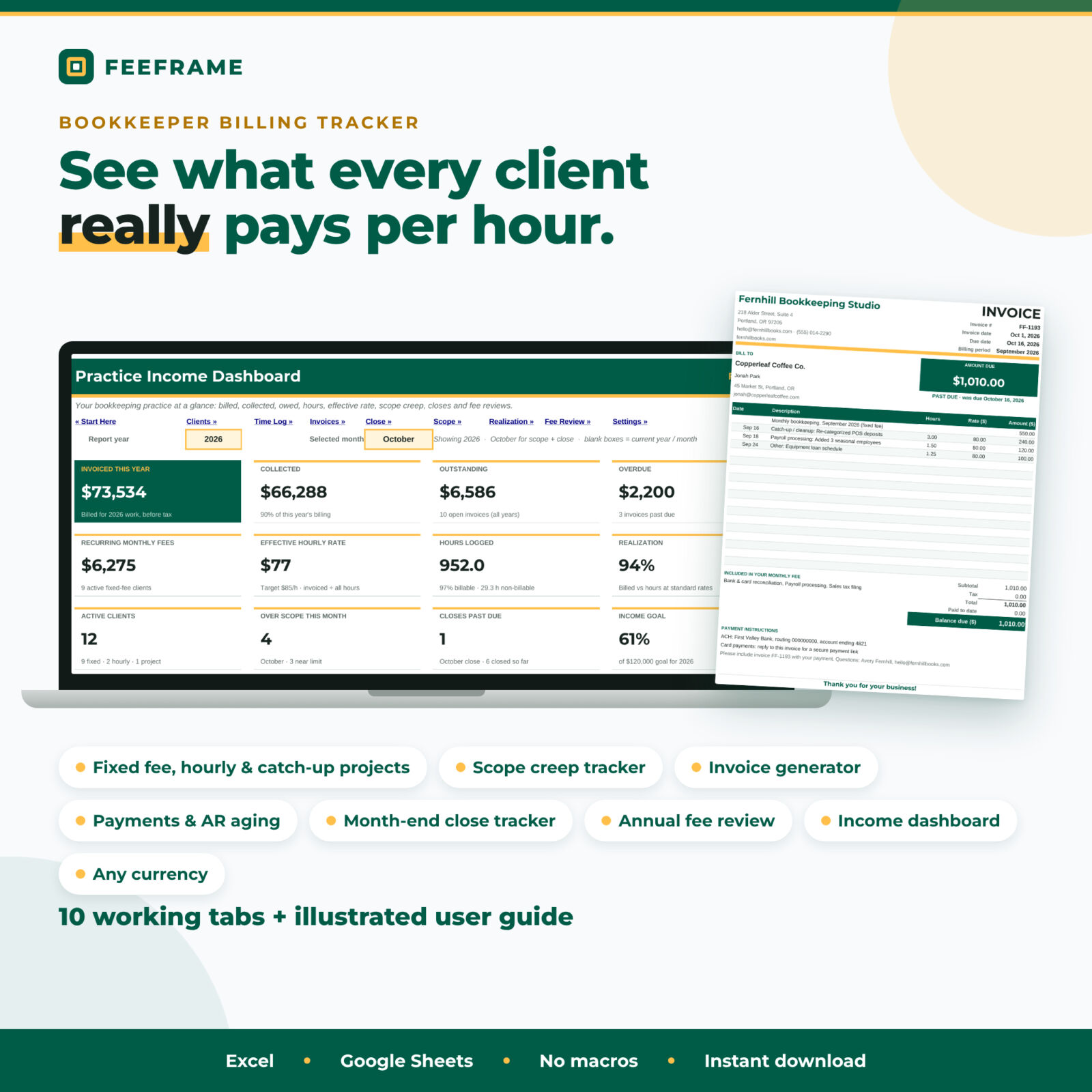
Most client trackers stop at a contact list and a time sheet. Feeframe connects the four things a bookkeeping practice actually juggles each month: the work (time), the close (status and due dates), the money (invoices, payments and aging) and the price (scope, effective rate and fee reviews).
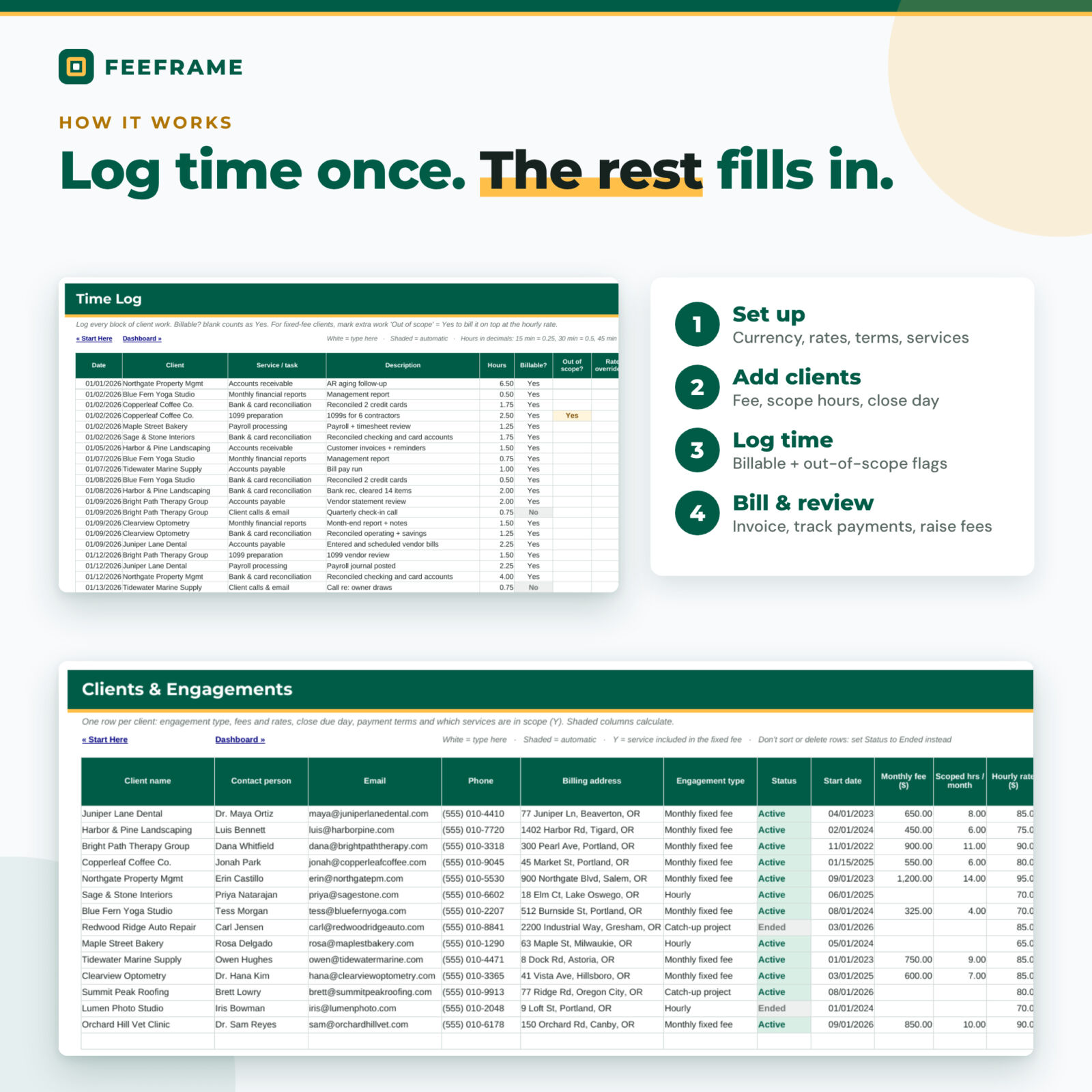
- Clients and engagements: up to 100 clients, each set as Monthly fixed fee, Hourly or Catch-up project, with fee, scoped hours, hourly rate, close due day, payment terms and a Y for each service included in the fee.
- Time Log: 3,000 rows with a billable flag, an out-of-scope flag for extra work on fixed-fee clients and an optional rate override.
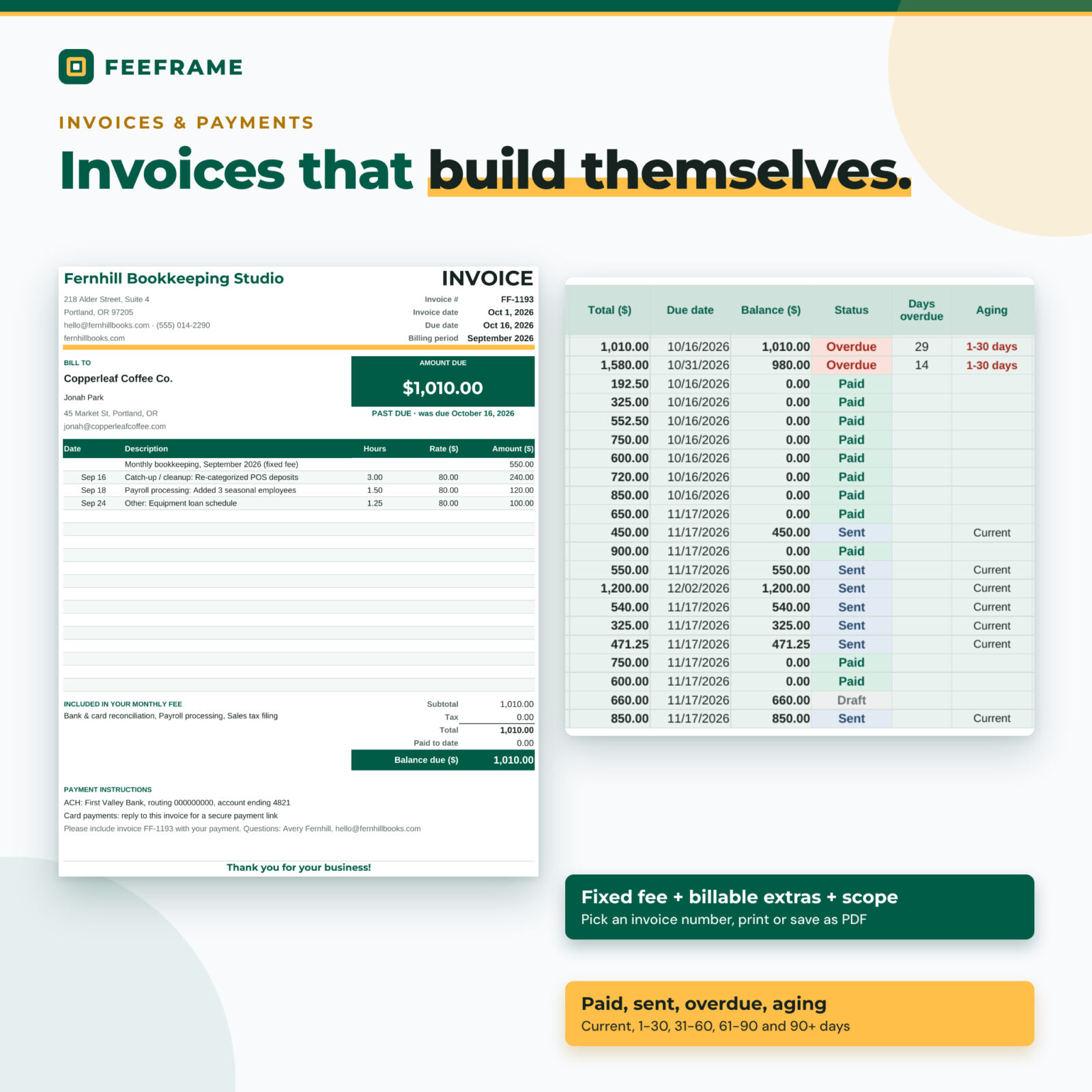
- Invoices and payments: 1,200 invoice rows. The fixed fee and billable time fill in by client and month; add project deposits, adjustments and tax. Status shows Draft, Sent, Part paid, Overdue, Paid or Written off, with 1-30, 31-60, 61-90 and 90+ day aging.
- Printable invoice: pick an invoice number to get a clean one-page invoice with itemized time, the services included in the fee, totals and your payment instructions. Print it or save it as a PDF.
- Month-End Close Tracker: January to December status for every client (Not started, In progress, Waiting on client, In review, Closed, N/A), due dates from each client’s close day and red past-due flags.
- Scope Check: fixed-fee hours vs scoped hours for any month, effective rate per hour, the value of over-scope time and a 12-month over/under heat map.
- Realization: per client for the year: billable %, standard value, invoiced, collected, realization % and effective hourly rate vs your target.
- Fee Review planner: review dates, 12-month average hours and effective rate, the fee that would hit your target rate, your planned increase, the date to send notice and the annual uplift.
- Practice income dashboard: 12 KPI tiles, invoiced vs collected and billable vs non-billable charts, income by engagement type, effective rate of your top clients, receivables aging, overdue invoices, close status and upcoming fee reviews.
Who it is for
Feeframe is built for solo and virtual bookkeepers, small bookkeeping firms and bookkeepers moving clients from hourly billing to fixed-fee retainers. If you have ever finished a month wondering why a “simple” client took twelve hours, this workbook makes that visible.
Main benefits
- Catch scope creep early. Out-of-scope time is kept apart from scoped hours, so you can bill it or use it in your next fee conversation.
- Know your real hourly rate. Effective rate counts every hour, including admin and client email, not just the billable ones.
- Get paid faster. Overdue invoices and aging buckets update with today’s date.
- Never miss a close. Each client’s due date is calculated and late closes turn red.
- Raise fees with confidence. Review dates, notice dates and the annual impact of each raise sit in one planner.
How it works
- Settings: add your business details, currency symbol, default and target hourly rates, payment terms and service list.
- Clients: add each client’s engagement type, fee or rate, scoped hours and close due day.
- Time Log: record your work in decimal hours.
- Invoices: add a row per client per month; totals, due dates and status calculate.
- Close Tracker and Dashboard: update close status and pick a year and month to see your numbers.
Fee increases don’t rewrite history: keep the old fee in the “prior” column with a start date for the new fee, and older invoices keep the old price.
What is included
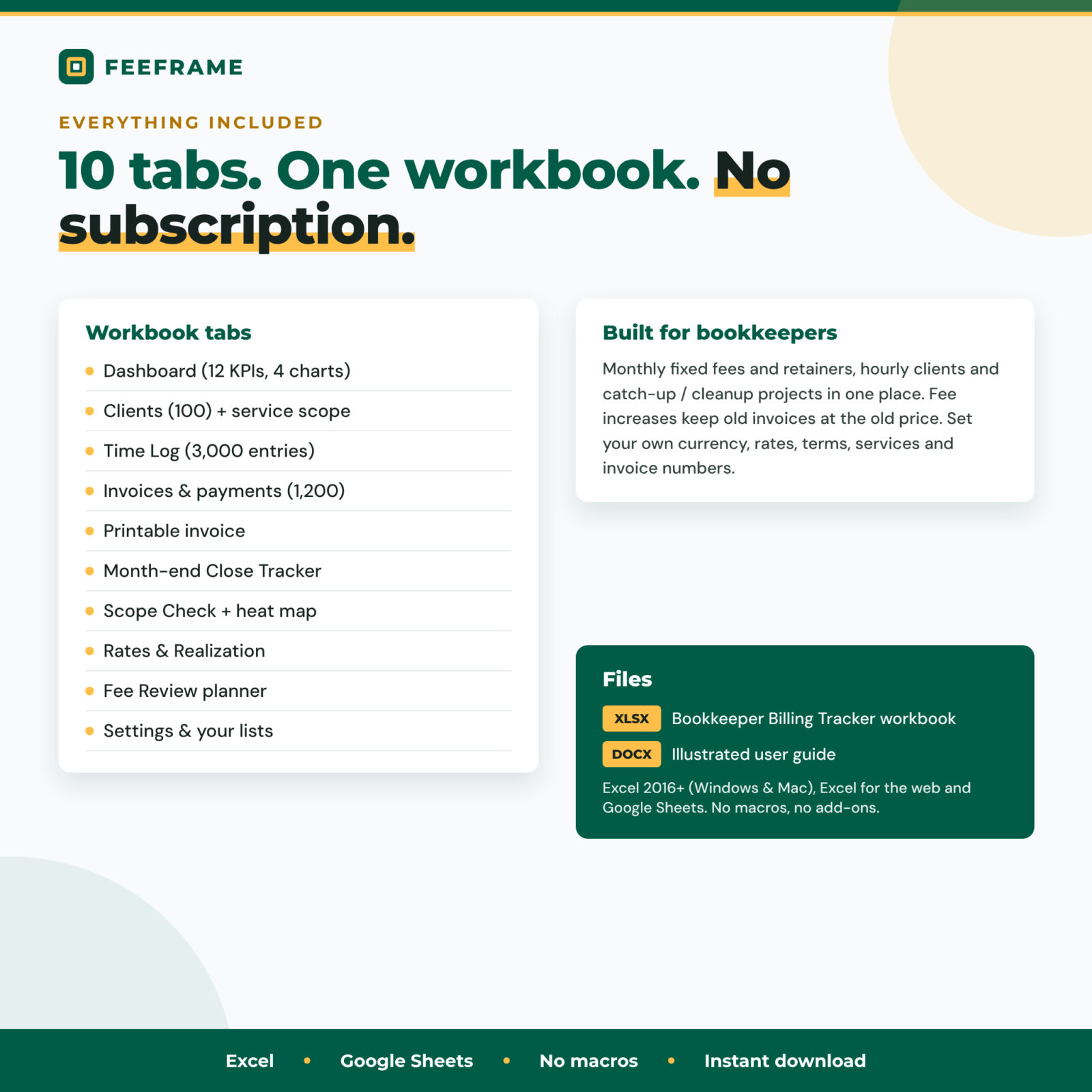
- Feeframe Bookkeeper Billing Tracker (.xlsx), 10 working tabs plus Start Here
- Illustrated user guide (.docx) covering setup, every tab, customizing, troubleshooting and FAQs
File formats and software requirements
One .xlsx workbook for Microsoft Excel 2016 or newer (Windows and Mac), Excel for the web, or Google Sheets (free with a Google account). No macros, scripts or add-ons. Charts are native spreadsheet charts.
Customization
Choose any currency symbol; every money header, tile and invoice reads it. Rename your 14 services and task types, set your payment methods, invoice prefix, default terms, tax rate on invoices, close due day, near-scope warning level and default fee increase. Formula cells are protected without a password so they are hard to break by accident but easy to unlock.
Digital download
This is an instant digital download. Nothing is shipped. Download the files from your order confirmation or account page and open the workbook in Excel or import it into Google Sheets.
Use cases
- A solo bookkeeper with 12 retainer clients checks Scope Check on the 5th of each month and bills out-of-scope cleanup on the same invoice as the monthly fee.
- A two-person practice uses the Close Tracker as its month-end board and the Dashboard for a weekly money check-in.
- A bookkeeper planning January price increases sorts out who is below target rate, sets new fees and sends notice 30 days ahead.
- A cleanup specialist bills a catch-up project with a 50% deposit and watches hours against the project budget.
Bookkeeper billing tracker FAQ
Does it work in Google Sheets?
Yes. It uses only functions that work in Excel and Google Sheets. Upload the .xlsx to Google Drive and open it with Google Sheets.
Can I track hourly and fixed-fee clients together?
Yes. Each client has an engagement type: Monthly fixed fee, Hourly or Catch-up project. The invoices, scope check and dashboard handle all three.
How many clients and invoices does it hold?
100 clients, 3,000 time entries and 1,200 invoices, which is several years of invoices for most solo practices.
Can I use my own currency?
Yes. Type your currency symbol once in Settings. The default is $.
Does it make invoices I can send?
Yes. The Invoice tab prints a one-page invoice for any invoice number, which you can print or save as a PDF to email.
Is this accounting or tax software?
No. It is a billing and practice-management template that records what you enter. It does not file taxes or give tax or legal advice.
Is it a subscription?
No. You pay once and keep the files.
Personal use only (or use within your own business for business templates). You may not resell, share, or redistribute the files. © 2026 Taskdale.

Reviews
There are no reviews yet.