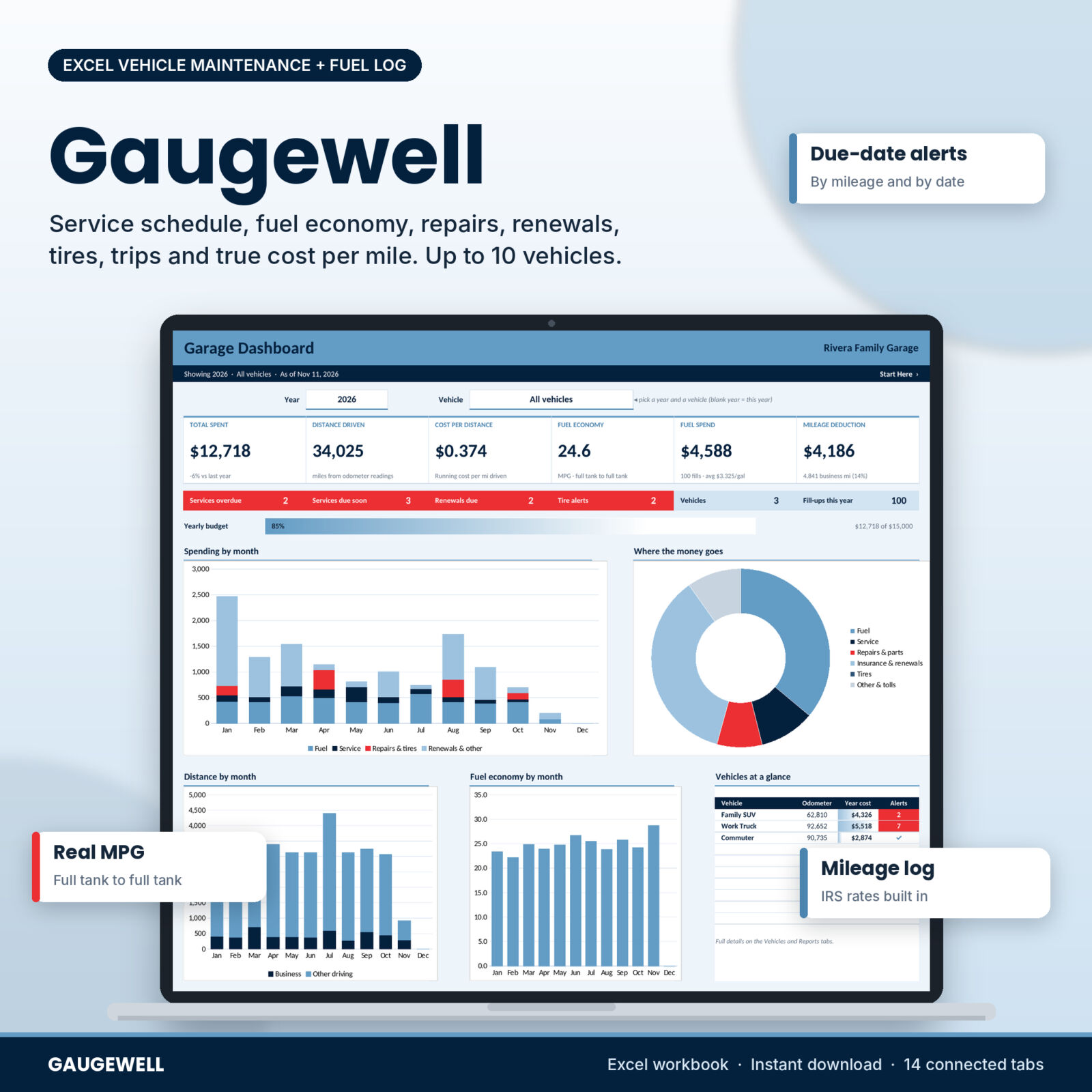



Gaugewell is a car maintenance log spreadsheet for Excel that tracks everything your vehicles need and everything they cost. Add a car, truck or van once. Then log fill-ups, services, repairs, renewals and trips as they happen. The workbook works out what is due next, your real fuel economy, the cost per mile of each vehicle and the value of your business mileage. It holds up to 10 vehicles, so it suits one car, a family garage or a small fleet.
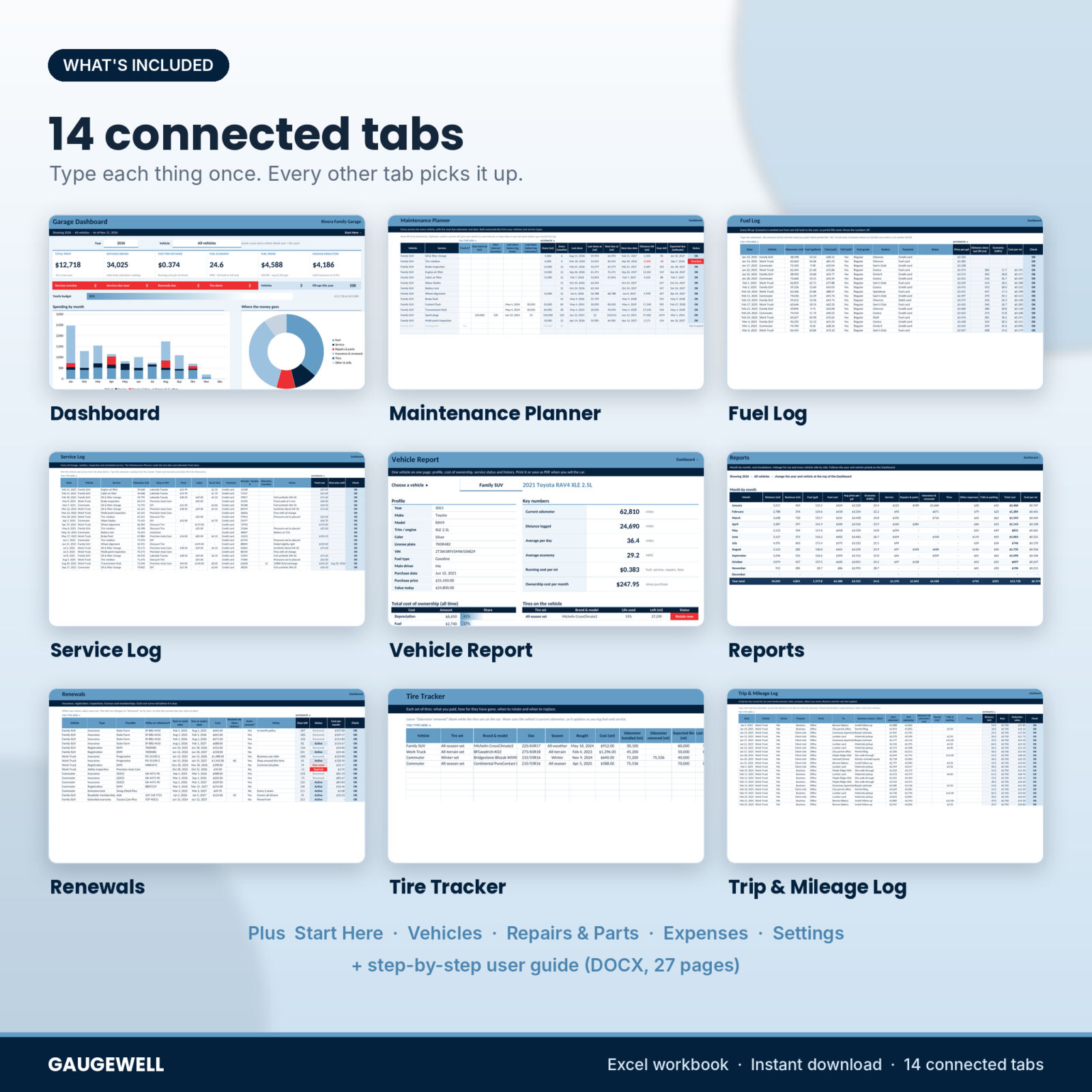
The 14 tabs are connected, so one odometer reading on a fuel receipt moves the service schedule, the tire wear, the cost per mile and the Dashboard at the same time.
What the vehicle maintenance tracker does
- Tells you what is due. The Maintenance Planner builds a schedule for every vehicle from 14 ready-made service types (oil, rotation, brakes, filters, fluids, plugs and more). Each one is due by miles and by months, whichever comes first.
- Predicts the date. It uses your own driving pace to estimate when you will reach the next due odometer, so a high-mileage truck gets its reminder earlier than a weekend car.
- Measures real fuel economy. The fuel log uses the full-tank to full-tank method, so a quick top-up never throws your MPG off.
- Adds up the true cost. Fuel, service, repairs, insurance and registration, tires, other expenses, tolls and parking, plus depreciation, give you total cost of ownership and running cost per mile.
- Keeps a mileage log for tax. The trip log uses the rate for each trip date and shows a yearly deduction value by purpose.
Who it is for
- Car owners who want a clean service history and fewer surprise repair bills
- Families with two or three cars and a pile of insurance and registration dates
- Freelancers, contractors, real estate agents and gig drivers who need a business mileage log
- Small fleets of up to 10 vehicles: trades, delivery, rentals, farms, churches and clubs
- Anyone selling a car who wants to hand a buyer a tidy service record
Features
Dashboard
Pick a year and one vehicle or all of them. Six cards show total spent (with the change from last year), distance driven, cost per mile, fuel economy, fuel spend with the average price per gallon, and your mileage deduction. Red alert chips count overdue services, services due soon, renewals due and tire alerts. Charts show spending by month, where the money goes, distance by month split into business and other driving, and fuel economy by month. Two lists show the next eight maintenance items and renewals, sorted by date.
Maintenance Planner and Service Log
Every service type appears for every vehicle on its own. Switch off a service a car does not need, give one vehicle its own interval (say 7,500 miles for a truck on synthetic oil), or type when a service was last done before you started the log. The Service Log records date, odometer, shop, parts, labor, tax, receipt number and warranty, and the planner reads the latest date and odometer from it.
Fuel Log
Type the date, odometer, fuel amount and total paid. You get the price per gallon or liter, distance since the last fill, MPG (or km/L or L/100 km) and cost per mile. Partial fills are marked with one drop-down.
Repairs and parts, renewals, tires and expenses
- Repairs & Parts: quantity, unit cost, labor, part number and a warranty end date that shows Active or Expired.
- Renewals: insurance, registration, safety and emissions inspections, license, roadside membership. Each turns pink before it is due and red when it expires. Add the next period and the old row changes to Renewed by itself.
- Tire Tracker: distance used, life used, distance left, next rotation and a status of Rotate now, Replace soon, Replace or Good, using tread depth too.
- Expenses: washes, parking, tolls, loan payments, accessories and tickets, so the cost of ownership is complete.
Trip and mileage log
Date, vehicle, driver, purpose, from, to, business reason and start and end odometer (or just the distance, with a round-trip option). The IRS standard rates for 2025 and 2026 are already in Settings, including the July 1, 2026 increase to 76 cents for business miles, and each trip uses the rate for its own date. Add next year’s rates in one row, or type your own country’s rates.
Vehicle Report and Reports
The Vehicle Report puts one vehicle on one printable page: profile, key numbers, total cost of ownership, tires, renewals, the status of every service and the newest 15 services and repairs. Reports adds a month-by-month table, a cost breakdown, a mileage summary by purpose and every vehicle side by side.
What is included
- Gaugewell-Vehicle-Maintenance-Fuel-Log.xlsx: the workbook with 14 tabs, blank and ready to use
- Gaugewell-User-Guide.docx: a 27-page guide with setup steps, every tab explained, troubleshooting and FAQs
How it works
- Open Settings. Pick your currency, miles or km and gallons or liters, and check the service intervals against your owner’s manual.
- Add your vehicles with a short nickname, today’s date and today’s odometer.
- Type any recent service dates on the Maintenance Planner so the first due points are right.
- Log fill-ups, services, repairs, renewals and trips as they happen.
- Open the Dashboard or the Vehicle Report whenever you want to know where things stand.
File format and software
One .xlsx workbook, built for Microsoft Excel 2010 or newer on Windows or Mac and tested in LibreOffice Calc. It has no macros or add-ins. It is not designed for Google Sheets or Apple Numbers. The guide is a Word .docx file.
Make it yours
Pick from 25 currency symbols in one cell and every money value follows. Switch between miles and km, gallons and liters, MPG and L/100 km. Rename or add service types, repair and expense categories, renewal types, trip purposes, fuel grades, payment methods and drivers. Formula cells are locked without a password so nothing breaks by accident, and input cells stay open. Formatting, column widths and filters work on every tab.
Digital download
This is a digital product. Your files are ready to download right after checkout. Nothing is shipped.
License: personal use for one household or one small business. Please do not resell, share or upload the files.
FAQ
Does it work in Google Sheets?
It is built for Excel 2010 or newer and tested in LibreOffice Calc. It is not designed for Google Sheets or Numbers.
How many vehicles can I track?
Up to 10, with room for 1,000 services, 1,500 fill-ups, 500 repairs, 150 renewals, 100 tire sets, 1,000 expenses and 2,000 trips.
Can I use kilometers and liters?
Yes. Pick km and liters on Settings and economy shows as L/100 km. You can choose km/L instead.
Does it calculate MPG automatically?
Yes, from one full tank to the next, including any partial fills in between.
Is the mileage log good for taxes?
It records date, purpose, route, business reason and distance for each trip and applies the rate for the trip date. It is a record-keeping tool, so check the rules with your tax preparer.
Are the service intervals right for my car?
They are common starting points. Change them on Settings, or give one vehicle its own interval.

Reviews
There are no reviews yet.