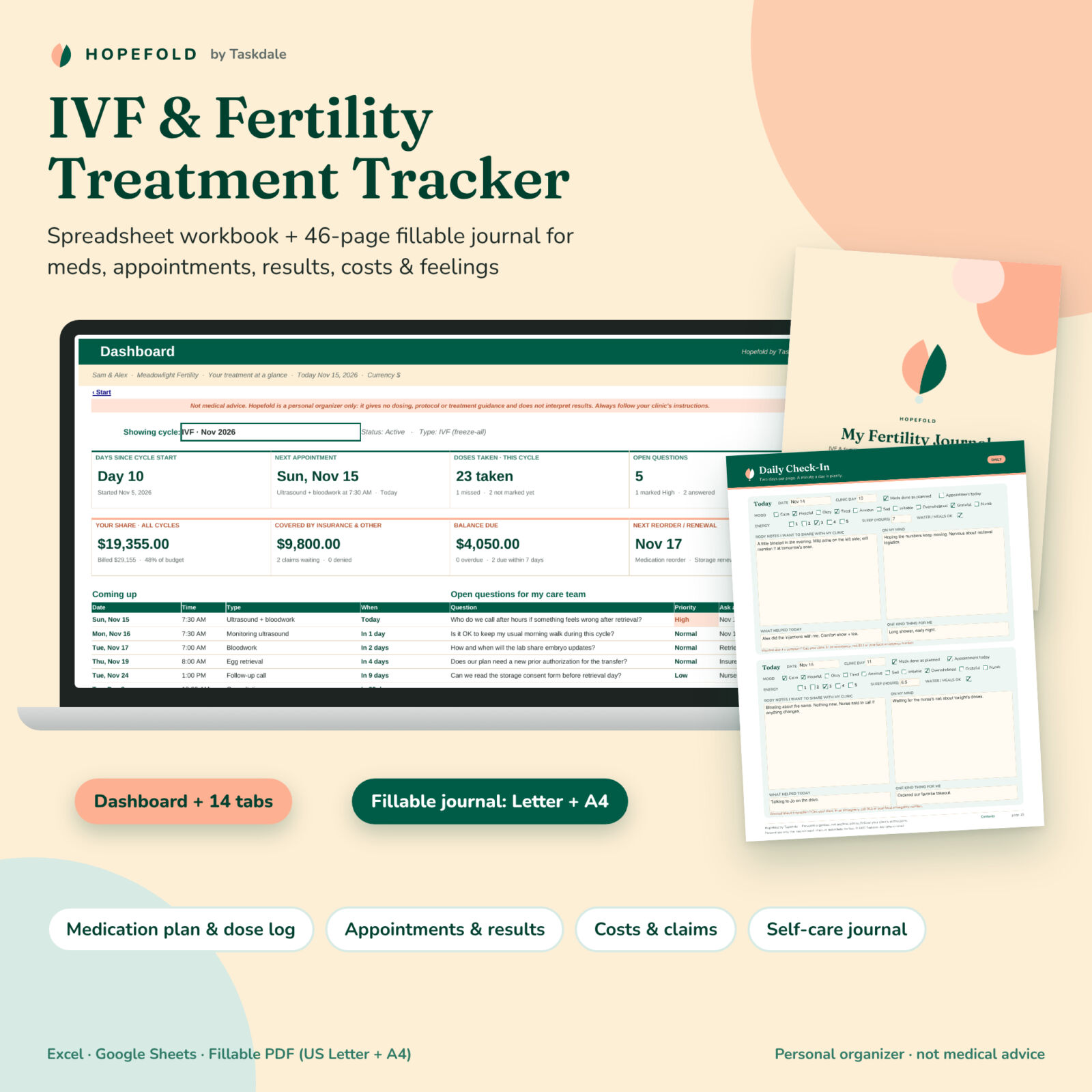


Hopefold is an IVF tracker and fertility treatment organizer that brings every moving part of a cycle into one place: the medications and doses your clinic prescribes, every dose you take or miss, monitoring visits and the results your clinic reports, retrieval and transfer days, storage renewals, bills, insurance claims and the questions you want to ask. It includes a 14-tab spreadsheet for Excel and Google Sheets and a 46-page fillable PDF journal in US Letter and A4.
Important: Hopefold is a personal organizer, not medical advice. It never suggests medications, doses, protocols or timing, never interprets results and makes no success-rate claims. You copy your clinic’s instructions; Hopefold keeps them tidy.
Why this IVF tracker spreadsheet helps
Fertility treatment comes with a lot of logistics at a time when you have very little spare energy: injection times, changing instructions after each scan, pharmacy orders, portal results, bills from several providers and insurance calls. Hopefold connects the paper side and the numbers side, so one entry shows up everywhere it’s needed.
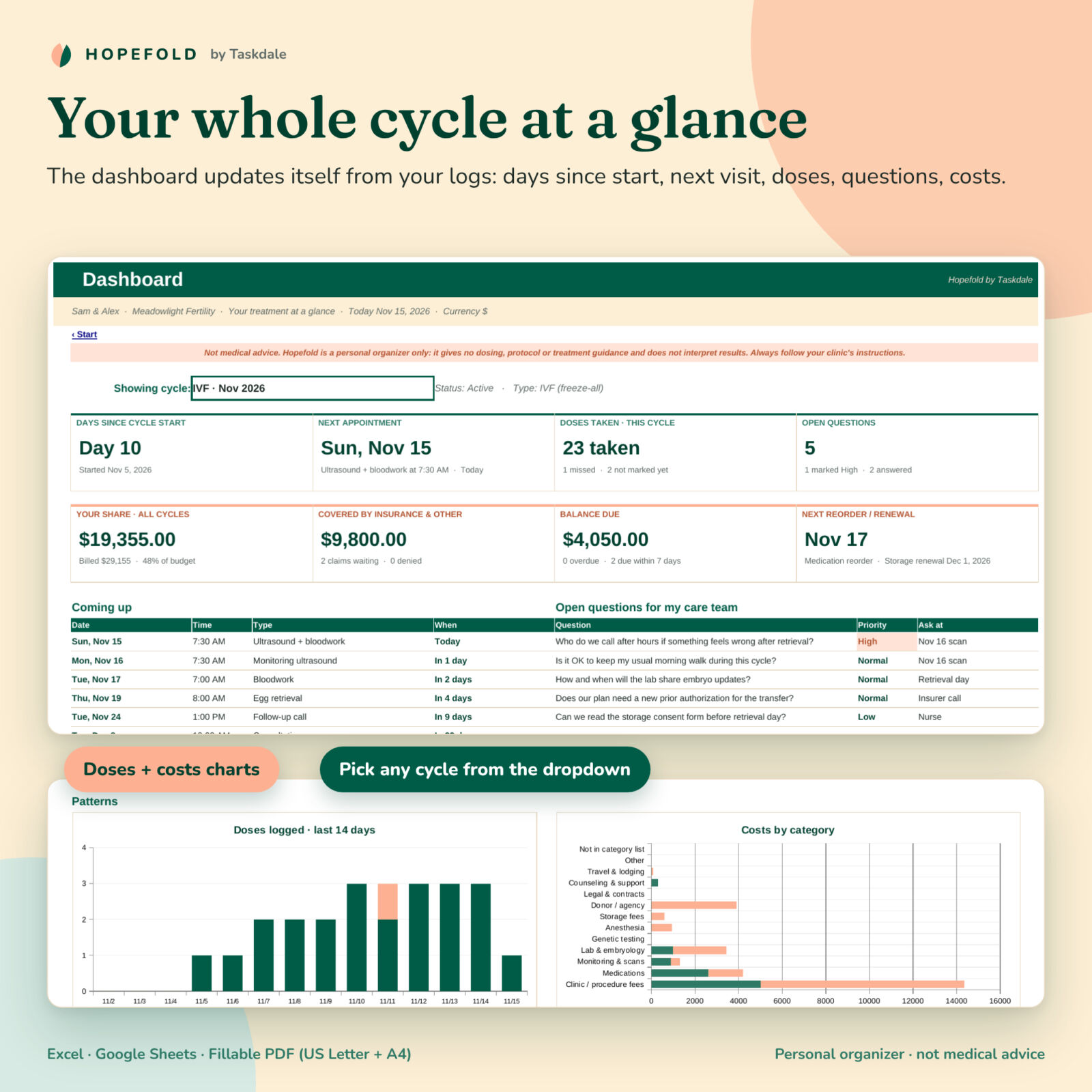
- Less to remember: the dashboard shows days since your cycle started, your next appointment, doses taken and missed, open questions and what you owe.
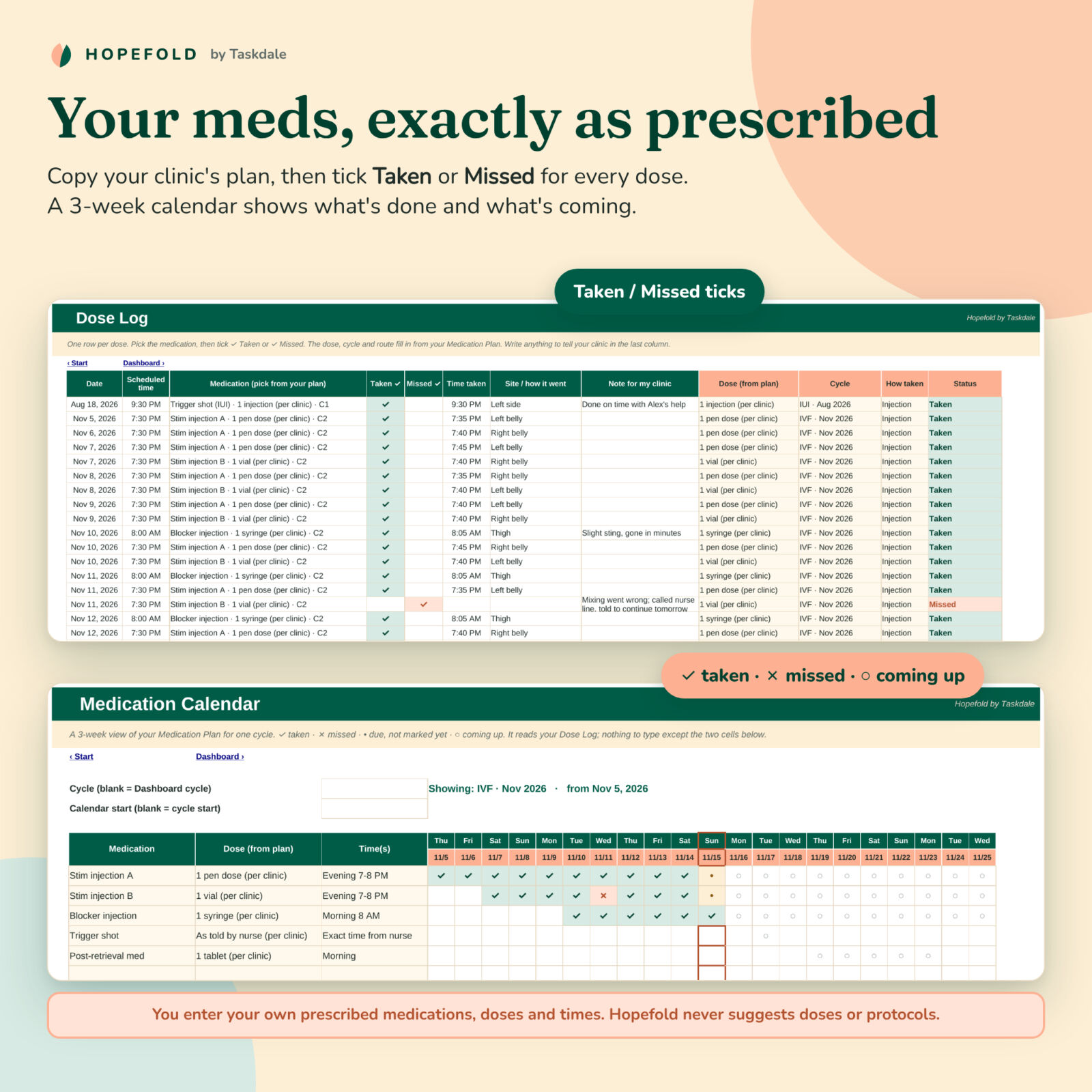
- Fewer missed details: tick each dose Taken or Missed and the medication calendar fills itself.
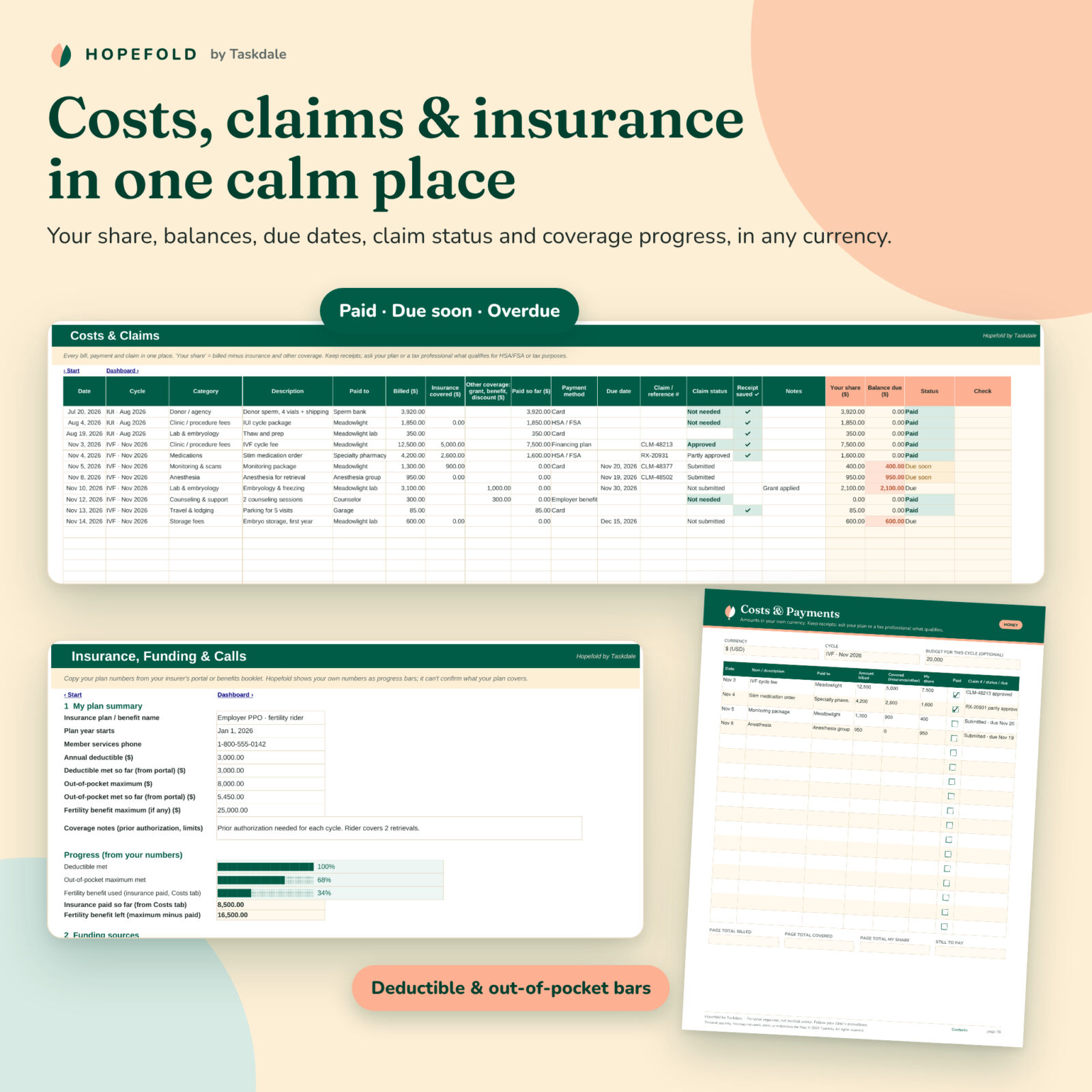
- Clear money picture: billed amount, insurance and other coverage, your share, balance due and claim status for every bill.
- Calmer appointments: your questions, sorted by priority, are ready to bring to every visit.
Who it is for
Hopefold is written for every path to parenthood: solo parents by choice, LGBTQ+ and same-sex couples, different-sex couples, donor egg, sperm or embryo journeys, reciprocal IVF, gestational carriers and fertility preservation. It works for IVF (fresh or freeze-all), frozen embryo transfer (FET), IUI, timed cycles, egg freezing and embryo banking. Every list can be renamed to match your clinic’s words and your story.
What’s included
IVF tracker workbook (Excel and Google Sheets)
- Dashboard: 8 tiles, the next six appointments, open questions (High priority first), doses logged in the last 14 days, costs by category, follicles counted per visit for the selected cycle, and coverage and budget progress bars.
- Settings: your names, clinic, one currency symbol for the whole workbook, and editable dropdown lists.
- Cycles: up to 12 cycles with type, start date, plan name in your clinic’s words, status, clinic quote vs billed, appointments, doses and costs per cycle.
- Medication plan: each prescribed medication with dose as written, how it’s taken, times, dates, instructions word for word, storage, pharmacy and reorder date.
- Dose log: 1,000 rows with Taken and Missed ticks, injection site and notes for your clinic; dose, cycle and route fill in automatically.
- Medication calendar: a 3-week tick grid per cycle showing taken, missed, due and coming-up doses, with today outlined.
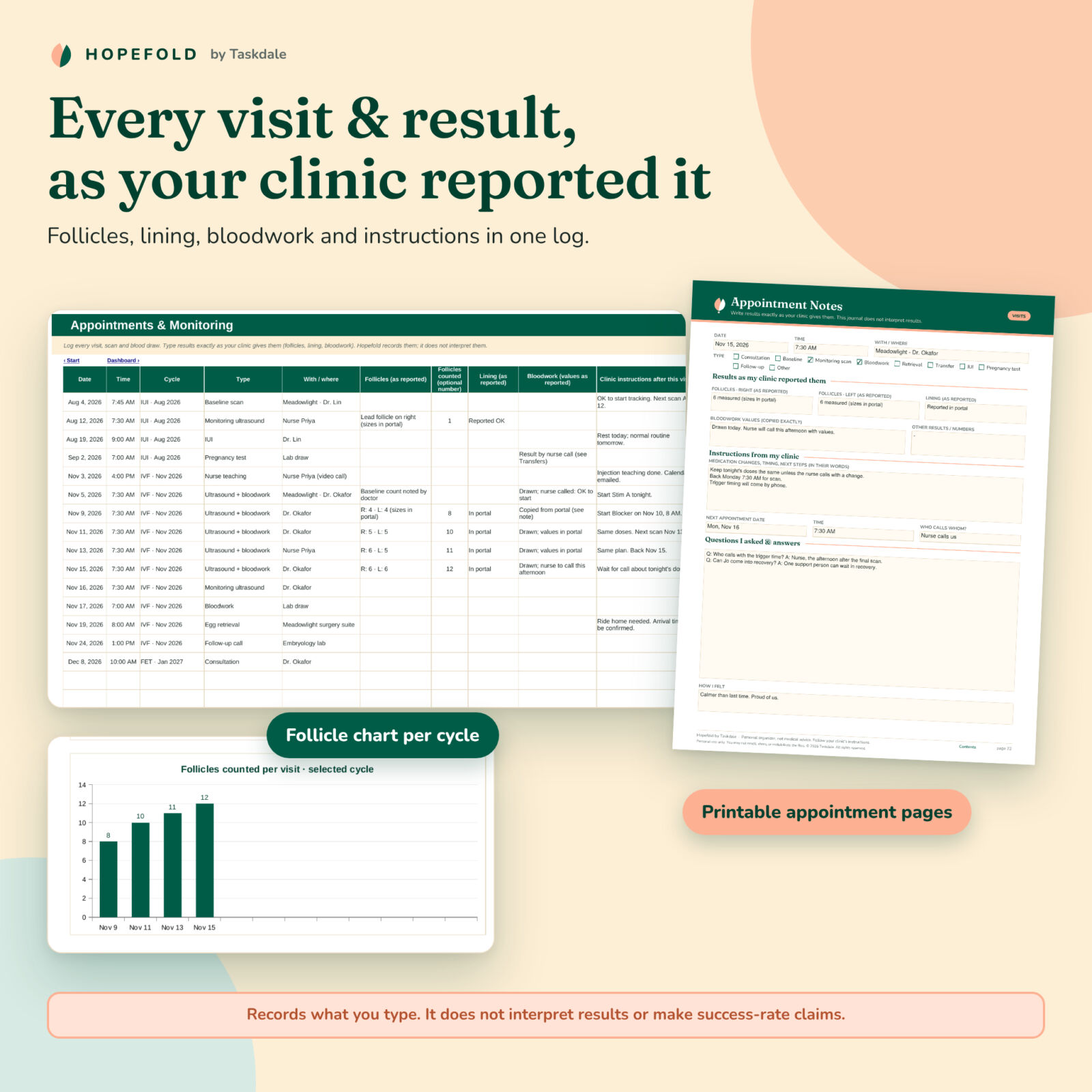
- Appointments and monitoring: visits, scans and bloodwork with follicles, lining and values exactly as reported, instructions and next appointment.
- Retrieval, transfer and storage: numbers as your lab reports them, test dates, and storage fees with renewal reminders.
- Costs and claims: 500 rows with your share, balance, due-date status, claim number and claim status, plus a receipt tick.
- Insurance, funding and calls: deductible and out-of-pocket progress from your own portal numbers, fertility benefit used, funding sources and a call log for reference numbers.
- Questions and contacts: questions with priority and answers in your care team’s words; every number including after-hours lines.
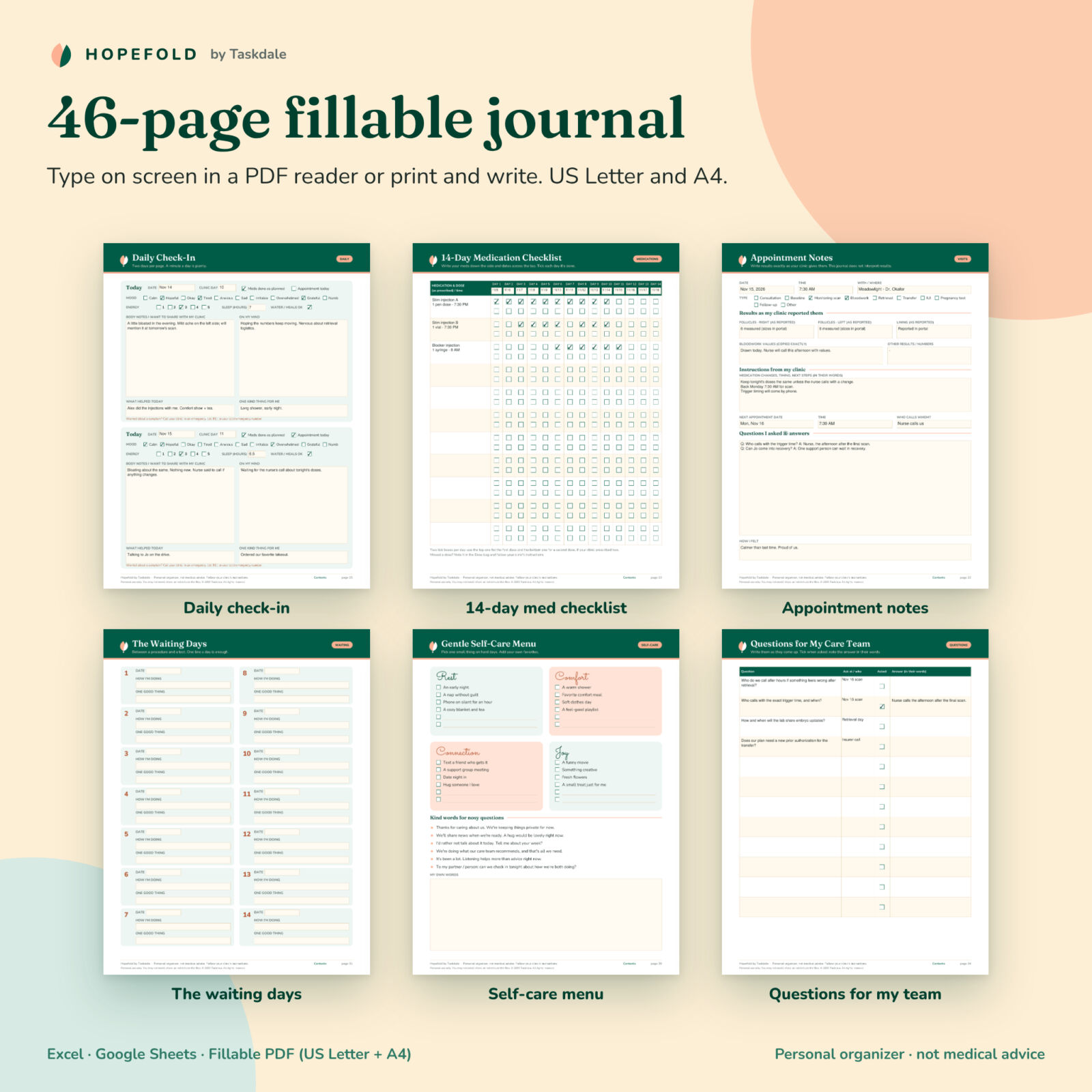
46-page fillable fertility journal (PDF)
- Care team, two cycle overview pages, medication plan, 4 dose log pages and a 14-day medication checklist
- 14 daily check-ins (mood, energy, sleep, body notes to share with your clinic, what helped)
- 6 appointment pages and a monitoring summary for results as reported
- Retrieval day, transfer or IUI day, the waiting days (14 day boxes plus gentle distractions) and a results day page
- Questions, costs, insurance and calls pages with neutral money fields for any currency
- Self-care menu, kind scripts for nosy questions, support circle, feelings, hopes and letting-go pages, and notes
User guide
A Word guide covers setup, every tab, customizing, troubleshooting and FAQs.
How it works
- Add your currency and clinic on Settings, then add your cycle on the Cycles tab.
- Copy your medication plan exactly as prescribed. If your clinic changes a dose, add a new line.
- Log as you go: tick each dose, add visits and results as reported, add bills and questions.
- Open the Dashboard or the medication calendar before each appointment, and fill the journal whenever it helps.
Use cases
- Keeping morning and evening injections straight during stimulation, with a record of any missed dose to tell your clinic.
- Copying follicle and bloodwork results from the patient portal so you can see every visit on one page.
- Splitting a cycle’s bills between insurance, an employer benefit, a grant and your own share, and chasing claims.
- Planning a frozen embryo transfer after a freeze-all cycle while tracking embryo storage renewal dates.
File formats and software
- XLSX workbook for Microsoft Excel 2016 or later, Microsoft 365 and Google Sheets (free Google account). No macros.
- Fillable PDF journal in US Letter and A4. Type in Adobe Acrobat Reader (free on desktop and mobile) or print.
- DOCX user guide for Word, Google Docs or LibreOffice.
Customization
Change the currency symbol once and every money heading and dashboard total follows. Rename cycle types, appointment types, cost categories, payment methods and contact roles. Formula cells are locked without a password, so you can unprotect a sheet whenever you want to change colors or layout. Print only the journal pages you need, as often as you need.
Digital download
This is an instant digital download; no physical item is shipped. After purchase you can download the workbook, both journal sizes and the user guide from your account. Personal use only; you may not resell, share or redistribute the files.
FAQ
Does this IVF tracker tell me what dose to take?
No. It records what your clinic prescribes. It gives no dosing, protocol or treatment advice and does not interpret results. Always follow your clinic’s instructions.
Does it work in Google Sheets?
Yes. Upload the file to Google Drive and save it as a Google Sheet; formulas, dropdowns, colors and charts carry over.
Can I use it for FET, IUI or egg freezing?
Yes. Cycle types include IVF, FET, IUI, timed cycles, egg freezing, embryo banking, donor and gestational carrier cycles, and you can add your own.
Can I fill in the journal on my iPad or phone?
Yes, in Adobe Acrobat Reader or another PDF app that supports form fields. You can also print it.
Can I use my own currency?
Yes. The workbook reads one currency symbol from Settings, and the journal’s money fields are neutral.
Can my partner or support person use it too?
Yes. Share the Google Sheets copy or keep the Excel file in a shared folder; print journal pages for anyone who prefers paper.
Is my health information private?
The files stay wherever you save them; nothing is sent anywhere. Store them somewhere private and backed up.
Reviews
There are no reviews yet.