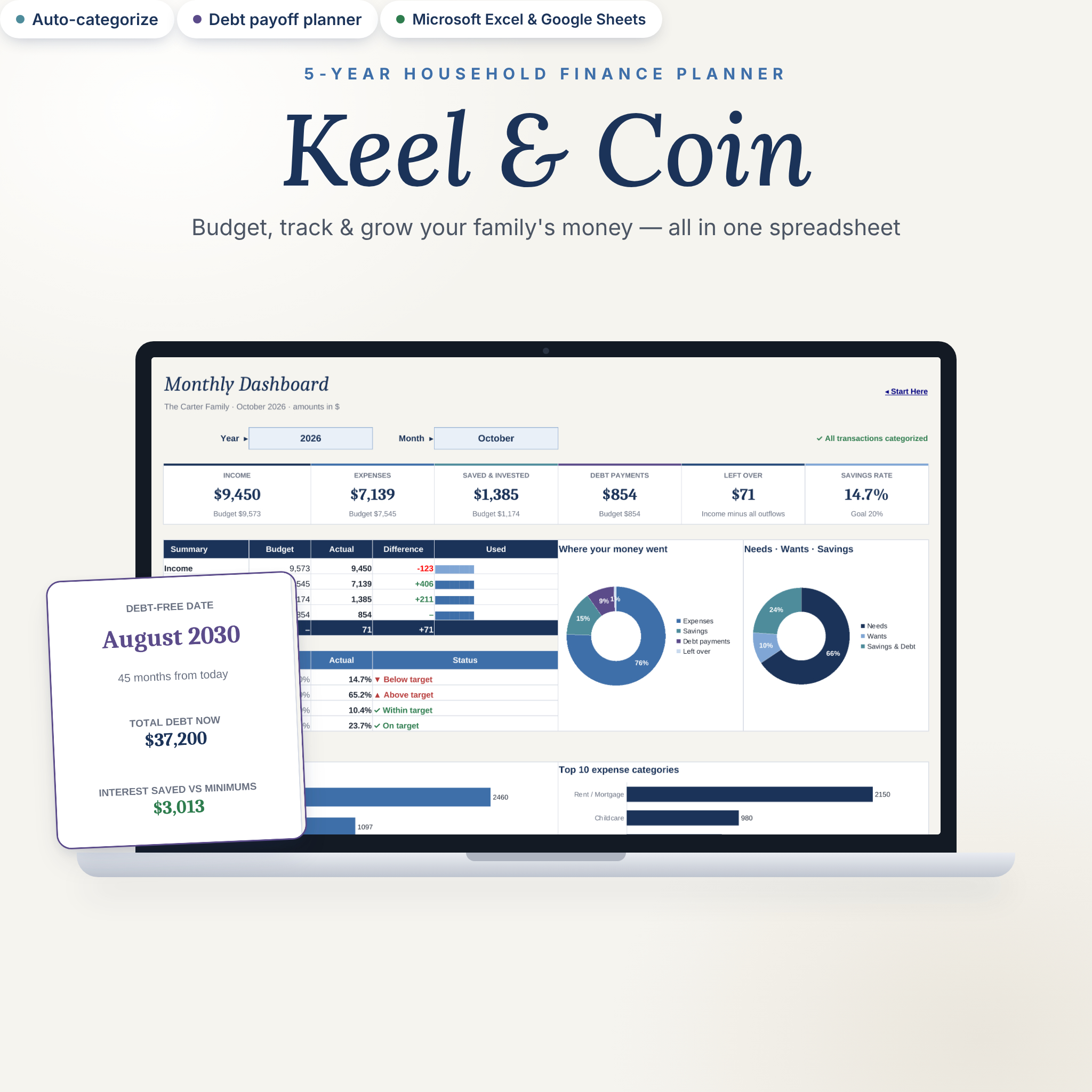


Keel & Coin is a household budget spreadsheet that runs your family’s money for five full years. Plan a zero-based budget, paste in your bank transactions, and watch monthly, annual and 5-year dashboards update on their own. It works in Microsoft Excel and Google Sheets, uses any currency, and needs no subscription or bank login.
A 5-year household budget spreadsheet that does the math for you
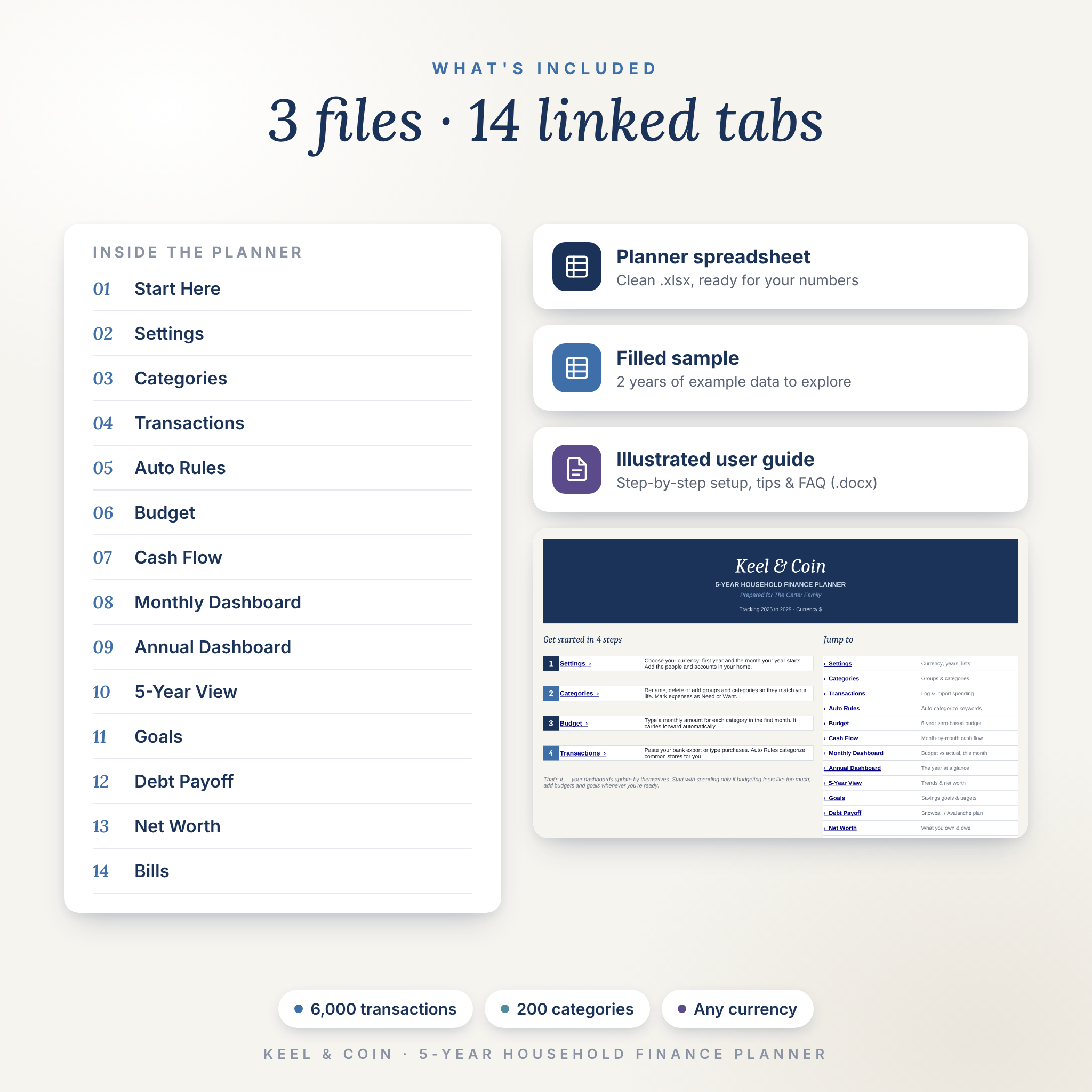
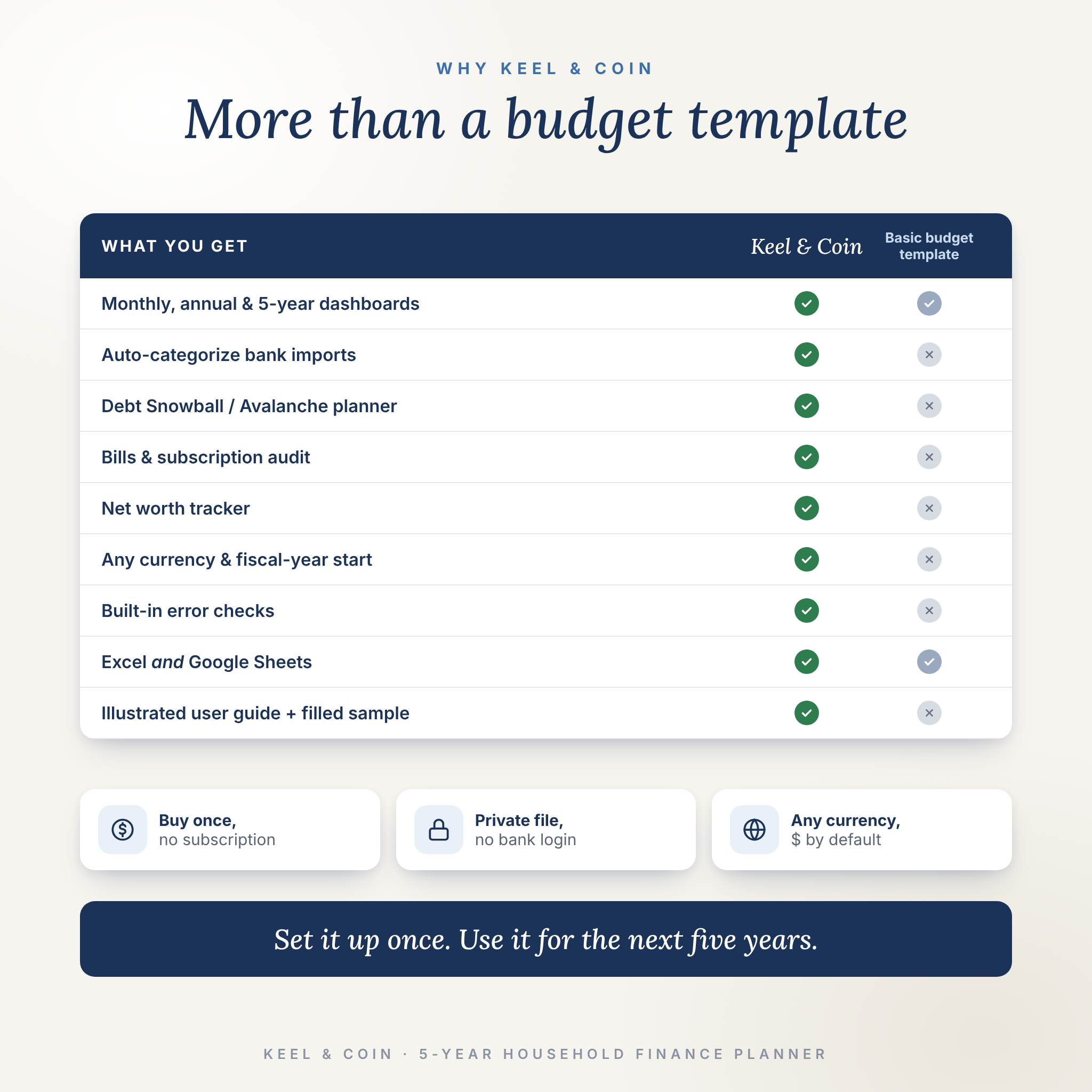
Most budget templates give you a few tables and leave the rest to you. Keel & Coin connects 14 tabs so every number flows where it should. Type a budget once and it carries forward month after month. Log a purchase and your cash flow, dashboards, goals and trends recalculate instantly. Built-in checks flag anything that needs your attention, so nothing slips through the cracks.
Who it’s for
- Couples and families who want one shared picture of their money
- Beginners who want to start by tracking spending and add budgets later
- Zero-based budgeters who like to give every dollar a job
- Anyone paying off debt or saving for an emergency fund, a home, college or travel
- Households that run on a fiscal or school year, not just January to December
Main benefits
- See where your money really goes with budget vs actual for every month, year and category
- Save hours on data entry: Auto Rules categorize imported transactions from common stores and services
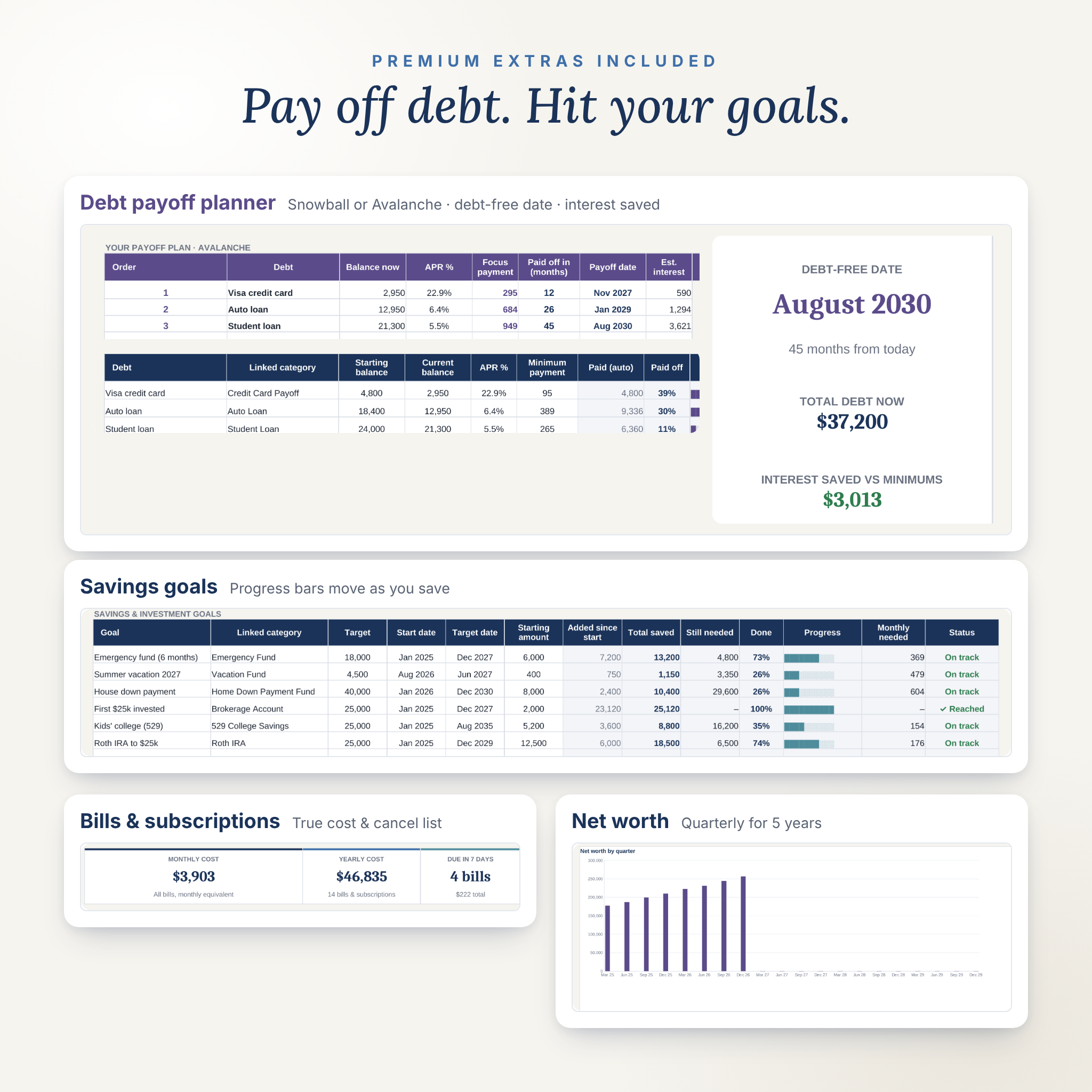
- Get out of debt faster with a Snowball or Avalanche plan, a debt-free date and the interest you save
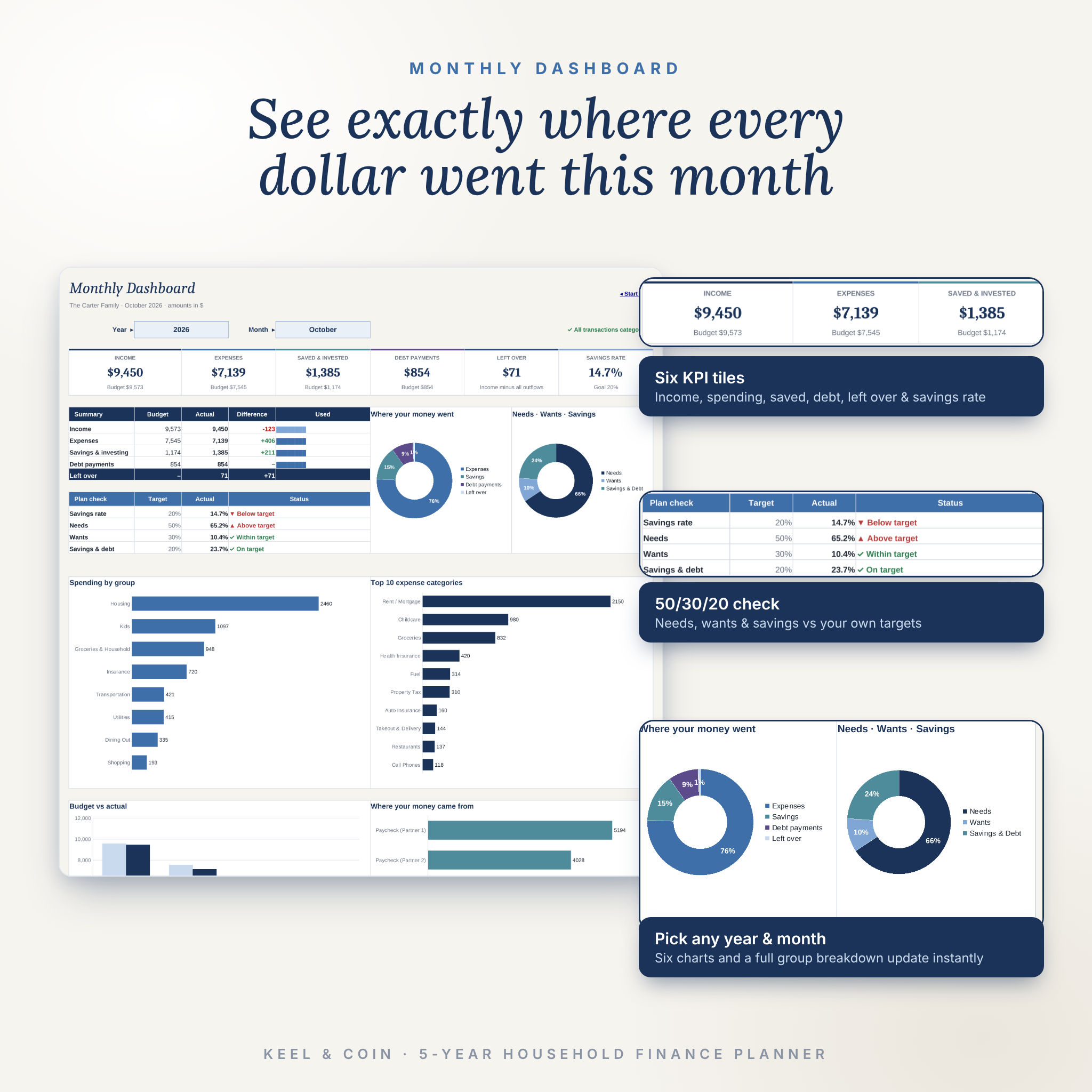
- Stay on track with savings goals that update themselves and a 50/30/20 check against your own targets
- See the long game: five years side by side, with year-over-year change and net worth
Features
Budget and tracking
- 5-year zero-based budget: enter a monthly amount once and it carries forward until you change it. A “Left to budget” line turns green when every dollar is assigned.
- Transactions log with room for 6,000 entries, dropdowns for category, account and person, a tax-deductible flag and notes
- Auto Rules: up to 100 keyword rules (40+ starter rules included) fill in the category for you
- Error checks on every row: missing date, missing amount, unknown category or a date outside your five years
- Refunds and split purchases handled with simple rows, no extra setup
Dashboards and reports
- Monthly Dashboard: six KPI tiles, budget vs actual with progress bars, savings rate, Needs / Wants / Savings check, six charts and a full group breakdown
- Annual Dashboard: yearly totals, a month-by-month table, income vs spending chart, savings rate trend and top 10 categories
- Cash Flow: every group and category by month, with Actual, Budget and Variance views
- 5-Year View: each year side by side, year-over-year change, spending by group with trend arrows, and net worth
Planning tools
- Debt Payoff planner: Snowball or Avalanche order, extra payment roll-over, payoff date for each debt, debt-free date and interest saved vs minimum payments
- Savings goals: 12 goals linked to categories, with progress bars, monthly amount needed and On track / Behind status
- Yearly targets for income, savings and debt payoff
- Net Worth tracker: quarterly snapshots of what you own and owe for five years, with a chart
- Bills & Subscriptions: 40 recurring bills with true monthly and yearly cost, next due date, days until due, autopay and a Keep / Review / Cancel audit that totals what you could save
What’s included
- Keel & Coin planner (.xlsx): clean and ready for your numbers, with 24 groups, 79 categories and 40+ auto rules pre-filled for US households
- Filled sample (.xlsx): two years of example data so you can explore every feature first
- Illustrated user guide (.docx): setup steps, every feature explained, tips, troubleshooting and FAQ
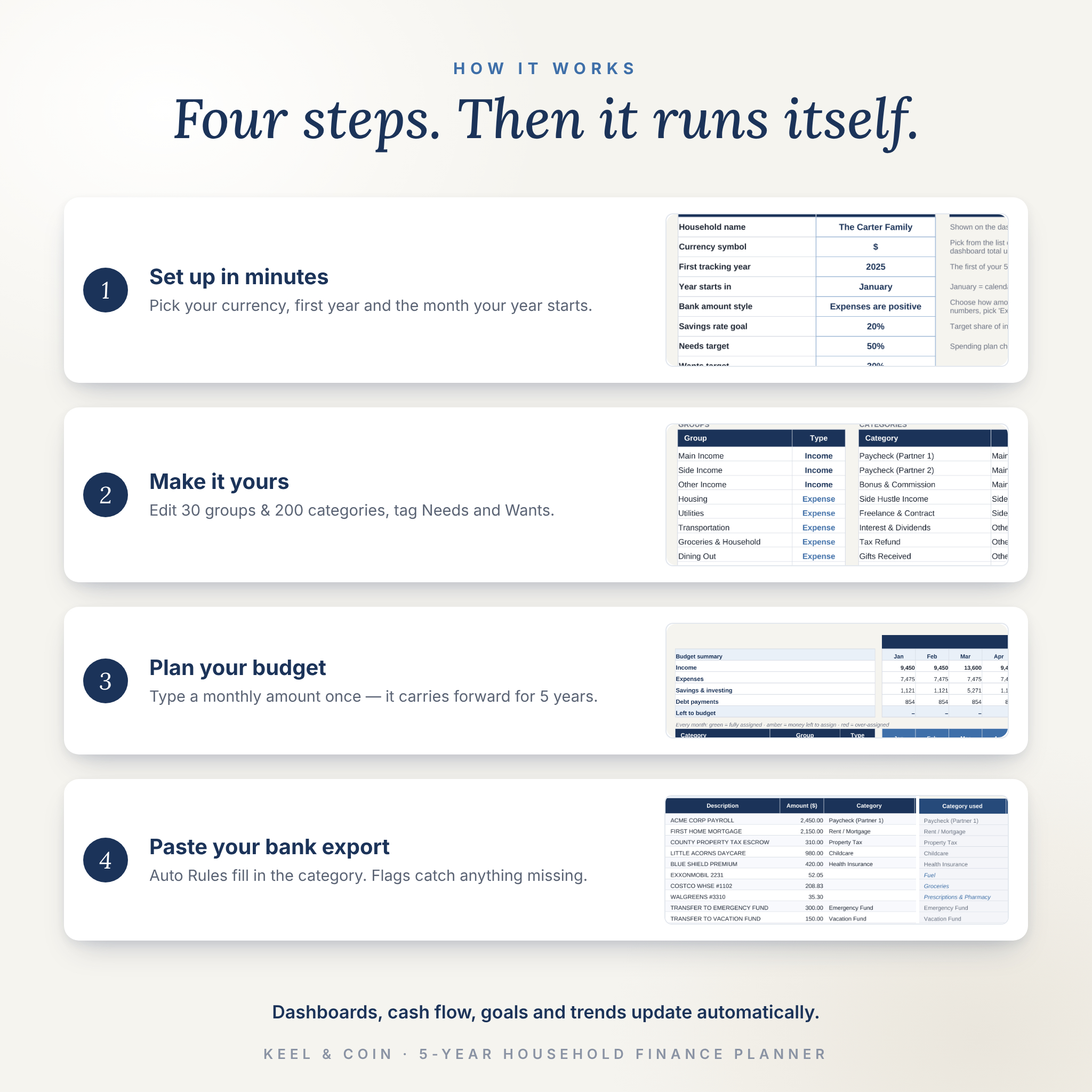
How it works
- Settings: choose your currency, first year and the month your year starts. Add the people and accounts in your home.
- Categories: rename, add or remove groups and categories. Tag expenses as Needs or Wants.
- Budget: type a monthly amount in the first month. It carries forward automatically.
- Transactions: paste your bank export or type purchases. Auto Rules fill in the categories.
That’s it. The dashboards, cash flow, goals, debt plan and 5-year trends update by themselves.
File formats and software requirements
- Microsoft Excel file (.xlsx). Works in desktop Excel for Windows and Mac (2016 or newer, including Microsoft 365).
- Works in Google Sheets: upload the file to Google Drive and open it with Google Sheets. Formulas, dropdowns and charts carry over.
- No macros, add-ons or internet connection required. The user guide is a Word document (.docx) that also opens in Google Docs.
Customization
Change the currency symbol once and every label and dashboard total follows, with $ as the default. Pick any month as the start of your year for a fiscal or school year. Rename categories, add up to 200, edit people and accounts, and set your own savings rate and 50/30/20 targets. Formula cells are protected without a password so they can’t break by accident, and input cells are clearly marked.
Digital download
This is an instant digital download. You’ll receive one ZIP file containing the planner, the filled sample and the user guide. No physical item will be shipped.
Use cases
- A couple combining finances after moving in together or getting married
- A family building a zero-based budget to stop living paycheck to paycheck
- Paying off credit cards, a car loan and student loans with a clear debt-free date
- Saving for a house down payment, emergency fund or college while watching progress each month
- Running a side hustle and keeping its income and costs separate from household spending
- Reviewing subscriptions every quarter and cancelling the ones you don’t use
FAQ
Does this budget spreadsheet work in Google Sheets?
Yes. Upload the .xlsx to Google Drive and open it with Google Sheets. Formulas, dropdowns and charts carry over.
Do I need Excel?
No. You can use Microsoft Excel or a free Google account with Google Sheets.
Can I use a currency other than dollars?
Yes. Change one currency setting and every money label and dashboard total updates.
Does it work for a fiscal year that starts in July?
Yes. Pick any start month in Settings and all months, years and reports re-label automatically.
Can I import transactions from my bank?
Yes. Download a CSV from your bank, paste the date, description and amount, and Auto Rules categorize them. It works with banks that show spending as positive or negative numbers.
Is it beginner friendly?
Yes. A Start Here tab, a filled sample and an illustrated guide walk you through it. You can start by tracking spending only.
Is there a subscription?
No. You buy it once and the file is yours. It doesn’t connect to your bank or the internet.
What happens after five years?
Save a copy, clear the transactions and set the next first year to start another five years.
License: for personal use by the purchaser only. Please don’t resell, share or distribute the files. This planner is an organizing tool and does not provide financial, tax or legal advice.
Reviews
There are no reviews yet.