A menu costing spreadsheet that starts at the supplier’s pack
Most independent cafés, bakeries, food trucks, caterers and restaurants know their menu prices. Far fewer know what each item costs to make this month. The Ladlemark Menu Costing Workbook is a menu costing spreadsheet and 30-day kit that converts supplier pack prices into usable ingredient costs, recipe costs and cost per serving, then shows what is left from each sale after the ingredient and packaging costs you enter.
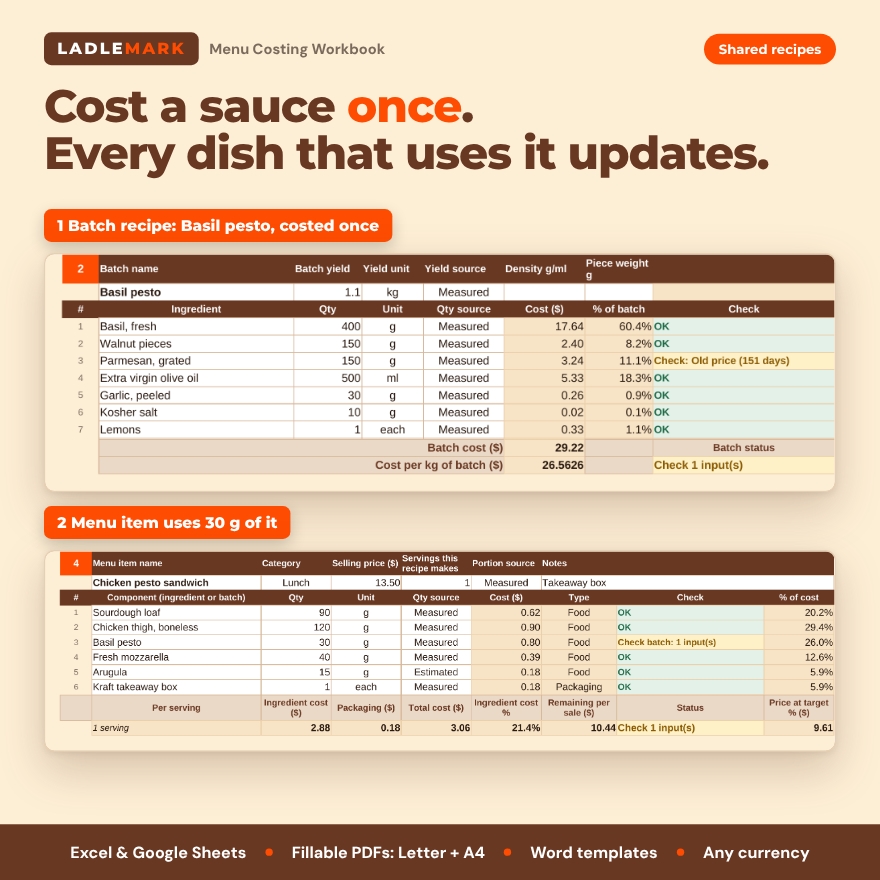
It is easy to see working: change one ingredient price and every recipe and menu item that uses it, including shared sauces and doughs, updates on the spot.
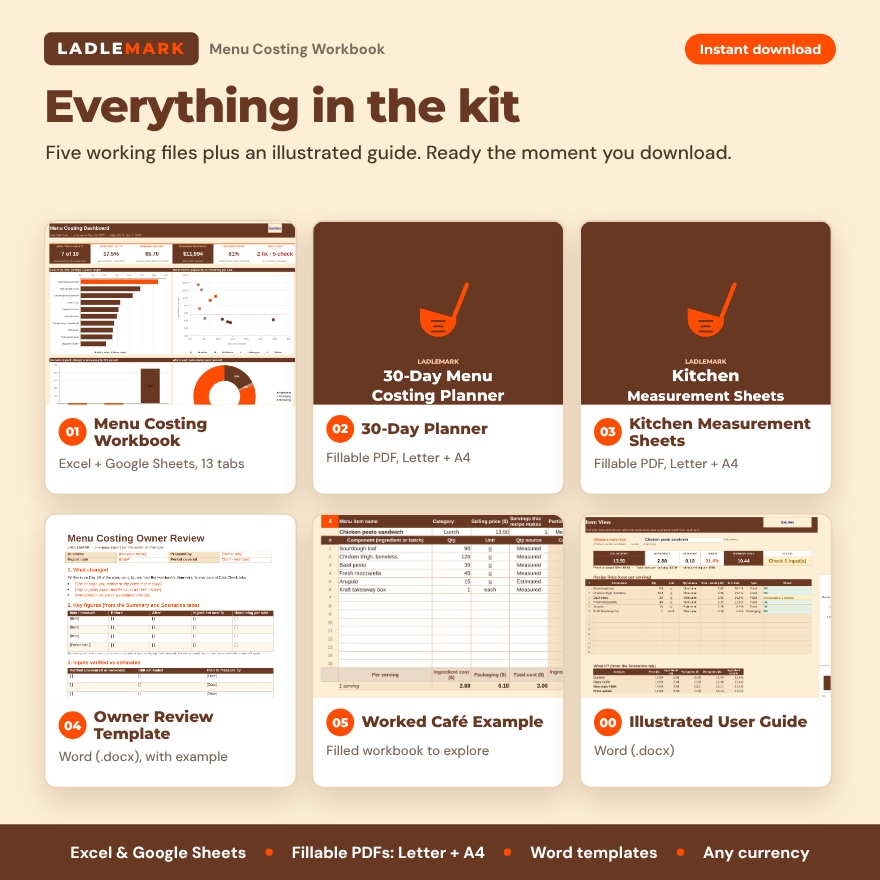
What’s included
- 01 Menu Costing Workbook (Excel / Google Sheets): Setup, Dashboard, Ingredients, Unit Conversions, Batch Recipes, Menu Items, Item View, Sales Mix, Scenarios, Summary, Data Check and Price Watch tabs.
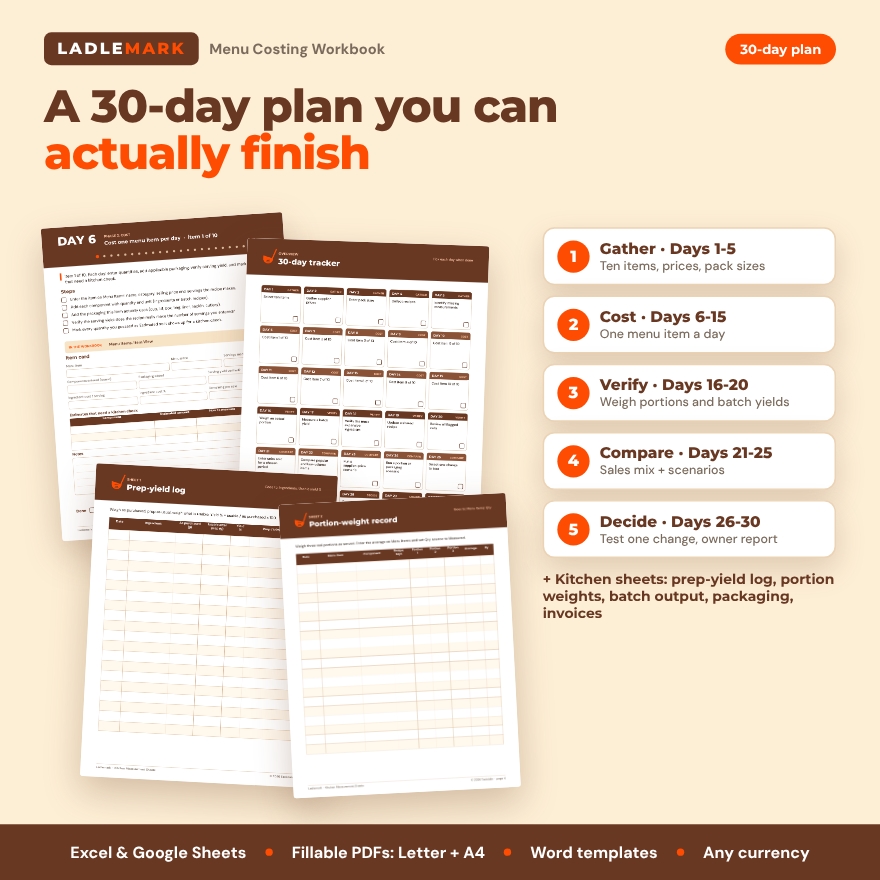
- 02 30-Day Menu Costing Planner (fillable PDF, US Letter and A4): a day-by-day plan to cost ten menu items, check real portions, log assumptions and test one change. Includes short instructions for cafés, bakeries, food trucks, caterers and restaurants.
- 03 Kitchen Measurement Sheets (fillable PDF, US Letter and A4): prep-yield log, portion-weight record, batch-output sheet, packaging checklist, invoice-entry sheet, cup-weight test and a unit reference card.
- 04 Owner Review Template (Word): a one-page report covering what changed, which inputs are verified, which are estimates, the proposed action and the review date, plus a filled example.
- 05 Worked Café Example (Excel): a fictional café menu with a batch-prepared sauce, a portioned main item, takeaway packaging and ingredients shared across several recipes.
- 00 User Guide (Word): illustrated instructions, troubleshooting and FAQ.
Recipe cost features that go deeper
Pack-to-portion conversion
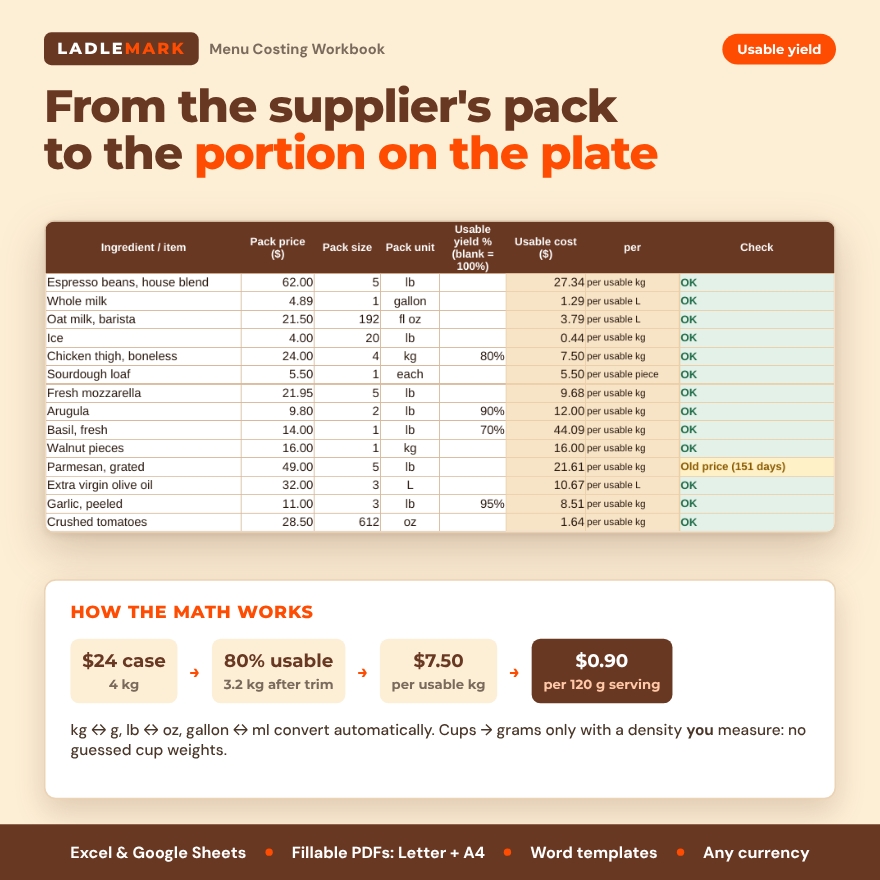
Enter the pack price, pack size and unit once. The sheet converts compatible units automatically (kilograms to grams, pounds to ounces, gallons to milliliters). It never assumes what a cup weighs: if a recipe measures by cup or spoon and you buy by weight, you enter that ingredient’s density, measured with the cup-weight test.
Usable yield
Account for trimming and prep loss. A $24 case holding 4 kg at 80% usable yield gives 3.2 usable kg at $7.50 per usable kg, so a 120 g serving costs $0.90 for that ingredient.
Batch recipes shared across dishes
Cost a sauce, dough, batter or base once and use a measured portion of it in several menu items. Update a shared ingredient and every linked recipe recalculates.
Per-item view
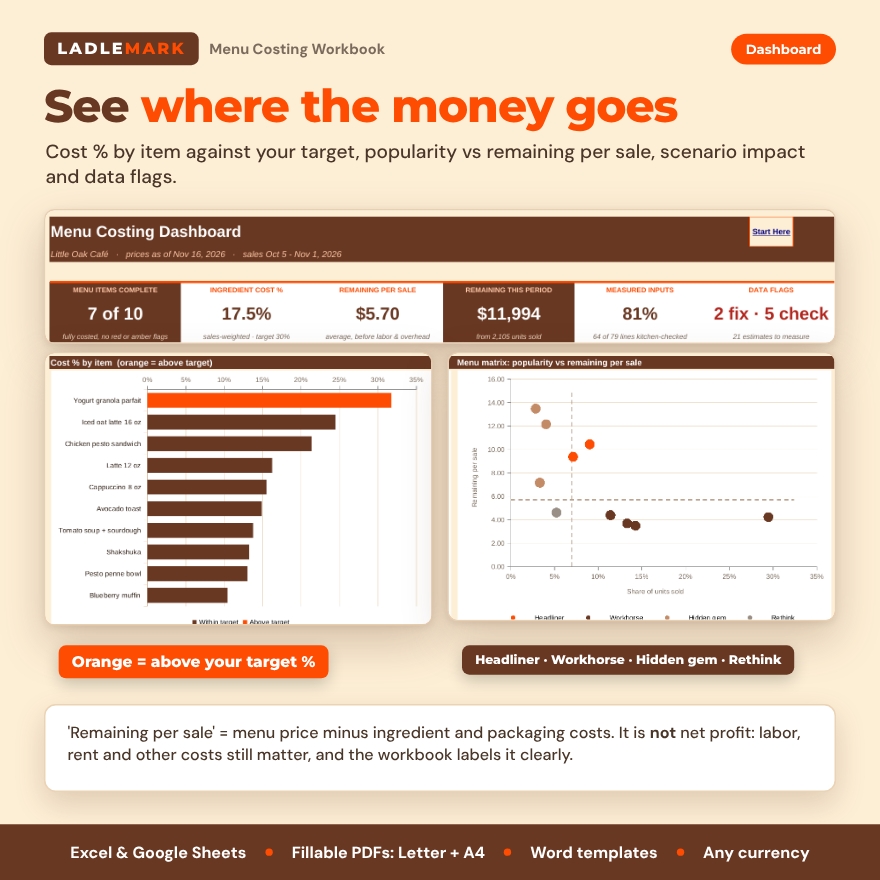
For every item: selling price, ingredient cost, packaging cost, ingredient cost %, the price that would hit your target %, and the amount remaining per sale. That remaining amount is not net profit; labor, rent, taxes and other costs still matter, and the workbook labels it that way.
Sales mix and menu matrix
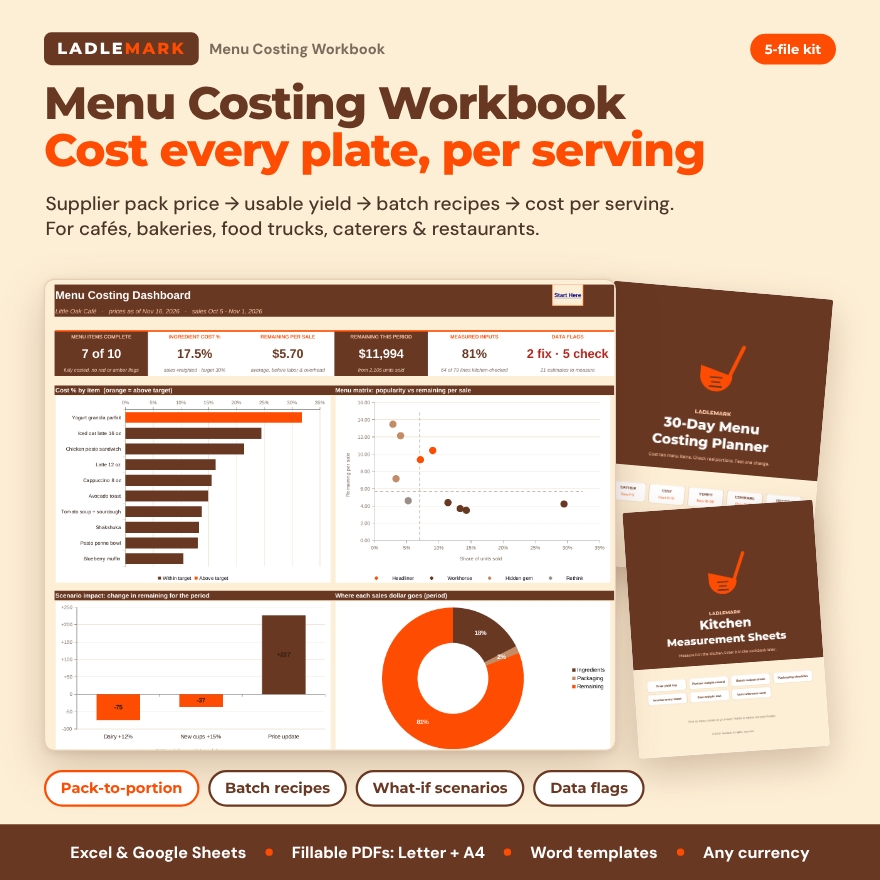
Enter units sold for a period to see each item’s share of sales and group it as a Headliner, Workhorse, Hidden gem or Rethink item on a popularity vs remaining-per-sale chart.
Scenario comparison
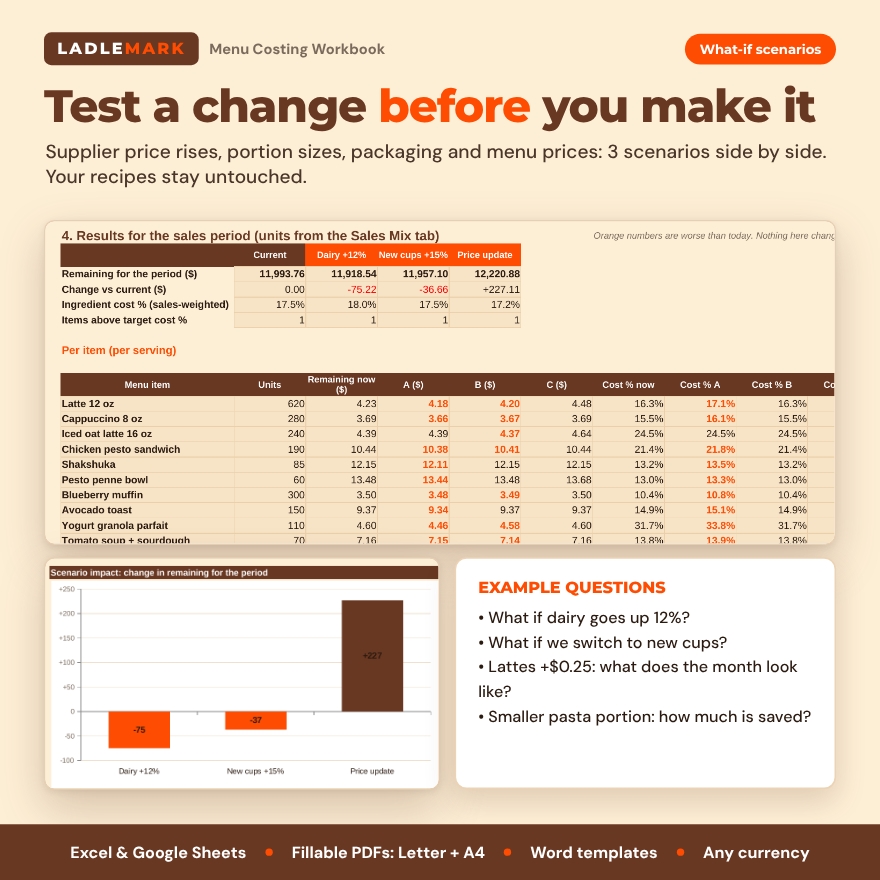
Test a supplier-price increase, a different portion size, a packaging change or a proposed menu price in three side-by-side scenarios, without overwriting the current recipe.
Data-quality flags
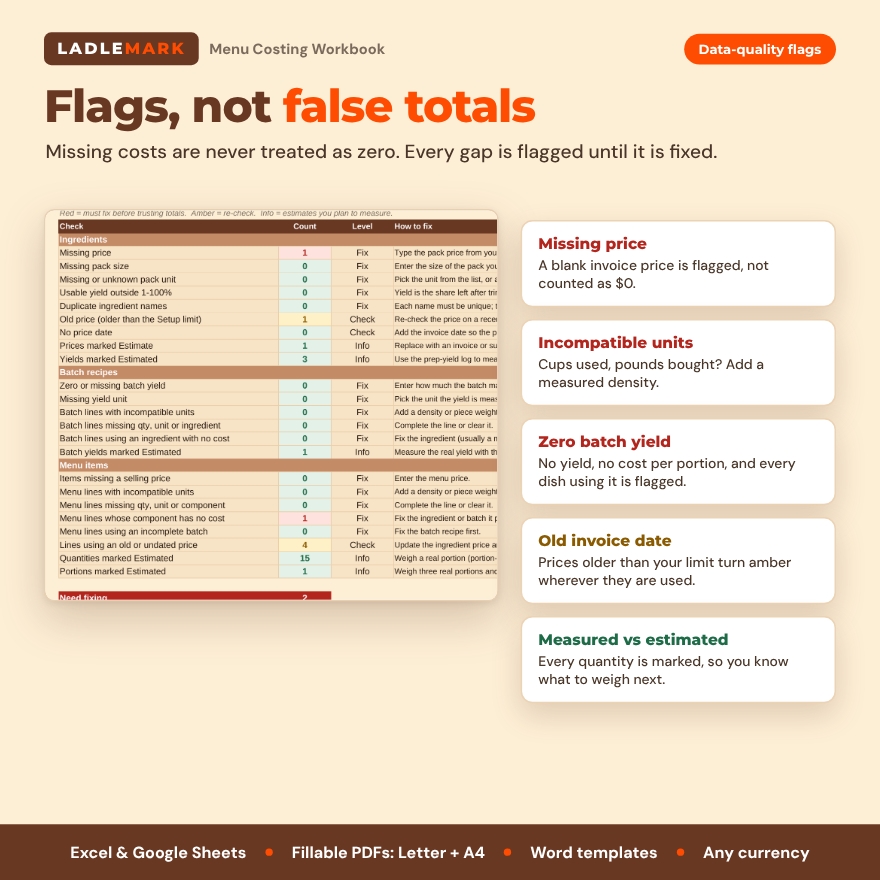
Missing prices, incompatible units, zero batch yields and old invoice dates are highlighted wherever they affect a total, and listed on one Data Check tab, so a plausible-looking number cannot hide a bad input. Every quantity is marked Measured or Estimated, so you always know what has been checked in the kitchen.
Dashboard
Items complete, sales-weighted ingredient cost %, average remaining per sale, remaining for the period, share of measured inputs, cost % by item against your target, the menu matrix, scenario impact and where each sales dollar goes.
How it works
- Set your currency symbol, target cost % and how old a price may get before it is flagged.
- Enter supplier packs from your invoices on the Ingredients tab.
- Build batch recipes, then menu items from ingredients, batches and packaging.
- Follow the 30-day plan: cost one item a day, weigh real portions, measure batch yields, then compare sales and scenarios.
- Finish with ten costed menu items, a record of what was measured versus estimated, and one decision the owner can explain with figures.
Who it’s for
Independent cafés, coffee shops, bakeries, food trucks, caterers, meal-prep kitchens and small restaurants that want reliable, current recipe costs without subscription software. Real situations: re-pricing lattes after a milk price rise, deciding whether to switch takeaway cups, checking whether a best-selling sandwich still earns its place, or costing a catering tray per guest.
File formats and requirements
- Workbook and example: .xlsx for Microsoft Excel 2016 or later (Windows and Mac), Microsoft 365 and Google Sheets. No macros.
- Planner and kitchen sheets: fillable PDF (Adobe Acrobat Reader, free) or print. US Letter and A4 versions included.
- Owner report and guide: .docx for Microsoft Word, also opens in Google Docs.
- Any currency: one setting changes the symbol shown everywhere.
- Capacity: 200 ingredients, 20 batch recipes, 40 menu items with 15 components each, 3 scenarios and 200 price-log rows.
Customization
Rename categories and suppliers, add your own units (for example a #10 can), choose whether the target applies to ingredients only or ingredients plus packaging, and set your own price-update rhythm. Formula cells are protected without a password, so nothing is overwritten by accident but you can still unlock a sheet.
Digital download
This is a digital product. You receive eight files to download right after purchase; nothing is shipped. License: personal use only (or use within your own business). You may not resell, share, or redistribute the files.
FAQ
Does this menu costing spreadsheet work in Google Sheets?
Yes. It uses functions that work the same in Excel 2016 or later, Microsoft 365 and Google Sheets.
Can it convert cups to grams?
Only with a density you measure for that ingredient. Weight converts to weight and volume to volume automatically; it never assumes a cup weight.
Is “remaining per sale” my profit?
No. It is the menu price minus the ingredient and packaging costs entered. Labor, rent, utilities, card fees and taxes still come out of it.
How is this different from a simple food cost calculator?
It adds usable yield, batch recipes shared across dishes, measured-vs-estimated tracking, data-quality flags, sales mix, scenarios and printable kitchen sheets, plus a 30-day plan to actually finish the job.
Can I use my own currency?
Yes. Type any symbol on the Setup tab.
Is there an example to follow?
Yes. The Worked Café Example is fully filled in for a fictional café, so you can see every feature before entering your own menu.
Can my staff use it?
Yes, within your own business. Please don’t share the files outside it.

Reviews
There are no reviews yet.