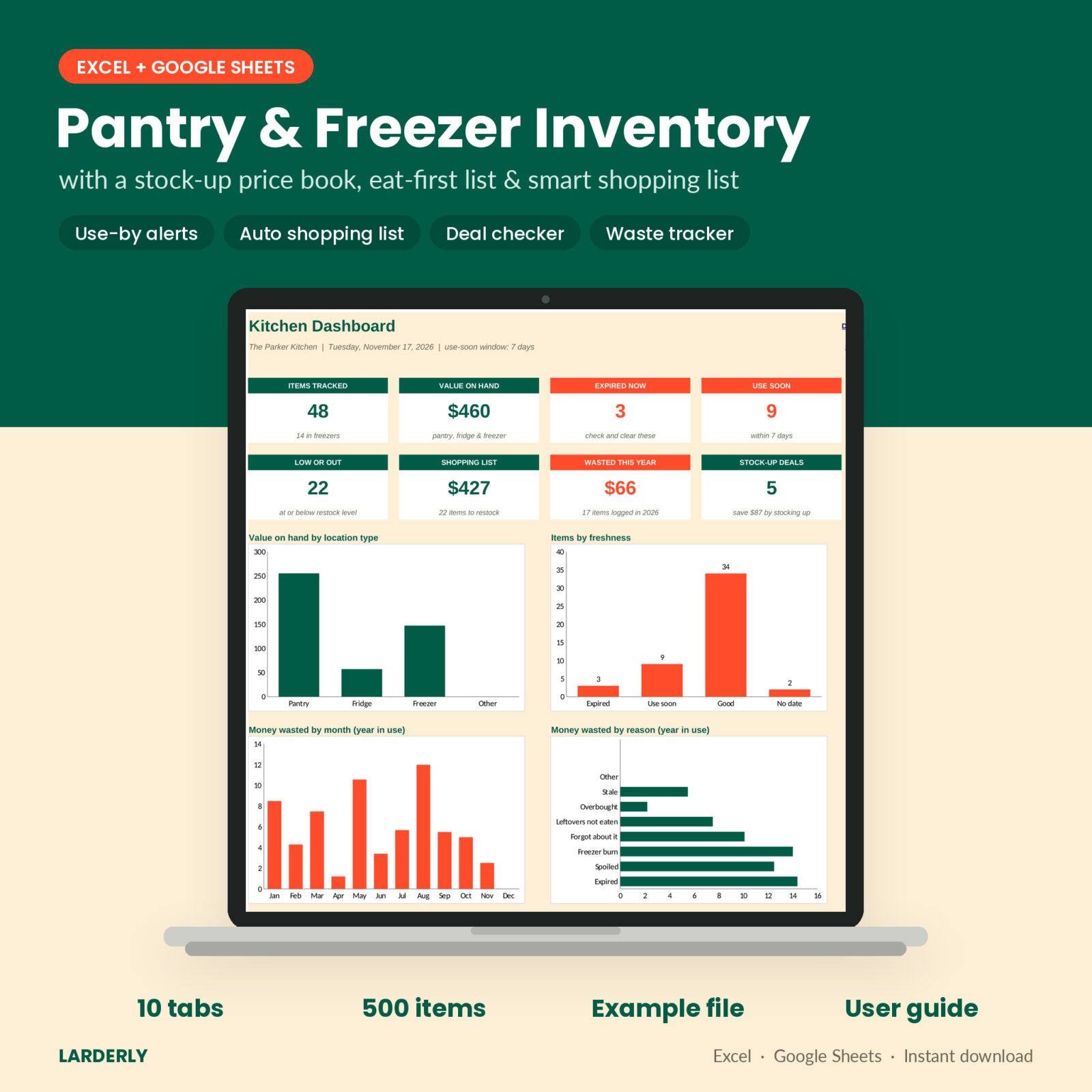





You open the chest freezer and find a bag of ground beef from who knows when. Meanwhile you just bought a fourth jar of peanut butter because you could not remember the three in the basement. Larderly is a pantry and freezer inventory spreadsheet that ends both problems. It keeps every shelf, fridge and freezer in one list, flags food before it expires, builds your shopping list by itself and tells you when a sale price is actually a good deal.
It works in Excel and in Google Sheets. No app, no subscription, no account.
What this pantry and freezer inventory spreadsheet does
- Tracks everything in one place. Kitchen pantry, kitchen fridge, kitchen freezer, chest freezer, garage shelves. Up to 500 items, each with a shelf or bin, quantity, dates, store and cost.
- Warns you before food expires. Every item gets a use-by date, days left and a freshness flag: Expired, Use soon or Good. No label date? It estimates one from a shelf-life guide you can edit, and shows the estimate in italics so you always know which is which.
- Tells you what to eat first. The Eat First list sorts everything by use-by date. Filter it to one freezer and print it for the door.
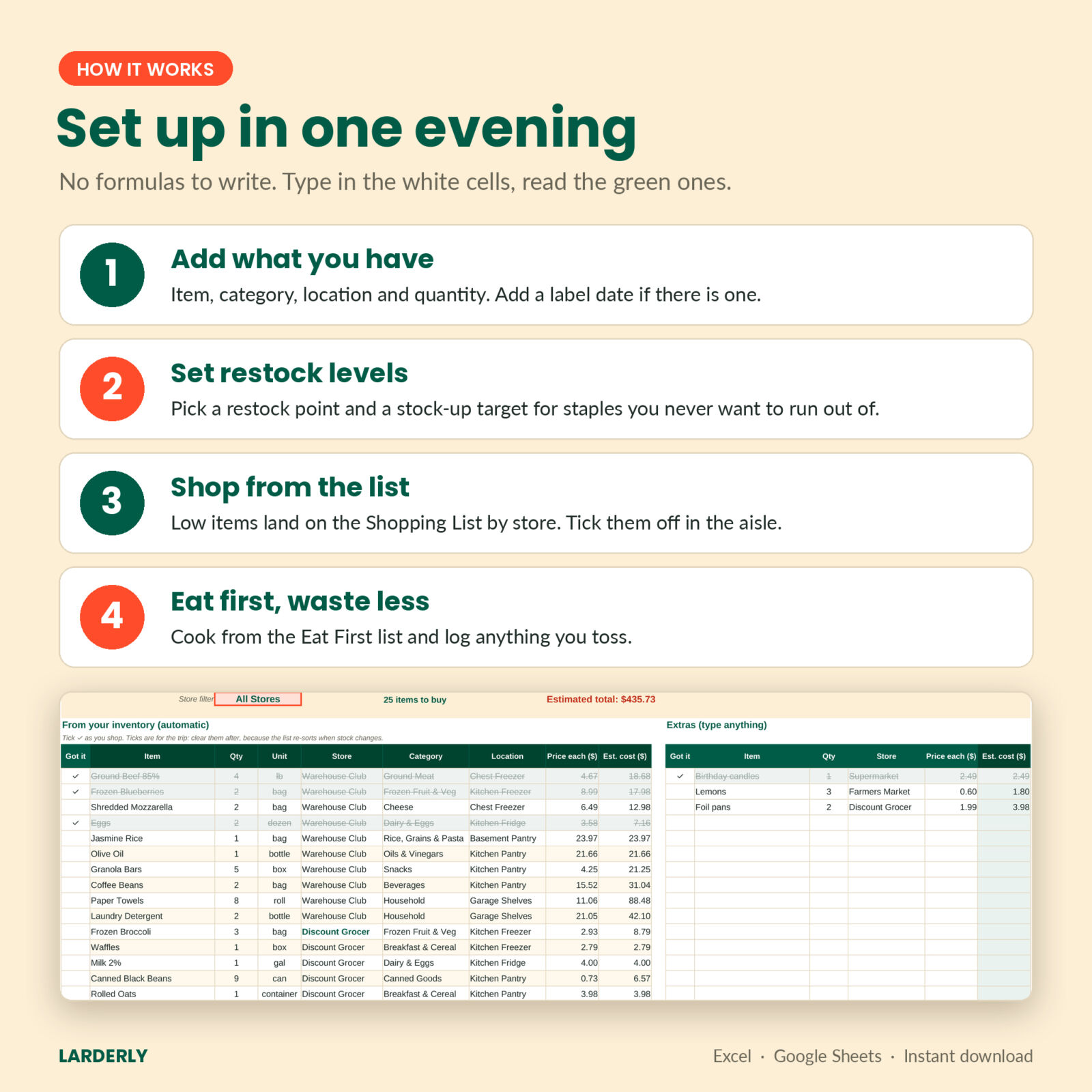
- Writes the shopping list for you. Set a restock level and a stock-up target for your staples. Anything that runs low appears on the Shopping List with the quantity to buy, grouped by store, with an estimated cost.
- Shows you a real deal. The Stock-Up Price Book keeps your lowest, average and latest unit price for each item, the store with the best price, and a signal: Stock up, Fair or High.
- Counts the cost of waste. Log what you throw away and why. The dashboard charts money wasted by month and by reason.
Who it is for
Families with a chest freezer or a garage pantry. Budget shoppers and couponers who keep a price book. Bulk buyers who shop at warehouse clubs. Meal preppers who freeze portions. Anyone who wants to waste less food and stop buying things they already own.
What is included
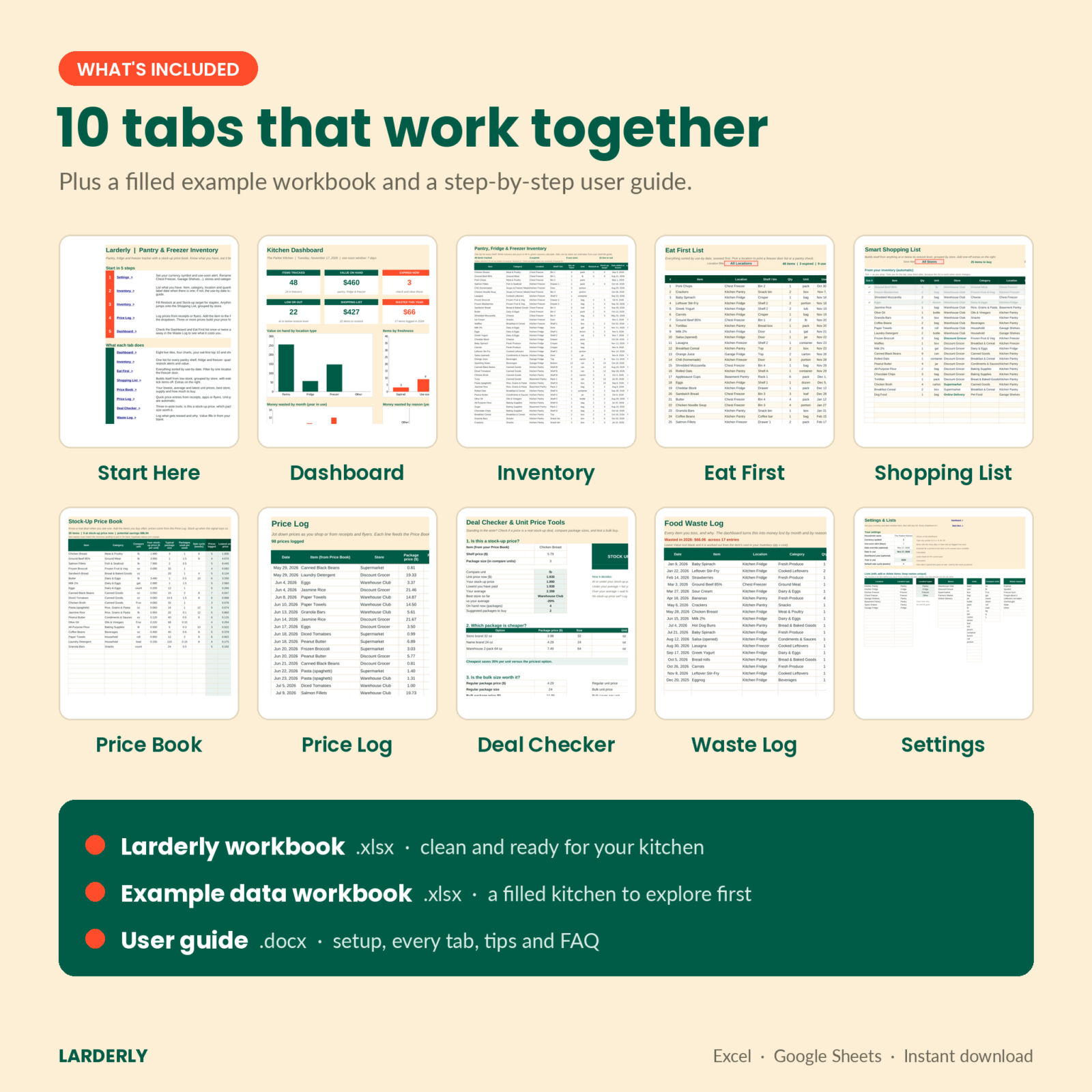
- Larderly workbook (.xlsx) with 10 tabs: Start Here, Dashboard, Inventory, Eat First, Shopping List, Price Book, Price Log, Deal Checker, Waste Log and Settings
- Example data workbook (.xlsx) filled with a sample kitchen, so you can see every feature working before you start
- User guide (.docx) with setup steps, every column explained, tips, troubleshooting and FAQ
Features in detail
Kitchen dashboard
Eight live tiles: items tracked, value on hand, expired now, use soon, low or out, shopping list cost, wasted this year and stock-up deals. Four charts show value by location type, items by freshness, waste by month and waste by reason. Below them: the 10 items to eat first and your shopping cost per store.
Freezer inventory with smart use-by dates
Type the date you froze something and pick a category. Ground meat in the freezer gets about 3 months, a whole roast about 6, soups and freezer meals about 3. Pantry and fridge items work the same way in days. All of these numbers live in an editable table on the Settings tab, so you can match them to your own habits. They are best-quality guides, not food-safety rules.
Automatic shopping list
The list re-sorts by store every time your stock changes. Filter it to one store before a trip, tick items off with a check mark, and add one-off extras on the side.
Stock-up price book and price log
Log prices from receipts, apps or flyers. Larderly works out the unit price per ounce, pound, count or load, compares it with your history, and tells you how many weeks of supply you have. The stock-up planner suggests how many packages to buy to last until the next sale and how much that saves compared with your average price.
Deal Checker
Three quick tools for the store aisle: is this price a stock-up price, which package size is cheaper, and is the bulk size worth it or will it go off before you finish it.
Food waste log
Leave the value blank and it uses the cost from your inventory. Over a few months you will see patterns, like the spinach that always spoils or freezer burn in the bottom bin.
How it works
- Open Settings. Set your currency symbol and your use-soon alert, then rename the locations and stores to match your home.
- Add what you have on the Inventory tab, one shelf or one freezer at a time.
- Give your staples a restock level. They will appear on the Shopping List when they run low.
- Log prices for the items you buy often. After a few trips the stock-up signal starts to work.
- Check the Dashboard and the Eat First list once or twice a week.
File formats and software
- Microsoft Excel 2019, 2021, 2024 or Microsoft 365 (Windows or Mac)
- Google Sheets: upload the file to Google Drive, then open it with Google Sheets
- No macros, no scripts, no add-ons
Customization
Use any currency symbol. Edit up to 20 locations, 14 stores, 25 units, 30 categories and 10 waste reasons. Change the shelf-life guide, the use-soon window and the default sale cycle. Formula cells are locked without a password, so you can type freely without breaking anything, and you can still remove the protection if you want to change something.
Digital download
This is a digital product. Nothing is shipped. You can download the files right after checkout from your order confirmation and your account page. For personal household use only; please do not share or resell the files.
Real ways people use it
- A Sunday freezer check before writing the week’s meal plan
- Printing the Eat First list for one chest freezer and taping it to the lid
- Filtering the shopping list to the warehouse club before a big monthly trip
- Checking a weekly ad price on the Deal Checker before buying 10 cans of beans
- Tracking food waste for three months to see where the grocery money goes
FAQ
Does this work in Google Sheets?
Yes. Upload the .xlsx file to Google Drive and open it with Google Sheets. Choose File, then Save as Google Sheets for the fastest editing.
Can I use it on my phone?
Yes, in the Google Sheets or Excel app. Entering items is easiest on a computer; checking lists and ticking off the shopping list works well on a phone.
How many items can I track?
500 inventory items, 200 price book items, 1,000 price entries and 500 waste entries.
What if a package has no expiration date?
Enter the date you bought or froze it. Larderly estimates a use-by date from the shelf-life guide and shows it in italics.
Can I change the currency?
Yes. Type any symbol on the Settings tab and every money heading and tile updates.
Is this a subscription?
No. It is a one-time download that you keep.
Can I track things like paper towels and detergent?
Yes. Use the Household category. They get restock alerts and price tracking, without a use-by date.
Reviews
There are no reviews yet.