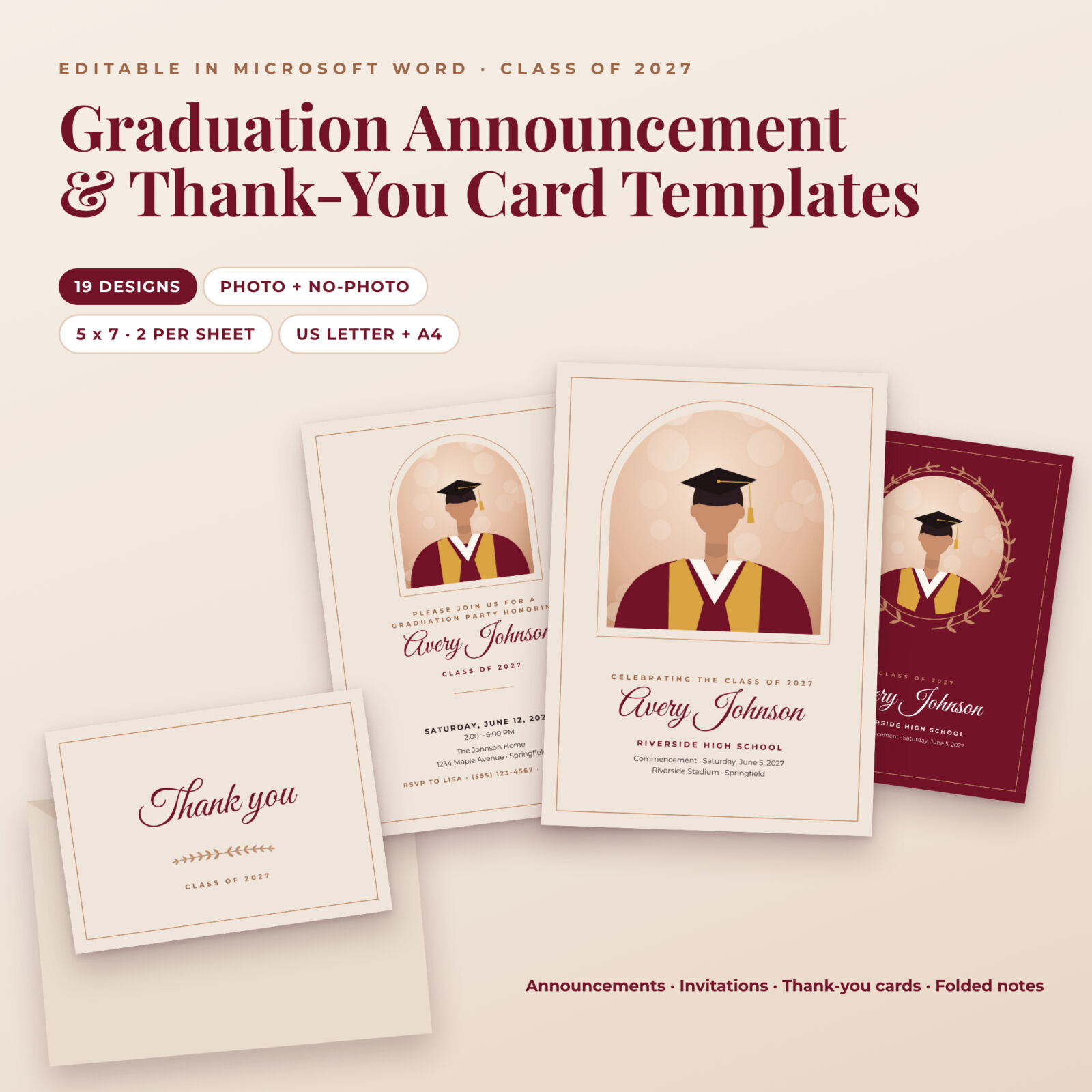




Editable Graduation Announcement Template Set for Microsoft Word
Laurelpost is a complete graduation announcement template collection you personalize in Microsoft Word and print at home or at a copy shop. You get 19 matching designs in a classic burgundy, sand and caramel palette: graduation announcements with and without photos, party and open house invitations, flat thank-you cards, folded thank-you notes and optional card backs. Every name, date, school line and the year are editable, so the set is ready for the Class of 2027 and still works next year.
Each card is 5 x 7 in and prints two per sheet on US Letter or A4 paper, with crop marks and bleed so your cards look professionally trimmed. No online editor, no account and no waiting for a seller to edit your proof.
What’s Included
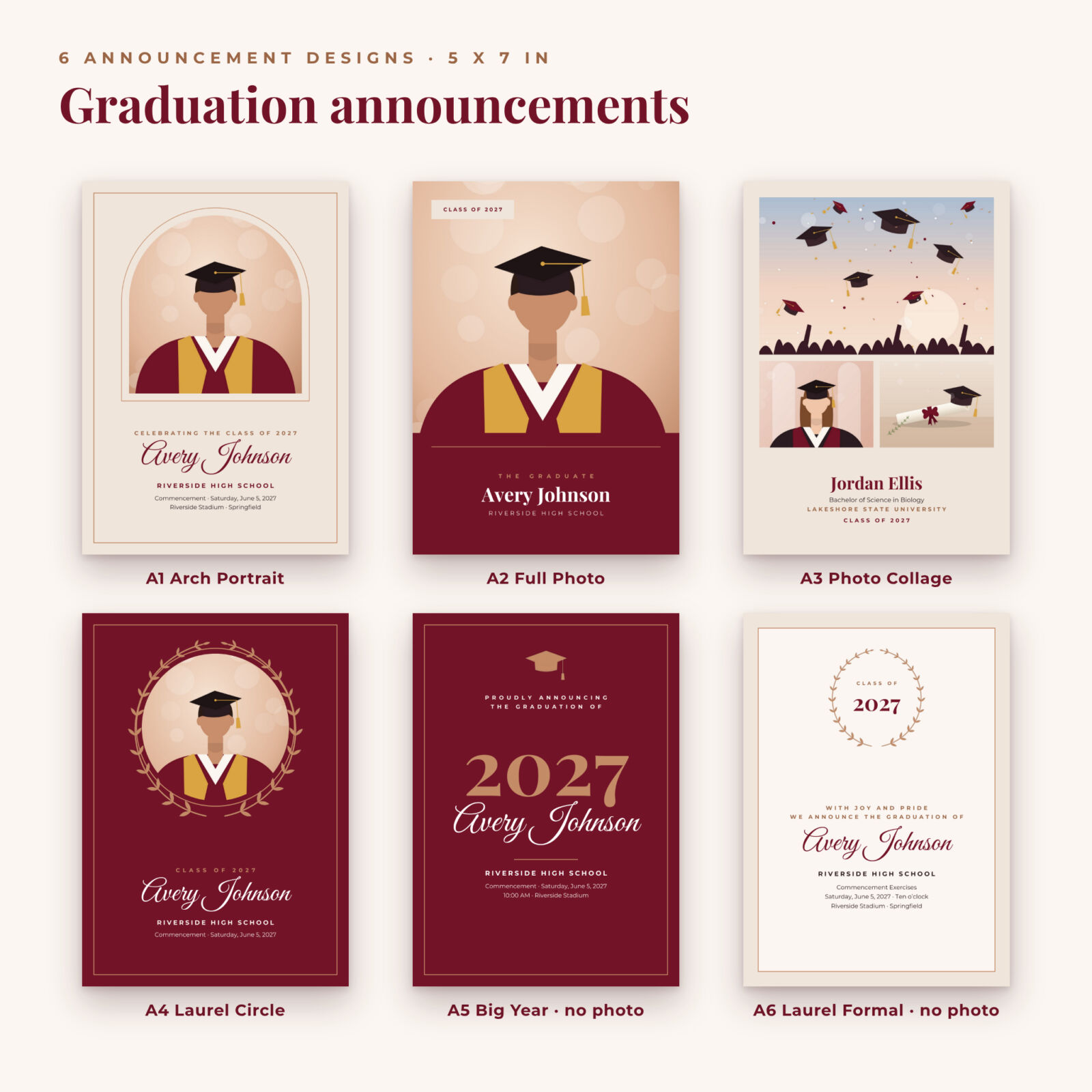
- 6 graduation announcements: Arch Portrait, Full Photo, Three-Photo Collage and Laurel Circle (photo designs), plus Big Year and Laurel Wreath Formal (no photo needed)
- 4 graduation party invitations: Arch Portrait, Photo Banner, Confetti and Open House, each with date, time, place and RSVP lines
- 3 flat thank-you cards (5 x 7 in): photo card with write-in lines, script card with write-in lines, and a printed-message card
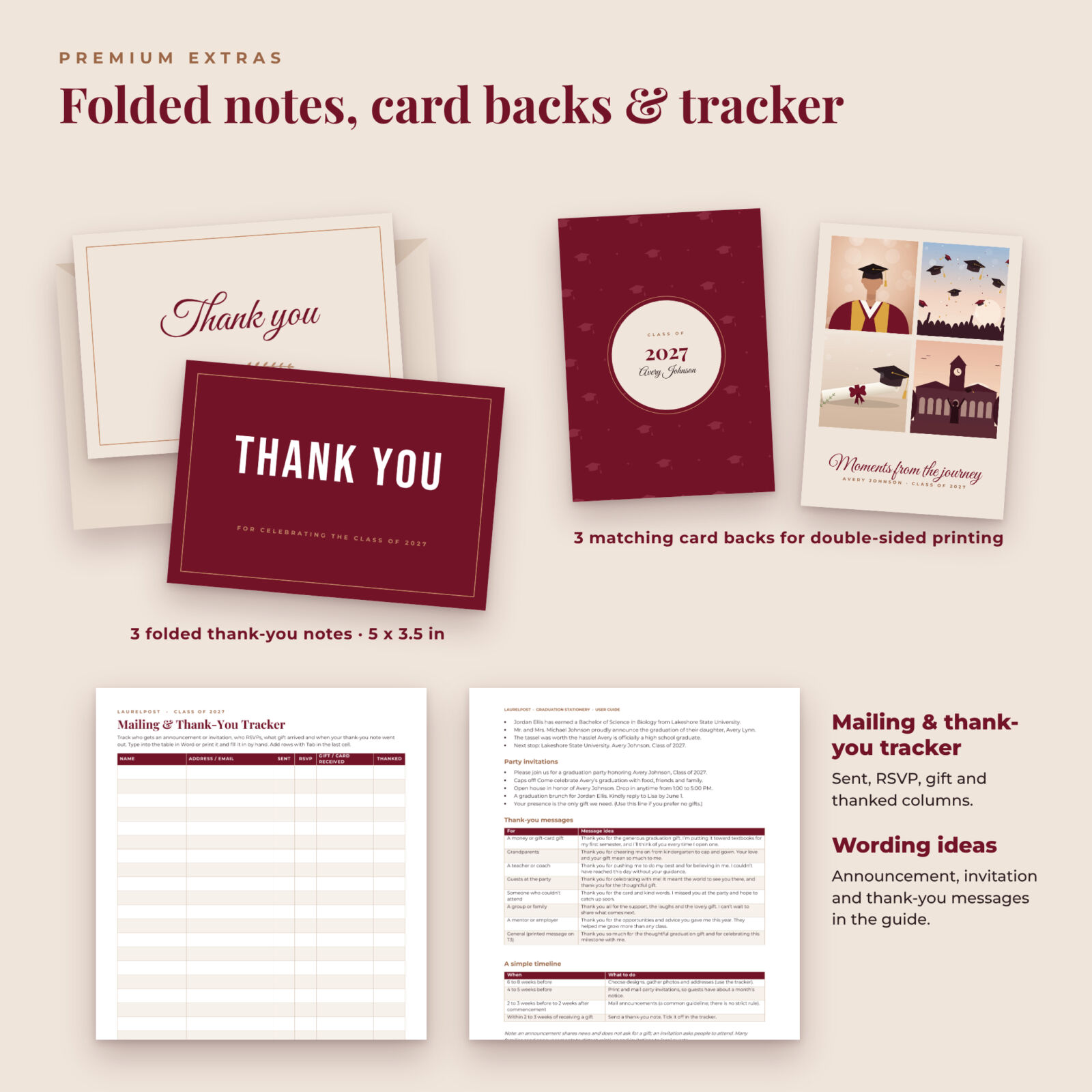
- 3 folded thank-you notes: fold to 5 x 3.5 in and stay blank inside for your handwritten note
- 3 matching card backs: pattern, four-photo collage and quote, for double-sided announcements
- Mailing & thank-you tracker: name, address, sent, RSVP, gift received and thanked columns
- Print-preview PDFs of every design, in US Letter and A4
- Illustrated user guide (Word): step-by-step editing and printing help, wording ideas, a timeline, troubleshooting and FAQ
Features That Make Graduation Cards Easier
Type once, both cards update
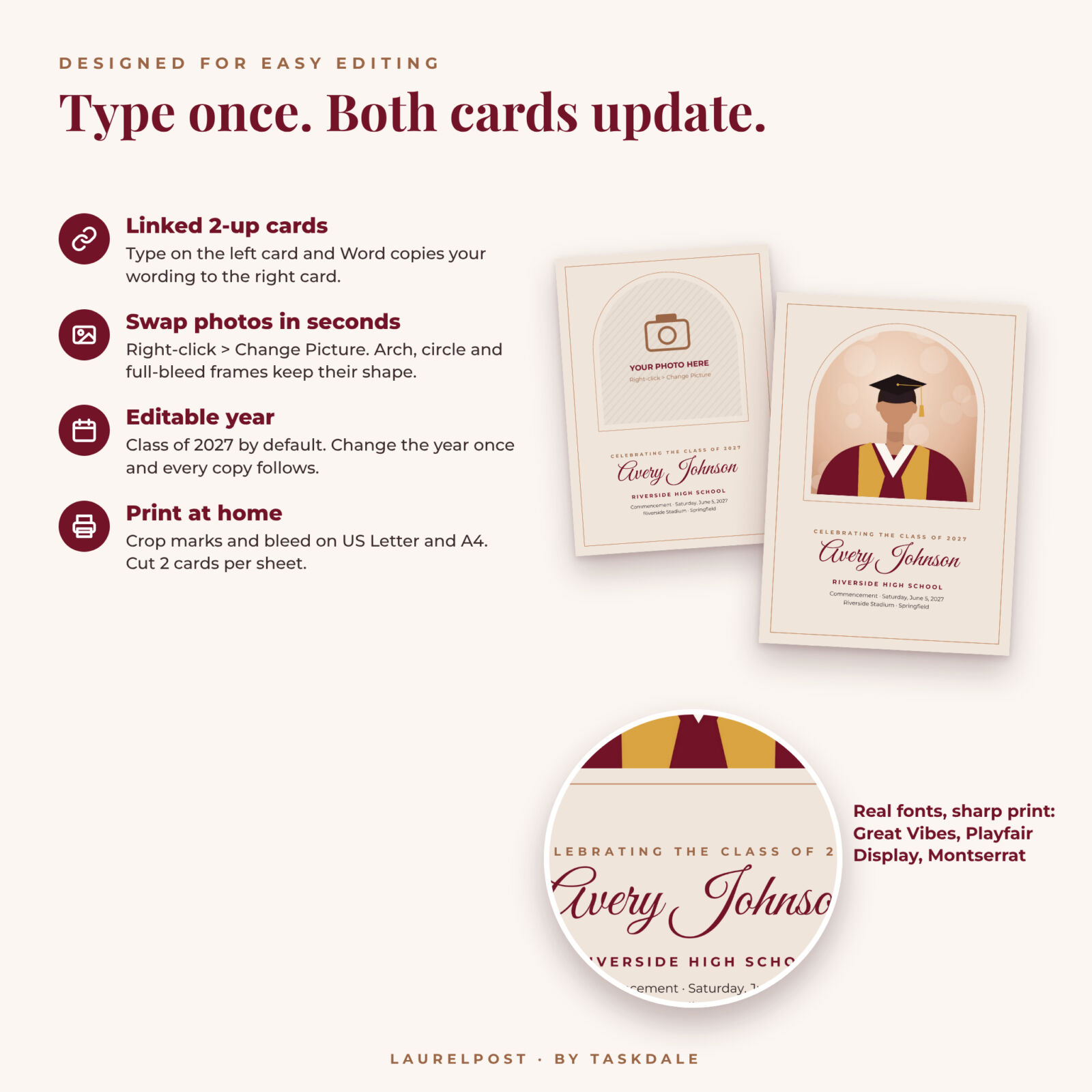
Each sheet holds two identical cards. The wording fields are linked, so when you type a name, school or party detail on the left card in desktop Microsoft Word, the right card fills in automatically. Change the year once and every “Class of” line on that page follows. In other apps you simply edit both cards.
Easy photo replacement
Right-click a photo placeholder, choose Change Picture and pick your photo. Arch, circle and full-bleed frames keep their shape, and Word’s Crop > Fill lets you position the photo perfectly. Every object has a clear name in the Selection Pane, such as “Photo 1 – right-click > Change Picture”.
Home-print friendly
- Two 5 x 7 in cards per sheet, on US Letter and A4
- Crop marks for straight cuts, and bleed on the outer edges so small trimming errors never show white slivers
- Fold marks on the folded notes
- Fonts embedded in the files (Playfair Display, Montserrat, Great Vibes, Bebas Neue)
Photo and no-photo designs
Nine designs need no photo at all, which is ideal if you are still waiting for senior portraits or prefer a typographic look. The photo designs include single portrait, collage and four-photo layouts.
Who It’s For
These printable graduation announcements suit high school seniors, college graduates, nursing and trade school grads, homeschool families and anyone celebrating a master’s or doctorate. Parents planning a graduation party or open house get invitations and thank-you notes that match the announcement, so the whole celebration looks pulled together.
How It Works
- Open the Word file in your paper size (Letter or A4). Page 1 lists every design and its page number.
- Go to your design and type your details on the left card.
- Right-click each photo placeholder and choose Change Picture.
- Print only that page at 100% (Actual size) on cardstock. Test on plain paper first.
- Cut on the crop marks, fold the notes on the fold marks, and mail in A7 (5 x 7 in cards) or A2 (folded notes) envelopes.
Real-Life Uses
- Mailing high school graduation announcements to relatives who live far away
- Inviting friends and neighbors to a backyard grad party or drop-in open house
- Sending college graduation announcements with your degree and university
- Writing thank-you notes for graduation gifts, money and gift cards, and keeping track of them
- Printing a small batch at home today, or saving as PDF for a copy shop
File Formats and Software Requirements
- Editable templates: Microsoft Word .docx (Word 2016 or newer, or Microsoft 365, on Windows or Mac desktop)
- Also opens and prints in LibreOffice Writer (free); there the two cards are edited separately
- Print previews: PDF (any PDF reader)
- Not recommended: Google Docs, Pages and Word for the web, which can shift floating photos and text boxes
Customization
Change any wording, the year, fonts, font sizes and colors. Swap the burgundy shapes for your school colors with Shape Fill, recolor or delete the laurel and cap artwork, and use the wording ideas in the guide for announcements, invitations and thank-you messages for grandparents, teachers, coaches and party guests.
Digital Download
This is an instant digital download. No physical item is shipped. You’ll receive the Word templates in US Letter and A4, the print-preview PDFs and the user guide. Print as many cards as you need for your own graduation. Personal use only; the files may not be resold, shared or redistributed. Illustrated sample photos in the previews are for demonstration; your files contain photo placeholders.
Graduation Announcement Template FAQ
Can I change the year from 2027?
Yes. The year is an editable field, and in Word every copy of it on a page updates together.
Do I need Canva or an online account?
No. These are Word files you edit on your own computer. Nothing is uploaded.
What size are the cards?
Announcements, invitations and flat thank-you cards are 5 x 7 in. Folded notes are 5 x 7 in flat and fold to 5 x 3.5 in.
Can I print them at home?
Yes. Each sheet prints two cards with crop marks on US Letter or A4. Most home printers handle 65 to 80 lb cover cardstock.
Can I use designs without a photo?
Yes. Nine of the 19 designs have no photo frames.
Does it work on a Mac?
Yes, in Microsoft Word for Mac.
Can a print shop print them?
Yes. Save your edited page as PDF and ask for 100% printing on cardstock, cut on the crop marks.
Reviews
There are no reviews yet.