



Ledgerlume is a small business bookkeeping spreadsheet for Microsoft Excel and Google Sheets that turns everyday income and expense entries into clear, live answers: how much you made, what you spent, what you owe in sales tax, how much to set aside for income tax and whether you’re on track for your goals. You type a few details per transaction – the formulas, charts and reports do the rest.
It’s designed for freelancers, makers, online sellers and service businesses who want professional-looking books without subscription accounting software. The dark, easy-on-the-eyes design uses soft pastel colors to separate income, expenses and profit, so you can read your numbers at a glance.
Why choose this small business bookkeeping spreadsheet?
- Everything in one connected workbook – 19 tabs that all read from the same income and expense logs, so nothing needs to be entered twice.
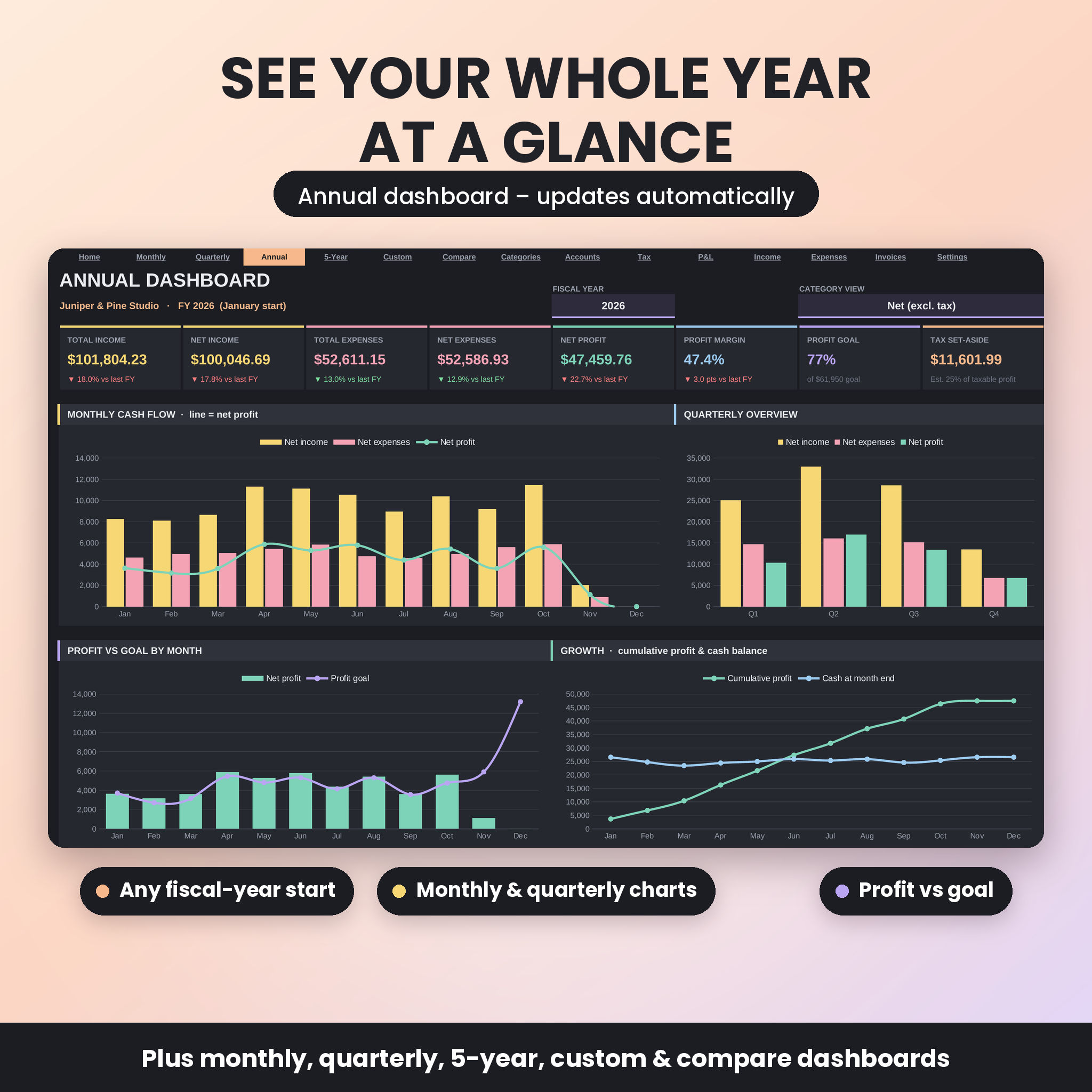
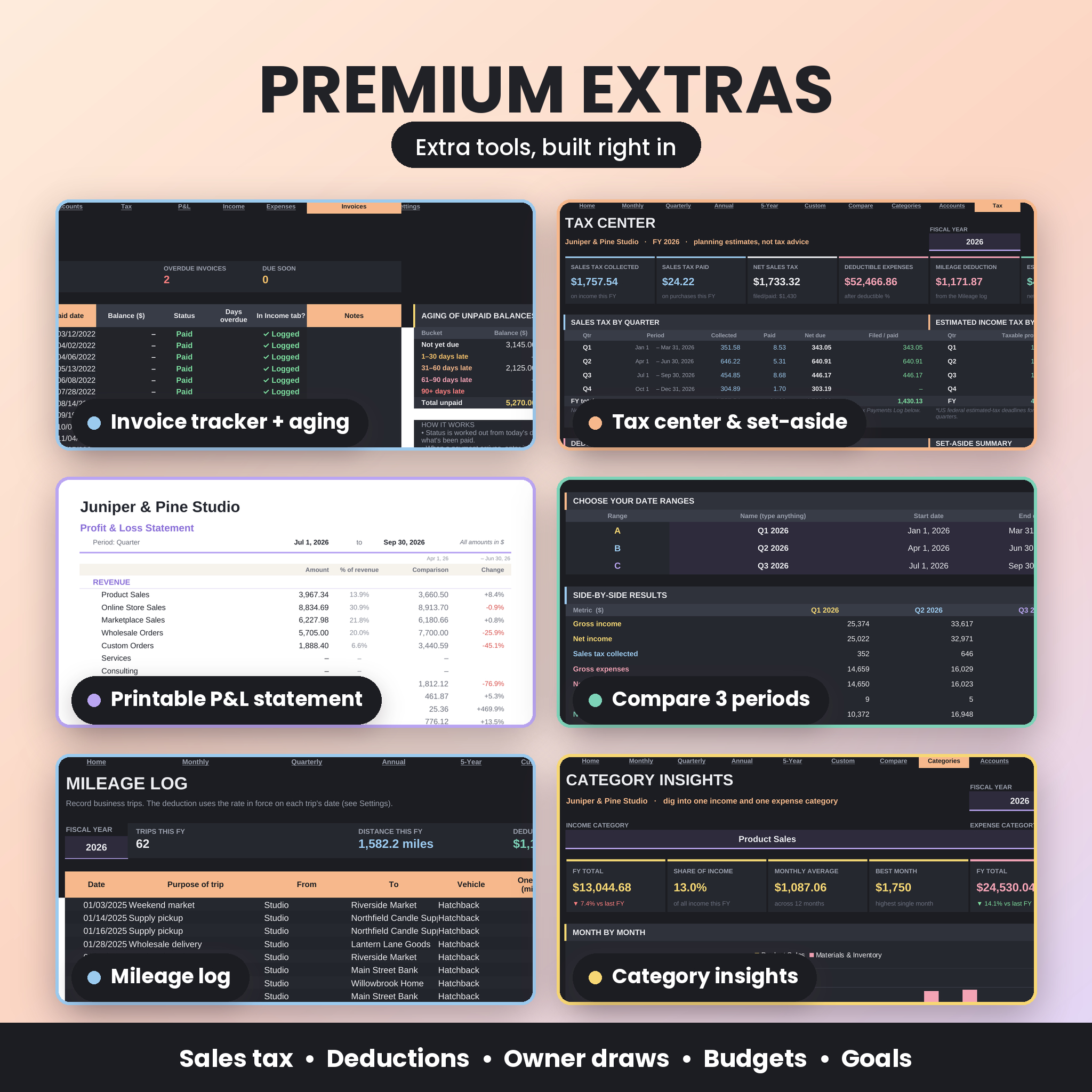
- Nine dashboards – Monthly, Quarterly, Annual, 5-Year, Custom Range, Compare (three periods side by side) and Category Insights, plus Account Balances and a Tax Center.
- Tax-ready records – sales tax collected and paid by quarter, deductible amounts, deductions grouped by tax-form line (US Schedule C style by default, renameable for any country) and a suggested income-tax set-aside.
- Any currency, any fiscal year – one currency setting updates every money label and card, and your fiscal year can start in any month.
- Built-in error checks – every row is checked for missing dates, text in amounts and unknown categories or accounts, and a Data Health panel shows what needs attention.
Features
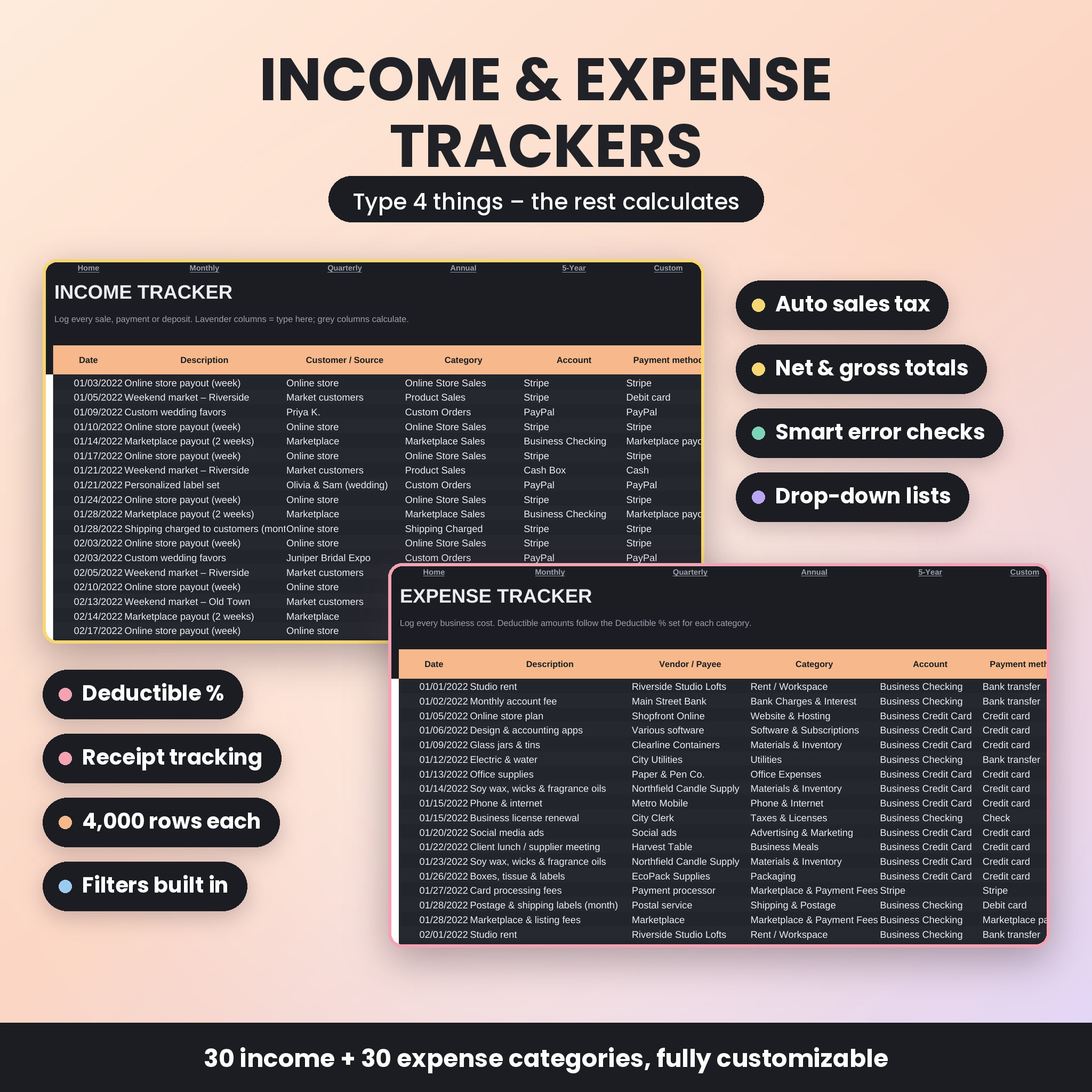
Income & expense trackers
- 4,000 income rows and 4,000 expense rows with drop-down categories, accounts and payment methods
- 30 income and 30 expense categories, fully customizable, each with its own sales tax rate
- Choose whether amounts include sales tax or tax is added on top; net, tax and gross calculate automatically
- Deductible % per expense category (e.g. 50% for business meals) and receipt tracking
- Per-entry tax override, refunds as negative amounts, and filters on every column
Dashboards and reports
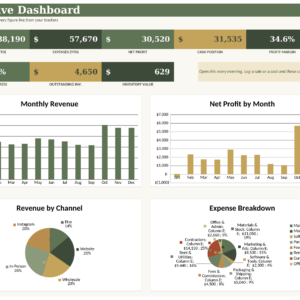
- KPI cards for total income, net income, total and net expenses, net profit, profit margin, goal progress and tax set-aside – each compared with the previous period
- Daily, weekly, monthly, quarterly and yearly charts with running profit lines
- Top income and expense categories with doughnut charts and a Gross / Net / Tax-only view switch
- Annual financial summary with a 12-month table and category-by-month heat maps
- Printable profit & loss statement for any month, quarter, fiscal year or custom dates, with a previous-period or same-period-last-year comparison
Extra tools
- Invoice tracker – due dates from payment terms, automatic status (Paid, Part paid, Open, Due soon, Overdue), days overdue, aging buckets and a check that each payment is logged as income
- Mileage log – round trips, miles or km, and rates by effective date, pre-filled with IRS business rates for 2025 and 2026 (including the July 2026 change)
- Transfers – moves between accounts, owner contributions and owner draws that keep balances right without affecting profit
- Account balances – up to 20 bank, card, cash and online accounts with opening balances, as-of date and month-end totals
- Goals and budget – monthly income and profit goals for five fiscal years, plus a monthly budget per expense category with On track, Running high and Over budget status
- Tax payments log – record sales-tax filings and estimated income-tax payments by fiscal year and quarter
What’s included
- Ledgerlume Bookkeeping Suite (.xlsx) – the clean workbook with default categories, ready for your data
- Example Business Workbook (.xlsx) – the same workbook filled with almost five years of sample data for a fictional business, so you can explore every feature first
- User Guide (.docx) – an illustrated step-by-step guide covering setup, every tab, customization, troubleshooting and FAQs
- All three files are also bundled in one ZIP download
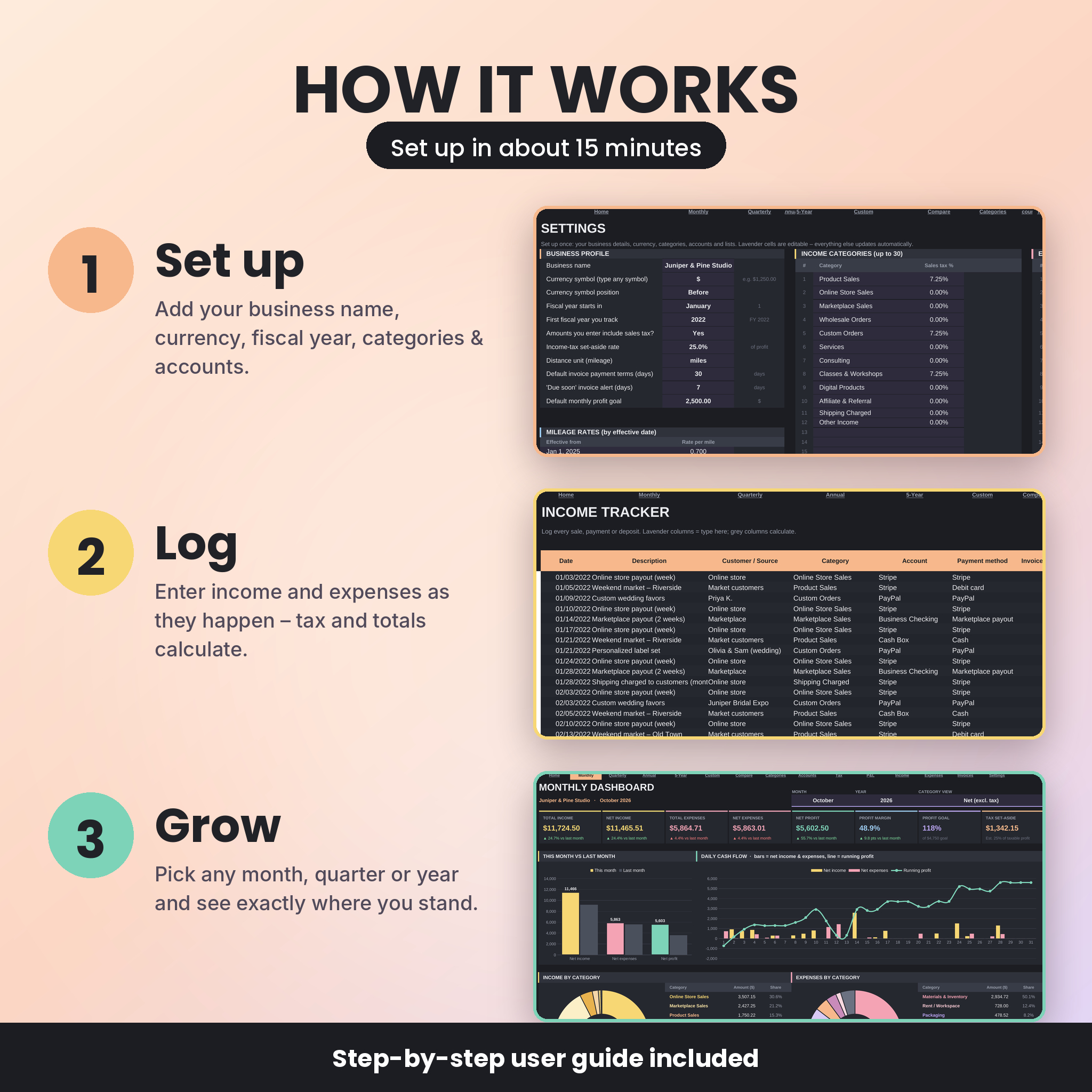
How it works
- Set up (about 15 minutes): on the Settings tab, add your business name, currency symbol, fiscal-year start month, categories, accounts and sales tax rates.
- Log as you go: add income and expenses with a date, category, account and amount. Lavender cells are for typing; everything else calculates.
- Review: pick any month, quarter, year or date range at the top of a dashboard and your charts, tables and tax figures update instantly.
File formats and software requirements
- Format: Microsoft Excel workbook (.xlsx) plus a Word (.docx) user guide
- Works in Microsoft Excel (Microsoft 365 and Excel for the web) and Google Sheets – upload the .xlsx to Google Drive and open it with Google Sheets
- No macros, add-ins or internet connection required in Excel
- Best used on a computer; the Excel and Google Sheets mobile apps can be used for viewing and quick entries
Customization
Rename categories, accounts, payment methods and tax report lines on the Settings tab, set your own tax rates and deductible percentages, choose miles or kilometers and change the mileage rate whenever it changes. Formula cells are protected in Excel without a password, so you can unprotect any tab to change colors or layout.
Digital download
This is an instant digital download – no physical item will be shipped. Your files are available immediately after purchase from your order confirmation and account page.
Use cases
- An online or marketplace seller tracking payouts, fees, packaging and shipping costs, and sales tax by quarter
- A freelancer or consultant sending invoices and watching which clients pay late
- A photographer, cleaner or tradesperson logging business mileage with the right rate for each trip
- A side hustle owner who wants a profit goal each month and a clear set-aside amount for taxes
- Anyone preparing an organized profit & loss statement and deduction summary for their accountant
FAQ
Does this bookkeeping spreadsheet work in Google Sheets?
Yes. Upload the .xlsx file to Google Drive and open it with Google Sheets – formulas, drop-downs, charts and links all work.
Can I use a currency other than US dollars?
Yes. Type any currency symbol on the Settings tab and choose whether it appears before or after amounts.
My fiscal year doesn’t start in January. Will it work?
Yes. Choose any start month and every dashboard, quarter and report follows your fiscal year.
Is it suitable for beginners?
Yes. A Start Here tab, color-coded input cells, drop-down lists, automatic error checks and the illustrated user guide walk you through everything.
How many transactions can I track?
Up to 4,000 income entries, 4,000 expense entries, 500 invoices, 1,500 trips and 500 transfers in one workbook.
Does it calculate my taxes?
It totals sales tax, groups deductions and estimates an income-tax set-aside using the rate you choose. These are planning estimates, not tax advice – please confirm figures with a qualified professional.
Can I share the file?
The license covers personal use in your own business. Please don’t resell, share or redistribute the files.
Ledgerlume is a record-keeping and planning tool and does not provide financial, legal or tax advice. Licensed for personal use in your own business only – no resale or sharing.
Reviews
There are no reviews yet.