

A podcast planner spreadsheet that does the busywork for you
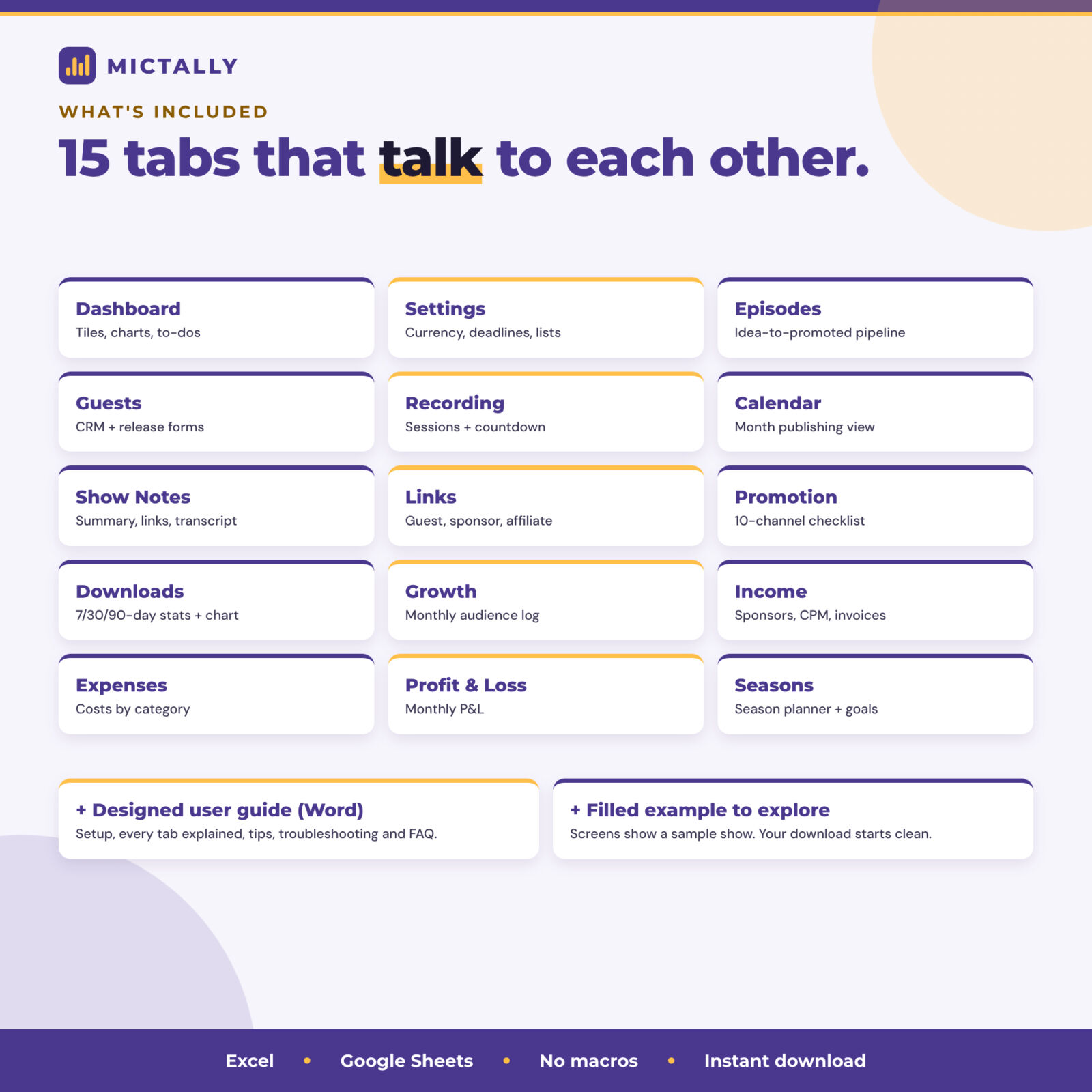
Mictally is a podcast planner spreadsheet for hosts, producers and podcast managers who are tired of juggling a notes app, a calendar, a guest inbox and a stats screen. You type each fact once: an episode’s stage and release date, a guest’s last contact, a sponsor’s rate. The planner then works out deadlines, next steps, follow-ups, reminders, totals and charts. Everything sits in 15 connected tabs for Microsoft Excel and Google Sheets.
Most podcast templates are a single episode list. Mictally connects that list to your guests, recording sessions, calendar, show notes, promotion, downloads and money, so you can see what is due this week and what is actually growing your show.
Who it is for
- Independent podcasters who batch-record and want deadlines worked out from the release date.
- Interview shows that need a guest tracker for pitches, bookings, release forms and thank-you links.
- Producers, editors and virtual assistants who manage shows for clients.
- Brand and business podcasts that report downloads and sponsor income every month.
- New podcasters who want a simple podcast episode tracker from day one.
Main features
Episode pipeline with automatic deadlines
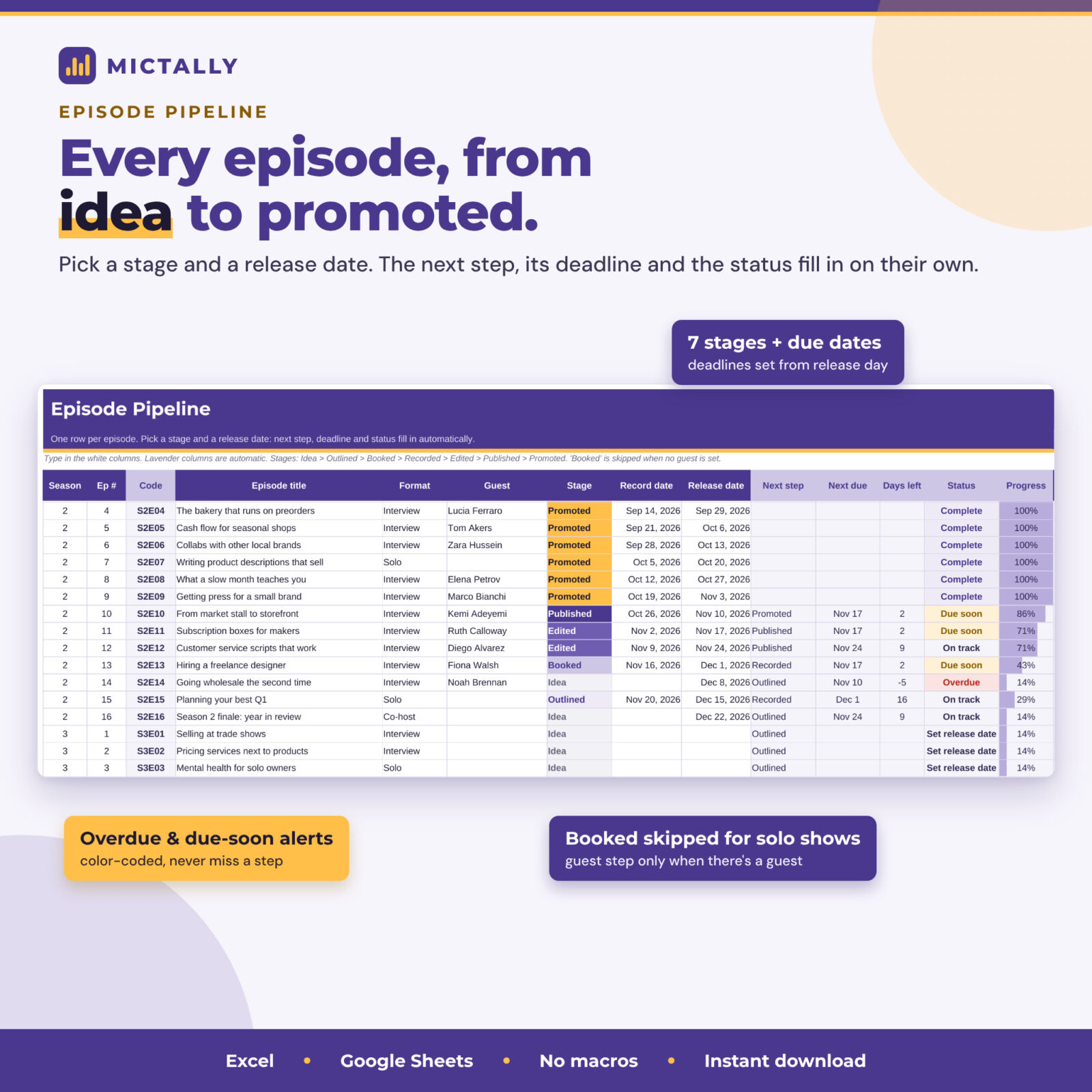
Every episode moves through seven stages: Idea, Outlined, Booked, Recorded, Edited, Published and Promoted. Pick a stage and a release date and the sheet shows the next step, its due date, days left, a progress bar and a status of Overdue, Due soon or On track. Solo episodes skip the Booked step automatically. You can change how many days before or after release each stage is due.
Guest tracker (podcast guest CRM)
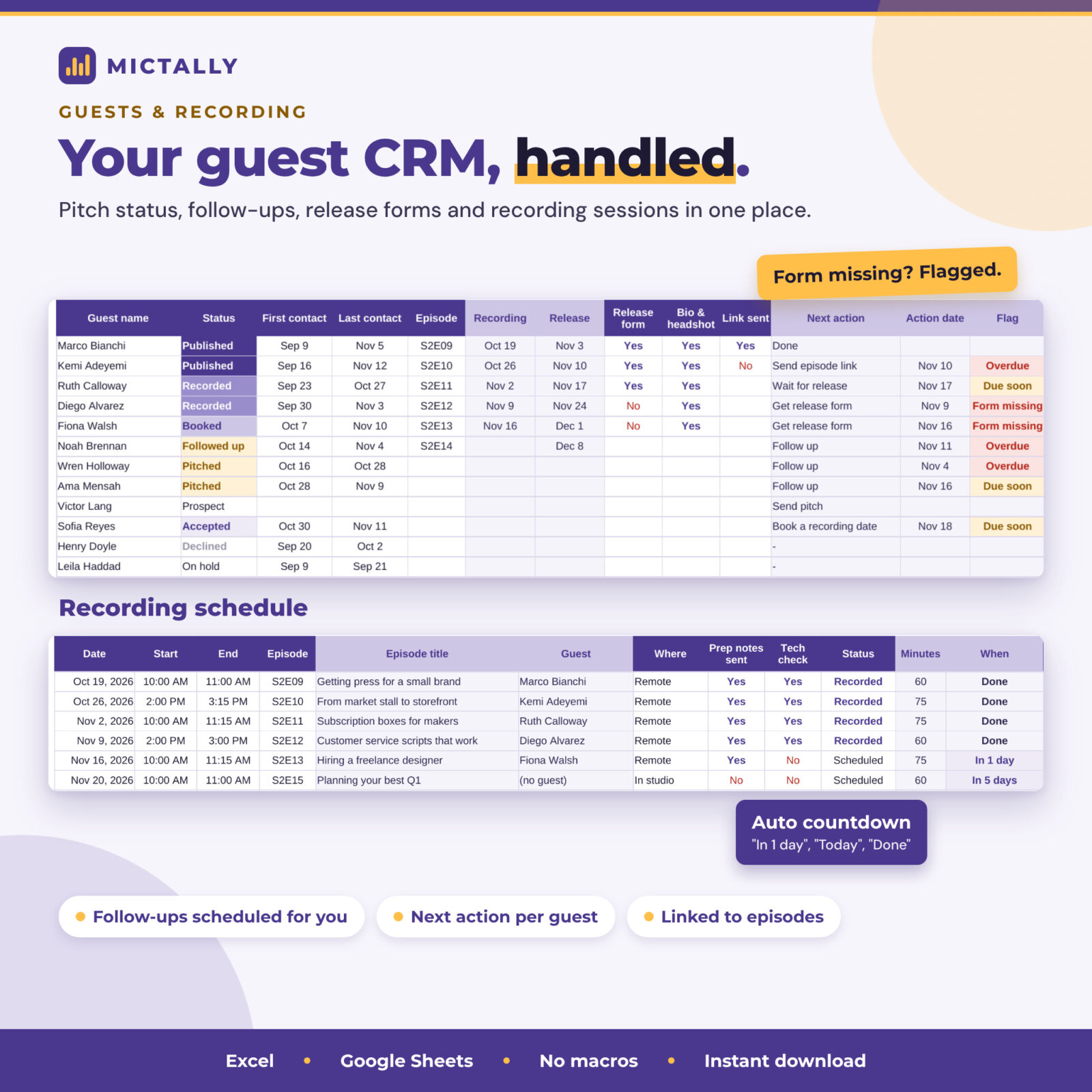
Track contact details, pitch angle, source and status from Prospect to Published. The planner sets follow-up dates from your last contact, pulls in recording and release dates, and flags any booked, recorded or published guest without a signed release form. A next-action column tells you exactly what to send next.
Recording schedule and publishing calendar
Log sessions with start and end times, place, session link, prep notes and tech check. Length and a countdown (“In 2 days”, “Today”) are automatic. The month-view podcast content calendar shows every release and recording session, with a Sunday or Monday start.
Show notes, links and promotion checklist
Write a summary, guest links, resources and call to action for each episode, and tick off chapters, transcript and posting. A link tracker checks every guest, sponsor and affiliate link. The promotion checklist covers 10 channels you can rename, such as audiogram, newsletter and socials. Each episode gets a progress bar and a deadline, and skipped channels don’t count against you.
Podcast downloads tracker with charts
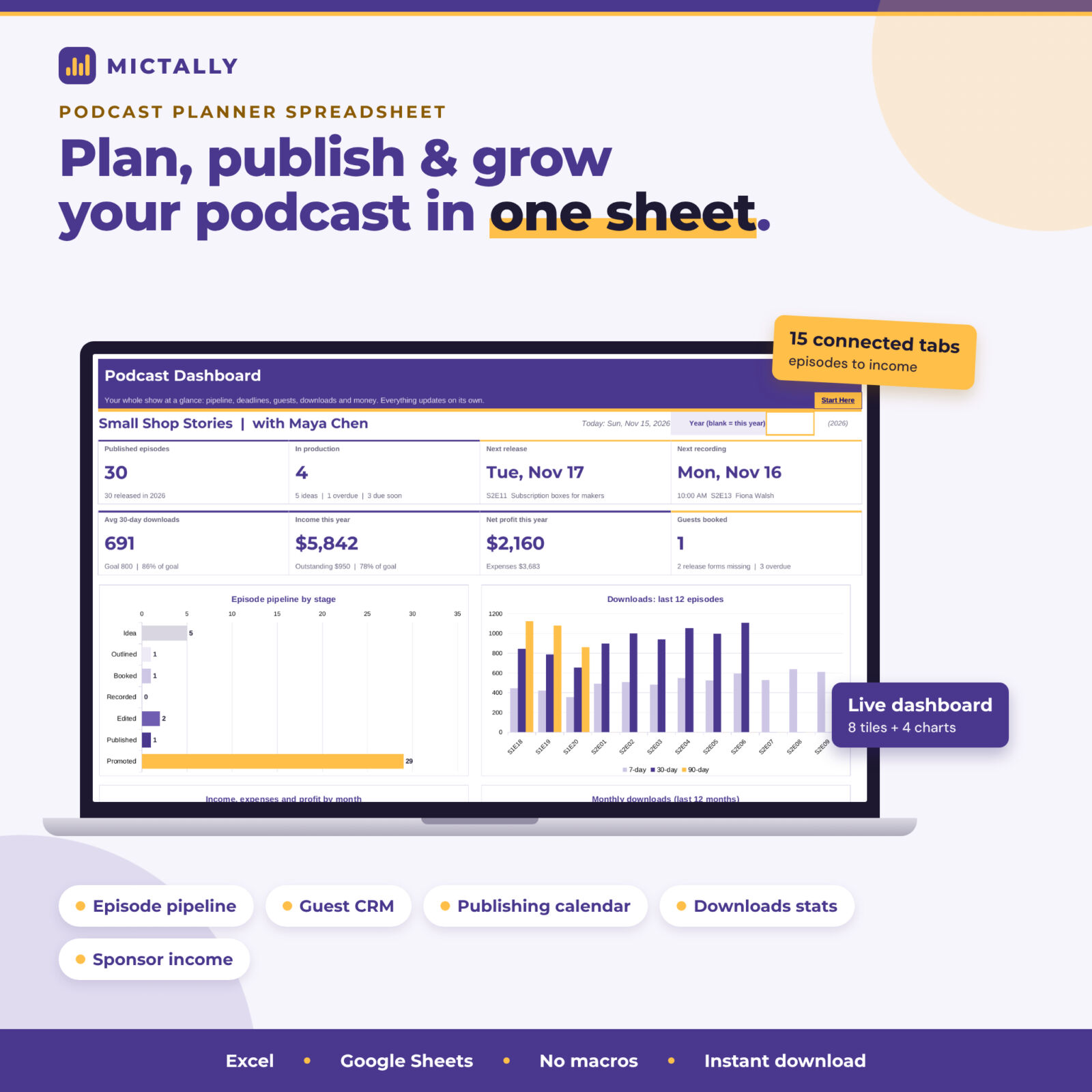
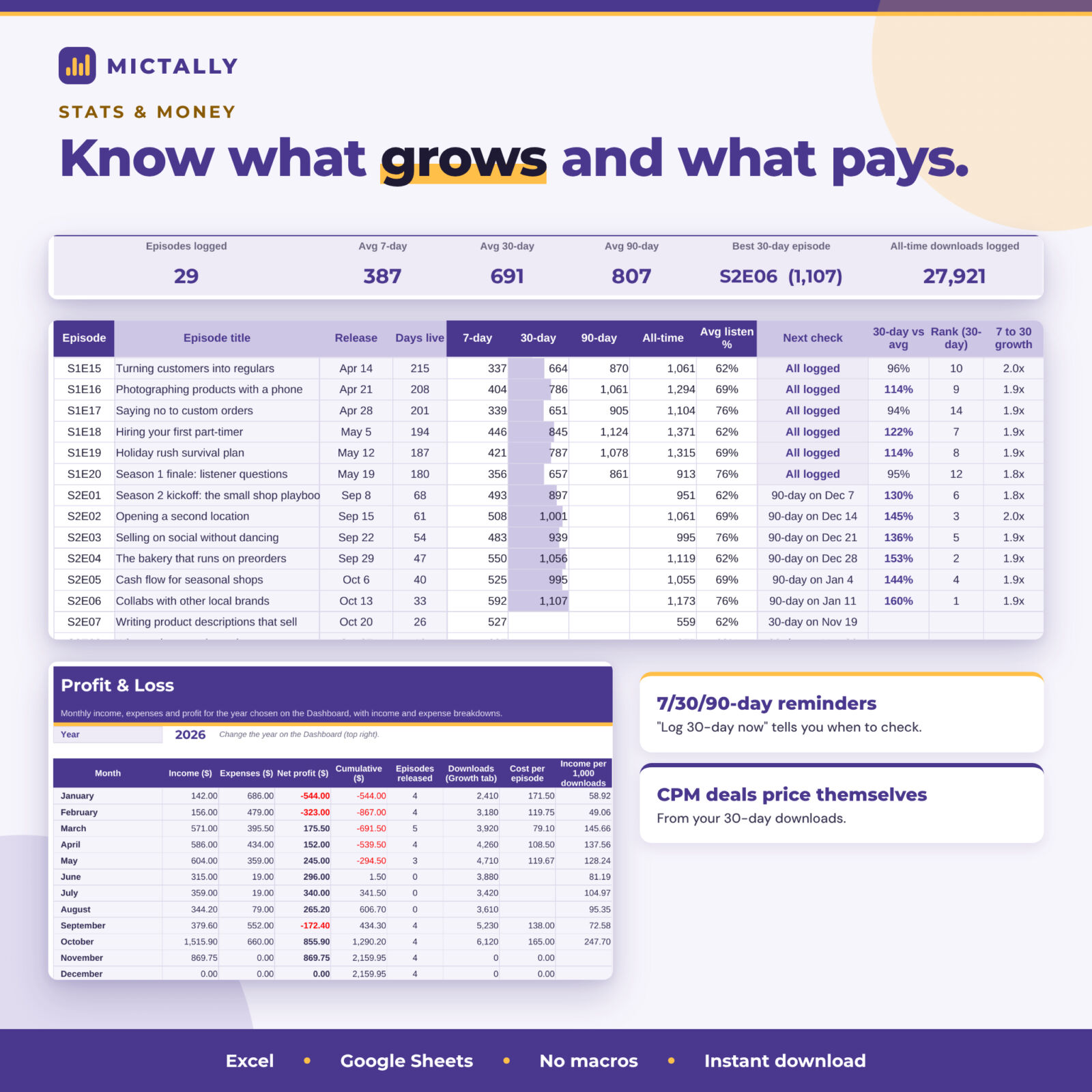
Log 7-day, 30-day and 90-day downloads per episode. Reminders show the date each number becomes due (“30-day on Nov 19”) and switch to “Log 30-day now” when it’s time. You also get show averages, your best episode, a rank, 7-to-30-day growth, comparison with your average and a chart of your last 12 episodes. A monthly growth tab logs downloads, followers, ratings, email list, social and video numbers.
Sponsor tracker, expenses and profit and loss
Record sponsorships, ad network payouts, affiliate income, listener support, merch and services. CPM deals price themselves from an episode’s 30-day downloads. Invoices get due dates and statuses (Invoiced, Overdue, Part paid, Paid). Expenses roll into a monthly profit and loss with cost per episode and income per 1,000 downloads.
Season planner and dashboard
Plan each season’s theme, dates, cadence and download goal, then track progress, average downloads, income and profit by season. The dashboard brings it together: 8 live tiles, 4 charts, upcoming releases and recordings, a guest to-do list and a health check with links to anything that needs attention.
What is included
- Mictally Podcast Planner Spreadsheet (.xlsx): Start Here, Dashboard, Settings, Episodes, Guests, Recording, Calendar, Show Notes, Links, Promotion, Downloads, Growth, Income, Expenses, Profit & Loss and Seasons
- Mictally User Guide (.docx): setup, every tab explained with screenshots, customizing, tips, troubleshooting and FAQ
How it works
- Open Settings and type your show name, currency symbol and week start.
- Add your season, guests and episodes. Episode codes such as S2E05 link every tab.
- Book recording sessions, then tick off show notes and promotion after each release.
- Log downloads when reminded, plus sponsor income and expenses. The dashboard updates on its own.
File format and software requirements
- One .xlsx workbook for Microsoft Excel 2016 or newer and Excel for Microsoft 365 (Windows and Mac)
- Works in Google Sheets: upload to Google Drive and open with Google Sheets
- No macros, scripts or add-ons. Formula cells are locked with no password, so you can unlock them to restyle.
- Room for 300 episodes, 300 guests, 300 recording sessions, 500 links, 300 income rows, 500 expenses and 20 seasons
Customization
Choose any currency symbol; every money column and dashboard total follows it. Change stage deadlines, the due-soon warning, follow-up timing, invoice terms, the promotion window and your goals. Edit the dropdown lists for formats, guest sources, recording places, income types, ad slots, expense categories, link types and cadence, and rename the 10 promotion channels.
Digital download
This is a digital product; nothing is shipped. Your files are available to download right after purchase. Personal use only (or use within your own business). Files may not be resold, shared or redistributed.
Use cases
- Plan a 12-episode season backwards from launch day and see which outlines are late.
- Keep an interview show’s guest pipeline moving with automatic follow-ups and release-form checks.
- Report monthly downloads and sponsor income to a client or co-host in one dashboard.
- Price a CPM sponsorship from your real 30-day downloads before you send the invoice.
- Run a weekly video podcast and track promotion across every social channel.
Frequently asked questions
Does this podcast planner work in Google Sheets?
Yes. Upload the file to Google Drive and open it with Google Sheets. The formulas, dropdowns and charts are compatible with both Google Sheets and Excel.
Does it connect to my podcast host automatically?
No. You copy download numbers from your host’s statistics page. This works with any host and keeps your data private.
Can I use it for a video podcast?
Yes. Rename the promotion channels and use the video views column on the Growth tab.
Do I need spreadsheet skills?
No. You only type in white cells and pick from dropdowns. Every formula is built in and locked so it can’t break by accident.
Can I change the currency?
Yes. Type any symbol on the Settings tab and every money header and total updates.
Is there a free version?
Yes. Taskdale offers a free two-tab episode and guest planner. The full Mictally planner adds the dashboard, calendar, recording schedule, promotion, downloads, income, profit and loss and season tabs.
Is this accounting software?
No. Profit and Loss summarizes what you enter for planning. Talk to a tax professional about your own situation.
Reviews
There are no reviews yet.