

A road trip planner spreadsheet that does the math for you
Milewild is a road trip planner spreadsheet for Excel and Google Sheets that keeps the route, the fuel, the stays, the money and the packing in one linked file. You type each leg of the drive, and it prices the fuel, adds up the miles and drive time, and shows where you sleep each night. You log what you spend, and it compares the plan with reality and tells everyone in the car who owes whom.
Most road trip templates are a pretty itinerary page with a budget table on the side. Milewild connects them: change your fuel price or add a second car, and every leg, the budget and the dashboard update at once.
Who it is for
- Families planning a summer road trip or a national parks loop
- Friends and couples sharing a car (or two) who want costs split fairly
- RV, van and camping travelers who want fuel, campgrounds and supplies in one budget
- Anyone driving a long move across the country who wants to price it first
Main benefits
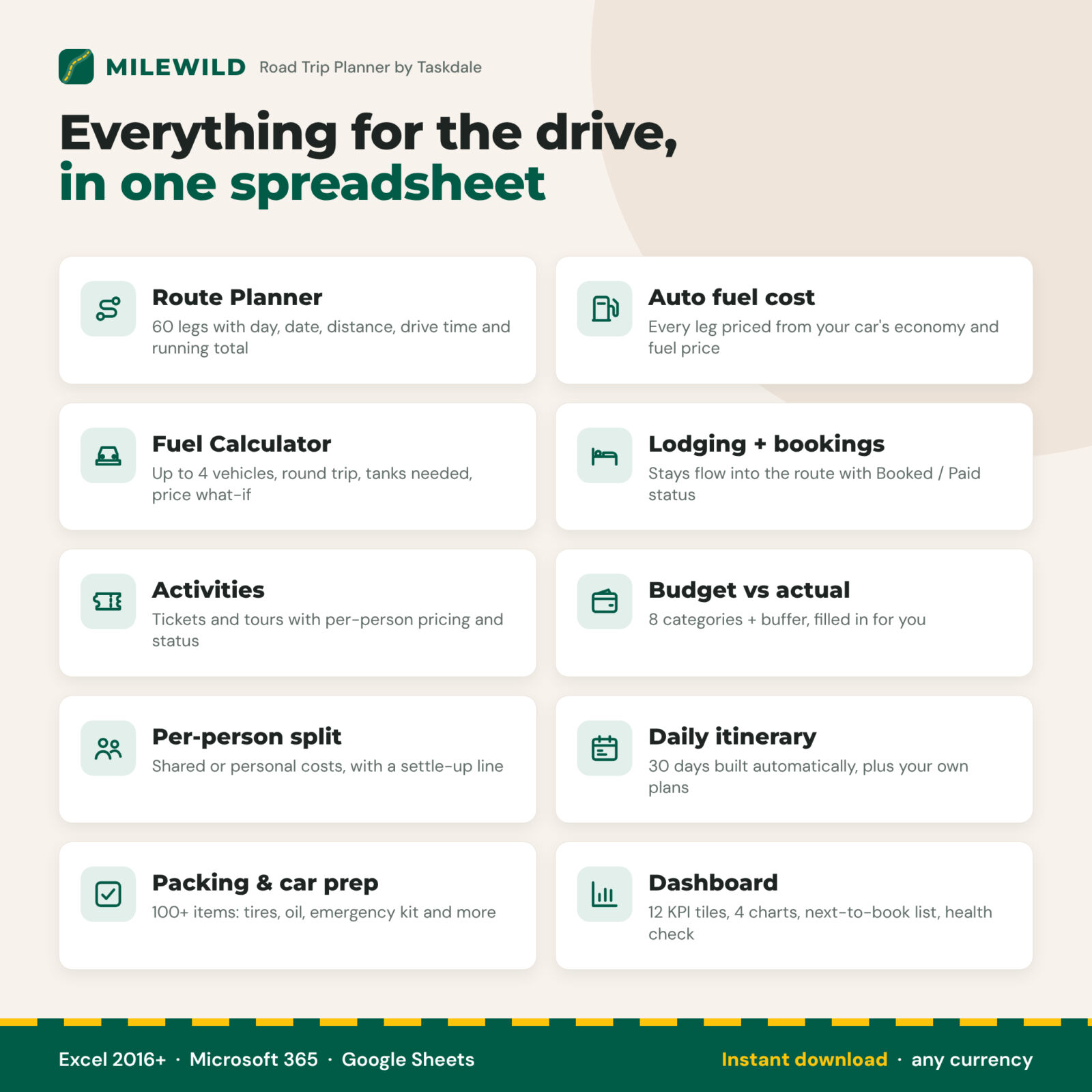
- Know the fuel cost before you go. Every leg is priced from your car’s fuel economy and the fuel price you enter.
- No double entry. Stays entered once on the Lodging tab appear on the route, the itinerary and the dashboard.
- No awkward money talks. Shared and personal costs are split automatically with a clear settle-up line for each traveler.
- Nothing forgotten. A next-to-book list, cancel-by dates, long-drive warnings and a car-prep checklist keep the trip on track.
Features of the road trip spreadsheet
Route Planner (60 legs)
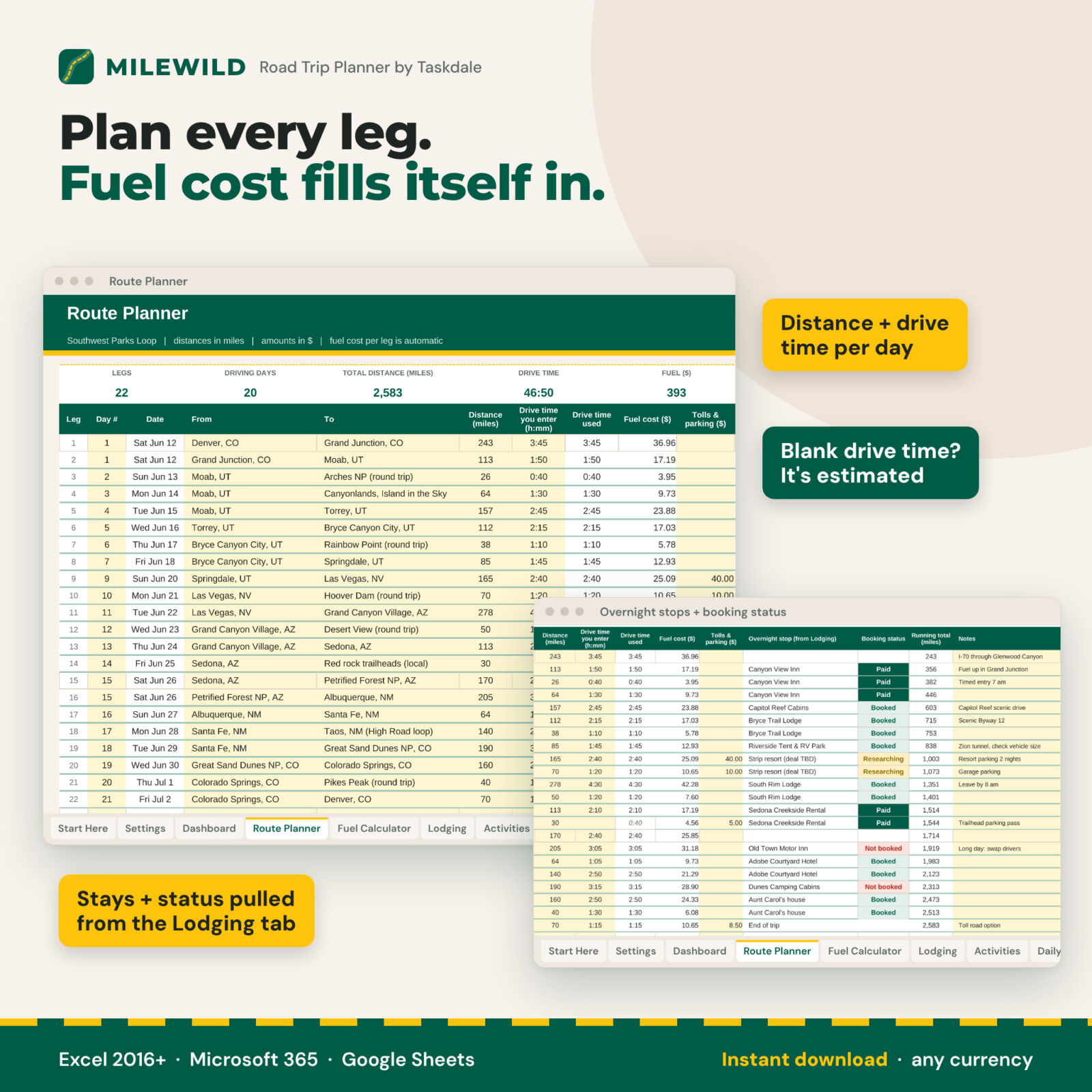
Day number, date, from, to, distance and drive time for every leg. Leave the drive time blank and it is estimated from your average speed. Fuel cost, tolls and parking, a running total, the overnight stop and its booking status fill in for you.
Fuel cost calculator
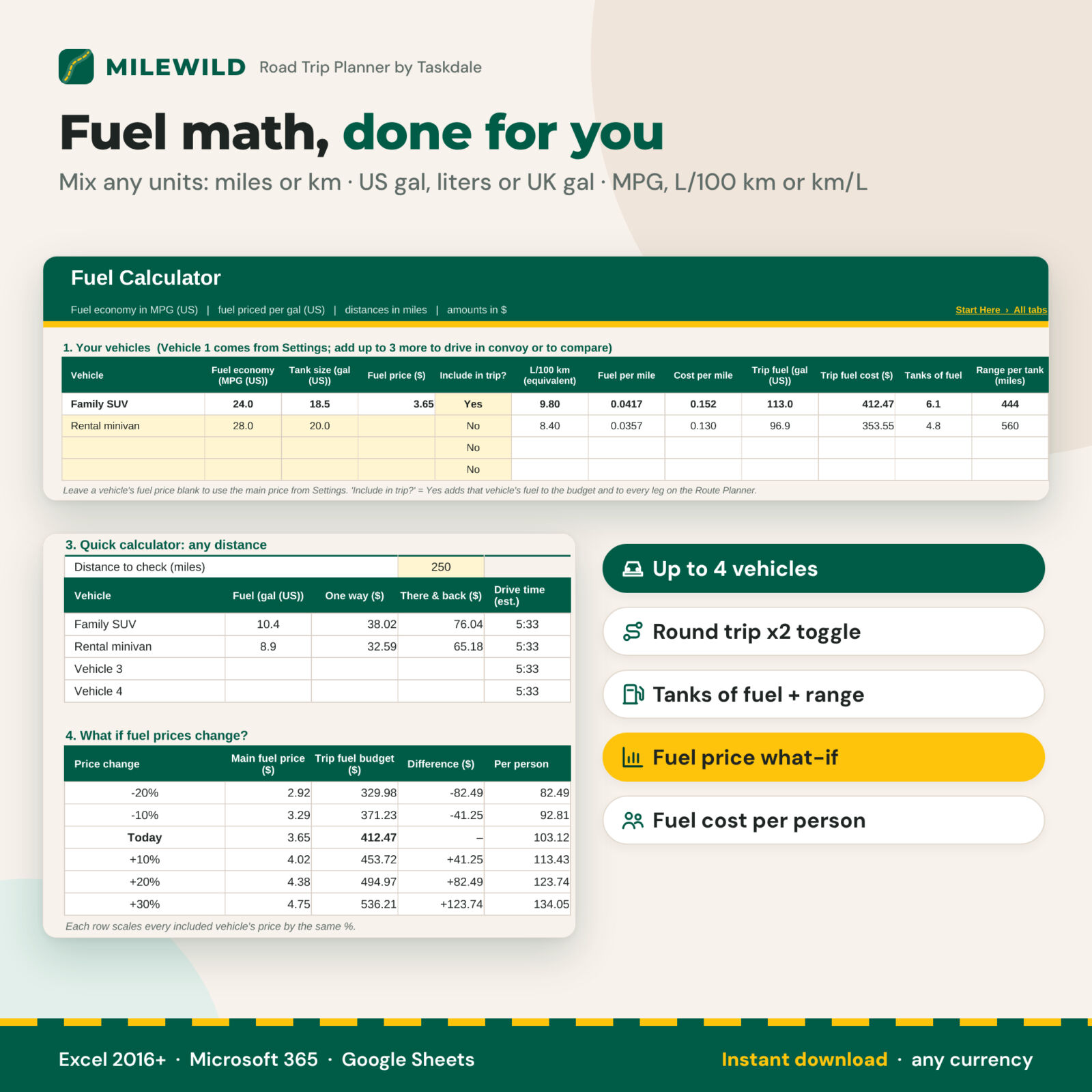
Add up to 4 vehicles to drive in convoy or to compare (your SUV against a rental minivan, for example). See cost per mile or km, trip fuel, tanks of fuel used and range per tank. Switch on a round trip to double the route, add a detour allowance, check any distance in the quick calculator and see the trip fuel budget at fuel prices from -20% to +30%.
Lodging and activities budget
Track 40 stays with nights, rate, taxes and fees, status, confirmation number and cancel-by date (highlighted when it is within a week). Track 60 tickets, tours and passes with price per person and booking status. Overlapping stays and nights without a bed are flagged.
Budget vs actual with a per-person split
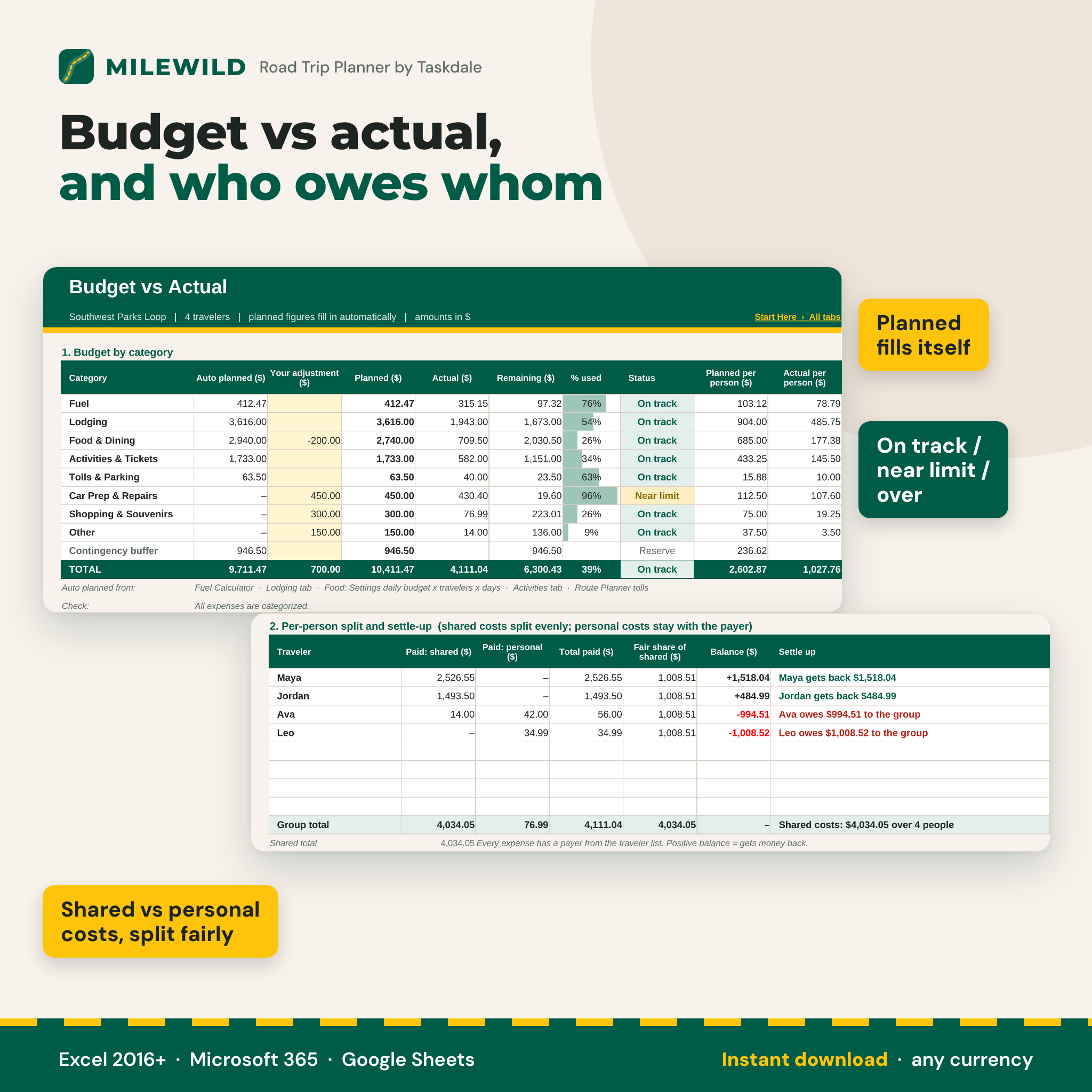
Eight categories plus a contingency buffer. Fuel, lodging, food, activities and tolls are planned automatically; add your own amounts for car prep, shopping and extras. A 400-row expense log feeds the actual figures, the on track / near limit / over budget status and the split for up to 8 travelers.
Daily itinerary that builds itself
Thirty days with start, end, distance, drive time, overnight stay, activities and money spent, pulled from the other tabs. Add your own plans, meals and notes.
Packing and car-prep checklist
Over 100 items across car prep (tire pressure and tread, oil, fluids, brakes, battery, lights, wipers), the emergency kit, documents, clothing, health, tech, food, kids and pets, and leaving home. Progress bars show each section’s percentage.
Dashboard
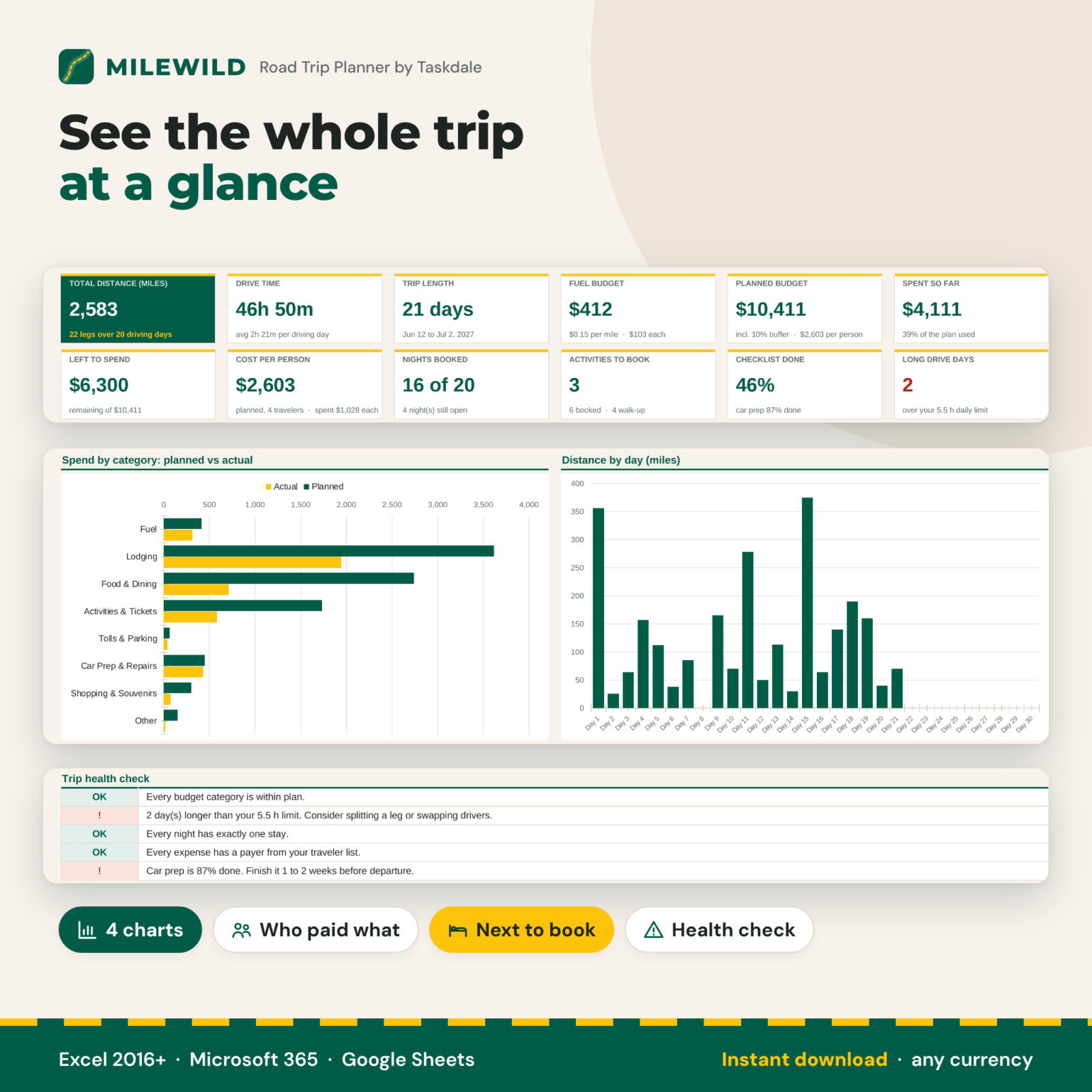
Twelve KPI tiles, spend by category, distance by day, budget mix, who paid what, next-to-book lists and a trip health check.
What is included
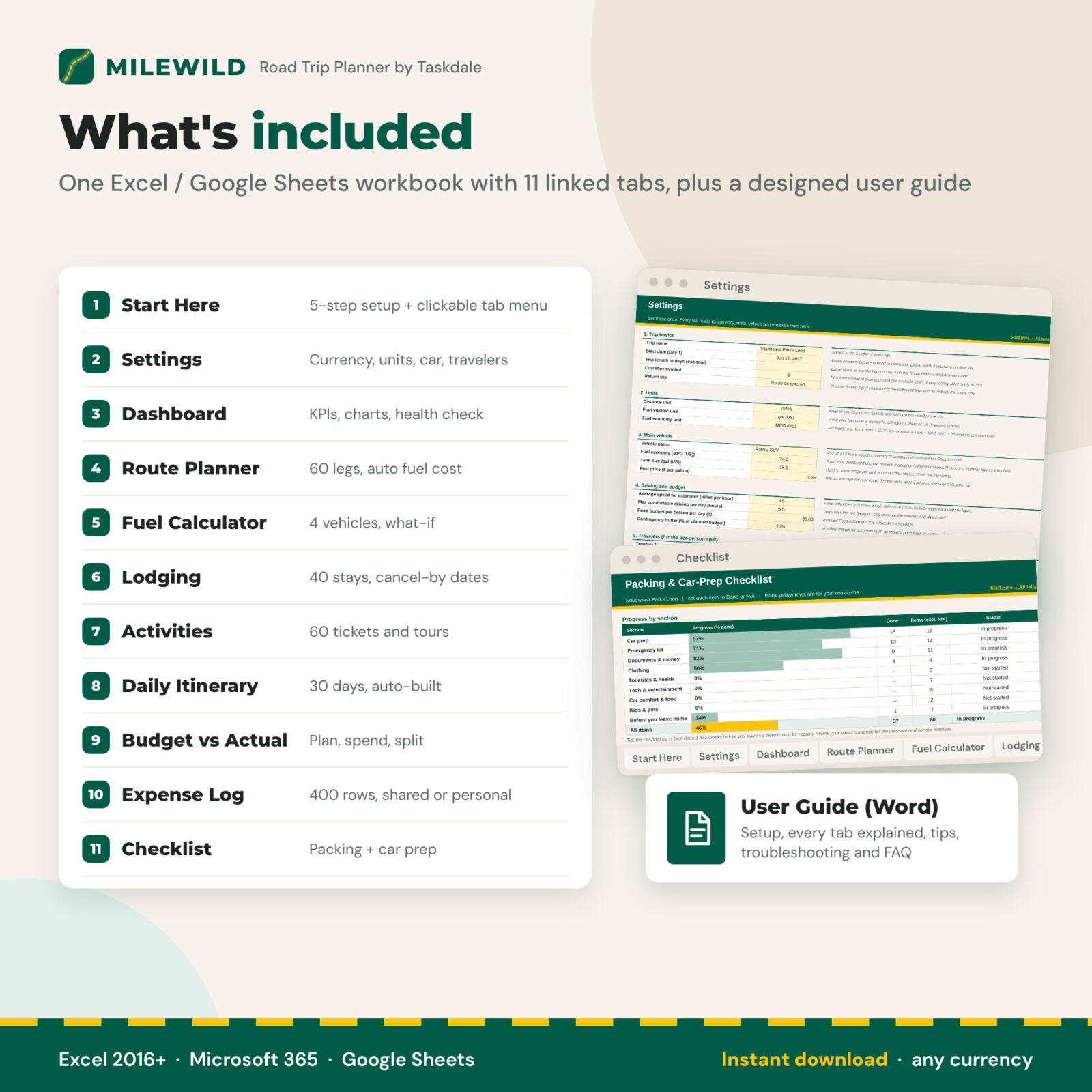
- Milewild Road Trip Planner workbook (.xlsx) with 11 tabs: Start Here, Settings, Dashboard, Route Planner, Fuel Calculator, Lodging, Activities, Daily Itinerary, Budget vs Actual, Expense Log and Checklist
- Designed user guide (Word .docx) with screenshots, tips, troubleshooting and FAQ
How it works
- On Settings, choose your currency, miles or km, fuel unit and economy unit, then enter your car and your travelers.
- Type your legs on the Route Planner and your stays and activities on their tabs.
- Check the dashboard, book what is still open, and log spending as you drive.
File format and software requirements
One .xlsx file that works in Microsoft Excel 2016 or later (Windows and Mac), Microsoft 365 and Google Sheets (free with a Google account). No macros, add-ins or internet connection are needed. Formula cells are locked without a password so they cannot be overwritten by accident.
Customization
Yellow cells are yours to fill. Use any currency symbol, mix units freely (miles + liters + MPG UK, or km + L/100 km), rename the vehicles, add your own checklist items in the blank rows and adjust any planned budget line. The workbook prints neatly with every tab fitted to the page width.
Digital download
This is a digital product. Nothing is shipped. Download the files right after purchase and start planning in minutes. Personal use only.
Use cases
- A 3-week national parks loop with a family of four, with nights booked step by step
- A weekend drive with friends where two cars share fuel and campsite costs
- A cross-country move, comparing the fuel cost of your car against a rental truck
- A holiday drive to see family, with tolls, stops and the return trip priced up front
FAQ
Does this road trip planner work in Google Sheets?
Yes. Upload the file to Google Drive and open it with Google Sheets. Every formula uses functions that work the same in Excel and Google Sheets.
How does it calculate gas cost for a road trip?
Fuel cost = distance ÷ fuel economy × fuel price, converted for your units. It is worked out for every leg and for the whole trip, including the return and any detour allowance.
Can I use kilometers, liters and L/100 km?
Yes. Choose km, liters and L/100 km or km/L on Settings, and use any currency symbol.
Can I plan with two cars?
Yes. Add up to 4 vehicles and include the ones that are driving. Their fuel is added to every leg and to the budget.
Does it split costs between travelers?
Yes. Mark each expense as shared or personal and pick who paid. The split shows what each person paid, their fair share and what they get back or owe.
Can I reuse it for my next trip?
Yes. Keep a blank copy, or clear the yellow cells and plan the next one.
Is there a printable version?
Every tab is set up to print on US Letter, fitted to the page width, so you can take the itinerary and checklist with you.
Reviews
There are no reviews yet.