



The Nest & Nickel Family Budget Planner is a complete family budget spreadsheet for Google Sheets that helps your household plan every paycheck, track every dollar and grow your savings, without writing a single formula. Instead of one tab you have to duplicate and rebuild every month, you get 12 ready-made monthly dashboards, one spending log that fills them in for you, and a yearly summary that builds itself as the months go by.
A family budget planner that does the math for you
Set up your categories once and the planner copies your monthly amounts into every month. Then simply record what actually happens: mark bills as Paid, type the income you received and log purchases as you make them. Totals, color-coded differences and charts update instantly, and each month’s ending balance carries forward to the next month automatically.
It’s built for real family life: you can budget monthly, by paycheck (weekly, biweekly or twice a month) or by a custom period such as the 15th to the 14th.
Who it’s for
- Families and couples who want one shared place to manage household money
- Anyone paid biweekly or weekly who needs to know which paycheck covers which bill
- Beginners who want a simple, guided budget template with no spreadsheet skills needed
- Budgeters paying down debt or saving for a goal like an emergency fund, vacation or college
Main features
12 monthly budget dashboards
- KPI cards for total income, total spent, left to budget and savings rate
- Cash flow summary: budget vs actual for income, bills, expenses, debt, savings and giving
- Income, Bills, Expenses, Debt Payments, Savings and Giving tables with automatic +/- columns
- Bill and debt status dropdowns (Paid, Pending, Late) with a paid counter
- 4 auto-updating charts: Budget vs Actual, Money Used, Spending Breakdown and Spending by Category
- Daily spending tracker with running total and budget left, with today highlighted
- Monthly goals, a to-do list and notes
- Spending by family member and by payment method
One spending log for the whole year
Log each purchase once with its date, category, amount, who spent it and how it was paid. Each month’s Expenses table and Daily Spending tracker fill in automatically by date. A built-in Check column flags missing dates or categories, and an “Uncategorized” line makes sure your totals always add up.
Year at a Glance dashboard
See month-by-month income, bills, expenses, debt, savings and giving, plus net cash flow, savings rate, monthly averages and year-end balance, with an income vs money out chart and an annual spending breakdown.
Category Report with heat map
Every category, bill, debt, savings fund and giving line by month, with totals, averages, share of spending and a color heat map that shows your most expensive months at a glance.
Built-in extras most budget templates leave out
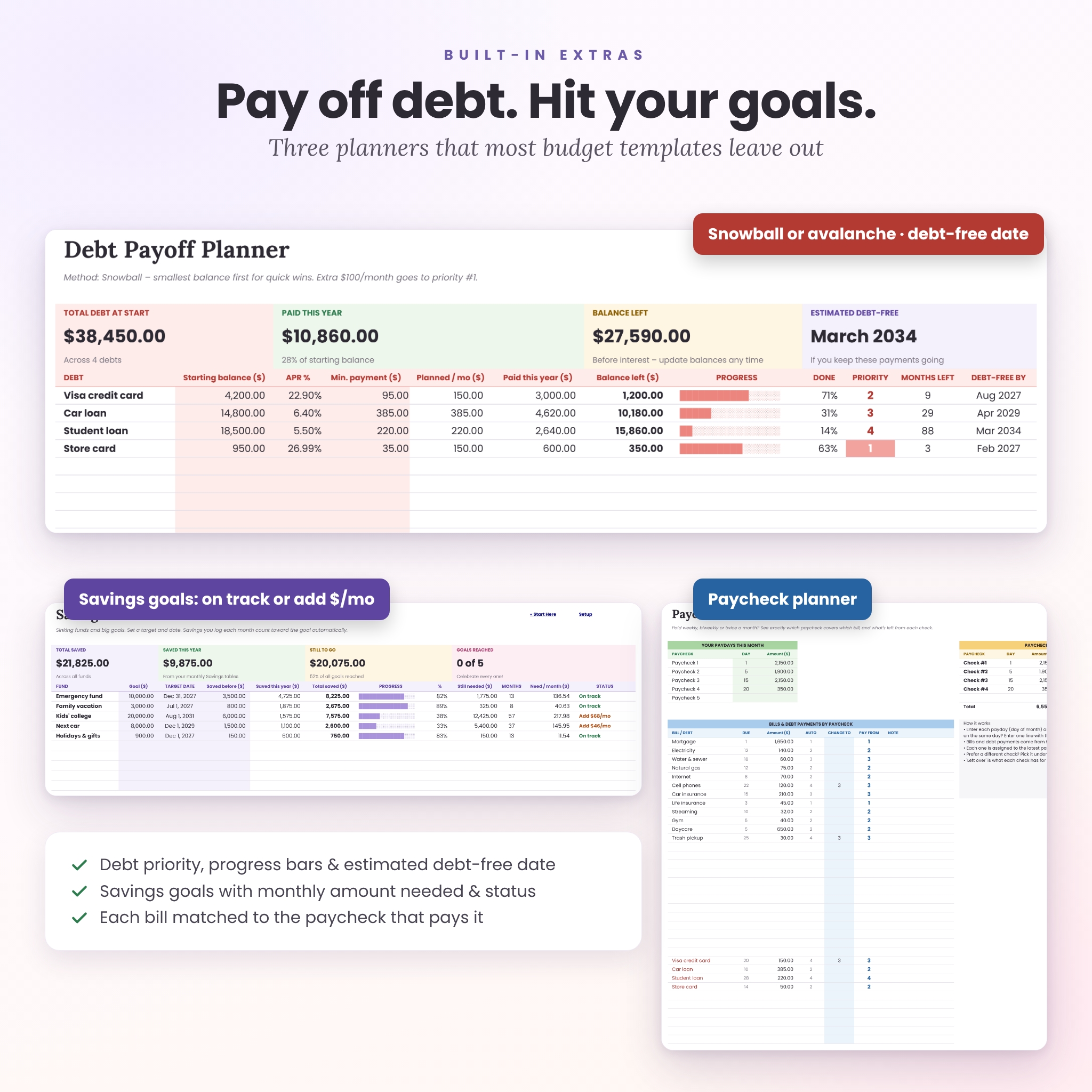
- Debt Payoff Planner: choose snowball or avalanche, add an extra monthly payment, and see priority order, progress bars, months left and an estimated debt-free date. Payments you log each month count automatically.
- Savings Goals tracker: sinking funds with goal amounts, target dates, progress bars, the monthly amount needed and an On track / Add $X per month status.
- Paycheck Planner: enter your paydays and every bill and debt payment is matched to the paycheck that pays it, showing exactly what’s left from each check.
- Monthly plan check: see your “left to assign” so every dollar has a job (zero-based budgeting made easy).
What’s included
- Nest & Nickel Family Budget Planner (.xlsx file for Google Sheets) with 20 connected tabs: Start Here, Setup, Jan–Dec, Transactions, Year at a Glance, Category Report, Debt Payoff, Savings Goals and Paycheck Planner
- Step-by-step User Guide (DOCX), with screenshots, setup steps, customization tips, troubleshooting and FAQ
How it works
- Download your files right after purchase.
- Upload the .xlsx to your Google Drive and open it with Google Sheets (File > Save as Google Sheets). The guide walks you through it.
- Set up once on the Setup tab: currency, year, starting balance and your categories. It takes about 10 minutes.
- Track and review each month while the dashboards, reports and charts update themselves.
File format and software requirements
- Designed and tested for Google Sheets (free with a Google account), on desktop, plus the Google Sheets app on phone and tablet for everyday updates
- Delivered as a standard .xlsx spreadsheet file and a .docx user guide
- No add-ons, scripts or subscriptions
Customization
- Use any currency: change one cell and every heading and total follows ($ by default)
- Rename or add income sources, bills, spending categories, debts, savings funds and giving
- Change any month’s budget right on its tab, or set custom budget period dates
- Add your family members and payment methods for per-person spending insights
- Change colors and fonts with Google Sheets’ normal formatting tools
- Print-friendly tabs set to fit the page width (US Letter or A4)
Real-life ways to use it
- A couple paid biweekly uses the Paycheck Planner so the mortgage and daycare never land on the same short check.
- A family of four logs groceries and kids’ activities on their phones and reviews the dashboard together at a monthly “money date”.
- A household paying off two credit cards and a car loan follows the snowball priority and watches the debt-free date move closer.
- A parent saving for holidays, car repairs and a vacation tracks each sinking fund and knows exactly how much to set aside each month.
Digital download
This is an instant digital download. No physical item will be shipped. Your files are available as soon as payment is confirmed.
Frequently asked questions
Do I need Excel?
No. This family budget planner is designed for Google Sheets, which is free with a Google account.
Can I use it on my phone?
Yes. Do the first setup on a computer, then use the Google Sheets app to log spending and check your dashboards on the go.
I’m paid biweekly. Will this budget template work for me?
Yes. Add each paycheck as an income line and use the Paycheck Planner to see which check covers which bill. You can also set custom period dates on any month.
Can my partner and I share it?
Yes. Share your Google Sheet and you can both update it at the same time.
Can I start in the middle of the year?
Yes. Enter your starting balance and begin on the current month. Earlier months stay empty.
Does it work with my currency?
Yes. Type any currency symbol or code on the Setup tab and the whole planner updates.
Can I reuse it next year?
Yes. Keep your original download, upload a fresh copy and change the budget year.
License
© Taskdale. For personal, household use only. Please do not resell, share or redistribute the files. This planner is an organizing tool, not financial advice.
Reviews
There are no reviews yet.