




A Dream Journal and Sleep Log That Does the Math for You
Nightwell is a dream journal and sleep log in two parts that work together: an 86-page fillable PDF journal for your evenings and mornings, and an Excel sleep and dream tracker that turns your nights into clear numbers and charts. Write by hand, type on screen, or use both.
Most sleep logs stop at a blank table. You write down bedtimes and nothing happens next. Nightwell adds the part that is usually missing: a calm routine before bed, a place to catch your dream before it fades, and a tracker that tells you how many hours you actually slept and which habits show up on your better nights.
Who It Is For
- Anyone who wants a calmer evening routine and a clearer picture of their own sleep habits
- Dream journal keepers who want room for titles, tones, themes, dream signs and recurring dreams
- People curious about lucid dreaming who want a simple practice log
- Anyone getting ready for a doctor visit who wants tidy notes of bedtimes and wake times
- Spreadsheet fans who like seeing their own data as charts
Inside the Printable Dream and Sleep Journal
Two pages for every night
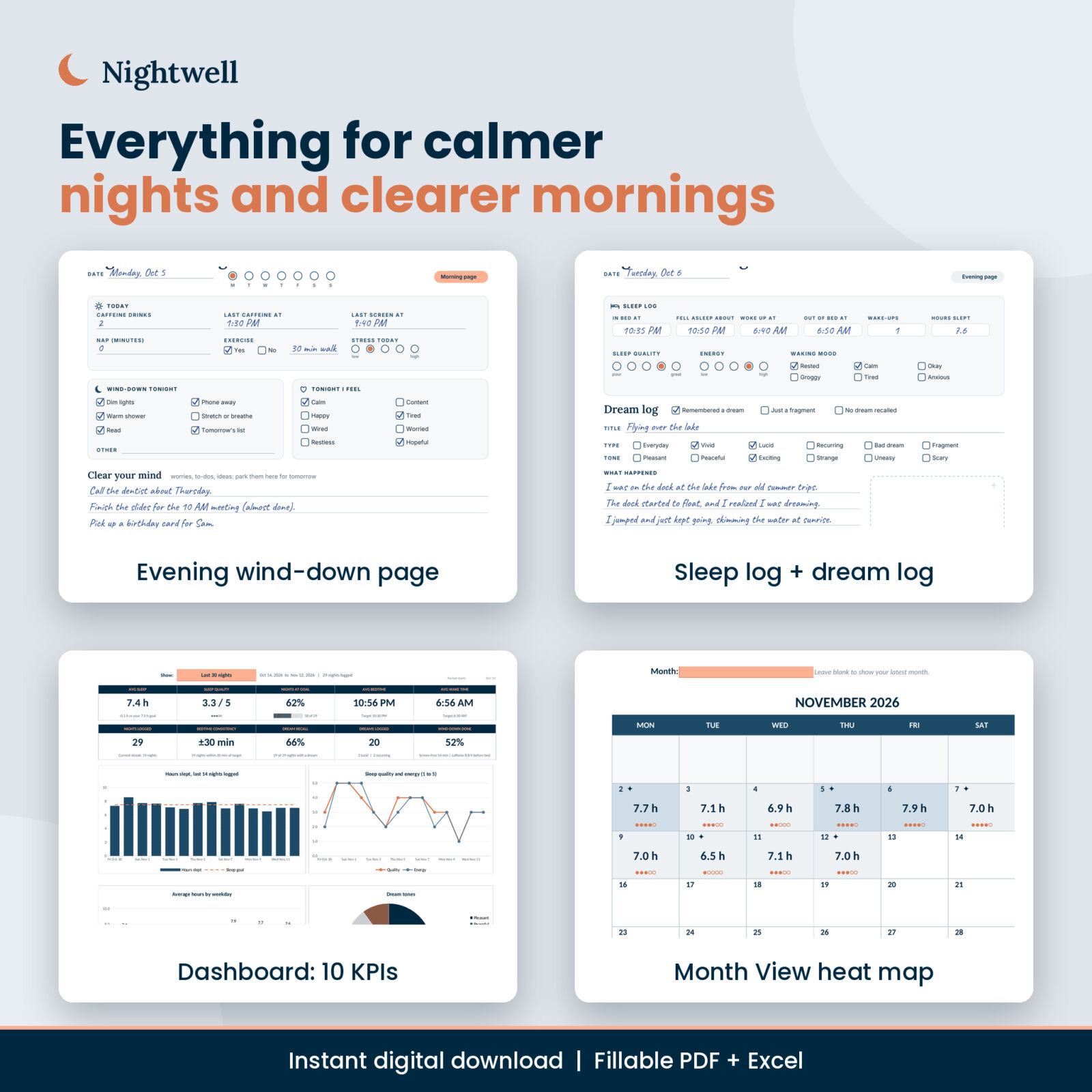
The Evening page covers caffeine, last screen time, naps, exercise and stress, a wind-down checklist, how you feel tonight, a Clear your mind section for worries and to-dos, three good things, and a dream intention with lights-out and alarm times. The Morning & Dream page logs time in bed, when you fell asleep, wake-ups, wake time and hours slept, plus sleep quality, energy and waking mood. Below that is the dream log: title, type, tone, what happened, a sketch box, people, places, symbols, how you felt and one word for the night.
Weekly logs and reviews
Each of the four weeks opens with a Plan & Log page (seven rows and a habit check grid) and closes with a Weekly Review that has stat tiles, a bar chart to shade and four short questions. A Four-Week Reflection lines the weeks up side by side.
Planning pages
- My Sleep Profile: targets, what helps, what keeps you up and three intentions
- Evening Wind-Down Routine: five time slots plus a list of ideas
- Sleep-Friendly Bedroom Check: a comfort checklist
- Caffeine & Screen Planner: a ready cutoff table and a seven-night check
- Monthly Sleep Tracker and Sleep & Dream Pixels
Dream tools
Dream Signs Tracker, a two-page personal Dream Dictionary (your own meanings, never fixed definitions), a Recurring Dream Tracker, a Lucid Dream Practice Log, Dreams to Remember, two Dream Sketch pages, Sleep Notes for a Doctor Visit and lined notes pages.
Every page has clickable tabs at the top, and the Index has a Jump to a night grid, so you can move around the PDF in one tap.
Inside the Excel Sleep Tracker
- Sleep Log: type bedtime and wake time and Nightwell works out time in bed, hours slept, sleep efficiency, your difference from goal, hours between your last caffeine and bed, and screen-free minutes. Bedtimes after midnight are handled correctly. Room for 400 nights.
- Dream Log: up to 500 dreams with type, tone, vividness, lucid and recurring flags and three themes. Hours and quality for that night link in automatically.
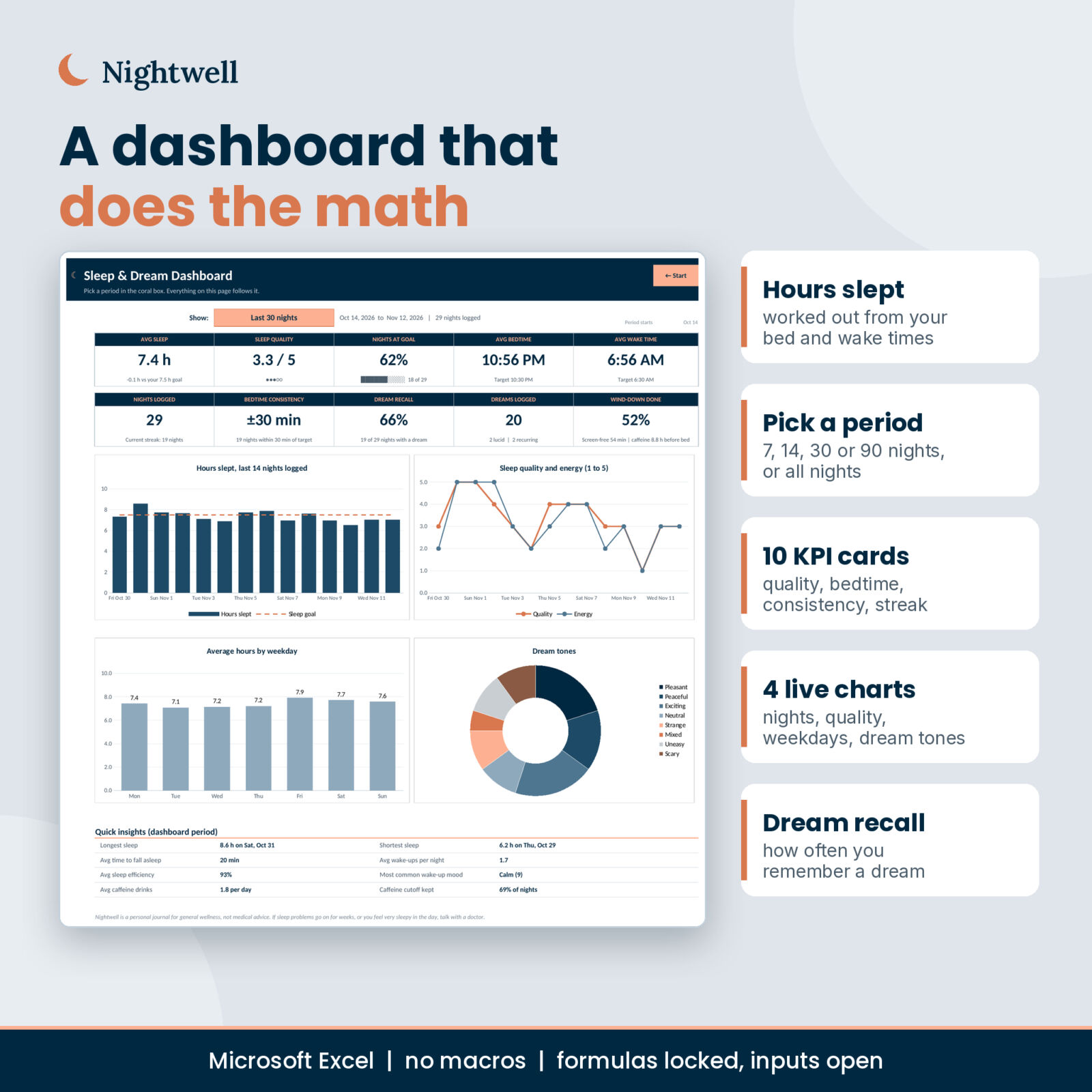
- Dashboard: pick the last 7, 14, 30 or 90 nights, or all nights. Ten KPI cards and four charts update to match.
- Weekly Review and Monthly: fill in on their own, with columns for your notes.
- Month View: a calendar heat map of every night, with dream markers and quality dots.
- Patterns: compares nights when you kept a habit with nights you did not, shows nights by weekday, dream recall by hours slept, top dream themes and moods.
- Sleep Summary: a one-page print of your last 14 nights with a notes box.
- Settings: your goals and every dropdown list in one place.
How It Works
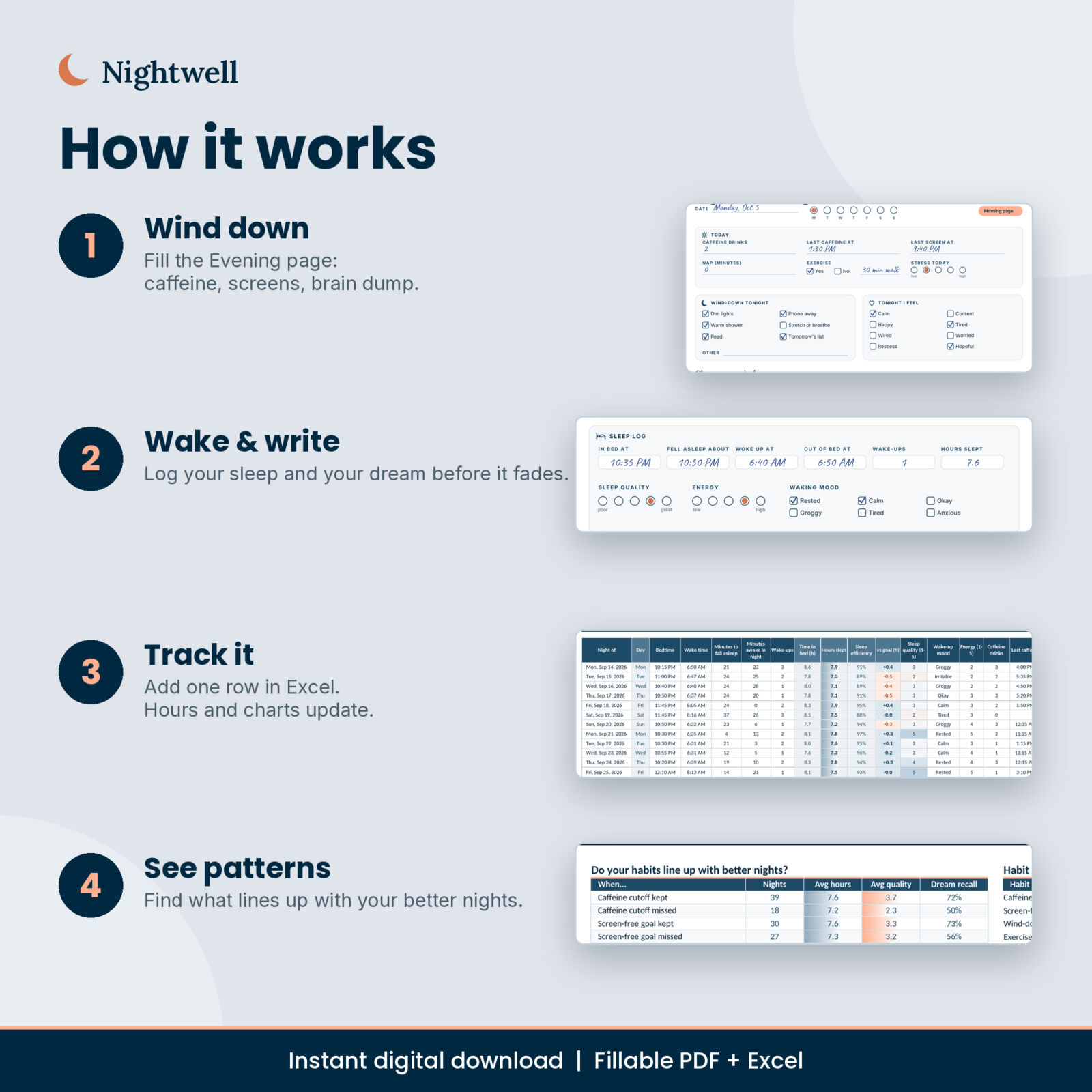
- Set your sleep goal, target bedtime and wake time on the Settings tab and the Sleep Profile page.
- Each evening, fill the Evening page and follow your wind-down plan.
- Each morning, log your sleep and any dream you remember.
- Add the night to the Excel Sleep Log in under a minute.
- At the end of each week, check the Dashboard and Patterns, then fill the Weekly Review.
Real Ways to Use It
- Building a steady bedtime after a busy season or a new job
- Seeing whether late coffee or late scrolling lines up with your rougher nights
- Keeping a dream journal for creativity, curiosity or lucid dreaming practice
- Bringing two weeks of clear notes to a doctor appointment
- A thoughtful gift for a friend who loves journaling (each buyer needs their own copy)
Files, Formats and Software
- Nightwell Dream & Sleep Journal, US Letter PDF (86 pages, fillable and printable)
- Nightwell Dream & Sleep Journal, A4 PDF (86 pages, fillable and printable)
- Nightwell Sleep & Dream Tracker, Excel .xlsx (11 tabs, no macros)
- Nightwell User Guide, Word .docx
The tracker is made for Microsoft Excel on desktop. The PDF can be filled in any PDF reader that supports fillable forms, or printed at home. You can also import the PDF into note-taking apps that accept PDFs, such as GoodNotes or Notability, and write on it by hand.
Customizing
Rename wake-up moods, dream types, tones and themes on the Settings tab and every dropdown and summary follows. Change your sleep goal or bedtime window at any time. Weeks can start on Monday or Sunday. Formula cells are locked to keep them safe, with no password if you want to make changes.
Digital Download
This is an instant digital download. No physical item ships. Download the files from your order confirmation or your account page right after checkout.
A Gentle Note
Nightwell is a journal for general wellness, reflection and curiosity. It is not medical advice and does not diagnose, treat or predict anything, including what dreams mean. If sleep problems go on for weeks or worry you, please talk with a doctor.
FAQ
Is the dream journal dated?
No. It is undated, so you can start any night of the year and reprint pages as often as you like.
Can I fill it in on my computer?
Yes. The PDF has fillable lines, checkboxes and rating dots. Use a PDF reader that supports forms and save as you go.
Does the spreadsheet calculate hours slept?
Yes. Enter bedtime and wake time, plus optional minutes to fall asleep and minutes awake, and it works out hours slept, time in bed and sleep efficiency.
Does it work in Google Sheets?
The tracker is built for Microsoft Excel desktop. Google Sheets is not supported because the tab buttons and some dropdown lists behave differently there.
Will it tell me what my dreams mean?
No. The Dream Dictionary is for your own meanings. Nightwell is for reflection, not dream reading.
Which paper size should I choose?
Both are included. Use US Letter in the US and Canada and A4 almost everywhere else.
Can I share it?
The license covers personal use by you and your household. Please do not resell, share or upload the files.
Reviews
There are no reviews yet.