

A password organizer spreadsheet that does the checking for you
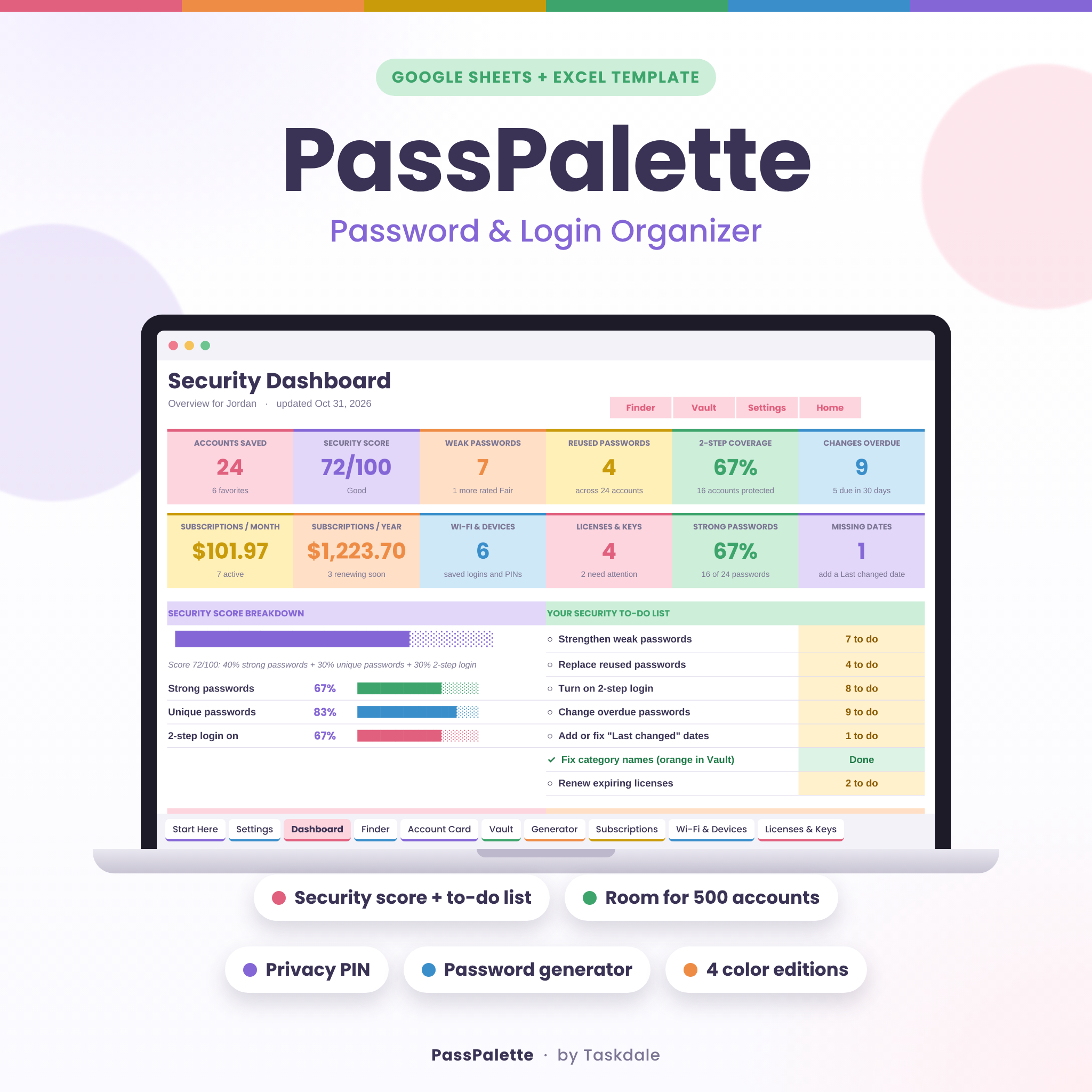
PassPalette is a password organizer spreadsheet for Google Sheets and Microsoft Excel. It keeps all your logins, passwords, security questions, Wi-Fi codes, software keys and subscriptions in one tidy, colorful file. It also checks your passwords as you type. Each one gets a strength rating, any password you’ve reused is flagged, and you’re reminded when it’s time to change it. The Security Dashboard then gives you a score out of 100 and a short to-do list, so you always know what to fix next.
There’s no app to install and no monthly fee. Your information stays in your own file, in your own Google Drive or on your own computer.
Who it’s for
- Anyone who keeps passwords on sticky notes, in a notebook or in their head
- Families who want streaming, school, utility and Wi-Fi logins in one shared place
- People who’d rather use a simple spreadsheet they control than a separate password app
- Anyone putting together an organized record of accounts for a partner or trusted family member
- Beginners: the white cells are where you type, and everything else fills in automatically
Main benefits
- Fewer lockouts. Usernames, recovery emails and security answers are all in one place.
- Safer accounts. Weak and reused passwords are easy to spot, and the to-do list walks you through fixing them.
- Less mental load. Change reminders and renewal alerts keep track of dates for you.
Features
Password Vault with automatic checks
Room for 500 accounts. Each row holds the account name, category, owner, login URL, username, password, 2-step login method, recovery email or phone, where your backup codes are kept, two security questions and answers, a last-changed date, a favorite star and notes. These columns fill in for you:
- Strength: Weak, Fair, Strong or Very strong, based on length and character mix
- Reused?: flags any password used on more than one account
- Change due and Status: Up to date, Due soon or Overdue, based on your reminder setting
Security Dashboard
- Security score out of 100: 40% strong passwords, 30% unique passwords, 30% accounts with 2-step login
- 12 live summary tiles, including weak passwords, reused passwords, 2-step coverage, overdue changes and subscription costs
- An automatic security to-do list that turns green as you finish each item
- A password strength chart, an accounts-by-category chart, the next 8 password changes and the next 8 renewals
Finder search
Search names, websites, usernames, categories and notes at once. You can also filter by category, person, strength, status and favorites.
Privacy PIN and privacy mask
Passwords show as dots in Finder and on the Account Card until you type your PIN. When the privacy mask is on, passwords, answers and keys appear as solid bars on the list sheets, so they’re hidden from anyone glancing at your screen.
Account Card
Pick any account to see every detail on one clean card you can print.
Password generator and strength checker
Make random passwords from 8 to 32 characters, with an option to leave out look-alike characters, or memorable passphrases of 3 to 6 words. You can also test any password and get tips, including a warning if it’s already used in your Vault.
Bonus trackers
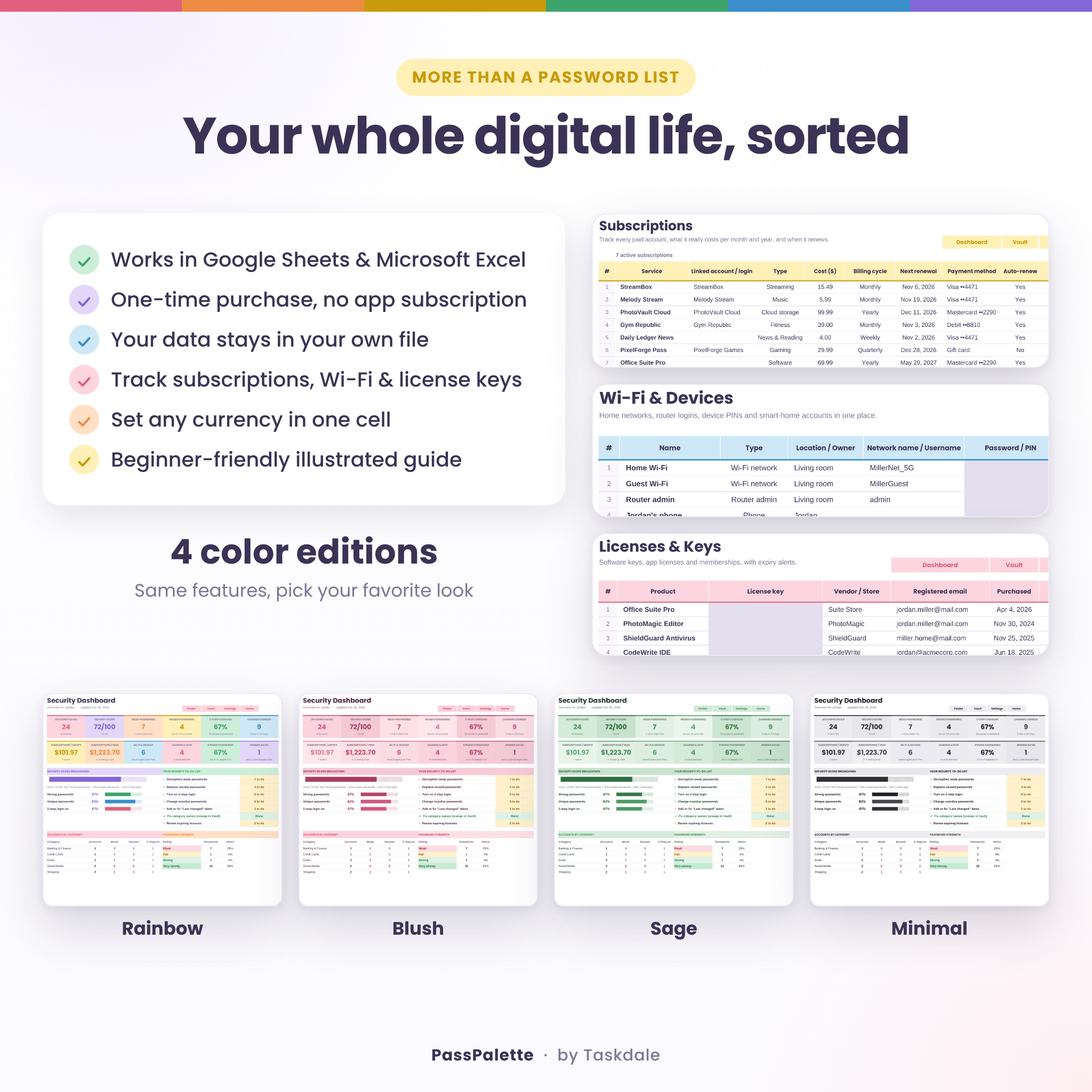
- Subscriptions: cost, billing cycle, monthly and yearly totals, renewal alerts, and active, paused or cancelled status
- Wi-Fi & Devices: network passwords, router admin logins, device PINs and alarm codes
- Licenses & Keys: software keys, seats, costs and expiry alerts
Personalize it
- One currency setting controls every money value ($ by default, or any symbol you like)
- 15 editable categories and 8 people slots for household use
- Adjustable reminder timing
- 4 color editions: Rainbow, Blush, Sage and Minimal
What’s included
- PassPalette Password Organizer – Rainbow edition (.xlsx)
- PassPalette Password Organizer – Blush edition (.xlsx)
- PassPalette Password Organizer – Sage edition (.xlsx)
- PassPalette Password Organizer – Minimal edition (.xlsx)
- A sample copy filled with example data, so you can see every feature in action (.xlsx)
- PassPalette User Guide (.docx): setup, every sheet explained, tips, troubleshooting and FAQ
Each workbook has 10 sheets: Start Here, Settings, Dashboard, Finder, Account Card, Vault, Generator, Subscriptions, Wi-Fi & Devices, and Licenses & Keys.
How it works
- Download the files right after purchase.
- Open your favorite edition in Excel, or upload it to Google Drive and save it as a Google Sheet.
- Set up your name, currency, Privacy PIN and categories on the Settings sheet.
- Add your accounts to the Vault, one row each.
- Check the Dashboard and work through your to-do list.
File formats and software requirements
- Format: Microsoft Excel workbook (.xlsx). The guide is a Word document (.docx).
- Google Sheets: free with a Google account. Upload the file and choose File > Save as Google Sheets.
- Microsoft Excel: Excel 2016 or newer, Microsoft 365, or Excel for Mac.
- Phones and tablets: works in the Google Sheets and Excel mobile apps. Setup is easiest on a computer.
- No macros, add-ons, scripts or external connections.
Customization
Formulas are locked without a password, so you can’t break them by accident, but you can still unlock any sheet whenever you like. You can change fonts and colors, resize columns, and rename categories and people freely. If you rename a category, any entries that still use the old name are highlighted, so nothing breaks without you noticing.
Digital download information
This is an instant digital download, so nothing will be shipped. The sample data in the photos is for illustration only. Your files come blank and ready to fill in.
Use cases
- Setting up a family password log for shared streaming, utility and school accounts
- Cleaning up old, weak and reused passwords one week at a time
- Catching forgotten subscriptions before they renew
- Preparing an organized account record for a trusted family member
FAQ
Does this password tracker work in Google Sheets?
Yes. Upload the .xlsx file to Google Drive and save it as a Google Sheet. It also opens directly in Microsoft Excel.
Is this a password manager app?
No. It’s a spreadsheet template you own and control. Nothing is sent anywhere.
Is my information encrypted?
The Privacy PIN and mask hide passwords from on-screen glances, but they aren’t encryption. If you use Excel, you can add real encryption with File > Info > Protect Workbook > Encrypt with Password. The guide explains more privacy best practices.
How many passwords can I store?
Up to 500 accounts, 100 subscriptions, 60 Wi-Fi and device entries, and 100 software licenses.
Can my family use it?
Yes. Add each person on the Settings sheet, then filter by person in Finder.
Can I use my own currency?
Yes. Type your currency symbol once on the Settings sheet and every money value updates.
Can I print it?
Yes. Each sheet has print settings ready to go, and the Account Card prints one account neatly.
Is it beginner friendly?
Yes. White cells are for typing, everything else is automatic, and the illustrated guide walks you through each step.
License
For personal use by the buyer and their household. Please don’t resell, share or redistribute the files, in whole or in part. © Taskdale.

Reviews
There are no reviews yet.