



The Password Tracker Spreadsheet That Tells You What to Fix
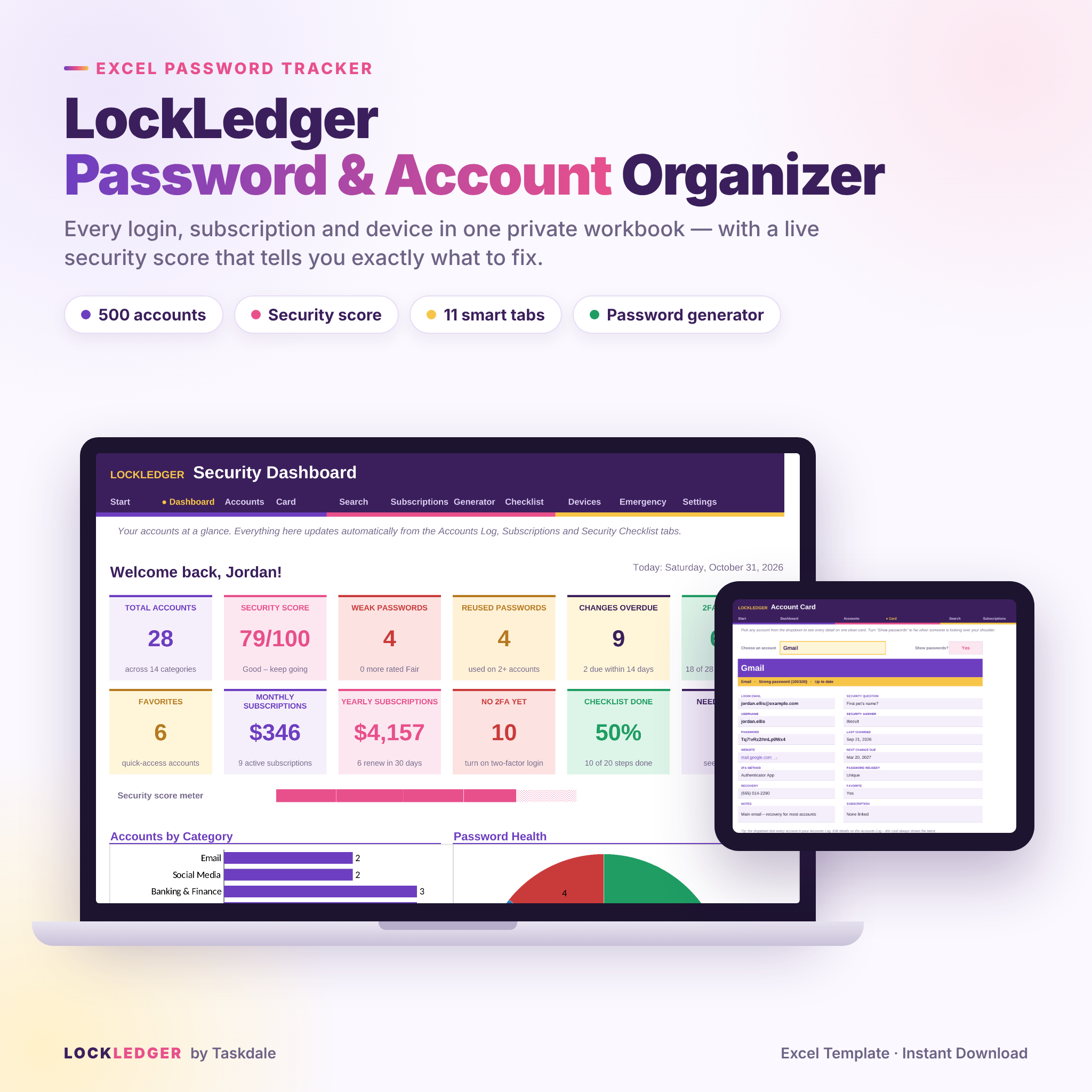
LockLedger is a premium password tracker spreadsheet for Microsoft Excel. It gives every login, subscription, device and recovery detail a tidy, private home. A basic password log only stores your passwords. LockLedger also checks them. Each password gets a strength rating, reused passwords are flagged, and you get a reminder when a password is due for a change. All of this feeds a live security score with a clear to-do list, so you always know which account to fix next.
It’s simple enough for complete beginners. Type in the white cells and the workbook handles the rest.
Who It’s For
- Busy individuals and families tired of “Forgot password?” links
- Freelancers and small-business owners juggling work and personal logins
- Anyone who wants an offline password log alongside, or instead of, a password-manager app
- People preparing an emergency or “digital legacy” plan for loved ones
Features of This Excel Password Log Template
Security Dashboard
- Security score from 0 to 100, based on password strength, reuse, two-factor (2FA) coverage and overdue changes
- 12 live stat cards: total accounts, weak passwords, reused passwords, changes overdue, 2FA coverage, favorites, monthly and yearly subscription spend, checklist progress and more
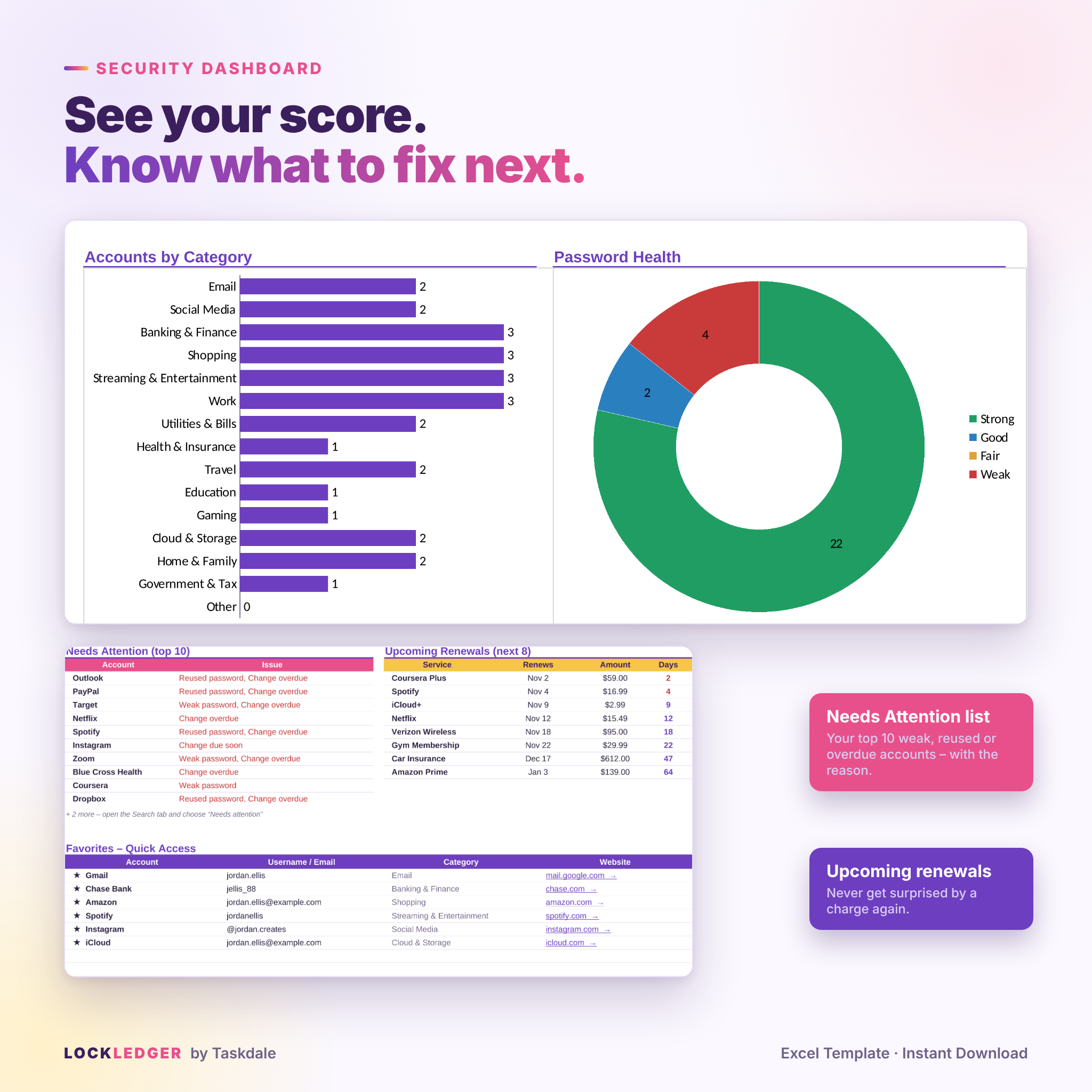
- Accounts-by-category chart and password-health chart
- Needs Attention list showing your top 10 problem accounts and the reason for each
- Upcoming renewals and a Favorites quick-access list with clickable website links
Accounts Log (500 accounts)
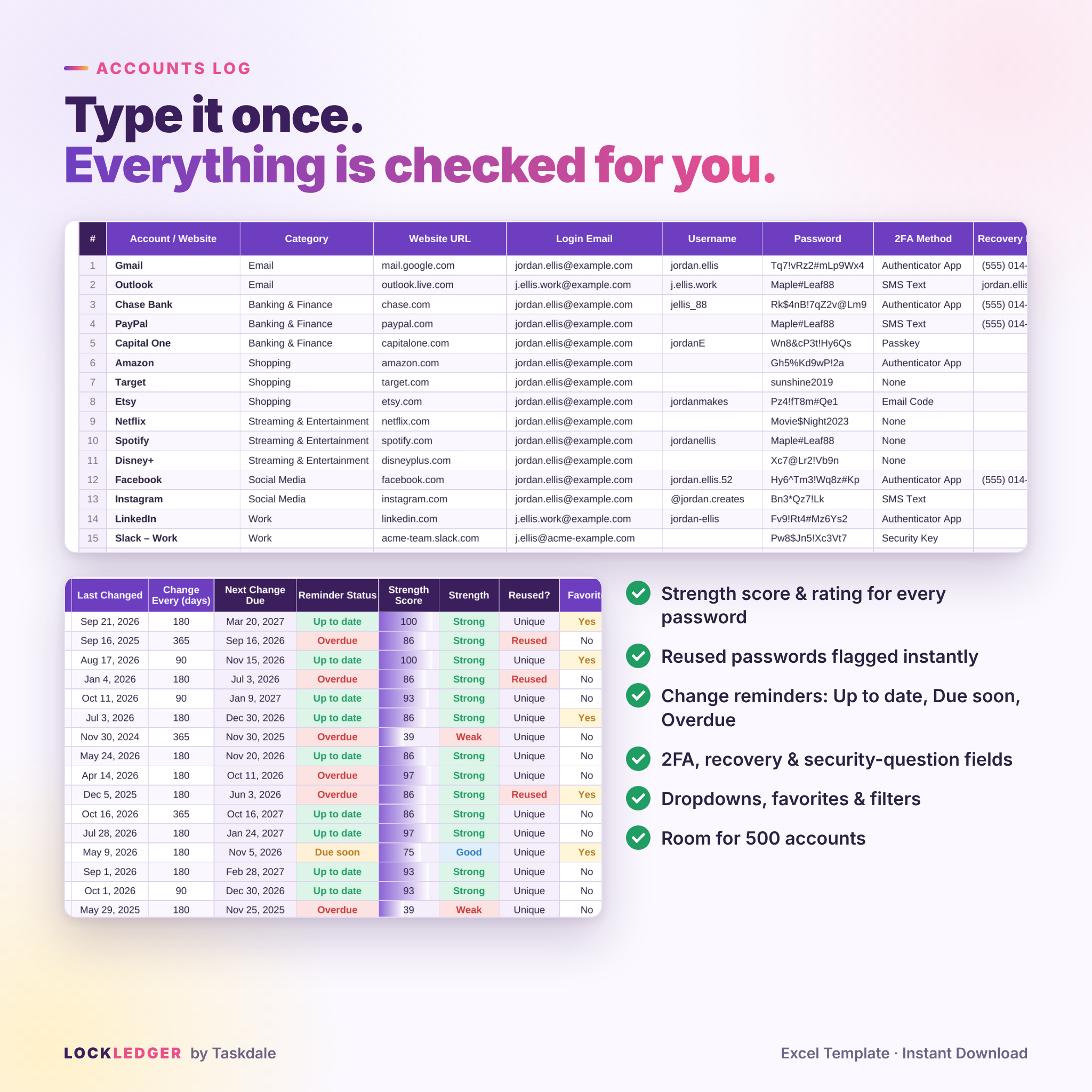
- Columns for website, category, URL, login email, username, password, 2FA method, recovery email or phone, security question and answer, and notes
- Automatic strength score and rating (Strong, Good, Fair or Weak)
- Reused-password detection (exact, case-sensitive)
- Change reminders that show Up to date, Due soon or Overdue
- Dropdowns, filters and color coding throughout
Account Card and Search
- Account Card: pick any account to see every detail on one clean card, with a “show passwords” switch for privacy
- Search and filter: find accounts by any word, category or issue (Needs attention, Favorites, No 2FA, Weak passwords)
Password Generator and Strength Checker
- Six random strong passwords at a time, 10 to 32 characters, with optional numbers and symbols and look-alike characters left out
- A strength checker that gives improvement tips and warns you if a password is already in your log
Subscription Tracker
- 100 rows for streaming, software, memberships and bills
- Converts weekly, monthly, quarterly, six-monthly and yearly charges into monthly and yearly totals
- Renewal countdown with “This week” and “This month” alerts
More Included Value
- Devices & Wi-Fi: Wi-Fi networks, router logins, device passcode hints, serial numbers, warranty status and software license keys
- Emergency Access: trusted contacts, where important things are kept, and what to do with each priority account
- Security Checklist: 20 proven steps plus room for your own, with a progress bar
- Settings: your name, currency, reminder windows and editable category lists
What’s Included
- LockLedger-Password-Account-Organizer.xlsx: the editable Excel workbook with 11 tabs
- LockLedger-User-Guide.docx: an illustrated user guide covering setup, every feature, customization, troubleshooting and FAQ
How It Works
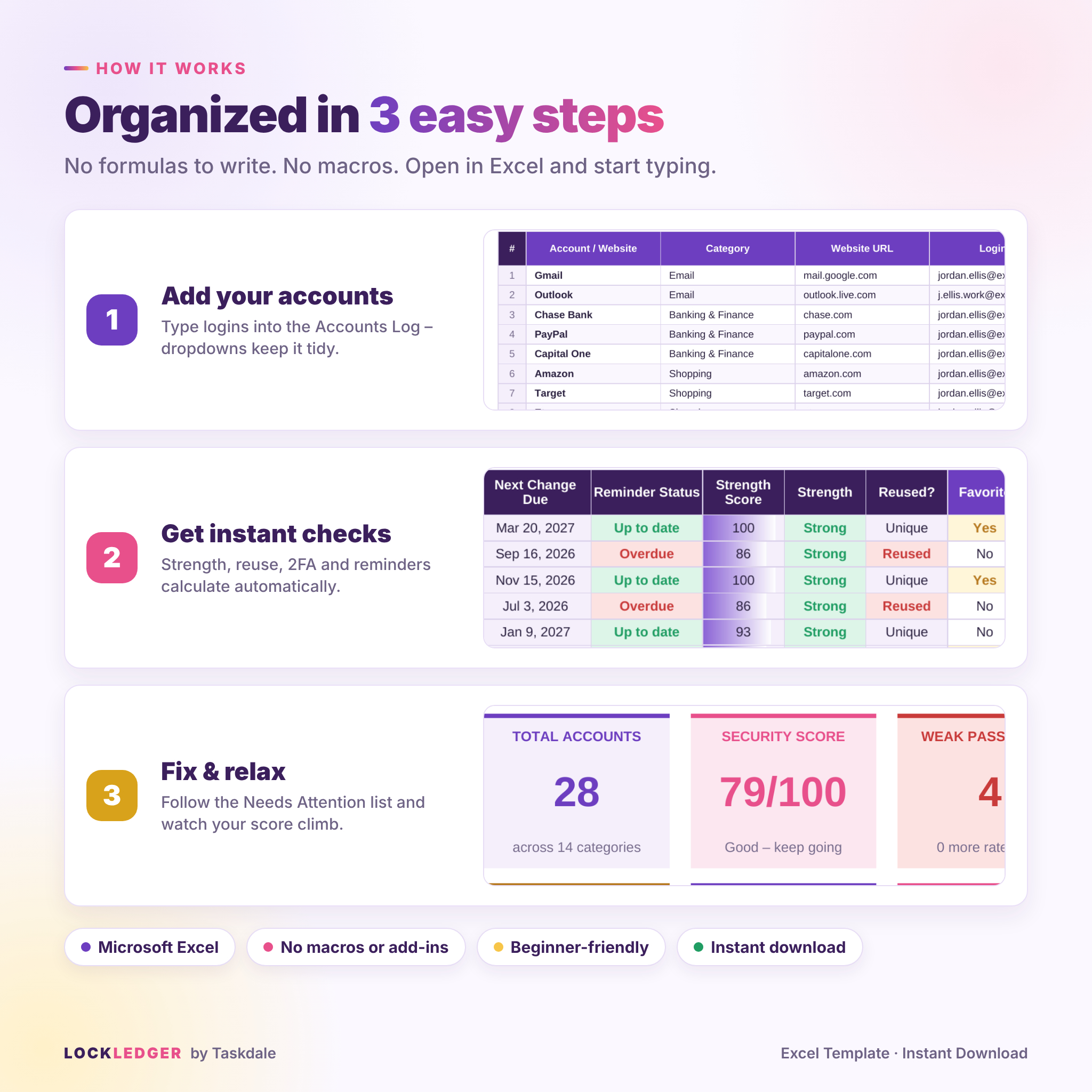
- Download the files right after purchase and open the workbook in Excel.
- Personalize it on the Settings tab with your name and currency symbol.
- Add your accounts in the Accounts Log, one per row.
- Check your Dashboard to see your score and the Needs Attention list, then work through it at your own pace.
- Protect the file with Excel’s built-in file-open password. The guide shows you how.
File Format and Software Requirements
- Format: .xlsx (Microsoft Excel workbook) plus a .docx user guide
- Requires Microsoft Excel 2016 or newer, or Microsoft 365 (Windows or Mac)
- No macros, add-ins or internet connection needed
- Print-ready on US Letter, with every tab set to fit the page width
Customization
- Set any currency symbol or code (default $). Every money value updates from one setting.
- Rename or replace the 15 account categories, and the dashboard follows automatically.
- Choose your own reminder intervals and “due soon” warning window.
- Sheets are protected without a password, so formulas can’t break by accident. Unprotect them any time to change colors or fonts.
- Need more than 500 accounts? The guide shows how to add rows so every formula expands automatically.
Digital Download Information
This is a digital product and nothing will be shipped. Your files are available to download right after purchase. Colors may look slightly different on different screens.
Real-Life Uses
- New phone, lost logins: you have every username, recovery email and 2FA method in one place.
- After a data-breach email: search for the site, generate a new strong password and see what else shared the old one.
- Subscription clean-up: see your true monthly and yearly spend, then cancel trials before they renew.
- Family admin: keep the Wi-Fi password, router login, device warranties and school portals together.
- Planning ahead: fill in the Emergency Access tab so loved ones know what to do.
- Small business: track shared tool logins and software license keys.
FAQ
Is my information uploaded anywhere?
No. LockLedger is a normal Excel file that stays wherever you save it. It has no macros and makes no internet connections.
How do I keep my password spreadsheet secure?
Add a file-open password in Excel (File › Info › Protect Workbook › Encrypt with Password). The user guide walks you through it on Windows and Mac.
Does it work on Mac?
Yes. It works in Microsoft Excel for Mac 2016 or newer and in Microsoft 365.
Can I use it in Google Sheets?
LockLedger is designed for Microsoft Excel. Other apps may handle protection, charts and formatting differently, so Excel is recommended.
How many accounts can I store?
Up to 500 accounts and 100 subscriptions, plus the Wi-Fi, device and license tables. You can add more rows if you need them.
Can I change the currency?
Yes. Type any symbol or code on the Settings tab and every money value updates.
Is this a password manager app?
No. It’s an organized, offline password log and security tracker. Many people use it to keep a backup record alongside a password manager.
Can I print it?
Yes. Every tab is set up to print, and the Emergency Access page is designed to be kept with your important papers.
License: personal use only. You may not resell, share or redistribute the files. Not affiliated with Microsoft.
Reviews
There are no reviews yet.