


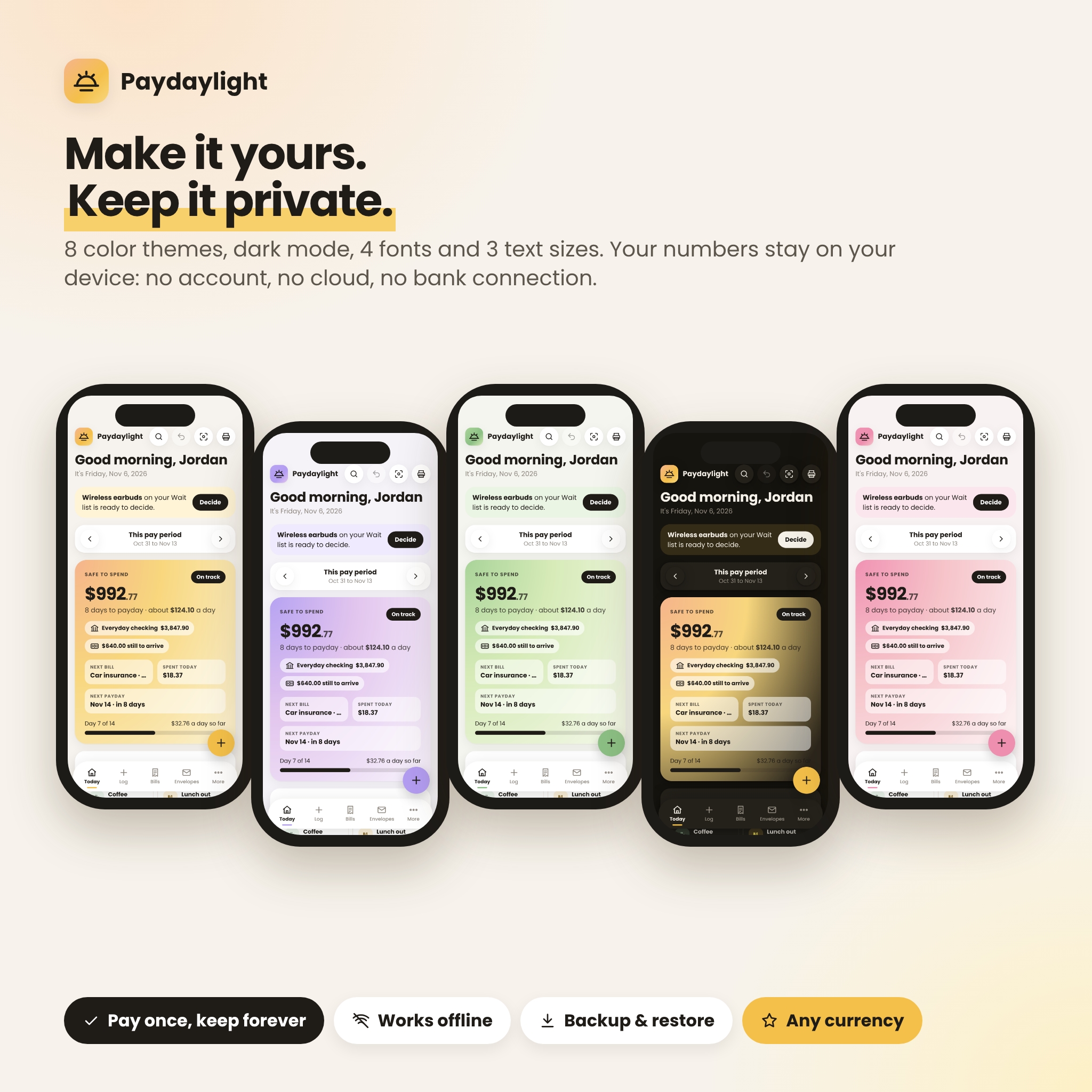
Paydaylight is an ADHD budget planner app built around one simple question: how much can I safely spend until my next payday? Instead of a spreadsheet full of tabs and formulas, you get one calm dashboard with a big, honest number, a daily spending amount, and everything that feeds it laid out in plain words.
It is a complete paycheck budget tracker that runs in your web browser from a single file. There is no app store, no account to create, no monthly fee and no bank connection. Your numbers stay on your device.
Why this ADHD budget planner works when spreadsheets don’t
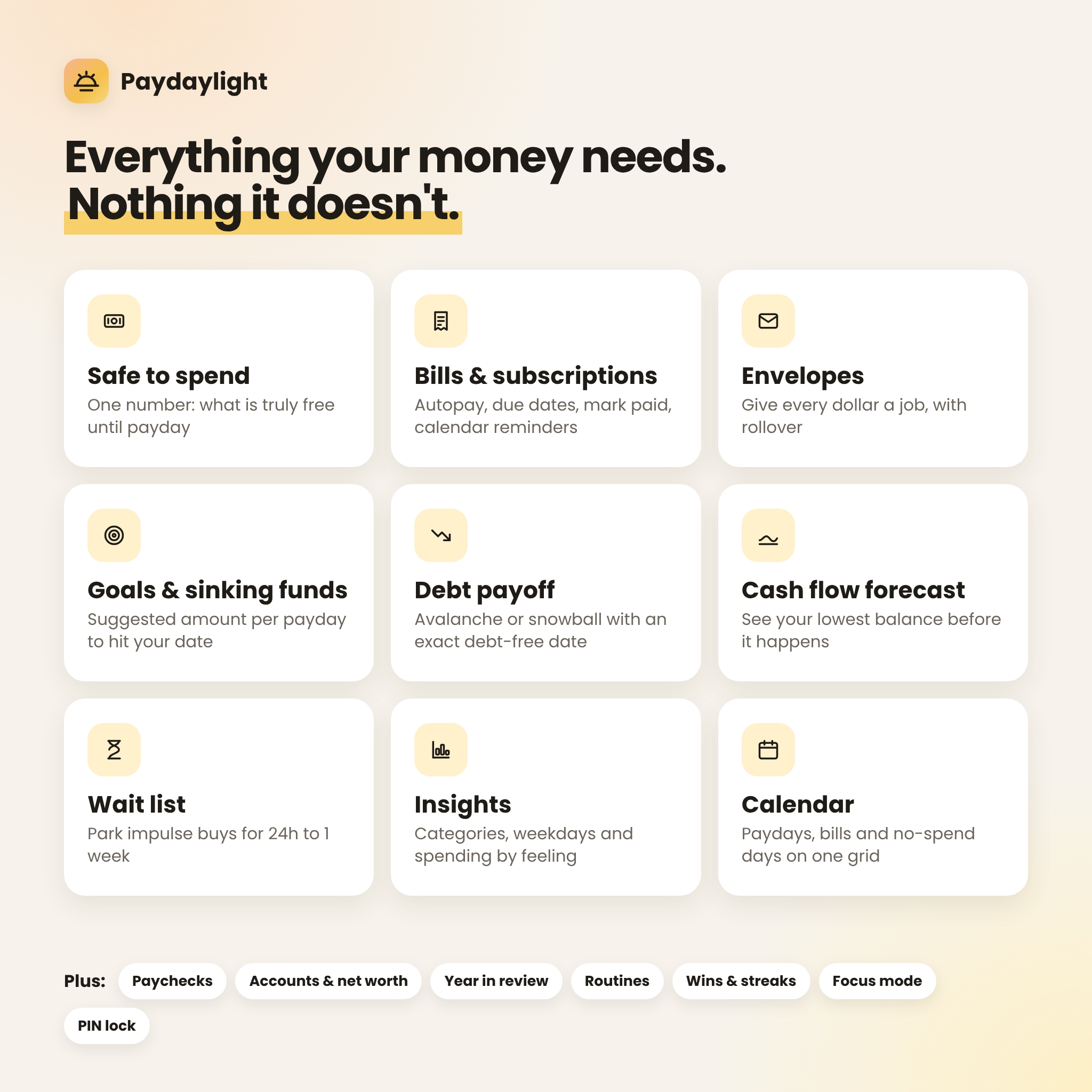
- One number to check. Safe to spend takes the pay that has actually landed, then sets aside bills, envelopes and goals. What is left is yours, split into a daily amount.
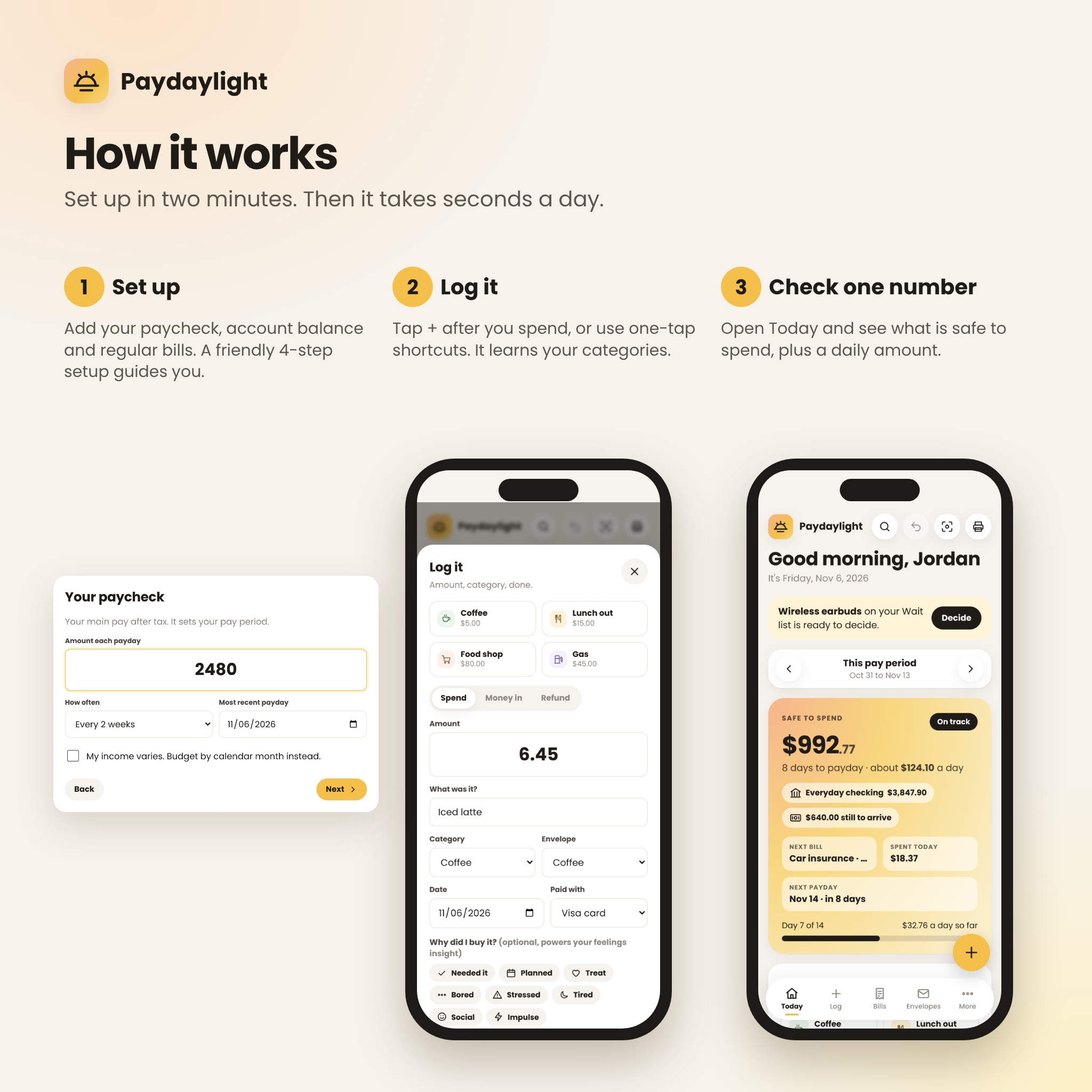
- Three-second logging. Tap +, type the amount, done. It remembers your usual places and picks the category for you. One-tap shortcuts handle the things you buy every week.
- Forgiving by design. Undo for every change, and a “Match my bank” catch-up that fixes a missed week in under a minute. No shame, no detective work.
- Dopamine you can see. Streaks, no-spend days, 16 badges, progress bars that fill up, and a little confetti when you hit a goal.
- Impulse protection. Park tempting buys on the Wait list for 24 hours to a week, then decide. Everything you skip adds to your “saved by skipping” total.
Features
Plan every paycheck
- Today dashboard: Safe to spend, days to payday, daily amount, next bill, spent today, a day-by-day spending chart and a category donut.
- Paychecks: weekly, every 2 weeks, twice a month (like the 1st and 15th), every 4 weeks or monthly. Add side income, a partner’s pay or a one-time refund. See the next six paydays, which paycheck pays which bill, and your 3-paycheck months.
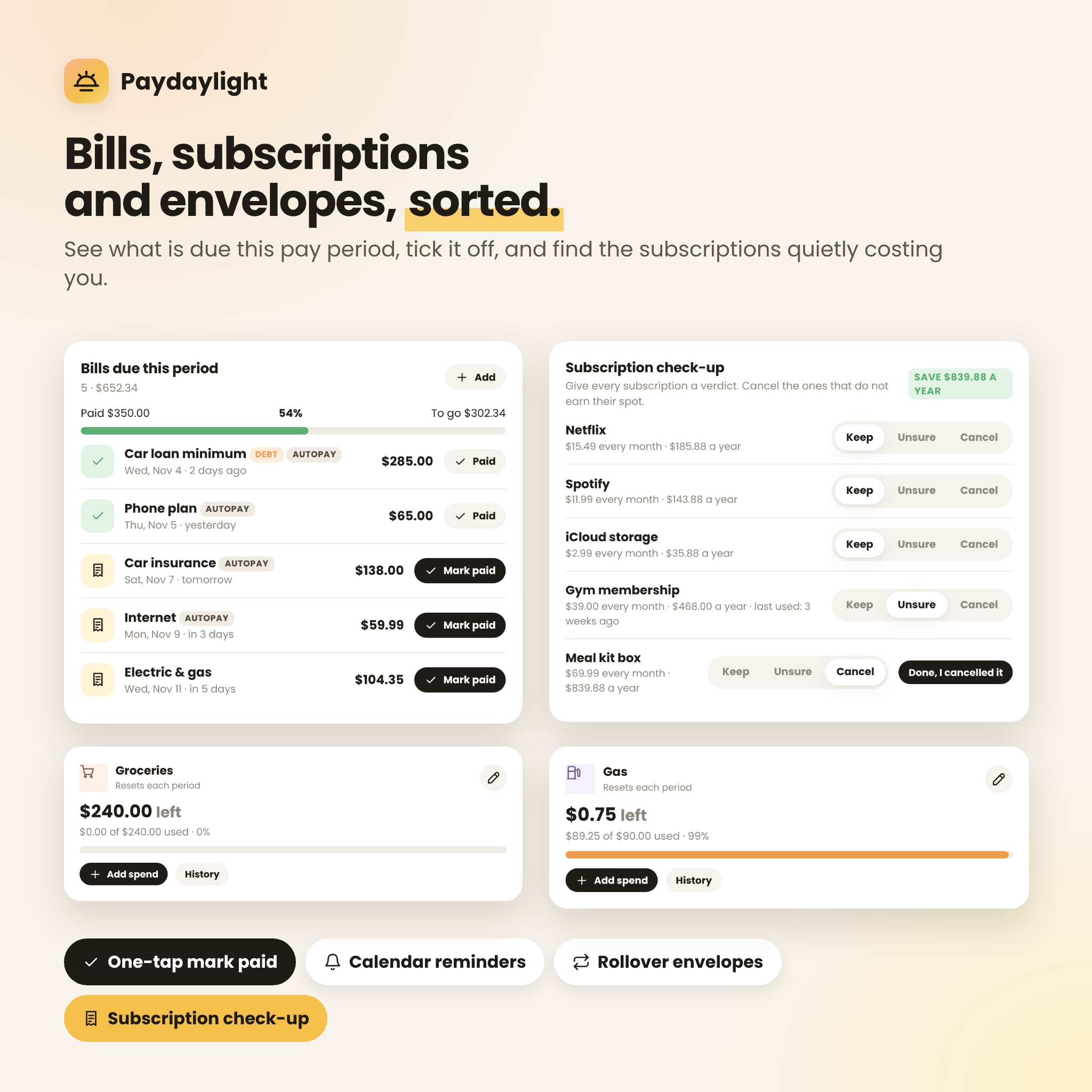
- Bills & subscriptions: due dates, autopay, one-tap mark paid, overdue alerts, monthly and yearly subscription totals, and a Subscription check-up (keep, unsure or cancel) that shows what you would save each year.
- Bill reminders: export every bill for the next 12 months to your phone or computer calendar, each with a reminder the day before.
- Envelopes: give every dollar a job. Rollover option, move money between envelopes, and green, orange and red progress bars.
- Calendar: paydays, bills, daily spending and no-spend days on one month grid.
Save, pay off debt and see ahead
- Goals & sinking funds: targets with due dates and an automatic “suggested per payday” amount, plus your savings cushion and savings rate.
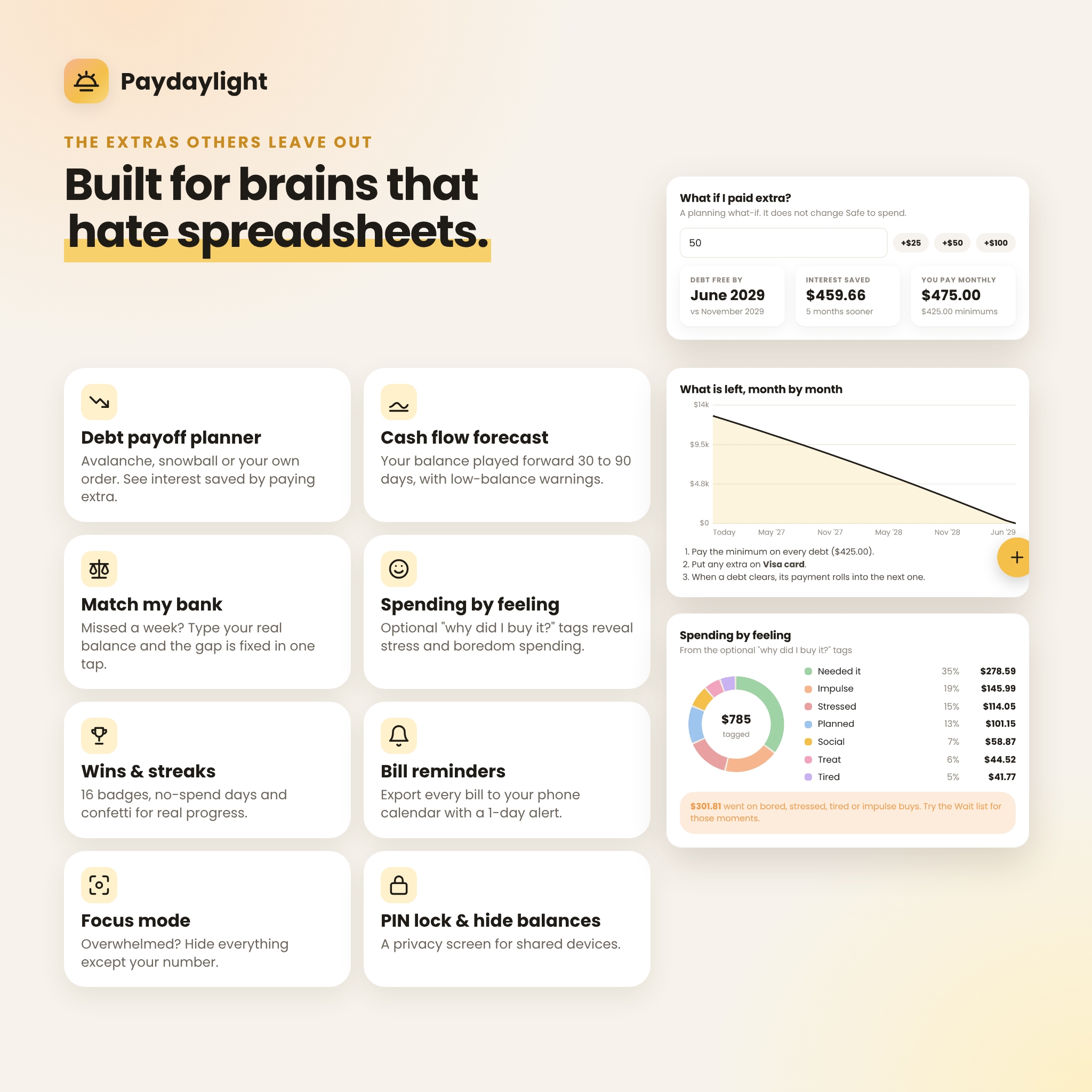
- Debt payoff planner: avalanche, snowball or your own order, an exact debt-free date, interest totals and a “what if I paid extra?” calculator.
- Cash flow forecast: your checking balance played forward 30, 60 or 90 days, with warnings before you dip below zero or below your cushion.
- Accounts & net worth: checking, savings, cash and credit cards that update as you log, plus money moves between accounts.
Understand your habits
- Insights: in against out, spending by category, which weekdays cost the most, top places, envelopes against plan and your biggest single spend.
- Spending by feeling: optional “why did I buy it?” tags (needed it, planned, bored, stressed, impulse and more) reveal emotional spending patterns.
- Year in review: month-by-month totals, best and worst months and three reflection prompts.
- Routines: a payday checklist and a weekly reset that clear themselves automatically.
- Focus mode: hide everything except your number on overwhelming days.
Who it is for
- Adults with ADHD, or anyone who has given up on budget spreadsheets
- People paid weekly, biweekly, semi-monthly or monthly who want a paycheck budget
- Freelancers and gig workers, using the calendar-month mode for changing income
- Anyone who wants a private money manager with no bank login and no subscription
Real situations it helps with
- It is Tuesday, payday is Friday, and you want to know if dinner out is fine. Open Today and look at your daily amount.
- Rent and the car payment land in the same week. The cash flow forecast shows the low point before it happens.
- You forgot to log for ten days. Type your real balance into Match my bank and you are back on track.
- You want to be debt-free sooner. Try an extra amount per month and watch the date move.
What is included
- Paydaylight app (single HTML file with built-in fonts, icons and charts)
- Paydaylight User Guide (16-page illustrated Word document: setup, every feature, tips, troubleshooting and FAQ)
- Both files are also bundled in one ZIP download
How it works
- Download and save the app file, then double-click it to open it in your browser. Bookmark it.
- Answer the 2-minute setup: currency, paycheck, account balance, regular bills and a few envelopes. Or explore the built-in sample data first.
- Log as you spend, mark bills paid, and check your Safe to spend number. That is it.
File format and requirements
- Format: HTML web app (one file) plus DOCX user guide. Instant digital download.
- Works offline once saved. Tested in Google Chrome on desktop and on phone-size screens; Chrome is recommended.
- Best used on a computer (Windows, Mac or Chromebook). The layout adapts to tablet and phone screens.
- Data is stored in your browser on your device. Use the built-in backup to keep a copy or move to another device. Clearing browser data erases the planner, so back up regularly (the app reminds you).
- Money values default to US dollars ($). Choose from 49 currencies in Settings and every amount follows.
Customization
8 color themes (including the warm Lemon Sun default), light and dark mode, 4 fonts, 3 text sizes, sharp or round corners, roomy or compact spacing and reduce-motion. Rename and recolor categories, edit your one-tap shortcuts and your routines. An optional 4-digit PIN screen and “hide balances” setting add privacy on shared devices.
FAQ
Is this a subscription?
No. You pay once and keep the file. There are no monthly fees.
Does it connect to my bank?
No. You type your balances and spending, and nothing is uploaded. That keeps your data private.
Does it work offline?
Yes. Once the file is saved on your device, you do not need the internet.
Can I use it on my phone?
The layout is designed for phone screens too, but opening a saved HTML file on a phone depends on your phone’s browser and file app. Most people use it on a computer, and the backup file lets you move your data between devices.
I get paid on the 1st and 15th. Will it work?
Yes. Choose “Twice a month” and set both days. Weekly, biweekly, every 4 weeks and monthly pay are supported too, and you can budget by calendar month instead.
Can I use my own currency?
Yes. US dollars are the default, and you can pick from 49 currencies in Settings.
Is this financial advice?
No. Paydaylight is a personal organizing tool. For decisions about debt, investing or taxes, talk to a qualified professional.
Digital download and license
This is an instant digital download; no physical item will be shipped. Licensed for personal use only: please do not share, resell or redistribute the files.
Reviews
There are no reviews yet.