




A kids allowance tracker spreadsheet that runs like a real bank
Holding your kids’ money for them gets messy fast. Who had birthday money? Did Leo already get paid for raking the leaves? How much is left for the bike? Pennyroost is a kids allowance tracker spreadsheet that answers all of that in one place. It works as a simple “Bank of Mom and Dad” for up to six children, in Microsoft Excel or Google Sheets.
Each child gets three jars: Spend, Save and Give. You set the allowance once and it lands in the jars on every payday, split by your percentages. Log gifts, paid jobs, purchases and donations as they happen. The workbook keeps every balance, goal and statement up to date.
What it does
- Allowance that pays itself. Choose weekly, every 2 weeks or monthly, plus the first payday. In Auto mode the allowance is added on each payday with no typing. Prefer to log it yourself? Switch that child to Manual.
- Spend, Save and Give jars. Any split that totals 100%, per child. Splits are rounded so the three parts always add up to the cent.
- Interest and parent match. Optional monthly interest on the Save jar and a % match on every deposit into savings, both paid at month end. Kids see saving pay off.
- Savings goals with reach dates. Up to 24 goals. Save jar money fills each child’s goals from the top, with a progress bar, the amount needed per week and an estimated date.
- Paid jobs board. 20 starter jobs with pay rates (edit or add up to 40). Pick a job in the Ledger, leave the amount blank and its pay fills in.
- IOUs and advances. When a child borrows from the bank, repayments in the Ledger pay off the oldest IOU first.
- Monthly statements. Opening balance, money in, money out, moves between jars and closing balance for each jar, plus the month’s transactions. Fits one printed page.
Who it is for
Parents of one to six kids who pay an allowance or pay for extra jobs. Families teaching saving and giving with real numbers. Homeschoolers running a money unit. Grandparents keeping track of gift money for several grandchildren. If you have ever said “I’ll keep it for you” about a child’s money, this is for you.
What is included
- Start Here: five quick setup steps and a clickable tab map.
- Settings: family name, currency symbol, start date, and one row per child with allowance, schedule, split, interest, match and opening balances. A Setup check column turns green when each child is ready.
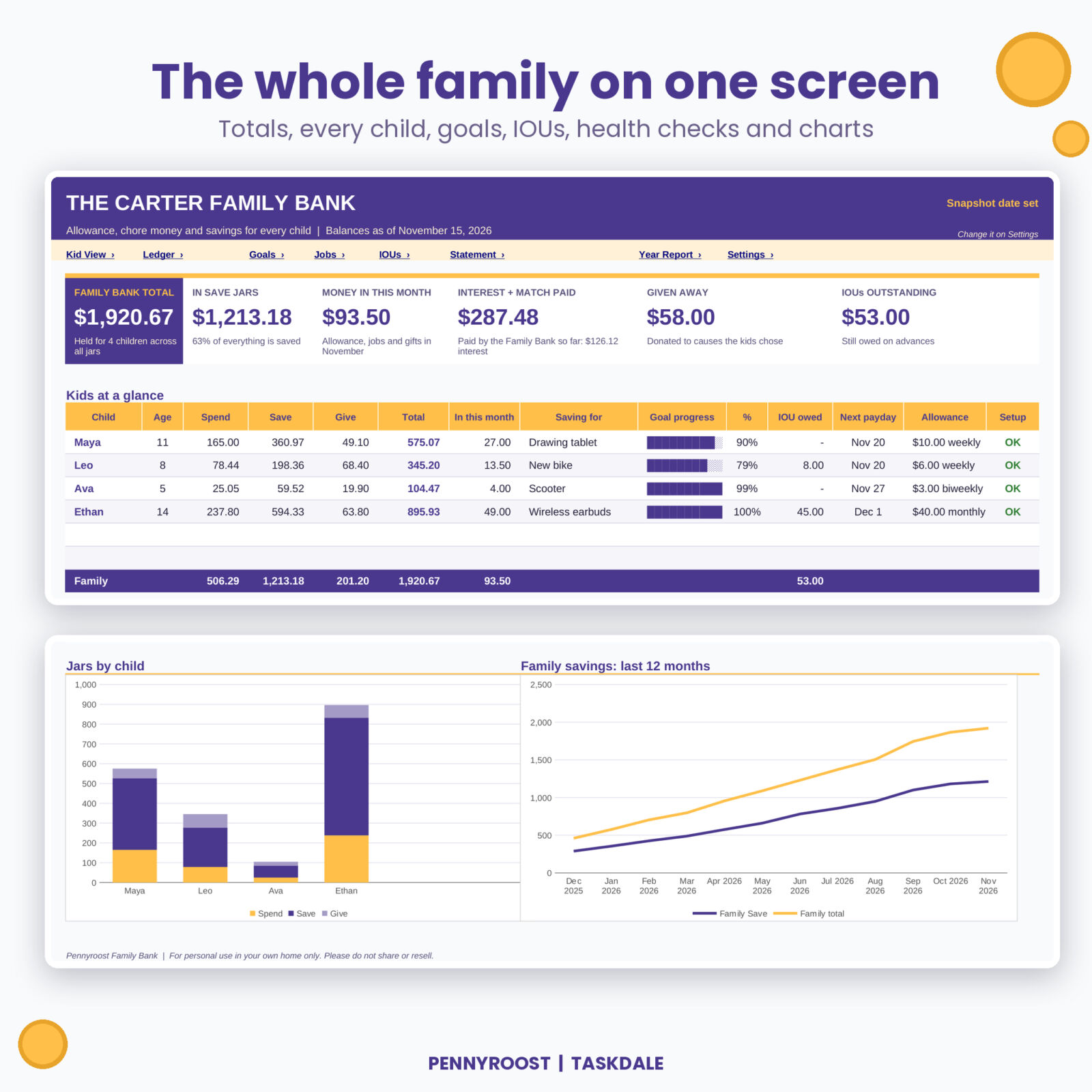
- Dashboard: family bank total, money in Save jars, money in this month, interest and match paid, money given and IOUs outstanding. A row for every child with jar balances, goal progress, next payday and IOUs. Health checks and two charts.
- Kid View: one child’s bank page with jar cards, goals, this month’s jobs and earnings, milestone stars from 10 to 1,000 and a 12-month chart.
- Ledger: 1,500 rows with dropdowns, automatic splits, in/out signs and a Status column that flags anything incomplete.
- Goals, Jobs and IOUs tabs.
- Statement: a printable monthly statement for any child and month.
- Year Report: month-end balances for every child, family money in, spending, giving, interest plus match, and charts.
- User guide (DOCX): setup, every tab explained, tips, troubleshooting and FAQ.
How the allowance and savings tracker works
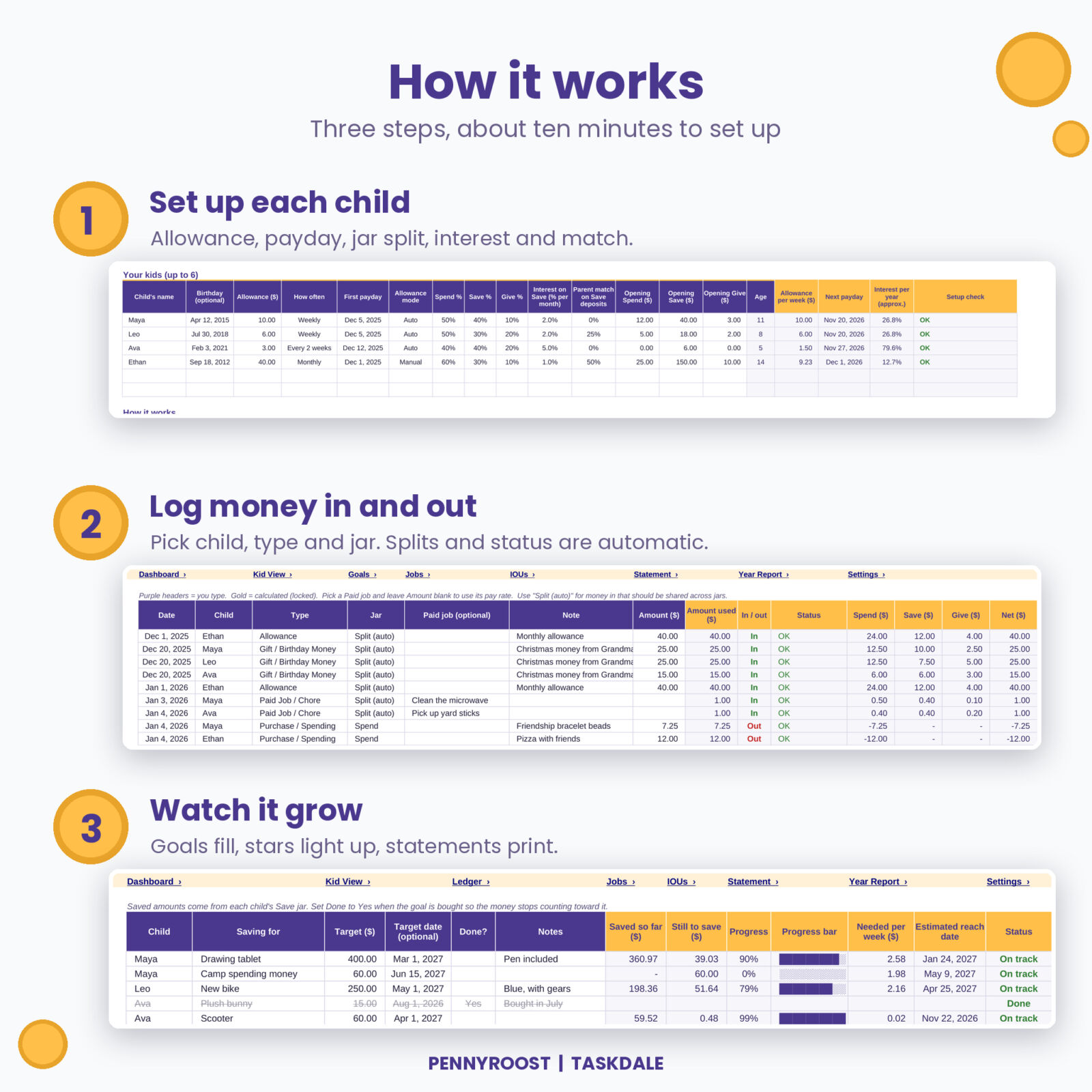
- Set up once. Add each child, their allowance and payday, and the Spend / Save / Give split. Turn on interest or a parent match if you like.
- Log the extras. Each gift, paid job, purchase, donation or move between jars is one Ledger row: date, child, type, jar, amount.
- Watch it grow. Balances, goals, stars, charts and statements update by themselves. Open Kid View on payday and talk it through together.
Why this one is different
Most allowance templates are a single log for one child, or a chore chart with a points column. Pennyroost keeps a proper month-by-month record for every child, so interest, matches, goals and statements all come from the same numbers. Built-in checks catch the common mistakes: missing details, a split that does not add to 100%, a renamed child, or an allowance logged twice. Formula cells are locked (no password) so a stray keystroke cannot break the math.
Real-life ways families use it
- A weekly allowance with 40% going to savings, and a 25% parent match to make saving feel like a win.
- Paying a teenager for mowing and babysitting while their monthly allowance runs in the background.
- A six-year-old saving for a scooter, with a progress bar and a date to look forward to.
- Lending a child money for a toy and tracking weekly repayments until it is paid off.
- Printing a statement each month so kids can see where their money went.
File formats and software
- One .xlsx workbook for Microsoft Excel (desktop or Microsoft 365).
- Google Sheets: upload the file to Google Drive and open it with Google Sheets. The formulas use functions Google Sheets supports.
- User guide as a Word document (.docx).
- Instant digital download. Nothing is shipped.
Customize it
Use any currency symbol: every money label follows the one cell on Settings. Rename jobs, change pay rates, pick any split, set interest to zero, or type a date to see balances on that day. Fonts and colors can be changed freely.
FAQ
Does this hold real money?
No. You keep the money in cash or your own account. The spreadsheet is the record of what belongs to each child.
How many kids can I track?
Up to 6 children, with 1,500 Ledger rows, 24 savings goals and 20 IOUs. It covers 36 months from your start date.
Does it work in Google Sheets?
Yes. Upload the .xlsx to Google Drive and open it with Google Sheets.
Do I have to type the allowance every week?
No. In Auto mode the allowance is added on each payday. Use Manual if you prefer to log it yourself.
Is it a chore chart?
It is a money tracker. Paid extra jobs live on the Jobs board and in the Ledger. Many families keep daily chores unpaid and pay only for extras.
Can I print it?
Yes. The monthly Statement fits one page, and the Dashboard, Kid View and Year Report print neatly too.
Is it beginner friendly?
Yes. Purple headers show where to type, dropdowns do the rest, and the user guide walks you through setup.
License
For personal use in your own household. Please do not share, resell or redistribute the files.
Reviews
There are no reviews yet.