




Pest Control App for Service Reports, Product Records and Recurring Routes
Pestpath is a pest control app you buy once and keep. It is an offline service log in a single file: you open it in your browser, log every treatment with its EPA Reg. No., and print a clean service report for the customer before you drive away. There is no account, no monthly fee and nothing to install.
If you run a one-truck business or a crew of up to five technicians, this pest control software for small business replaces the clipboard, the carbon-copy tickets and the Sunday night spreadsheet. It is an exterminator app offline, a pest control customer management app and a pest control invoice app in one file.
What the Pestpath pest control app does
- Holds every customer and property. Gate codes, pets, square feet, route and stop order, standing conducive conditions and a full service history.
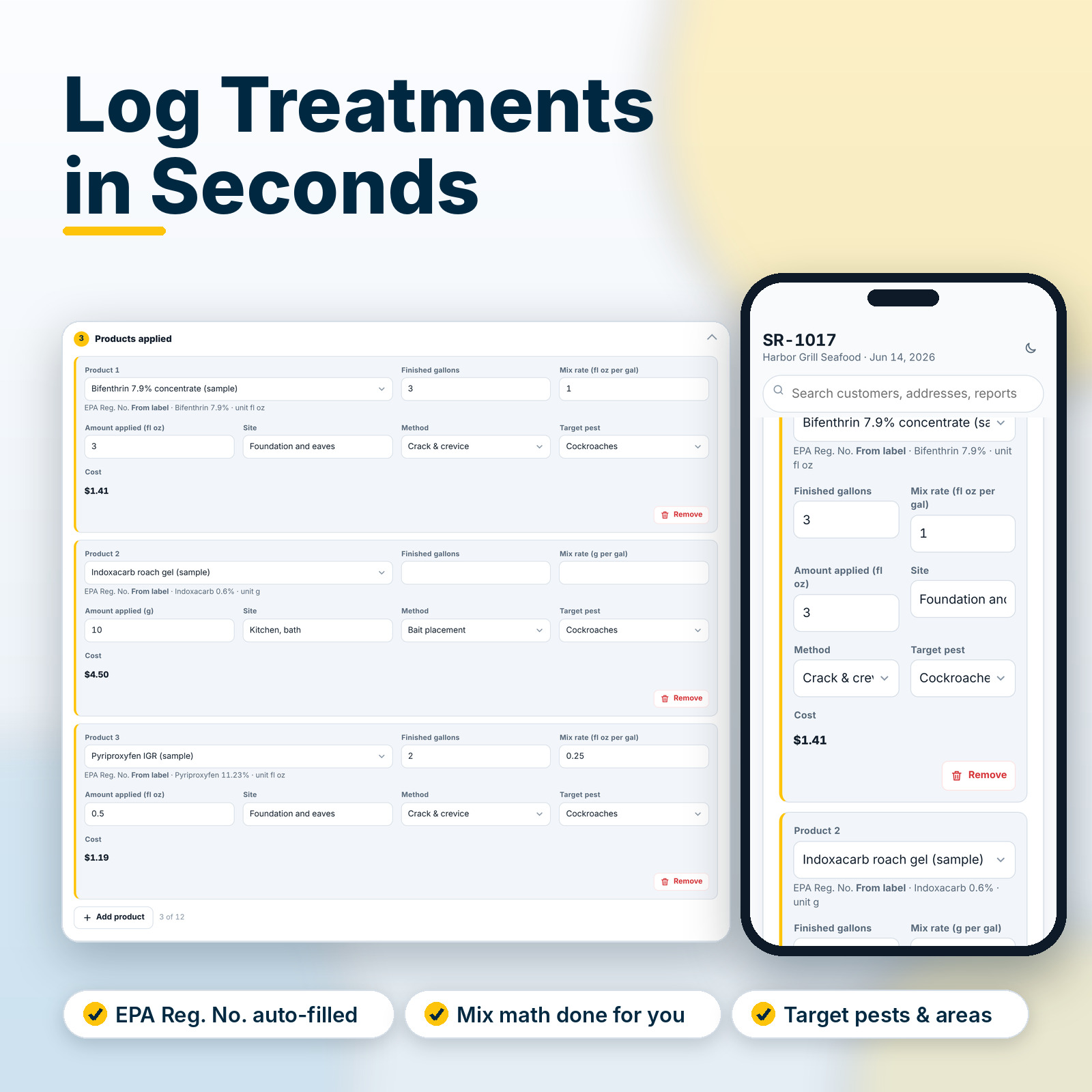
- Logs each visit the way a pest tech works. Target pests, areas treated, products applied, activity level, conditions found, station checks, recommendations, prep and re-entry notes and a customer signature.
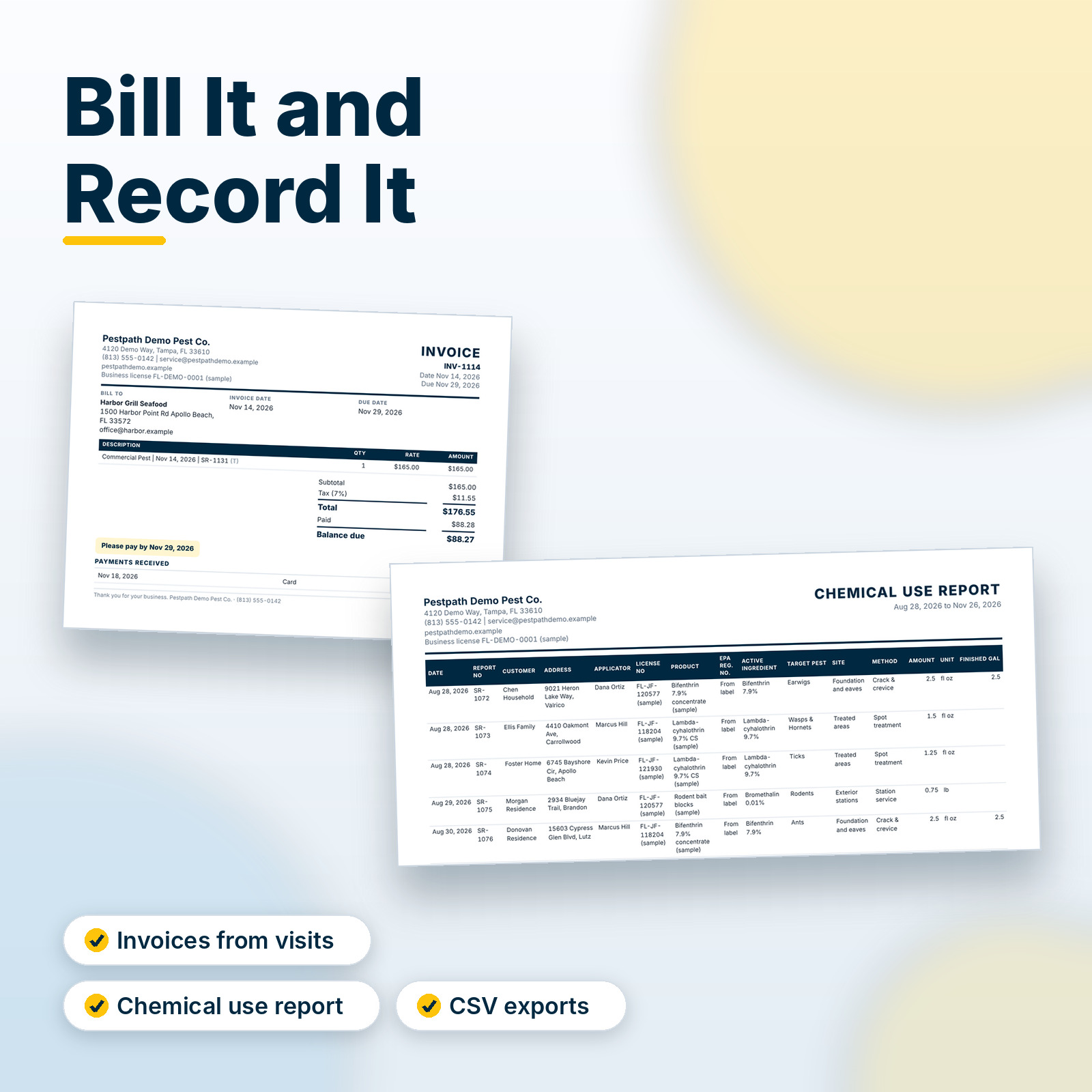
- Prints a pest control service report for the customer and a chemical use report for your records.
- Tracks recurring service plans with a next due date, an overdue list and a printable day route sheet.
- Bills the visit. Invoices from completed visits, payments, balances and statements.
Pesticide application record app features
Every application is saved with the details a record request asks for: date, customer and address, applicator and license number, product, EPA Reg. No., active ingredient, target pest, site, method, amount and unit. Pick a product from your list and the EPA Reg. No., active ingredient and unit fill in for you. Enter the finished gallons and the label rate and the app works out the amount of concentrate and the cost of the line.
The product details are saved with the visit, so editing a product later never rewrites history. Export every application to CSV, one row per product.
Bait station inspection log app
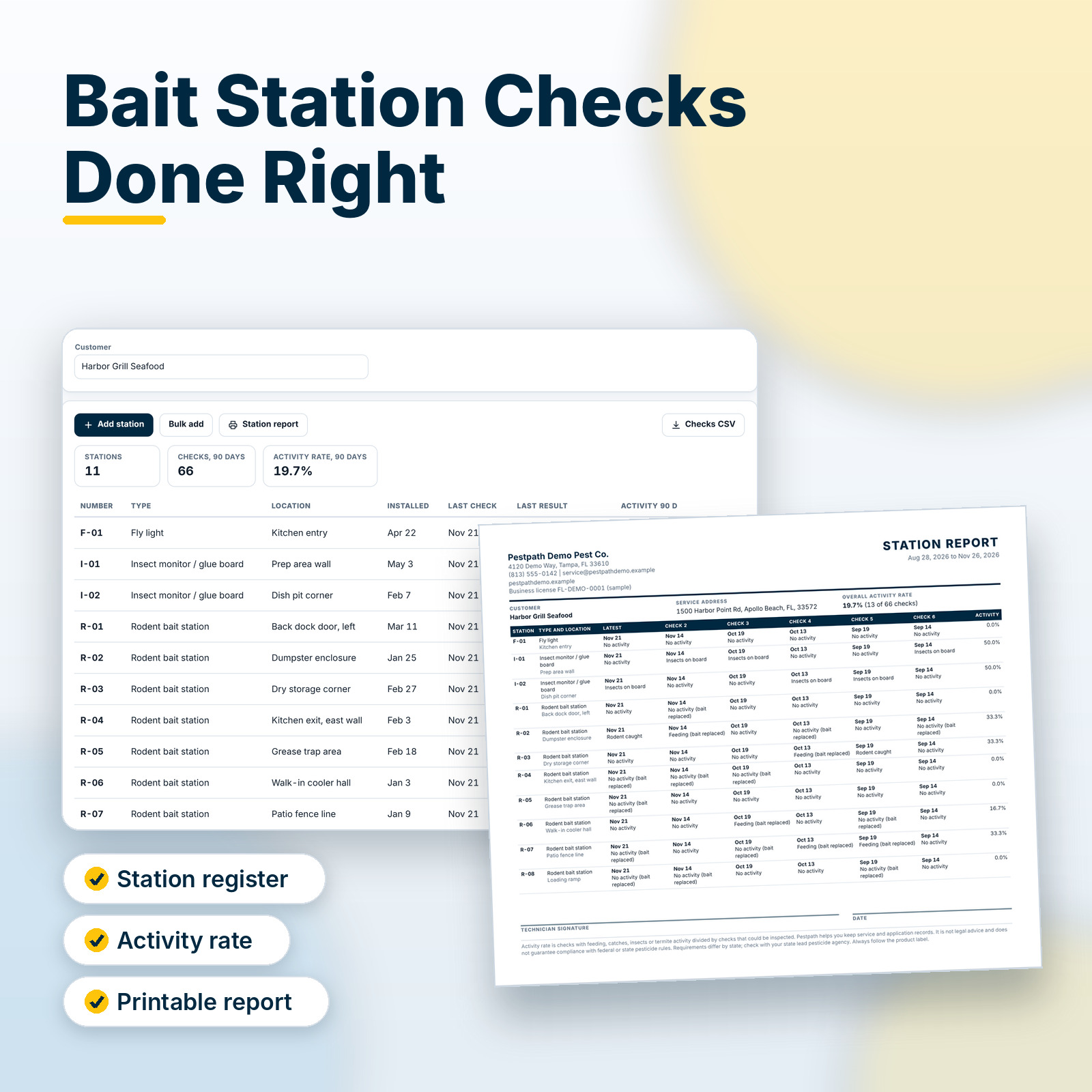
Build a station register for each commercial or food account: rodent bait stations, trap stations, termite monitors, insect monitors and fly lights. Add ten stations numbered R-01 to R-10 in one step. At each visit press All no activity and change the exceptions. Pestpath keeps the history and calculates the activity rate per station and per customer, then prints a station report with the last six checks.
Never miss a recurring service
Next due is worked out from the last completed visit, not the calendar. A quarterly customer last serviced on August 14 is due November 14 and shows 12 days overdue on November 26. A callback does not reset the schedule, and a weather delay or a skip stays on the overdue list until the service is actually done, so a rainy week never makes a customer disappear.
The Schedule shows overdue services first, then the next 14 days, with a Start visit button that fills in the visit form from the plan.
What is included
- Pestpath-Pest-Control-Service-Log-App.html, the app
- User guide in DOCX format with screenshots and worked examples
- Start Here PDF, a one page quick start
- All files also come as one ZIP
Features at a glance
- Dashboard with eight tiles and three charts: revenue by month, visits by target pest and service mix
- Schedule with route sheet, customers, service log, service plans, stations, invoices and payments, products and stock, reports and settings
- Service report, invoice, customer statement, station report, chemical use report and day route sheet, all printable
- Product stock on hand with low-stock alerts, revenue per hour and callback rate
- CSV export of customers, plans, visits, applications, station checks, invoices, payments and products
- Backup and restore with one JSON file
- Light and dark themes, phone, tablet and desktop layouts, US Letter or A4 printing
- One currency setting for every money value, with $ as the default
- Sample data you can load to explore and clear in one step
How it works
- Open the HTML file in your browser and bookmark it.
- Enter your business name, license number, technicians and products once in Settings.
- Add a customer and a service plan.
- Press Start visit from the Schedule, log the treatment, collect the signature and print or save the service report.
- Create the invoice from the completed visits and record the payment.
File formats and requirements
You receive an HTML file, a DOCX user guide and a PDF. Pestpath was tested in Chrome and Edge and uses standard features that work in any modern browser. It works offline, makes no network requests and keeps your data in your own browser on your own device.
Data lives in one browser on one device, so techs do not share a live database. Move data between devices with Download backup and Import backup.
Use cases
- A solo technician running a quarterly route who prints a service report at each stop.
- A small office billing monthly commercial accounts with station checks.
- Answering a customer who asks what was sprayed last spring.
- Pulling every application for the year when a record request arrives.
Customizing
Rename or reorder the lists for service types, pests, areas, methods, routes and station types. Set invoice and report numbering, the prep note, report footer, technician colors, license numbers, tax rate and paper size.
Digital download
You download the files right after purchase. The license covers one business and its devices. Do not resell, share or redistribute the files.
Frequently asked questions
Does this pest control app work offline?
Yes. Everything runs inside the page, so it works with no signal at the job site.
Is there a monthly fee?
No. You pay once and keep the file.
Does it work on iPhone and Android?
The layout is built for phone and tablet screens. Copy the file to the phone and open it in Safari or Chrome, not the Files app preview. Data stays on that device. Try the free Pestpath Lite on your phone first.
Can my technicians share one database?
Not live. Each device keeps its own data. Move it with backup and import.
Can I print service reports?
Yes. A normal visit fits one US Letter or A4 page, and you can save it as a PDF to email.
Does it track bait stations?
Yes. It has a station register, check history, activity rate and a printable station report.
Can I change the currency?
Yes. Choose from 14 symbols or enter your own, and place it before or after the amount.
How many records can it hold?
Browsers give the app about 5 MB. That is roughly 1,200 visits with invoices and signatures, or about 3,000 without signatures. A meter in Settings warns you at 80%, so it suits solo operators and small crews rather than large companies.
Does it make my records compliant?
It holds the fields most record requests ask for, but rules differ by state, so check yours. Pestpath helps you keep service and application records. It is not legal advice and does not guarantee compliance with federal or state pesticide rules. Always follow the product label.
Author: Taskdale. Sample data uses made-up names and the placeholder EPA Reg. No. “From label”.


Reviews
There are no reviews yet.