




A budget planner spreadsheet that plans your whole year
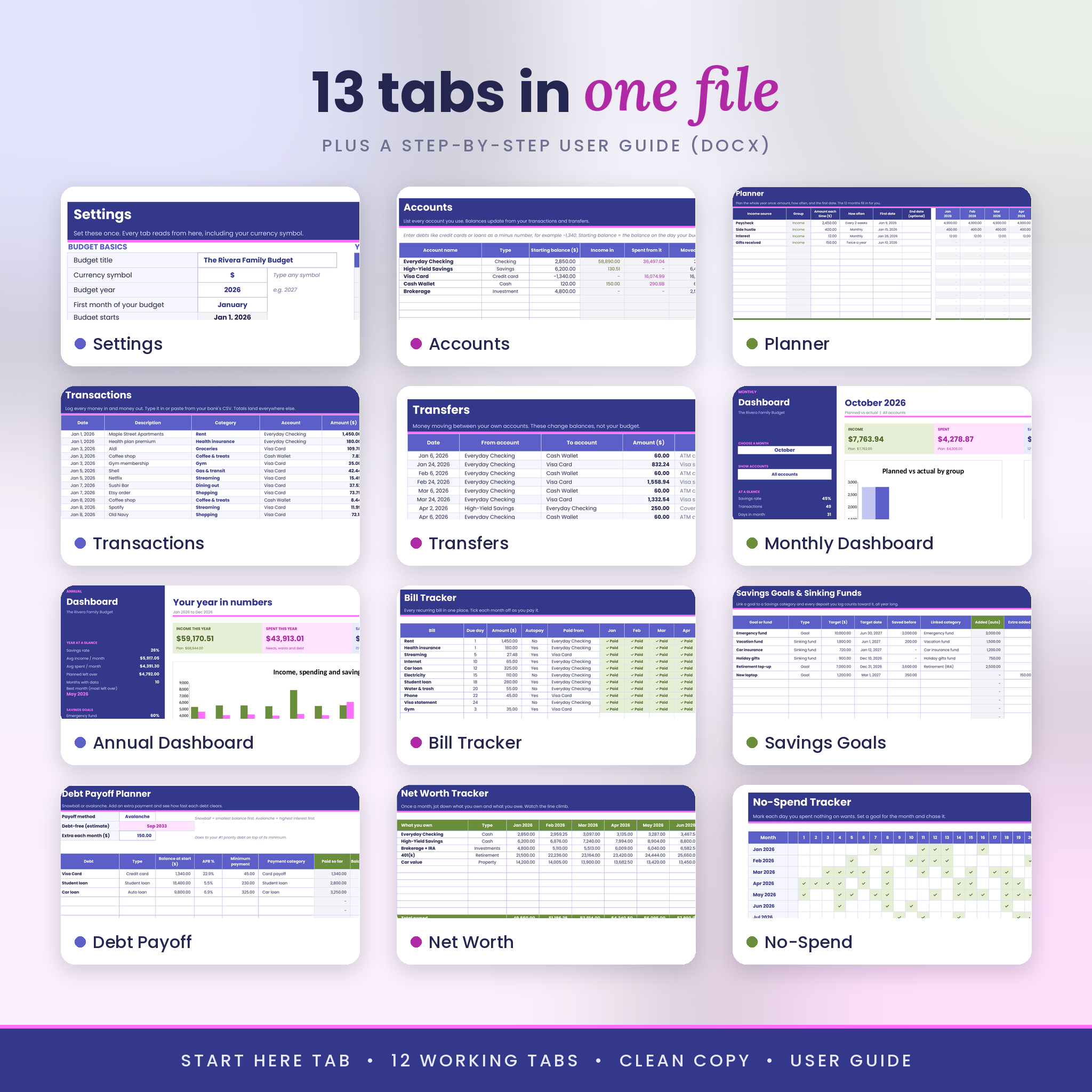
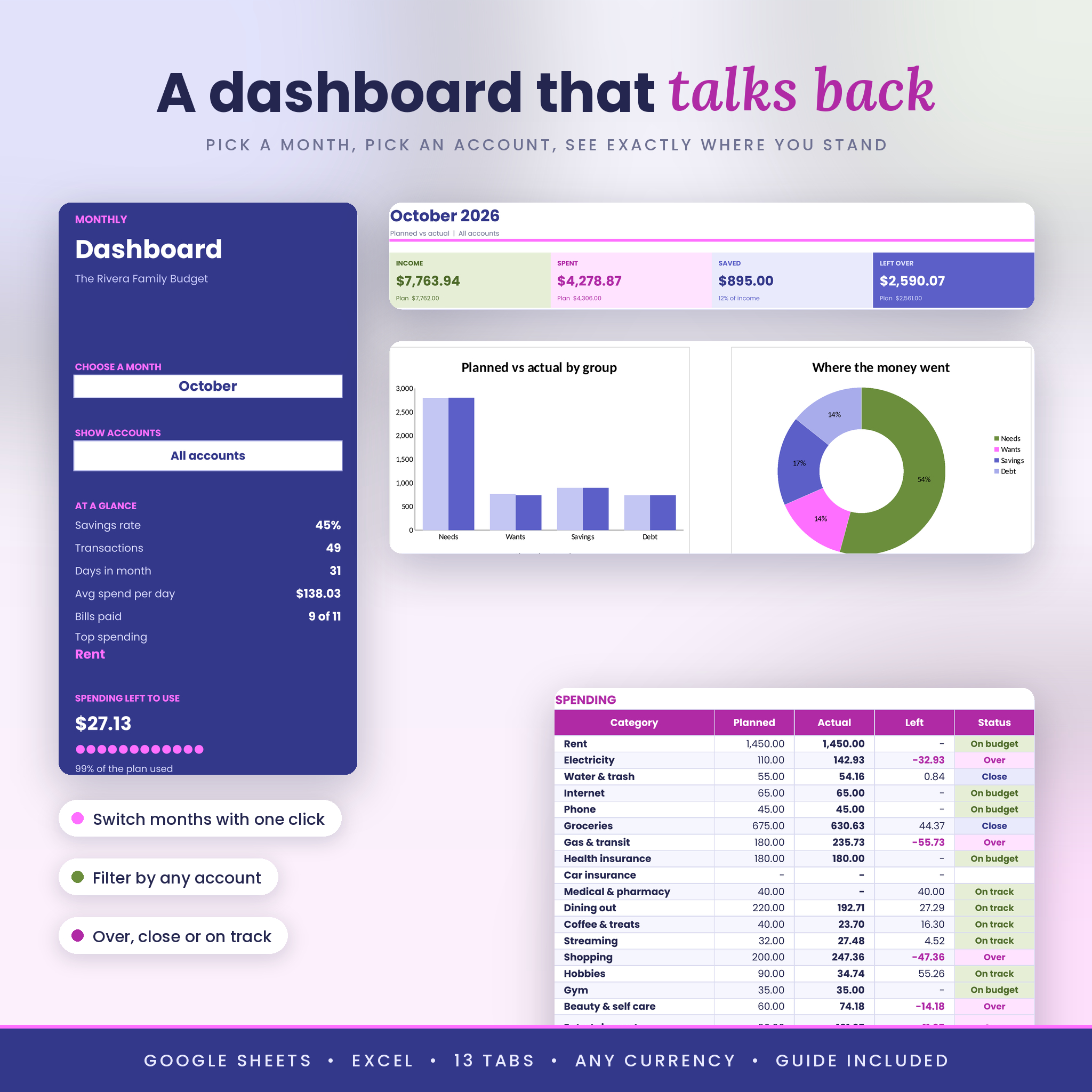
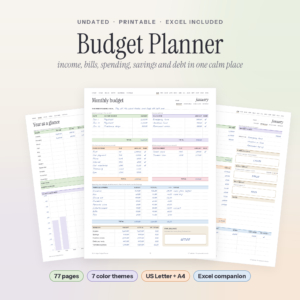
Pocketgrove is a budget planner spreadsheet for Google Sheets and Excel. You set up your income and bills once, log money as it moves, and two dashboards show you exactly where you stand. Pick a month. Pick an account. See what’s left to spend.
Setup takes about 15 minutes. You never touch a formula. And unlike a one-month template, Pocketgrove covers 12 months, starting in whatever month you choose. Your sinking funds, savings goals and debt balances keep running from one month to the next.
Who it’s for
- Anyone who wants to see the full year, not just this month
- Couples and families running checking, savings, a couple of cards and some cash
- Savers using sinking funds for car insurance, holidays, gifts or vacations
- People paying off credit cards, student loans or a car loan
- Beginners who’ve never budgeted in a spreadsheet before
Main benefits
- Know where every dollar went. Planned vs actual for every category, every month.
- Stop getting caught by big bills. Sinking funds hold their balance until the bill shows up.
- See a debt-free date. Snowball or avalanche, with an extra payment that rolls forward.
- Spot the 3-paycheck months. The planner counts real paydays, so you can plan where that extra check goes.
Features inside the monthly and annual budget template
Yearly planner
Up to 15 income sources and 50 spending categories. Type the amount, pick how often (weekly, every 2 weeks, twice a month, monthly, quarterly, twice a year, yearly or one time) and add a first date. All 12 months fill in. Add an end date for things that stop, like a loan or a summer camp.
Transaction tracker and transfers
A 1,500-row log with category and account dropdowns. Paste straight from your bank’s CSV if you like. The type and group fill in by themselves, and a pink flag shows up if a category is missing or misspelled. A separate transfers tab handles money moving between your own accounts, so card payments never get counted twice.
Monthly dashboard
Choose a month from a dropdown and the whole page switches. Cards for income, spent, saved and left over. A planned vs actual chart, a donut chart by group, a top 5 list, account balances at month end, and a 50/30/20 check. You can also filter the page to one account, like your credit card.
Annual dashboard
The year on one page: income, spending and saving by month, savings rate, a running total, your top 10 categories, plus goal progress and debt totals in the sidebar.
More trackers built in
- Accounts: up to 30 accounts with live balances
- Savings goals and sinking funds: 15 goals linked to your savings categories, with a per-month amount to hit each target date
- Debt payoff planner: 15 debts, snowball or avalanche, payoff dates and interest still to come
- Bill tracker: 30 bills with a paid grid for each month
- Net worth tracker: monthly snapshot with a line chart
- No-spend tracker: a daily challenge with a goal for every month
What’s included
- Pocketgrove Smart Budget spreadsheet (.xlsx) with 13 tabs, ready for your numbers
- User guide (.docx), 14 pages with screenshots, tips, troubleshooting and FAQ
How it works
- Download the files right after checkout.
- Open the spreadsheet in Excel, or upload it to Google Drive and open it with Google Sheets.
- In Settings, choose your currency, year and first month.
- Add your accounts and plan your year in the Planner.
- Log transactions as they happen. The dashboards do the rest.
File format and software requirements
- File type: .xlsx spreadsheet plus a .docx user guide
- Google Sheets: a free Google account, on a computer, tablet or phone
- Microsoft Excel: Excel 2016 or newer, or Microsoft 365
- No macros, scripts or add-ons. Just regular formulas.
- Not made for Numbers, Notion or GoodNotes
Customization
Rename any category and every dropdown updates. Choose any currency symbol, from $ and € to £, R or ZiG. Start your year in any month, which suits school years and fiscal years. Set your own 50/30/20 targets. In Excel, formula cells are locked without a password, so you can unlock a sheet whenever you want to change colors or layout.
Digital download
This is an instant digital download. Nothing is shipped. Your files are ready on the order page and in your confirmation email as soon as payment goes through. Buy once and reuse it every year: make a copy, clear the logs and change the year.
Real ways buyers use it
- A family moves $120 a month into a car insurance fund and pays the 6-month premium without a scramble.
- A nurse paid every 2 weeks plans the two months a year that have three paychecks and sends that money to debt.
- A couple filters the dashboard to their shared Visa to see what it’s really costing each month.
- A teacher starts the budget in August to match the school year.
Budget spreadsheet FAQ
Does this budget spreadsheet work in Google Sheets?
Yes. Upload the file to Google Drive, open it with Google Sheets and save it as a Google Sheet. It also works in Excel.
Can I use my own currency?
Yes. Pick or type your symbol in Settings. Every money label and dashboard card updates.
Can I start in the middle of the year?
Yes. Choose any first month and the 12 months roll from there.
Does it track credit cards?
Yes. Log purchases with the card as the account and pay the card with a transfer. Balances stay correct and nothing gets counted twice.
Can my partner and I share it?
Yes. In Google Sheets, click Share and add them. You’ll both see the same numbers.
Can I reuse it next year?
Yes. Make a copy, clear Transactions and Transfers, and change the year in Settings.
Is it beginner friendly?
Yes. A Start Here tab and the user guide walk you through setup step by step. White boxes are for typing. Gray cells do the math.
License: for personal use only. Please don’t resell, share or redistribute the files. This spreadsheet is a planning tool and isn’t financial advice.
Reviews
There are no reviews yet.