




237 real estate AI prompts that sound like an agent, not a robot
Listwise is a library of 237 real estate AI prompts for agents who want to write faster without sounding like every other listing. Each prompt is a complete instruction with clear [PLACEHOLDERS], a “use it when” note and, where it helps, a tip from the field. Paste it into ChatGPT, Claude, Gemini, Copilot or any AI chat tool, fill the brackets and you have a first draft in seconds.
Most prompt packs give you one-liners like “write a listing description.” You get generic copy back, full of “nestled” and “boasts”. Listwise prompts tell the AI exactly what to do: the facts to use, the order to write in, the length, the words to avoid, and when to stop and ask you a question first.
Why agents choose Listwise
- Fair-housing guardrail built in. Every prompt that writes public marketing ends with a line telling the AI to describe the home and the area, not the kind of person who should live there, and not to invent facts.
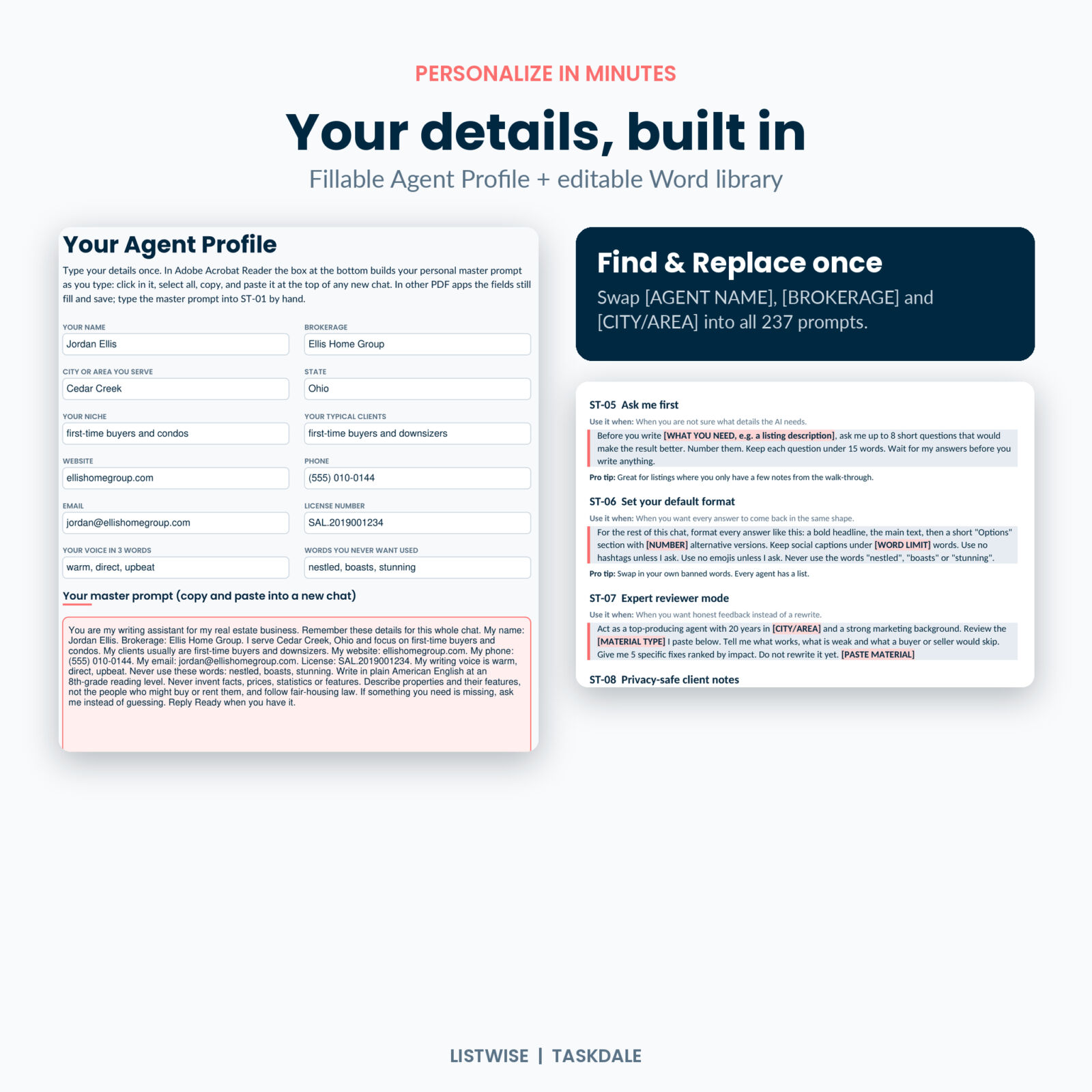
- Set up once, use everywhere. Start Here prompts teach the AI your name, brokerage, area, voice and rules at the top of each chat.
- Fillable Agent Profile. Type your details once. In Adobe Acrobat Reader the profile builds your personal master prompt as you type.
- Editable Word library. Use Find and Replace to put your name, brokerage and city into all 237 prompts at once, then copy and paste.
- Worked examples. Eight prompts filled in for a sample listing, with the kind of answer to expect and what to check.
What is inside the prompt library
15 categories of real estate prompts
- Start Here: set up your AI assistant (8)
- Listing descriptions and property marketing (25)
- Social media content (25)
- Email marketing and newsletters (18)
- Lead follow-up and nurture (20)
- Buyer clients (18)
- Seller clients and listing appointments (18)
- Open houses (12)
- Market updates and local expertise (12)
- Objection handling and negotiation prep (15)
- Sphere, referrals and reviews (12)
- Video scripts and reels (12)
- Under contract to closing (14)
- Business, planning and productivity (14)
- Fix and refine follow-up prompts (14)
Extras that save real time
- 6 prompt workflows: New Listing Launch, New Lead to Appointment, Listing Appointment Prep, Contract to Keys, Monthly Market Content and Past-Client Referral Month. Run them in order in one chat.
- 30-day content plan: a post idea for every day, each linked to the prompt that writes it, with a Done box to tick.
- Fair-housing wording guide: 16 commonly flagged phrases, why they raise concern and what to write instead.
- Using AI safely page: privacy, fact checking, MLS rules and photo edit disclosures in plain language.
- Placeholder guide and full index: every prompt listed by ID with a page link.
How it works
- Start a new chat in your AI tool and paste your master prompt and the fair-housing guardrail.
- Pick a prompt from the linked PDF or the Word library.
- Fill the [PLACEHOLDERS] with your listing facts, client first names or market numbers.
- Refine with a Fix and Refine prompt: shorten it, warm it up, remove clichés or run a fair-housing wording check.
- Check every fact and post, send or print.
Real situations where agents use these prompts
- You just left a listing walk-through with a page of notes and need MLS remarks under 1,000 characters by tonight.
- A portal lead came in at 9 PM and you want a friendly first text that ends with one easy question.
- Your seller wants to list above the comps and you need calm talking points before tomorrow’s call.
- It is the first of the month, you have your MLS numbers, and you want a market snapshot, a reel script and an email from the same data.
- You are under contract and want a clear timeline, a wire fraud warning and closing day instructions for your buyers.
- You want to post consistently but never know what to say. The 30-day plan tells you, day by day.
File formats and requirements
- Listwise PDF, US Letter (85 pages) and A4 (80 pages): side tabs, clickable contents and index, bookmarks, fillable Agent Profile, “Used it” checkboxes and printable layout. Fonts embedded.
- Listwise Prompt Library (DOCX): every prompt in an editable Word file with heading styles, so the Navigation Pane lists each prompt by ID.
- User Guide (DOCX): setup, every feature, customizing, tips, troubleshooting and FAQ.
- You need a PDF reader and a word processor that opens DOCX files, plus access to any AI chat tool. Free AI plans work. The master prompt auto-build runs in Adobe Acrobat Reader; in other PDF apps the fields still fill and save.
Customize it
Every prompt is plain text you can edit. Add your banned words, change word and character limits to match your MLS, write in your own voice with the voice prompt, or build new prompts using the same structure. The Word library is made for this.
Digital download
This is an instant digital download. No physical item ships. After checkout you can download the two PDFs, the Word prompt library and the user guide from your order confirmation and your account. Listwise is an independent product and is not affiliated with or endorsed by any AI company, MLS or trade association. It offers general marketing guidance, not legal advice.
License: personal use for one agent in their own business. Please do not share, resell or redistribute the files or prompts. Teams, one copy per agent.
FAQ
Do these prompts work in ChatGPT, Claude and Gemini?
Yes. They are plain text, so they work in any AI chat tool you can type into, on free or paid plans.
Will the AI write fair-housing compliant listings?
The prompts steer the AI toward describing the property, and the pack includes a wording guide and a wording-check prompt. AI can still make mistakes, so review everything and follow your broker’s rules.
Can I edit the prompts?
Yes. The Word library is fully editable, and you can personalize every prompt at once with Find and Replace.
Is this good for new agents?
Very. The Start Here prompts, worked examples and user guide walk you through it, and the prompts cover the messages new agents write most.
Can I print it?
Yes. Pick the US Letter or A4 PDF and print at actual size for your own use.
Does it include market data?
No. Market prompts ask you to paste numbers from your MLS or board, so your updates are accurate and local.
Can my team share one copy?
The license covers one agent. Each agent on a team needs their own copy.
Reviews
There are no reviews yet.