

Hotshot Load Tracker and Profit Spreadsheet for Owner-Operators
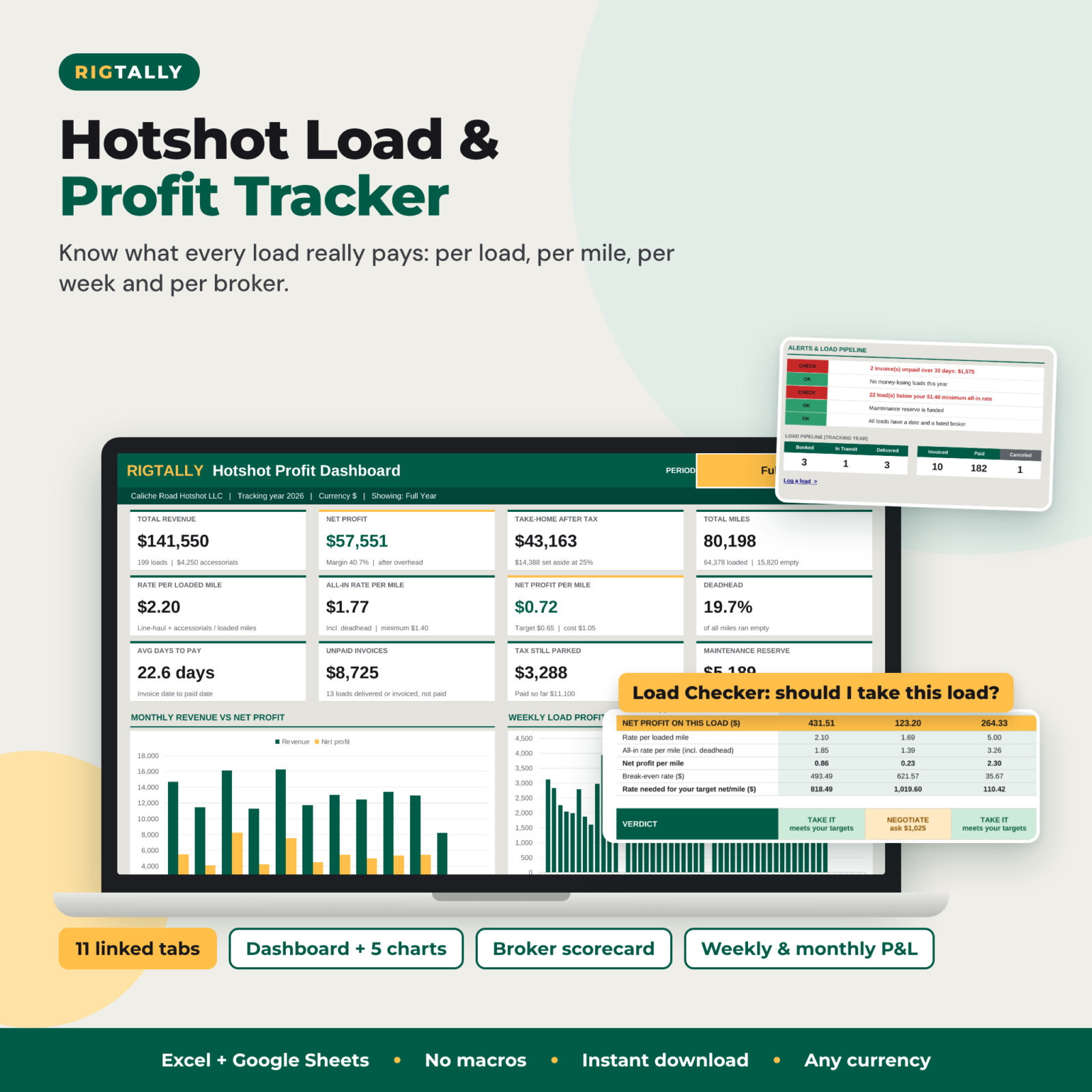
Rigtally is a hotshot load tracker that tells you what every load really pays. Log a load once (broker, lane, loaded and deadhead miles, rate and tolls) and the spreadsheet works out fuel from your own MPG, dispatch and factoring fees, a maintenance reserve, net profit, and your rate per mile with and without deadhead. Everything rolls up into a dashboard, weekly and monthly profit and loss, and a broker scorecard. It works in Excel and Google Sheets.
A $1,200 load looks great until you count 180 empty miles, fuel for a loaded one-ton and the dispatcher’s cut. Rigtally does that math for you on every load, so you can see which loads, lanes and brokers are worth your truck.
Who it is for
- Hotshot owner-operators running a pickup with a gooseneck, flatbed or car-hauler trailer
- New-authority carriers who need to know their real cost and rate per mile
- Small hotshot fleets booking through brokers, dispatchers or direct shippers
- Spouses and office managers who keep the books for the truck
Main benefits
- See true profit per load. Revenue minus fuel, tolls, permits, dispatch fee, factoring fee and maintenance reserve, for every row.
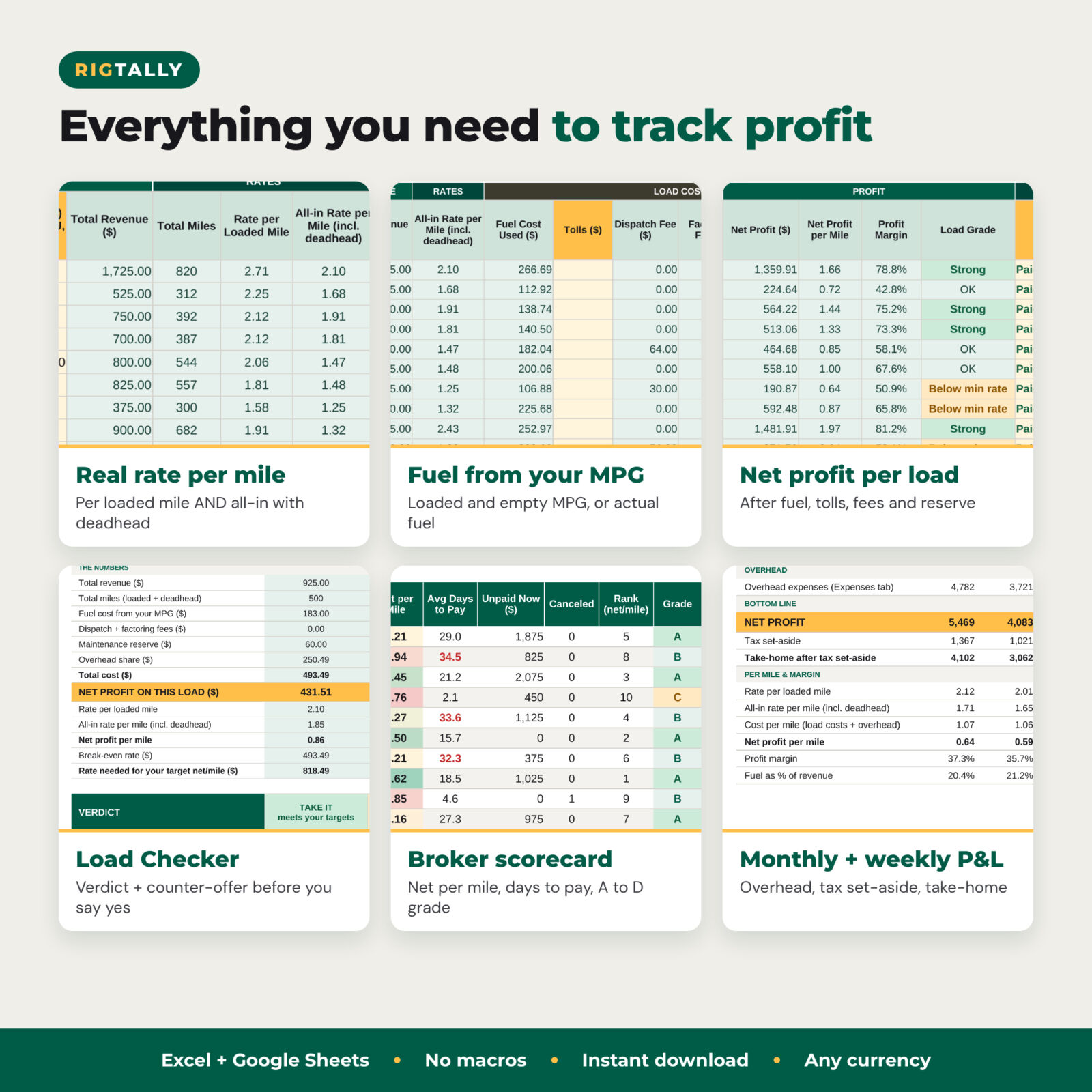
- Know your real rate per mile. Rate per loaded mile (what brokers quote) and all-in rate per mile including deadhead (what the truck really earned).
- Decide before you book. The Load Checker gives a TAKE IT, NEGOTIATE or DECLINE verdict and the rate to ask for.
- Pick better brokers. The scorecard ranks every broker by net profit per mile and average days to pay.
- Stop tax-time surprises. A tax set-aside and maintenance reserve show what to park every month.
Features of the hotshot profit tracker
Load Log (600 loads)
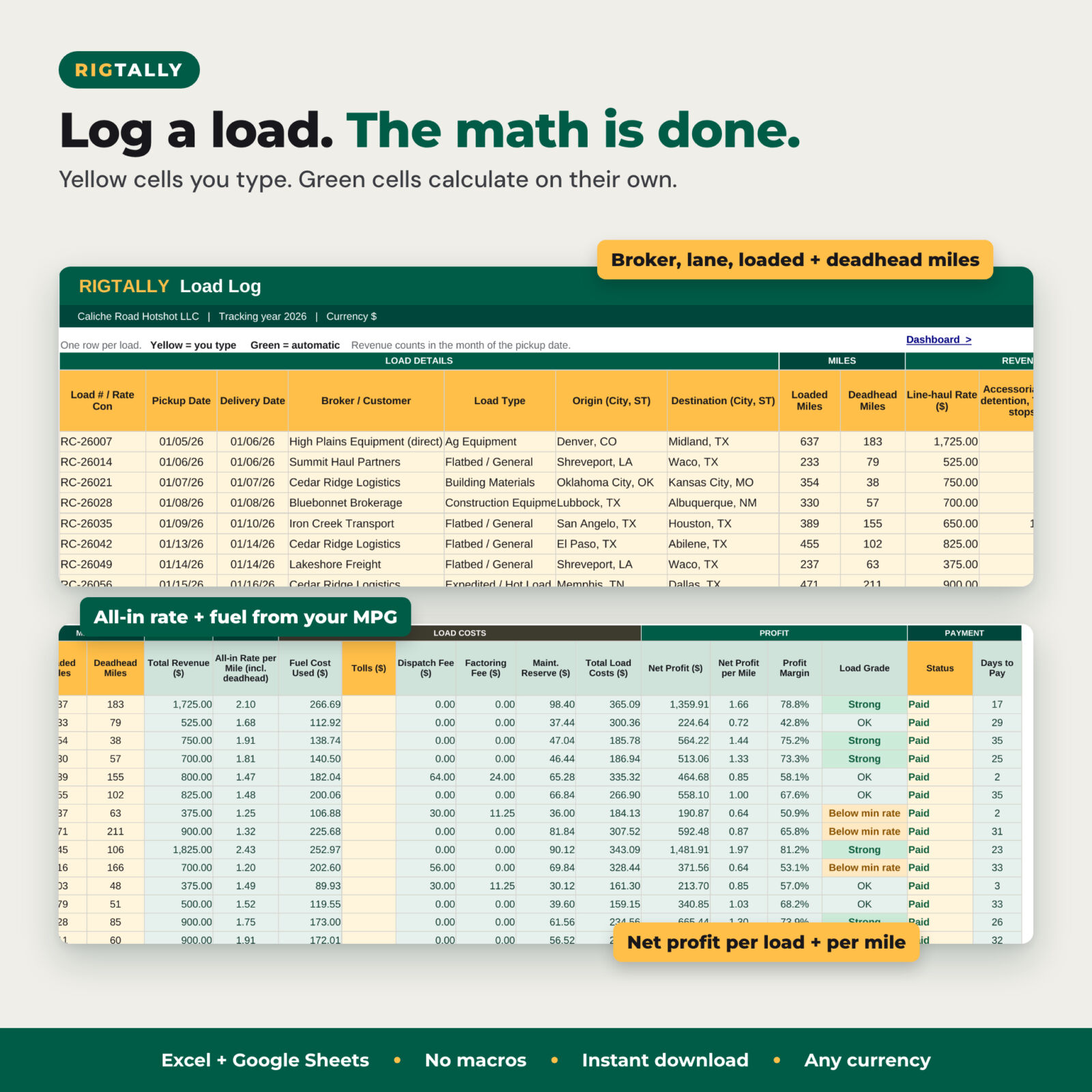
- Load number, pickup and delivery dates, broker, load type, origin and destination
- Loaded and deadhead miles, line-haul rate and accessorials (detention, layover, TONU, extra stops)
- Fuel cost estimated from separate loaded and empty MPG and your fuel price, or your actual fuel spend
- Tolls, permits and escorts, dispatch fee and factoring fee (Yes or No per load), maintenance reserve per mile
- Net profit, net profit per mile, margin and an automatic Load Grade (Strong, OK, Below min rate, Loss)
- Status from Booked to Paid, invoice and paid dates, and days to pay
Load Checker
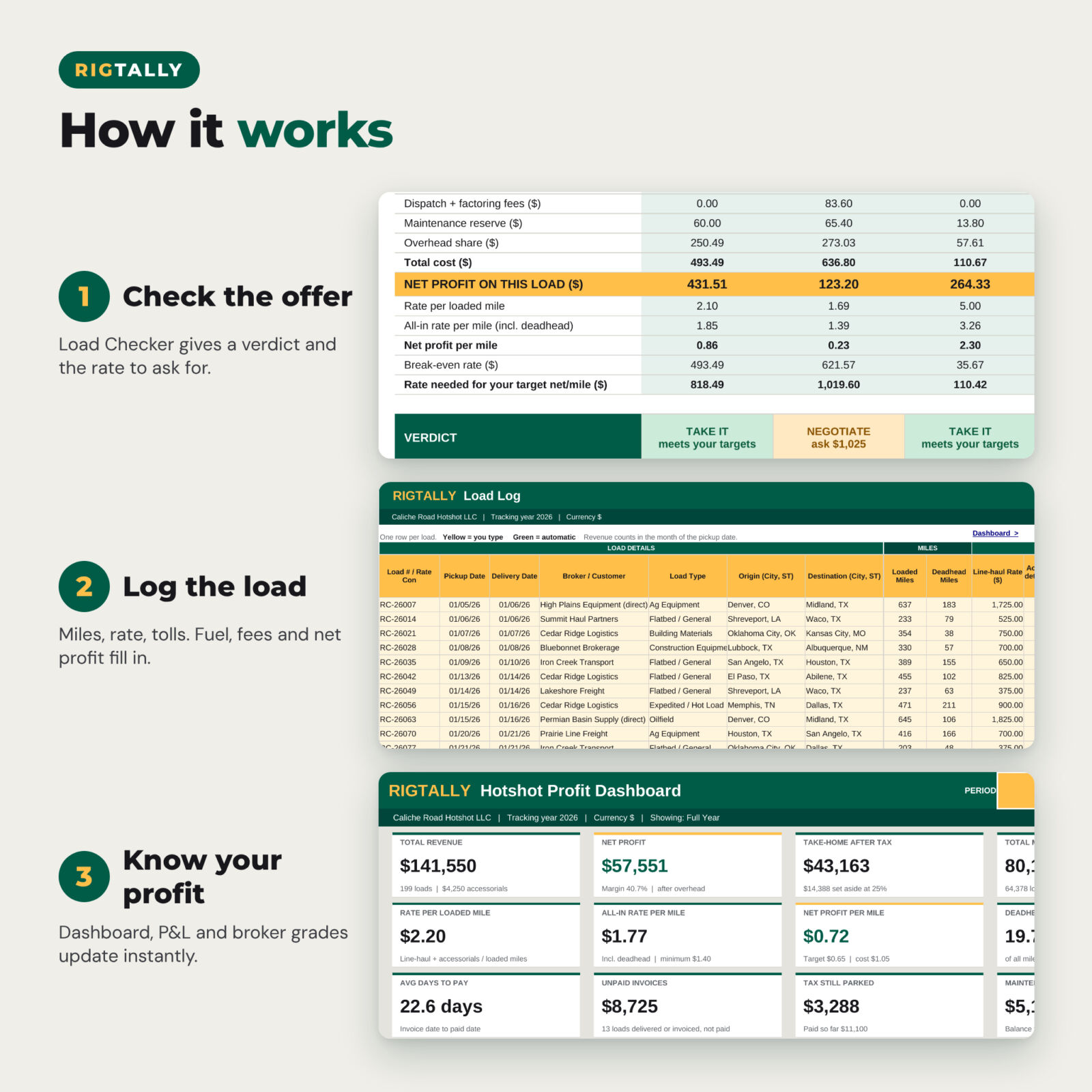
Compare up to three load offers side by side. See fuel, fees, reserve, your share of overhead, net profit, break-even rate and the rate needed to hit your target net per mile, with a counter-offer rounded up to the next 25.
Dashboard
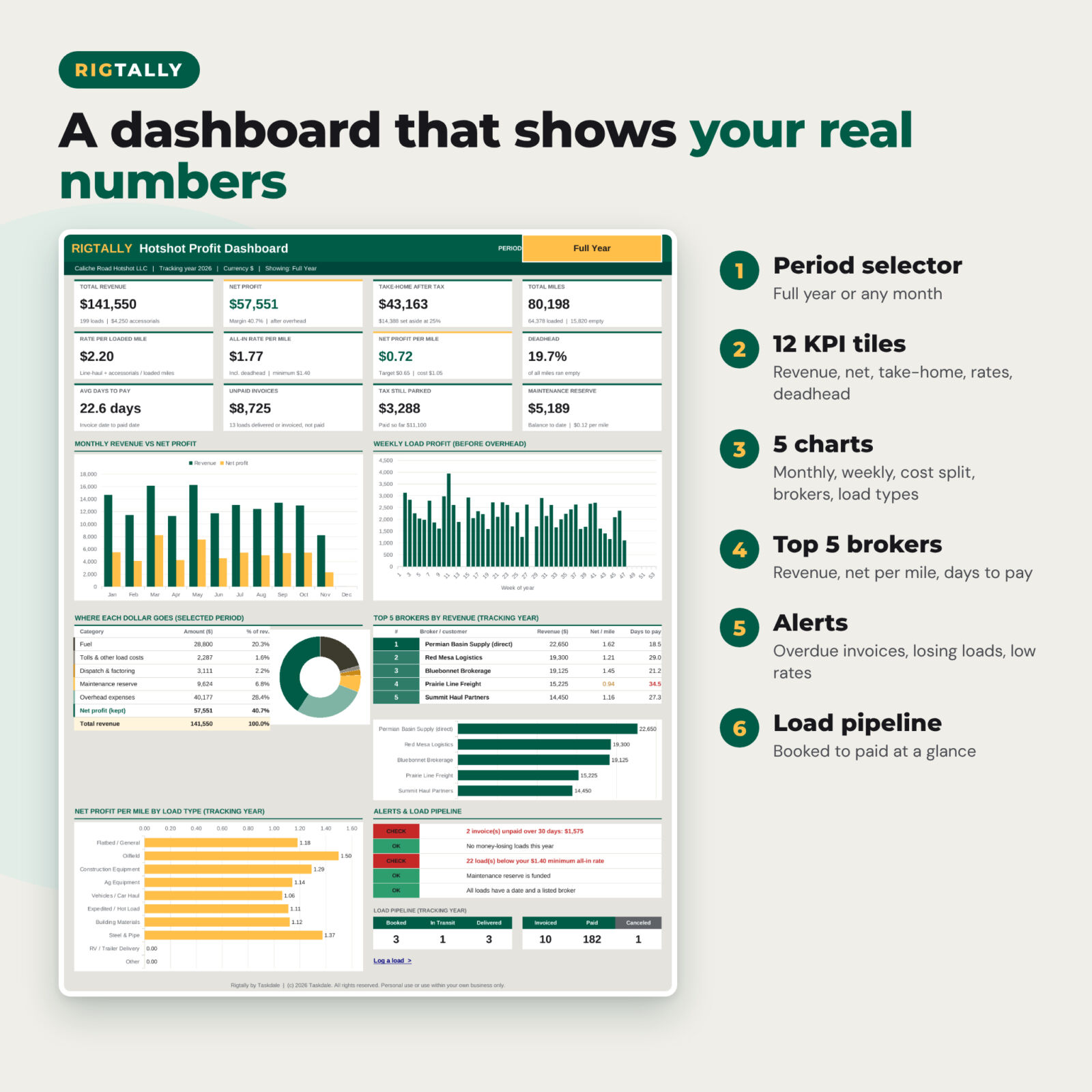
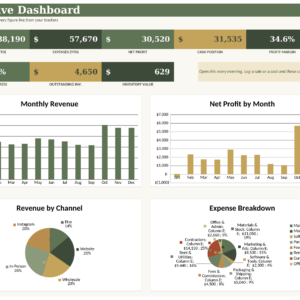
Twelve KPI tiles (revenue, net profit, take-home after tax, miles, rate per loaded mile, all-in rate, net per mile, deadhead %, days to pay, unpaid invoices, tax still parked and maintenance reserve), a period selector for the full year or any month, five charts, top five brokers, alerts and a load pipeline.
Weekly and monthly P&L
A 53-week P&L and a 12-month profit and loss statement with overhead from the expense tracker, tax set-aside, take-home, cost per mile and net profit per mile, plus expenses by category.
Broker Scorecard
Loads, revenue, share of revenue, rates per mile, net profit, net per mile, average days to pay, unpaid balance, cancellations, rank and an A to D grade for each broker or customer.
Expenses, Reserve & Tax, Load Recap
An 800-row expense tracker with your own categories, a maintenance reserve balance by month, quarterly tax set-aside against what you paid, and a printable one-page recap for any load.
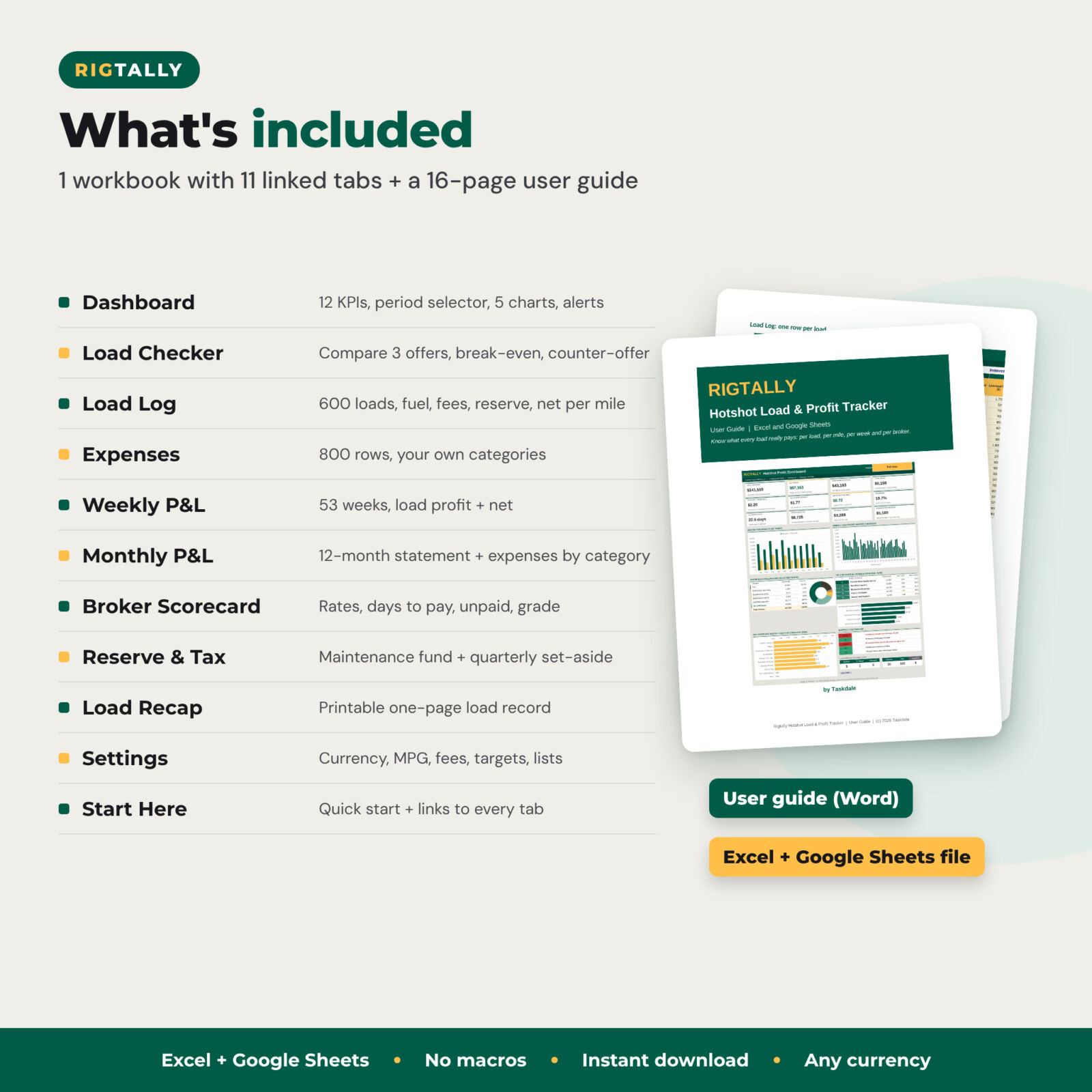
What is included
- Rigtally Hotshot Load & Profit Tracker (.xlsx) with 11 linked tabs: Start Here, Dashboard, Load Checker, Load Log, Expenses, Weekly P&L, Monthly P&L, Broker Scorecard, Reserve & Tax, Load Recap and Settings
- A 16-page user guide (Word .docx) with screenshots, troubleshooting and FAQ
How it works
- Open Settings and enter your currency, tracking year, fuel price, loaded and empty MPG, fees, reserve per mile, tax % and targets. Add your brokers and load types.
- Run new offers through the Load Checker before you accept them.
- Log each load in the yellow cells. Green cells calculate on their own and are locked so formulas stay safe.
- Log overhead such as insurance, truck payments and repairs on the Expenses tab.
- Update status and paid dates, then check the dashboard each week.
File format and software requirements
- Format: .xlsx spreadsheet plus .docx user guide
- Works in Microsoft Excel 2016 or later, Excel for Microsoft 365 and Google Sheets (free Google account)
- No macros, add-ins or subscriptions. Sheets are protected with no password
Customization
Choose any currency symbol and every money header and dashboard tile follows. Set your own fees, MPG, reserve, tax %, minimum rate and target net per mile. Edit up to 40 brokers, 15 load types and 25 expense categories, and decide which categories are paid from your maintenance reserve. Start a fresh copy each year.
Digital download
This is a digital product. No physical item is shipped. You can download the files right after purchase. License: personal use, or use within your own business. You may not resell, share, or redistribute the files.
Use cases
- Checking whether a 450-mile flatbed load with 95 deadhead miles beats a shorter direct-shipper run
- Finding out which broker pays the best net per mile and which one takes 35 days to pay
- Seeing your true monthly take-home after insurance, truck payments and a tax set-aside
- Building a rate floor for your favorite lanes before you call a broker back
- Handing your bookkeeper a clean monthly P&L and expense breakdown
FAQ
Does this hotshot load tracker work in Google Sheets?
Yes. Upload the .xlsx to Google Drive and save it as a Google Sheet. It uses functions Google Sheets supports and no macros.
How is fuel cost per load calculated?
Loaded miles divided by your loaded MPG plus deadhead miles divided by your empty MPG, times your fuel price. Enter your actual fuel spend instead if you have it.
Does rate per mile include deadhead?
You get both: rate per loaded mile and an all-in rate per mile that divides revenue by loaded plus deadhead miles.
Can I track dispatch and factoring fees?
Yes. Set your percentages once and mark each load Yes or No. Fees come off net profit automatically.
How many loads can I log?
600 loads and 800 expenses per workbook, which is plenty for a busy hotshot year.
Is the tax set-aside my actual tax bill?
No. It is a savings rule based on the percentage you choose. It is not tax advice, so ask a tax professional what rate to use.
Does it include IFTA reporting?
No. Rigtally focuses on loads and profit. Keep state miles and fuel receipts for IFTA in a separate log.

Reviews
There are no reviews yet.