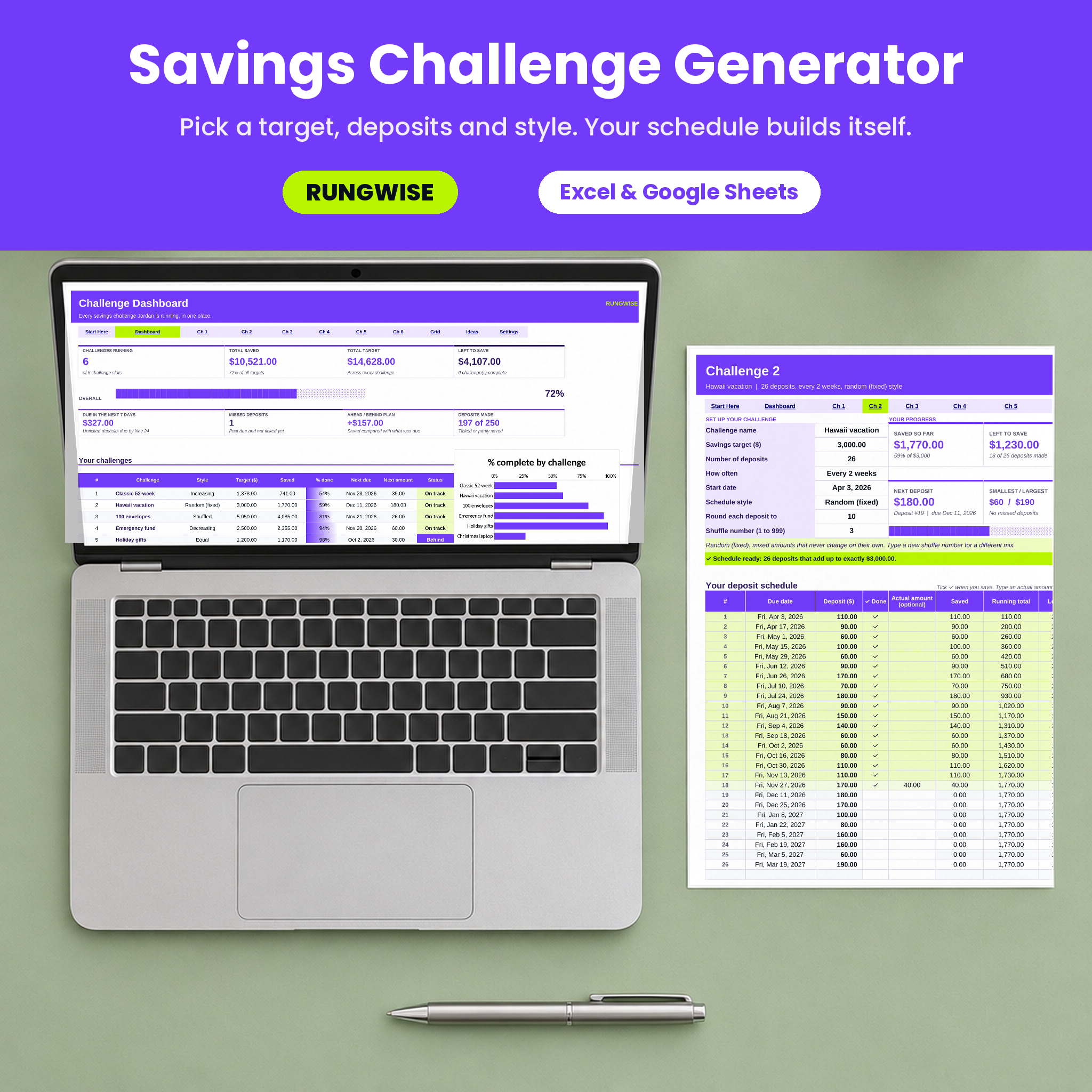



A savings challenge generator that fits your budget, not a fixed chart
Most savings challenges come as a fixed printable: $1 in week one, $52 in week fifty-two, and a total of $1,378 whether that suits you or not. The Rungwise savings challenge generator works the other way around. You decide the target, how many deposits, how often and the style. The spreadsheet then builds the whole schedule for you, with every due date and every amount, and it always adds up to exactly your target.
Want $5,000 by next December, paid every two weeks, with smaller deposits at the start? Four dropdowns and two numbers. Want the 100 envelope challenge but in $5 steps? Done. Running a vacation fund and an emergency fund side by side? Use two of the six challenge tabs and watch both on one dashboard.
Who it is for
- Savers who like the 52-week or 100 envelope challenge but need different numbers
- Anyone paid weekly, every two weeks or monthly who wants deposits that land on payday
- Families and couples saving for several things at once
- Cash stuffers who want tidy $5, $10 or $20 amounts for envelopes
- Beginners: you only type in white cells, and everything else is calculated and locked
How the savings challenge generator works
- Set it up. Name the challenge, enter a savings target and the number of deposits (1 to 365).
- Pick how often. Daily, weekly, every 2 weeks or monthly, plus a start date.
- Pick a style and a rounding step. Round each deposit to 0.01, 1, 5, 10, 20, 50 or 100.
- Save and tick. Each time you save, pick the check mark. Running total, status and charts update on their own.
Five schedule styles
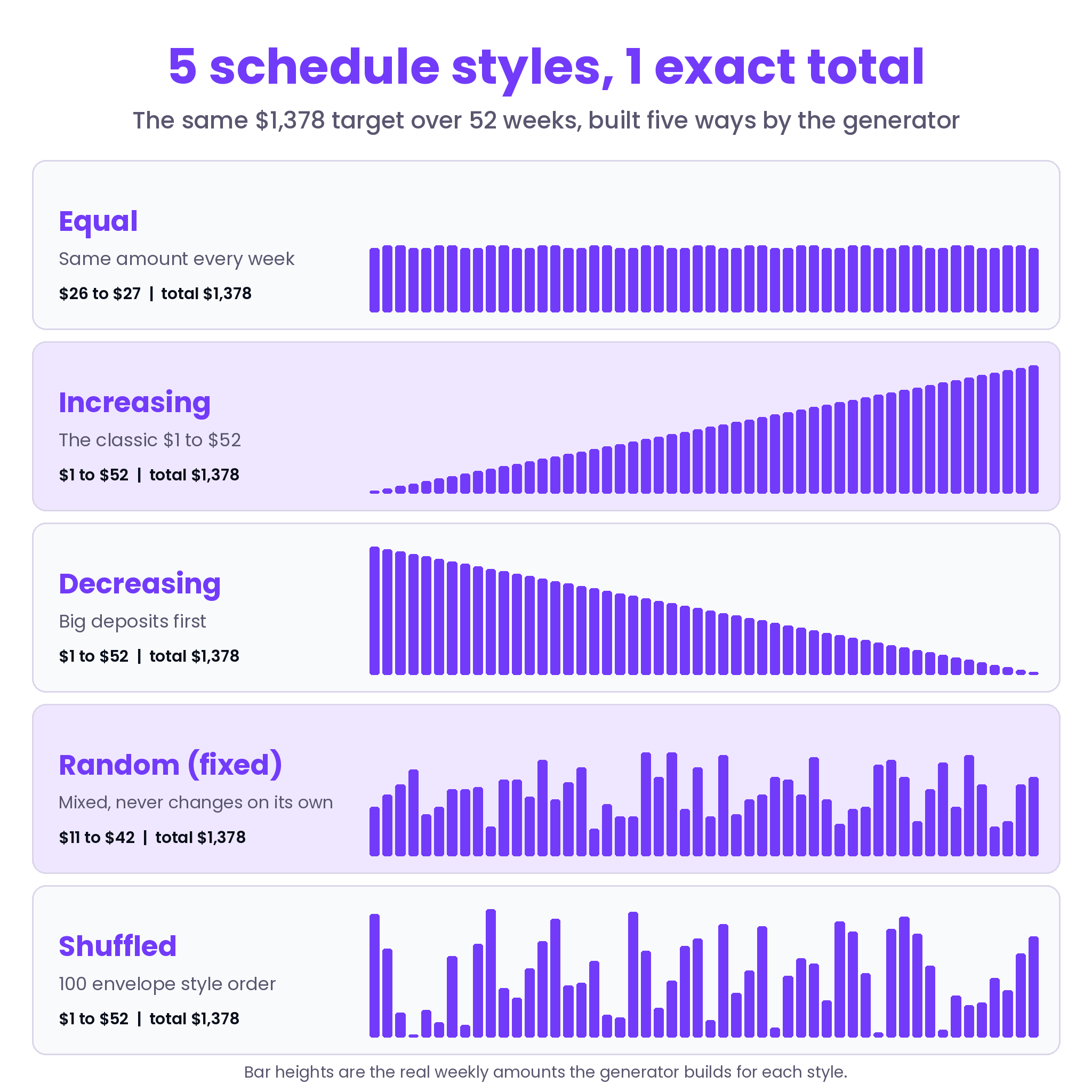
- Equal: the same amount every time. $1,200 over 40 weeks is $30 a week.
- Increasing: starts small and grows. $1,378 over 52 weeks gives the classic $1 to $52.
- Decreasing: the biggest deposits first, while motivation is high.
- Random (fixed): mixed amounts that never jump around on their own. Type a new shuffle number for a different mix with the same total.
- Shuffled: increasing amounts in random order. $5,050 over 100 deposits gives every amount from $1 to $100 exactly once, which is the 100 envelope challenge.
Every style uses the same rounding rule: amounts snap to your step and the final deposit absorbs any leftover cents, so the schedule always lands on your exact target.
Features
Six challenge tabs
Each tab has a setup panel, six progress tiles (saved so far, left to save, status, next deposit, smallest and largest deposit, finish date), a progress bar, a saved vs left doughnut chart and an At a glance panel. Below sits the generated schedule with up to 365 rows: deposit number, due date, planned amount, a check-off column, an optional actual amount, saved, running total, left to save, % done and a status that reads Saved, Partial, Missed, Due soon or Upcoming.
Progress dashboard
The dashboard adds up all six challenges: challenges running, total saved, total target, left to save and an overall progress bar. Four more tiles show what is due in the next 7 days, how many deposits you missed, how far ahead or behind plan you are and how many deposits you have made. A challenge table links to each tab, a bar chart compares % complete, and a monthly table and column chart show planned vs saved for the year you choose.
Printable tracker grid
Pick any challenge and the Tracker Grid shows one box per deposit with its number and amount. Saved boxes turn lime automatically. Print it for the fridge and color the boxes by hand if you like paper.
16 ready-made challenge ideas
The Ideas tab lists 16 tested challenges with their settings, first deposit and biggest deposit: the classic and reverse 52-week challenge, 52 weeks to $5,000, $10,000 in a year, the 100 envelope challenge, the 365-day penny challenge, a biweekly paycheck plan, a 30-day sprint, an emergency fund kickstart and more.
Built to be hard to break
- One currency setting: type $, €, £, R or any code and every money label follows it
- Formula cells are locked (no password), input cells are open
- Dropdowns and input limits catch typos before they cause trouble
- A check line warns you if a rounding step is too big for your target
- No macros, so it opens without security prompts
What is included
- Rungwise Savings Challenge Generator (.xlsx), 11 tabs: Start Here, Dashboard, Challenge 1 to 6, Tracker Grid, Ideas, Settings
- Rungwise User Guide (.docx) with setup steps, every feature explained, tips, troubleshooting and FAQ
The file you download is clean and empty. The sample challenges in the listing images are there to show how it looks once you start saving.
File formats and software
- Microsoft Excel
- Google Sheets: upload the file to Google Drive and choose File > Save as Google Sheets. The tab buttons may only work in Excel; in Google Sheets use the tabs at the bottom. Excel data bars do not display in Google Sheets.
- Digital download. No physical item is shipped.
Customizing it
Change the currency, your name and the dashboard year in Settings. Rename challenges at any time. Sheets are protected without a password, so you can unprotect them to change colors or fonts. Need more than six challenges? Save a second copy of the file.
Ways people use it
- A family running a vacation fund, a holiday gift fund and an emergency fund at the same time
- A biweekly earner matching 26 deposits to 26 paychecks
- A cash stuffer printing the Tracker Grid for a 100 envelope challenge in $5 steps
- A student doing a 30-day sprint with random small amounts
- A couple saving a down payment on a 24-month increasing ladder
FAQ
Can I make my own 52-week savings challenge with a different total?
Yes. Enter any target with 52 weekly deposits and the Increasing style. The amounts scale to your total.
Does it work in Google Sheets?
Yes. The formulas use functions Google Sheets supports and there are no macros. The tab buttons in row 5 may only work in Excel.
Do the random amounts change every time I open the file?
No. They are calculated from a shuffle number, so they stay put until you change that number.
Can I track partial deposits?
Yes. Type what you actually saved in the Actual amount column. Less than planned shows as Partial and counts toward your total.
How many challenges can I run?
Six at once, each with up to 365 deposits, all summed on the dashboard.
Can I use a currency other than dollars?
Yes. Type your symbol or currency code in Settings once.
Is it a subscription?
No. It is a one-time download that you keep.
License
Personal use only for you and your household. Please do not resell, share or upload the files. Copyright Taskdale.

Reviews
There are no reviews yet.