

The SapphireCents annual budget spreadsheet plans and tracks a full year of money in one file. Set it up once, log what you earn and spend, and it works out your budget, bill calendar, debt payoff date, savings goals and net worth for you. It opens in Google Sheets and Microsoft Excel, and it is styled in creamy grey, sapphire navy and lipstick pink so it is easy on the eyes when you sit down to check your numbers.
What this annual budget spreadsheet does
Most budget templates make you copy the same bills into every month. SapphireCents does not. You list each paycheck and bill once on the Planner, choose how often it repeats, and the spreadsheet places every payment across your 12 months. Rent on the 1st, a paycheck every two weeks, groceries every Saturday, insurance every six months. All of it lands on the right dates.
Then you log real transactions as they happen. The Dashboard, Budget View, Bill Calendar, Year Overview and Net Worth tabs update on their own. No formulas to write. No totals to add up.
Who it is for
- Beginners who want a budget that tells them what to type and where
- People paid weekly, biweekly, twice a month or monthly
- Couples and families juggling several checking, savings and credit card accounts
- Anyone working through debt with the snowball or avalanche method
- Savers with goals like an emergency fund, a trip or a new laptop
Main benefits
- See your whole year at once. Planned vs actual income and expenses for every month, with a running total.
- Budget any way you are paid. Budget View shows planned vs actual for a month, a week, two weeks or one paycheck. Duplicate the tab for as many views as you like.
- Stop missing bills. The Bill Calendar lists every planned bill with Paid, Due or Overdue status. Link a payment to its bill and it ticks itself off.
- Know your debt-free date. Pick snowball, avalanche or your own order and see each payoff month and the total interest.
- Catch mistakes early. A Check column flags missing dates, unknown categories and entries outside your budget year, and the Dashboard counts them.
Features
Planning and tracking
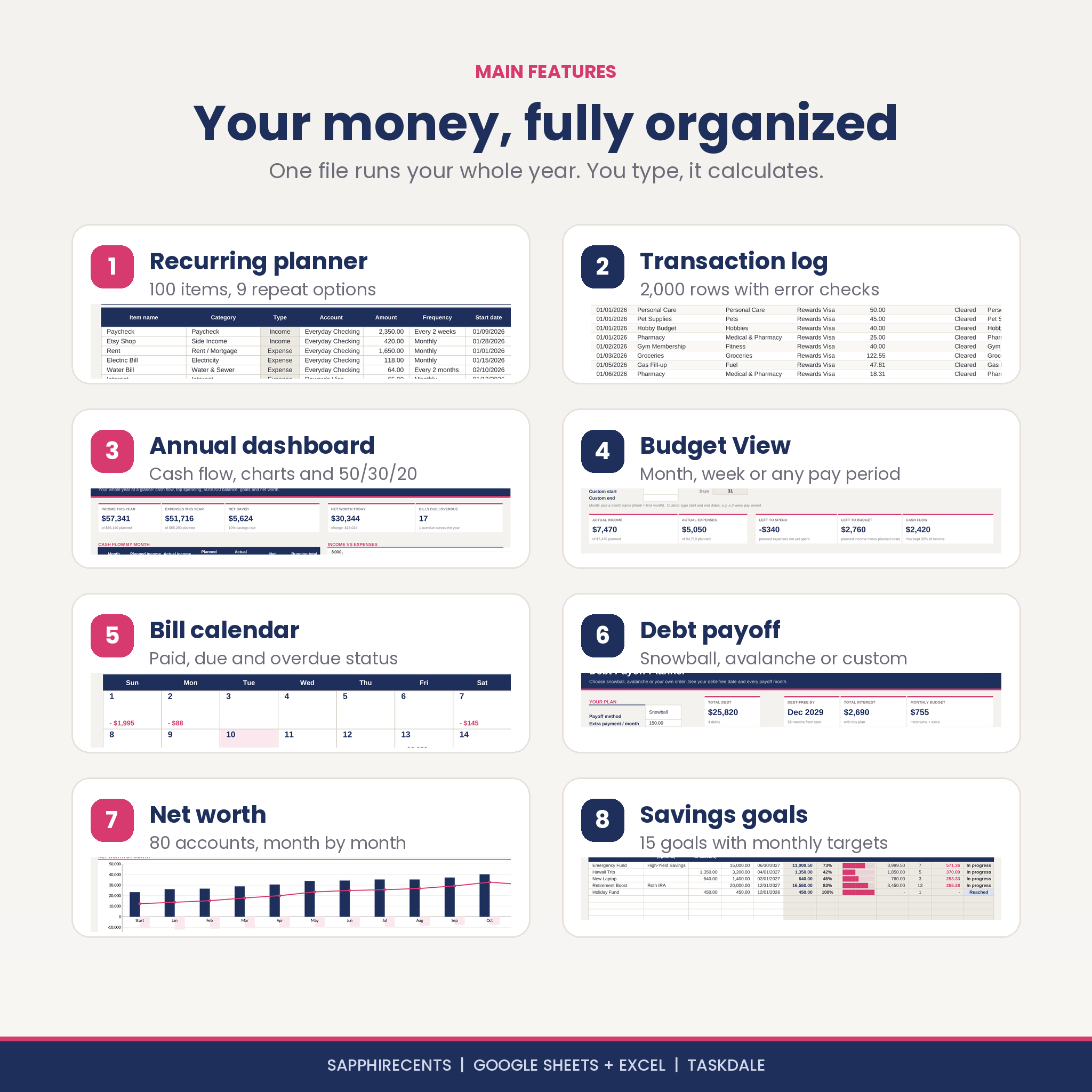
- Up to 100 recurring income and expense items with 9 repeat options: one-time, weekly, every 2 weeks, twice a month, monthly, every 2 months, quarterly, every 6 months and yearly
- Optional end dates for loans or subscriptions that stop mid-year
- Left to budget card for zero-based budgeting, plus a monthly overview of planned money in and out
- 2,000 transaction rows with automatic type, group and month
- 300 transfer rows to move money between accounts or adjust a balance without touching your budget
- “Moves money to” column so savings deposits and loan payments update both accounts
Dashboards and reports
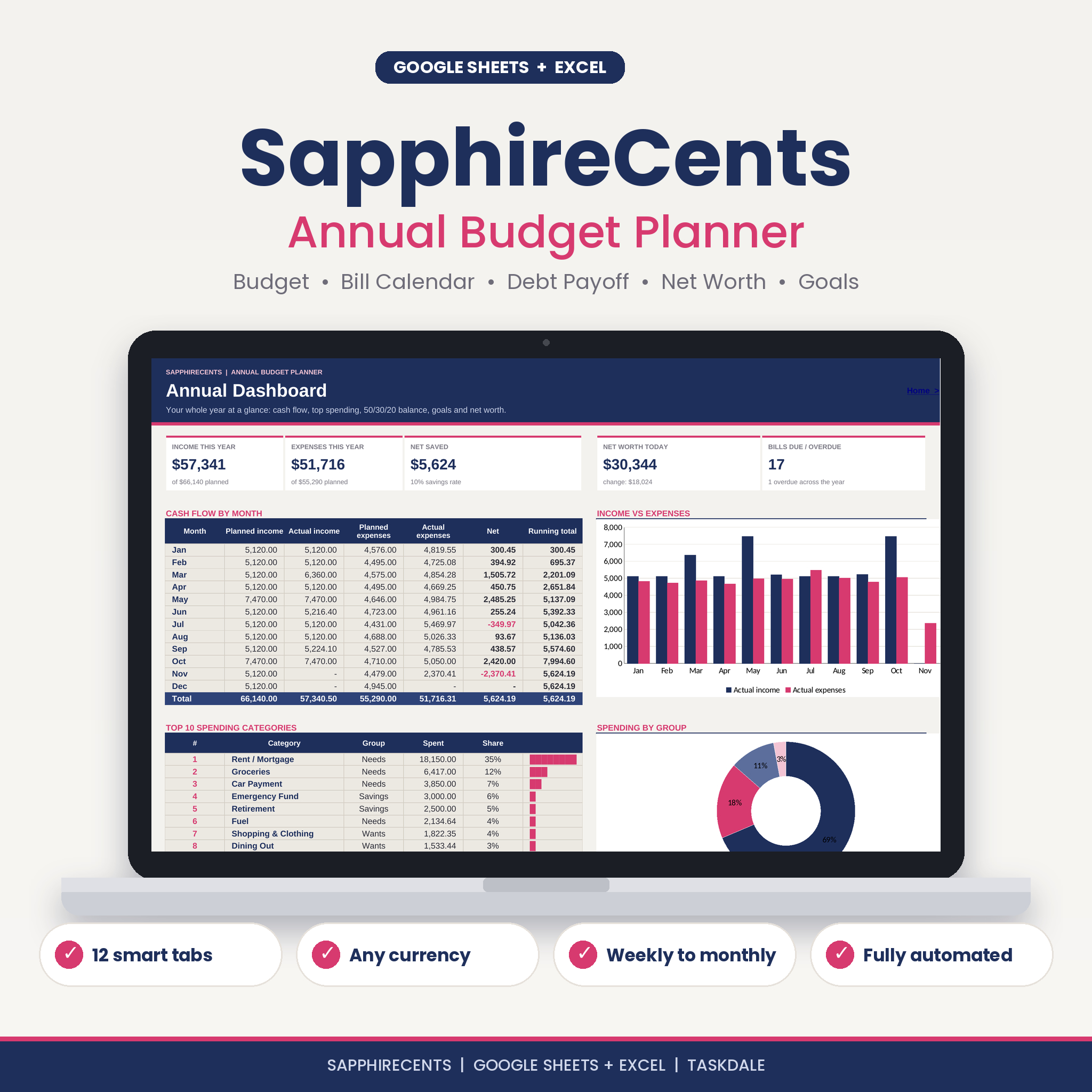
- Annual Dashboard with income, expenses, net saved, savings rate, net worth and bills due
- Cash flow by month table and income vs expenses chart
- Top 10 spending categories with share bars and a spending by group chart
- 50/30/20 check for Needs, Wants and Savings & Debt
- Year Overview with every category for all 12 months, monthly averages and a spending heat map
- Net worth tab with month-end balances for up to 80 accounts and an assets vs debts chart
Goals and debt
- 15 savings goals with progress bars, months left and how much to save each month
- Link a goal to an account to use its live balance
- Debt payoff planner for up to 40 debts with extra monthly payment, payoff order, payoff dates, interest per debt and a balance-by-year chart
- Warning when a minimum payment does not cover the interest
What is included
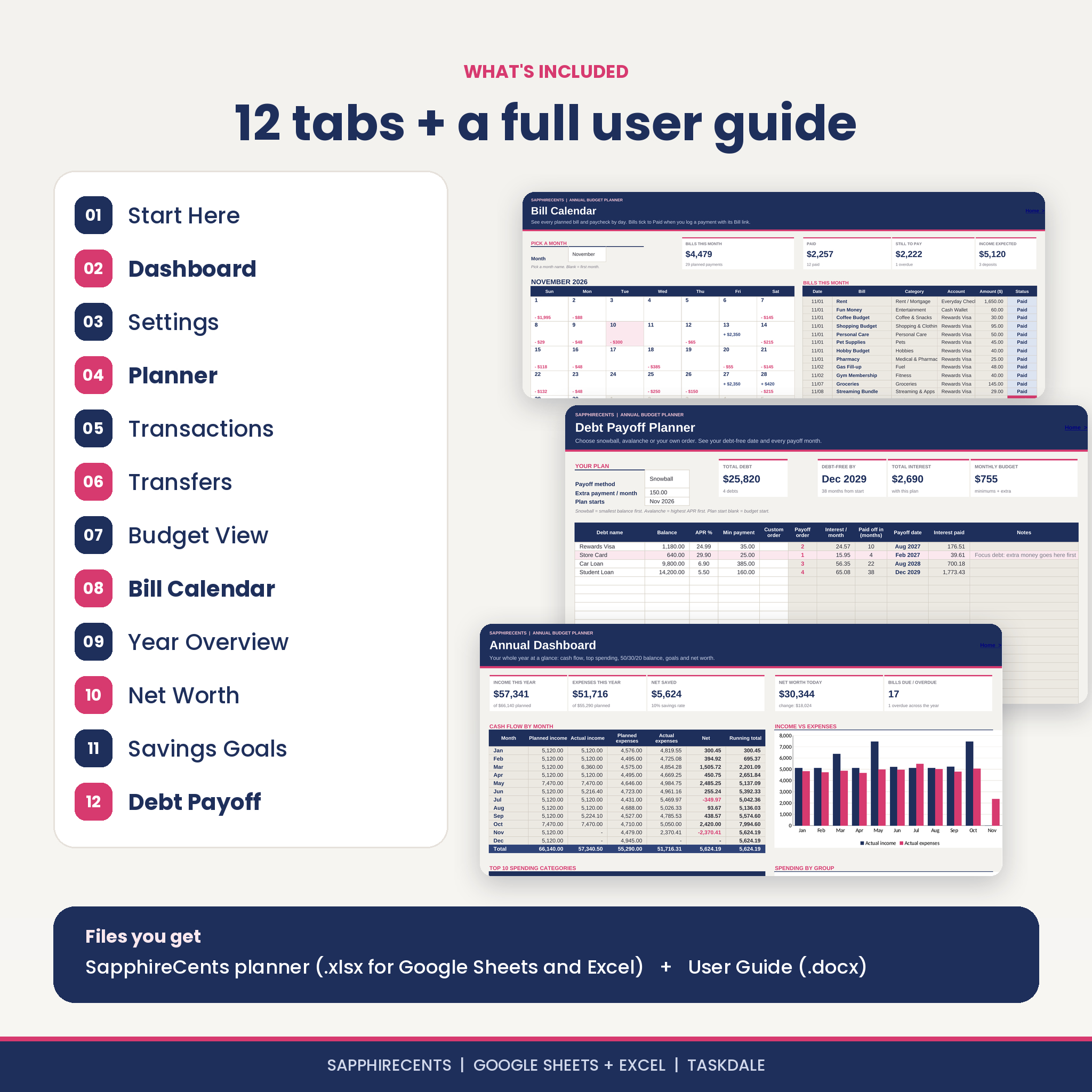
- SapphireCents Annual Budget Planner (.xlsx) with 12 tabs: Start Here, Dashboard, Settings, Planner, Transactions, Transfers, Budget View, Bill Calendar, Year Overview, Net Worth, Savings Goals and Debt Payoff
- Illustrated User Guide (.docx) with setup steps, a tab-by-tab walkthrough, common situations, troubleshooting and FAQ
How it works
- Settings: type your currency symbol and budget start date, then add your accounts with today’s balances.
- Planner: list your regular income and bills once and pick how often each repeats.
- Transactions: log what you actually earn and spend. Every other tab updates on its own.
White cells are for typing. Grey cells calculate. Navy marks headers and totals, and pink means something needs your attention.
File formats and software requirements
- File format: .xlsx spreadsheet and .docx guide
- Google Sheets: free Google account. Upload the file to Google Drive and open it with Google Sheets
- Microsoft Excel: Excel 2010 or newer on Windows or Mac, including Microsoft 365
- Not made for Apple Numbers or mobile spreadsheet apps
Customization
Use any currency: change one symbol in Settings and every money label follows. Start your year on any date, so you can begin in January, at the start of a pay cycle or today. Rename categories, assign each one to Needs, Wants, Savings or Debt, and recolor cells if you want your own look. In Excel the tabs are protected with no password so formulas stay safe, and you can unprotect a tab in one click if you want to edit.
Digital download
This is an instant digital download. No physical item will be shipped. After payment you can download the planner and the guide from your order confirmation and your account. Buy once and reuse it every year: save a copy, clear your entries and change the start date.
Real ways people use it
- A nurse paid every two weeks builds a budget per paycheck with Budget View and Custom dates.
- A couple tracks two checking accounts, a joint savings account and three credit cards in one file and watches net worth climb month by month.
- A recent graduate lists a car loan, a student loan and two cards, picks the snowball method and adds $150 a month to see the debt-free date move closer.
- A family uses the Bill Calendar every Sunday to see which bills are still due this month.
Annual budget spreadsheet FAQ
Does this budget spreadsheet work in Google Sheets?
Yes. Upload the .xlsx to Google Drive and open it with Google Sheets. Formulas, dropdowns, charts and links all work there.
Does it work in Excel?
Yes, in Excel 2010 or newer, including Microsoft 365 on Windows and Mac.
Can I budget biweekly or by paycheck?
Yes. Plan a paycheck as every 2 weeks, then use Budget View with Custom dates for any pay period.
Can I use my own currency?
Yes. Type your symbol once in Settings. Amounts are not tied to dollars.
Can I start mid-year?
Yes. Pick any start date and the 12 months run from there.
Does it connect to my bank?
No. Your data stays in your own file. You type or paste transactions.
Can I reuse it next year?
Yes. Save a copy, clear your entries and set a new start date.
License: personal use for one person or household. Please do not resell, share or redistribute the files. This planner is a budgeting tool and does not give financial, tax or legal advice.
Reviews
There are no reviews yet.