Locksmith Business Spreadsheet: Every Call-Out, Part and Payment in One Excel File
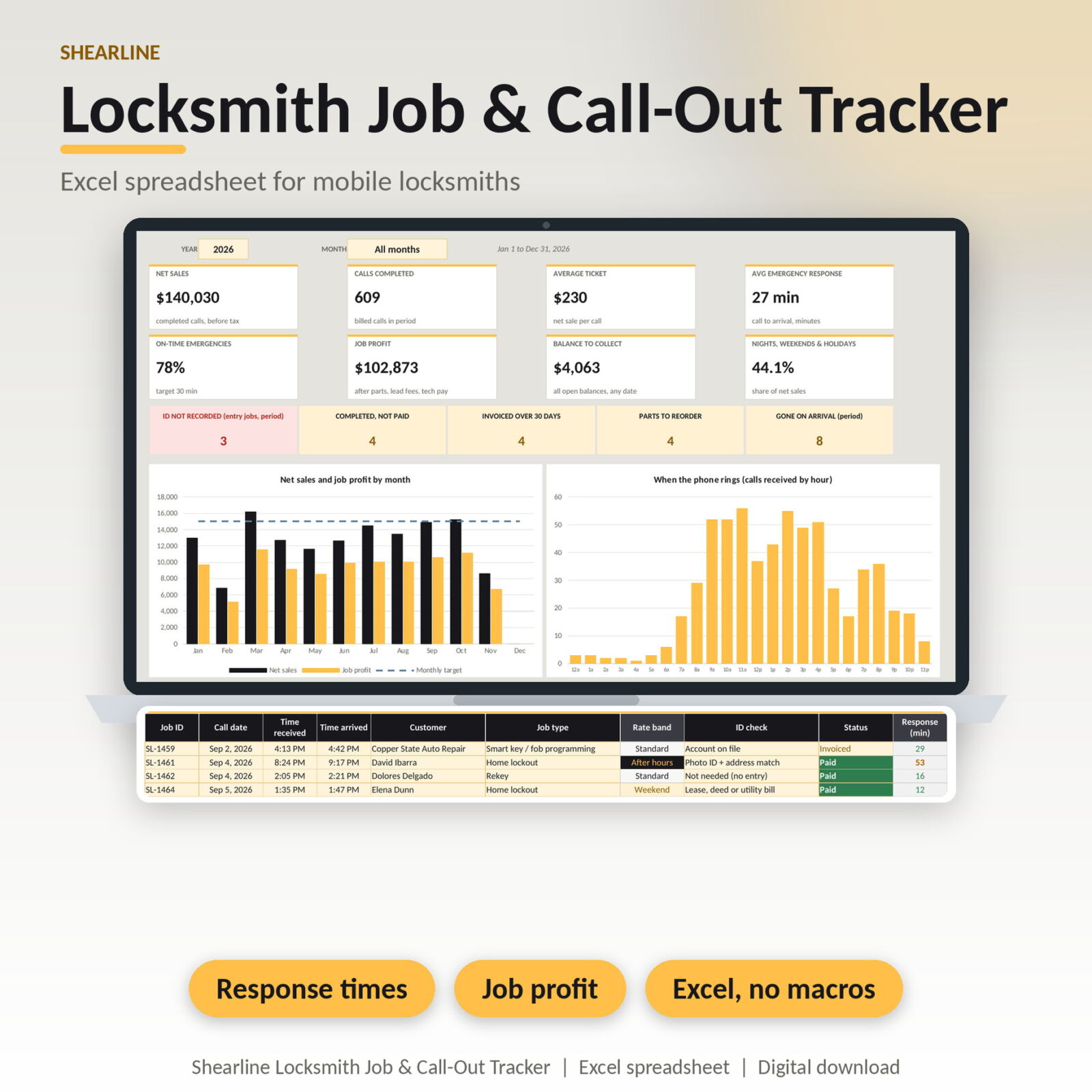
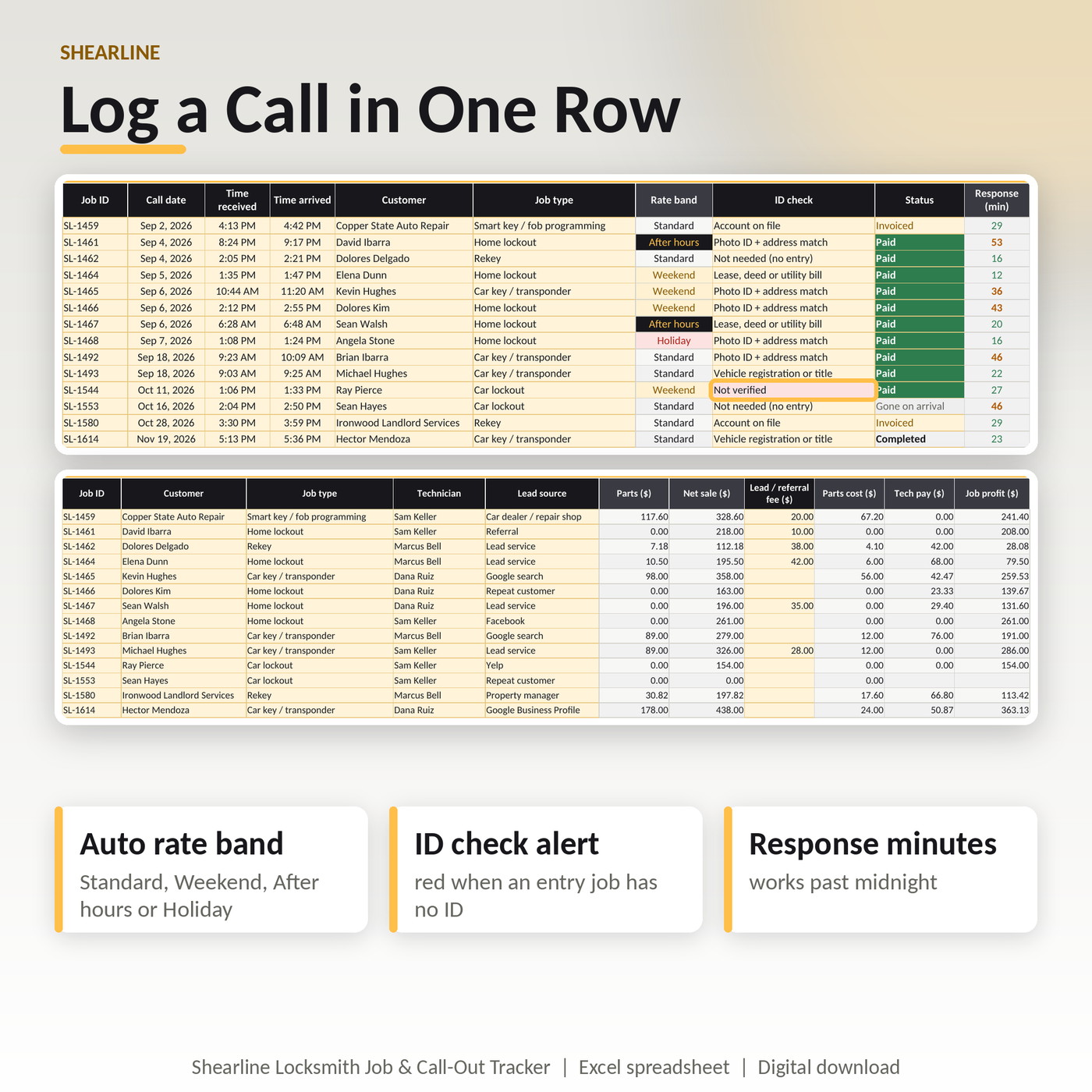
The Shearline Locksmith Job & Call-Out Tracker is a locksmith business spreadsheet that follows each call from the moment the phone rings to the moment you get paid. Log a call in one row: when it came in, when your tech arrived and finished, the job type, the ID check and the ticket. The workbook does the rest. It shows real response times, labels nights and weekends, counts van stock down and works out what each job earned after parts, lead fees and tech pay. It is a digital download for Microsoft Excel. Nothing is shipped, and there is no monthly fee.
Who this locksmith job tracker in Excel is for
It is made for owner-operators and small shops with one to six vans and roughly 600 to 1,500 calls a year: home, car and business lockouts, rekeys, lock installs, car keys and fobs, some safe work and a few commercial accounts. If your call book today is a phone notes app, a paper pad and your card reader history, this file replaces all three. Locksmith software often runs $19 to $189 a month. This is a one-time purchase.
What you can do with it
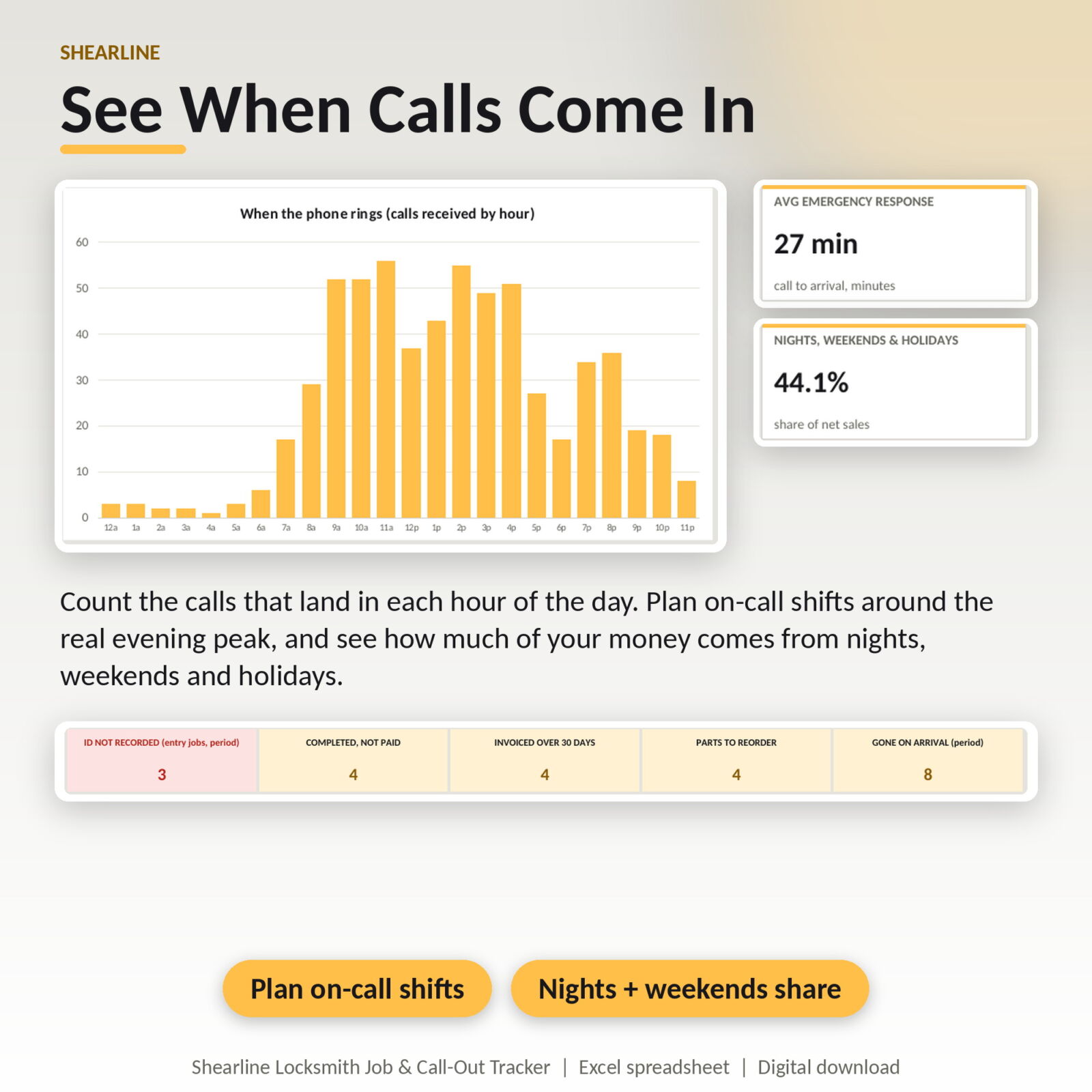
- Prove and improve response times. Time received, arrived and finished are logged per call. The Dashboard shows your average emergency arrival time and the share of emergency calls you reached inside your own target (30 minutes by default). Calls that cross midnight work too: received 11:50 PM, arrived 12:20 AM is 30 minutes.
- See what nights and weekends bring in. Every call is labeled Standard, Weekend, After hours or Holiday from its date and time, using your open and close hours and your holiday list. A tile shows what share of your net sales comes from the odd hours.
- Stop losing money on unbilled parts. Parts used come off your van stock and land on the job, at a markup or a fixed price.
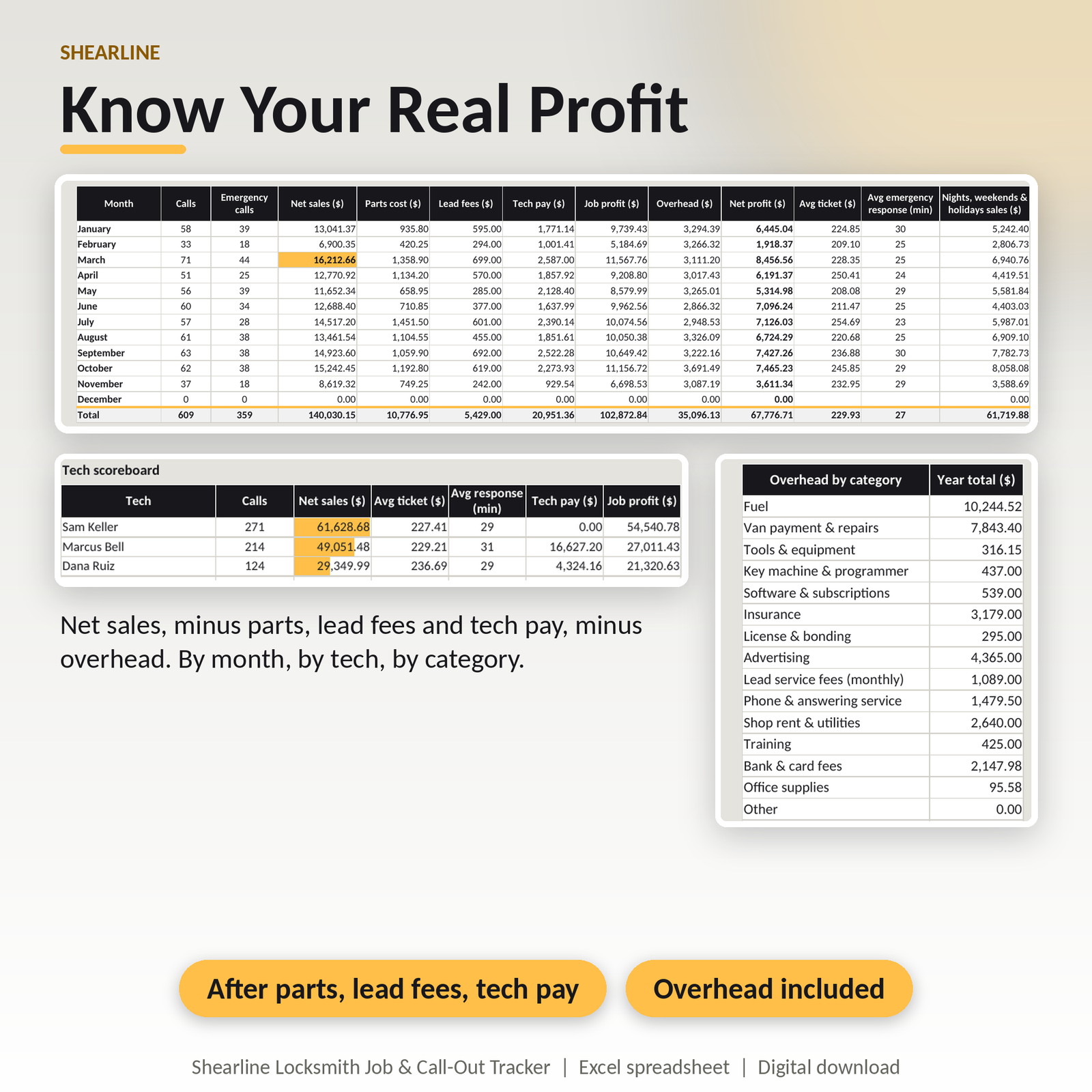
- Know profit per job. Net sale minus parts cost, lead service fees and tech pay.
- Chase unpaid invoices. On-site and later payments, a balance per job and per account, and an oldest-unpaid list.
Locksmith call out log template: what is on each sheet
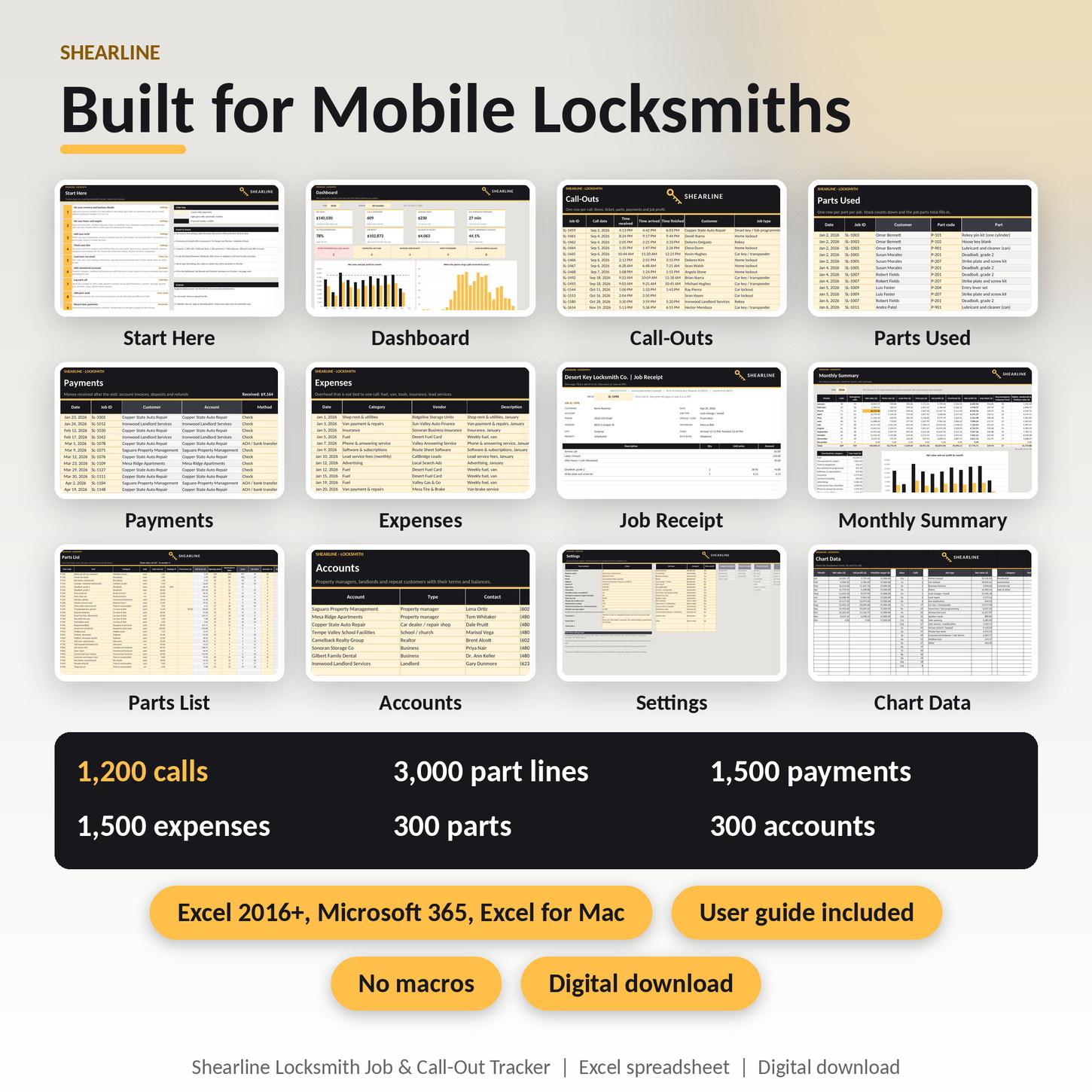
The workbook has 12 sheets, a numbered Start Here page and a User Guide in DOCX format.
- Call-Outs: a call out log for up to 1,200 calls with 18 locksmith job types in four categories, priority, technician, lead source, vehicle or lock details, cylinders rekeyed, keys made, ID check, status and every ticket line.
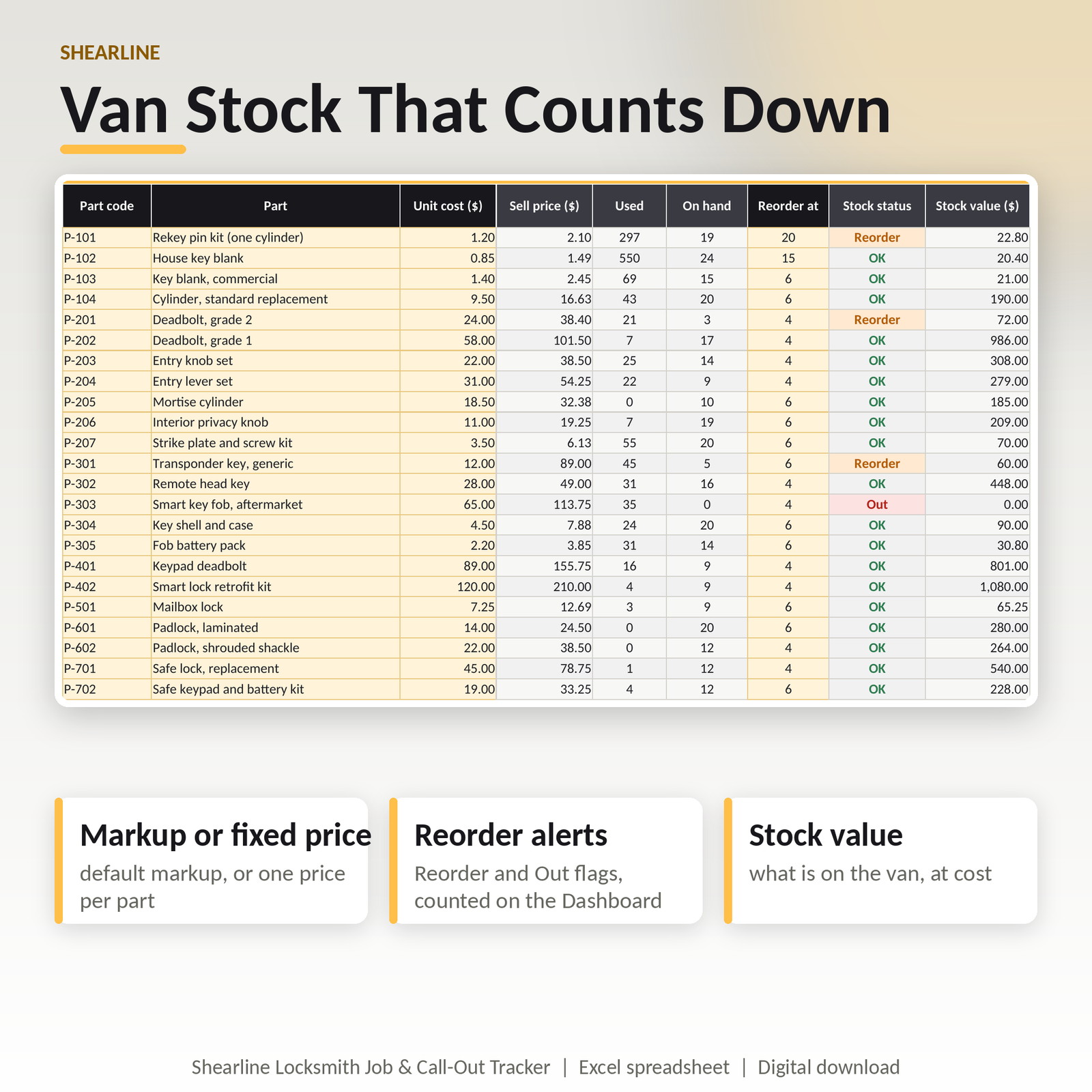
- Parts Used and Parts List: the mobile locksmith van stock spreadsheet. Up to 300 parts with cost, sell price, opening stock, received to date, reorder level, stock status and stock value. Twelve generic starter parts are included.
- Payments and Expenses: a locksmith invoice and payment tracker for money that arrives after the visit, plus overhead such as fuel, van payments, insurance, tools and lead service subscriptions.
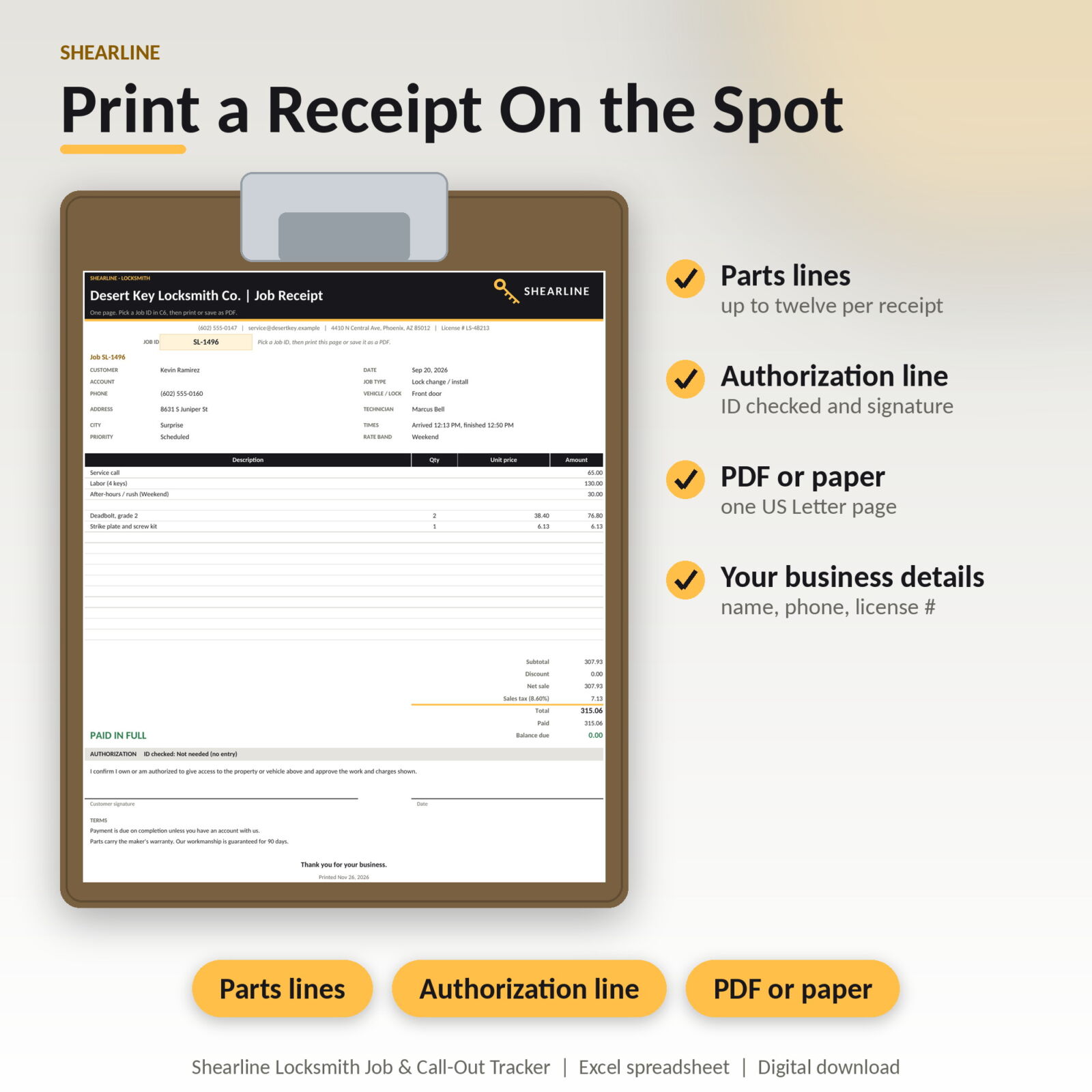
- Job Receipt: a one-page printable receipt for any Job ID, with parts lines, tax, balance and an authorization line.
- Monthly Summary: a locksmith profit and loss spreadsheet view with job profit, overhead and net profit for every month.
- Accounts: property managers, landlords and repeat customers with terms, balance due and last call.
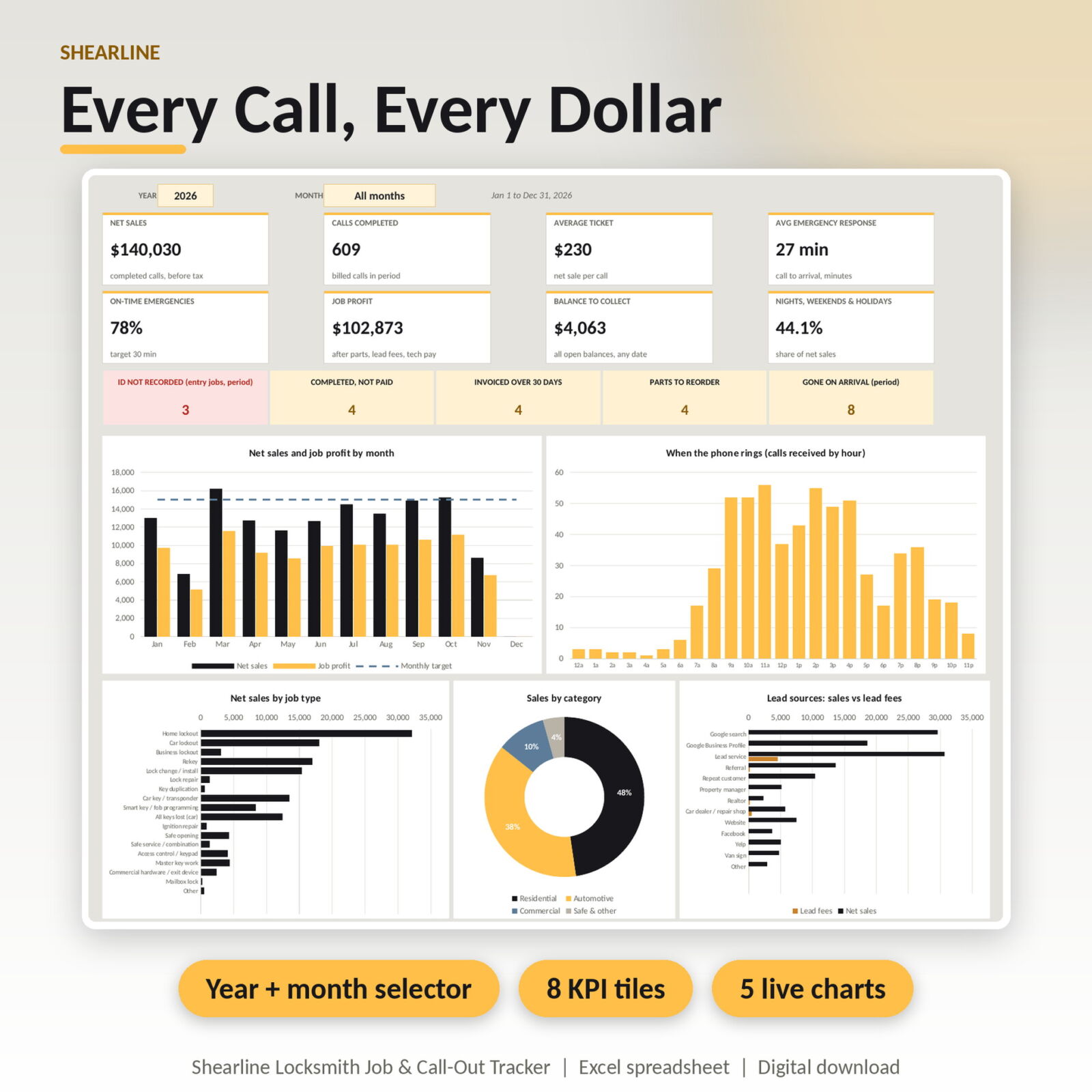
- Dashboard: pick a year and a month. Eight KPI tiles, five alert tiles, five charts, an oldest-unpaid list and a tech scoreboard.
- Settings: currency, hours, targets, techs and every dropdown list.
A locksmith response time tracker with a “when the phone rings” chart
The calls-by-hour chart counts the calls you received in each hour of the day. A solo locksmith can see how many 9 PM lockouts he ran last month. A two-van shop can see the evening peak start around 6 PM and plan on-call cover to match. Other charts show sales and job profit by month against your target, sales by job type and category, and sales against lead fees for each lead source, so you can tell whether a paid lead service is worth what it costs.
Tech pay three ways
Pay each technician on commission (a percentage of service call, labor and after-hours), hourly (rate times on-site minutes plus paid travel) or as the owner. The scoreboard shows calls, sales, average response, pay and job profit for each tech. A subcontracted locksmith is just another tech on the list.
Built to be simple and safe
- One currency setting. Type your symbol once in Settings and every heading, tile and receipt line follows.
- Formulas are locked, with no password. You type in the cream cells; the light gray cells calculate. Dropdowns and checks stop a bad entry from breaking a total.
- No macros. Plain formulas and charts only.
- No key codes, on purpose. There are no fields for bitting, key codes or master key charts. The only key field is a reference on Accounts. Keep codes in proper master key software.
How it works
Open Start Here and follow the twelve steps: set your currency and hours, add your techs, load your van stock, then log your first call. Type the date, the time received, the customer and the job type, pick the priority and the tech, and add the arrival and finish times. Add the parts you used on Parts Used. The ticket, tax, response minutes, rate band and profit fill in by themselves.
What is included
- Shearline-Locksmith-Job-and-Call-Out-Tracker.xlsx (clean workbook, no sample calls)
- Shearline-Locksmith-Job-and-Call-Out-Tracker-User-Guide.docx (step-by-step guide with screenshots and FAQ)
Software requirements: Microsoft Excel 2016 or later, Excel for Microsoft 365, Excel for Mac. No macros or add-ins. We have not tested it in Google Sheets or Numbers, so we do not promise either. Digital download: nothing is shipped. You get the files right after purchase.
Real situations it handles
- A solo locksmith checks how many 9 PM lockouts he ran last month.
- An owner sees that a paid lead service brought 40 calls but most of the profit went to fees.
- A two-van shop reorders transponder keys before a weekend.
- An office chases a property manager’s Net 30 balance.
Frequently asked questions
Does this locksmith business template work on a Mac?
It is made for Microsoft Excel 2016 or later on Windows and Mac. It has no macros.
Does it work in Google Sheets?
We have not tested it in Google Sheets, so we do not promise it. Use Microsoft Excel.
Can I add more techs?
Yes. Settings holds twelve techs.
Can I print invoices or receipts?
Yes. Job Receipt prints a one-page receipt for any Job ID, with an authorization line.
Can I change the currency?
Yes. Type any symbol of up to four characters in Settings. The dollar sign is the default.
Can I store key codes?
No, on purpose. There are no fields for bitting or key codes.
Is it a subscription?
No. It is a one-time purchase and the file stays on your computer.
License
Single business license: use it for your own locksmith business. Do not resell, share or upload the file. Copyright Taskdale. It is a record-keeping tool, not tax, legal or licensing advice.
Reviews
There are no reviews yet.