


Locksmith App for Call-Outs, Response Times, ID Checks and Signed Authorizations
This locksmith app is a job log that lives on your phone and your laptop. Log the call when the phone rings, tap En route, Arrived and Done, price the job from your own price list at 2 AM, get the customer’s signature on the screen and print the receipt. It works offline, keeps your data on your device, and you pay once instead of every month.
What this locksmith job log app does
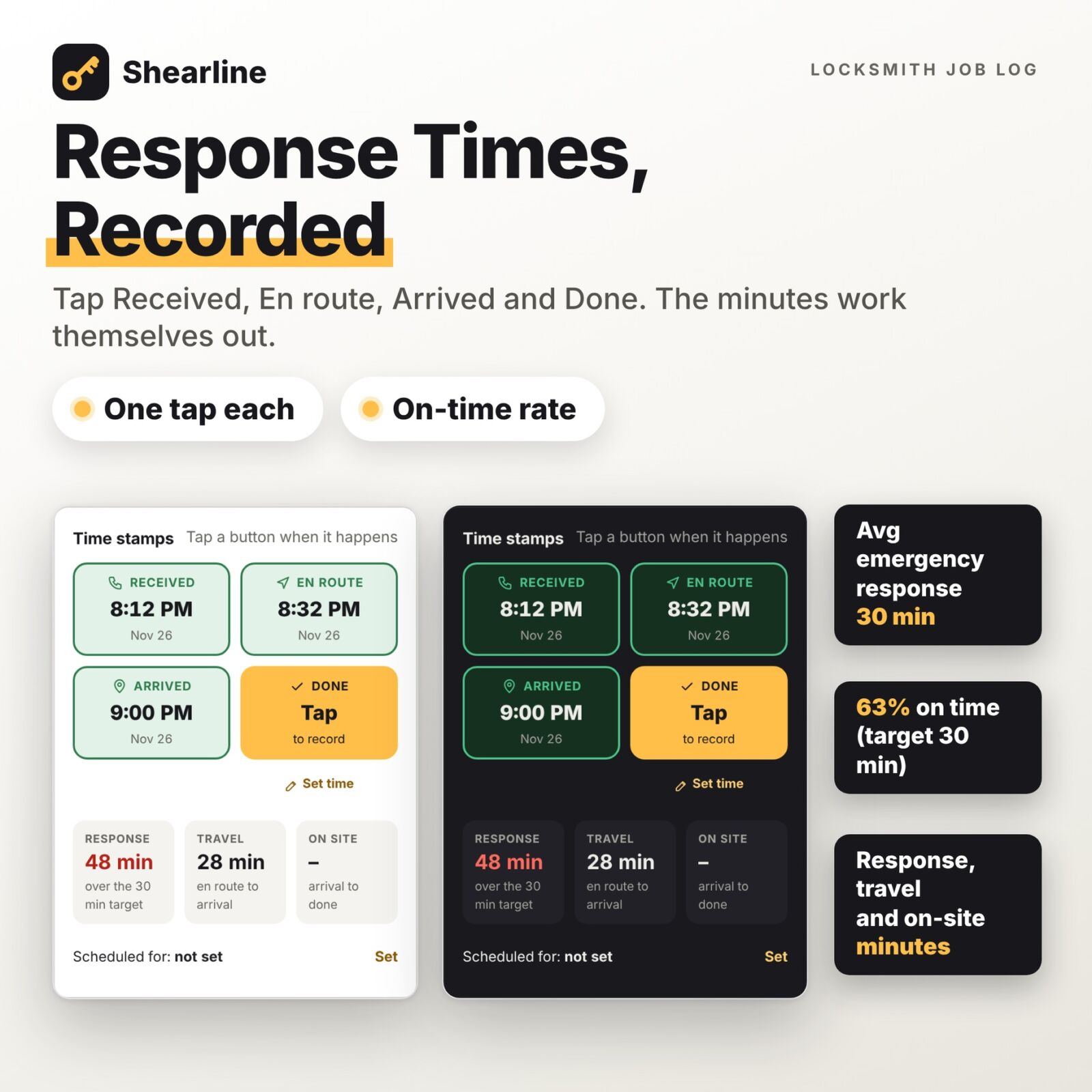
Shearline is built around one real day in a van. A lockout comes in at 9:40 PM on a Saturday. You log it in a few seconds, tap the times as you go, and the app works out response, travel and on-site minutes by itself. It picks the After hours rate band from the call time, adds the travel zone fee and your emergency rush fee, and checks the total against your minimum charge. Then the customer signs under your authorization statement and you print the receipt.
It is locksmith software without the subscription: no login, no cloud, no per-tech seat fees.
Who it is for
Owners of mobile locksmith businesses, solo or with up to five techs. You handle lockouts day and night, rekeys, lock installs, car keys and fobs, safes and some commercial accounts. You work from a phone in the van and a laptop at home, and you are tired of paying for a locksmith dispatch log you barely use.
Main benefits
- Prove fast response. Four time stamps give you response, travel and on-site minutes on every call, plus an on-time rate against your own target.
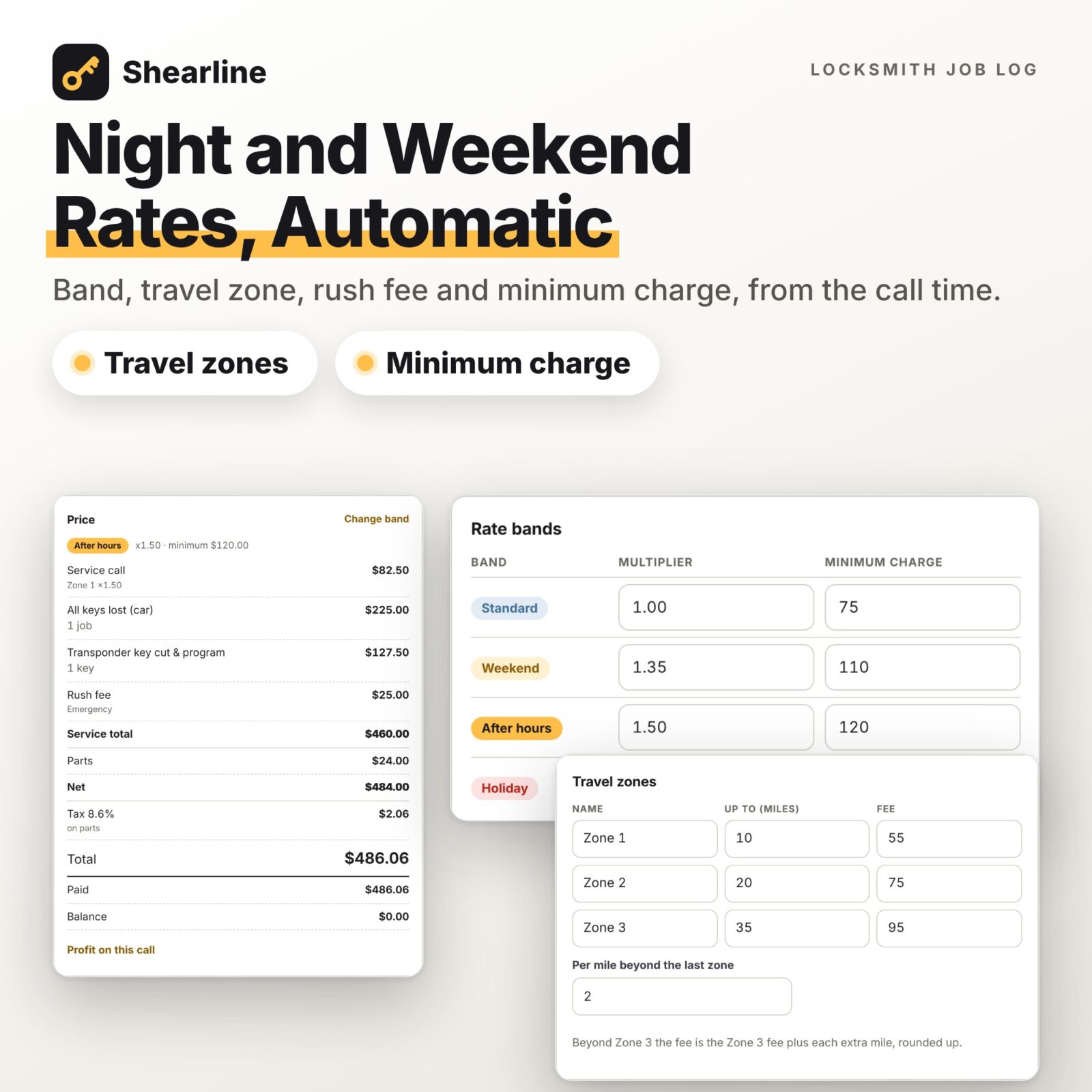
- Charge night, weekend and holiday rates every time. The band comes from the call time, your hours and your holiday list, so nobody forgets the surcharge at midnight.
- Protect yourself. Record the ID type checked, two match checks and a signature under your own wording, all stored with the job and printed on the receipt.
- Keep key records property managers trust. Each property has a lock register with keyed-alike groups and a key issue log you can print.
- Never run short of the parts you need. Van Stock counts down as parts go on jobs and prints a reorder list.
Features
- Call log with four time stamps and response, travel and on-site minutes
- Rate bands from date and time with a holiday list, plus a button that adds next year’s US holidays
- Travel zones with a per-mile charge beyond the last zone, rush fees and a minimum charge
- A 17-item price list you can edit, parts from van stock, tax, payments and balances
- Receipts and invoices with terms, due dates and overdue tracking
- ID check with signature capture, and a printable work authorization form
- Customers with properties, lock register, keyed groups, key issue log and vehicle records
- Van Stock with restock, adjust and a reorder list
- Techs with commission estimates, lead fees and profit per call
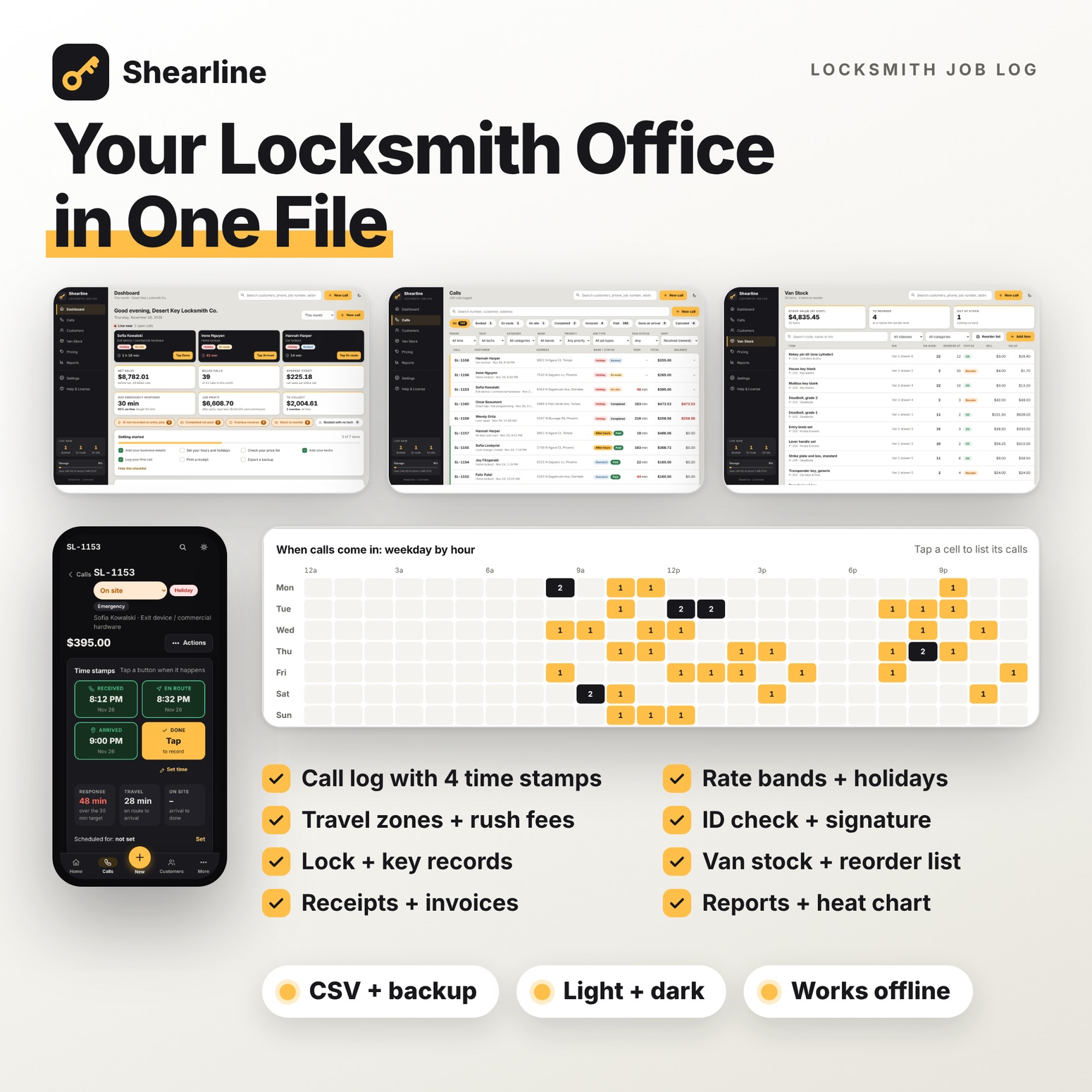
- Dashboard with six KPI tiles, alerts and four charts, plus reports with a weekday by hour heat chart
- CSV exports, JSON backup with signatures, one currency setting, light and dark themes
What is included
- Shearline-Locksmith-Job-Log-App.html: the app, one self-contained file
- User Guide (DOCX): 17 chapters with screenshots, worked pricing examples and troubleshooting
- Start-Here.pdf: one page on opening the file, adding it to a phone home screen and backing up
- Work Authorization Form (PDF): a blank printable form with a US Letter page and an A4 page
The download is a ZIP with all four files. The HTML file and the guide are also offered separately.
How it works
- Open the HTML file in your browser and accept the license. Start empty, or load the sample data to look around.
- Set your business details, price list, hours, holidays, travel zones and techs once.
- Press New call, tap your time stamps, add the work and parts, check the ID and get the signature.
- Print or save the receipt, record the payment, and export a backup every week.
File formats and software requirements
The app is a single HTML file with its code inside it. It makes no network requests and needs no account. It was tested in Chrome and Edge at desktop, tablet and phone sizes. It should also work in Safari and Firefox, but we did not test those. On a phone, copy the file to the device and open it in the browser, not in a file preview. Receipts print or save as PDF on US Letter or A4. The guide is a DOCX file you can open in Word or any compatible reader.
Customization
Every price, multiplier, minimum charge, zone, fee, holiday and list is yours to change. Rename job types, lead sources and payment methods, mark which job types are entry jobs, set your authorization and receipt wording, upload your logo and pick one currency symbol that every amount follows. The default prices are examples, not market rates.
Digital download
This is a digital product. After purchase you download the files from your order page. Nothing is shipped. Your data is stored in the browser on the device you use. Move it between devices with the backup export and import.
Use cases
- A 10 PM lockout logged from the driveway, with the signature taken on the phone before you hand over the keys.
- A property manager asking which units were rekeyed in March, answered with a printed key and lock record.
- A Monday restock from the reorder list, with suggested quantities.
- An owner checking the heat chart and seeing that Friday from 6 to 9 PM is the busiest slot, then planning on-call cover around it.
Frequently asked questions
Does this locksmith app work without internet?
Yes. It is one file with no network requests, so it works offline once it is on your device.
Does it work on iPhone and Android?
It was tested in Chrome at phone sizes, so it should work on Android and iPhone browsers, though we did not test real devices. Open the file from the device in the browser.
Where is my data stored?
In the browser on the device you use. Browsers allow about 5 MB for the file, which held about 4,500 typical calls in our Chrome test. Signatures are saved separately as small pen strokes. The app warns you at 80%. Export a backup every week, because clearing browser data erases the app.
Can my techs share data?
Each device has its own data. Share by exporting and importing backups. There is no live sync, no online booking and no card processing.
Can I print receipts and invoices?
Yes, on US Letter or A4, or save them as PDF. Invoices show terms and a due date.
Can it store key codes?
No, on purpose. The app has no field for bitting or key codes. Keep those in your master key software.
Is it a subscription?
No. It is a one-time purchase with no monthly fee.
License: single business use. You may not resell, share or upload the app or the guide. The authorization wording, prices, tax and commission figures are examples and estimates, not legal, tax, accounting or payroll advice.


Reviews
There are no reviews yet.