


Shelfglow Reading Tracker Spreadsheet 2027: your whole reading year in one cozy file
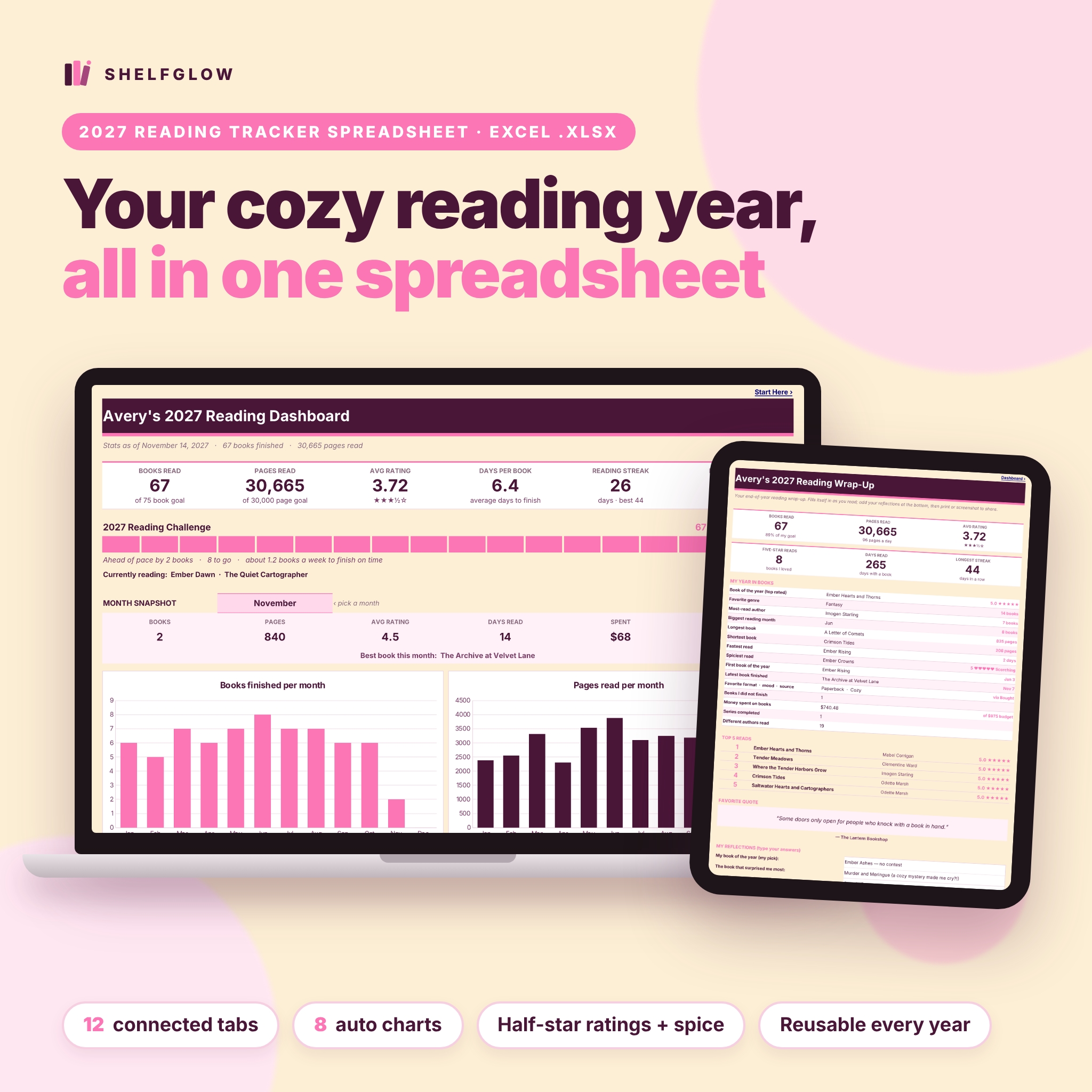
Shelfglow is a reading tracker spreadsheet for book lovers who want their stats to calculate themselves. Log a book once on the Book Log and every other tab updates on its own: your reading challenge progress bar, dashboard tiles and charts, monthly stats, series progress and an automatic end-of-year wrap-up. It is designed in soft cream, berry and pink, with clear white cells for typing and protected formulas, so it feels as cozy as a paper reading journal but does all the math for you.
It is the spreadsheet companion to our printable Pagewren reading journal, made for readers who love numbers, charts and a good BookTok-style wrap-up.
Who it is for
- Readers doing a yearly reading challenge who want to know if they are ahead or behind pace.
- BookTok and Bookstagram readers who rate in half stars and track spice levels, moods and tropes.
- Series readers who want to see what to read next and when the next book comes out.
- Anyone who wants to keep book spending under control without giving up new releases.
- Beginners. There are no formulas to write, and a clickable Start Here tab plus a full user guide walk you through setup.
Features of this book tracker spreadsheet
Dashboard that fills itself in
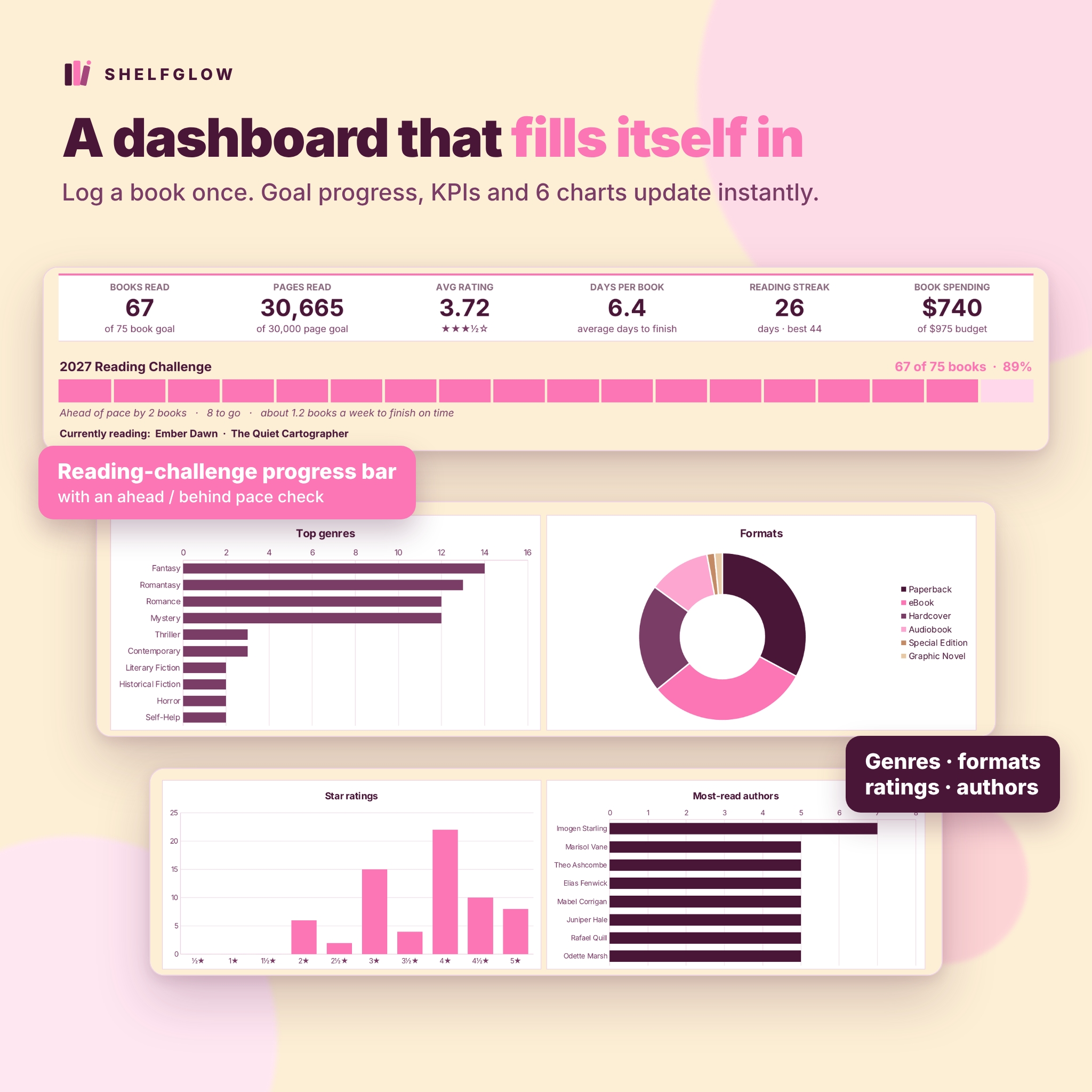
- 6 KPI tiles: books read, pages read, average rating with stars, average days per book, current reading streak and book spending.
- Reading challenge progress bar with a pace check (ahead, on pace or behind) and the books per week you need to finish on time.
- Month snapshot: pick any month to see its books, pages, rating, days read, spending, top genre and best book.
- 6 charts: books per month, pages per month, top genres, formats, star ratings and most-read authors.
- A “currently reading” line that lists books with the status Reading.
Book Log (500 rows)
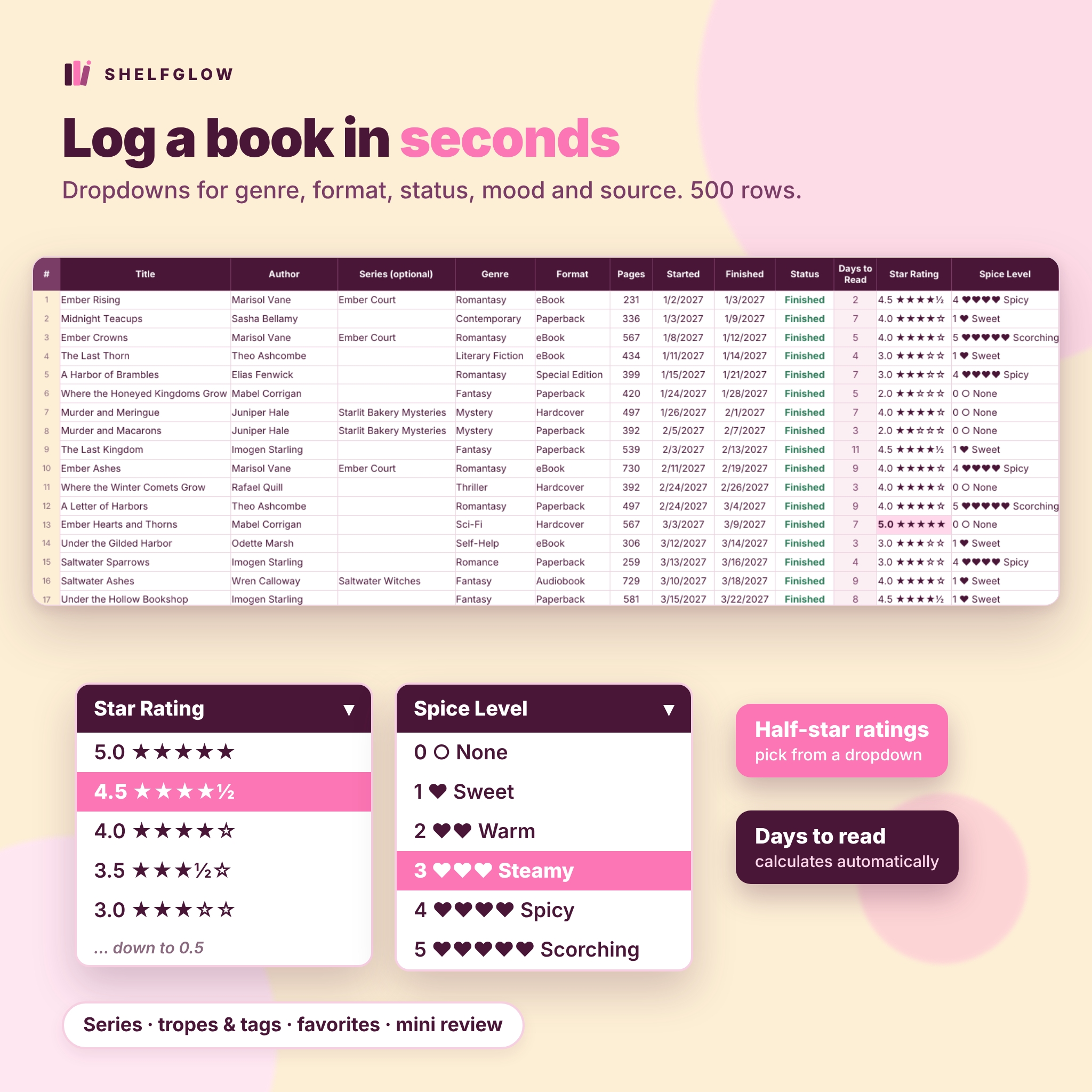
- Title, author, series, genre, format, pages, started and finished dates, status (Reading, Finished, DNF, Paused).
- Days to read calculates automatically.
- Star rating dropdown from 0.5 to 5.0 in half-star steps, and a 0 to 5 spice level.
- Mood, source (bought, library, library app, gift, advance copy and more), favorite flag, tropes and tags, and a mini review.
- Filters on every column and color highlights for five-star reads, favorites, current reads and DNFs.
Challenge, stats and streaks
- Challenge tab: book goal and page goal bars, pace check, a books-read vs. goal-pace chart and 30 editable reading prompts that tick themselves off.
- Stats tab: month-by-month table plus breakdowns by genre, author, format, rating, mood and source, and a year-at-a-glance list.
- Reading Calendar: log pages or minutes for every day of the year. The grid colors itself like a heatmap and counts your current and longest streak, days read and best day.
Planning and extras
- TBR list (200 rows): priority from Read Next to Someday, owned or library-hold status, who recommended it, mood and date added, plus an estimate of days to clear your TBR at your current pace.
- Series tracker (80 series): books read are counted automatically from your log, with progress bars, status and next-release highlights.
- Book-buying budget: a monthly budget with optional overrides, a 300-row purchase log, status labels and a budget vs. spent chart.
- Quotes (200 rows): save favorite lines with book, page, speaker and feeling. Your top favorite appears on the wrap-up.
- Wrap-Up: an automatic end-of-year summary with totals, book of the year, favorite genre, most-read author, longest, shortest, fastest and spiciest reads, top 5 reads, favorite quote and space for your reflections.
What is included
- Shelfglow-Reading-Tracker-2027.xlsx with 12 tabs: Start Here, Dashboard, Book Log, Challenge, Stats, Reading Calendar, TBR, Series, Book Budget, Quotes, Wrap-Up and Settings.
- Shelfglow-User-Guide.docx, an illustrated guide with setup steps, how to use every tab, customization, troubleshooting and FAQ.
How it works
- Open Settings and add your name, tracking year, yearly book goal, page goal, monthly budget and currency symbol.
- Add books to the Book Log using the dropdowns. Add a finished date when you finish a book.
- Open the Dashboard and watch your progress bar, tiles and charts update.
- Log daily pages on the Reading Calendar and use the TBR, Series, Budget and Quotes tabs whenever you like.
- In December, open the Wrap-Up for your year in books.
Customize it
Every dropdown list (genres, formats, sources, moods, TBR priority, purchase types, TBR status) lives on the Settings tab with 16 slots each, so you can rename or add options without touching a formula. One currency setting controls every money label. To reuse the reading tracker next year, save a copy and change the tracking year; only books finished in that year are counted.
Use cases
- Hitting a 52-book or 100-book reading challenge with a clear weekly pace.
- Making monthly wrap-up posts for BookTok or Bookstagram from the month snapshot.
- Planning a buddy read or book club list from your TBR.
- Catching up on a long fantasy series before the next release.
- Seeing how much you spend on books and how many reads came from the library.
File format and requirements
- Excel-format .xlsx for Microsoft Excel; tested in LibreOffice Calc; built with standard functions that also work when you open it in Google Sheets.
- Font: Inter (free, open license). Your app shows a similar font if it is not installed.
- Formula cells are locked and input cells are open. Sheets are protected without a password.
- Printable: every tab has a print area that fits the page width.
- Digital download. No physical item is shipped.
FAQ
Does this reading tracker work in Google Sheets?
It is an Excel-format .xlsx built with standard functions that also work when you open it in Google Sheets. Upload it to Google Drive and open it with Sheets.
Can I use it after 2027?
Yes. Change the tracking year on Settings and keep going. It is reusable every year.
Does it support half-star ratings?
Yes, from 0.5 to 5.0 stars in half-star steps, plus an optional spice level.
How many books can I track?
500 books in the log, 200 TBR books, 80 series, 300 purchases and 200 quotes.
Can I change the currency?
Yes. Type your symbol on Settings and every money label updates.
Is there a free version?
Yes. Shelfglow Lite includes a 50-row book log and a dashboard with 2 charts.
Do I need to know formulas?
No. Type in the white cells and everything else calculates for you.
License
Personal use only. You may use and edit the file for your own reading. Please do not resell, share, upload or distribute the file or edited copies. © Taskdale.
Reviews
There are no reviews yet.