

Spoonbook: the recipe organizer app for every recipe you love
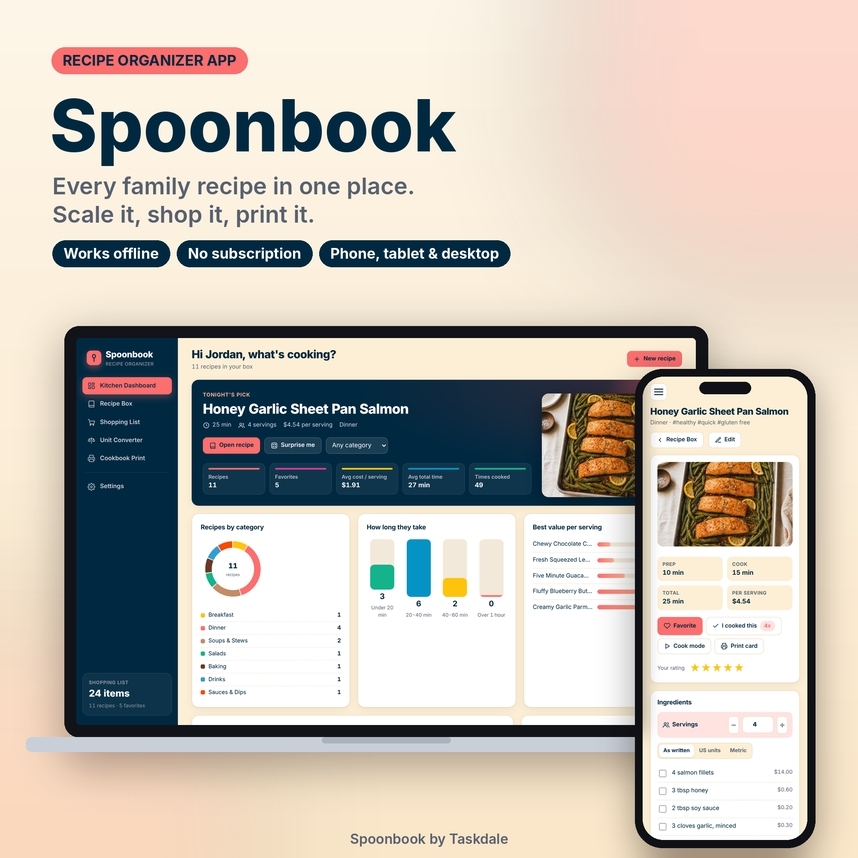
Spoonbook is a recipe organizer app that runs in your web browser from one downloaded file. Type in grandma’s banana bread, paste the ingredients from a recipe site, add a photo, and every dish lands on a clean photo card in your own digital recipe book. There is no account, no subscription and no ads, and it works offline.
Open it on the laptop while you plan the week, then on your phone in the grocery store aisle. Your recipes stay private on your own device.
Who this recipe organizer is for
- Home cooks with recipes scattered across screenshots, bookmarks, magazines and stained index cards.
- Families saving handwritten recipes who want to print them as a keepsake cookbook.
- Budget cooks who want to know that a pot of chili costs about $2 a bowl, not guess.
- Meal preppers who double recipes and need one merged shopping list.
- Anyone who cooks from US recipes but measures in grams, or the other way around.
Features of the Spoonbook recipe app
A kitchen dashboard that answers “what’s for dinner?”
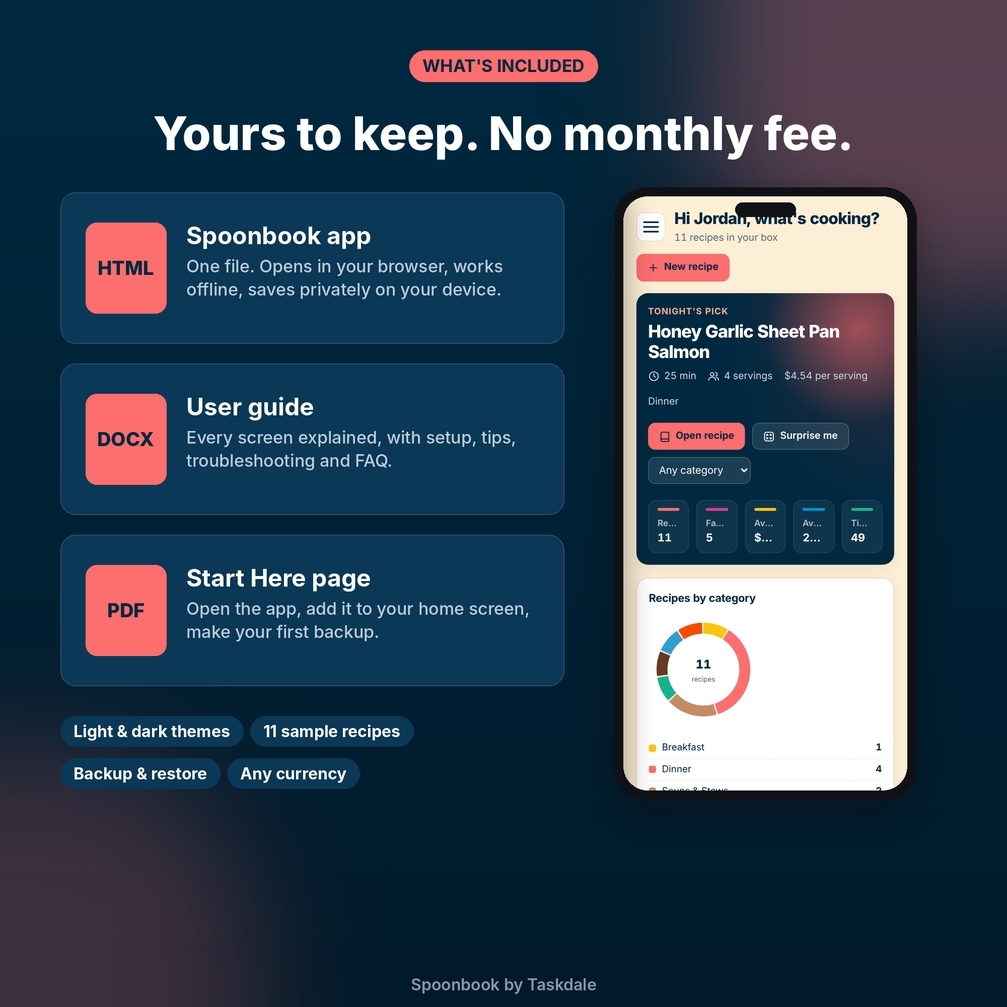
The dashboard opens with Tonight’s pick, a large photo card with time, servings and cost per serving. Press Surprise me for a random recipe, or pick a category first so it only suggests dinners. Below it you get a recipes-by-category donut chart, a “how long they take” chart, your five best-value recipes per serving, favorites, most cooked, popular tags and recently added.
Recipe cards with photos, tags and ratings
Every recipe sits on a photo card showing category, total time, servings, cost per serving and a five-star rating. Add a photo by pasting an image link or uploading one from your phone or computer. Search reaches titles, tags, ingredients and notes, so typing “chickpeas” finds every recipe that uses them. Filter by category, tag or favorites and sort by quickest, cheapest, top rated or most cooked.
Servings scaler with kitchen fractions
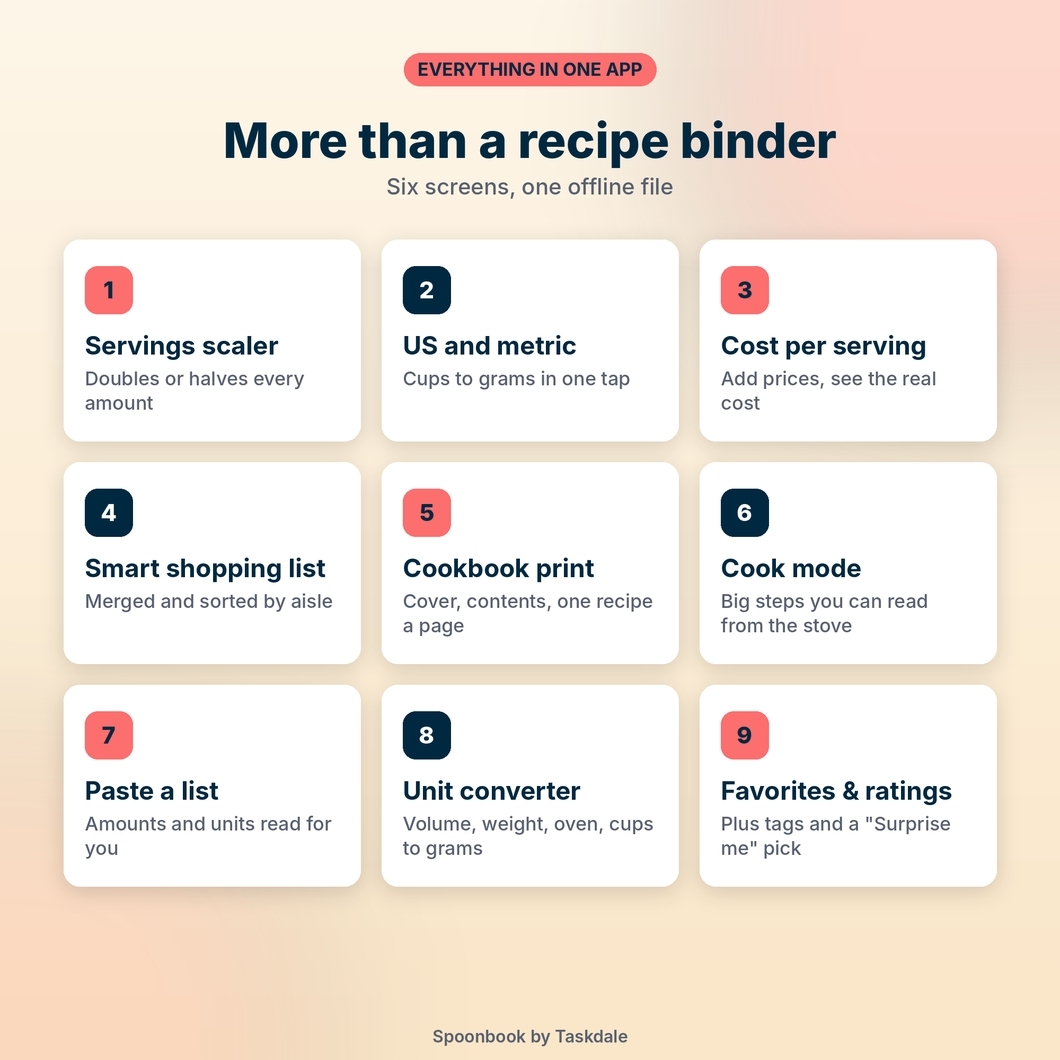
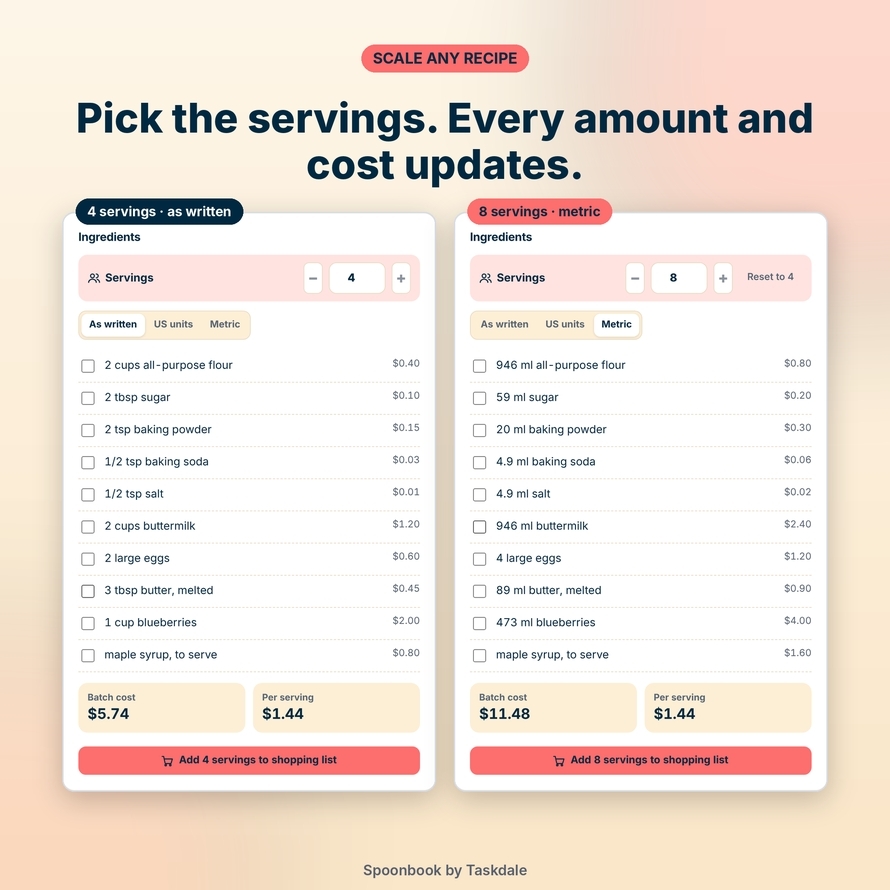
Change a 4-serving recipe to 6 and 1 cup of flour becomes 1 1/2 cups. Spoonbook shows real kitchen fractions such as 1/3 and 3/4 instead of 0.333, and the batch cost updates with the servings.
Unit converter and US or metric view
One tap switches a whole recipe between as written, US cups and spoons, or metric grams and milliliters. The separate unit converter handles volume, weight and oven temperature, plus a cups-to-grams table for 18 ingredients, because a cup of flour (120 g) weighs far less than a cup of honey (340 g).
Cost per serving
Add an optional price next to each ingredient and Spoonbook works out the batch cost and the cost per serving. The dashboard then ranks your best-value meals. One currency setting controls every amount, with $ as the default.
Smart shopping list from your recipes
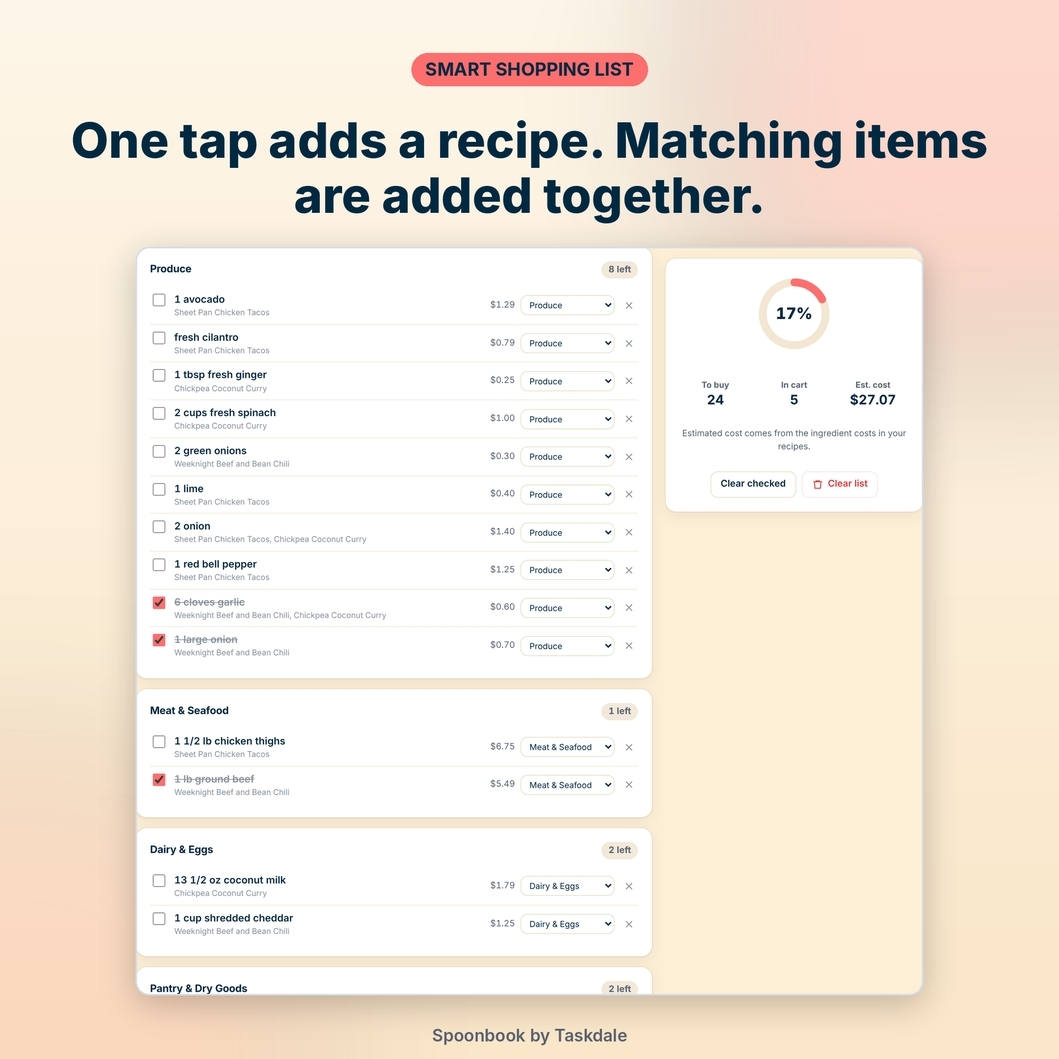
Press Add to shopping list on any recipe and its ingredients go on your list for the servings you picked. Matching items from different recipes are added together, so two recipes that each need 1/2 cup butter give one line of 1 cup. Items sort by store aisle (produce, dairy, pantry and more), and you can check them off, copy the list into a text or print a two-column checklist.
Print your own cookbook
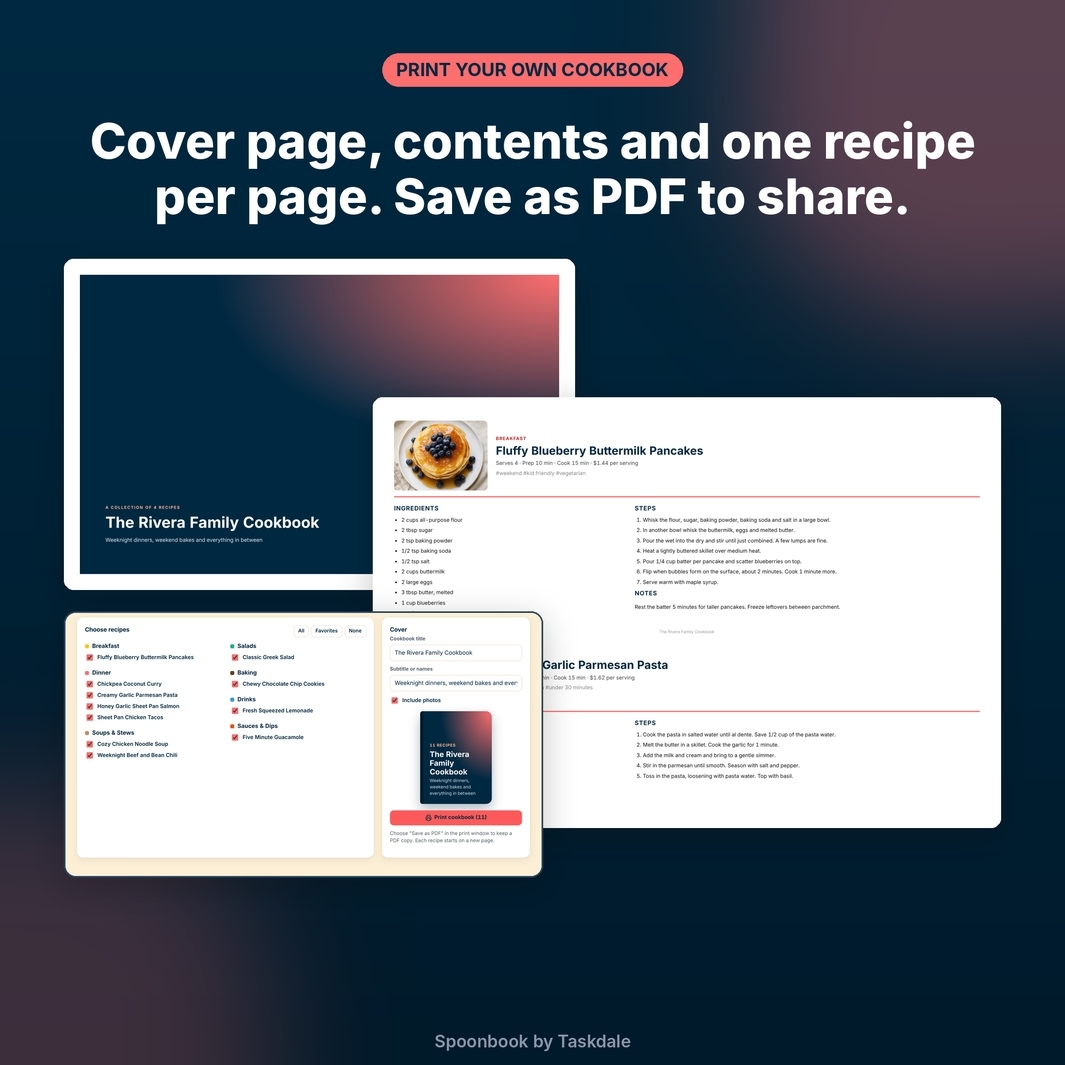
Choose all recipes, favorites or a hand-picked set, give the cookbook a title, and print. You get a cover page, a contents page grouped by category and one recipe per page with photo, ingredients, steps and notes. Save it as a PDF to send to family. Print card prints a single recipe.
Cook mode and more
- Cook mode shows one step at a time in big type, readable from the stove.
- Paste a list reads amounts like 2 1/4 cups, ½ tsp, 1-2 tbsp and 3 cloves for you.
- Section headings such as “For the sauce”, notes, source links and an “I cooked this” counter.
- Light and dark themes, duplicate a recipe, and undo after deleting.
What is included
- Spoonbook recipe organizer app (one HTML file) with 11 sample recipes you can load and clear.
- User guide (DOCX, 12 pages): setup, every screen, tips, troubleshooting and FAQ.
- Start Here page (PDF): open the app, add it to your home screen, make your first backup.
How the recipe organizer works
- Download the ZIP, unzip it and open Spoonbook-Recipe-Organizer.html in your browser.
- Add your name and currency, then add your first recipe or load the sample recipes.
- Scale, shop and cook. Export a backup now and then from Settings.
File format and software requirements
The app is a single offline HTML file. We tested it in Google Chrome and Microsoft Edge at desktop, tablet and phone sizes, and it uses standard web features found in current browsers. No install and no internet needed, except to show photos you added by link. On iPhone and iPad, the Files preview cannot run web apps, so open the file in a browser or an HTML viewer app. The guide is a Word document (DOCX) that also opens in Google Docs and Pages.
Customization
Pick from 12 categories, add any tags you like, choose your currency symbol, show units as written, US or metric, and switch between light and dark themes. Recipes move between devices with Export backup and Import backup.
Digital download
This is a digital download. Nothing is shipped. You get the ZIP right after purchase, plus the app and the guide as separate files.
Real ways people use Spoonbook
- Typing up a shoebox of family recipe cards and printing a cookbook for a holiday gift.
- Planning Sunday meal prep: add three recipes, get one shopping list sorted by aisle.
- Halving a 24-cookie recipe for a small household without doing fraction math.
- Following a British or European recipe in grams with American cups, or the other way around.
- Comparing cost per serving to keep a weekly grocery budget on track.
Recipe organizer app FAQ
Does this recipe app need internet or an account?
No. It runs offline with no sign up. Only photos added by link need internet to show.
Can I import recipes from websites?
There is no automatic web import. Copy the ingredient list from any page and use Paste a list, which reads the amounts and units for you.
Will it work on my phone?
Yes, the layout adapts to phones and tablets. On Android open it in Chrome. On iPhone and iPad open it in a browser or HTML viewer app, not the Files preview.
How many recipes can it hold?
Hundreds of text recipes. Browsers allow about 5 MB per file, and uploaded photos use the most space, so Settings shows how much you have used.
Can I share my recipe book with family?
Yes. Print the cookbook to PDF, or export a backup that they import into their own copy.
Can I use my own currency?
Yes. Choose from the list or type any symbol. Every cost reads from that one setting.
Is there a subscription?
No. You pay once and keep it.
License
Personal use license. Use Spoonbook for your own recipes on your own devices. Please do not resell, share or redistribute the files.

Reviews
There are no reviews yet.