

Online Seller Inventory Spreadsheet with a True Profit Dashboard
A sale can leave more money in your account than it actually earns. Part of it pays for materials you bought last month, part covers marketplace and payment fees, part pays the postage and mailer, and part should pay you for your time. Stocklark is an online seller inventory spreadsheet that separates those amounts. Start with one item, follow it from purchase or production through to sale, and use the same figures to decide whether to restock, make another batch, raise a price or offer free shipping.
It works in Microsoft Excel (2016 or newer, and Microsoft 365) and Google Sheets, with no macros, add-ins or logins.
Who it is for
- Makers who sell handmade goods: candles, soap, jewelry, prints, stationery, crafts and small-batch food packaging*
- Resellers who buy finished products and sell them online, at markets or wholesale
- Shops that sell on more than one channel: a handmade marketplace, their own website, a social shop, craft fairs and wholesale
*Food businesses must follow their own local rules; the workbook only tracks costs and stock.
What makes the profit “true”
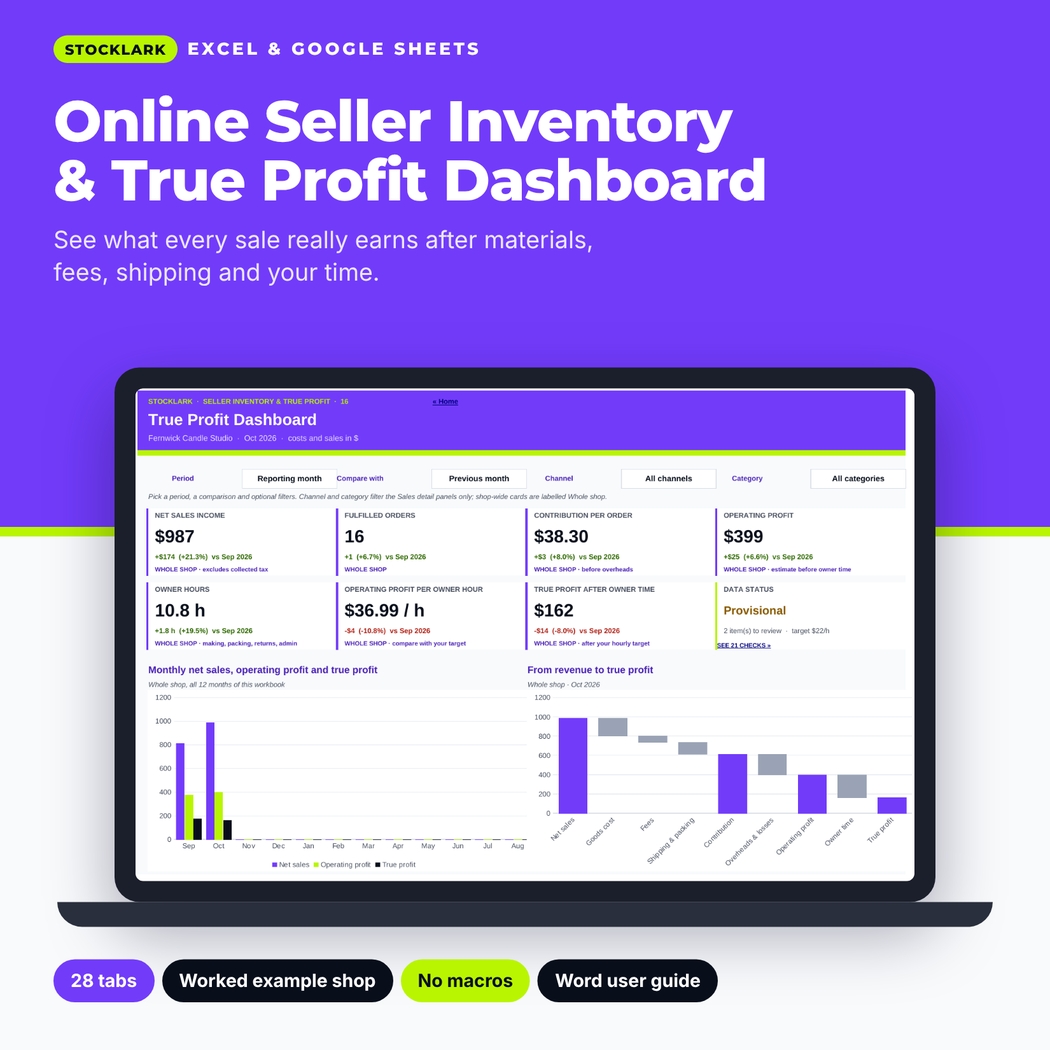
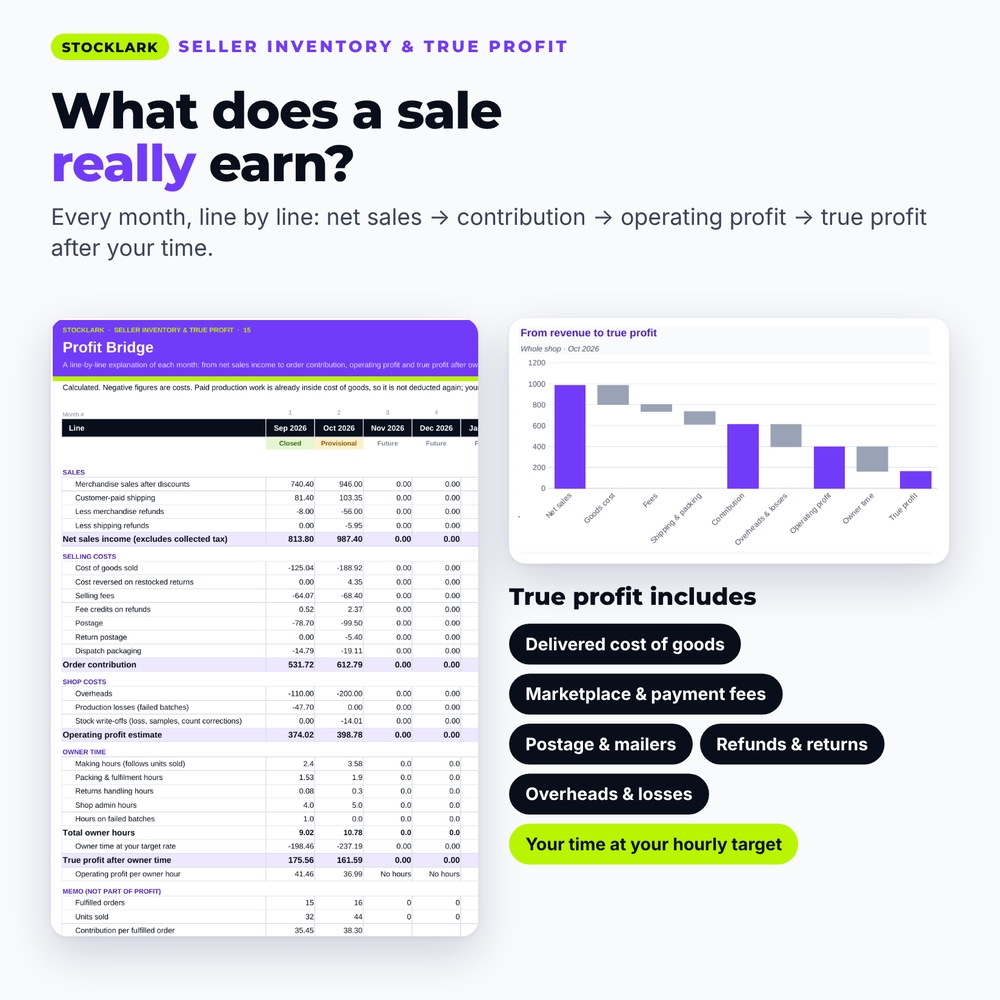
The Profit Bridge explains every month line by line, and the dashboard shows it at a glance:
- Net sales income: discounted merchandise plus customer-paid shipping, minus refunds. Collected tax stays out.
- Order contribution: after cost of goods, selling fees, postage, return postage and mailers.
- Operating profit estimate: after overheads, failed batches and stock write-offs.
- True profit after owner time: after valuing your making, packing, returns and admin hours at your own hourly target.
- Operating profit per owner hour: so a slow-to-make bestseller cannot hide.
Features
Inventory that updates itself
- Item catalogue for products, raw materials, product packaging and mailers, with units per pack, lead time, minimum stock and reorder multiples
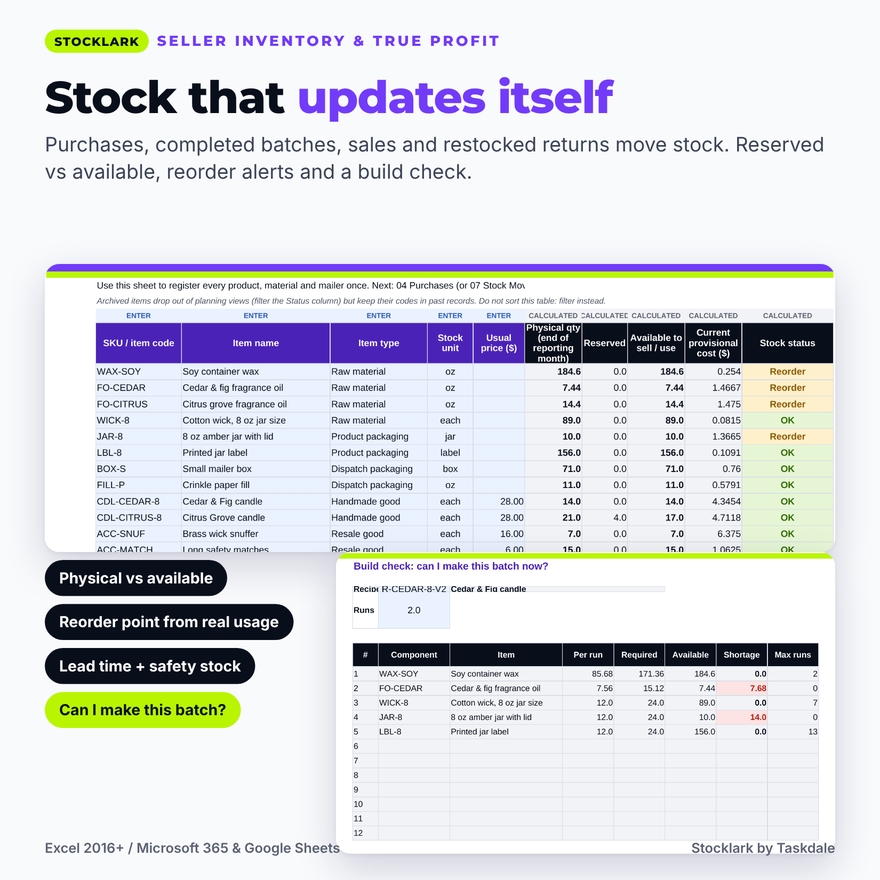
- Purchases, completed batches, fulfilled sales and restocked returns move stock automatically; a Stock Movements sheet handles opening stock, counts, damage, samples, owner withdrawals and reservations
- Physical, reserved and available quantities, on-order stock (never counted as available) and a reorder list based on real usage, lead time and safety stock
- Build check: can I make this recipe now, and how many whole runs?
Real cost per unit
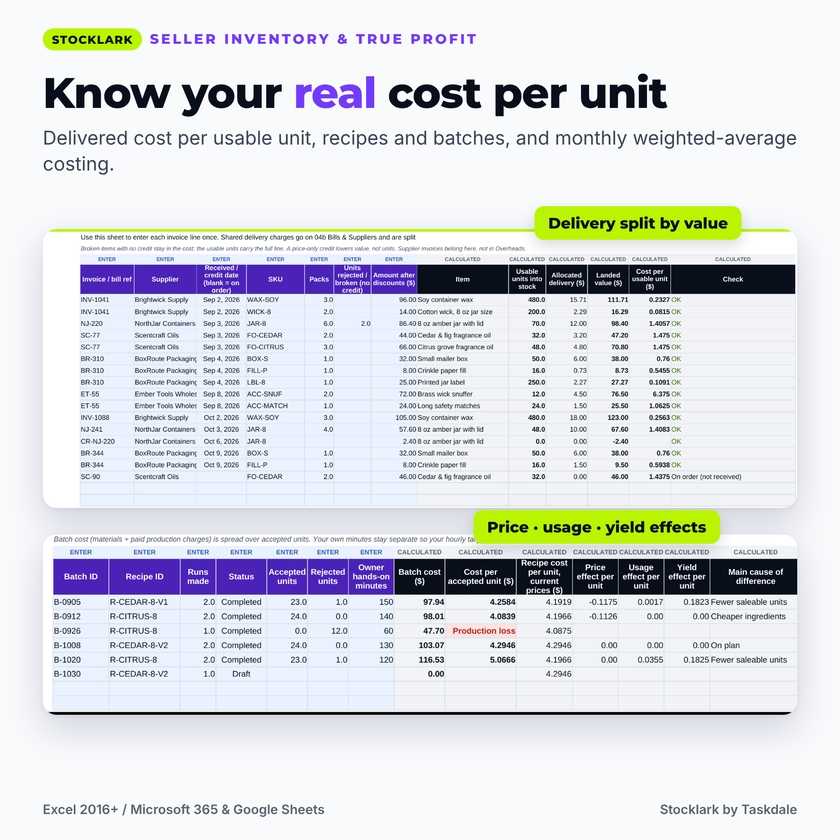
- Delivered cost per usable unit: a bill’s delivery charge is entered once and split across its lines by value; broken items stay in the cost; supplier credits for price or returned goods
- Supplier comparison by delivered unit cost
- Product recipes with versions and waste allowances, and a batch log with accepted and rejected units, paid production charges and your minutes
- Batch variance that names the cause: dearer ingredients, extra consumption or fewer saleable units; failed runs recorded as production losses
- Monthly weighted-average costing for supplies and finished goods, with closed and provisional months
Orders, mixed baskets and returns
- Dated, editable fee profiles per channel: commission, payment processing, fixed and per-unit charges and ad fees, with switches for shipping, tax and discounts
- Shipping profiles that show the customer charge beside the real parcel cost, including the box and filler
- Mixed baskets: shipping income, fees, postage, packaging and packing minutes are split across the items by value
- Returns that separate the refund from the units that come back: refund only, saleable return or damaged return, with fee credits and return postage
Decide with confidence
- True Profit Dashboard with period and comparison selectors, channel and category filters, KPI cards, a revenue-to-true-profit waterfall and a needs-attention panel
- Product Comparison: contribution per unit beside contribution per hands-on hour, sortable, with Strong earner / Slow to make groups
- Offer Tester: compare a discount, free shipping and a bundle with your current offer, including the volume hurdle and a stock and time check
- Price Finder: the price floor for break-even, a target contribution or a target hourly earning, with percentage fees solved exactly and practical rounding
- Month Close checklist with values-only snapshots, a Checks register of data problems, and a Decision Sheet with a decision log
What is included
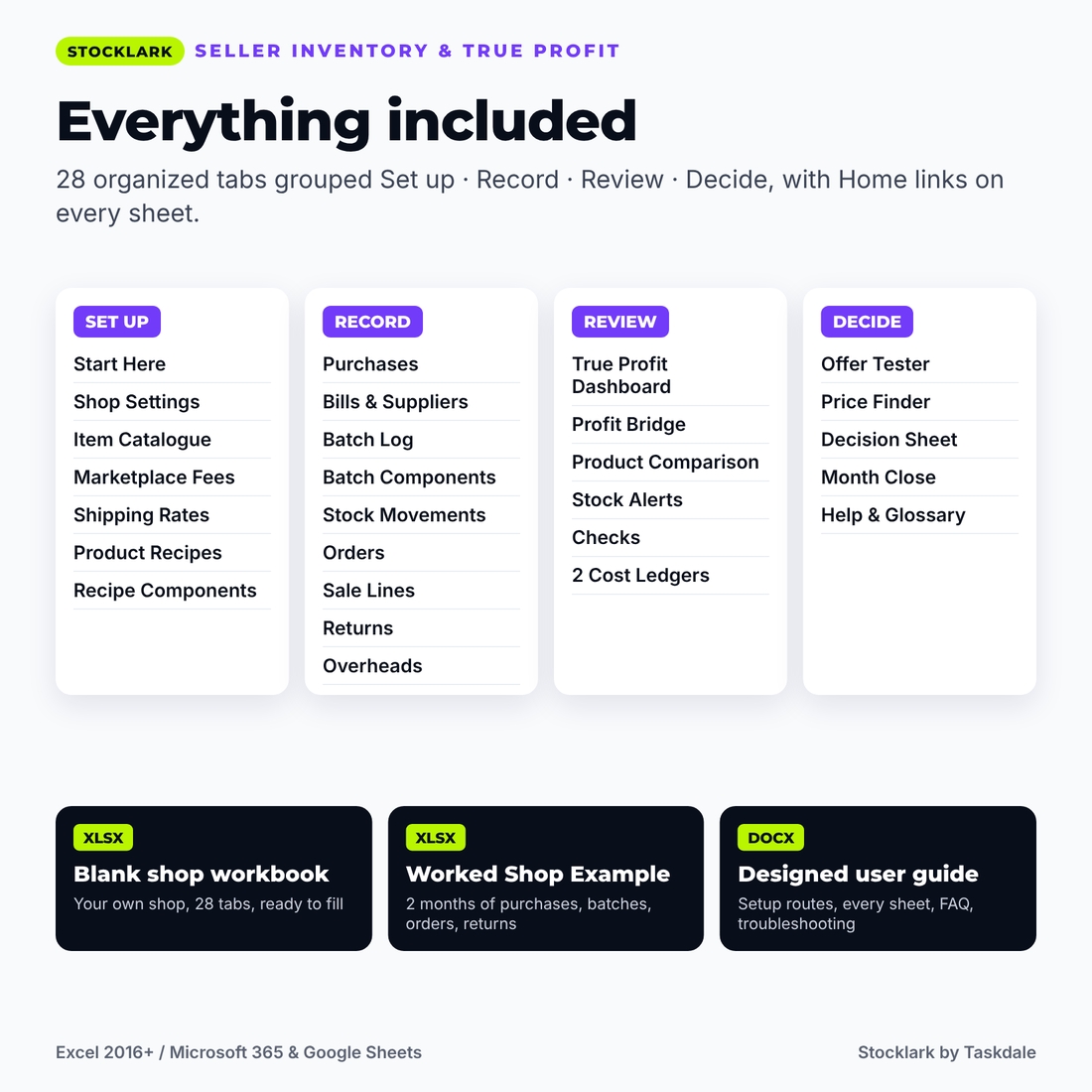
- Stocklark Seller Inventory & True Profit Workbook (.xlsx): your blank shop file with 28 organized tabs
- Worked Shop Example (.xlsx): the same workbook completed for a fictional candle shop with two months of purchases, batches, orders and returns (fee rates are illustrative)
- User Guide (.docx): setup routes, every sheet explained, troubleshooting and FAQ
How it works
- Set your workbook year, currency, hourly target and stock policy on Shop Settings.
- Add your items, then a purchase (or opening stock) for each.
- Made goods: build a recipe and log a completed batch. Resale goods skip this step.
- Copy your fee rates from your latest statement and set up shipping profiles.
- Record orders and their items as they ship; record any returns.
- Review the dashboard, close the month, and use the pricing tools before changing a listing.
File formats and software
Macro-free .xlsx files for Microsoft Excel 2016 or newer on Windows or Mac, Microsoft 365 and Google Sheets (import the file). The guide is a Word .docx file that also opens in Google Docs. Capacity: 120 items, 400 purchase lines, 150 batches, 400 orders, 600 sale lines and 150 returns for one 12-month year.
Customization
Set any currency symbol, rename channels, categories, suppliers, locations and overhead categories, and enter your own fee profiles, shipping profiles, lead times and targets. Formulas are protected without a password so they are hard to break by accident and easy to unlock if you want to restyle.
Use cases
- A candle maker finds that a bestseller earns well per candle but poorly per hour, and raises the price by a dollar.
- A reseller sees that free shipping on a low-priced item loses money on every order and sets a minimum basket instead.
- A jewelry shop reorders findings before a market weekend using the reorder list and build check.
- A seller closes September, then notices a late fee adjustment flagged as changed since the snapshot.
Digital download
This is a digital product: no physical item will be shipped. You can download the files right after purchase. Personal use only (or use within your own business); you may not resell, share or redistribute the files.
FAQ
Does it work in Google Sheets?
Yes. It uses no macros or Excel-only functions. Import the .xlsx into Google Sheets and it calculates there.
Does it connect to my marketplace or sync stock?
No. It is a manual-entry workbook with no logins, so your data stays in your file.
I only resell products. Is it still useful?
Yes. Recipes and batches are optional; enter purchases and sales and everything else works.
Are marketplace fees built in?
You enter your own current rates as dated fee profiles. Example rates in the worked example are illustrative, not a live fee directory.
Is “true profit” my taxable profit?
No. It is a management estimate for decisions. It is not tax, legal or accounting advice and does not replace your bookkeeping.
Can I use my own currency?
Yes. Type any symbol on Shop Settings and every money heading and dashboard card follows it.
How many products can I track?
Up to 120 items and 600 sale lines per 12-month workbook. Start a fresh copy each year with your closing stock as opening balances.
Reviews
There are no reviews yet.