
A succession planting spreadsheet that plans by bed, not just by date
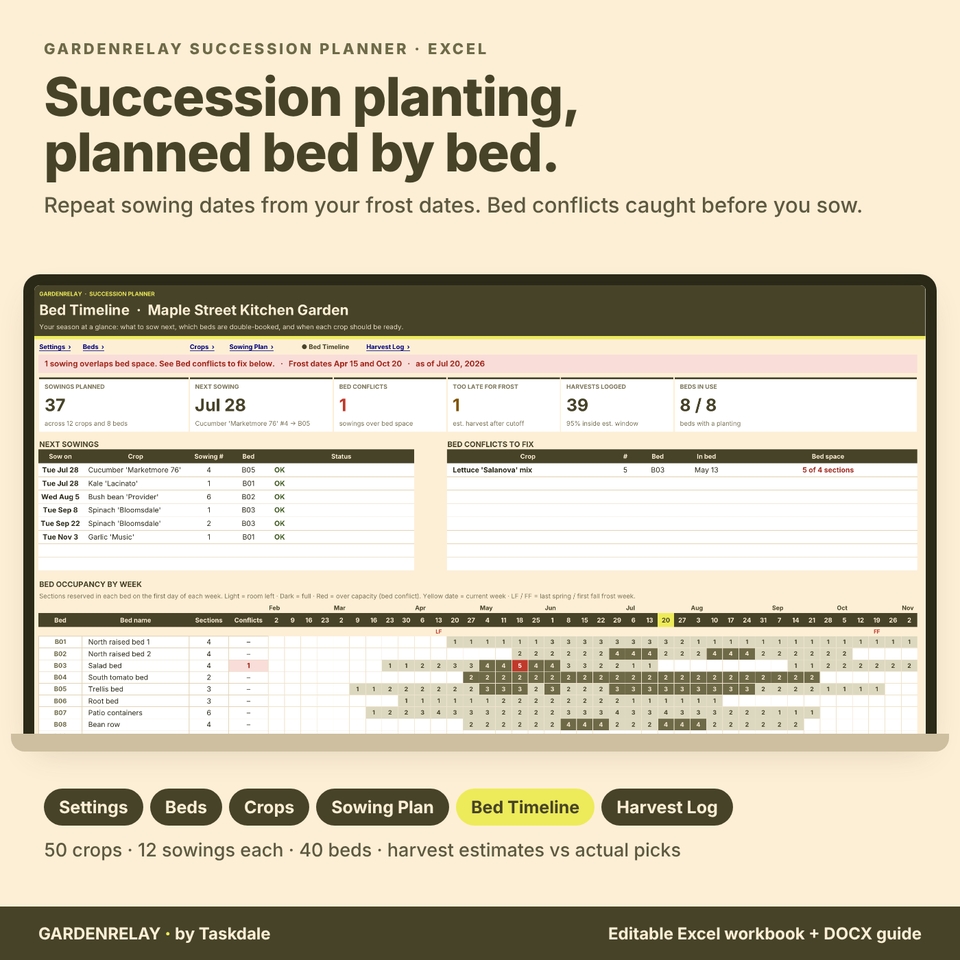
Most sowing calendars stop at a list of dates. The hard part of succession planting is space: by the time the fourth lettuce sowing is due, is there still room in the bed? GardenRelay Succession Planner is a succession planting spreadsheet for Excel that generates every repeat sowing from your frost dates, assigns it to a bed, and checks bed space on the day each sowing goes in. It then labels each harvest window as an estimate and compares it with the dates you actually pick.
It is built for home vegetable gardeners, raised-bed and allotment growers, community gardens, and small market gardens who sow the same crops several times a season and want a steady harvest instead of feast-and-famine weeks.
What it does, with a worked example
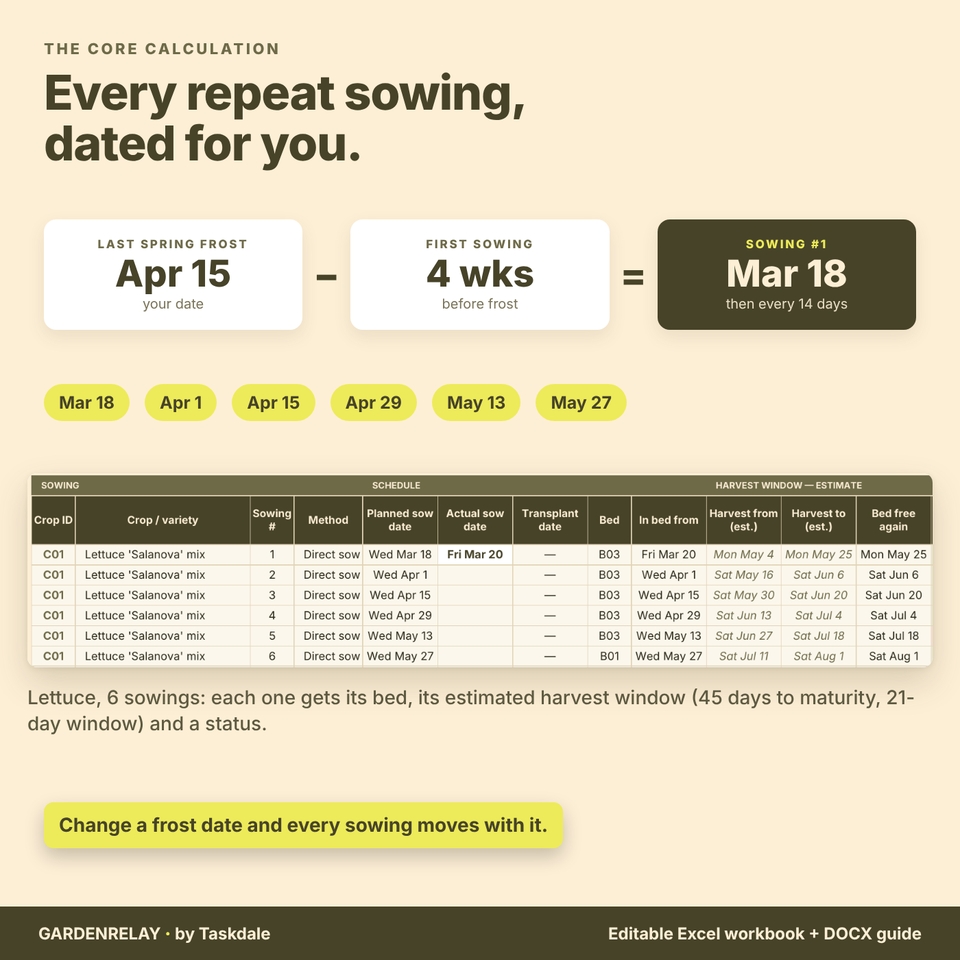
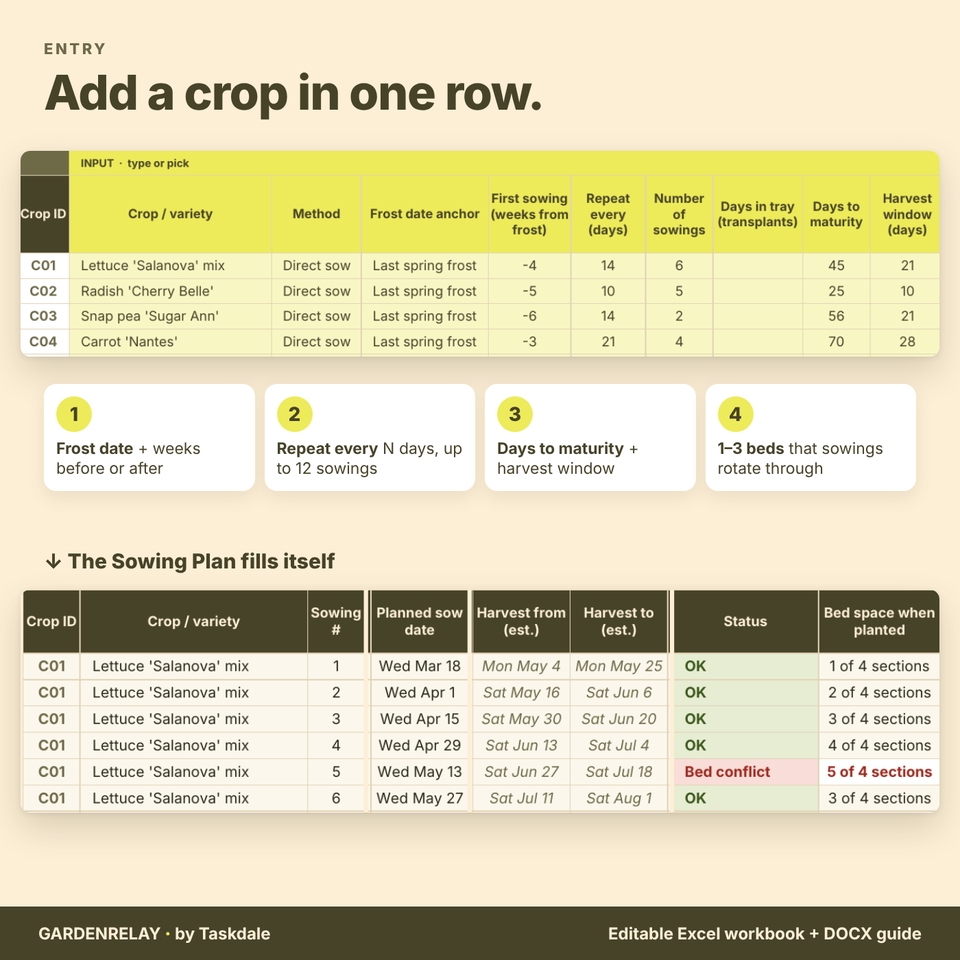
Say your last spring frost is April 15. You want lettuce four weeks before that, then every 14 days, six times. GardenRelay dates the sowings March 18, April 1, April 15, April 29, May 13 and May 27. With 45 days to maturity and a 21-day harvest window, the first sowing is estimated to harvest May 2 to May 23, and every later sowing two weeks after that.
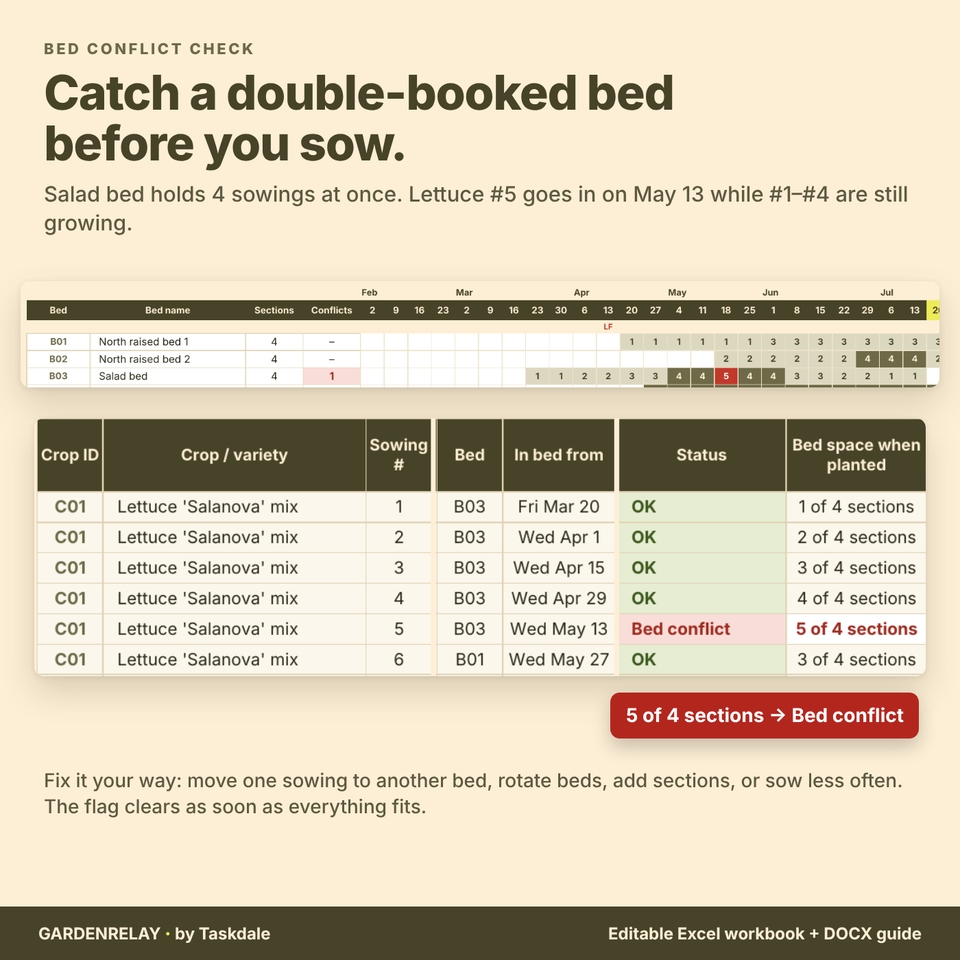
Now the bed check. Your salad bed is split into 4 sections. On May 13, lettuce sowings 1 to 4 are still growing, so sowing 5 would need a fifth section. The Sowing Plan marks it Bed conflict and shows “5 of 4 sections”. Move that one sowing to another bed, add a second bed to the crop’s rotation, or sow less often, and the flag clears.
The frost check works the same way. Cucumbers sown every 30 days from late April have a fifth sowing on August 27. With 60 days to maturity, its estimated first harvest is October 26, after an October 20 first fall frost, so it is flagged Too late for frost and left out of bed reservations. Later, when you log picks, the workbook shows each one as inside, before or after its estimated window, and tells you when your lettuce really took 50 days instead of the packet’s 45.
What’s included
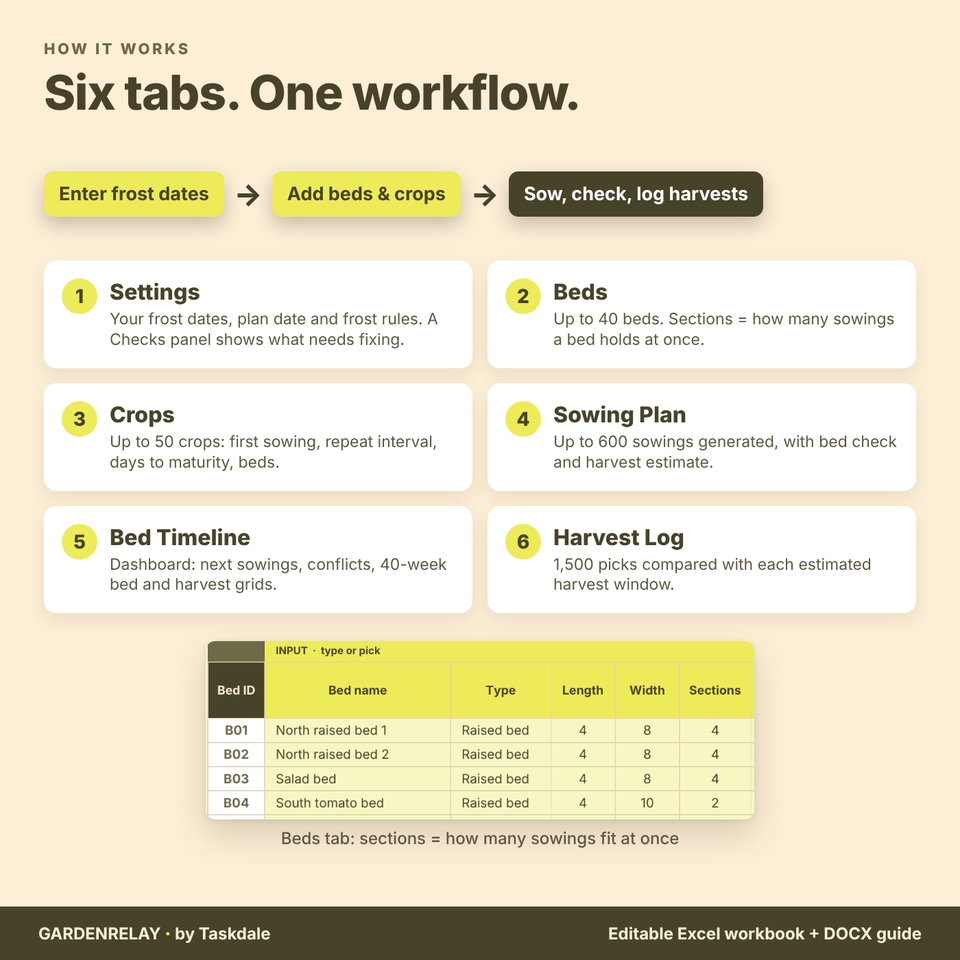
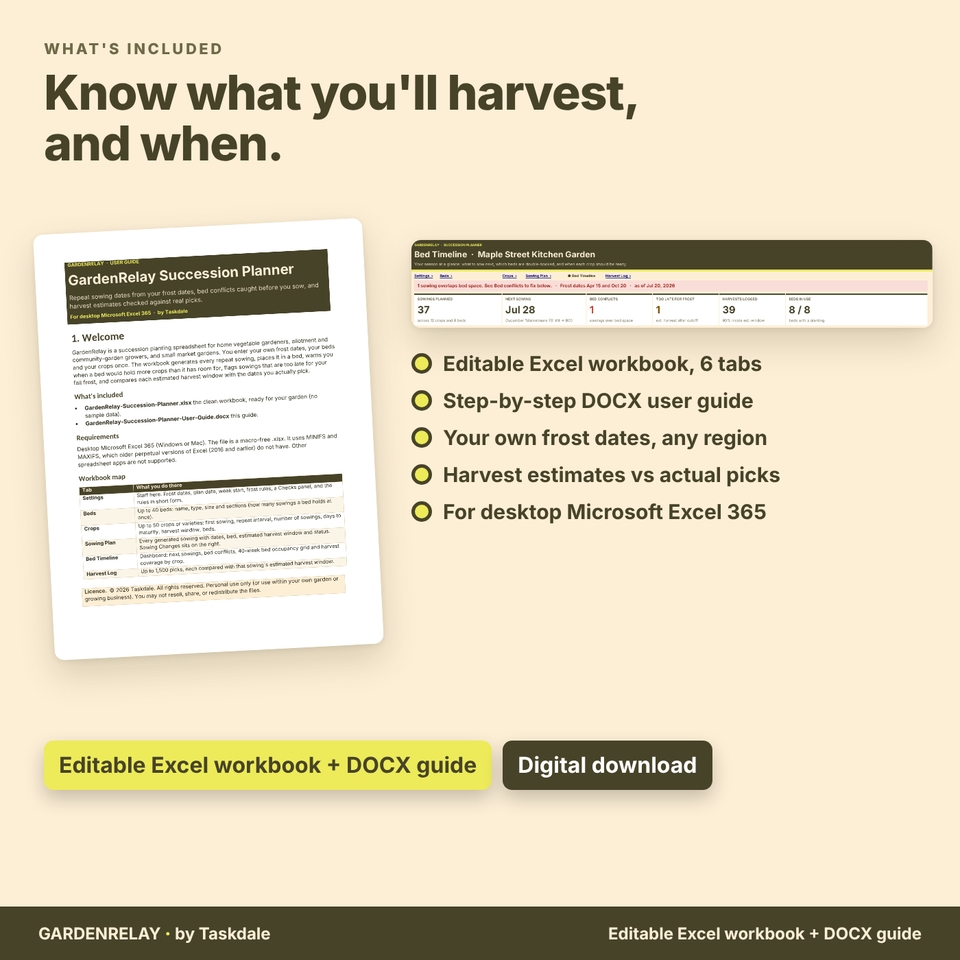
An editable Excel workbook with six tabs:
- Settings: your last spring and first fall frost dates, plan date, week start, frost rules for tender and hardy crops, bed turnaround days, a Checks panel and the start-here steps.
- Beds: up to 40 beds with type, size and sections (how many sowings a bed holds at once), plus conflicts per bed.
- Crops: up to 50 crops or varieties: direct sow or transplant, frost-date anchor, weeks before or after, repeat interval, number of sowings (up to 12), days in tray, days to maturity, harvest window, frost tolerance and up to three beds to rotate through. It also shows the last safe sowing date and any planned harvest gap.
- Sowing Plan: up to 600 generated sowings with planned and actual sow dates, transplant date, bed, estimated harvest window, status and bed space. Sowing Changes lets you skip a sowing, move it to another bed, or record the date you really sowed.
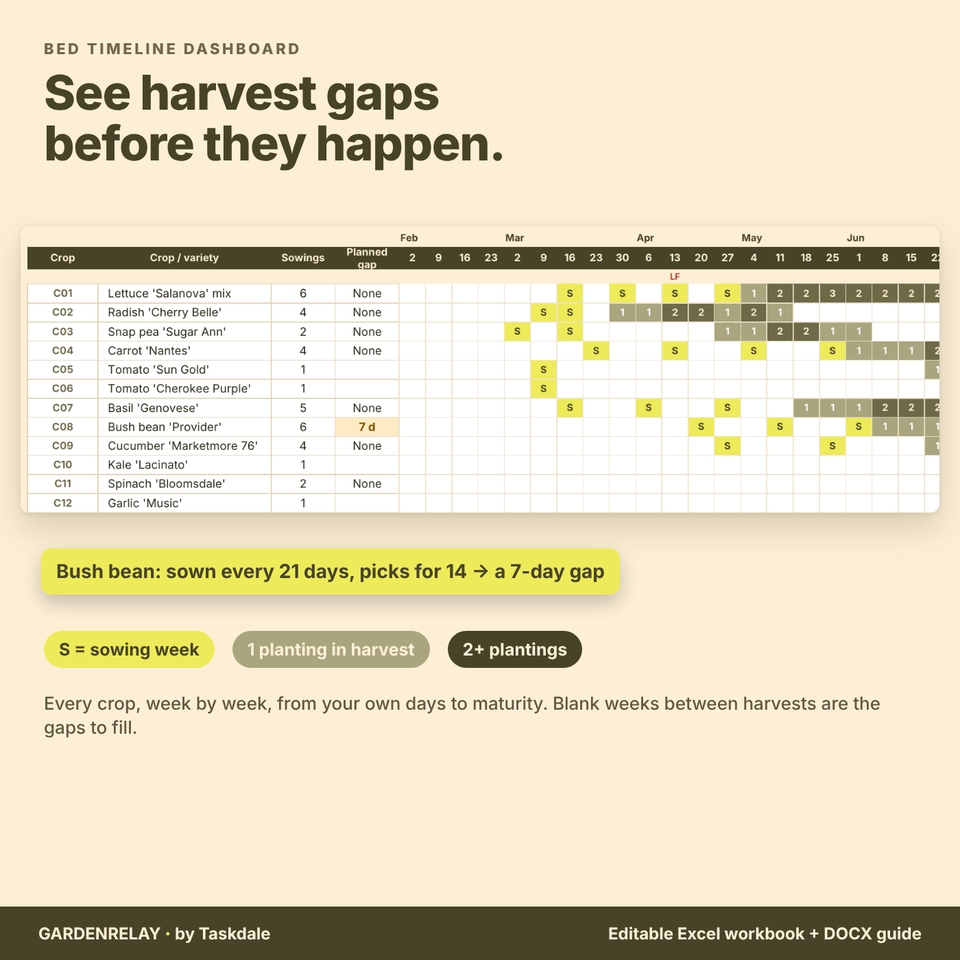
- Bed Timeline: the dashboard: sowings planned, next sowing, bed conflicts, sowings too late for frost, harvests logged, next eight sowings, conflicts to fix, a 40-week bed occupancy grid and a harvest coverage grid by crop.
- Harvest Log: up to 1,500 picks, each compared with that sowing’s estimated harvest window.
You also get a six-page DOCX user guide with screenshots. The workbook you download is clean and ready for your garden; the filled garden in the images is a demonstration.
How to use it
1. Enter your frost dates
Type your average last spring and first fall frost dates on Settings. Use the dates from your local Cooperative Extension office or your own records. The workbook does not look them up, so it works in any region.
2. Add beds and crops
Name your beds and give each one a number of sections. Add a row per crop with its first sowing, interval, days to maturity, harvest window and beds. Crop and bed IDs never change, so you can rename anything later.
3. Read the plan, fix conflicts, log harvests
The Sowing Plan and Bed Timeline update on their own. Fix any red flags, then record picks in the Harvest Log as the season goes.
Format, customization and download details
- For desktop Microsoft Excel 365 (Windows or Mac). Macro-free .xlsx file. Not tested for Google Sheets, Excel for the web or mobile apps.
- DOCX user guide, readable in Microsoft Word or a compatible reader.
- Formula cells are protected without a password; everyday entry cells are yellow and stay editable. Dropdowns for methods, frost tolerance, beds and crops.
- Edit crop names, beds, sections, intervals, harvest units and every setting. No money is tracked, so there is no currency setting to change.
- Capacity: 40 beds, 50 crops, 12 sowings per crop, 200 sowing changes, 1,500 harvest entries, 40-week timeline.
- Digital download: no physical item will ship.
- Licence: personal use only (or use within your own garden or growing business). You may not resell, share, or redistribute the files.
Use cases
- A raised-bed gardener who wants lettuce, radishes and beans every week from May to September without overplanting.
- A community garden plot holder fitting spring peas, summer cucumbers and fall spinach into the same trellis bed.
- A small market grower planning weekly salad harvests and checking which plantings came in early or late.
- Anyone planning next season who wants to know the last safe date to sow beans before the fall frost.
Frequently asked questions
Does it know my frost dates?
No. You enter your own last spring and first fall frost dates. Everything else is calculated from them.
Can two crops share one bed?
Yes. Give the bed several sections. A conflict only appears when the sowings in a bed need more sections than it has on the day a new sowing goes in.
Does it handle transplants and fall crops?
Yes. Transplants use days in tray, and their days to maturity count from transplanting. Fall crops can be counted back from the first fall frost. Overwintering crops such as garlic are never flagged as late.
Are the harvest dates exact?
No. They are estimates from your days to maturity and harvest window. The Harvest Log shows how real picks compared, so you can adjust next season.
What if I sow a few days late?
Enter the actual sow date in Sowing Changes. That sowing and its harvest estimate move; the rest of the plan stays the same.
Does it work in Google Sheets?
This listing is for desktop Microsoft Excel 365. Google Sheets is not supported.
Is there a seed or crop database included?
No. You enter the values from your seed packets or your own records, which keeps the plan accurate for the varieties you grow.
Known limitations
- One season window of 40 weeks on the timeline; overwintering harvests show their dates but fall outside the grid.
- The weekly grids sample the first day of each week; the Sowing Plan checks the exact planting day.
- No frost-date lookup, weather data, seed database, costs or garden map.
Reviews
There are no reviews yet.