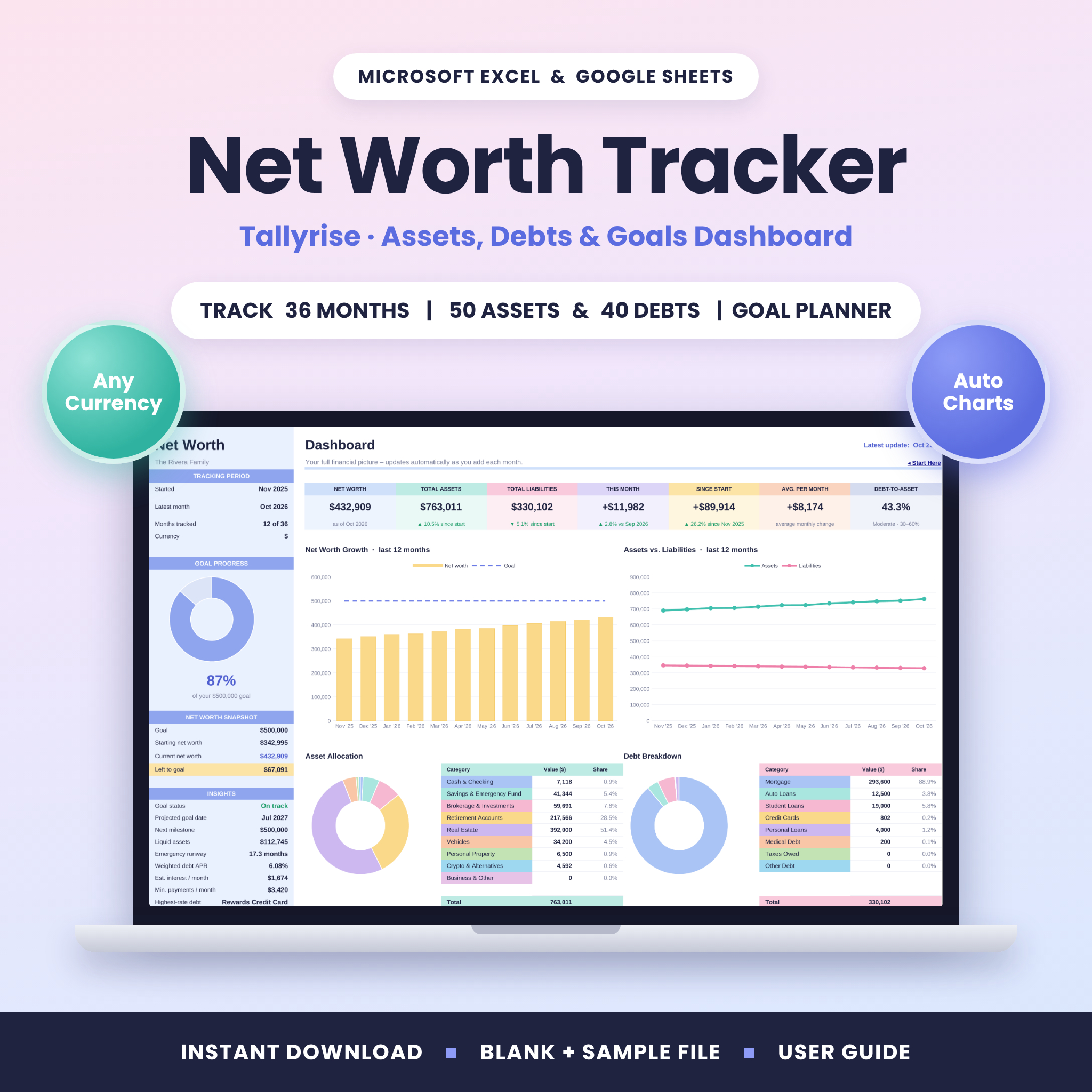


The Tallyrise Net Worth Tracker is a net worth tracker spreadsheet for Microsoft Excel and Google Sheets. It turns a few minutes of monthly updates into a clear picture of your money: what you own, what you owe and how fast your wealth is growing. Enter your month-end balances and the workbook calculates your net worth, draws the charts, tracks your goal and shows insights you can act on for 36 months.
A Net Worth Tracker That Does the Math for You
Most people only see one account at a time, which makes progress hard to spot. Tallyrise puts your bank accounts, investments, retirement accounts, home, vehicles, credit cards and loans in one place. Each month you add one column of balances, and everything else updates automatically. You don’t need to write formulas, connect a bank or pay a subscription.
Who It’s For
- Individuals, couples and families who want one clear view of their finances
- Anyone paying down debt who wants to see the bigger picture improve
- Savers and investors working toward a number, such as a first $100K, a home deposit or early retirement
- Beginners. Input cells are white, formula cells are shaded and locked, and a Start Here tab links to every tab
Main Benefits
- See your real progress. Monthly change, growth since you started and average monthly growth are calculated for you.
- Know where your money is. Asset allocation and debt breakdown rings come with matching color-coded tables.
- Reach your goal faster. The goal planner shows your projected goal date, the monthly growth you need for your target date and whether you’re on track.
- Understand your debt. See your weighted APR, estimated monthly interest, total minimum payments, highest-rate debt and the % of debt paid off.
- Stay prepared. Emergency runway shows how many months your liquid savings would cover.
Features
Dashboard
- 7 KPI cards: Net Worth, Total Assets, Total Liabilities, This Month, Since Start, Average per Month and Debt-to-Asset ratio
- Goal progress ring plus a net worth snapshot (goal, starting, current and left to goal)
- Insights panel: goal status, projected goal date, next milestone, liquid assets, emergency runway, weighted APR, interest per month, minimum payments, highest-rate debt and debt paid off
- 4 automatic charts: net worth growth vs. goal, assets vs. liabilities, asset allocation and debt breakdown
- Rolling 12-month table, printable on one landscape page
Assets & Liabilities Trackers
- Up to 50 assets and 40 debts, each with 36 months of balances
- Category dropdowns: 10 asset and 10 debt categories you can rename
- Current value, change since start and ▲▼ trend arrows for every row
- An “update” reminder when a row is missing the latest month
- APR and minimum payment fields for each debt
- Automatic category totals for every month, plus an “Uncategorized” check so totals never silently go wrong
- The latest month is highlighted so you always know where you are
Goals & Milestones
- Goal planner with average monthly growth, months to goal, projected date, target date, monthly growth needed and on-track status
- 10 customizable net worth milestones showing when each one was first reached and your progress toward the rest
Monthly Summary & Yearly History
- All 36 months in one table: assets, liabilities, net worth, change, change %, growth since start, liquid assets and debt-to-asset ratio, plus a notes column
- Full-history chart across every month you track
- Yearly History tab: enter past year-end totals and the tracked years fill in automatically, with a chart of your net worth across the years
What’s Included
- Tallyrise Net Worth Tracker: blank, ready for your numbers (.xlsx)
- Filled SAMPLE copy (an example household) so you can explore every feature first (.xlsx)
- Step-by-step User Guide (.docx) covering setup, every tab, customizing, troubleshooting and FAQ
The workbook has 8 tabs: Start Here, Setup, Dashboard, Assets, Liabilities, Monthly Summary, Goals and Yearly History.
How It Works
- Set up (2 minutes): choose your currency, start month and year, and optionally a net worth goal, a target date and your monthly expenses.
- Add your accounts: list what you own and owe, pick a category for each and enter this month’s balances.
- Update monthly: add one new column of balances each month and watch your dashboard, charts and milestones update instantly.
File Formats & Software Requirements
- Format: Excel workbook (.xlsx) and Word user guide (.docx)
- Microsoft Excel: Microsoft 365, Excel 2016 or newer (Windows or Mac) and Excel for the web
- Google Sheets: upload the .xlsx to Google Drive and open it with Google Sheets (free Google account)
- No macros, add-ons or bank connections. Your data stays in your own file
- A computer is recommended for setup. You can update the file afterward in the Excel or Google Sheets mobile apps
Customization
- Any currency: one setting changes the symbol everywhere ($ by default; €, £, ¥, ₹, C$, A$, R and more, or type your own)
- Rename asset and debt categories and choose which ones count as liquid
- Edit all 10 milestone amounts
- Start in any month and year
- Formulas are locked with no password, so you can unprotect a sheet to restyle it if you want
Real-Life Use Cases
- Debt payoff season: watch total liabilities fall month by month and see how much interest your debts cost each month.
- Couples’ money check-in: label accounts by owner and review the dashboard together on the first of each month.
- Saving for a house: set a goal and target date, then see the monthly growth you need and whether you’re on pace.
- Building an emergency fund: track liquid assets and how many months of expenses they cover.
- Long-term wealth building: record past years in Yearly History and see your progress over a decade.
Digital Download Information
This is an instant digital download. No physical item will be shipped. After purchase, download your files from your order confirmation or account page. The license is for personal use by the buyer and their household. Reselling, sharing or redistributing the files is not permitted.
Net Worth Tracker FAQ
Does this net worth tracker work in Google Sheets?
Yes. Upload the .xlsx file to Google Drive and open it with Google Sheets. All formulas, dropdowns and charts work. Google Sheets restyles charts slightly and shows the Goals progress bars as percentages.
Which versions of Excel are supported?
Microsoft 365, Excel 2016 or newer on Windows or Mac, and Excel for the web. The workbook uses only classic functions and no macros.
Can I use my own currency?
Yes. Choose a symbol from the list or type your own on the Setup tab, and every money value follows. The default is $.
How many accounts can I track?
Up to 50 assets and 40 debts, each for 36 months.
Does it connect to my bank?
No. You enter balances yourself, which keeps your financial data private and in your own file.
What happens after 36 months?
Save a copy, clear the monthly balances, set a new start month and keep going. Your Yearly History carries your long-term record forward.
Is this financial advice?
No. Tallyrise is an organizing tool for informational purposes only. Please talk to a licensed professional about your financial decisions.

Reviews
There are no reviews yet.