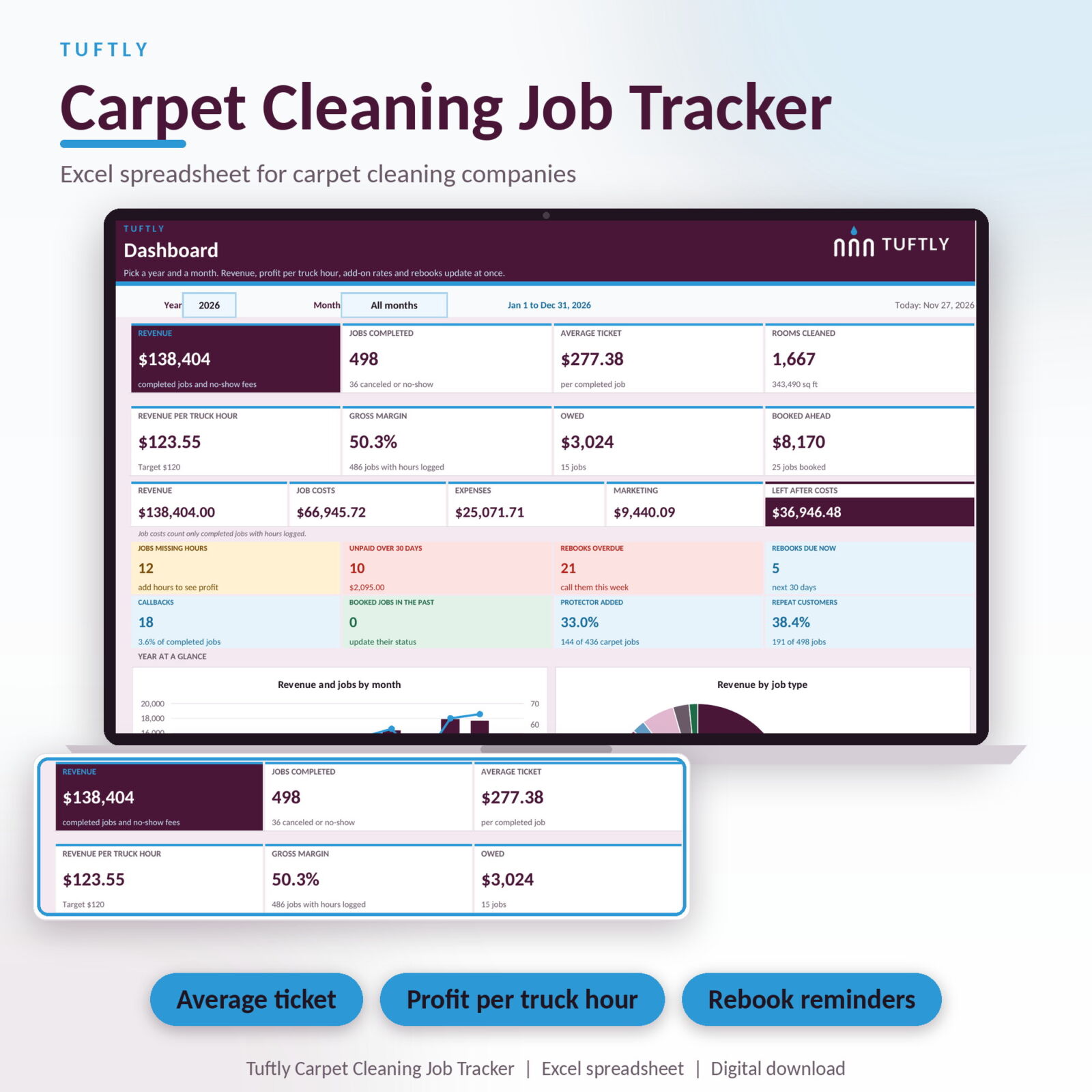


Tuftly Carpet Cleaning Job Tracker is a carpet cleaning business spreadsheet for Microsoft Excel that remembers every job and every customer for you. Log each clean in one row: rooms, hallways, stair steps, square feet, upholstery, rugs, stain spots and the add-ons you sold. Type the hours on site and the sheet shows what the job really earned per truck hour. Then print the Rebook List on Monday and call the customers who are due. One purchase, no monthly software fee.
A carpet cleaning business spreadsheet built for your trade
Most cleaning spreadsheets track maid visits. A carpet job is different. You charge by the room, the flight of stairs and the sofa, you sell protector and pet treatment on top, and a good customer comes back in 6 or 12 months. Tuftly follows that rhythm. A three-room clean with 13 stair steps, five spots and a protector sale is one row, and every number you care about falls out of it.
It suits an owner with one or two truckmounts or portables, up to four technicians and 4 to 30 jobs a week.
What you can do with it
- Know your average ticket. The Dashboard shows revenue, jobs completed and average ticket for any year and month.
- Raise it with add-ons. See how often protector, pet treatment and upholstery sell, per month and per technician.
- Find your real profit per truck hour. Labor, truck cost and chemicals come off every job, and your own time counts.
- Fill quiet weeks. Every customer gets a next cleaning date from the last job and their household type.
- Collect what you are owed. Balances, pay status and an alert for jobs unpaid after 30 days.
- Spend marketing money where it returns most. Log mailers, search ads and home shows and read the revenue per 1 spent for each lead source.
Carpet cleaning job tracker: one row per job
The Jobs sheet is the heart of the carpet cleaning job tracker. Each row holds the customer, job type, lead source, technician and status (Booked, Completed, Canceled or No-show). Next come rooms, hallways, stair steps, carpet square feet, upholstery pieces, area rugs and stain spots, plus Yes or No flags for pet treatment, protector and deodorizer.
Prices go in five groups: carpet, upholstery and rugs, stains and pet, protector and deodorizer, and other charges such as a trip fee. Add a discount, an optional sales tax rate, a deposit or payment, and the balance and pay status work themselves out. A no-show fee goes in Other charges and counts as revenue. A canceled job counts none, and a deposit on it shows Refund due.
Profit that waits for the hours
Type the hours on site and the crew size. Tuftly works out labor from each technician’s pay rate (with your payroll burden estimate), helper pay, truck cost per hour and chemicals, typed or estimated from square feet. You see gross profit, margin and revenue per truck hour against your own target. Until the hours are in, the cell says “Add hours” and the job stays out of your margin, so a job with no costs never looks like a 90 percent winner.
The rebook list that fills your calendar
Each customer has a household type: standard home, pets, kids and pets, allergies, heavy traffic, rental turnover or business. You set how many months each waits (12, 6 or 3 by default). Tuftly takes the last completed job and works out the next cleaning date, month-end safe, so a clean on Aug 31 with a 6 month cycle is due Feb 28.
Statuses read Overdue, Due now, Coming up, Booked, Not due or Lapsed. A customer who already has a Booked job never gets a reminder call. The printable Rebook List puts up to 40 customers on one page, oldest due date first, with phone, pets, last ticket and a reminder script at the bottom.
Dashboard, monthly summary and technician scoreboard
- 8 tiles, a Money left strip (revenue minus job costs, expenses and marketing), 8 alerts and 5 charts.
- The next 10 booked jobs, and a rebook status table.
- A 12-month summary with protector %, pet treatment %, revenue per truck hour and callbacks.
- A technician scoreboard: jobs, revenue, hours, revenue per truck hour, callback rate and protector rate.
- Callbacks logged with a reason, such as wicking spot or missed area.
What is included
- Tuftly-Carpet-Cleaning-Job-Tracker.xlsx, ready for your own jobs (empty, nothing to delete)
- A DOCX user guide with screenshots, worked examples, troubleshooting and FAQ for your carpet cleaning business spreadsheet
The workbook has 11 sheets: Start Here, Dashboard, Jobs, Customers, Rebook List, Technicians, Expenses, Marketing, Monthly Summary, Settings and Chart Data. It holds 1,000 jobs, 500 customers, 1,000 expenses, 300 marketing entries and 10 technicians.
How it works
- Set your currency, tax rate and truck cost on Settings.
- Add your technicians (yourself too) and your customers.
- Log each job when you book it, then mark it Completed.
- Type the payment and the hours on site.
- Print the Rebook List every Monday.
File format and software
An Excel .xlsx file with no macros. Made for Microsoft Excel 2016 or later (Windows and Mac), including Excel for Microsoft 365. It has not been tested in Google Sheets or Numbers. Formulas are locked with no password, input cells are light blue, and dropdown lists stop typing mistakes. One currency setting changes every heading, tile and report.
Customize it
Change the currency symbol, sales tax, helper rate, truck cost and your target revenue per truck hour. Rename or add lead sources and callback reasons. Set your own rebook months for each household and rewrite the reminder script.
Digital download
After checkout you get an instant download of both files. Nothing is shipped.
Real situations
- A solo owner with a truckmount doing 12 homes a week.
- A two-van company comparing technicians’ callback rates.
- A landlord account with move-out cleans every summer.
- Deciding whether the spring mailer paid for itself.
Frequently asked questions
Does it work on a Mac?
It is made for Microsoft Excel 2016 or later on Windows and Mac, including Excel for Microsoft 365.
Does it work in Google Sheets?
It has not been tested there. It is made for Excel.
How does it know when a customer is due again?
It adds the household’s rebook months to the date of the last completed job and shows Overdue, Due now, Coming up, Booked, Not due or Lapsed.
Can I track upholstery and area rugs?
Yes. Each job has upholstery pieces and area rugs, with their own price group and job types.
How is profit worked out?
Job total minus labor, truck cost, chemicals and other job costs. It appears once the hours are logged.
Can I change the currency?
Yes. Type any 1 to 4 character symbol on Settings.
How many jobs does the carpet cleaning business spreadsheet hold?
1,000 jobs and 500 customers.
Is this carpet cleaning job tracker a subscription?
No. One purchase, and the file is yours.
License
Single business license: use it in one carpet cleaning business. Do not resell, share or upload the files. Tuftly is not accounting, tax, payroll or legal advice. © Taskdale.


Reviews
There are no reviews yet.