Best Service Agreement Template: Four Kits Compared
The best service agreement template is the one whose clauses match the work you actually do, in a file you can edit in minutes. For most small businesses that means a Word template with scope, payment and change-order terms, plus matching intake and invoice forms. Below, we compare four kits so you can choose with confidence.
Contracts can feel heavy, and it's easy to worry that one missing clause will cost you later. It needn't be so complicated. A good template gives you the structure, and your job is to fill in the details honestly. We'll walk through what to look for, how the four kits differ and how to set one up.
Key facts at a glance
- A service agreement template is a ready-made contract that sets out what you will do, for how much, by when and what happens if the job changes.
- All four kits on this page come as editable Word files in US Letter and A4, and each lets you work in any currency.
- The Professional Organiser Contract Template Bundle has the shortest agreement (3 pages) and the Contract and Proposal Template Bundle has the longest clause list (16 clauses).
- Only two kits, Rinsewell and ScopeSigned, include an Excel calculator for quotes, deposits and tax.
- A template is a starting point, and for high-value work it's sensible to have a solicitor review it for your location.
 Professional Organizer Contract Template Bundle | Sorted & Signed Client Intake Form, Service Agreement, Invoice & Business Forms in Word | US Letter & A4
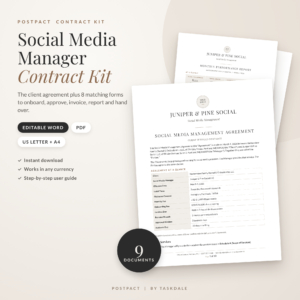 Social Media Manager Contract Template | PostPact Social Media Management Agreement + Client Onboarding Kit | Editable Word & PDF, US Letter & A4
Table of Contents
Toggle
- What should a good service agreement template include?
- How do the four service agreement templates compare?
- Which service agreement template suits which business?
- How do you set up a service agreement template?
- What mistakes should you avoid with a service agreement template?
- What affects the price of a service agreement template?
- Which service agreement template should you pick?
- Common questions
What should a good service agreement template include?
A good service agreement template includes a clear scope of work, payment terms, a way to handle changes and a signature block, all in a file you can edit freely. Everything else is a bonus. Browse all 4 options below with these five factors in mind.
A scope of work you can make specific
A scope of work is the section that lists exactly what you will and won't deliver. It is where most disputes begin, so a template should leave room for detail rather than a single vague line. The Social Media Manager Contract Template is a good example: it includes a key terms summary and scope sections, so the client sees the deliverables on page one.
Payment terms, deposits and fees
Payment terms state when you invoice, how long the client has to pay and whether a deposit is due before work starts. Look for money fields that don't lock you to one currency. All four kits here work with any currency, and the ScopeSigned and Rinsewell kits go further with an Excel calculator that handles deposits and tax.
A change-order route
A change order is a short form that records extra work and its cost before you do it. Without one, "just one more thing" quietly becomes unpaid hours. The Contract and Proposal Template Bundle and the Social Media Manager kit both include a change form, which is the sort of document you'll be glad of the first time a client's brief grows.
Editable files that suit your printer and your clients
Check the paper size and file type. US Letter suits North America and A4 suits the UK and most other countries, and every kit here includes both. Word files let you adjust wording, while fillable or print-ready PDFs help when a client signs on paper or on a tablet.
Matching documents around the agreement
A contract rarely works alone. You'll also want an intake form to collect client details, an estimate or proposal, an invoice and often a sign-off. Matching documents look consistent, and consistency tells a client you run an orderly business. The kits range from nine forms to 22, so decide how much of that you'll really use.
How do the four service agreement templates compare?
The four kits differ mainly in agreement length, the trade they're written for and whether a calculator is included. The table sets out what the product details actually say.
| Product | Agreement | Other documents | Calculator | Formats |
|---|---|---|---|---|
| Professional Organiser Contract Template Bundle | Sorted & Signed Client Intake Form, Service Agreement, Invoice & Business Forms in Word | US Letter & A4 | 3-page service agreement | 21 editable documents in total, including intake form, estimate, invoice and receipts; bonus business cards, gift certificates and thank-you notes | None listed | Word and printable PDF, US Letter and A4 |
| Social Media Manager Contract Template | PostPact Social Media Management Agreement + Client Onboarding Kit | Editable Word & PDF, US Letter & A4 | Social Media Management Agreement with key terms summary, scope, fees and approval schedules | 8 client forms including onboarding questionnaire, change request, monthly report and handover checklist; 12-clause library; 8-page user guide | None listed | Word and print-ready PDF, US Letter and A4 |
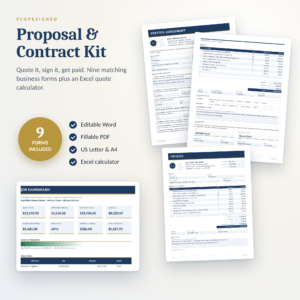 Contract and Proposal Template Bundle | ScopeSigned Service Agreement, Job Quote, Change Order & Invoice Forms | Editable Word + Fillable PDF, US Letter & A4 | 16-clause service agreement | Nine matching forms including proposal, change order, invoice and completion sign-off; step-by-step user guide | Excel calculator for quotes, tax, deposits and payment plans | Word and fillable PDF, US Letter and A4 |
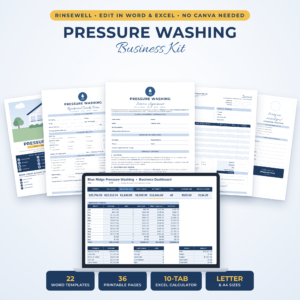 Rinsewell Pressure Washing Business Kit | Editable Contract, Client Intake Forms, Proposal, Invoice & Estimate Templates for Word + Excel Quote Calculator | Flyers, Door Hangers & Business Cards | US Letter & A4 | Service agreement | 4 editable Word templates including residential and commercial intake, proposals, inspection form, invoices, flyers, door hangers and business cards | Excel quote and invoice calculator with profit dashboard | Word and Excel, US Letter and A4 |
Which service agreement template suits which business?
Each kit suits a different kind of work, so the best choice depends on what you sell. Here is how we'd match them.
Professional Organiser Contract Template Bundle suits home organisers and similar one-to-one service providers. Its short 3-page agreement is easy for a client to read, and the discovery call notes and intake form fit the way organisers start a job. You can brand every page in about 10 minutes using Find & Replace, which helps if you want to start taking clients this week.
Social Media Manager Contract Template suits freelancers and small agencies who work on a monthly basis. The approval schedules, monthly report and handover checklist cover the ongoing nature of the work. The 12-clause library lets you add extra terms without writing them from scratch.
Contract and Proposal Template Bundle is the most general of the four. If you're a consultant, designer, tradesperson or any project-based business, its 16-clause agreement, change order and completion sign-off follow a job from quote to finish. It's the safest pick if none of the trade-specific kits describes you.
Rinsewell Pressure Washing Business Kit suits pressure washing and similar cleaning trades, particularly if you serve both homes and commercial sites. The inspection form and the calculator that adds discount, tax and a deposit save time on quotes. It also includes flyers, door hangers and business cards, and no Canva account is needed.
How do you set up a service agreement template?
Setting up a service agreement template takes four steps and usually less than an hour for the core documents. Work through them in this order.
- Replace the placeholders. Use Find & Replace to swap in your business name, contact details and the client fields. The Professional Organiser kit is built around this, with a stated 10 minutes to brand every page.
- Write the scope in plain words. List each deliverable, the schedule and anything that is excluded. If you can't describe the job in a short paragraph, the client won't understand it either.
- Set your payment terms. Enter your deposit, due dates and currency. If your kit has an Excel calculator, run a sample quote first so the figures in the contract match the quote.
- Read the whole document as the client would, then save a master copy and a PDF. Check it against the laws of your location, and consider a solicitor's review for larger contracts.
Keep the original untouched and make a fresh copy for each client. That way, a change made for one job never leaks into the next.
What mistakes should you avoid with a service agreement template?
The most common mistake is signing a template without changing it, because unedited placeholders and unsuitable clauses can undermine the document. A few other pitfalls come up again and again.
- Leaving the scope vague. "Social media management" means different things to different people. List the platforms, number of posts and approval steps.
- Skipping the change route. If extra work isn't recorded on a change order, you'll struggle to charge for it later.
- Mixing up currency and tax fields. Check that totals, tax and deposits are right before sending a quote.
- Treating the template as legal advice. These are business documents, not a substitute for a professional opinion, and rules on contracts vary by country and region.
- Buying more than you need. A 22-document kit is useful only if you'll use the forms. Pick the kit closest to your trade and ignore the rest.
What affects the price of a service agreement template?
The price of a service agreement template mostly depends on how many documents come with it and whether it includes tools such as a calculator. A single agreement costs less than a full business kit. That is the broad pattern here, and the live product cards show each current price.
A kit written for one trade, with inspection forms or marketing items, tends to cost more than a general one because there is more in the download. A calculator that tracks deposits, tax and profit adds value if you quote often and little if you quote once a month. Since these are digital files, you pay once and reuse them for every client, so the real cost per job falls quickly.
Which service agreement template should you pick?
Pick the kit that matches your trade first, and only choose the general bundle if none does. If you organise homes, take the Professional Organiser kit. If you manage social media accounts, take the Social Media Manager kit. If you clean exterior surfaces, take Rinsewell.
For any other project-based work, choose the Contract and Proposal Template Bundle. Whichever you pick, edit every field, write a specific scope and keep a signed copy for your records.
Common questions
Is a service agreement template legally binding?
A service agreement becomes binding when both parties agree to its terms, usually by signing, and the terms meet the rules where you live. The template itself is only a draft. For large or unusual jobs, ask a solicitor to check it first.
Do I need Word to edit these templates?
You need software that opens Word files, such as Microsoft Word or a compatible word processor. Each kit here is delivered as editable Word documents, with PDFs included for printing or filling in. The two kits with calculators also need Excel or a compatible spreadsheet program.
Can I use a US Letter template in the UK?
Yes, though you may prefer A4. All four kits include both US Letter and A4 versions, so you can use A4 for UK clients and printing. Currency fields are neutral, so you can enter pounds, dollars or any other currency.
How long should a service agreement be?
A service agreement should be as short as it can be while still covering scope, payment, changes and ending the contract. The kits here range from a 3-page agreement to a 16-clause one. Longer isn't better, so choose the length that suits the risk of the job.
What is the difference between a proposal and a service agreement?
A proposal offers the work and its price, while a service agreement sets the terms once the client accepts. The Contract and Proposal Template Bundle includes both, so the proposal can lead directly into the signed agreement without retyping details.