Best Task Planner: Printable and Spreadsheet Picks
The best task planner is the one that matches how you already work. Choose a printable PDF if you like pen and paper, a fillable PDF if you prefer typing, and a spreadsheet if you want tasks, calendar and habits to update together. Every option below is a downloadable template, so there is nothing to subscribe to or install.
 Weekly To-Do List Printable & Fillable PDF | Wrenweek Undated Weekly Planner, Task Planner & Habit Tracker | Letter, A4, A5, Half, Classic Happy Planner
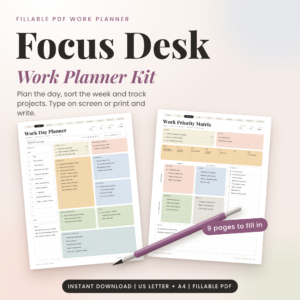 Focus Desk Work Planner Kit: Fillable Work Day Planner PDF, Priority Matrix and Weekly Planner (US Letter and A4)
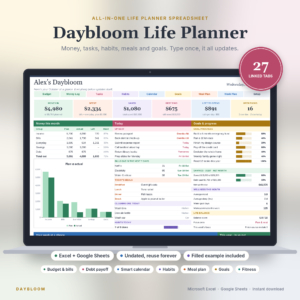 Daybloom Life Planner Spreadsheet | Excel & Google Sheets | Budget, Bills, Debt, Habit Tracker, Meal Planner, Goals & Digital Calendar
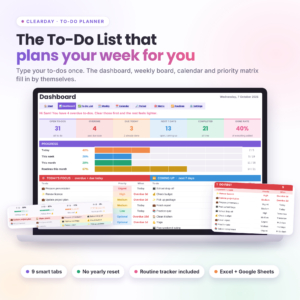
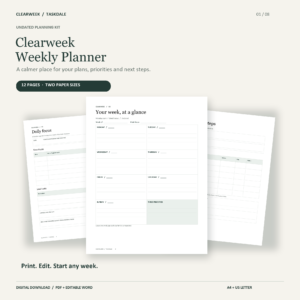
Task planner key facts at a glance
- A task planner turns a loose list of jobs into a plan by adding priorities, days and a place to review what slipped.
- The five planners here come in three formats: printable PDF, fillable PDF and Excel or Google Sheets spreadsheet.
- Clearday To-Do Planner holds room for 500 to-dos across 9 connected tabs, and the Daybloom Life Planner Spreadsheet has 27 linked tabs.
- Wrenweek is the only planner here that comes in five paper sizes, including A5 and the Classic Happy Planner size (7 x 9.25 in).
- Focus Desk Work Planner Kit is built for a five-minute daily plan, and Clearweek Weekly Planner Printable suits anyone who wants a simple weekly layout without extras.
Table of Contents Toggle
- What should you look for in the best task planner?
- How do the best task planners compare?
- Which task planner suits which person?
- How do you use a task planner so it sticks?
- What mistakes should you avoid when choosing a task planner?
- What affects the price of a task planner?
- Which task planner should you choose in the end?
- Common questions
Choosing a planner can feel bigger than it should. There are dozens of layouts, formats and promises, and it is easy to buy something that looks lovely and then never open it. We'll keep this practical: what to check, how the 5 options on this page differ, and which type fits which kind of week.
What should you look for in the best task planner?
The best task planner for you is one you will open every day, so judge it on format, size, page types, how much it does for you and how easily you can edit it. Five factors decide most of that, and each is covered below.
Format: printable, fillable or spreadsheet
A printable PDF planner is a file you print and write on by hand. A fillable PDF lets you type straight into the pages on screen, and a spreadsheet planner is a workbook for Excel or Google Sheets that calculates as you go.
Paper suits people who remember things better when they write them down. Typing suits people who spend the day at a computer anyway. Spreadsheets suit people who want one list to feed several views.
Size and paper fit
Page size matters more than people expect. A planner that does not fit your bag, desk or binder gets left behind.
Wrenweek covers US Letter, A4, A5, Half Letter and the Classic Happy Planner size, so it works if you already own a binder or discs. Focus Desk Work Planner Kit and Clearweek Weekly Planner Printable offer A4 and US Letter only. Spreadsheets have no paper size at all, which is a point in their favour if you rarely print.
Planning pages beyond the list
A plain to-do list records tasks but does not help you choose between them. A priority matrix, which sorts tasks by urgency and importance, helps with that choice.
Three of these planners include one: Wrenweek, Focus Desk Work Planner Kit and Clearday To-Do Planner. Time-blocking pages, where you assign tasks to slots in the day, appear in Wrenweek and the Focus Desk kit. Clearweek leans on four weekly layouts and six planning worksheets instead.
Whether the planner updates itself
A linked spreadsheet planner is one where you enter something once and every tab that needs it changes. In Clearday, you add a to-do, mark it done, and the dashboard, weekly board and monthly calendar keep up. Daybloom works the same way across its 27 tabs.
Printable planners do not do this. You copy tasks from page to page yourself, which takes a minute but also makes you look at your list again.
Editing, compatibility and guidance
Check what software you need. Clearday works in Microsoft Excel 2010 or newer and in Google Sheets. Daybloom is for Excel and Google Sheets. Clearweek includes editable Word files as well as PDFs, so you can change headings or wording before printing.
Guidance counts for a lot when you are new to planners. Daybloom includes a 35-page illustrated user guide, Clearday a 17-page guide, Focus Desk a Word user guide with filled examples, and Clearweek a completed example and step-by-step guide.
How do the best task planners compare?
The five planners differ mainly in format and scope. Two are paper-first weekly planners, one is a fillable work kit, and two are spreadsheets of very different sizes.
Which task planner suits which person?
Each planner suits a different habit, so match the planner to how your week actually looks rather than how you would like it to look.
Wrenweek suits you if you want one calm page per week with space for habits and a weekly reset. The five sizes make it the easiest to fit into a binder you already own.
Focus Desk Work Planner Kit suits you if your tasks arrive at a desk. The Work Day Planner, Priority Matrix and Time Blocker are meant to be filled in on screen or on paper, and the kit aims at a plan in about five minutes.
Daybloom Life Planner Spreadsheet suits you if your to-do list is tangled up with bills, savings, meals and cleaning. It is the largest option here, so it asks for more setup time in return.
Clearday To-Do Planner suits you if you want a straightforward list that also gives you a dashboard and calendar. It is narrower than Daybloom, which makes it quicker to learn.
Clearweek Weekly Planner Printable suits you if you want paper, a plain layout and the option to edit it in Word. It has fewer extras than Wrenweek, and many people find that a benefit.
How do you use a task planner so it sticks?
A task planner works when you use it at the same time each day, and the routine is short. This sequence works with any of the five.
- Empty your head first. Write every task down in one place. Wrenweek has a brain dump page for this, and in a spreadsheet you simply add rows.
- Pick the few that matter. Choose three jobs for the day. Use the priority matrix if you have one.
- Give each job a time. Put the three jobs into slots, leaving gaps. A day booked solid has no room for the unexpected.
- Check once at midday. Tick off what is done and move what is not.
- Review on one fixed day. Spend ten minutes looking back over the week and carrying over what remains.
If you are using a spreadsheet, start with the sample file or filled example. Seeing a completed version first makes the blank one far less daunting.
What mistakes should you avoid when choosing a task planner?
The most common mistake is buying more planner than your week needs. A 27-tab workbook is impressive, but if you only want to track the school run and a few work jobs, it becomes another task in itself.
Other pitfalls are worth checking before you buy:
- Ignoring paper size. If you print, confirm that A4, US Letter, A5 or the size your binder takes is included. Focus Desk and Clearweek do not list A5.
- Skipping the software check. Spreadsheets need Excel or Google Sheets. Clearday lists Excel 2010 or newer, so very old versions may be a problem.
- Choosing by looks alone. A pretty layout with no priority page gives you a record of tasks but no help in choosing between them.
- Expecting the planner to fix the habit. A planner is a tool. If you never review it, a dearer or bigger one will not change that.
- Planning every minute. Leave space in the day, or the plan collapses by Tuesday.
What affects the price of a task planner?
The price of a task planner mostly reflects how much it contains and how much work has gone into linking it together. A simple printable weekly layout generally costs less than a multi-tab spreadsheet that updates itself.
Several things push the cost up or down:
- Number of pages or tabs. More layouts, worksheets and trackers mean more to create and support.
- Automation. Linked spreadsheets, where one entry feeds a dashboard and calendar, take more building than static pages.
- Sizes and versions. Wrenweek's five sizes and its Soft Colour, Ink Saver and Fillable versions add value for those who need them.
- Guides and examples. Longer user guides and filled examples take effort to write.
Since these are digital downloads, you also have printing costs to think about if you choose a paper planner. Clearday is described as an instant download with no subscription, which means no ongoing fee for that one. Check the live product cards for current prices.
Which task planner should you choose in the end?
Choose the simplest planner that covers your real week, and only step up if you hit a clear limit.
- Want paper and plenty of size options: Wrenweek.
- Work at a desk and want to type: Focus Desk Work Planner Kit.
- Want a live list with a dashboard: Clearday To-Do Planner.
- Want tasks, money and home in one file: Daybloom Life Planner Spreadsheet.
- Want a plain printed week you can edit in Word: Clearweek Weekly Planner Printable.
If you are unsure, start with a weekly planner for a month. You will quickly learn whether you need more.
Common questions
What does undated mean on a planner?
An undated planner has no printed dates, so you write them in yourself. You can start on any day and skip a week without wasting pages. Wrenweek, Daybloom and Clearweek are all undated.
Do I need to print a fillable PDF planner?
No. A fillable PDF lets you type straight into the pages on screen. Focus Desk Work Planner Kit lets you either type into the pages or print them and write by hand, so you can choose whichever suits the day.
Can I use a spreadsheet planner without Excel?
Yes. Clearday and Daybloom both work in Google Sheets as well as Excel. Clearday lists Microsoft Excel 2010 or newer, so check your version if you use Excel rather than Google Sheets.
Is a spreadsheet or a printable planner better for a beginner?
A printable planner is usually easier to start with, because there is nothing to learn beyond writing in boxes. A spreadsheet takes a little longer at first, but guides and sample files help, and it saves copying tasks across later.
Can a task planner also track habits?
Yes, several do. Wrenweek has a habit tracker page, Clearday includes a 12-month routine tracker, and Daybloom has a habit tracker tab. Focus Desk and Clearweek concentrate on tasks and planning.